-
Who is this character for aiko 3 ?
Aiko 3 is a generation 3 character along with Michael 3 and Victoria 3, designed to be an anime character. Very popular in the day. There is still content in the store for her.
http://www.daz3d.com/catalogsearch/result/?q=aiko+3
Iconic shapes for genesis has an Aiko 3 clone
Thanks FirstBastion. Yah, I just went through the store and didnt find that particular character. Im wondering if she might just be a setting from the a3 morph pack. Ill look around some more.
putting back the dson morph into the figureIs it just your morphs that are having trouble loading or are other morphs of G2F having issues?
If it is just yours then I would suggest opening your morphs in a text editor alongside a morph that works and compare the parent line of your morphs to the parent line of the morph that loads correctly. If they don't match, copy the parent line from the good one to your morphs.
When Jayden/Brodie 7?So, inspired by this thread...
Brandon morph/skin, Older Teen preset from Growing Up, some tweaks to the nose (really don't like the Brandon nose as is), iray skin converter, omri hair with shader cribbed mostly from Antonia hair, painter's lights, clothes from Horror Survivor Marius.

Click on image for full size.
Legacy UV's for Genesis 3; V4I'd point out that with 'gazillion UVs for G2F' you could do transfer maps to convert them. Step 1, convert to a format the Legacy package can use, then step 2... use it. ;)
Naturally you could also use blender or Blacksmith3d to convert the maps directly to G3F, however the whole point of Cayman's brilliant product is not to have to convert any maps at all. This is particular useful for characters with many different maps for make up options or tatooos. It would be very tedious to convert all these maps.
My First PropHI :)
The bow and string,. need to be one single vertex model,. so that you can create the "morph target" shape.
If you import your Bow model, jump into Edit this in the Vertex modeller,. then create the String model , Move the string into position for the bow.
You now have two (separate) "poly meshes". which make one vertex model.
The two poly meshes don't need to be Physically connected (welded) but they both need to be editable at the same time to create morphs.
It's a good practice at this point,. to select each "poly mesh" and Name it,.(Right hand panel) also,. as Tango Alpha mentioned,. you can create or rename the shading domains. (the shading domain name will be the name you see for your "shader" (material) (in the surfaces panel in DS)
NOTE: When you create a model,. Carrara will create a default shading domain for that model,. this is normally called "Texture 0"
you can simply rename that default domain, for each poly mesh, rather than creating a new shading domain.
Now that you have shading domains,. you can UV map the parts
In UV mapping,,. there are some easy options,. for example cylindrical mapping can be applied to the string,. and Planar mapping could be applied to the Bow,. or you could select edges to be used as UV seams to define where the model should be split and unwrapped (flattened)
Once it's UV mapped,. you can select the entire model (bow and string) and create a Morph area,. then create morph targets,
One tip here,. Pose your figure, to help you see where the (fully drawn back) morph target needs to extend to.
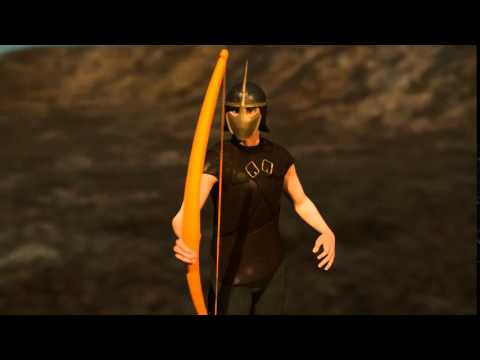
the choice of more or less definition on the string is a creative decision, you're free to decide how defined you want to make it,. that's just the way I'd make it.
three edges should work,. but five gives you an area for the fingers, and seven to ten give you more scope for adding flex and reverberation as the tension is released and resonates.
You could also create a couple of morph for "being carried", or Worn over the shoulder, or over the torso,... it's up to you and how you want to do it.
As you go through the process,. you'll see how things are working out,. and you'll adjust the model or morphs or shading domains, or UV mapping, as you need to.
Although some of the terminology used in Carrara is different from DS,. I'm not a big DS user, the principles and techniques are the same in most 3D programs
Hope that makes sense :)
anything you're not clear about,. just ask
Edited to fix spelling and add,..
Out of curiosity,. I loaded up a Bow from the props folder from (i think) woodland warriors (or something like that)
just to have a look at the definition on the bow and string.
Legacy UV's for Genesis 3; V4I'd point out that with 'gazillion UVs for G2F' you could do transfer maps to convert them. Step 1, convert to a format the Legacy package can use, then step 2... use it. ;)
Poses zeroing out Parameters - how to fix?Use ERC Freeze:
Set everything the way you want it, with no other morphs or transforms.
Right-click in the Parameetrs pane and set it to edit Mode (if it isn't).
Right-click in the Parameters pane again, Create New Property.
Set the name, set the path to soemthing like Actor/Full Body/Real World or whatever seems apt, set the type to Modifier/Shape. You may want the Min limit set to 0. Click Accept
Right-click on the new proeprty and select ERC Freeze. Al the transforms and morphs used by your character should be listed at the bottom, the new property should be listed as the controller - assuming all is well click Accept.
Test to make sure everything works, if it does File>Save as>Support Assets>Morph Asset. The names you enter for Author and Product determine where in the figure's \Data\Creator\Product\Item\Morphs folder your files go.
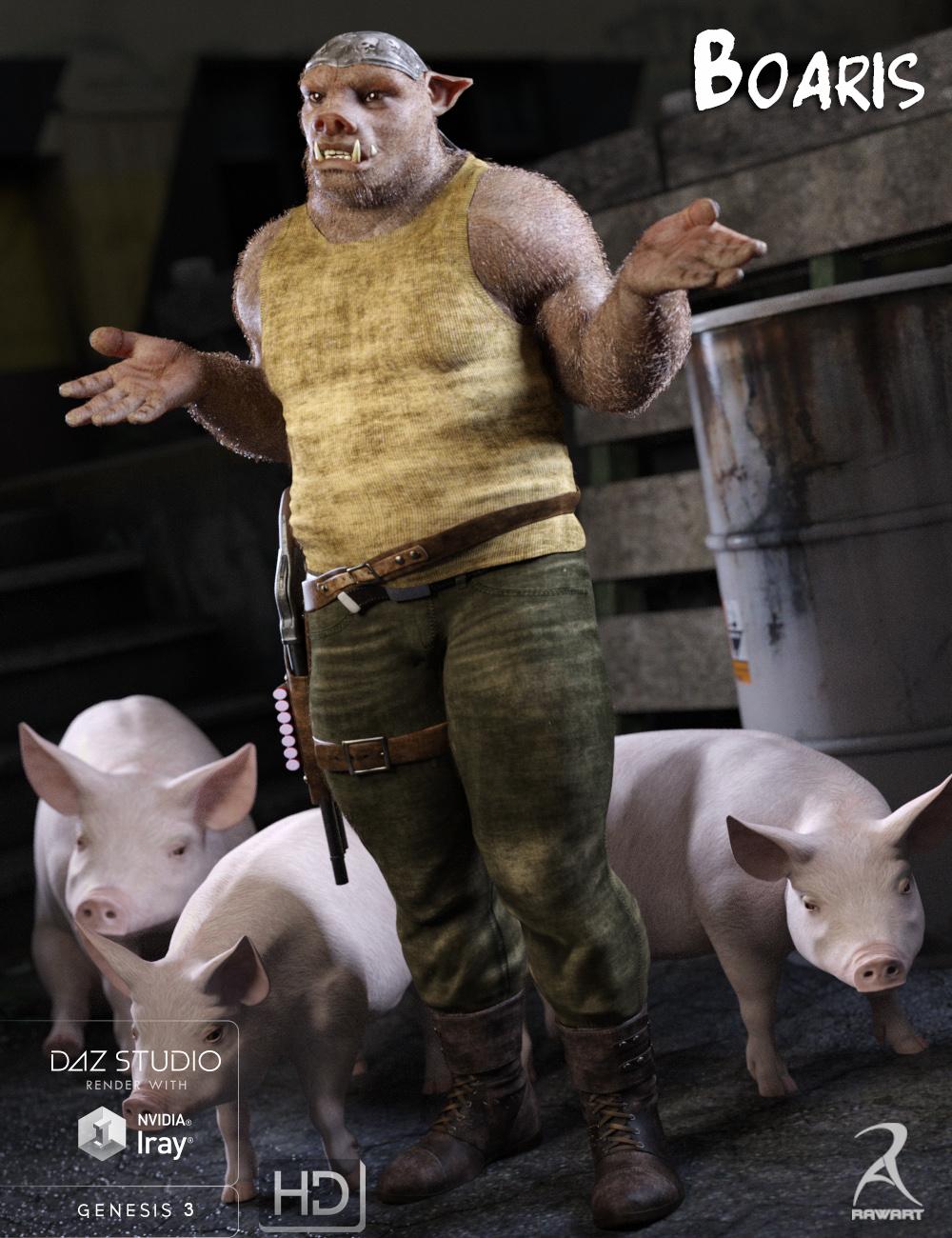
Boaris [commercial]Looks great but am I right to think it's a full body morph and does not have separate head and body dials?
I expect I'll get it either way if just for the textures and LAMH preset (not to mention 3DL preset) and as a kicker for 80% off a couple of things I am watching Fast Grab for, it'll only really cost me seven or eight bucks yanky. A bargain for one of your skins :-)
Boaris [commercial]Boaris
http://www.daz3d.com/boaris-for-genesis-3-male-s
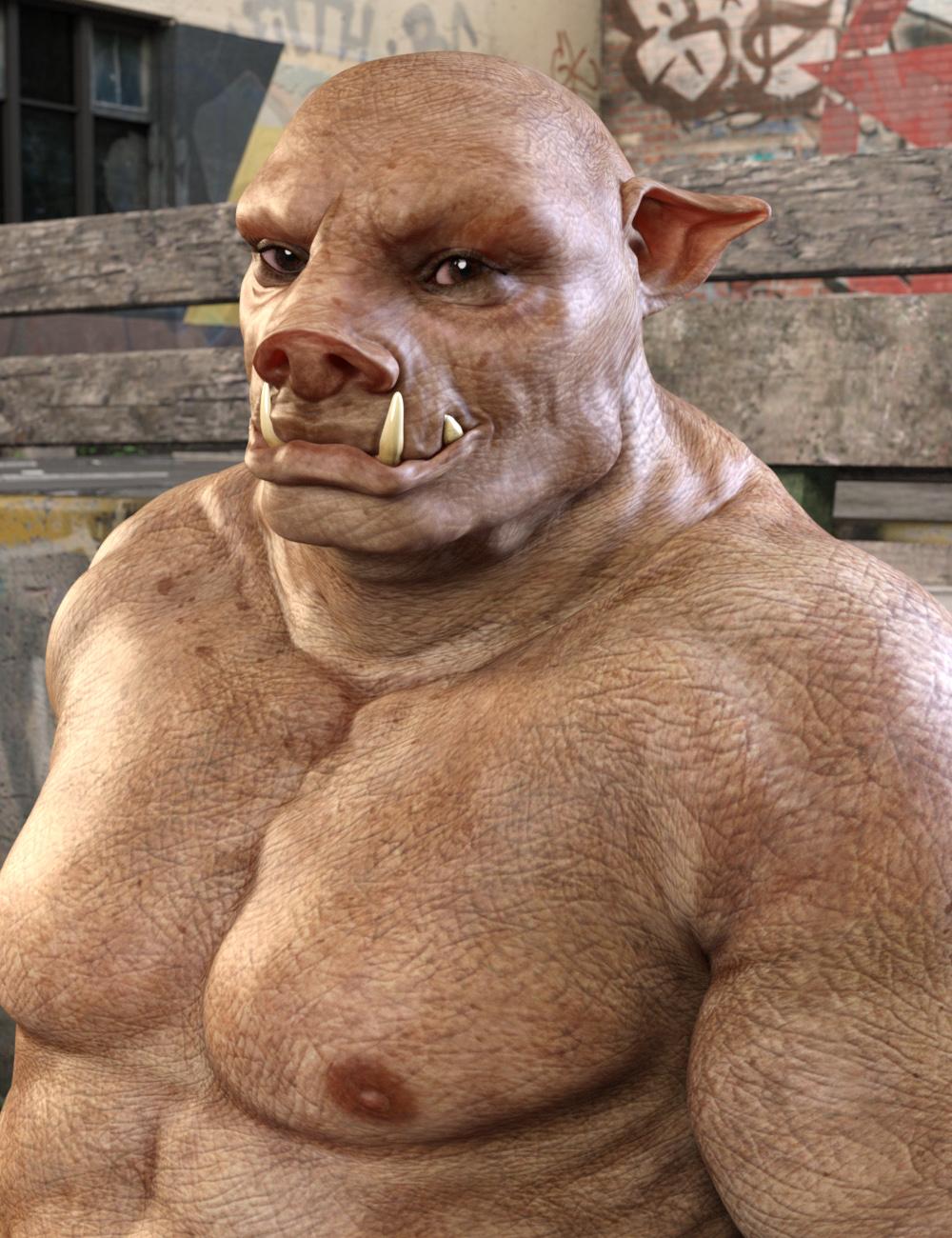
Big Boaris is one burley bruiser. Leaving the farm he said he could no longer live in the straw and the wood, and made a life for himself in the city of bricks and stone. Now he is no longer troubled by wolves, but the foxes sure love his bacon bits.
The set comes complete with custom crafted High Definition Morphs, and a highly detailed texture set, suitable for Iray and 3DL
Product Includes:
• One Boaris Character Preset
• One Boaris Morph Preset
• Two Boaris Full Material Presets
• Two Genital Material Presets
• Also includes IRAY and 3DL MAT files
 Greedy girl for G3F (Ropes for G3F) how can i fit with other G3F bodymorphs?
I take it the rope is a prop rather than a figure? To get auto morph transfer you would need to make it a fitted figure for Genesis 3 female - that woudl be done using the Transfer Utility, with the rope set as the target and Genesis 3 Female as the Source; assuming it fits the default figure there should be no need to change any other settings. Alternatively use a modeller (or DForms) to make a fit morph for each shape you wish to use it with, which would probably allow better results but would require a lot more work.
Greedy girl for G3F (Ropes for G3F) how can i fit with other G3F bodymorphs?Hi everyone,
how can I fit the rope prop (https://www.renderosity.com/mod/bcs/the-rope-for-g3f/111265) to g3f.
The attach fils will show what i mean:
1. G3F normal body (with the greedy girl morp witch only change the chest area)
2. G3F with Teen Josie body morph (she is to thin and the ropes doesnt fit anymore)
3. Try to: Edit -> Object -> Rigging -> Convert to figure (which option i used is unimportant. Alle the same result)
I hope someone know a other way cause I dont know how.
When Jayden/Brodie 7?I actually don't buy teen figures at all or children either. In the rare instance I need a kid, I dial one with genesis or use a morph set. I haven't liked any of the teen figures produced by daz so far anyway. Their style looks out of place with the other characters who look more realistic, their lips in particular bug me for some reason.
I'm always looking for adult male characters though.
I've cut back drastically on female characters too. I'm strictly buying what I don't have enough of which is adult men. I'll buy a female if she's unique enough. But, it takes something like Mei-Lin to interest me.
Things this made me think:
a. You're saying you don't buy them because their style doesn't fit, which is the same issue we're saying (not "we don't buy them because male" but "we don't buy them because specific style doesn't fit to x") I think it's relatively fair to say that most casual users would expect Victoria to match well in a scene with Michael, Josie to match well with both of them, Jayden the same (or whoever.) They don't, therefore some people don't buy them.
b. I didn't buy Jayden 6, but I didn't buy Josie 6 either. It wasn't that I didn't want a teen male character; I wanted a matching pair that would go together. She looked a bit... unfortunate for some reason and then Josie 7 came out and she looked good so I decided to invest in the G3 line for teens instead (you'd think I'd have learned after investing in Genesis 2 for anime characters only to discover there was no male Aiko OR Keiko.)
c. New users tend to look at the Pro Bundles as a safe way to get all the appropriate bits they need for a type of character (unless I'm completely weird and it was only me that thought that at first.) They don't know much about morphs or what goes with what beyond the basic numbers and things. There are plenty of forum posts suggesting that longer term users still don't fully understand the various generation and morph integrations.
Basically, teen males (or anime males or whatever) will almost certainly sell less. They will sell a LOT less if they don't match the companion figures they're suggested to. But their companion females will also sell less as a result, and you're curating customers who only want more females by only offering that. A typical new customer being told "they can get around it by buying and experimenting with morph packs and textures and if they do x and adjust this..." is not going to want to invest in that sort of suggestion. They want to buy one thing and have it be the character and a selection of appropriate options in hair clothing skin for that character.
When Jayden/Brodie 7?I actually don't buy teen figures at all or children either. In the rare instance I need a kid, I dial one with genesis or use a morph set. I haven't liked any of the teen figures produced by daz so far anyway. Their style looks out of place with the other characters who look more realistic, their lips in particular bug me for some reason.
I'm always looking for adult male characters though.
I've cut back drastically on female characters too. I'm strictly buying what I don't have enough of which is adult men. I'll buy a female if she's unique enough. But, it takes something like Mei-Lin to interest me.
RiggingAlright guys, got the male undersuit rigged. I rigged it in Blender using the Rigify addon. Really enjoyed using it, wasn't that hard at all. About to import a Genesis 2 male into my Blender scene with G2M in with standard T-pose position. Then posing the male undersuit to match the G2M as close as possible. I know Kaotbliss was able to get the female undersuit to work using the Transfer Utility without the female under suit not being in Tpose position. I tried many times but it didn't work for me. On that note, which I don't think previously I've asked this. When scaling and moving the bones to match the under suit, does the orientation of the bones all have to be the same on both sides of the rig? What I mean by this is if I were to scale the right shin bone, should the left shin bone be the exact same scale also. Also, by keeping both side exactly the same, is there a mirror option that I can select when manipulating one side of G2M'S RIG?
Daz does have a symmetry option for posing. I'm not sure what it does with scaling though. I hardly ever use it. I think it's under edit->figure->symmetry
When I did the female suit, I did it the hard way and copied the xyz rotations and scales from one bone and pasted them to the opposite side and made adjustments as needed, then moved on to the next bone.
When I tried the last time, I just typed in the numbers of whatever the opposites bone was.
Poses zeroing out Parameters - how to fix?Thanks BeeMKay,
Locking the parameters worked.
Is there a way to make a custom morph with all the edited scaling parameters so I can load those parameters into any character?
Transfering a rig from one OBJ to another in DAZAh, that makes sense. So did you try "Transfer Rigging"?
Yet another PC suggestions threadSo if anyone tells you that AMD is better than Intel, or vice-versa, just shake your head and ignore them. Right now, the only REAL benefit to Intel over AMD is that most AMD motherboards don't support PCI-E 3.0. They only support PCI-E 2.1 and before. So your potential bandwidth to your GPUs is much more limited. There are a COUPLE of high-end AMD motherboards that DO support PCI-E 3.0, but that's it.
Is it likely to significantly impact performance if using anything but the latest cards that support the newer PCIe revision?
PCI-E 3.0 provides for additional lanes, as well as higher bandwidth transfer rates. For gaming, this is a big thing, as stuff is getting shuffled around from main memory to the GPUs often and frequently. For rendering on GPU, it won't have much of an impact, as Iray primarily runs on the GPU, with everything being loaded up first, and then only returning pixel buffer information. For rendering on CPU, the PCI-E bus won't be involved except for displaying the frame buffer.
So, if you don't game on the machine, PCI-E 3.0 will have little impact on rendering times. A few seconds, at most.
RiggingAlright guys, got the male undersuit rigged. I rigged it in Blender using the Rigify addon. Really enjoyed using it, wasn't that hard at all. About to import a Genesis 2 male into my Blender scene with G2M in with standard T-pose position. Then posing the male undersuit to match the G2M as close as possible. I know Kaotbliss was able to get the female undersuit to work using the Transfer Utility without the female under suit not being in Tpose position. I tried many times but it didn't work for me. On that note, which I don't think previously I've asked this. When scaling and moving the bones to match the under suit, does the orientation of the bones all have to be the same on both sides of the rig? What I mean by this is if I were to scale the right shin bone, should the left shin bone be the exact same scale also. Also, by keeping both side exactly the same, is there a mirror option that I can select when manipulating one side of G2M'S RIG?
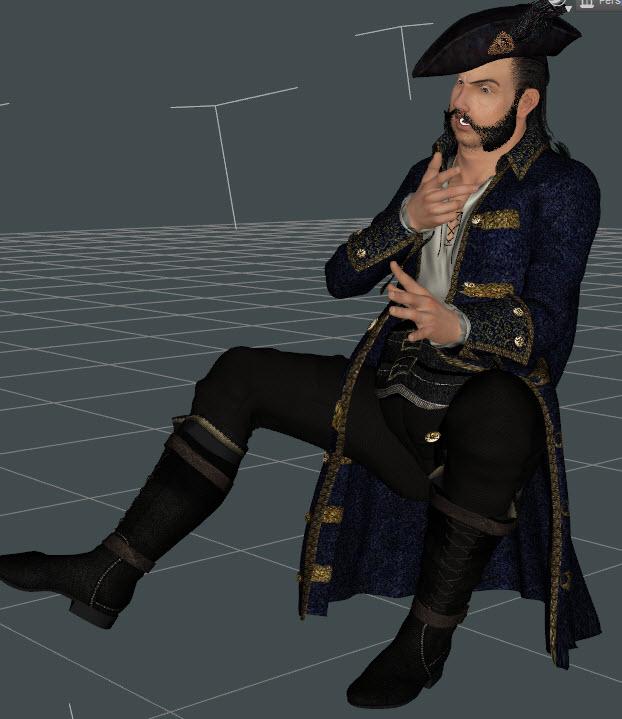
Dracorn's Render ThreadChallenge: Captain's Coat colliding with his legs. When I sat the Captain down, the coat went through his legs. No amount of dial spinning could fix it. I tried D-Formers, but they pulled on both sides of the coat at once (or maybe I don't know how to use them). Even so, the best that D-Formers could give me was a bulge in the side of the coat, and not the opened up look I wanted.
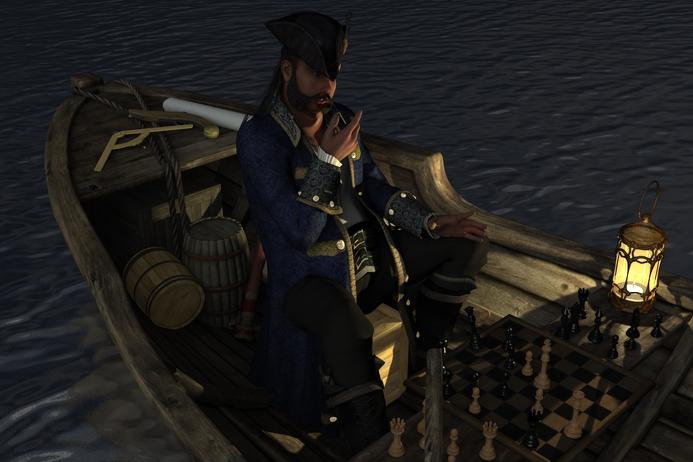
So I turned to Hexagon. I had picked it up a long time ago but never did anything with it. So I had to hunt around for tutorials to create morphs. So I happily morph away, thankful I was able to get the hang of it quickly.
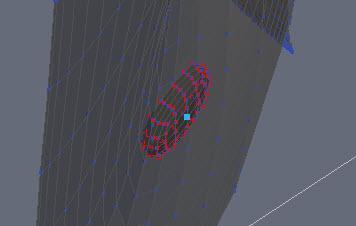
Then the snag hit me: The buttons would not move with the coat. ...?!... I thought I could just grab one and move it to where it needed to go. This worked, sort of. I couldn't rotate the button to be at the right angle. For the buttons that did work, they move out place again once I loaded the morphed coat onto the captain.
I spent time on the Hexagon forum, I just couldn't isolate the buttons to rotate them and they weren't behaving the way they should. OK, forget it! I've wasted enough time with the stupid buttons... I'll just add them in postwork, that otta show 'em!

 Did i make big mistake accidentally Buying Dynamic clothes Or can i convert to Conforming?
"then do a rigging transfer from G2M to the now karate suit prop"
I don't understand this part. What do you mean do a rigging transfer. What menu is that at?
I think I forgot a step in there :(
After the karate suit is converted to a prop, you need to re-convert it back into a triax weighted figure
select the suit and go to edit->object->rigging->convert prop to figure
Make sure triax weght map is selected and click ok
Once that is done, load up your G2M figure and go to edit->figure->transfer utility (top of the list)
on the left side drop down for the donor figure select your G2 character and on the right side for target figure, select the karate suit.
This will transfer the weight maps and rigging from the G2 character over to the suit to make it a conforming clothing item :)
Daz 3D is part of

Connect
DAZ Productions, Inc.
7533 S Center View Ct #4664
West Jordan, UT 84084Licensing Agreement | Terms of Service | Privacy Policy | EULA
© 2026 Daz Productions Inc. All Rights Reserved.