-
How to smooth out wrinkles without ruining your look?
hansolocambo said:
It's impossible to express with words the behavior of ZBrush brushes. You're gonna have to practice ZBrush a bit more to understand how sculpting works.
Only advices I could give :
- Work in ZBrush with 3D Layers when doing morphs. Import Genesis with GoZ, or by importing an obj. As soon as Genesis is imported, create a 3D Layer (name it for example Base Genesis). This way if anything goes wrong, you still have the base mesh. And then add layers for each modification or morph you're working on. Be sure to always check that the 3D Layer you work on is the good one, and is in Record mode.
- Genesis is too small for ZBrush's world scale which makes sculpting uneasy. Create a second Layer (Name it for Example Genesis Scale). Then use the Gizmo 3D (Y) to scale Genesis once until your reach "10" (the maximum scale you can do with that tool). This will give you a better control over the brushes' draw size. Be careful to not move the Gizmo. And be sure of course to slide that scale 3D Layer back to 0 before sending the morph back to Daz.
- Then create a 3rd 3D Layer and work on a morph. A 4th 3D Layer and work on another morph. And so on.
- When working on any morph, it's preferable to subdivide the Genesis in ZBrush. 1/ It's a non destructive modifier so no worries, morphs will work in Daz 2/ it'll avoid any unwanted modification of the base wireframe 3/ it'll give you a more precise control when using brushes : the more vertices, the more control you have over your mesh in ZBrush.
The rest really is all about practicing brushes. Your "wrinkles" I guess exist only because they follow Genesis' polyflow around the eyes. So move your brushes following the flow of polygons and you'll avoid creating unwanted details such as this one. The movement of a brush is important when painting, it's also true in 3D sculpting.
Good luck.
Thanks for answering! :)
I tried the suggestion you gave and it worked perfectly for me with ZBrush! Especially you mentioned subdivide, I always thought it would break the character, when I added subdivide to smooth the character, it worked a lot better, thank you very much! :DLooking for Modern Hospital GurneyThe only ones remotely similar that I've been able to find are for sale at 3D model specific sites. The gurneys in the DAZ store are more hospital beds than an actual transport gurney- or they are MUCH older varieties.
Some sites can have pretty expensive options ( Turbo Squid) , but I found some workable and affordable options at CG Trader. They aren't morphable and some minor kitbashing may be needed. But you should be able to get something in an obj file format that you can import into DS.
SketchUp's 3D Warehouse might have a free version. If you have Blender you can use the free SketchUp importer add on to open the file in Blender and then export an .obj to use in DSDiffeomorphic HD helpUpdated from 1310 to 1312 and I'm still getting all fingernail textures on my HD import.
anyone else still having this issue? Is there a workaround? I tried just applying textures once imported but the material zones don't seem right.
Josie 9marcus.ames said:
What's the update today? It's not on the documentation page.
I checked the files, the only thing I see different is the large metadata image was replaced with a small one.
Diffeomorphic DAZ Importer version 1.6.0 releasedPlease upload the animation file so I can test it. There's no way that import action is limited to 250 frames. Is this specific to one animation or do you get this behavior for any animation ?
Diffeomorphic DAZ Importer version 1.6.0 releasedPadone said:
@denisnormandin Import action is not limited to 250 frames, probably you just need to setup the blender timeline to play the whole range.
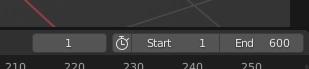
Thanks Padone, but that doesn't work, the action stops after 250 frames even if I set the end frame as 2130. Like I said earlyer, I even tried to set the last frame to the desired lenght before importing. The last frame comes back to 250, and setting the total number of frames to the right amount doesn't change anything, the character dances for 250 frames and then stops while the animation count continues along the timeline.
Compress High Poly Hair Models for FBX Export?high top fade hair [...] so I guess it's hugely detailed
Not everyone has that bundle handy. So please post screenshots, and in this case of the wireframe, or it's basically impossible to answer your question.
When I export the FBX
Fbx is useful when there's a rig. If your aim is just to work on the hair meshes : Hide everything but the hair. Export as obj. Most widely used format to export geometry. Just doing that should fix your issue. C4D might freeze because of whatever options you chose in the fbx export format. If the rig of your hair is exported too that's probably what causes the freeze (screenshots of your Daz export settings and C4D import settings could help).
Obj is much more simple thus more compatible. It contains basically only vertices position and pixels projection coordinates. So if you work on geometry only : forget about fbx.
[...] have to uninstall all that and try again
Reinstalling as a "solution" is synonym of giving up. It's a loss of time and there is usually always an explanation to a problem ;)
Diffeomorphic DAZ Importer version 1.6.0 released@denisnormandin Import action is not limited to 250 frames, probably you just need to setup the blender timeline to play the whole range.
@rugeyohe Yes single principled doesn't support shells. As for triax if you convert triax to general in daz studio then triax is converted but not deleted, you need to delete triax as a separate step with the weight map brush, but it's not required for the conversion to work.
Diffeomorphic DAZ Importer version 1.6.0 releasedWell, why was I so naive to think there could be a simple solution?
Importing a second animation just overwrites the previous one. There are still only 250 frames. Starting where the previous animation ended. But no action from the initial position.I tried solving my problem by going through the Daz to Blender Bridge. The process worked fine and all frames of the animation were transfered. But as usual with the bridge (at least from my experience) the clothes and hair came out all wrong (actually, the hair were not there at all). The animation was "sort of" working from start to end. But the model looked like she was dancing on ice. Feet gliding of the ground on a very unrealistic way.
The reason I need to do the animation in Belnder rather than in Daz is that I have props created in Blender that I just cant import into Daz with correct texturing. I have renounced trying to import obj files into Daz a while back after many hours of wasted efforts. Maybe I'll have to revisit that issue and try to solve that problem instead.
Diffeomorphic DAZ Importer version 1.6.0 releasedTranks Padone,
Problem almost solved.
Part of the animation is importing fine (though moving much slower). But, there are 250 frames of the 2130 that are being imported. The default Blender value.I tried to set the frame count in the Blender timeline to the right amount before importing, but that didn't change a thing. I will now try to save pose presets in Daz in 250 frames chunks and import them one by one. I guess I'll have to reset the character in its "T" pose before each import?
Anyway, I'll fiddle with that and come back here with the results.
I also wonder how I can sink the action to music. But that's another question all together.categories content in smart content still appears in "lost and found"PerttiA said:
NorthOf45 said:
PerttiA said:
NorthOf45 said:
I hope that the metadata we get with DIM is IDENTICAL (at least functionally) to that from Connect.
The metadata DAZ Connect downloads and 'updates', is saved in the 'Cloud' folder, and the metadata from DIM is saved in 'Runtime\Support' = They can be different and conflicting
I know where it goes. There should be no difference in the contents.
History has proven otherwise
Yes, it has, from what I understand, to many users' chagrin. I have never touched Connect, so I have never had the pleasure.
categories content in smart content still appears in "lost and found"NorthOf45 said:
PerttiA said:
NorthOf45 said:
I hope that the metadata we get with DIM is IDENTICAL (at least functionally) to that from Connect.
The metadata DAZ Connect downloads and 'updates', is saved in the 'Cloud' folder, and the metadata from DIM is saved in 'Runtime\Support' = They can be different and conflicting
I know where it goes. There should be no difference in the contents.
History has proven otherwise
categories content in smart content still appears in "lost and found"PerttiA said:
NorthOf45 said:
I hope that the metadata we get with DIM is IDENTICAL (at least functionally) to that from Connect.
The metadata DAZ Connect downloads and 'updates', is saved in the 'Cloud' folder, and the metadata from DIM is saved in 'Runtime\Support' = They can be different and conflicting
I know where it goes. There should be no difference in the contents.
categories content in smart content still appears in "lost and found"NorthOf45 said:
I hope that the metadata we get with DIM is IDENTICAL (at least functionally) to that from Connect.
The metadata DAZ Connect downloads and 'updates', is saved in the 'Cloud' folder, and the metadata from DIM is saved in 'Runtime\Support' = They can be different and conflicting
categories content in smart content still appears in "lost and found"NorthOf45 said:
The original metadata for this product does not assign every asset to a category, only the DAZ Studio format assets (the materials presets, and a set of 10 poses).
I may not understand because when I check category for all files I see a category for each one and none is Lost and Found.
Sorry, I was referring to the original post, about V4.2 Base. Parker Road is another product, and another, unrelated, story. The older Poser formats generally do not have metadata, unless a Studio version was made (usually later), even then, it might or might not include the Poser format files, just the DAZ Studio formats. I hope that the metadata we get with DIM is IDENTICAL (at least functionally) to that from Connect. That was the promise.
I see in the screen caps from the first post that you do not have "Sync Product and Local Database" checked. In that case some information will not be saved. Also, do you have "Auto Export" checked (bottom of the dialog)? If so, changes will be saved to a new metadata file in the Runtime/Support folder. If you had previously accepted the changes with Auto-Export checked, the Lost and Found category would have been included, and will always return, because the metadata file is considered Vendor Data (as opposed to User Data). You can edit the existing metadata file to see if it explicitly sets a category to Lost and Found ([library]/Runtime/Support/DAZ_3D_4783_Victoria_4_2_Base.dsx).
To permanently remove the Lost and Found, the new metadata file (with the Lost and Found category removed) must be exported and re-imported (from DIM, or from Content DB Maintenance). It is the only way I have found to permanently remove vendor data once a product is installed. You can also replace the metadata file in the product package and re-install the product.
categories content in smart content still appears in "lost and found"mric said:
PerttiA said:
But you are still logging in to DS, which means the DAZ Connect inside DS is frequently 'updating' your metadata and often makes a mess of it.
Uncheck "Show Login Page" and "Automatically Login With Remembered Credentials" at DS Preferences
Thank you PerttiA I modified my params.
NorthOf45 said:
The original metadata for this product does not assign every asset to a category, only the DAZ Studio format assets (the materials presets, and a set of 10 poses).
I may not understand because when I check category for all files I see a category for each one and none is Lost and Found.
It is probably due to DAZ Connect having 'updated' the metadata - It is not the same metadata that DIM updates and it is not stored in the same location = One reason for problems people are having with 'Smart' Content.
categories content in smart content still appears in "lost and found"PerttiA said:
But you are still logging in to DS, which means the DAZ Connect inside DS is frequently 'updating' your metadata and often makes a mess of it.
Uncheck "Show Login Page" and "Automatically Login With Remembered Credentials" at DS Preferences
Thank you PerttiA I modified my params.
NorthOf45 said:
The original metadata for this product does not assign every asset to a category, only the DAZ Studio format assets (the materials presets, and a set of 10 poses).
I may not understand because when I check category for all files I see a category for each one and none is Lost and Found.
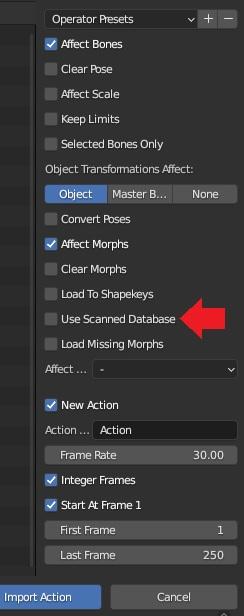
Diffeomorphic DAZ Importer version 1.6.0 releasedUnfortunately the plugin is growing stuffed with tons of options to accomodate any user request. This is useful but makes simple things confusing. We should really have better defaults and advanced options separated from basic ones. Anyway, the database is an advanced option and doesn't need to be scanned nor used, I don't use it myself, but import action sets the database as default, just uncheck it.
See the picture.
 Award for stupid problem
All I know is that one day I realized all the images I had been downloading in one download folder, were no longer being 'read' until I moved them out into other folders. It was a scary moment lol ...
As to merging Runtimes, rather than copy/paste [which would take forever 'cause you'd have to do it piecemeal], I would try renaming the folders, sliding one folder over to merge with another, that type of thing. Tell the system to 'skip' duplicates 'cause one would have to manually verify those.
Or, if one has most of those products from one location, i.e. Daz3d, then I'd go for renaming the official 'content/mylibrary' collection folder to something else and make an empty one bearing the required name. Delete any metadata from DIM's collection, sign in at Daz3D the store, then run DIM to download and reinstall everything to the one location. It's the fastest way. Keep in mind though that the install location is correct before starting ;-) And of course make sure that said location is large enough to accept it all.
And unless there's some very good reason for downloading/installing 'everything' -- might want to size down the request aiming for the products truly in use or expected use for now and the near future.
Diffeomorphic DAZ Importer version 1.6.0 releasedI don't know if I'm at the right place to ask that question. I've screened through the thread, which is now 19 pages long, but didn't find what I was looking for.
So the question is about improting an animation from Daz to Blender using Diffeomorphic Daz Importer following this tutorial:
 and some other sources including a tutorial from Daz : https://www.google.com/search?client=avast-a-3&q=how+to+apply+aniMate+in+daz+3d&oq=how+to+apply+aniMate+in+daz+3d&aqs=avast..69i57j0.24968j0j4&ie=UTF-8#kpvalbx=_yC2WY7i_H-LY5NoP1cKHyAU_30
Anyway. All went fine until I tried to import the animation with the "Import action" button. I got a message "Daz Importer. Error (1.6..2.1248): The following database needs to be rescanned: Genesis2Female."
I have no idea what rescanning a database means. And obviously, no idea how to do it.
I'm using Daz Studio 4.21, Blender 3.3.0 (which I thought was the latest until I read the previous post) and, as noted in the error message, Diffeomorphic 1.6.2.1248.
Daz 3D is part of

Connect
DAZ Productions, Inc.
7533 S Center View Ct #4664
West Jordan, UT 84084Licensing Agreement | Terms of Service | Privacy Policy | EULA
© 2026 Daz Productions Inc. All Rights Reserved.