-
Problem with new computer and old content
My computer died (motherboard, not hard drive.) So I bought a new Dell with 32 gigs of ram and all the bells and whistles. Including a solid state drive where the operating programs live. The problem is, I have more content than the size of the solid state drive. So now, I have to figure out how to transfer my files from the hard drive of the old computer (C:) to the hard drive in the new computer, which is named D:. How do I do this?
I bought the Daz Dragon 3 and now it's on sale!A couple of days ago, I bought the Daz Dragon 3, the morph package, and the Daz Dragon 3 textures for $89.95, and now the Pro bundle is on sale for 50% off--$67.48. It figures! Would Daz give me a refund on those individual items if I bought the pro bundle now?
Celebrity Look-a-Likes for 3D figures Part 2I put up this morph a couple of weeks ago on Sharecg. It's my humble try at a celeb portrait for Angie Harmon. Comments? Critiques?
http://www.sharecg.com/v/84353/view/21/DAZ-Studio/Jane-Morph
Why is Victoria 4.2 Not Opening in Nude FormIt's not that complicated, apply the material preset you like and save as a scene subset. I inject all the morphs and save as a scene subset, because when you inject the Poser-format morph data it requires memory for each morph, but when you load a .duf file it doesn't.
(My highlighting) - wow, is that true? You learn something (useful) every day!
.dufs and .cr2sThank you Leana and Richard,
The shoes in question are high heels and they do require a morph but I am also getting the distortion you mention so if I could start with a fix for that, I can move onto the actual fit.
T.I.A.
Geoff
.dufs and .cr2sShoes can be a problem, but if you want to use them on a later figure conversion is probably a necessary first step (you could reshape the mesh in a modeller and rig from scratch, but that would still involve the kind of weight-map editing that AutoFit often calls for). What sort of problems are you having? Are they shoes that require a morph to fit the feet to the shoes, which can be hard to work around, or are you getting the distorted high heels, which is a relatively simple fix by filling the heels with a uniform weight?
When Jayden/Brodie 7?One missed opportunity that Daz has done before but not repeated in a while is bundles that have a paired male and female. For Generation 5 we had http://www.daz3d.com/base-young-teens (plus a Starter and Pro bundle) and http://www.daz3d.com/genesis-michael-victoria-combo-bundle . The one for the teens benefited from the two being released together and the Mike/Vicky bundle was very "complete" in that it had the morphs and acted as a Pro bundle so it came with the Anotomical Elements. It's actually what I think the main figure bundle should be for a generation.
I feel like this has been a missed opportunity too. The YT5 bundle was great (and the MV5 bundle would have been if I hadn't gotten them from Carrara) but there's been nothing like that for forever. A few PAs did similar things (Sadie+Sam for example) but it seems as though since then all things have been female and a few token males that often don't really fit the females.
Thorne has made pretty much all the teens, ever, right? (Still actively making them I believe, as well as resource morph kits, but that's about it?)
MallenLane made Hitomi and Hiro (if they'd been sold as a pair promotion of some sort I bet that'd have gone better too.) (Doesn't seem to have released anything since Gen1 really.)
I don't know who made Keiko but I liked the style and was sad there was no male companion directly made to go with her.
Legacy UVs for Genesis 3 [Commercial]...
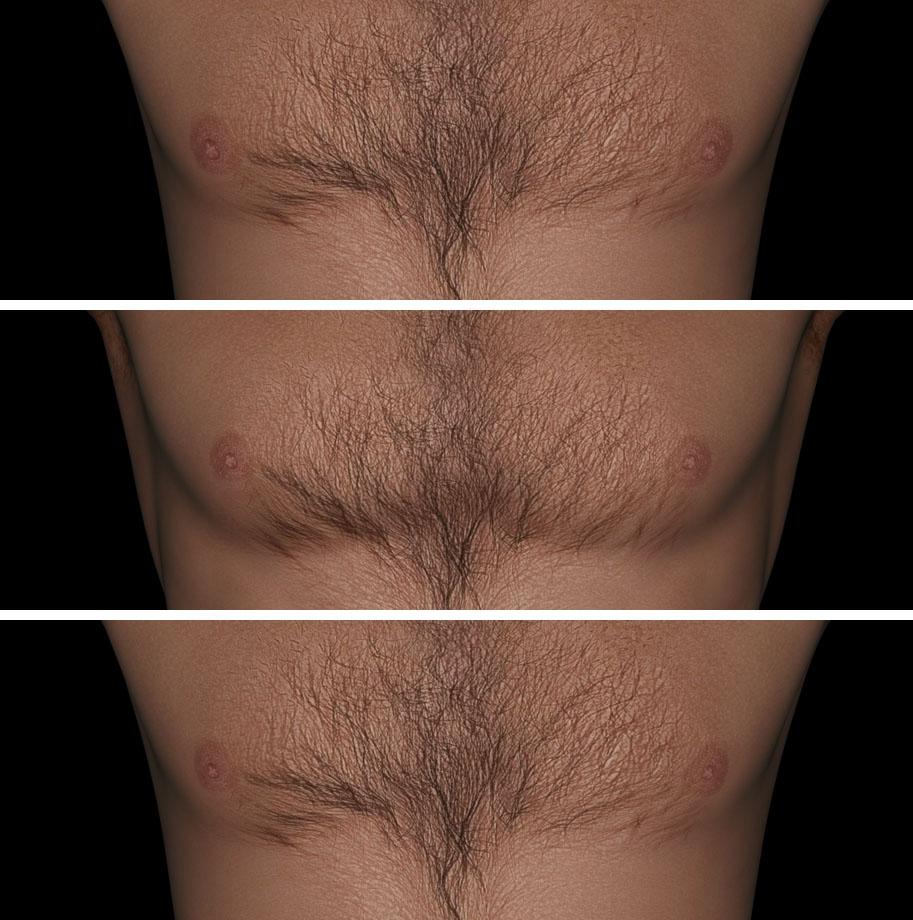
I am noticing some distortion in the nipple area in the uv's for M4. They are a bit larger. I assume this is a problem area with the texture transfer? Has anyone found any tips to minimize this?
Yes, the nipples are slightly larger than the originals. They are also wider and lower on the chest, which is a geometric difference between M4 and G3M. It was a judgement call on my part so as to give the texures an overall similar appearance.
If you have the Body Morphs you can set the "Areolae Diameter" to -25% and the "Nipples Diameter" to -10% to give roughly the original size. In the attachment you can see a comparison. The middle image is the original M4, above is the Legacy transfer, and at the bottom is the Legacy transfer with the Body Morph adjustments.
 GenX2 and Genesis 2 AddOn released! [Commercial]
Either I've forgotten how to use this or something is gummed up. I've loaded my V4 source figure, I can see and sleect the morphs in the pane, but I cannot select the target figure nor can I change the transfer type? I'm on D|S 4.9 if that helps.
Why is Victoria 4.2 Not Opening in Nude FormIt's not that complicated, apply the material preset you like and save as a scene subset. I inject all the morphs and save as a scene subset, because when you inject the Poser-format morph data it requires memory for each morph, but when you load a .duf file it doesn't.
Ice Dragon Art WIP'sBack to testing characters and sets. This is Dawn from Hive Wire - I morphed her face a bit as I am not terribly fond of her default look. Udane hair and the make up is Nissa. Unfortunately when I bought this I didn't realize that its for Poser only-clearly stated in the listing I was just not paying attention- so the morph for Nissa does not work but the make up works just fine. Which is one of the main reasons I bought it. This light set up and prop is from Khory's scintillant light set for tan skin. Love this prop and the lights. I did have to move one of the lights a bit since she is on the floor and not upright but that wasn't a big deal at all.
 Legacy UVs for Genesis 3 [Commercial]
I like LR's skins because his character's eyes are beautiful. They remind me of Nagel's art.
I am noticing some distortion in the nipple area in the uv's for M4. They are a bit larger. I assume this is a problem area with the texture transfer? Has anyone found any tips to minimize this?
HD Add-ons What's the point?Just came to this topic among search results for something (which I haven't been able to find). But while I'm here ...
To the original poster:
I think that the reason you are seeing the same detail from a character like Mei Lin 6 and Mei Lin 6 HD whereas the promos of the HD product show the non-HD version smooth and without the detail is something I noticed and did some experiments on. It's the normal maps. Not the bump maps - they have other details on; it is specifically the normal maps that have the same details on as the HD add-on morphs.
If you load any of the figure actors - like Mei Lin 6 which loads the figure morphed and textured - it loads with the normal maps applied. If you load the HD version that loads the figure with the HD morphs and textures applied, it loads WITHOUT the normal maps, because the HD morph produces the same details as the normal maps (and in fact DAZ have released updates for several of the HD add-ons specifically to change the HD figure so they loaded without the normal maps, where the original release had the HD figure load with the normal maps on as well as the HD morph by mistake). So your renders and the promos for the base figures look to have all the details of the HD version because the normal maps are supplying that detail. In the HD add-on promos with the side-by-sides of the untextured, grey figure with and wiithout the HD morphs applied, the 'without HD' version doesn't have the normal maps applied so looks smooth (and quite different to the base figure's own promos where the normal maps were on). If you take that grey, non-HD figure shape and just apply only the normal maps (each of the main -6 and -7 figures has a 'normal maps on 'and 'normal maps off' preset in that figure's material folder, which only puts the normla maps on or off and doesn't change anything else, so you can use them on an untextured grey Genesis 2 or 3), you will find it now looks just like the HD morphed version; if you re-did the promo side-by-sides of grey figure, one with no HD morph but the normal maps, and the other (as in the actual promos) with HD morph and no normal maps, you will be hard pressed to tell the difference. Certainly the tests I did for a couple of the HD add-ons, with an otherwise untextured grey figure, rendering close in, once with the HD morph on, then again with the HD off but the normal maps on, the fine detail was the same in each case and there wasn't a pixel different in the HD-morph-Vs-normal map pairs of test renders.
So, yes, in a way it is valid to ask what's the point of the HD morphs when you can just use the normal maps (which also use much less computer resources and have little affect on rendering speed as compared with the HD morphs).
Two points:
1 You can use e.g. the Mei Lin 7 or Gia 6 or Victoria 7 or whatever normal maps with other character textures for that UV, and instead of any normal maps that came with that character texture set (if any - many PA chaaracter texture sets don't have normal maps anyway, and if they come with their own good set of micro-detail normal maps you don't need the HD morph).
2 The apparent advantage of the HD morphs over the normla maps is that theHD morphs are UV independent. So. e;g; you can use the Gia 7 HD add-on or Eva 7 HD add-on to add some definition and 'abs' with a character set that uses the V7 morph as the base for its shape and the Genesis 3 Female Base UVs for its textures. The various normal maps are each, as they come, only for the UV set of the figure thay came with - so the Gia 7 normal maps are specific to the Gia 7 UVs and texture sets which use those UVs. Except ... actually DS comes with the wonderful Map Transfer tool built in, and it actually takes less than a minute to get DS to take e.g. the Gia 7 normal maps and produce a version of them changed to the Genesis 3 Female Base UVs. And you only have to do each conversion once. So ... the majority of PA Genesis 3 textures use the Genesis 3 Female UVs, so if you get the Map Transfer tool to make conversions to those UVs of the Gia 7 normal maps, Olympia 7 normal maps, Mei Lin 7 normal maps etc, then you can get virtually the same detail effects with those normal maps with any of the Genesis 3 Female Base UV texture sets as using those HD add-ons. Just make sure to crank the baking quality setting in the Map Transfer to the max ... it still only takes seconds to convert the normal maps to another UV, and testing - rendering up close on a grey, untextured shape - the original normal maps using their native UV against the Map Transfer converted normal maps using the UV converted to, I again can't find a pixel difference.
So, using the Map Transfer tool within DS to convert the assorted -6 and -7 figure normal maps to other UVs (for the -6 figures, most PA texture sets are Base Female or Victoria 6 UV; for the --7 figures almost all PA texture sets are Base female UV; so those are the UVs to convert the other UV normal maps to), all the normal maps actually ARE - in effect - UV independent, and can be used with other characters just like the HD add-ons to add in the same detail as the HD add-on morphs.
the freakhello!!! I try to use the freak character... I have buyed it, with the morph injections, but it stays unemployed since today... I have installed everything, but the morphs, after the morph injections, doesn't work... For example, to get an ogre belly, I have some polygons growing disorderly, and that's all... as The Freak is a classic character, what happens, and how to get the differents morphs working correctly?? thank you for your comments!!!
he doesn't work right in DS also - so no help
He doesn't?
If you load the character and apply the large belly morph (as mentioned above), the polyps push forward and look as if they're about to tear off at the bottom. I didn't test any further, but gave it a quick try to see if I could see what they're talking about.
-- Walt Sterdan
When Jayden/Brodie 7?Actually, it really is getting easier and easier for me to think of the named (and numbered) DAZ characters as an update to the gen4 Elite series of characters. They all require an underlying base that isn't provided in the package (since the user is expected to already have it), they come with a morph and a skin, which is usually a very good quality skin.
The bundles are just something that's been tacked on since if they were operating by the old rules, they'd only have a reason to offer a bundle when they brought out a new generation. And it would be a bit much to expect them to have to wait two years between bundles.
Celebrity Look-a-Likes for 3D figures Part 2That said, I think a lot of the curve is texture based, not morph based, so be careful...
the freakhello!!! I try to use the freak character... I have buyed it, with the morph injections, but it stays unemployed since today... I have installed everything, but the morphs, after the morph injections, doesn't work... For example, to get an ogre belly, I have some polygons growing disorderly, and that's all... as The Freak is a classic character, what happens, and how to get the differents morphs working correctly?? thank you for your comments!!!
he doesn't work right in DS also - so no help
He doesn't?
When Jayden/Brodie 7?One missed opportunity that Daz has done before but not repeated in a while is bundles that have a paired male and female. For Generation 5 we had http://www.daz3d.com/base-young-teens (plus a Starter and Pro bundle) and http://www.daz3d.com/genesis-michael-victoria-combo-bundle . The one for the teens benefited from the two being released together and the Mike/Vicky bundle was very "complete" in that it had the morphs and acted as a Pro bundle so it came with the Anotomical Elements. It's actually what I think the main figure bundle should be for a generation.
I agree that there should be a morphs/expression bundle that will turn up in the store, whenever a new generation figure base launches, rather than *having* to go hunting them out and buy them piecemeal. The primary morph set needs to be there for the underlying base, rather than the named chartacter. Some people may only want to pick them up one at a time, but the bundle option ought to be there.
The Young Teens launch was very much a blast from the past, resembling the Kids4 launch more than a little. But then, K4 was a shared base, as was Genesis 1. The decision seems to have been whether to split by age or split by gender. And the choice was to split by gender. There are advantages either way. But now that the gender split has been reinforced by changes in the underlying mesh, I don't know if there is a way back.
I rather suspect that the real question is whether the bends of G2 and G3 are *so* much better than G1's that the apparant rush to always develop only for the latest version is justifiable. I know that I have no problem buying Genesis 1 skins to put on kid characters. (Or gen4 skins either, when you come right down to it). But maybe not everyone feels that way. Perhaps it would make sense to push for vendors to try developing for G1 again. It's a perfectly valid figure to use.
New here, hoping for some clarifications and advice!1. SubD has been in DS for the whole of the DS4 run (which is several years), I can't now recall if we had it in 3. I don'tt hink there's any active discouragement of the use of SubD, though if you do want tot arget Poser as well as DS you need to bear in mind that Poser doesn't, unless it was added in the latest version, support edge-weighting (DS does, and will read it from an FBX import).
2. Broadly yes. I'm not sure which minotaur you are looking at, but if it lists one of the Daz figures as a requried product it is a shape for that figure and ideally clothing etc. should be modelled arounf the base (it is possible to subtract the effect of a morph from a shape before rigging, but the results of such a reverse projection will usually be less polished than an item modelled diectly on the base).
3. Genesis, Genesis 2 Female, Genesis 2 male, Genesis 3 Female, and Genesis 3 male are included with DAZ Studio. There are AutoFit clones included that will allow clothes for the preceeding gernation of the same sex and the current generation of the opposite sex to be converted, and the conversions can be saved and used as a basis for fuirther conversion. The store has other clone shapes, for going backwards or skipping generations. AutoConversion is not usually regarded as store-ready though, at the very least it needs tidying up.
4. The current geenration would probably be the ideal target, though there iss til demand for Genesis 2 content and at least soem demand for earlier generations.
5. Maps would be usable in other application, only the most nbasic settings will transfer though. DS can use MDL shaders in Iray.
6. No, but using a Sahder Mixer sahder it is possible to do alpha blending of materials.
7. I'm not sure - you would need to discuss that with PA support.
8. Not being a PA I can't really comment. The top vendors suport themselves on their PA income, but tothers may beed additional sources. It wil take a while, with multiples releases, to build a steady icnome in any event.
Genesis 3 and V7 skin in Daz 4.6 on genesis 2Yes, Genesis 3 Starter Essentials should be in the account of the OP...if not just 'purchase' 4.9 and don't install it, yet, just use the Start Essentials...that way Genesis 3 skins can be used on Genesis 3.
But that said, I suspect, though that a lot of the 'look' of the G3F skin, is due to the renderer/settings that are NOT available in 4.6. Without knowing the skin and what look was wanted, it's hard to say if it could be worth using in earlier versions.
And there is a way of doing it...the reverse of this
http://www.daz3d.com/forums/discussion/59665/tutorial-converting-textures-from-gen2-to-gen3/p1
With the 'baking' pair set up you could go either direction with a skin...but it will take a bit more work setting up the 'reverse' direction, as there isn't a 'native' G3F morph for G2F, so you'll need an add-on
http://www.daz3d.com/genesis-3-female-for-genesis-2-female-s
or build your own
Daz 3D is part of

Connect
DAZ Productions, Inc.
7533 S Center View Ct #4664
West Jordan, UT 84084Licensing Agreement | Terms of Service | Privacy Policy | EULA
© 2026 Daz Productions Inc. All Rights Reserved.