-
The prices are getting out of hand
tmraider:
"Has anyone ever tried Marvelous Designer?"
---
Yes I have. I've had some pretty good luck with creating stuff in Marvelous Designer. There are a number of inherent problems that are enough to drive you a bit crazy if you let them:
1) The default pose in DAZ (t-pose) is not a traditional clothing pose, so you have always reinterpret patterns to fit that pose. Marvelous designer is designed to mimic real-world sewing, but it's hard to use real-world patterns when creating clothing for DAZ (primairly tops) because of this issue.
2) When you bring models into DAZ, you still have to rig them for DAZ. I'm still trying to figure out how to weightmap models because it's hard to pose a lot of clothing within DAZ. Sickleyield's Ultra Templates (http://www.daz3d.com/sy-ultra-templates-for-genesis-3-female-s) are a godsend for importing clothing into DAZ from Marvelous Designer. The Ultra Templates add handles to dresses that can be manipulated to alter dress strucutre when you import the dress into DAZ. This isn't perfect, but it's definitely a decent work. Admittedly, it's still nowhere as nice as weightmapping, but until they figure out a way to make that easier, I'll stick with Sickeyield.
3) If you're going to purchase Marvelous Designer, I highly recommend taking a look a the course by CGElves. Again, this product isn't perfect, but I really learned a lot from watching the videos.
4) I've learned if you have a specific pose you want to use, it's best to export the model in that pose and then import that model into Marvelous Designer as a new avatar morph. Then you can re-export the mesh and then load the revised mesh as a new morph into DAZ. I experimented with this when I was working on a project I called fashion week (see below).
Here are a couple of freebie products I have created using Marvelous Designer:
http://www.sharecg.com/v/82049/view/21/DAZ-Studio/JPolo
http://www.sharecg.com/v/81907/view/21/DAZ-Studio/DAZ-Model-T-shirt-and-Short-Shorts-for-G2M
http://www.sharecg.com/v/83010/browse/21/DAZ-Studio/Fashion-Week
http://www.sharecg.com/v/82873/browse/21/DAZ-Studio/Pilgrim-Wear
Jason
PS. Yes, I agree that the costs have gotten more and more expensive. I'm starting to see myself buy less and less. If it's not something that is either a merchant resource I could see myself using or an item that I think is just way cool, I'm not purchasing. I do support artists who create male content because I feel the need to encourage better male content on here.
...I have an older version of the Personal Edition. I believe they are now beta testing MD-5 as I received an email about it a week or so ago. Unfortunately it too has become rather expensive as well with the perpetual personal licence costing almost as much as the old commercial one did.
Genesis 2 female sculpted head/body morph for characterThis is my Mudbox sculpted head morph for a graphic novel I've been working on on and off as a personal project. Right now I'm still in the concept design stage but got really anxious to test out tech theory from reality. the reality is that its a pretty straight forward process for me, exporting the base gen 2 female out of daz as an fbx file and importing into mudbox with textures. I no longer have a problem with textures displaying right in mud because the uv's are in seperate tile space unlike with genesis 1, allowing me to do some photoshop like texture edits in 3d space vs a flat 2d image. I cross refrence photo and 3d when I sculpt paint and draw. It's also really cool to know that I can do portrait or refrence sculpts that have more of a dynamic functionality to them then just static images or really posed looks like that of the classic boris vallejo or Alex Ross work.
Manly man stuff for men mainly [commercial]I thought the men in our lives needed some new looks, I never said they would be for the pretty!
Mean Mugs ( four new character looks) takes advantage of HD morph detail as well as the layer system within Daz Studio to really give some character to your characters.
T7M Cyborg proves that beauty is only skin deep with HD morph details and a neat-o cyber prop for Michael 7Sometimes its good to look bad.
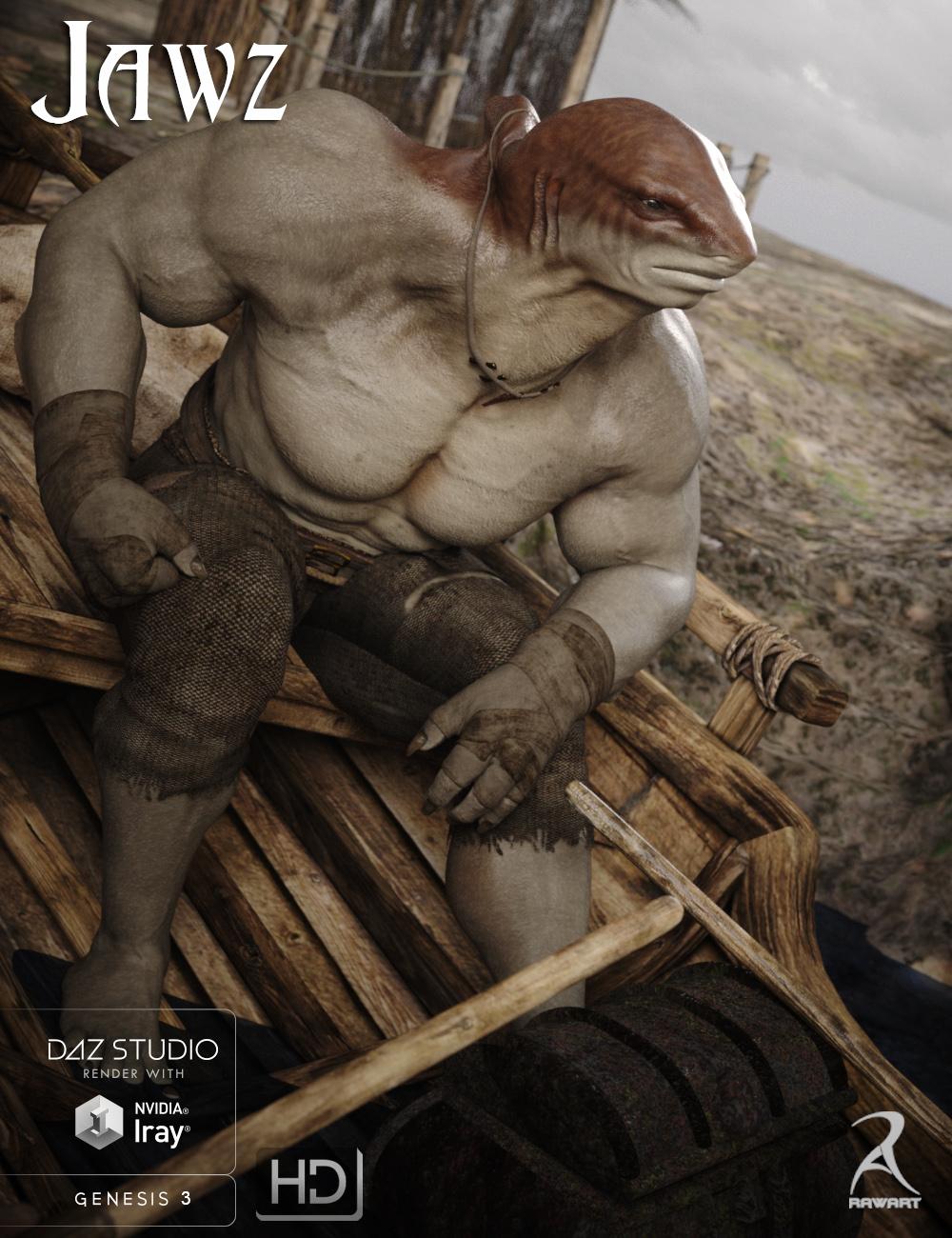
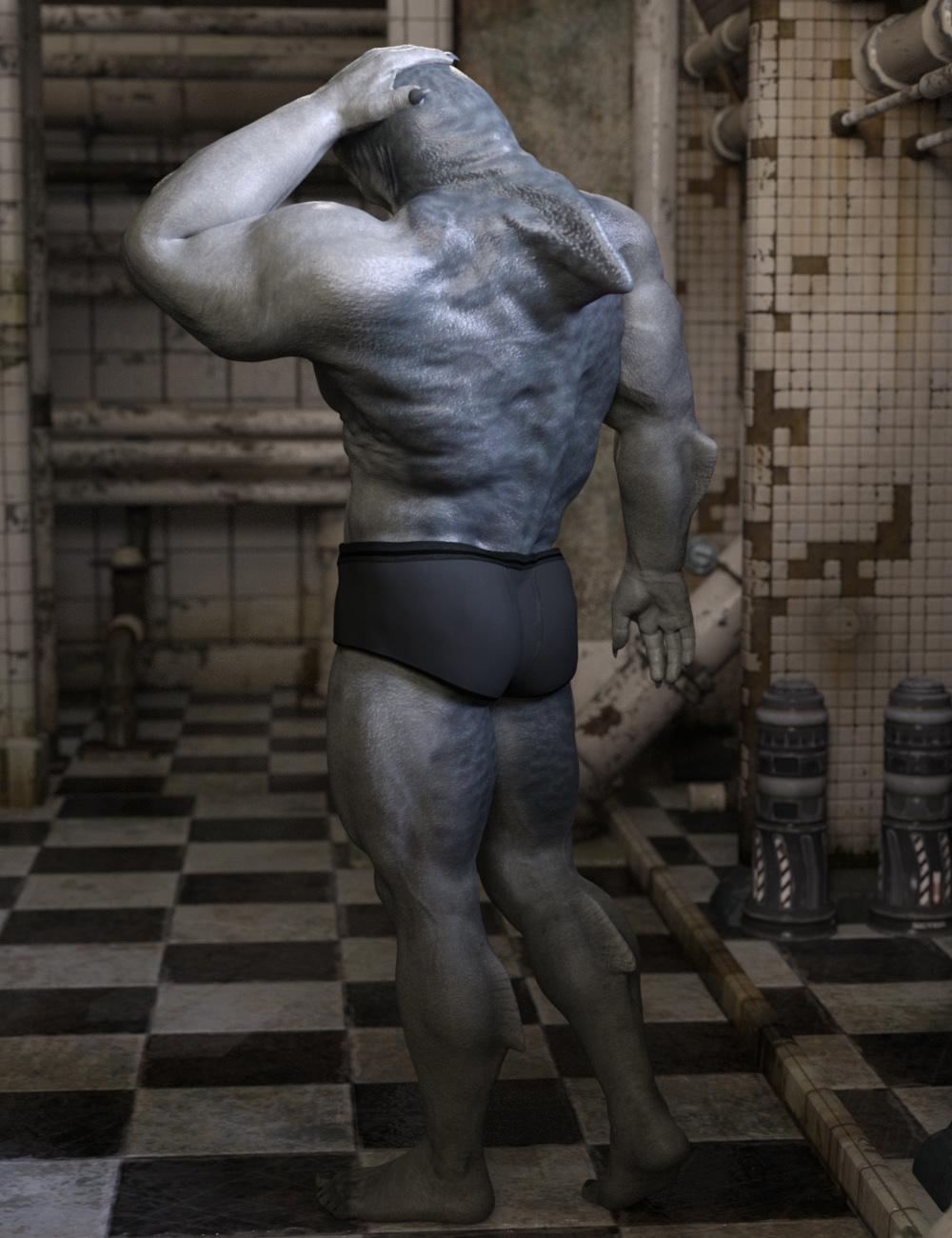
Beware Land Sharks! [commercial]JAWZ!!!!!
http://www.daz3d.com/jawz-for-genesis-3-male
“When that shark bites with his teeth, dear..Scarlet billows begin to spread.”
Just when you thought it was safe to get out of the water, the Land Shark emerges to hunt the streets.
The set comes complete with custom crafted High Definition Morphs, and a highly detailed texture set, suitable for Iray and 3DL
Product Includes:
One Jawz Character Preset
One Jawz Morph Preset
Two Jawz Full Material Presets
Two Genital Material Presets
Also includes IRAY and 3DL MAT files
 M4 for G3...
Feeling your pain. Wonderland! I have some M4s that I've tried to port over to G2M and G3M without much success on the head morphs. Can use the textures just fine, but without those head morphs, they just don't look right. I've tried adjusting G3M morphs by hand to look like the M4 pics, but it just doesn't work. The shapes of the head are too different and even with many different morph pack options, I can't get as close as I really want to. Seems like Generation 4s were more realistically scaled and I think that's why they look so much better. They look like real people. The Genesis 1, 2, and 3s are great, but something is very different, and you really notice it when you're trying to bring over M4 and V4.
I'm hoping that GenX2 will solve the head morph issue when the Genesis 3 addon comes out, but I'm not holding my breath. I've tried converting head morphs using GenX2 on supported models and haven't had much luck. I can get the body morphs and textures over just fine, but not the heads. Could be user error. I've learned a lot since the last time I tried and I've also built a computer specifically for 3D, so I'll try again and see what happens.
But for now, some of my characters will simply remain as Generation 4s. I'm glad RDNA has come over with so much great stuff for them, and that there's still a lot in the DAZ catalogue for cheap.
The prices are getting out of handtmraider:
"Has anyone ever tried Marvelous Designer?"
---
Yes I have. I've had some pretty good luck with creating stuff in Marvelous Designer. There are a number of inherent problems that are enough to drive you a bit crazy if you let them:
1) The default pose in DAZ (t-pose) is not a traditional clothing pose, so you have always reinterpret patterns to fit that pose. Marvelous designer is designed to mimic real-world sewing, but it's hard to use real-world patterns when creating clothing for DAZ (primairly tops) because of this issue.
2) When you bring models into DAZ, you still have to rig them for DAZ. I'm still trying to figure out how to weightmap models because it's hard to pose a lot of clothing within DAZ. Sickleyield's Ultra Templates (http://www.daz3d.com/sy-ultra-templates-for-genesis-3-female-s) are a godsend for importing clothing into DAZ from Marvelous Designer. The Ultra Templates add handles to dresses that can be manipulated to alter dress strucutre when you import the dress into DAZ. This isn't perfect, but it's definitely a decent work. Admittedly, it's still nowhere as nice as weightmapping, but until they figure out a way to make that easier, I'll stick with Sickeyield.
3) If you're going to purchase Marvelous Designer, I highly recommend taking a look a the course by CGElves. Again, this product isn't perfect, but I really learned a lot from watching the videos.
4) I've learned if you have a specific pose you want to use, it's best to export the model in that pose and then import that model into Marvelous Designer as a new avatar morph. Then you can re-export the mesh and then load the revised mesh as a new morph into DAZ. I experimented with this when I was working on a project I called fashion week (see below).
Here are a couple of freebie products I have created using Marvelous Designer:
http://www.sharecg.com/v/82049/view/21/DAZ-Studio/JPolo
http://www.sharecg.com/v/81907/view/21/DAZ-Studio/DAZ-Model-T-shirt-and-Short-Shorts-for-G2M
http://www.sharecg.com/v/83010/browse/21/DAZ-Studio/Fashion-Week
http://www.sharecg.com/v/82873/browse/21/DAZ-Studio/Pilgrim-Wear
Jason
PS. Yes, I agree that the costs have gotten more and more expensive. I'm starting to see myself buy less and less. If it's not something that is either a merchant resource I could see myself using or an item that I think is just way cool, I'm not purchasing. I do support artists who create male content because I feel the need to encourage better male content on here.
Applying Rigging To Edited Figure/ObjIn order to use the Transfer Utility the hand would need to line up with the original Genesis hand.
Need More Face Morphs For GF3 and GM3EotA, for me it's just the same: I don't use G3M too often because of the lack of morphs. Now there is a new morph set - not 200+, but quite promising: http://www.daz3d.com/genesis-3-male-head-morph-resource-kit-2
Dhampyr, the night children for M4 (commercial)http://www.daz3d.com/dhampyr-the-night-children
Face is a custom morph
Body with morphs++My favorite morph for M4 :)
Many aeristic renders
Who is on your 'Buy Without Looking At' List?.Nothing from DAZ3D goes into my cart without looking anymore. That connect thing has to be watched for and whether there are 3Delight materials or iRay only. Not that I refuse to purchase anything iRay-only because I have several items...but they have to be something I really really really like or something not too complex that I can convert.
Overall I have the most DAZ products by far (discounting DAZ Originals or Platinum Club) from 3 vendors: Predatron, 3DUniverse, and The Ant Farm.
I also have the complete stores of a few including Luthbellina, Dogz, and Sloshwerks and most of the likes of Flipmode, Stonemason, First Bastion, Kibaretto, RawArt and 3DJoji.
These are all vendors who have been around a while. And I'm finding some newer ones I like very much such as Indigo Jansen and IH Kang.
As you can see I'm more into props and scenes (also toons, animals, and nature) and not too much into characters except for the DAZ ones though I have tons of clothes and hair. I hunt for special skins and older or distinctive characters. I get many morph sets too so I can roll my own on the rare occasions I do a portrait or two.
There are always those who are special but you've forgotten to list...so I hesitated to write this. But I'm old so I give myself that as an excuse...and I'm sticking to it.
Edit speaking of having the vast majority of their catalogs and forgetting names: Andrey Pestryakov, Alessandro_AM, Denki Gaka
Edit again. Because another thread here had me going to a vendor's page to check out something I must add Collective3D to the above list. Only 2 prods I DON't have.
This is getting embarrassing....
Edit again....so I'd better add some smilies

 Use Genesis 2 textures with M4/V4.
Not by default.
If you own "V4 for Genesis 2 female" and "M4 for genesis 2 Male" you could use Map Transfer in DS to convert the textures to V4/M4 UVs.
edit: or if you have Blacksmith3D or Texture Transformer there are Male and Female add-ons (available at Renderosity) that enable you to convert textures using G2F/G2M base UVs to V4/M4.
How to sculpt around eyes without messing up eyelash geometryYou can export the base figure with surface materials checkmarked. I haven't checked Genesis 2, but on Genesis 3, the full set of both lashes are one object with surfaces. You can hide them so you can see the lids. I would leave the lids at the lash line alone if you are trying to shape around the eye, in terms of the eyelids. You can use the mask brush to paint out the interior rows within the eye socket, plus the lids at the lash line. If you're good with ZModeler, you could use masking tools within that since you're working at base res. If you need to do the lid line, then you can use the move brush (BMV) with the lashes visible and the brush at a small size to affect only a small portion of the lid edge at a time. Time consuming and you have to be careful. You would want to make sure at all times that all of the eyeball is not affected by masking that area. I recommend storing a morph target of the base before starting to restore the eyeballs en mouth interior.
With Genesis 3, you also have an additional option as it has a face rig. when you move the lids (which is composed of sections), the lashes are rigged to follow the movement of the lid. This also, as I understand it, means you don't have to adjust the rigging, if you employ this method. With anything else, you will and will likely have to do MCMs (Morph Corrective Morphs) for the eyes to properly close.
Transferring Morphs from Genesis to G2M/G2F and from G2M/G2F to Genesis (Now with Clones!)Oddly it shows up when I conform the G3F object to my morphed G2F... so I have no idea how to fix it.
Da Dah!
I had exactly the same problem but I have discovered how to fix it.
What I was trying to do was bring morphs across from genesis or g2f to g3f. I successfully managed to do so using kattey's method (posted above).
BUT.... because the zero pose of g2f is different than that of g3f what happened was the arms and fingers were screwed up when I tried to pose it. I was hoping that "select morph vertices" enabled only to e.g. affect the selected vertices with the morph (in this case I wanted to transfer only the head morph from g2f not the entire shape of g2f). It didn't work though.
What DOES work is this: follow the kattey method to get the g2f morph shape into g3f as a g3f morph using clones.
THEN.... export the g3f base shape (no g2f morph dialled in) with base resolution and subdivision 0.
THEN.... export the g3f with the g2f morph dialled all the way to 100% with base resolution and subdivision 0.
THEN.... import the g3f base shape into zbrush, set it as a morph target.
THEN... import the g2f saved export into zbrush over top.
THEN... with the "morph brush", paint over all of the parts you DON'T want to morph. What this does is revert the parts you don't want to morph back to the original morph target of g3f. In my case I only wanted the head so I painted over the entire body EXCEPT the head, thus leaving the head morph in place and the standard base g3f body for the rest.
THEN... export the combination morph out of zbrush
THEN.... import the combination morph back into daz using morph loader
and HEY PRESTO... you have a *fixed* g3F base model with the g2f head morph. Magic!!!!
How to use "select morph vertices" on parameters tabThanks for answering.
In any case, I have figured out the answer....
What I was trying to do was bring morphs across from genesis or g2f to g3f. I successfully managed to do so using kattey's method (posted somewhere else on this forum).
BUT.... because the zero pose of g2f is different than that of g3f what happened was the arms and fingers were screwed up when I tried to pose it. I was hoping that "select morph vertices" enabled only to e.g. affect the selected vertices with the morph (in this case I wanted to transfer only the head morph from g2f not the entire shape of g2f). It didn't work though.
What DOES work is this: follow the kattey method to get the g2f morph shape into g3f as a g3f morph using clones.
THEN.... export the g3f base shape (no g2f morph dialled in) with base resolution and subdivision 0.
THEN.... export the g3f with the g2f morph dialled all the way to 100% with base resolution and subdivision 0.
THEN.... import the g3f base shape into zbrush, set it as a morph target.
THEN... import the g2f saved export into zbrush over top.
THEN... with the "morph brush", paint over all of the parts you DON'T want to morph. What this does is revert the parts you don't want to morph back to the original morph target of g3f. In my case I only wanted the head so I painted over the entire body EXCEPT the head, thus leaving the head morph in place and the standard base g3f body for the rest.
THEN... export the combination morph out of zbrush
THEN.... import the combination morph back into daz using morph loader
and HEY PRESTO... you have a *fixed* g3F base model with the g2f head morph. Magic!!!!
M4 for G3...D3D is working on the morph transfers, its an updated version of GenX2
This might sound noob, but how can I apply morphs to D3/M3 in Daz Studio 4.9?If you load David by going to Content Library > Poser Formats > My DAZ 3D Library > Figures > DAZ People > David.cr2
and apply the morph injections from
Content Library > Poser Formats > My DAZ 3D Library > Pose > !David All Mrph INJ > !All HEAD Morphs.pz2
does that work?
Applying Rigging To Edited Figure/ObjI've created an OBJ of the right hand of Genesis for a personal project {also the face, arms/hands & hip/legs - a total of 4 OBJ's}. I've been through a few tutorials on Rigging and using the Transfer Tool but nothing seems to allow me to apply the Genesis rigging to those OBJ's - even after I've turned the Hand into a "Figure".
Here is an image of the Hand:

I'd like it to have the same movements/morphs as it would if it was still attached to Genesis {and the other 3 OBJ's for their respective movements/morphs}.
Is there any way to accomplish this? I don't have any experience with rigging and have only be playing around with 3d modelling up to now. Any help would be appreciated!
Thanks in advance,
M. Stohler
{BlueDragonFire}
Creature creator for M4/V4 is not morphing the face.I don't think they work outside of Daz Studio, but I have no idea. Share cgi has a LOT of cool free stuff. I highly recommend Dietrying's morph bundles.Again thanks for posting useful stuff. I'll try the shaders and export the textures to see if it's they work and post the results later. I'll do the same with the morphs. Again thanks!
I can't locate my installed products within DazThere they are! Thanks a lot. Also, does AIKO come installed or do I have to put that in separately?
there's no Aiko in the base content, if that's what you meant.
One more thing. I'm trying to apply injections and it keeps telling me:
InjDeltas.FBMEmaciated
Is this part of something I need to install seperately?
That the name of a full body morph so it's probably in the body morphs pack for the figure you're using.
Creature creator for M4/V4 is not morphing the face.I don't think they work outside of Daz Studio, but I have no idea. Share cgi has a LOT of cool free stuff. I highly recommend Dietrying's morph bundles.Daz 3D is part of

Connect
DAZ Productions, Inc.
7533 S Center View Ct #4664
West Jordan, UT 84084Licensing Agreement | Terms of Service | Privacy Policy | EULA
© 2026 Daz Productions Inc. All Rights Reserved.