-
Why can't I add eyelashes?
I tried to add my eyelashes to the models like in the tutorial
But when I click Accept in Transfer Utility
Nothing happens
Maybe I'm doing something wrong?

I tried to follow the instructions but my Scene Indificator,Combatility Base is empty


Can someone explain how to add your eyelashes to your morph?
HowTo: Create missing Genesis 8.1 Head skin maps from Genesis 8/3 skin mapsThese instructions have one minor flaw. They are leaving one step out. A step that is done automatically by genesis8 materials but if I'm just plugging in all my own custom textures it's not done.
So after loading all the textures you want to convert from genesis8 to genesis8.1 as in loading all the textures that are genesis8 torso textures into the gensis8.1 head surface you need to go and make sure the uv map is set to base female. In this case base female meaning genesis8 and genesis3's uv map style. Why does this matter? Well that "CURRENT" in map transfer references this. So in order to convert from gen8 to gen8.1 CURRENT has to be base female, but map transfer won't let you change current to anything else. Well no worries, this added step just changes what current currently is. Process then proceeds flawlessly from there on.AOBB's Classic Hollywood Stars G9 mega bundle. 19 head morphs. No materials nor textures.Hi friends,
It took me almost ten months to complete this project and I sincerely hope you will like the end result. All you need to know, including the head morph mega bundle, is included in the zip file you will find here:
https://drive.google.com/file/d/1durUwWim507pcyrrp64AxoIX_fa8hnPn/view?usp=sharing
============================================================================================================================================================
There is no file.
New file link please
[LINKS] Doctor Who freebie list: RegenerationJust curious, is there an Alex Kingston (River Song) morph, preferably for G8F. I have HID Lily, Osuine for Genesis 8 Female by Sangriart, CS112 for Jodie Whittaker, Joequick's ExSmith for Matt Smith. River Song would be a great addition.
[Released] Character Converter from Genesis 2 Male to Genesis 8 Male [Commercial]I have deleted the files from C:\Users\User\AppData\Roaming\DAZ 3D\Studio4\CharacterConverterMorphs and C:\Users\User\Documents\DAZ 3D\Studio\My Library\data\Daz 3D\Genesis 8\Male\Morphs\My user name\Matt Smith 11th Dr for Genesis 8 Male multiple times and retried using "zero" and "restore" to see if that made a difference. I still get the same result. The only morph I am using is Joequicks exsmith at 100%. from above mentioned product. See attached for what I get. I am at a loss. It's the first time I have tried to use this product, even though I bought it a while ago. I use DIM to install all my products.
The head is selected in the picture only because I selected the head and used the little square with the + sign in the middle to point the camera at the head.
[Released] Oso Otter for Genesis 9Oso3D said:
Eboshijaana said:
Your creatures are worth buying just for the amount of morphs alone, Oso. I didn't know I needed webbed hands and feet options, but I do NOW.
Thank you for keeping it up!I will note that the webbing is a bit limited, just coming up along the first segment of the fingers. Going past that point is orders of magnitude more difficult (requiring a lot of correctives or a geograft or whatever) and that seemed a bit much for this project.
It is still great that it is a separate morph. Its existence at all is good enough for me ^^
The [Disco Chives] Misplaced Parrot Complaint ThreadWendyLuvsCatz said:
Gordig said:
Just started watching the show Undone on Amazon Prime. By all indications, they filmed actors and then ran the footage through AI to effectively rotoscope it, which really smacks of low effort. It's a good show, but I wish they'd just conventionally animated it. In some shots, characters look like they weren't even touched by the roto process (especially the dark-skinned ones). Hair is constantly changing shape, there's a really odd mixture of line quality and weight.

I had stopped posting in this thread but I felt compelled to set you straight on this one as too many people are mistaking digital art for AI
This isn't an issue with assuming that all digital art these days is AI; this is an issue with the art in this show BEHAVING like AI. The art style isn't consistent from scene to scene, stationary objects morph for no apparent reason, objects that should have similar focus in a given scene have different levels of detail, and so on. Things are wrong in ways that would probably be difficult for humans to do intentionally. It looks more like Corridor's AI-driven anime videos than any hand-drawn art I've seen.
edit: I guess what I'm saying is, if this show was all rotoscoped by hand, then why doesn't it look THAT much better than what Ralph Bakshi was doing in the 70s?
Why can't DAZ prevent Duplicate Formula problems with products they sell?barbult said:
FenixPhoenix said:
barbult said:
Does this error imply use of MSO Faye in the creation of Fesoul's Nisa? MSO Faye is not a merchant resource. Why is it referenced in an Fesoul character morph? How does this happen?
I don't have those characters. But it may just be that each PA added a corrective for their characters that just happened to have the same name, causing the duplicate formula. The fix is to change the name for the corrective. This is why DAZ encourages PAs to name their morphs with their initials first to avoid this issue.
The original post stated "FeSoul's Nisa has an output called Genesis9:/data/Daz%203D/Genesis%209/Base/Morphs/FeSoul/Nisa/FE_Nisa_body_cbs_thigh_x90n_r.dsf#MSO_Faye_body_cbs_thigh_x90n_r?value". I'm trying to understand how an MSO_Faye tag would come to be on an FE_Nisa product morph.
Perhaps a simple mistake in setting the link up, there are a lot of hidden morphs and they display with "greyed out" labels so if something was typed in the filter box on Parameters to isolate them it would be easy to grab the wrong cbs_thigh_x90n_r and drag it into the Property Hiearchy. of course that may well mean that the correction isn't working as it should, so a further wrinkle to be checked by support.
Duplicate formula found Genesis 9Nemesis10, thanks so much for your suggestion! I was able to find the exact cause of the error. I've uninstalled the morph (Red Ant Suzette from RenderHub), and have contected the content creator.
I guess it's to be expected, but when I open a G9 that's been saved as a scene subset, DAZ still tries to find RA Suzette. If I deleted the scene subset and saved a new version, would DAZ still try to find the Suzette morph?
Render your buys! ALL TIME Challenges#AnythingGoes
Just me, testing some new flowers I've picked up in recent weeks and hadn't used yet. Oh, and a tank, and some other stuff.
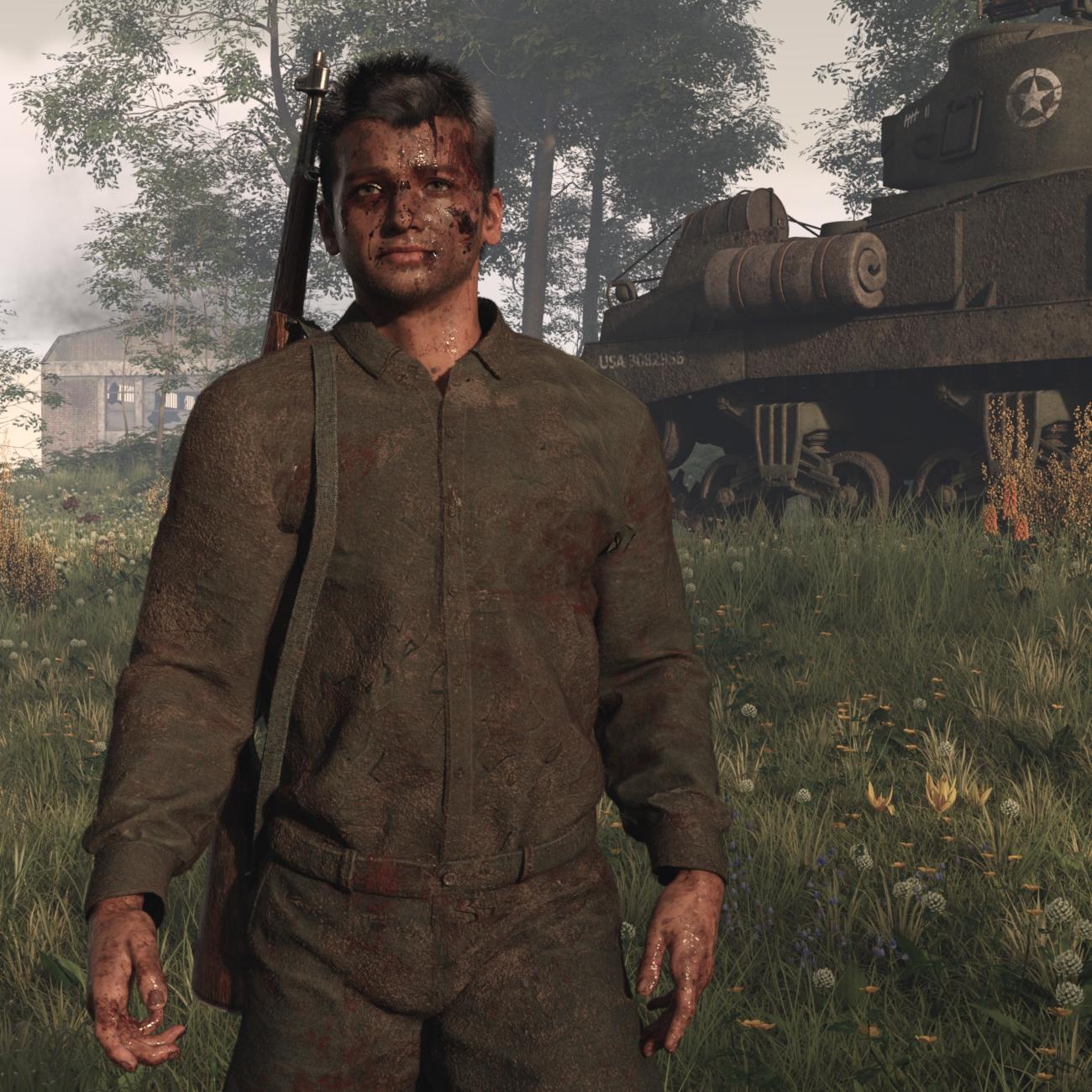
https://www.daz3d.com/ww-ii-us-army-tank
https://www.daz3d.com/abandoned-factory-buildinghttps://www.daz3d.com/omnihair-li-anti-hero-hair-for-genesis-9
https://www.daz3d.com/head-shapes-vol2-masculine-for-genesis-9
(Just a smidge, with other shapes and morphs, on a Face Transfer 2 character)
https://www.daz3d.com/unbroken-lie-makeup-for-genesis-9
https://www.daz3d.com/dirtfx-for-genesis-9
https://www.daz3d.com/mdbd-blood-n-dirt--geoshell-manager
(bought it a while ago, but since I didn't know at the time how to create a geoshell - or that I needed to - I don't think I've used it for a formal render)and umpteen flowers, including:
https://www.daz3d.com/wildflowers-buttercups-and-celandine
https://www.daz3d.com/crocus-plants--spring-flowers
https://www.daz3d.com/flowering-broom-cytisus-bushes
https://www.daz3d.com/verbena-bonariensis--garden-and-grassland-flowers
https://www.daz3d.com/heathland-wildflowers--harebells
https://www.daz3d.com/kniphofia-plants--red-hot-poker-flowersWhy can't DAZ prevent Duplicate Formula problems with products they sell?FenixPhoenix said:
barbult said:
Does this error imply use of MSO Faye in the creation of Fesoul's Nisa? MSO Faye is not a merchant resource. Why is it referenced in an Fesoul character morph? How does this happen?
I don't have those characters. But it may just be that each PA added a corrective for their characters that just happened to have the same name, causing the duplicate formula. The fix is to change the name for the corrective. This is why DAZ encourages PAs to name their morphs with their initials first to avoid this issue.
The original post stated "FeSoul's Nisa has an output called Genesis9:/data/Daz%203D/Genesis%209/Base/Morphs/FeSoul/Nisa/FE_Nisa_body_cbs_thigh_x90n_r.dsf#MSO_Faye_body_cbs_thigh_x90n_r?value". I'm trying to understand how an MSO_Faye tag would come to be on an FE_Nisa product morph.
Why can't DAZ prevent Duplicate Formula problems with products they sell?barbult said:
Does this error imply use of MSO Faye in the creation of Fesoul's Nisa? MSO Faye is not a merchant resource. Why is it referenced in an Fesoul character morph? How does this happen?
I don't have those characters. But it may just be that each PA added a corrective for their characters that just happened to have the same name, causing the duplicate formula. The fix is to change the name for the corrective. This is why DAZ encourages PAs to name their morphs with their initials first to avoid this issue.
Why can't DAZ prevent Duplicate Formula problems with products they sell?Does this error imply use of MSO Faye in the creation of Fesoul's Nisa? MSO Faye is not a merchant resource. Why is it referenced in an Fesoul character morph? How does this happen?
Want to commission a G9 geograft.Have you considered fake nails? I.e. a fake nail on top of the existing.
If you want more geometry and it shall be part of the finger, you need more geometry on the finger, so the geografts should be more of the fingers, or probably part of the hand so you only need one attachment point for a geograft.
You could let the nail replce the old nail, but then you would need a morph to let the mesh be connected
AOBB's L.A. 2019 G9 head morph bundle - 7 1982 Blade Runner characters. No materials incl.The link leads to this:
"Sorry, the file you have requested does not exist."
AOBB said:
This bundle includes the same characters as the ones I made for G8.1 plus the new head morph of Eldon Tyrell (Tycoon G9). The brand new sculpts are definitely superior to their G8.1 counterparts.
The Lady Noir G9 morph included in this bundle is an improved version of the "standalone" Lady Noir G9 that I released before, so you might want to replace the Lady Noir G9 you have installed before with the one from this bundle. That's up to you. Just in case, I won't remove the previous version of Lady Noir G9. You just can't have them installed simultaneously, because they share the same name.
Non-commercial use only!
You will find the bundle here:
https://drive.google.com/file/d/1jSP98tWVpksBgqQjPNleAkcQ-JSDSWkc/view?usp=sharing
face transfer/g9 issueive been trying to use face transfer with g9 bercuase they look better and i get an error message saying it cant find the 9 start essentials? everyhting is installed properply so im not sure why its not working. i'd apprecaite any info
Want to commission a G9 geograft.So, I'm not sure exactly how in depth I should go specifically in here, but I am looking for someone who can make a geograft for the G9 fingernails. Basically what I am looking for is a setup with more usable geometry aswell as better UV mapping, but not really changing the overall shape or the ability to use existing morphs. This is something that isn't addressed well enough with the various "accessory" type fingernails as I still want to be able to mix and match alot of morphs together, and then adjust the result in Blender.
My main use case is I am currently developing a whole character creation workflow for myself that is based on G9 in Blender that uses a ton of procedural shaders that can then be baked into rasterized tiles. And the main problem I have run into with the nails is that there's just not enough geometry for me to make a high level morph that also works procedurally. There is a similar problem with the g9 nipples and navels, but there's a ton of super cheap geografts that fix that. However something like the ultra-fine details of the fingernails is alot less of a focus for most people, so it seems no one has done this yet. Some of the flaws are very minor and not noticable to most people, but it is still something I am bothered by quite a bit. And then other flaws like the UV mapping are something that are currently unworkable for me.
I have no idea how much I should be expected to pay for something like this or even what the proper way to go about this is. But if anyone has the ability to make a graft that works, I'd be able to discuss all of that. It would give me a huge step forward towards completing my pipeline.
Basketball player animations?You are right, I also couldn't find any animations for basketball, at least with that in the name. I didn't try 'hoops' or a generic 'sports' though. I do have a thought though.
First, I have never played basketball so I have no idea how good these may be. Maybe take the available poses and use them with the Pane Puppeteer might work for you?
https://www.daz3d.com/z-utility-series--ball-sports--props-poses-and-partials-for-genesis-3-and-8
https://www.daz3d.com/basketball-poses-for-genesis-8-and-81-male
https://www.daz3d.com/z-shooting-hoops-scene-and-poses-for-genesis-8
If you need them for G9 or another generation/sex, then the Bone Minion series might work to transfer the pose on the fly to the generation you are using.
Considering how popular men's and now women's basketball is in the United States, I am surprised we don't have an animation for it. As well as American football, baseball, soccer (world football), rugby, and hockey. And up-to-date outfits and gear. Just saying. I (think?) Denver has national teams in each. But it is a popular school sport.
Making pairs of mirrored Daz morphs using Blender [Solved]barbult said:
Morph loader pro can create a mirror morph from an OBJ, right in DAZ Studio. Why do you need to do it in Blender?
Lolz. I don't need to do it in Blender at all now that you've informed me that Morph Loader can do it.
Thanks so much, barbult!
Yes, I found Morph Loader's X swap function. And, cool, there's also the option to mirror so you don't have to make ERC to control left and right together.
Ya. Blender's X-swap equivelant shown in the vid I posted above does not preserve vertex order and will fail in Morph Loader pro. And I guess this is why they gave Morph Loader Pro the ability to do mirror swap properly for morphs.
[Released] Character Converter from Genesis 2 Male to Genesis 8 Male [Commercial]Thanks for the reply. No, I deleted C:\Users\User\Documents\DAZ 3D\Studio\My Library\data\Daz 3D\Genesis 8\Male\Morphs\My user name\Matt Smith 11th Dr for Genesis 8 Male. That was the path the file log showed me. It displayed the name I changed the character too. I have now deleted the file you mentioned. There was only one file. C:\Users\User\AppData\Roaming\DAZ 3D\Studio4\CharacterConverterMorphs is now empty. I will check tomorrow. I am in the middle of a render that will take about 30 minutes more and it's bed time (LOL). The morph I am trying to convert is https://www.daz3d.com/extraordinary-men-for-genesis-2-male-s-volume-1 and the Smith morph (Matt Smith 11th Doctor Who).
Daz 3D is part of

Connect
DAZ Productions, Inc.
7533 S Center View Ct #4664
West Jordan, UT 84084Licensing Agreement | Terms of Service | Privacy Policy | EULA
© 2026 Daz Productions Inc. All Rights Reserved.