-
Daz Studio Pro 4.22(.0.x) - NVIDIA Iray
Iray 2022.1.0, build 363600.1229
Known Issues and Restrictions
- Newer driver versions (R525 branch) fix a brightness/color clamping issue when using the AI denoiser, especially with bright images (nvbugs 3760304).
- Also due to additional performance improvements, R525 GA2 (Windows: 526.67) is thus the recommended driver for Iray 2022.1.0.
- Note that due to the new features listed below, this time unfortunately the bridge had to be changed compared to the 2022.1.0 beta.
Added and Changed Features
- General
- Replaced still leftover FreeImage usages by OpenImageIO (e.g. SDK examples, Server, plugins).
- Updated general libraries:
- OpenSSL 1.1.1s
- OpenImageIO 2.4.5.0
- Iray Photoreal & Iray Interactive
- Added multi matte canvas. This adds a new render target type (see mi::neuraylib::TYPE_MULTI_MATTE) and accompanying parameter type to the public API. It offers a scalar or vector canvas that contains one coverage mask per channel.
- Iray Photoreal
- Native ghostlight support, a new concept to make lights seemingly invisible when viewed via specular or glossy reflection, see e.g. ghostlight_factor for how it is used, or the new section in the programmers manual (IRAY-1753).
- Added LPE support for emissive volumes and introduced a new light subtype, Lv, to denote light emitting volumes in LPEs (nvbugs 3867389).
- Added UV texture coordinate computation for spheres/particles.
- Added support for spheres/particle motion blur.
- Material Definition Language (MDL)
- Improved Windows implementation of mi::base::Lock to use SRWLOCK instead of CRITICAL_SECTION primitives.
Fixed Bugs
- General
- Fixed releasing of scopes (nvbugs 3877982).
- Support gray-alpha images with 16 and 32 bits per channel in OpenImageIO plugin (nvbugs 3829963).
- Fixed missing initialization of the volume_priority attribute.
- Fixed a bug where nvenc_encoder failed to load on a host with no GPU driver, causing the worker to refuse to start (nvbugs 3874131).
- Fixed missing tracking of changed geometry status when adding spheres/particles or setting particle data.
- Re-enabled network timeout by default, which was disabled by accident in an earlier release. Without the timeout, hosts leaving the cluster were not detected in UDP mode.
- Iray Photoreal & Iray Interactive
- Fixed ground/matte shadow for a sun disk size of 0 (nvbugs 3867412).
- Iray Photoreal
- Made guided sampling fully deterministic, so renderings on the same rendering setup will result in exactly the same image.
- Fixed spectral rendering accidentally clamping EDF values.
- Fixed more issues with and added some small optimizations for the optional instance camera shift (nvbugs 3860755).
- Fixed some performance regressions for materials featuring glossy transmission with no cutouts.
- Fixed missed intersections on transformed linear fibers (nvbugs 3845215).
- Fixed an issue with guided EDF sampling and direct light sampling (nvbugs 3858634).
- Fixed near clipping events to enable volumetric properties (nvbugs 3787726).
- Fixed remaining triangle/self intersection precision issues on Turing-without-RTcores (GeForce GTX and low-end mobiles with sm75), A100 (sm80) and H100 (sm90) (nvbugs 3870551 and 3881264).
- Fixed some remaining triangle/self intersection precision issues on CPU (nvbugs 3883738).
- Retweaked some ambient occlusion and rounded corners precision issues (nvbugs 3864452).
- Fixed crashes happening when using the ground/global fog (nvbugs 3872355).
- Fixed an issue with volumes and far clipping planes (nvbugs 3878355).
- Fixed a crash when rendering AUX buffers in combination with inhomogeneous volumes.
- Fixed numerical corner cases where the hair BSDF could create invalid numbers (Jira MDL-798).
- Made volume emission vs scattering/background scale independent.
- Improved section objects/caps interaction with SSS/volumes (nvbugs 3878246).
- Avoided some severe performance overhead (around 1.2x, depending on rendering setup and scene) for enclosing glossy transmission-only hulls, like found in a popular public benchmark scene (nvbugs 3846081).
- Optimized light hierarchy traversal, especially noticeable on CPU.
- Optimized hair BSDF component selection to reduce variance in importance sampling (OM-72862). Note that this will also lead to noticeably brighter hair rendering in some cases, if the firefly filter is enabled.
- Further reduced memory usage for volume data a bit, especially visible for huge, but rather sparse volumes.
- Iray Interactive
- Fixed an issue with sampling the glossy component for environment maps/IBL (nvbugs 3557365).
- Material Definition Language (MDL)
- libbsdf: Optimized hair BSDF component selection to reduce variance in importance sampling (OM-72862).
- Fixed IType_factory::is_compatible() for enums (the sets of enumeration values need to be equal, not just one a subset of the other).
- OpenImageIO plugin
- Fixed import of gray-alpha images with 16 and 32 bits per channel.
- Fixed crash inside the MDL core compiler when an enum value is used as the right hand side of a select expression.
- Fixed crash in the MDL core compiler when the qualified name of an import declaration is ill formed.
- Changed the behavior of state functions when used with an invalid texture space. Now they return always zero.
How to properly set up 3d files to import into daz studio?I have a similar question; I used V4 and attached Technophilia items to it that transforms it into a robot, but when I save it and import in Daz Studio, the model comes out black instead of chrome or silver. These files are the Vol2 Chic files from the Gynoids folder. Anyone has encountered this problem that can help out here? Thanks.
Project motion/transforms of one bone to another (fix root motion)Let me first try to describe the problem (maybe there is better way how to solve this). Also be warned I am DAZ Studio newbie!
I have collection of animations I need to transfer into Unreal Engine but I need the root motion feature. However, DAZ character (Genesis 8.1) does not have a root bone directly and the whole animation is done from the hip bone down to its children. When I export the character and the animation to the FBX file and import it into Unreal Engine, in place of the root bone, it says Genesis 8.1 so if I remember the object in DAZ studio and repeat the steps I have root bone in Unreal Engine which, however is staying in-place during the whole animation so I cannot use root motion feature in UE to actually move the character in the world together with animation.
I was able to fix this in Blender by from DAZ Studio and importing into Blender using the latest DAZ to Blender plugin. In Blender I did following:
- Created a placeholder bone where I copied the hip bone transforms.
- Then I deleted transforms - rotations from hip bone.
- I used Blender bone constraints to mimic XY translations and Z (in blender up/down axis) rotation (IN WORLD COORDINATES) on the root bone while all rotations i projected back to the hip bone.
By projecting - not copying stuff, animation played as expected with root bone as a parent to the hip bone.
I am trying to achieve the same in DAZ Studio as I feel that exporting to Blender, fixing it there and then to UE is too much work to achieve this and I am wondering if I can do the same directly in DAZ for animation I have.
My initial though was to replicate the steps I succeeded with in Blender (with the placeholder) but I do not know how. I want to project the whole animation transforms to the placeholder bone and then project translation to the Genesis 8.1 object with Y (up/down axis) rotations so that the whole character is moving and rotating with the animation. At the same time I want to project hip bone rotations ONLY back from the placeholder bone so that the hip bone is playing as before.
I am very new to DAZ Studio and I am totally lost with trying to achieve this goal. Maybe more important question is, if there is any other way I can achieve the root motion in DAZ Studio for importing it to Unreal Engine?
I would be thankful for any kind of help or pointing me to the right direction.
Does inheritance work in DAZ ScriptHello,
after several experiences with DAZ Studio metadata I am considering writing a script to make handling my problems easier for me, especially for managing my own categorization and tags which I am using heavily. Currently I am experimenting with the scripting language. I really do like the effort going into it, but there are some gaps in the documentation which do make experimenting very time consuming. So I will start with a very basic question. Does DAZ script support inheritance and how would you do it?
Best regards
MichaelHas any one made Daz3D to Unity URP updated tutorialUsually, I just choose URP version in Daz to Unity bridge, wait for the conversion to finish,
then switch to Unity, wait there.
After that, if it is the first conversion to that Unity project, navigate to the Assets\Daz3D\Support folder
and double-click "DazToUnity URP.unitypackage" and click Import.
Please check the forum thread:
for more detailed description.
Usually, I am quite satisfied with the results and do not need to change anything in Unity,
besides changing Daz characters rig to Humanoid.
In Unity, I use Beautify 3 or at least Volume to improve visuals.
For me, the key is to experiment and see in real time changes in the Game view.
Export and import dForce dreadlocks hair from DAZ to BlenderUnless you are a developer, you don't want the source.
"The beat animate with the hear but seem to be slightly off in some frames." - I'm sorry, I don't understand. But I think you might need to change the Blender FPS (probably 24) to match the DAZ Studio FPS (probably 30).
The "Write Texture Maps" options is only for when you want to rebuild the textures completely in Blender. It just saves all the texture maps, named so that you can figure out what is what. Probably not what you want.
As for textures, the Alembic format does not support textures. It will, however, preserve the material slots. I think what you want to do is to deselect "Write Texture Maps" and instead select "Use Diffeo Materials". This will cause Sagan to name the Blender material slots in such a way that if you export with Diffeo first, and then import the Alembic file, the Alembic objects will "inherit" the superb Diffeo converted materials. You can then delete the Diffeo objects, if you don't need them.
I haven't tried it in a lone time, but it used to be the case that the Diffeo materials would reference its own normal maps, and wouldn't work when the materials were applied to the Alembic object. So when "Use Diffo Materials" is selected, Sagan will also create a script in the scripts directory to correct the normal maps on the Alembic objects.
Lastly, Sagan also creates a script in the scripts directory to rename the Blender material slots to more meaningful names, based on the material group name in DAZ Studio.
Lets move any further conversation to the Sagan topic.
Face Mocap for Gen 9I have FaceMotion for G8 and 8.1, which is essentially the same product, and it doesn't work on G9. I'm guessing it's because the shape keys aren't set up for G9. You might be able to send it to Blender via diffeo, set up the FACS on the rig and then import the FaceCap .txt file. It might work but I haven't played around with it since I'm not using G9.
MDBridge for Daz3Dthedoctor said:
Hi and thank you for creating this tool. For some time I've been exporting figures from Daz as OBJ avatars into MD. For animation I use the MDD cache from Daz into MD and then I export/import the garments as OBJ files back into Daz. I'm assuming your tool is a superior workflow and I would like to understand its advantages over the import/export method I've been using. THANKS
The script is an easy way to get your character into MD with any desired pose and export the clothing back to Studio. It is a convenient way of getting the tasks done. There will be improvements in the process as we go along. If there is anything you are looking for to make your workflow easier please let me know. It will be good to get a better understanding how end users use the programs so we can get more features in the future.
Experimenting with ML Deformer in UE5.1There is no need of manually fiddling with jcms/drivers etc., because you only need to export the body mesh with jcms+drivers once and whenever you import any "fixed" animation or pose for the corresponding character into UE from blender/daz, UE handles all the drivers automatically.
I've tried to use the UE Metahuman skin material once, but the procedural micro normals caused bad seams at the edges of the uv maps, so MetaHuman Materials are just good for the Face, but not for full characters.
Can Geoshells be officially edited (Geometry editor, MeshGrabber) independent of its parent object?delete polygons on the shell
Select the shell > Paramters Tab > Shell > Visibility.
There you can set parts of the shell On of Off. That's how you hide parts. No deleting them.
reloading the scene the shell is as expected, it follows the parent. The Meshgrabber indents stayed, though.
As explained by Richard, Shells have the exact same geometry as the object they were made from. The push modifier (offset) or MeshGrabber do NOT modify the geometry, they just move things around like a morph. Same amount of polygons, same vertices order, same rigging to bones. So yes of course, it still follows the original object's bones, and modifications to the Shell's geometry (movements) is taken into account.
this way one could create rather cool effects.
If you want total control over a shell... don't use a shell.
- Create a Geoshell. Export it as obj (or send it to ZBrush, etc).
- Edit this shell object (a pure copy of Genesis) with any 3D app. Let's say you want a tattoo on the arm : delete all shell's polygons but the ones on the part of the arm you need. Export that object as obj.
- Import the obj into Daz and use the Transfer Utility to fit it to Genesis like you'd do for socks, etc. You now have only a small portion of a "shell", which is a basic 3D object, fitted to the arm. But because it was made from a shell : it has the exact same shape as the arm (with the offset of the orginial shell) and the exact same UVs. Which makes it easy to texture it with anything you want.
- Such an object has most of the advantages of a shell : it moves with Genesis, adapts to morphs, accepts any shader and materials, still has UVs from the original arm, etc... without some eventual inconvenients of a shell.
Daz Studio InsallationI mainly install content through Connect, but currently I have one main content directory for not-my-own content (store and freebies), oen for my own files, and one as a test location for things like freebies and stores without DIM support (so I can more easily track down the fiels when adding metadata, or fixing errors, then I move them across to the main content directory; that dosn't break the database entries as those are relative to the content directory without a record of which content directory it is)
Has anyone tried to render DAZ3D models in Lumion?We can't tell you that, but it will certainly play a role. A fast SSD and a fast GPU with at least 10 GB graphics memory and more should be standard.
We have also noticed that different DAZ models take different amounts of time to import. But all this is quite fast. We don't want to advertise Lumion, but its strengths are the workflow. It's all very simple and well thought out. It's fun like a game.When they have been working with us for 6 months, they don't want anything else.
https://lumion.com/blog/faster-3d-rendering-with-6-workflow-boosting-features-in-lumion-10.html
 MDBridge for Daz3D
Hi and thank you for creating this tool. For some time I've been exporting figures from Daz as OBJ avatars into MD. For animation I use the MDD cache from Daz into MD and then I export/import the garments as OBJ files back into Daz. I'm assuming your tool is a superior workflow and I would like to understand its advantages over the import/export method I've been using. THANKS
DAZ, MD, and Traditional Pattern Making - Graduation@lilweep - great insights as always. I'm still struggling with how to deal with FBMs that don't play well with others - but I have a few ideas on the way and your possible solution is an interesting one. I'm working on a similar script to import JCMs no matter which software you use to create them. Very similar to the create shapes morphs script, only the JCM pose needs to be loaded for reverse deforms. I'm using the createMorph function in the included code library that also clamps the morph to 0 and 1. I'm going to add hiddenTrueFalse and color fields to both the JSON and function to control the parm display as well.
This is the function definition so far:
function createMorph(oNode, fullPathFileName, morphName, reverseDeformationsTrueFalse, propertyGroup)and here's a single JSON example entry that 'drives' each morph for now. It could be modified for whatever morph you want to import, as long as the figure on the keyframe matches the deformation you're bringing in.
"ShapeName": "Minerva9",
"MorphName": "Minerva9_body_bs_Body",
"MorphPath": "Actor/Full Body/People/Feminine",
"KeyFrame": 210Thanks again all so much for your insights and sharing your experience. I'm learning so much.
DAZ, MD, and Traditional Pattern Making - Graduationbarbult said:
This looks interesting. I saw my name in there! I wonder how well the final morphs mix together. I've had some problems with that in the past when using MD draping to generate FBMs. Each one looks good, but when I mix FBMs. they become somewhat of a mess sometimes. It may well have been a lack of skill on my part.
I look forward to your first release as a new PA.
This is also what I worry about too. I think this method that bohemian has put forth should work well for very low poly and tight garments where interference from the other FBM morphs when mixing would be minimal.
for higher poly shapes and looser fits, i can imagine that the particular folds or drape from a given body could interfere in unwanted ways, and this would probably be an inherent problem. I kind of ran into this problem when i experimented with making pJCMs in marvelous designer (which perhaps is an easier problem for making non interferencing morphs than the FBM problem since pJCM only affects one area where FBM affects the whole garment).
Im just spitballing, but I guess you could do this method as a first pass, and then maybe try to further tweak the FBMs to adhere to a standard drape with less risk of incompatibility when mixing. This would be a hybrid approach of getting a physical sim from MD and then shifting it toward a perhaps less-than-ideal shape but something still better than the autogenerated FBM.
I would also wonder how you could survey every combination of FBMs when doing QA checks to make sure they all mix well.
I guess the beauty of the approach bohemian proposed is its simplicity and once you start tweaking and doing further adjustments then it becomes as annoying and complicated as the manual way. That said, i think the bulk import of FBMs is very clever and will help stay organised. I didnt watch the video or dl the script yet, but did it include pJCMs?
DAZ, MD, and Traditional Pattern Making - GraduationAs I consider becoming a content creator for DAZ I was feeling overwhelmed by all the morphs and files that are needed so I decided to try my hand at scripting the process. This video will be mainly of interest to others who are currently content creators or considering it like me.
In this thread I learned a great deal about exchanging animations between (thanks all for your contributions) and am now using the Sagan Alembic Exporter, info linked below.
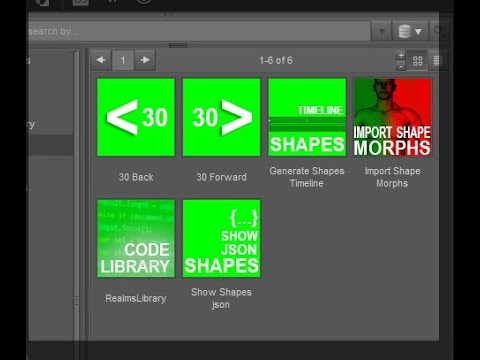
Even if you don't use Marvelous Designer to create your shape morphs, the chapters on using a JSON file to drive your import process may be of interest. The scripts linked below are not encoded and you can adapt them to your pipeline and workflow.
Core Workflow
- Generate Timeline from JSON file of shapes you want to create morphs for
- Export Genesis9 figure shapes animation using Sagan Alembic
- Use your software of choice to create your morphs on your garment / product
- Use same JSON file import the morphs
The import process script imports the morphs using reverse deformations, clamps to 0 - 1 values and colors the property display to aqua so you can find them.
I look forward to any insights you all have on improving and simplifying this process. Thanks.
Links:
Sagan A Daz to Blender Alembic Exporter
DAZ Scripts Used in these videos
 Has anyone tried to render DAZ3D models in Lumion?
Well, after make some test, I give up on lumion currently.
For one reason. I tried to import two genesis with cloths, hair, etc at once. It tooks a long time to get it in.
No matter how fast the render is, if the import process also takes time, the time cost would be just the same.
This is somthing I'm afraid of since the beginning.Anw @wendy I haven't tried your hypotesis.
My solution for now to cut the time cost is to reduce the iray render quality and use denoiser.
Content can't be foundRichard Haseltine said:
Older products may not have complete metadata. One thing you can try is to load the figure (Aiko 3 here) then drag the items you ant to associate with her from the Content Library pane to a category container in Smart Content.
That worked. Thank you very much.
categories content in smart content still appears in "lost and found"Thank you for your advice.To be honest I have not understood everything.
Regarding
I organize my content to remove it from "lost and found" in smart content.
But some keep coming back to "lost and found". In this example files are categorized to "lost and found" _plus_ to other categories.
I did not encounter this issue since.
Following your advice I have Edit> Preferences> Content = Is "Show Hidden Vendor Categorizations" => UNCHECKED
Regarding the fact many products are in L&F folder, I have started to categorize them and most of them are old content without categorization.
I am working with DIM
and my product have meta data as seen in the screenshot above
It has metadata, and I checked all its items, none is in Lost and Found, but the product is present in Lost and Found
Typically those products have a folder in "content library > categories > Lost&Found" .
When I make sure the "content library > categories > Lost&Found > product folder" is empty (categorize then refresh).
When I delete that "content library > categories > Lost&Found > product folder" then the product disapears from "smart content > Lost&Found".
Databases, Content, Smart content tabes_b199eb1e said:
NorthOf45 said:
I assume you installed with DIM or Central, and not Connect. Connect is another method to install content, in a different location. If you use DIM or Central, you do not need Connect to use Smart Content, so you do not need to log in to DAZ from Studio. The "Install" icon is Connect's way of telling you it wants to nstall, but don't do it. You will have a second, overriding installation of the content, and possible conflicts. Much has been discussed about this subject, and the general rule is that if you use DIM/Central, do not use Connect, do not log in to DAZ from Studio. You can set this in your Preferences (F2). If the Product thumbnails are in colour, nothing is wrong.
Is that the 'automatically login with remembered credentials' checkbox?
Yes.
BTW, re-import metadata can be done at any time, but for the whole library, hopefully just once. You can re-import metadata from DIM for one or more selected products in the Installed tab.
Daz 3D is part of

Connect
DAZ Productions, Inc.
7533 S Center View Ct #4664
West Jordan, UT 84084Licensing Agreement | Terms of Service | Privacy Policy | EULA
© 2026 Daz Productions Inc. All Rights Reserved.