-
Why does G8F take FOREVER to load?
SofaCitizen said:
@Wonderland, just thought of a plan B if you wanted to try and disable the errors yourself. In Turbo Loader you can search for the morph that is throwing the error and uncheck it from there.
For example, in my previous example if the duplicate formula line listed the file "data/DAZ 3D/Genesis 8/Female 8_1/Morphs/PUBLISHING_ARTIST_NAME/PRODUCT_NAME/MORPH_FILE_TRIGGERING_CLASHES.dsf" then you could then put MORPH_FILE_TRIGGERING_CLASHES in the Morph search box and hit enter and that would give you the item to disable.
Again, that will only give you the option of disabling the second of the two products with a clash but perhaps allows you to have some control over managing this?
I just added to my last post while you were posting this. DS was updating metadata through Connect so I must have several items installed through Connect which maybe leads to duplicate formulas. I logged out of DS and now all products are in the wrong order but how do I uninstall all Connect items/?
DAZ Metadata ErrorTry re-installing the male part of Genesis 8 Starter Essentials. Sounds like the Ape World package has some metadata problems. I have not noticed anything wrong, but it is not the last product I have installed, so another product might have reset it properly.
Why does G8F take FOREVER to load?SofaCitizen said:
Wonderland said:
'Wow, thanks, but that looks really complicated. For now, could you let me know which known products have these issues so I can just uninstall them?
Yeah, unfortunately it's not quite simple to self-fix and probably a little off-putting if you are not technically-minded.
Also, it's not quite so simple to provide either a global list of products that cause duplicate formulas or to even tell from the logs which products are in conflict. Mainly because the logs only point to a file (and so you would then need to workout which product that file is part of) and also it only lists the second file that is in conflict - the first file is not mentioned anywhere.
It is probably possible to write a script to do this but I haven't yet had time to delve into Daz scripting myself. For my own issue I never even got round to locating the first product that was clashing - I just fixed the second one.
However, if you want to attach your log to this thread I can take a look at it and see if I can figure out one of the products from the error messages? Might be tricky if it points to a product I don't have tho.'Thanks, starting up Studio now. I will have to disable Turbo Loader (which still gives me the same errors) then load a G8 --which can take a WHILE...
Thanks, I'm starting up DS now and have to disable Turbo Loader (which still has the same errors with less characters) and load a G8 which can take a WHILE...
It also takes DS a long time just to start and takes like 10 minutes to load all the products I own. I just realized it was updating metadata from Connect so I logged out. I may have duplicate products installed through Connect. How do I uninstall anything that's installed through Connect?
Question about using DS from a different computerI would probably avoid using Daz Central or Connect in that situation - infact if you setup the base library on the external drive properly you won't even have to run DIM after Daz Studio is installed. Once DS is installed, immediately go into the list of base libraries and remove the pre-created ones which will be on C: - you will probably want to manually remove those folders. Then you can add the base library from your external drive and within Content DB Maintenance you can check Process Metadata Queue and Re-import Metadata and this will import everything into Smart Content (after several minutes).
However, even if you fully clean up and uninstall everything before you go home you would have to check the T&Cs to see if that is allowed. It probably would be since you would not be loading paid assets onto your friends computer but it's best to check for sure.
Iray preview does run on non-nvidia cards - albeit slowly. However, I don't know what the minimum spec would be for that, or filament or even just textured preview.
DAZ Metadata ErrorSomething very strange happened when I was using DAZ Studio.
I used DAZCentral to install the following product...
Ape World Chimp with dForce Hair for Genesis 8 Male | Daz 3DAnd for some reason, whenever I loaded any Genesis 8 Male figure; the metadata associated with it (hair, wardrobe, poses, etc) is no longer available in Smart Content.
As an example of what I mean, I'm attaching some screenshots of the Smart Content menus. The first is for Genesis 8 Female, and the second is what happened when I loaded in a Genesis 8 Male figure. For some reason, it's registering the figure as the Ape World Chimp figure - I had to uninstall the data to fix the issue in DAZCental, but at the time, there was an Actor option in Smart Content that was only the figure in question.
Is there a way that I can reset the Smart Content to allow me to easily access content elements for Genesis 8 Male?Here’s a suggestion for PAsI can understand being frustrated by the lack of masculine genesis 9 content. I sure am. I really want to use genesis 9 and not having a lot of genetics to play with is hamstringing. Especially when there are a lot of female items released daily.
for what i s worth, I like genesis 9, and do want to use it. I'm waiting for a skin solution and a better way to import morphs like xtransfer.
Experimenting with ML Deformer in UE5.1Krys Kryngle said:
Yes, so glad to see someone else experimenting with this. I'll share what I've found out, although I've taken a break from trying it (now I may have to start again).
First question is are you going from DAZ straight to unreal? If so, how did you get the alembic file exported?
I'm using Unreal to Blender with diffeomorphic. I went through the pain of putting all the joint limits in the Maya trainer and generated the 50,000 frame animation. I imported the skeletal animation into blender and got it to work fine. If anyone needs it for experimentation I'd be glad to share. It's just an FBX skeletal animation without the mesh so I don't think I'll be breaking any copyrights or anything. I can also save someone some time with the presets for Maya if anyone needs it. No sense typing in all those values if you don't have to.
I triangulated both meshes, the fbx and alembic, prior to exporting from Blender. This helped with one issue I was having. I think blender triangulates the alembic but not the fbx, or vice versa, so adding the traingulate modifier, applying it, and re-associating the shape keys helps. I have instructions on that if anyone wants.
I was able to get it working with a character at base resolution. I can't find a copy of my settings in Unreal but I remember bumping up most of the settings. I would really appreciate a copy of your settings to see what you used. I'll run another test and upload mine.
The biggest problem I ran into was bumping up the character resolution to sub 1 which is somewhere around 65,000 verts. I kept getting the results shown in the attached image. I tried many different settings but couldn't get anything to work. It would not let me increase the 'num morph targets per bone' without throwing an error after simulation (ran out of memory or something). If anyone was able to get this working, please, please, pleasefg post your settings in Unreal. I can't get this part working. So close...
I use a very different workflow. I originally started with Maya but soon switched to using Houdini, where I'm attempting to build a tool to automate things as much as possible. Here is a high level overview of my workflow.
In Daz Studio:
- I'm using the Daz to Maya plugin (just the Daz side of it) to export a subd 1 FBX of my character.
- I also use the Daz to Maya plugin to export an FBX of my training animation, which I made in Daz by just keyframing my character into various poses, around 500 frames in total at the moment. I'm slowly adding more poses to it, although I've not found much benefit in adding more poses to the training animation. Doesn't seem to improve the end result based on my initial experiments.
- Finally, on the Daz Studio part, I'm using the Sagan Alembic Exporter to export the same training animation as an alembic cache.
- One important thing with my workflow is that frame 0 of the training animation is unposed. This is because frame 0 of the Alembic cache gets used as the final character mesh at the end of this process.
At this stage I had the skinned subd1 character in FBX format, the training animation in FBX format, and the alembic cache of the same training animation. Theoretically this is all that's needed to use the ML Deformer but of course it was never going to be that simple.
The first problem I ran into inside UE and setting up the ML Deformer training was this error:
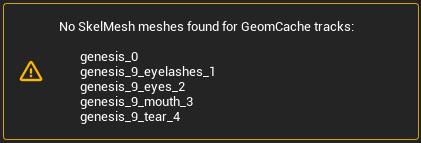
This led me down a path of trying to understand the internals of Alembic files as for some reason, UE was renaming the the tracks in the Alembic cache exported from Daz which meant that the tracks nolonger matched the parts of my character mesh. At least I think that's what was happening as I could find no information about this error.
The second problem I ran into was that the vertex order in the Alembic cache was different to that of my character mesh.
Also, UE was importing the Alembic cache at 24fps whereas it was importing the training animation FBX at 30fps, so I was getting a wanring about that as well.
To solve all of these things I decided to use Houdini:
- I import the character FBX, the alembic cache and the training animation into Houdini.
- I grab the geometry from first frame from the Alembic cache and this becomes my character mesh, which means that the vertex order matches.
- I fix up the paths/tracks of the Alembic cache, which solves the first error above.
- I rebind this new mesh to the skeleton and transfer the joint weights and materials across.
- I ensure that houdini is set up to export both the FBX animation and the alembic cache at 30fps.
- I also strip all of the properties/attributes from the alembic cache before exporting everthing (the character FBX, the training animation FBX and the Alembic cache) back out.
- All of this now happens automatically in Houdini. I don't need to do any manual work now that it's set up.
The new assets, exported out of Houdini now work perfectly for me in the ML Deformer setup.
I do a few others things in Houdini as well, not necessary for the ML Deformer to work, such as optimising the materials down to 10, packing the 4x4k head, body, arm and leg textures down to a single 8k texture, fixing up the eyes to work with the Metahuman eye material setup, renaming materials etc. I'm keen to continue building on my Houdini setup to work with Genesis 9 figures, alter the skeleton to better match the UE5 skeleton, handle clothing better anda few other things.
I did run into a similar problem you are having. At least it looked visually similar. I'm assuming that the vertex orders match between your character mesh and the alembic cache? For me the issue was due to some attributes/properties that were in the Alembic cache file exported out of Daz, which I now strip out in Houdini. I'll try to reproduce the problem again and see if I can work out what the exact cause was.
I tend to just run with the default settings in UE now as bumping things up didn't seem to make much difference to the quality of the end result. I haven't had any memory warnings though so it's possible that you're running out of GPU memory?
I'm in the process of updating my workflow for Genesis 9 so it's a bit broken at the moment but once I get it runnign again I'll do some more experiments and get back to you.
Export and import dForce dreadlocks hair from DAZ to BlenderTheMysteryIsThePoint said:
Unless you are a developer, you don't want the source.
"The beat animate with the hear but seem to be slightly off in some frames." - I'm sorry, I don't understand. But I think you might need to change the Blender FPS (probably 24) to match the DAZ Studio FPS (probably 30).
The "Write Texture Maps" options is only for when you want to rebuild the textures completely in Blender. It just saves all the texture maps, named so that you can figure out what is what. Probably not what you want.
As for textures, the Alembic format does not support textures. It will, however, preserve the material slots. I think what you want to do is to deselect "Write Texture Maps" and instead select "Use Diffeo Materials". This will cause Sagan to name the Blender material slots in such a way that if you export with Diffeo first, and then import the Alembic file, the Alembic objects will "inherit" the superb Diffeo converted materials. You can then delete the Diffeo objects, if you don't need them.
I haven't tried it in a lone time, but it used to be the case that the Diffeo materials would reference its own normal maps, and wouldn't work when the materials were applied to the Alembic object. So when "Use Diffo Materials" is selected, Sagan will also create a script in the scripts directory to correct the normal maps on the Alembic objects.
Lastly, Sagan also creates a script in the scripts directory to rename the Blender material slots to more meaningful names, based on the material group name in DAZ Studio.
Lets move any further conversation to the Sagan topic.
Thanks again.
Indeed, importing the Diffeomorphic exported object in Blender first, followed by the object from the Sagan Alembic exporter resulted in populated material slots.
Daz-Diffeo-Blender-Cascadeur-Blender workflowI agree. Cascadeur looks awesome. I think I'm going to try it also.
I'm not sure what your particular issue is but I know Blender is notoriously bad with FBX. There is a plug-in called 'Better FBX Importer' that fixes some of the import/export bugs in Blender. It looks like Cascadeur has a preset for DAZ so you probably don't want to convert the rig in Blender before exporting.
Blender also uses a different scale. DAZ is cm and Blender is meters. You might have to scale everything prior to export. I know this causes issues when going from Blender to Unreal. Not sure about Cascadeur, just throwing out ideas.
Using VAM models in DAZ?PPehrson said:
RobertDy said:
I recently came across Virtamate and I actually find that many of their figures look better than the vast majority of DAZ ones. I'd be very keen to import these VAM models into DAZ, but after a few rounds of intense googling it seems that the conversation always goes in the opposite direction, getting DAZ models into VAM. is there a known way of getting VAM figures to work in DAZ? From what I've read it looks like VAM figures are G2F so it should be doable?
Since they are DAZ characters, what makes you think/mean/feel they look better? They don't. You cannot seriously believe that a realtime display of a Daz character looks better than a rendered display of the same character.
having a lifesize quality, detailed G2 model dancing with you in VR trumps any render I have ever done in DS, LOL When I first discovered VAM, i stopped using DS for months and spent all my time creating characters for use in VR instead.
Using VAM models in DAZ?RobertDy said:
WendyLuvsCatz said:
probably because of the DAZ EULA Interactive Licensing requirements
Huh? So that means you can't use VAM figures in DAZ?I am a long time VAM and VR user as well as a Daz Studio user. This is one thing you need to keep in mind. VAM is coded to be able to take the licensed G2 models and import them into VAM which is based on the Unity game engine which is why the models look differently in VAM than they do in DS or renders. The other issue is that the community around VAM uses a LOT of unlicensed and stolen DAZ and PA resources when they shouldn't and bakes and imbeds these into chatacters for VAM and then shares and sells them on patreon which is all against the DAZ EULA and licensing. Even if you could manage to get the VAM character morphs to import into DS, there is the issue of VAM models coming with genitals already and DS models not, so the vertices would not match up.
Using VAM models in DAZ?RobertDy said:
I recently came across Virtamate and I actually find that many of their figures look better than the vast majority of DAZ ones. I'd be very keen to import these VAM models into DAZ, but after a few rounds of intense googling it seems that the conversation always goes in the opposite direction, getting DAZ models into VAM. is there a known way of getting VAM figures to work in DAZ? From what I've read it looks like VAM figures are G2F so it should be doable?
Since they are DAZ characters, what makes you think/mean/feel they look better? They don't. You cannot seriously believe that a realtime display of a Daz character looks better than a rendered display of the same character.
Daz Studio Pro 4.22(.0.x) - NVIDIA IrayIray 2022.1.0, build 363600.1229
Known Issues and Restrictions
- Newer driver versions (R525 branch) fix a brightness/color clamping issue when using the AI denoiser, especially with bright images (nvbugs 3760304).
- Also due to additional performance improvements, R525 GA2 (Windows: 526.67) is thus the recommended driver for Iray 2022.1.0.
- Note that due to the new features listed below, this time unfortunately the bridge had to be changed compared to the 2022.1.0 beta.
Added and Changed Features
- General
- Replaced still leftover FreeImage usages by OpenImageIO (e.g. SDK examples, Server, plugins).
- Updated general libraries:
- OpenSSL 1.1.1s
- OpenImageIO 2.4.5.0
- Iray Photoreal & Iray Interactive
- Added multi matte canvas. This adds a new render target type (see mi::neuraylib::TYPE_MULTI_MATTE) and accompanying parameter type to the public API. It offers a scalar or vector canvas that contains one coverage mask per channel.
- Iray Photoreal
- Native ghostlight support, a new concept to make lights seemingly invisible when viewed via specular or glossy reflection, see e.g. ghostlight_factor for how it is used, or the new section in the programmers manual (IRAY-1753).
- Added LPE support for emissive volumes and introduced a new light subtype, Lv, to denote light emitting volumes in LPEs (nvbugs 3867389).
- Added UV texture coordinate computation for spheres/particles.
- Added support for spheres/particle motion blur.
- Material Definition Language (MDL)
- Improved Windows implementation of mi::base::Lock to use SRWLOCK instead of CRITICAL_SECTION primitives.
Fixed Bugs
- General
- Fixed releasing of scopes (nvbugs 3877982).
- Support gray-alpha images with 16 and 32 bits per channel in OpenImageIO plugin (nvbugs 3829963).
- Fixed missing initialization of the volume_priority attribute.
- Fixed a bug where nvenc_encoder failed to load on a host with no GPU driver, causing the worker to refuse to start (nvbugs 3874131).
- Fixed missing tracking of changed geometry status when adding spheres/particles or setting particle data.
- Re-enabled network timeout by default, which was disabled by accident in an earlier release. Without the timeout, hosts leaving the cluster were not detected in UDP mode.
- Iray Photoreal & Iray Interactive
- Fixed ground/matte shadow for a sun disk size of 0 (nvbugs 3867412).
- Iray Photoreal
- Made guided sampling fully deterministic, so renderings on the same rendering setup will result in exactly the same image.
- Fixed spectral rendering accidentally clamping EDF values.
- Fixed more issues with and added some small optimizations for the optional instance camera shift (nvbugs 3860755).
- Fixed some performance regressions for materials featuring glossy transmission with no cutouts.
- Fixed missed intersections on transformed linear fibers (nvbugs 3845215).
- Fixed an issue with guided EDF sampling and direct light sampling (nvbugs 3858634).
- Fixed near clipping events to enable volumetric properties (nvbugs 3787726).
- Fixed remaining triangle/self intersection precision issues on Turing-without-RTcores (GeForce GTX and low-end mobiles with sm75), A100 (sm80) and H100 (sm90) (nvbugs 3870551 and 3881264).
- Fixed some remaining triangle/self intersection precision issues on CPU (nvbugs 3883738).
- Retweaked some ambient occlusion and rounded corners precision issues (nvbugs 3864452).
- Fixed crashes happening when using the ground/global fog (nvbugs 3872355).
- Fixed an issue with volumes and far clipping planes (nvbugs 3878355).
- Fixed a crash when rendering AUX buffers in combination with inhomogeneous volumes.
- Fixed numerical corner cases where the hair BSDF could create invalid numbers (Jira MDL-798).
- Made volume emission vs scattering/background scale independent.
- Improved section objects/caps interaction with SSS/volumes (nvbugs 3878246).
- Avoided some severe performance overhead (around 1.2x, depending on rendering setup and scene) for enclosing glossy transmission-only hulls, like found in a popular public benchmark scene (nvbugs 3846081).
- Optimized light hierarchy traversal, especially noticeable on CPU.
- Optimized hair BSDF component selection to reduce variance in importance sampling (OM-72862). Note that this will also lead to noticeably brighter hair rendering in some cases, if the firefly filter is enabled.
- Further reduced memory usage for volume data a bit, especially visible for huge, but rather sparse volumes.
- Iray Interactive
- Fixed an issue with sampling the glossy component for environment maps/IBL (nvbugs 3557365).
- Material Definition Language (MDL)
- libbsdf: Optimized hair BSDF component selection to reduce variance in importance sampling (OM-72862).
- Fixed IType_factory::is_compatible() for enums (the sets of enumeration values need to be equal, not just one a subset of the other).
- OpenImageIO plugin
- Fixed import of gray-alpha images with 16 and 32 bits per channel.
- Fixed crash inside the MDL core compiler when an enum value is used as the right hand side of a select expression.
- Fixed crash in the MDL core compiler when the qualified name of an import declaration is ill formed.
- Changed the behavior of state functions when used with an invalid texture space. Now they return always zero.
How to properly set up 3d files to import into daz studio?I have a similar question; I used V4 and attached Technophilia items to it that transforms it into a robot, but when I save it and import in Daz Studio, the model comes out black instead of chrome or silver. These files are the Vol2 Chic files from the Gynoids folder. Anyone has encountered this problem that can help out here? Thanks.
Project motion/transforms of one bone to another (fix root motion)Let me first try to describe the problem (maybe there is better way how to solve this). Also be warned I am DAZ Studio newbie!
I have collection of animations I need to transfer into Unreal Engine but I need the root motion feature. However, DAZ character (Genesis 8.1) does not have a root bone directly and the whole animation is done from the hip bone down to its children. When I export the character and the animation to the FBX file and import it into Unreal Engine, in place of the root bone, it says Genesis 8.1 so if I remember the object in DAZ studio and repeat the steps I have root bone in Unreal Engine which, however is staying in-place during the whole animation so I cannot use root motion feature in UE to actually move the character in the world together with animation.
I was able to fix this in Blender by from DAZ Studio and importing into Blender using the latest DAZ to Blender plugin. In Blender I did following:
- Created a placeholder bone where I copied the hip bone transforms.
- Then I deleted transforms - rotations from hip bone.
- I used Blender bone constraints to mimic XY translations and Z (in blender up/down axis) rotation (IN WORLD COORDINATES) on the root bone while all rotations i projected back to the hip bone.
By projecting - not copying stuff, animation played as expected with root bone as a parent to the hip bone.
I am trying to achieve the same in DAZ Studio as I feel that exporting to Blender, fixing it there and then to UE is too much work to achieve this and I am wondering if I can do the same directly in DAZ for animation I have.
My initial though was to replicate the steps I succeeded with in Blender (with the placeholder) but I do not know how. I want to project the whole animation transforms to the placeholder bone and then project translation to the Genesis 8.1 object with Y (up/down axis) rotations so that the whole character is moving and rotating with the animation. At the same time I want to project hip bone rotations ONLY back from the placeholder bone so that the hip bone is playing as before.
I am very new to DAZ Studio and I am totally lost with trying to achieve this goal. Maybe more important question is, if there is any other way I can achieve the root motion in DAZ Studio for importing it to Unreal Engine?
I would be thankful for any kind of help or pointing me to the right direction.
Does inheritance work in DAZ ScriptHello,
after several experiences with DAZ Studio metadata I am considering writing a script to make handling my problems easier for me, especially for managing my own categorization and tags which I am using heavily. Currently I am experimenting with the scripting language. I really do like the effort going into it, but there are some gaps in the documentation which do make experimenting very time consuming. So I will start with a very basic question. Does DAZ script support inheritance and how would you do it?
Best regards
MichaelHas any one made Daz3D to Unity URP updated tutorialUsually, I just choose URP version in Daz to Unity bridge, wait for the conversion to finish,
then switch to Unity, wait there.
After that, if it is the first conversion to that Unity project, navigate to the Assets\Daz3D\Support folder
and double-click "DazToUnity URP.unitypackage" and click Import.
Please check the forum thread:
for more detailed description.
Usually, I am quite satisfied with the results and do not need to change anything in Unity,
besides changing Daz characters rig to Humanoid.
In Unity, I use Beautify 3 or at least Volume to improve visuals.
For me, the key is to experiment and see in real time changes in the Game view.
Export and import dForce dreadlocks hair from DAZ to BlenderUnless you are a developer, you don't want the source.
"The beat animate with the hear but seem to be slightly off in some frames." - I'm sorry, I don't understand. But I think you might need to change the Blender FPS (probably 24) to match the DAZ Studio FPS (probably 30).
The "Write Texture Maps" options is only for when you want to rebuild the textures completely in Blender. It just saves all the texture maps, named so that you can figure out what is what. Probably not what you want.
As for textures, the Alembic format does not support textures. It will, however, preserve the material slots. I think what you want to do is to deselect "Write Texture Maps" and instead select "Use Diffeo Materials". This will cause Sagan to name the Blender material slots in such a way that if you export with Diffeo first, and then import the Alembic file, the Alembic objects will "inherit" the superb Diffeo converted materials. You can then delete the Diffeo objects, if you don't need them.
I haven't tried it in a lone time, but it used to be the case that the Diffeo materials would reference its own normal maps, and wouldn't work when the materials were applied to the Alembic object. So when "Use Diffo Materials" is selected, Sagan will also create a script in the scripts directory to correct the normal maps on the Alembic objects.
Lastly, Sagan also creates a script in the scripts directory to rename the Blender material slots to more meaningful names, based on the material group name in DAZ Studio.
Lets move any further conversation to the Sagan topic.
Face Mocap for Gen 9I have FaceMotion for G8 and 8.1, which is essentially the same product, and it doesn't work on G9. I'm guessing it's because the shape keys aren't set up for G9. You might be able to send it to Blender via diffeo, set up the FACS on the rig and then import the FaceCap .txt file. It might work but I haven't played around with it since I'm not using G9.
MDBridge for Daz3Dthedoctor said:
Hi and thank you for creating this tool. For some time I've been exporting figures from Daz as OBJ avatars into MD. For animation I use the MDD cache from Daz into MD and then I export/import the garments as OBJ files back into Daz. I'm assuming your tool is a superior workflow and I would like to understand its advantages over the import/export method I've been using. THANKS
The script is an easy way to get your character into MD with any desired pose and export the clothing back to Studio. It is a convenient way of getting the tasks done. There will be improvements in the process as we go along. If there is anything you are looking for to make your workflow easier please let me know. It will be good to get a better understanding how end users use the programs so we can get more features in the future.
Daz 3D is part of

Connect
DAZ Productions, Inc.
7533 S Center View Ct #4664
West Jordan, UT 84084Licensing Agreement | Terms of Service | Privacy Policy | EULA
© 2026 Daz Productions Inc. All Rights Reserved.