-
Sakura 8
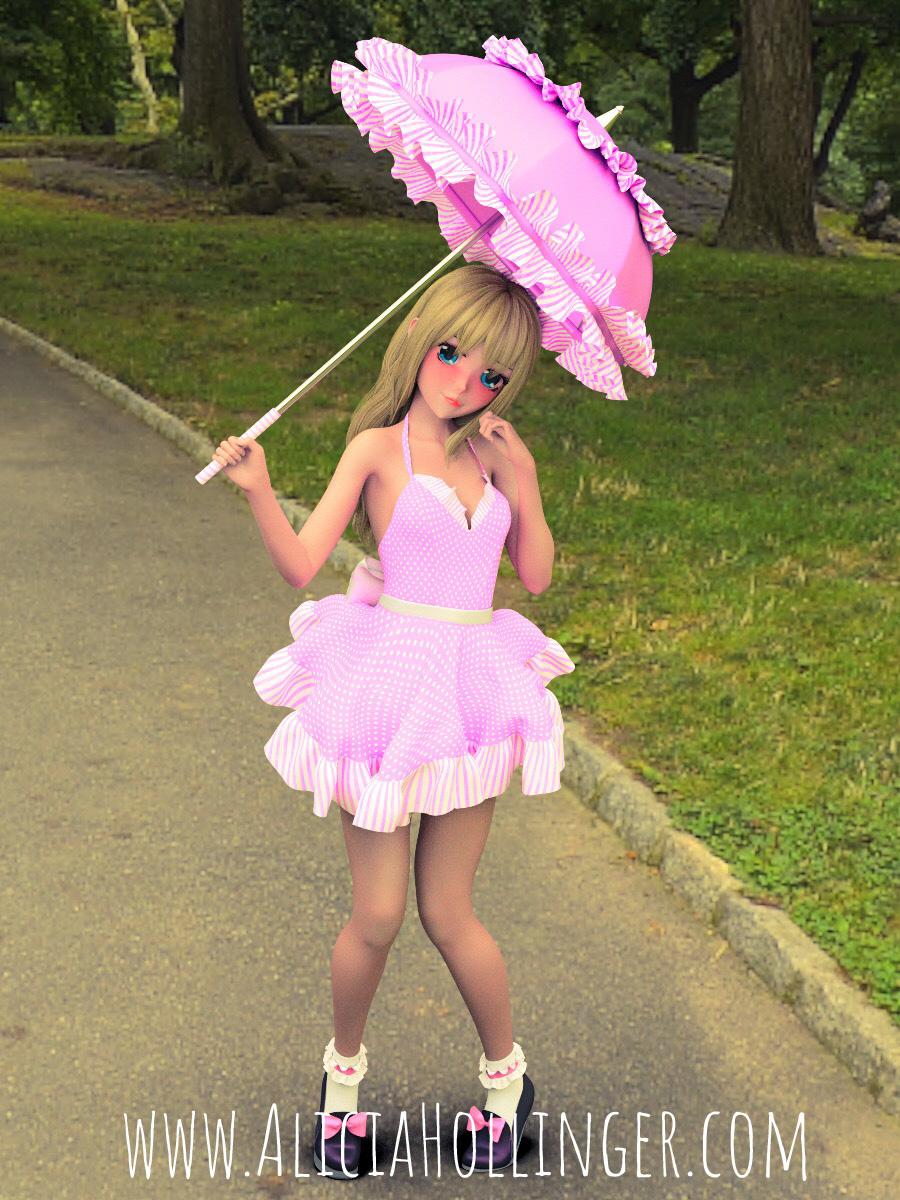
I finally got Sakura to work--now her eyes, eyelashes and eyebrows are showing up when I installed through Connect rather than DIM... I think she's adorable, but I'm definitely going into that uncanny valley with this one. Tried out Mec4D's Central Park HDRI (plus extra lights) with it and a drop of iPad postwork (still sick in bed with flu!) Central Park was my childhood stomping ground so I couldn't pass that up when it was on sale. I see her products are on sale again, but I really miss those loyalty rewards...
Very cute, Wonderland! So sorry to hear you've got the flu. We spent a good chunk of December sick with Influenza A. My entire family had it at the same time. Guess who was sick and got to stay up with sick kids? So glad it's over (it really wrecked Christmas this year!)
Thanks @Llynara. I got sick a couple days after Christmas so missed New Years Eve and am STILL sick! Horrible cough, asthma, just started antibiotics. When I went to the doctor, she coughed in my face! Everyone seems to be sick in LA and it was 70/80 degrees until a few days ago.Raining yesterday and today. Sorry, so OT here, but I discovered something cool because of this: Himalayan Pink Salt lamps! (Available on Amazon.) Great for people who spend a lot of time in front of the computer. They are gorgeous and help remove EMFs...
How could I modify the height of the head of Genesis figures?What you are looking for is called a D-former in DAZ Studio. With your figure selected, go to the menu bar and Create > New D-Former. A popup dialogue will prompt you for a name. If it is only going to be used temporarily, I usually just use the default. Your choice. Click "OK", and nothing will seem to happen. Go to your Scene pane and expand the figure's node heirarchy if it isn't already, and you'll see two new entries for your D-former: one for Field, and one for Base. Selecting the one for Base will highlight all the vertices on your figure in the Viewport, and you'll see the default will have the central portion of the figure highlighted in red, with the remainder in yellow. That indicates the strength of the deformer field, which can be adjusted as required. The default deformer field is a sphere, as you can see, with the figure at the centre. If you expand the D-Former Base, you'll see the D-Former itself. Selecting this, then switching to your Parameters pane will allow you to use the sliders there to deform your figure. But you want one for just the top of the figure's head, so select the Field item back under the Scene tab, then back to the Parameters tab. Since you don't need the field to be that big, you can start by shrinking it down until it is somewhat larger than your figure's head, then translate it up so it is positioned roughly encompassing the head. By using the X, Y and Z scaling sliders and the translation sliders you can size and position your deformer to give you more or less what you are after.
Your Intel based computer is (probably) going to get slower this month (along with the whole world).The little sticker on my laptop says Intel Core i5. Not too good with the more technical stuff, but could this be a reason why my renders seem to be taking longer?
Yes, if you are doing CPU renders. I CPU render too. Those folk talking of 0.5 - 4 hour renders are rendering with nVidia GPUs.
Ok, I'm going to sound stupid now. What's the difference between CPU renders and GPU, which would you recommend and how do I know which one I'm using? I should probably know this stuff by now!
Simply said, you need a lot of calculations to render an image. Each calculation is done by a core. A core can do one calculation at a time. Your CPU (Central processing unit) has probably 2 cores, plus 2 virtual cores = 4 rendering cores. The nVidea cards (GPU=Graphic procesing unit) have anywhere between 500 and 2500 (I think) so-called Cuda cores, which do the calculation. So the stack of neccessary calculations gets worked off much faster than your four CPU cores, hence your render is "completed" much faster.
Also, Iray only works with nVidea graphic cards, as AMD cards don't have the neccessary cuda cores for this.
EDIT: You can find out if you are rendering with CPU or GPU if you check your log file. ou can alsosee if you have a GPU available in REnder settings, in the advanced panel. Note that you might have to update your card's driver to render, and if the scene you try to render is larger than your VRam, it's going to CPU anyway.
Sakura 8I finally got Sakura to work--now her eyes, eyelashes and eyebrows are showing up when I installed through Connect rather than DIM... I think she's adorable, but I'm definitely going into that uncanny valley with this one. Tried out Mec4D's Central Park HDRI (plus extra lights) with it and a drop of iPad postwork (still sick in bed with flu!) Central Park was my childhood stomping ground so I couldn't pass that up when it was on sale. I see her products are on sale again, but I really miss those loyalty rewards...
Very cute, Wonderland! So sorry to hear you've got the flu. We spent a good chunk of December sick with Influenza A. My entire family had it at the same time. Guess who was sick and got to stay up with sick kids? So glad it's over (it really wrecked Christmas this year!)
Sakura 8
Oooo so cute. Love the pose Wow didn't see this set before and its a flash sale. Caught it in the nick of timeI finally got Sakura to work--now her eyes, eyelashes and eyebrows are showing up when I installed through Connect rather than DIM... I think she's adorable, but I'm definitely going into that uncanny valley with this one. Tried out Mec4D's Central Park HDRI (plus extra lights) with it and a drop of iPad postwork (still sick in bed with flu!) Central Park was my childhood stomping ground so I couldn't pass that up when it was on sale. I see her products are on sale again, but I really miss those loyalty rewards...
Sakura 8I finally got Sakura to work--now her eyes, eyelashes and eyebrows are showing up when I installed through Connect rather than DIM... I think she's adorable, but I'm definitely going into that uncanny valley with this one. Tried out Mec4D's Central Park HDRI (plus extra lights) with it and a drop of iPad postwork (still sick in bed with flu!) Central Park was my childhood stomping ground so I couldn't pass that up when it was on sale. I see her products are on sale again, but I really miss those loyalty rewards...
Merry ChristmasValentine's card - white front, inner surface red. Boolean cut-out of a heart shape on the front to show through to the "red" inside, and have some white writing? A popular trend on commercial cards where I live is to glue on some "bling"(rhinestones, glass or plastic "gems" etc.)
Typing of bling, I obtained some free .OBJ format gemstones from another site... what's the trick to disassembling or breaking up the "sheet" of stones that you seem to get? They all seemed to have been "grouped" together.
Also when I apply a shader to this type of .OBJ file the best translucent, "glossy" effect seem to happen when a surface is unbroken. In the case of the large flat emeralds here (middle row) removing the central edges gives a great big n-gon? This is a no-no, right?
I am quite taken with gemstone and glass and water shaders... it would be nice to be able to 'control' them if possible, in the geometry. So far so good except when a large "facet" in the gem "face" has polygon edges running through it... not sure.
OT: What's your New Years Eve celebrations?Had a great evening here. Hubby went to bed first though, which was a bit unfortunate as he put the central heating on before he went to bed and never got round to turning it off again. He's the only one here who knows how to work it after reading the manual and stashing it away somewhere when the boiler was replaced. Son of mine stayed over with his Italian girlfriend, who is used to a warmer climate and has already been causing him to lose sleep at home by insisting on putting the winter duvet on in October(!). The poor lad slept with the window open last night while she slept under a hefty pile of quilts. New Year's resolution is to locate and read the central heating manual :)
I hope everyone had a good one! :)
The No Complaint too Trivial Complaint Thread...oops, been busy doing tests with the new IBL Master.
Happy 2018 to all in the Central portion of the nation, the mountains, and Daz Land
53 minutes to go here.
The No Complaint too Trivial Complaint ThreadHappy New Years Eve everyone, except ps1, to whom I say Happy New Year!!!
It is already new year's day there?
IIRC they're 12 hours ahead of Central time, which puts them into tomorrow Down Under. I might be a few hours off, though.
The No Complaint too Trivial Complaint ThreadThis was a real thing. They used it in movies, too. Good times...

The radio was telling us there are fourteen tons of fireworks stashed in central Melbourne waiting to go off, asbestos snow is sounding good right now :)
Oh no; consider the extreme health hazards of the asbestos.
The No Complaint too Trivial Complaint ThreadThis was a real thing. They used it in movies, too. Good times...
The radio was telling us there are fourteen tons of fireworks stashed in central Melbourne waiting to go off, asbestos snow is sounding good right now :)
"GODZILLA!!! Everybody, run!!!"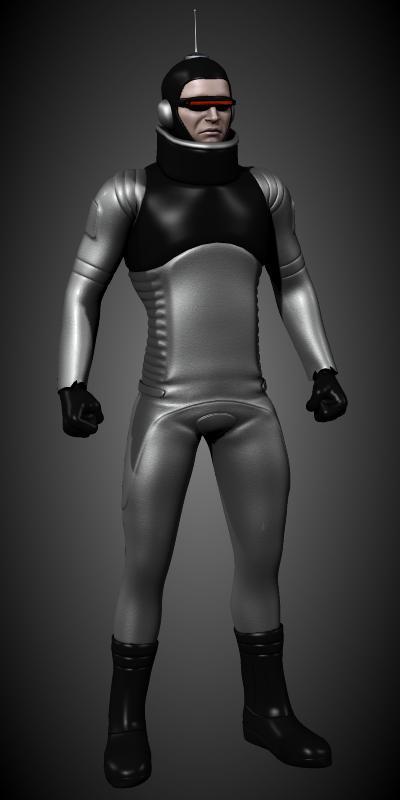
Not so much a composition as it is an "assembly study".
I bet DynaGirlsDaddy will recognize this character. It's an "Xilien" from "Invasion of Astro-Monster", alternatively titled "Godzilla vs. Monster Zero", the titular kaiju being revealed as King Ghidorah.
The Xiliens were aliens living upon a planet on the far side of Jupiter. Besides introducing ETs to the Godzilla franchise, they presented the trope of aliens controlling kaiju as weapons. Well, at least within Goji films. Other movies (usually from the West) in no way connected to Godzilla had already explored this theme, but the Xiliens were Toho's take on the idea.
The Xiliens had a very distinctive appearance, wearing form hugging grey jumpsuits with black "vests", a matching "cumberbund" (an element I did not include here), gloss black gloves, boots and a scuba-like cowl mounted with an antenna. They also wore thin visors predating the "cyberpunk" look by nearly 20 years. Most eye-catching, at least to me, was the inclusion of a wide tubular "collar" that reached a height so as to partially hide the chin.
This collar reminded me of something. JoeQuick had originally sold a product called "Alien Force", one he later offered for free at ShareCG. The central item was a jumpsuit with, yup, a wide tubular collar and a large selection of material zones that could be customized. While not as absurdly tall as the collars on the Xilien costumes, by selecting a "ghost" body group labeled "neck" (the collar geometry is actually associated with the "chest" group), I was able to lengthen the "T" axis to make it look more like the movie outfit. Boom! Instant Xilien!
JoeQuick's freebie is still available at ShareCG.
http://www.sharecg.com/v/62305/gallery/11/Poser/M4-Alien-Force-Suit
I used a cowl from "Zero-Gravity" a near future spacesuit for Michael 4, but JoeQuick has a variety of superhero freebies, some of which likely contain a "near enough" cowl.
Anyway, just something silly to show on a lazy Saturday.
Sincerely,
Bill
WOW! That's dang close! And I like the updated while still clearly oldschool look! Very good Job Bill! And for some added info, Toho's first foray into the alien invasion controlling monsters was the non Godzilla film The Mysterians(1957), where the titular aliens controlled two robot monsters called Mogerua(later to become a combining mecha of human creation in Godzilla VS SpaceGodzilla). And here's some examples of Daz Dragon 3's versatility:
"GODZILLA!!! Everybody, run!!!"Not so much a composition as it is an "assembly study".
I bet DynaGirlsDaddy will recognize this character. It's an "Xilien" from "Invasion of Astro-Monster", alternatively titled "Godzilla vs. Monster Zero", the titular kaiju being revealed as King Ghidorah.
The Xiliens were aliens living upon a planet on the far side of Jupiter. Besides introducing ETs to the Godzilla franchise, they presented the trope of aliens controlling kaiju as weapons. Well, at least within Goji films. Other movies (usually from the West) in no way connected to Godzilla had already explored this theme, but the Xiliens were Toho's take on the idea.
The Xiliens had a very distinctive appearance, wearing form hugging grey jumpsuits with black "vests", a matching "cumberbund" (an element I did not include here), gloss black gloves, boots and a scuba-like cowl mounted with an antenna. They also wore thin visors predating the "cyberpunk" look by nearly 20 years. Most eye-catching, at least to me, was the inclusion of a wide tubular "collar" that reached a height so as to partially hide the chin.
This collar reminded me of something. JoeQuick had originally sold a product called "Alien Force", one he later offered for free at ShareCG. The central item was a jumpsuit with, yup, a wide tubular collar and a large selection of material zones that could be customized. While not as absurdly tall as the collars on the Xilien costumes, by selecting a "ghost" body group labeled "neck" (the collar geometry is actually associated with the "chest" group), I was able to lengthen the "T" axis to make it look more like the movie outfit. Boom! Instant Xilien!
JoeQuick's freebie is still available at ShareCG.
http://www.sharecg.com/v/62305/gallery/11/Poser/M4-Alien-Force-Suit
I used a cowl from "Zero-Gravity" a near future spacesuit for Michael 4, but JoeQuick has a variety of superhero freebies, some of which likely contain a "near enough" cowl.
Anyway, just something silly to show on a lazy Saturday.
Sincerely,
Bill
Iray display style issuesWhat's your rendering device, CPU or GPU or both? Either way, depending on the machine, the action of rendering the preview window is no different from clicking the Render button, at least where system resources are concerned. Think about it: if it's just using the GPU, the same GPU is also handling all of your primary display. If it's using the CPU, well, there's a reason it's called the Central Processing Unit. If it's using both, then you can figure out the rest.
Novica & Forum Members Tips & Product Reviews Pt 10OT: Every year I put up a holiday light show synchronized to music. I posted a video of this year's show if you'd like to see it. Best to view it full screen.
That is amazing! I laughed out loud when your figure spoke. I don't think I've ever seen something spelled out, either. It's also amazing that arches' lights can go different directions. How long did it take you to set that up?????!!!!
Setup time varies by year. I usually add a new feature or new song each year and that takes more time to work out. The physical setup is about 20-25 hours and 10 hours to take down. The central tree is new this year (replaced a simpler one I had) and it became a bear as I had to build the display which took a couple days then figure out how to program the lights, redo all the song sequences to use it, and then it overwhelmed my data network so I had to set up a second one in parallel. So I ended up pulling a number of 12+ hour days sorting it all out. It will be easier next year (which I say every year, and then I add something new, and oops, it takes more time than I thought). It's a lot of fun to do and local people always ask if I have it up and running yet.
The was excellent and fun to watch!
Novica & Forum Members Tips & Product Reviews Pt 10OT: Every year I put up a holiday light show synchronized to music. I posted a video of this year's show if you'd like to see it. Best to view it full screen.
That is amazing! I laughed out loud when your figure spoke. I don't think I've ever seen something spelled out, either. It's also amazing that arches' lights can go different directions. How long did it take you to set that up?????!!!!
Setup time varies by year. I usually add a new feature or new song each year and that takes more time to work out. The physical setup is about 20-25 hours and 10 hours to take down. The central tree is new this year (replaced a simpler one I had) and it became a bear as I had to build the display which took a couple days then figure out how to program the lights, redo all the song sequences to use it, and then it overwhelmed my data network so I had to set up a second one in parallel. So I ended up pulling a number of 12+ hour days sorting it all out. It will be easier next year (which I say every year, and then I add something new, and oops, it takes more time than I thought). It's a lot of fun to do and local people always ask if I have it up and running yet.
Support for 3Delight - Is it Fading? . . . and why?this.
...OK set up a short test., Created a sphere primitive and put it in an enclosed room (the old Stateroom which has 3DL shaders). Used one AoA Ambient light (at 50%) and one AoA spotlight (100%) set to 360° spread (essentially making it a point light) by the central ceiling lamp. Shadows were set to 20% softness with shadow colour 34, 34, 34, nd all settings at default.
I flagged the sphere to not be illuminated by the Ambient light as it was creating a secondary light source in the reflection that didn't look right. UE would have taken too long to do this test.
With just a bit of experimentation I approximated a smooth silver surface with the following settings (I have skill in actually creating shaders).
Lighting model Glossy (Plastic) Using Glossy (Metal) made the sphere turn black during rendering (similar to what you experienced)
Diffuse colour 46, 42, 43
Glossiness: 75%
Specular colour 255, 255, 255
Specular Strength: 100%
Negative bump -.3
Positive bump .3
Reflection Colour: 230, 232, 250
Reflection Strength: 100%In Open GL it looked black and featureless
In the rendered image (below) the reflection worked fine as you can see.
Thanks for that - The glossy-plastic shader setting seems to be the one that did the trick! All those settings I was fiddling with and it comes down to one button LOL
..glad that helped. Yeah a lot of times it's always soemthing small that thwarts one's plans.
Support for 3Delight - Is it Fading? . . . and why?this.
...OK set up a short test., Created a sphere primitive and put it in an enclosed room (the old Stateroom which has 3DL shaders). Used one AoA Ambient light (at 50%) and one AoA spotlight (100%) set to 360° spread (essentially making it a point light) by the central ceiling lamp. Shadows were set to 20% softness with shadow colour 34, 34, 34, nd all settings at default.
I flagged the sphere to not be illuminated by the Ambient light as it was creating a secondary light source in the reflection that didn't look right. UE would have taken too long to do this test.
With just a bit of experimentation I approximated a smooth silver surface with the following settings (I have skill in actually creating shaders).
Lighting model Glossy (Plastic) Using Glossy (Metal) made the sphere turn black during rendering (similar to what you experienced)
Diffuse colour 46, 42, 43
Glossiness: 75%
Specular colour 255, 255, 255
Specular Strength: 100%
Negative bump -.3
Positive bump .3
Reflection Colour: 230, 232, 250
Reflection Strength: 100%In Open GL it looked black and featureless
In the rendered image (below) the reflection worked fine as you can see.
Thanks for that - The glossy-plastic shader setting seems to be the one that did the trick! All those settings I was fiddling with and it comes down to one button LOL
Support for 3Delight - Is it Fading? . . . and why?...OK set up a short test., Created a sphere primitive and put it in an enclosed room (the old Stateroom which has 3DL shaders). Used one AoA Ambient light (at 50%) and one AoA spotlight (100%) set to 360° spread (essentially making it a point light) by the central ceiling lamp. Shadows were set to 20% softness with shadow colour 34, 34, 34, nd all settings at default.
I flagged the sphere to not be illuminated by the Ambient light as it was creating a secondary light source in the reflection that didn't look right. UE would have taken too long to do this test.
With just a bit of experimentation I approximated a smooth silver surface with the following settings (I have skill in actually creating shaders).
Lighting model Glossy (Plastic) Using Glossy (Metal) made the sphere turn black during rendering (similar to what you experienced)
Diffuse colour 46, 42, 43
Glossiness: 75%
Specular colour 255, 255, 255
Specular Strength: 100%
Negative bump -.3
Positive bump .3
Reflection Colour: 230, 232, 250
Reflection Strength: 100%In Open GL it looked black and featureless
In the rendered image (below) the reflection worked fine as you can see.
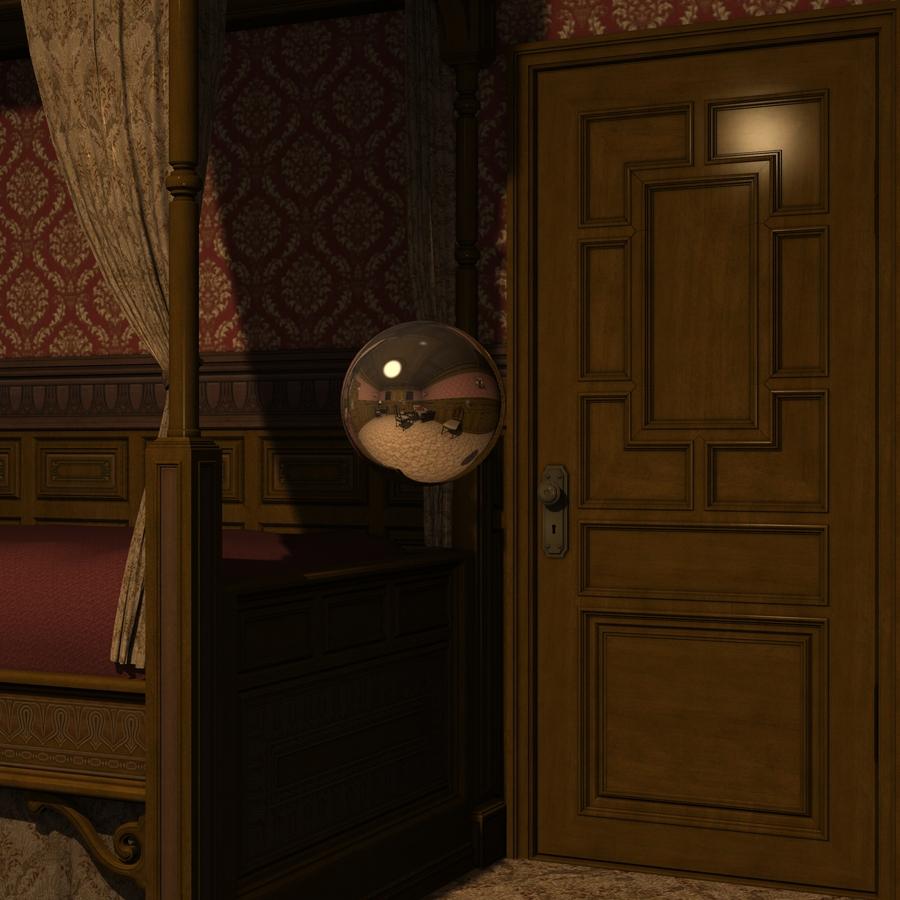
Didn't have to flip normals or anything like that.
Apologies, Yeah, I probably should have posted this to the Nuts & Bolts forum but already posted a suggestion here to fix this.
Daz 3D is part of

Connect
DAZ Productions, Inc.
7533 S Center View Ct #4664
West Jordan, UT 84084Licensing Agreement | Terms of Service | Privacy Policy | EULA
© 2026 Daz Productions Inc. All Rights Reserved.