-
Smart Content Library is empty. Help
Have are you installating?
And have you tried for Smart Content to click the '"burger menu" (3 horisontal bars) > Content DB Maintenance > Reimport metadata?
DIM suddenly hates content not on C: driveIs the DIM config file being saved properly? (%APPDATA%\DAZ 3D\InstallManager\UserAccounts\[yourUsername.ini]). It should have an entry (or several) in a section called [InstallPaths] with your choice of path(s).
It sounds like the Not-C-Drive can't read/write data. Where is the CMS data cluster? By default it is in the AppData\Roaming\DAZ 3D\cms folder. If you deleted the entire DAZ3D folder under Roaming, you nuked your database. You can re-build it by re-importing your metadata (product and user) in Studio.
Blender 3.4 Import/Export OBJ settingslilweep said:
Vertex Order when importing into Blender was important in the legacy Blender (pre 3.2 days). There is a button on import to click Keep Vertex Groups (but that's not the same as Vert Order). It seems like the new blender obj import and export has the default setting to maintain vert order, so we dont have to worry about constantly clicking that 'Keep Vert Order' button.
Anyway, using the new Blender obj importer (from 3.2 onwards) you can still just export from Daz at default 100% scale, import to Blender using default settings (i.e., scale 1.0), export from Blender using default settings (scale 1.0), then bring back to Daz using default 100% import scale and it will be the right size. You can test this as I dont know about Blender 3.4, as I only have 3.3 installed, and it the scale still works properly.
It would be interesting to know what scale you are exporting from Daz at, importing to Blender at, and exporting from Blender at? If you're not rescaling again within Blender itself, then you can just work out what scale adjustment you need to make from those values.
Side note: Make sure you expand the 'Show Individual Settings' for morph loader pro to see if youre not applying some weird rescale on Moprh Loader Pro.
I'l try to attach screen shots of my (pre-3.2 AKA "Legacy") settings which work for me (but not with the new OBJ Blender import/export). I also check "Apply Modifiers" when I create the morphs using Shape Keys.
Otherwise, yes, I always look at the full settings for Morph Loader Pro as I am in the habit of setting Reverse Deformations to "Yes" for evey import.
Blender 3.4 Import/Export OBJ settingsmarble said:
lilweep said:
sounds like you just have it at different scale in blender. In my experience, if you export from daz at 100% and then edit in blender without changing scale, it will go back into Daz at correct scale.
You pobably just need to rescale your mesh by some order of magnitude before doing morph loader.
(In the blenders legacy obj importer and exporter, you had to preserve vertex order (that was the crucial thing to remember), but I think you can forget about that in the new versions of blender.)
Yes, that was my first thought too so I played with the export/import scales but it doesn't apply the morph and I can't get it to scale right either. Maybe I'm changing the wrong things. I've also tried to make sure Vertex Groups is selected in Blender (I saw a YouTube video saying this is important but that was not for DAZ to Blender).
I think I will go back to the Legacy OBJ import/export in Blender 3.4 rather than the new "improved" version - at least until there is some clarification.
Vertex Order when importing into Blender was important in the legacy Blender (pre 3.2 days). There is a button on import to click Keep Vertex Groups (but that's not the same as Vert Order). It seems like the new blender obj import and export has the default setting to maintain vert order, so we dont have to worry about constantly clicking that 'Keep Vert Order' button.
Anyway, using the new Blender obj importer (from 3.2 onwards) you can still just export from Daz at default 100% scale, import to Blender using default settings (i.e., scale 1.0), export from Blender using default settings (scale 1.0), then bring back to Daz using default 100% import scale and it will be the right size. You can test this as I dont know about Blender 3.4, as I only have 3.3 installed, and it the scale still works properly.
It would be interesting to know what scale you are exporting from Daz at, importing to Blender at, and exporting from Blender at? If you're not rescaling again within Blender itself, then you can just work out what scale adjustment you need to make from those values.
Side note: Make sure you expand the 'Show Individual Settings' for morph loader pro to see if youre not applying some weird rescale on Moprh Loader Pro.
Blender 3.4 Import/Export OBJ settingslilweep said:
sounds like you just have it at different scale in blender. In my experience, if you export from daz at 100% and then edit in blender without changing scale, it will go back into Daz at correct scale.
You pobably just need to rescale your mesh by some order of magnitude before doing morph loader.
(In the blenders legacy obj importer and exporter, you had to preserve vertex order (that was the crucial thing to remember), but I think you can forget about that in the new versions of blender.)
Yes, that was my first thought too so I played with the export/import scales but it doesn't apply the morph and I can't get it to scale right either. Maybe I'm changing the wrong things. I've also tried to make sure Vertex Groups is selected in Blender (I saw a YouTube video saying this is important but that was not for DAZ to Blender).
I think I will go back to the Legacy OBJ import/export in Blender 3.4 rather than the new "improved" version - at least until there is some clarification.
Blender 3.4 Import/Export OBJ settingsI have been happily using Blender for years to create morphs for clothing, etc. I have saved a list of settings for both DAZ and Blender Import/Export OBJ files. However, Blender 3.4 seems to have changed all that and now the parameters don't match my saved list. I just tried a new morph on a dress and, although the morph imported back from Blenderusing Morph Loader Pro without error, it did not work. All that happens is that the dress either shrinks or grows in total size as I dial in the morph.
Please, can someone walk me through the new settings? Or does anyone have a working set of parameters?
Sagan: A DAZ Studio to Blender Alembic ExporterTorkuda said:
Okay, after a TON of work, I figured out why strand based hair may not be working very well for many of you. Mesh based hair still stubbronly refuses to not look like a helmet when rendered and I believe Sagan has said before he's still working on that- as is the creator of diffeomorphic as that problem exists with or without the alembic.
When you import your figure through diffeomorphic, on the hair, under material method, make sure to use single principaled. I don't know WHY this makes a difference, it just does.
Hi @Torkuda
One rationale behind simplifying Sagan 3 was to make it simpler to add functionality that is orthogonal to actually exporting Alembic: Figuring out SBH. With so much unrelated functionality, it was really getting difficult to keep things straight. David asked for the code, and I'm sure he probably threw up a little when he looked at it :)
But now, it should be pretty simple: Set tesselation to 2, and calculate all the vertices of each strand as being the average between the sides at any given point along the strand. Another user pointed out that I can determine which end is the root by looking at the UV coordinates.
But as you probably know, the old particle system in Blender is quite old and it's pretty janky what you have to do in order to do something as simple as create a hair particle system from a bunch of know vertices that model the strands. The new hair curve object has a great (read simple) Python API to access the hair, all its strands, and all the vertices of each strand. That's perfect. But what hasn't been implemented yet is the Python API to add a strand with its vertices. It's going to be glorious when it's implemented, but my question when it might be worked on went unanswered. From that I infer that know one knows yet. So I'm going to wait for the better way, and then we'll have functionality to export SBH as a new Blender Curve object at a given frame, animated over a frame range, and also in a binary format suitable for the Houdini hair sim tool I paid Alex to write. As an incidental aside, Alex is Ukrainian, and I sent him a message asking if he was OK, and got no response. I don't know what that means.
NVIDIA vMaterials 1.7.0 PresetsOmniflux said:
This includes 2261 presets (many are identical except for colors).
Thank you to @Catherine3678ab and @Bejaymac for help with shader bricks!
These were automatically generated using a script and were generated with one of the attached shader networks depending on whether the provided material uses a cutout.
If you have suggestions for improving the shader networks, I would love to hear them!
I have added support for adding a user specified cutout (recommended by @Catherine3678ab), but adding a cutout forces the material to be "Thin Walled" and so does not work as expected with all materials. I have not found a way to determine if a material is thin walled while generating the presets (other than if it already uses a cutout), so for some materials you must enable cutouts via an additional option.
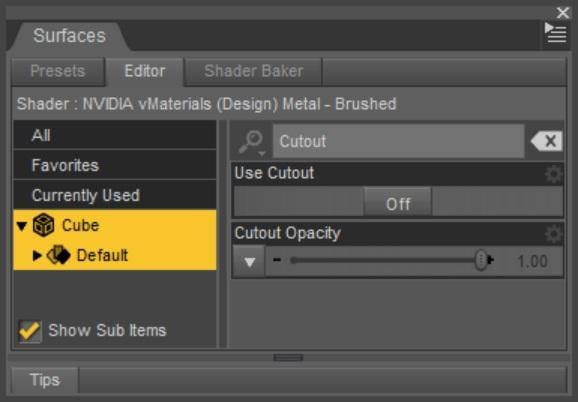
- Install NVIDIA vMaterials 1.7.0 (1.44 GB)
- Install NVIDIA vMaterials 1.7.0 Presets for DS (252 MB)
- Restart Daz Studio if it was open when you installed vMaterials
- Navigate to "/Shader Presets/NVIDIA vMaterials 1.7.0/Setup"
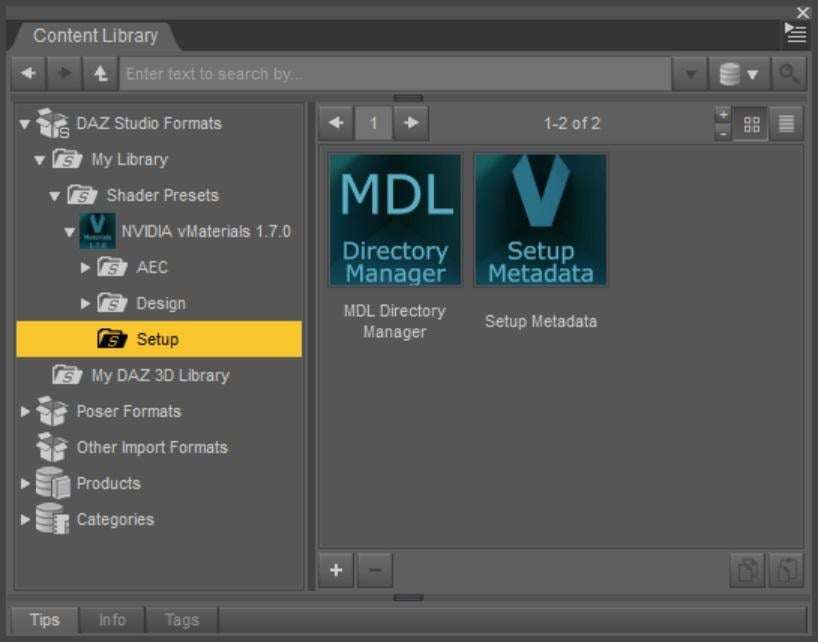
- Run the "MDL Directory Manager" script
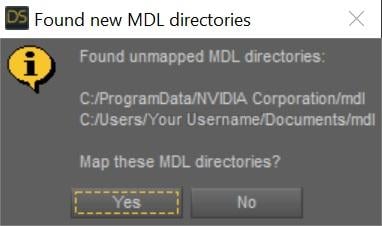
- If the new MDL directories were automatically found, click "Yes" to map them
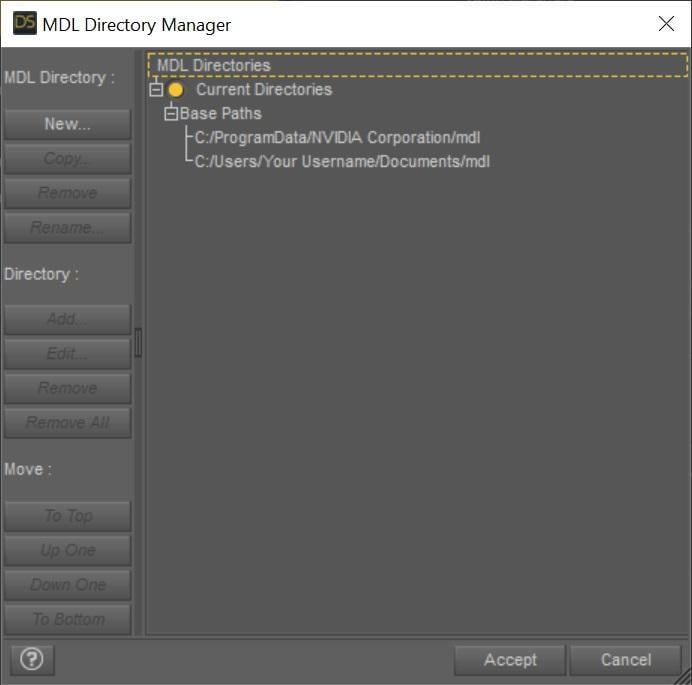
- If the new MDL directories were not automatically found, map them manually
- If the new MDL directories were automatically found, click "Yes" to map them
- Click Accept
- Run the "Setup Metadata" script
NOT WORKING , NO MATTER WHAT [...] I DO.
Casual Outfits for Genesis 8 Male - as a single piece - is this possible?With a little Blender work it's possible to split the pieces up into their respective parts, then import them into Daz and tweak with Mesh Grabber
The most difficult thing is that the texture is superimposed over the top of the mesh, so you would have to adjust the UV mapping (or create your own from scratch) in order to get a jacket with a visible zipper or pants with visible pockets and seams.
In this quickie example, I started with James sporting "Casual Outfit 01," imported just the outfit into Blender, deleted the jeans and t-shirt, then imported the sweatshirt it back into Daz and paired it with '50s Fab Jeans.' Red cloth shader is from Fabric Factory.
(i didn't spend much time smoothing the rough cuts, but this is not hard to do in Blender)
iClone 8 and CC4 anyone?MachineClaw said:
do you HAVE to have the iray plugin? Also is there a way once in CC4 and character is created modified etc is there a way to import back into Daz Studio as FBX or something?
Hi, you don't need the IRay plugin, it's slow... Importing back from iClone to DAZ, I tried it but then I sometimes need to buy an additional license (which I don't have or willing to buy).
The winning combo to me is DAZ Studio and export it the model as an FBX file.
I use iClone 8.12 and Character Creator 4.12...
I really only do toon/stylized /anime renders and Daz3d just doesn't have the 3d assets to purchase for what I do and renders I work on. I'd like to get into animation and do simple memes or short animations, Daz Studio is just not suited to animations and I have lots of issues with the Daz Studio animation timelines etc (some is down to learning), most is Daz Studio limitations.
content confusionRight-click on Daz Studio Formats in the Content Library and select Add New Base Directory. Browse to and select the folder that contains the Runtime and Data folders. If there are two such folders, one inside the other, you need to select one and merge the other with it (having additional content directories that are not inside others is fine). Do the same for Poser Formats, this time selecting Add New Runtime Directory - again, you want the folder with the Data and Runtime folders inside it.
Having doen that, right-click on the tab of the Content Library pane, select Content DB Maintenance, check reimport Metadata, and Accept. In the next dialogue you would again select everything and click Accept. That should rebuild the CMS Database, used by Smart Content and the presets tabs in many property panes (among other things).
iClone 8 and CC4 anyone?do you HAVE to have the iray plugin?
Yes but it will cost you extra $99 USD on top of the $900 USD buy in for IC8/CC4
Also is there a way once in CC4 and character is created modified etc is there a way to import back into Daz Studio as FBX or something?IC/CC4 have FBX export with presets for the major 3DCC's&game engines
However I am not certain DS has reliable FBX import.
I'd like to get into animation and do simple memes or short animations, Daz Studio is just not suited to animationsHonestly I think DS can handle this type of animation no problem.
iClone 8 and CC4 anyone?I am thinking very hard on going the CC4 +iClone 8 system.
do you HAVE to have the iray plugin? Also is there a way once in CC4 and character is created modified etc is there a way to import back into Daz Studio as FBX or something?
I really only do toon/stylized /anime renders and Daz3d just doesn't have the 3d assets to purchase for what I do and renders I work on. I'd like to get into animation and do simple memes or short animations, Daz Studio is just not suited to animations and I have lots of issues with the Daz Studio animation timelines etc (some is down to learning), most is Daz Studio limitations.
Remixing your art with AIFuture?
- DAZ3D? I'd say precise 3D never will be out, but there will be need to keep up with competitors, and the market for simple and quick drawings with tasty effects may go to some cloud service, at least medium term. DAZ3D may have many edges with potential for high impact improvements (faster setup, help with placing/posing/animating/export/import), as well as cooperating with or incorporating generative ai services. E.g. they could distribute protoype renders from multiple angles with each product, and either cooperate directly, or craft it towards cooperation with some generative ai system(s). Perhaps it'll be feasible to have a whole model for the whole shop (how frequently can you train it?), or there will be advancements in generative ai, such that you not only have "a language model", but also "a posing model" and "an animation model" and "a placement model", as well as the possiblity to confine to certain assets being used or excluded during runtime. "Paint stick-figure 2 like in the image here" paired with the "knowledge" of the DAZ applicaitions condensed into auxiliary tools/models/parts of the system, may make quick rendering possible in pretty precise ways. Making work with 3D more efficient and simply faster, may be doable without means of ai, to some extent, though fast mock up change-preview might be doable by render + modification-ai. - or think of post-work inpainting and effects, simply. Of course they'll compete with cloud services to some extent, specialized on such. Imagine in that scenario, the stance of asset-stores vs. a "free to feast on" internet, in terms of scraping art made with their products - this could be hard competition in the end. Some licenses already contain "not for training ai with" - and who knows if lawmaking pulls the plug on restrictions the other day.
- The very general generator? Uncertainty principle might prevent the precise "can do everything" thing. However, one day there may be advanced systems with multiple "grammar-like" auxiliary models used at the same time, as envisioned in the DAZ3D section for one case, which does a little less on the "arbitrary magic" side, but e.g. a combination of several tools, will still be easy to use, just way more precise to control than current text-to-image generators. Short term and for free, or as a cloud service rolling up the internet - hard to imagine very short term. After all common sense is hard to do in ai.
- More specialized tools? These certainly are evolving already (not necessarily generative ai), but moreso will further evolve for sure. The high quality and precise tools will stay somewhat costly likely, similar to what is now, but allow for even faster and still high quality production, likely. For the relative masses (rather), perhaps pretty specific tools evolve, in cooperation or attached to generative ai services, resulting in less perfect but pretty nifty tools like for storyboarding, creating and modifying images and entire movies. These may have the greatest impact on the majority of (fast/simpl-ish) content producers. Impact could also hit movie/anime production to some extent, because you can make a movie for the favorite story of your child "in no time", with the effect of more children growing up, getting used and attached to the specific services. Of course many of nowadays producers will then use the better-quality tools, with uncertain continuation. "Good enough" may sweep the market at some point.
- Race to the bottom? Maybe. Also envision the possibility, that at some point "good enough" rules the market once more, but the service with the largest impacts on media and ads simply winning out, towards even further concentration of power. Services like DAZ3D get destroyed or bought and then destroyed, we already know this version of "is not a monopoly" from the movies. Some competition is kept alive as pets and to keep regulation at bay, similar to nowadays.
- Other jobs, other people? Partly. The scribe then can have a storyboard made with a little help by an ai - fast and efficient. Programmers who get replaced by ai, may become artists now? IDK. With all the high impact changes, ai being one, not only for the world of art, jobs undergo some re-evaluation, some new ones are there, many get less value or get removed for most, some are increased in value due to the new possibilities.
- Jobless people everywhere? Likely - but mostly in all other jobs first. Highest impact areas first, that's not art, most is automation, just that you can automate tasks, which were considered to demand for some brain, previously. Societies will have to reform to allow for many people not having jobs all the time, because automation doesn't create more jobs in general. Rarely work is layed off to other countries, where it's cheaper. Utopia would be to increase the impact and possibilities for education in the broad, as well as for inspiring each other, and also to benefit from inspiring others. (With or without cloud services.) (There may be some cushioning effects with hauling back jobs from abroad. However large new production facilities will be built... based on the latest technology for most, i'd assume.)
- Expectations and common sense? Hard to do common sense. Humans grow up with a high bandwidth perception, imagination (generative elements also in dreaming), and don't only learn by other people slamming images of "what can be" into their faces while shouting the relevant terms to them. We learn in many small steps, deviate based on whatever, and maybe get held back, or maybe not, high frequency feed-back from parents and people, and so much is implicit, learning from example on the one hand, but also social and social self-control happen, e.g. you're imagining or having the impulse that you could do something, but no one goes there, or your parents don't and you don't. In the end so many people end up being "different", and our expectation is, that a severely limited system, could do more than imitation and more than all different people at once and within a whimp of random training? More likely someone rolls up the market and installs some dictatorship. Should neither underestimate what these systems can do nor overestimate their abilities, the latter of which being important for societal development and not to let people assume power based on misconception.
- Historical recordings? Maybe. Extreme cases are, humans lose abilities to do stuff, because it's "not needed". One event, and we're set back past middle age. One of my sci-fi scenarios has this for craftsmanship and production (in a remote place, detached from the center of civilization), but that's rather for the convenience, to allow me to use any assets from any period, because the blueprints come from the holo-deck for most, with the robot-ai (actual) making sense of them in a context somehow, and other robots basically printing them out. Of course there is plenty of such robots, partly due to the place having been equipped with the build-to-last self-maintaining pre-wars-tech, partly due to no one wanting to go there in the first place, plus trade being available to some extent.
- (Memes: Rather think of "enhanced communication", maybe with generated "artwork", certainly with image modification, text display, incorporated into an easy to use interface within a social network or some application in the communication context. This is not the market-killer or artist-killer scenario, it's meant to illustrate how widespread use and acceptance could happen. Getting people used to something like lower quality mp3 playback with all it's artifacts, can have a significant impact on the whole thing. Not directly life-threatening, but changing what can be sold to many easily. So this is more like the secondary impact of fast transitions, or a driver of a faster transition.)
Beta testers for DAZ Studio metadata pluginOmniflux said:
What I'd really like to see is crown sourced metadata corrections...
Automatically submit corrections to an online database, semi-automatically retrieve them...
This was discussed as length and proposed concretely to DAZ by a group of us in 2012, along with recommendations for standardizing metadata and a list of improvements to the tooling. There was no appetite then and I'm unsure there is any appetite now. So any such effort will have to be entirely community led.
Sagan: A DAZ Studio to Blender Alembic ExporterAs for diffeomorphic the best option for material conversion is bsdf. Not all the top coat options are supported yet since iray gets a ton of them, so this may be the issue with some hairs. Also some hairs use not supported custom shaders, in this case you can try to convert to uber before exporting. Same if you import a 3delight material the plugin warns you that must be converted to uber before exporting, though there's some basic support for 3delight too.
So in general the best conversion you can do is convert to uber then export then import as bsdf.
note. If you have a specific hair that doesn't work, apart the limits explained above, please let me know I'll look at it.
Old Town Paris
Thanks, I've worked with solidworks models before, they are always so heavy!... Perfect for the precision that engineering requires but 3dsMax always throws a fit when I have to import them. Max on the other hand is used so much in the game industry that it's pretty easy to keep the polycount lowrichardandtracy said:Yep, I must echo that. I am a professional engineer working with SolidWorks 3D models on a daily basis, and the LOD you produce on your models is such that any of us in the office would struggle to produce similar designs so quickly. Here I'm mentally equating the time involved texturing the models to the time needed to create 2D drawings (and in my case, I know texturing takes me considerably longer than 2D drawings).
Regards,
Richard
Sagan: A DAZ Studio to Blender Alembic ExporterOkay, after a TON of work, I figured out why strand based hair may not be working very well for many of you. Mesh based hair still stubbronly refuses to not look like a helmet when rendered and I believe Sagan has said before he's still working on that- as is the creator of diffeomorphic as that problem exists with or without the alembic.
When you import your figure through diffeomorphic, on the hair, under material method, make sure to use single principaled. I don't know WHY this makes a difference, it just does.
Beta testers for DAZ Studio metadata pluginWhat I'd really like to see is crown sourced metadata corrections...
Automatically submit corrections to an online database, semi-automatically retrieve them...
Beta testers for DAZ Studio metadata pluginTheMysteryIsThePoint said:
I don't have the experience you require, but if your solution is easy to use with clear concepts that make it obvious what metadata is and does, I'd buy it on day one.
Edit: And if it can make content purchased in other stores appear as "first class citizens", even better...
It would be helpful to get your perspective too, thank you. Sent DM.
Daz 3D is part of

Connect
DAZ Productions, Inc.
7533 S Center View Ct #4664
West Jordan, UT 84084Licensing Agreement | Terms of Service | Privacy Policy | EULA
© 2026 Daz Productions Inc. All Rights Reserved.