-
Import body morphs from DAZ Studio to Blender
Cornelius said:
lilweep said:
Desired Resolution = usually would be Base Resolution but can be High Resolution if you want (up to you and your limitations of what youre doing), but you have to keep the same throughout process
in Daz:
Load Gen 3 and set Resolution to "Desired Resolution"Export Gen 3 figure as obj (only export the Gen 3 figure, no eyelashes, no hair, no tearline etc)
Load the morph you want at the same "Desired Resolution"
Export Gen 3 morphed figure as obj (only export the Gen 3 figure, no eyelashes, no hair, no tearline etc)
in Blender:
Load both Objs you exported
Do the Join as Shapes process outlined earlier
Under Shapekeys, dial in the shape
For the work I'm supposed to do, I only need the body without the head, since the shape of the head and face shouldn't be changed.
If I import the entire Genesis it will change the shape of the face too, right?No, if you make no changes to the shape of the head the head will be unchanged by the morph (and it won't interfere with any other head morphs - morphs just stack).
Anyway, great explanation!
 Import body morphs from DAZ Studio to Blender
lilweep said:
Desired Resolution = usually would be Base Resolution but can be High Resolution if you want (up to you and your limitations of what youre doing), but you have to keep the same throughout process
in Daz:
Load Gen 3 and set Resolution to "Desired Resolution"Export Gen 3 figure as obj (only export the Gen 3 figure, no eyelashes, no hair, no tearline etc)
Load the morph you want at the same "Desired Resolution"
Export Gen 3 morphed figure as obj (only export the Gen 3 figure, no eyelashes, no hair, no tearline etc)
in Blender:
Load both Objs you exported
Do the Join as Shapes process outlined earlier
Under Shapekeys, dial in the shape
For the work I'm supposed to do, I only need the body without the head, since the shape of the head and face shouldn't be changed.
If I import the entire Genesis it will change the shape of the face too, right?
Anyway, great explanation!Animations - QuestionsDon't know about Unity, but with Blender, go and download Diffeomorphic. With that use easy import and set up the rig to be Rigify and you will be able to animate perfectly. I'm sure there's an easy way to get blender animations into Unity, I just don't have any experience with that. If you go to the Blender forum section, there's a whole thread on Diffeomorphic. And importing through Diffeo, your characters will have the correct textures. There's three options on the easy import, each has it's own pros and cons so you just have to experiment and find which suits your needs, but they all look good. Happy animating!
metadata on startupIf you do not install content products with Daz Connect (inside Daz Studio) don't log in to your Account from inside Daz Studio. Go to Preferences and disable Automatic Login. That will eliminate those automatic metadata downloads.
daz obj fitted in MD got geometry not matchRichard Haseltine said:
Although the vertex count is right several detail look diferent in your Scen Infor pane (and not just because you have only the base resolution):
Name :
SportsBra_7768
Label :
Basic Wear Sports Bra
Class :
DzFigure
Vertices :
30,602 / 7,768
Triangles :
0 / 0
Quads :
30,128 / 7,532
Total Faces :
30,128 / 7,532
Total Lines :
0 / 0
:
Hello Richard,
I didn't do anything on it. This sport bra was straight from the library, and then export to an OBJ file for MD to import.
Best,
Josh
metadata on startupOn one of my Desktop Computers DAZ Studio 4.21.0.5 loads thousands of metadata on startup. I had this problem once before I cannot remember how I fixed the problem.Any suggestions would be helpful. Cheers
Daz Studio 5 development updateRichard Haseltine said:
wsterdan said:
algovincian said:
Torquinox said:
vrba79 said:
What is the actual purpose of Filament anyway?
I could be wrong, but I think it was supposed to be a really fast real-time renderer like Blender's Eevee. I don't think it reached its potential, though.
My understanding is that Filament was designed for use as a real-time physically based rendering engine for Android mobile devices. I believe it was originally a side project by a few people at Google.
It's being used in DS as an alternative option for viewport previews (as opposed to a full blown render engine meant for final renders).
- Greg
It will be the Mac replacement for the Apple-depredated OpenGL, for one thing. Personally, as I've mentioned way too many times, I'm pumped about using it for toon animation. I'm currently using OpenGL and getting 1080p frames for under under half-a-second, Filament should give me the same render times or faster, an will add features like HDRI and better transparency, among other things. For me, at the very least, an OpenGL renderer equivalent but on steroids.
I believe a fully-supported version of Filament has the abilty to cast shadows as well, though I have no idea what features will be provided in DAZ Stuido 5. Fingers crossed, though.-- Walt Sterdan
We are told that on Mac, as on Windows, Filament will be an alternative PBR preview Drawstyle. The OpenGL Drawstyles are being updated to take advantage of more modern technology in Qt 6, but that is separate from Filament.
Well, as a Mac user that is fairly promising and may actually get me to use DS again outside of shaping characters and prepping them for import into Blender.
Create background like thisI'm a longtime beginner at Daz Studio. Another possibility could be to create a gradient color scheme in a 2D image editor such as GIMP, Photoshop, even Microsoft Paint/Word (which I just experimented with), etc., and save the image in a file format (png, jpg, etc) that Daz Studio can import into the Diffude color chanel in the Surfaces tab. In Daz Studio, create a plane Primitive, position it as desired and use the saved image file in the Diffuse color channel for the plane.
Little Pony HairThank you for all the hair items that you make, I really like them.
But I have no clue on how to use them in Daz, as far as I see there is no way to import Car files.
How would I get these hairs in Daz or would I need Carrara to export to OBJ?Renaming the assets of the Smart Content tabYou can rename products in Content Library>Products
Select the product, right-click select Rename, rename the product, click OK.
Edit: Existing metadata should be unaffected. I have no idea if changing the product name affects DIM, DAZ Central or DAZ Connect update notifications or if the product name will be changed back (if it's tracking the SKU for updates) if there is an update.
Diffeomorphic and poses librariesI'm not sure what you mean. You can just use the "import pose library" tool to import a whole daz library into blender. Of course be sure to delete unneccesary data or the scene will be heavy depending what you have in it. For poses to work you only need to keep the armature and delete everything else. You may also need to use "file > cleanup > recursive unused data blocks" to prune the internal data.
note. Anyway daz poses can be complex and also use morphs. The blender approach is only good for armature poses. In general you need to load the pose from the daz library directly to affect morphs as well.
 Importing Vroid characters in Daz
taiuri said:
Hi!
I'd like to import Vroid characters into Daz, but I can't figure out how to do it.
I tried to convert them to .pmx and then import them into Daz, but they don't do it correctly. That's why I think it'd be better if I export directly from Vroid to Daz, but I don't know how to do it.
I hope you can help me, guys!
OLÁ, SOU WAGNER DAVI, PARA IMPORTAR DO DAZ USE O BLENDER, PROCURE POR UM PLUGIN DO BLENDER, É GRATUITO E FUNCIONA, DO BLENDER VOCÊ PODERÁ IMPORTAR DO VROID E EXPORTAR COMO QUALQUER TIPO DE ARQUIVO.
Beta testers for DAZ Studio metadata pluginlilweep said:
TheMysteryIsThePoint said:
I don't have the experience you require, but if your solution is easy to use with clear concepts that make it obvious what metadata is and does, I'd buy it on day one.
Edit: And if it can make content purchased in other stores appear as "first class citizens", even better...
Yes and would be good if 3rd party content creators could supply metadata categorization that could be loaded/or automatically read by this plugin so then at least 3rd party vendors can provide metadata support for people with pluginThey can - Content Wizard can make DIM packages, and, slightly down from first class, anyone can create a product using the tools in DS and ad the metadata to their zip for users to import.
Beta testers for DAZ Studio metadata plugin
Yes and would be good if 3rd party content creators could supply metadata categorization that could be loaded/or automatically read by this plugin so then at least 3rd party vendors can provide metadata support for people with pluginTheMysteryIsThePoint said:I don't have the experience you require, but if your solution is easy to use with clear concepts that make it obvious what metadata is and does, I'd buy it on day one.
Edit: And if it can make content purchased in other stores appear as "first class citizens", even better...
Import animation from blender into dazYes, I've got a few issues to resolve having to do with mocap with armature bones that have different orientations, but I'm close. And I still have to port the import app to Win32, but I'm just going to make a quick and dirty command line app. I just have to find the time to do it.
Beta testers for DAZ Studio metadata pluginOoooh I would love to help with this. I have been messing with my metadata for a long time and added a lot of my old stuff with various frustions. I have followed a number of your posts and suggestions. This week I managed to figure out how to finally solve my duplicate product icon problems. I would love to see a way to make this easier with less frustration.
Grasp Helper for Genesis 8 and Genesis 8.1 - ideas?mazinkaiserzero said:
I'm still kind of lost on how this is any different than making it yourself, (hide every part of the G8 you don't need, export as obj with higher subd, import back, add as collision object on the object you want grabbed/squeezed, hide the obj)
does this improve in any way how the smoothing mod actually works or something?
Okay, so I'm quite familiar with this method, and it works great when figure1 grabs figure2. But uh. If I want figure1 to grab themselves. After I hide the collision object, and bring figure1's hand into the pre-grabbed deformed section. It then also collides with the hidden object. How do you hide an object and make it so it's prior collisions remain intact but it generates no new collisions?
Can anyone explain that step to me please?Website improvement DAZ3D.COM - Product metadata/keywordsIt isn't exactly a product improvement, but relates to products... specifically, locating products. The website desperately needs an overhaul and one of the biggest areas would be that of metadata. Locating a product is often difficult and the metadat is sorely lacking. You can search all around a product you've seen before and still never find it. Most of the time I resort to going to google and doing a search out there in order to find something on the DAZ site. That's pretty sad. With advances in AI, there has to be engines that would analyze an image and generate keywords. This would do a good deal of the heavy lifting in generating some additional product search terms. The invetory of products is huge, ant the task is daunting, I'm sure. But starting with newer products and working backwards would make sense. And moving forward, initiate a requirement for new products to include broader general search terms. I mean this should be of great interest to DAZ as it drives sales. One cannot purchase what one cannot find. While your at it, have PAs list other (indirect) products used in generating promotional images. This also would increase sales. Anyone agree with this notion?
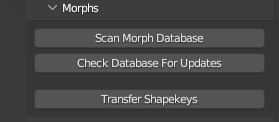
Diffeomorphic: Adding Custom Morphs to clothingPadone said:
it's setup > morphs > import custom morphs
I tried to do this too but the parameter you mention (import custom morphs) is not there. Here's what appears to me under the heading Morphs
 [Released] RSSY Clothing Converter from Genesis 8 to Genesis 9 [Commercial]
Use your Genesis 8 and 8.1 clothing with your Genesis 9 characters! Convert almost your entire wardrobe of clothes using the new Clothing Converter from Genesis 8 Female to Genesis 9 or the Clothing Converter from Genesis 8 Male to Genesis 9 scripts! The Clothing Converter scripts provide batch execution for converting your Genesis 8 and 8.1 clothing to Genesis 9 clothing in your library. Easily select the wardrobe items in your library, select an output directory, and execute the script. Even better, icons and categories are copied from your original Genesis 8 clothing to the new Genesis 9 clothing items.
Your new Genesis 9 wardrobe is completely Smart Content aware! They will show up when you select a Genesis 9 figure. Plus, all materials shown in Smart Content for your Genesis 8 item will show for your converted Genesis 9 item. Converted clothing, instead of using Auto-Fit, produce vastly less distorted results.
The Clothing Converter script does not work with props (e.g., swords, wands, etc) and wearables (e.g., outfits). Items without metadata can be converted but will not show up in Smart Content. They may also need to be converted using a Force Convert Item(s) button. It may also not work as well with high-heeled shoes because of problems with positioning the feet without turning on the Use Foot Dialog option during conversion.
The script may not be able to convert all clothing items without issues. Converted items may exhibit poke-through. Usually, this can be fixed by adding a smoothing modifier.
Features
- Convert Genesis 8 and 8.1 Clothing items for use by Genesis 9 characters.
- Convert Dresses, Pants, Shirts, Skirts, Shoes, etc. Converted clothing, instead of using Auto-Fit to fit clothing to Genesis 9, produce vastly less distorted results.
- Convert Accessories* (e.g., Hats, Belts, etc)
- Copies icons from Genesis 8 clothing to Genesis 9 clothing for a professional look
- Copies Smart Content Products! Converted clothing will be organized into similar products as the original items, with multiple converted items in one converted product and even using the original product image.
- Converted Clothing is Smart Content enabled! All materials shown in Smart Content for your Genesis 8 item will show for your converted Genesis 9 item.
Note: Converting accessories are limited because the bone structure is too different between Genesis 9 and Genesis 8. By default, only accessories with metadata for the head or hip are accepted as these bones have the same name between generations. You can try to convert other accessories. Many accessories do not use the bone structure and will load and convert correctly. However, for accessories that attempt to load onto a missing bone, the accessory will load in the wrong location. Daz Studio may also become unstable and crash the script when trying to SAVE the accessory.
Daz 3D is part of

Connect
DAZ Productions, Inc.
7533 S Center View Ct #4664
West Jordan, UT 84084Licensing Agreement | Terms of Service | Privacy Policy | EULA
© 2026 Daz Productions Inc. All Rights Reserved.