-
thinking about buying elinore do i have to have akio 7
Eleanor on G3F with no A7 dialled in (i really like it!)
Oh wow!! I have Aiko 7 and was going to give Eleanor a miss, however I really like her non Aiko 7 morph you've posted here and may well purchase Eleanor to use on base G3F, great character!! Thanks for posting the image @jakiblue
Main figure HD Morphs, or, The lost manKalea has an HD morph, so why wouldn't her release partner? He is, quite literally, the only major figure in Generation 7 that doesn't have a main HD morph.
Guy 7 got one but Girl 7 didn't. Kenji 7 has one but Aiko 7 doesn't. Teen Josie 7 and Izabella 7 don't.
Huh. For some reason, I'd have sworn that I saw one for Girl 7 and Izabella 7; I remember wondering why on earth you would do that with Girl 7. Must have been mistaken. And Aiko is just new enough to be within that sort of fluffy range ... although I'm mildly surprised that Kenji got one before she did.
All that said: http://www.daz3d.com/kimo-7-hd-add-on has arrived. Oddly enough, by all three usual download formats.
It's weird because I feel like I remember Girl 7 getting one too, but I couldn't find it anywhere in store. Izabella didn't for sure - Thorne doesn't seem to do HD morphs in general.
Kimo 7 HD looks good - and nice to see he's available for everyone.
Main figure HD Morphs, or, The lost manKalea has an HD morph, so why wouldn't her release partner? He is, quite literally, the only major figure in Generation 7 that doesn't have a main HD morph.
Guy 7 got one but Girl 7 didn't. Kenji 7 has one but Aiko 7 doesn't. Teen Josie 7 and Izabella 7 don't.
Huh. For some reason, I'd have sworn that I saw one for Girl 7 and Izabella 7; I remember wondering why on earth you would do that with Girl 7. Must have been mistaken. And Aiko is just new enough to be within that sort of fluffy range ... although I'm mildly surprised that Kenji got one before she did.
All that said: http://www.daz3d.com/kimo-7-hd-add-on has arrived. Oddly enough, by all three usual download formats.
July 2016 New User 3D Art Contest “Portrait Rendering” – WIP ThreadI really regret trying to work on a second image at the beginning of the month when I got this one posed. I took a break from this one because I was putting off the daunting task of building these gloves. Then I had a week long family vacation, and here I am, end of the month, and what feels like a lot of work ahead of me still…
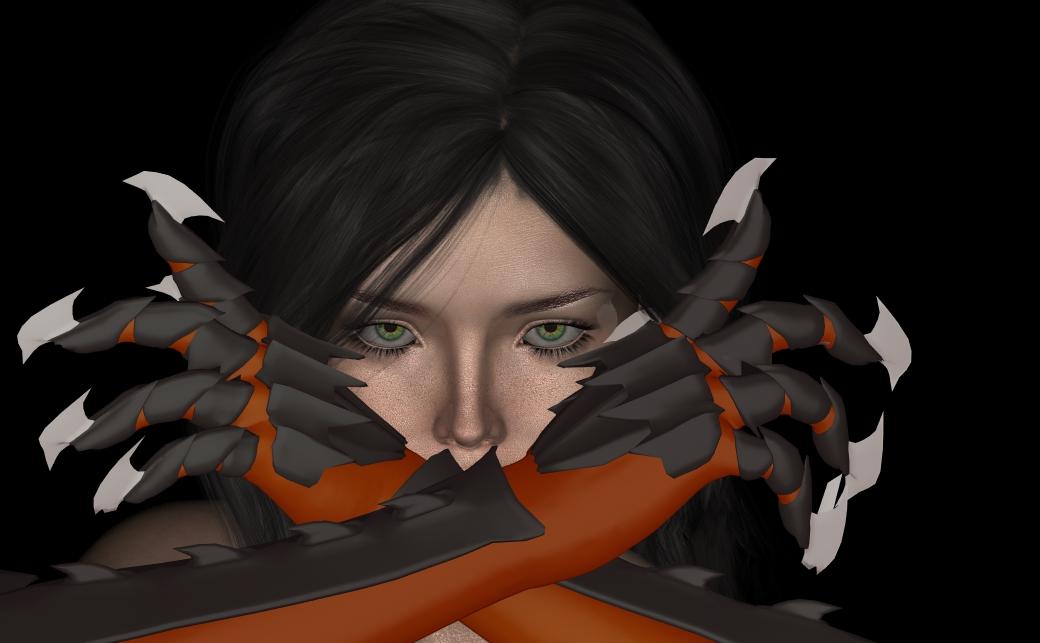
Anyway, hoping someone can help. I built these gloves, and was surprised with how easy they were to turn into a wearable object for Genesis 3 Female… but I’m having problems with the mesh deforming when I pose the figure. Basically all the black parts are supposed to be metal, and shouldn’t bend. Also the blades on the fingers are pretty deformed as well.
I tried putting all the individual metal pieces in rigidity groups. The problem is that I created a bunch of vertex groups in Blender to use as rigidity groups in Daz, but I can only use them as Face Groups for selection before I use the transfer utility. Once I use the transfer utility, I can no longer select the polygons via the vertex groups I made.
However, I am starting to suspect that this isn’t the right way to be going. The more I Googled to try to solve my problem, the more it seemed that Rigidity Groups are more for preventing objects from changing too much when a morph is applied to your base model. I am thinking that I probably want to be rigging the metal pieces to the bones of the character myself, as I suspect the transfer utility is just mapping vertices to the nearest armature. But… I have no idea where to start doing that...I can't help with the distortion problems, but to tell you the truth, they don't bother me at all. The focus is well placed on her eyes and it is an interesting composition. In light of the rapidly approaching deadline, I'd ignore the gloves details and concentrate on finalizing lighting to make the image a little less flat. Then let it render long enough to remove the noise and submit it to the entries thread. It is strong enough without fixing the gloves. (The fact that you made those gloves yourself is pretty impressive, although not a factor in the contest judging.)
Yeah, best advice ever right here. I got so fixated on my gloves that I kind of didn't realize the potential my image still had, even if the gloves aren't as perfect as I want them to be.
I had forgotten that I had added a fingernail morph, and removing that fixed the blade deformation a lot... except those pinkys... there's like just a couple of verticies that look like they got maped to the ring finger for some reason. >_<
Anyway, I will probably take my quest to remove the deformations somewhere else on the forums as Chris suggested, and when I finish it, I will post the FINAL final image here in case anybody is interested.
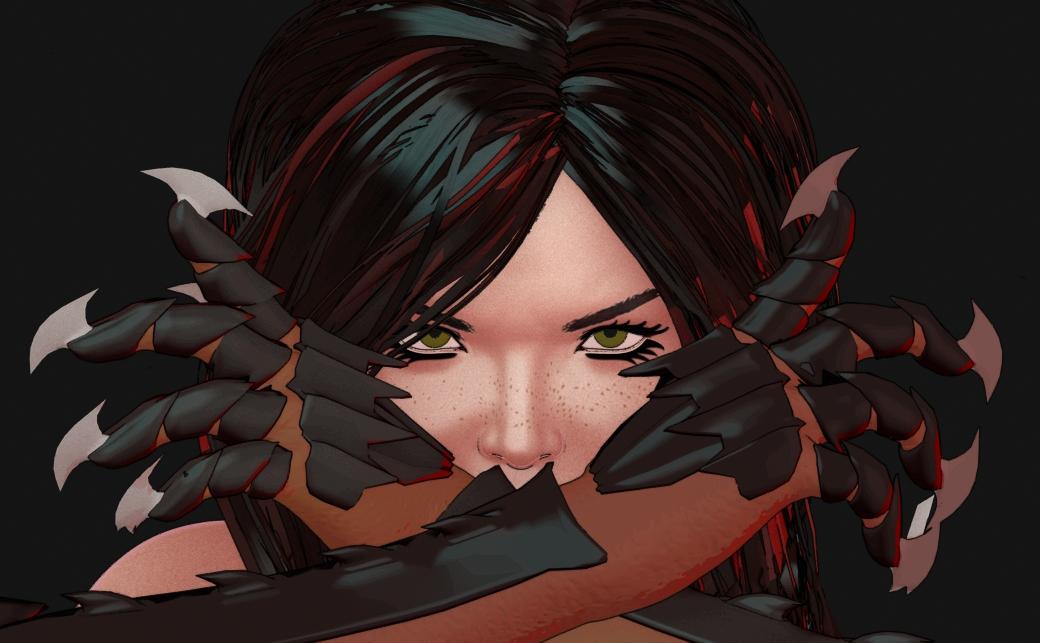
Just want to throw this out for a day and see what feedback I get. There are still a couple of things I want to fix on it. The background needs some more pop, and so do the eyes. Other than that, I just wanted to see what everybody else noticed.
Thanks
I don't want to derail your progesss, but I liked the less cartoony version more.
 You did improve the ends of the gloves a lot here, though.
Personally I think the less cartoon looking one is better too but I think she should be really sweaty or is she just slicing bread with those gloves?

As others have said, I got really busy the last day of the contest, and only had enough time to post my entry and haven't been able to respond. Thanks for the feedback, guys. I am using the contest to build up a workflow for toon rendering, so I will probably mostly be submitting toon renders. Just so you know I didn't ignore your feedback... it's just... it doesn't fit my agenda. :D
Anyway, great job everyone! And thanks everybody for the feedback!
I am also learning DAZ to do cartoon style but I am at more of a beginner stage though so I need to learn the basics first. I do have a printed book on how to do cartoon caricatures at the ready for learning how to do toons though.
Good luck to everybody.
Vendors: We all don't use Iray ...When I programmerer the only really rare skill amongst programmers was those programmers that actually made a concerted effort to test their code thoroughly enough. Anything else was learnable on an as-needed basis.
You've never played with AI/Expert Systems languages, have you?
There are many programming languages that do not use the same skills as programming in C, C++, BASIC, or Pascal. OPS5, Lisp, Forth, Prolog, and others. There are languages that look a lot like XML/JSON but without the objects. There are strict sequential languages that have few methods for jumps, and no subroutines at all (sorta like writing everything in inline assy). There are languages where almost nothing is sequential. There are even languages that change/morph as you program them (Forth is one of these).Many of these take years of training to learn before one can competantly write anything of value in them. Many of them you may never get the chance to program UNLESS you've had specific training in the first place.
EDIT: RIB is a lot like a description file that happens to contain code. There are a lot of global variables (with really stupid single letter names) that have very specific meanings in one context, while having a completely different meaning in another context, yet the two are mere lines apart.
I remember when I was younger, a much more experienced programmer once opined the following: "The only language every programmer understands is Profanity."
Kendall
July 2016 New User 3D Art Contest “Portrait Rendering” – WIP ThreadI really regret trying to work on a second image at the beginning of the month when I got this one posed. I took a break from this one because I was putting off the daunting task of building these gloves. Then I had a week long family vacation, and here I am, end of the month, and what feels like a lot of work ahead of me still…
Anyway, hoping someone can help. I built these gloves, and was surprised with how easy they were to turn into a wearable object for Genesis 3 Female… but I’m having problems with the mesh deforming when I pose the figure. Basically all the black parts are supposed to be metal, and shouldn’t bend. Also the blades on the fingers are pretty deformed as well.
I tried putting all the individual metal pieces in rigidity groups. The problem is that I created a bunch of vertex groups in Blender to use as rigidity groups in Daz, but I can only use them as Face Groups for selection before I use the transfer utility. Once I use the transfer utility, I can no longer select the polygons via the vertex groups I made.
However, I am starting to suspect that this isn’t the right way to be going. The more I Googled to try to solve my problem, the more it seemed that Rigidity Groups are more for preventing objects from changing too much when a morph is applied to your base model. I am thinking that I probably want to be rigging the metal pieces to the bones of the character myself, as I suspect the transfer utility is just mapping vertices to the nearest armature. But… I have no idea where to start doing that...I can't help with the distortion problems, but to tell you the truth, they don't bother me at all. The focus is well placed on her eyes and it is an interesting composition. In light of the rapidly approaching deadline, I'd ignore the gloves details and concentrate on finalizing lighting to make the image a little less flat. Then let it render long enough to remove the noise and submit it to the entries thread. It is strong enough without fixing the gloves. (The fact that you made those gloves yourself is pretty impressive, although not a factor in the contest judging.)
Yeah, best advice ever right here. I got so fixated on my gloves that I kind of didn't realize the potential my image still had, even if the gloves aren't as perfect as I want them to be.
I had forgotten that I had added a fingernail morph, and removing that fixed the blade deformation a lot... except those pinkys... there's like just a couple of verticies that look like they got maped to the ring finger for some reason. >_<
Anyway, I will probably take my quest to remove the deformations somewhere else on the forums as Chris suggested, and when I finish it, I will post the FINAL final image here in case anybody is interested.
Just want to throw this out for a day and see what feedback I get. There are still a couple of things I want to fix on it. The background needs some more pop, and so do the eyes. Other than that, I just wanted to see what everybody else noticed.
Thanks
I don't want to derail your progesss, but I liked the less cartoony version more.
You did improve the ends of the gloves a lot here, though.Personally I think the less cartoon looking one is better too but I think she should be really sweaty or is she just slicing bread with those gloves?
As others have said, I got really busy the last day of the contest, and only had enough time to post my entry and haven't been able to respond. Thanks for the feedback, guys. I am using the contest to build up a workflow for toon rendering, so I will probably mostly be submitting toon renders. Just so you know I didn't ignore your feedback... it's just... it doesn't fit my agenda. :D
Anyway, great job everyone! And thanks everybody for the feedback!
Mystery Fangs in my Genesis 2 FemaleI made a character with G2F and josie 6, but have discovered she has fangs!! i have looked all over and can't see a control that brought them in--they are a complete mystery to me. Does anyone know about them, and how to make them invisible? I'm puzzled and feeling helpless.
It could be from an unnoticed morph that has been transferred over if you've used any morph transfer program or method, otherwise, I really have nothing to offer you in the way of a solution.
Back-up Your DAZ Studio Before It's Too LateOn the note of archiving. DVDs, Hard Drives, Stone Tablets, whatever.
Please remember that all technology has a limited life span.
FOR DATA STORAGE/ARCHIVE:
Date the storage medium on the first day you recorded to it. Also if it was manufactured more than 18 months before you used it, make sure it is still good and maybe back date for the first use date.
Atleast every 5 years or sooner from first use date transfer the data to a new storage medium and keep an old copy just in case.
Do not put your faith in the longevity of technology if the data is priceless to you. All storage mediums and electronics will chemically breakdown over time. Temperature and humdity control can lessen the effect but over time all things fail it could mean significant loss or an enormous cost to recover the data.
Also remember that the newer technology which is able to stack more data in a smaller space is also more prone to major data loss. It works great until it doesn't.
The only exceptions I know of to my caviats are industrial archival technology which national archives around the world are starting to implement and cost tens of thoudands of dollars. Even they are only talking about lifespans of 100 to 200 years.
Get Your Encrypted Daz Connect Content Here Thread - none at the moment 2018-01-30Oh boy I have a personal offer for 30% off Kenji 7 HD. ...shame it's locked in Connect, otherwise I would 100% have bought it today.
This is a pretty important milestone for Daz since it's the first "core" product that's been locked away behind the 4.9 Connect wall. Might have to give up on further rounding out my Genesis 3 collection.
I'm not sure if the HD morph for an anime character counts as "core". Now, if it were the HD morph of a realistic character...
How to save Zbrush Morph in Different folder?When you loaded the morph with Morph Loader Pro, it would appear you left the default setting for the path under Property Group. You can set it there by right-clicking the field and choosing or editing the field itself manually.
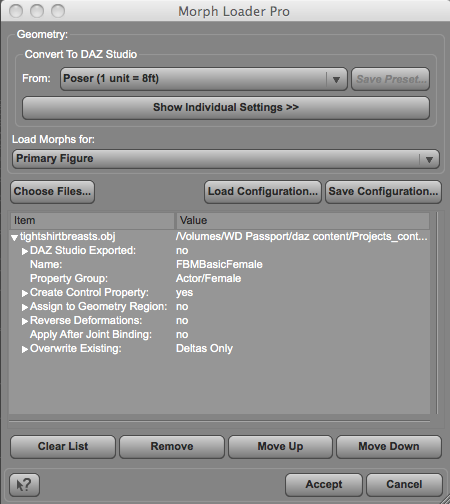
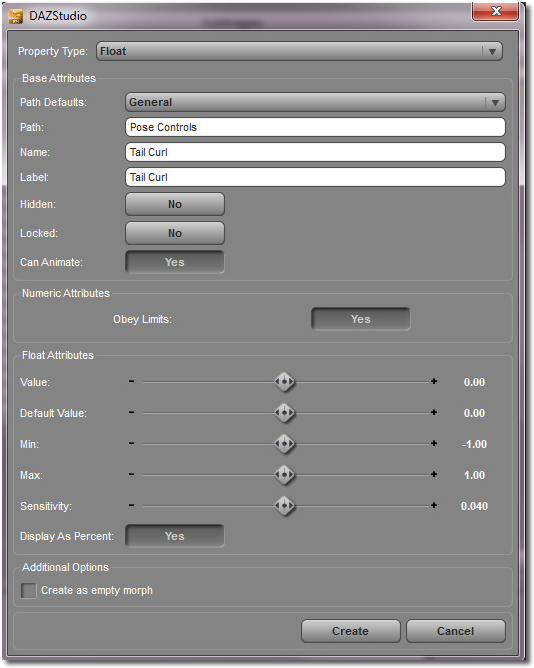
However, if you have loaded it and want it somewhere else, you can click on the Gear icon on the dial. There you will see the path.. You can input the location you prefer
 Aging Morphs for Genesis 3 Female(s) and Male(s) (Commercial)Great, thanks. And thanks for taking clothing into account in your morph design!How to save Zbrush Morph in Different folder?
You may need to enable the Advanced options dialogue for GoZ - in Edit>Preferences>Interface in the Release version of DS, or Edit>Preferences>Bridges for the current beta. Once enabled you should be able to expand the options under the morph and right-click on the path to chnage it.
Aging Morphs for Genesis 3 Female(s) and Male(s) (Commercial)The clothing fits pretty well. I tried to match the lines on the shape so clothing won't distort, but FC will come in handy for the breast area. I have to update fit control anyways so maybe I will add in a few dedicated aging morph presets.
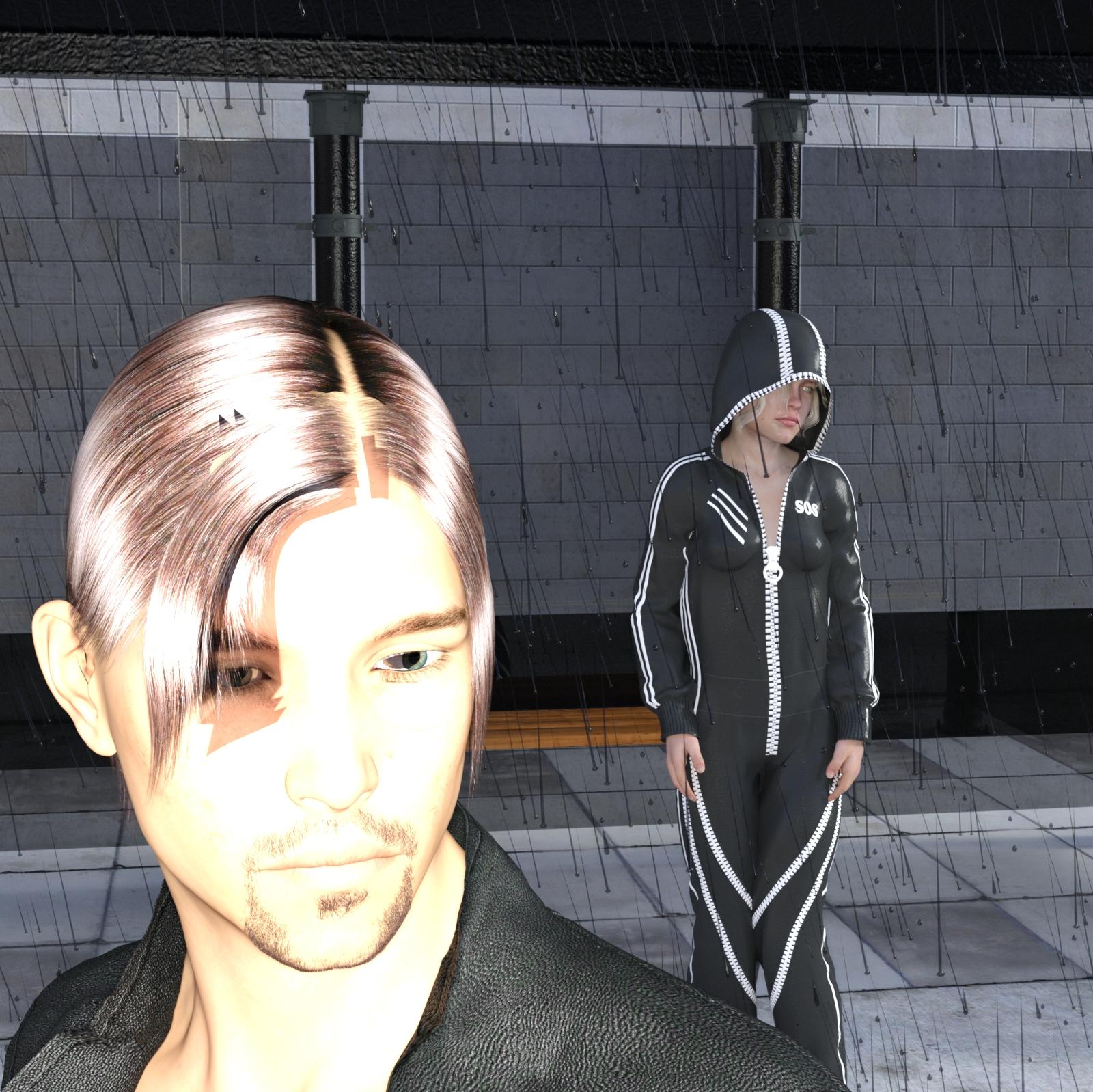
My Renders, Now I can go to bedG1F(some morph dials I used) and Genesis 3 Aiden rendered in IRAY
this was done for Llola Lane's Song/Music/Story/Poem Inspired Render Thread... Join me if you wish!!! thread
the post work version of this can be seen there, actually nothing spectacular, just used a filter " Cartoon" on it
should had spent some time with the lighting, but decided to be lazy and not
 Aging Morphs for Genesis 3 Female(s) and Male(s) (Commercial)
Thanks for the kind words guys. I hope to have a full morph list posted before the night is over.
RuntimeDNA clowns in the M4 and V4 sale promotionIf you are looking for clown textures, Mortemvetus (the good folks who made Stan) periodically release texture add-ons for the character. Many of them are freebies that seamlessly match up with Stan's base textures, although they can be used with different M4 characters if you wish and want to take the time to muck around in photoshop to soften the texture boundaries. You can find the freebies on Mortemvetus' personal website.
Stan was quite the hit at RuntimeDNA and other vendors introduced various addons of their own to piggyback on Stan's success, mainly new head and body shapes (but no textures).
Speaking as a guy who has rendered way too many creepy clown images to count, I encourage you to start off with Stan from RDNA or RawArt's The Clown Clan (which is more Joker themed). Experiment and apply those textures to any M4 morphs you can get your hands on, including freebies available at sharecg.com. You'll be pleasantly surprised at how a formerly scrawny or dumpy M4 morph that left you uninspired when clad in a handsome texture will look when wearing hellacious circus makeup.
How to save Zbrush Morph in Different folder?Hi Dumb question, but here goes:
I created a morph in Zbrush for genesis 3F, then I loaded it in using morph loader pro. So it shows up under morph loader pro. I then selected the morph and did "save as" > "support asset" > "morph asset".
I was expecting it to offer me a place to save it but it didn't, it just went ahead and saved it.
So that's cool, the morph is saved but it's stuck in the "morph loader pro" folder.
Other people have morphs under e.g. "Actor" > "Head" etc.
SO: How do I save the morph into a different folder than where it loads in under morph loader pro?
Thanks in advance for any advice
Laguna Mermaid Set for Merman (G3M)One thing you might try is using GenX2 to transfer male morphs over to female.
I've done that with other generations with geografts and similar, which are often specific to one model.
Head propHi,
A friend of mine at another forum has this really cool Anime Head that can be set up as a Universal head to fit just about any figure. He created it orginally for Poser though and wanted to bring it over to DAZ Studio too but ran into some issues.
If he converts it to TriAx all his ERC's dials are lost. He's tried a few different ways of this but to no avail unless someone can help with that.
The head, since it's a parented head, really can't make any use of weight mapping so sees no real reason to convert to TriAx in the first place.
He's got over 200 morphs built into the original CR2 and found that a good many are lost when coverted to TriAx as well.
Aside from keeping it as a native CR2 and perhaps setting up native DAZ surface settings is there any hope in bringing this prop over to DAZ Studio and setting it up natively without having to load in each and every morph by hand? He's looking for a conversion that works.
Thanks!
Richard
virtual penny 4 yor carrara thoughts ?The way that I now determine when to use a Bezier Tweener:
Animations that need to start and end slowly, with a climactic middle. These get a Bezier.
 I don't mean to make them sound bad, because they truly are an excellent in-betweener. It was the default tweener in Poser when I was learning to animate figures in that. It took me a long time to finally figure out why my morphs would go beyond their limits - it was a nightmare. In the end, it was almost like I didn't need tweeners since I had to end up with a key at every frame in order to defy the bezier effect.
Nowadays I am a lot more used to animating, so I know ahead of time whether I want to use Bezier or something else - so I leave my default Tweener as Linear, but change it to Bezier when I want to design whole details along the timeline with them in. Otherwise I just select the tweeners I want and set them to Bezier manually.
Use what feels most comfortable to you. The big thing to take away from all of this is that, if things are looking all wonky, like the eyelids are getting way too wide open or way too closed... switch the tweener before head-aching over endless tweeks! ;)
Bezier are fantastic for times when you want to set one pose at 0:00, and then move a few seconds away and change the pose... the Bezier is the tool to make that sort of thing look very natural. But when you need to make eyes blink or switch targets (what they're looking at), try using linear ;) If you want a subtle movement of the blouse to make it look like there's a breeze in the air, try a Noise tweener - set the movement morph at the very end of the animation, or even a few seconds beyond, and put a Noise tweener between that and the beginning, set the type to "Cubic", the bottom radio button, and adjust the T-Scale to make it either change quickly, many times, or slowly, just a few times. Magnitude will adjust how close to either end the morph is applied.
Animating is a real joy! Have fun with it!
thanks!! was lookin all over for where to change the tweener
Daz 3D is part of

Connect
DAZ Productions, Inc.
7533 S Center View Ct #4664
West Jordan, UT 84084Licensing Agreement | Terms of Service | Privacy Policy | EULA
© 2026 Daz Productions Inc. All Rights Reserved.