-
It's My Party and I'll Complain If I Want To Complaint Thread
Bethesda Fountain at NYC's Central Park has a bird with a sense of humor... Or irony... I'm not sure which...
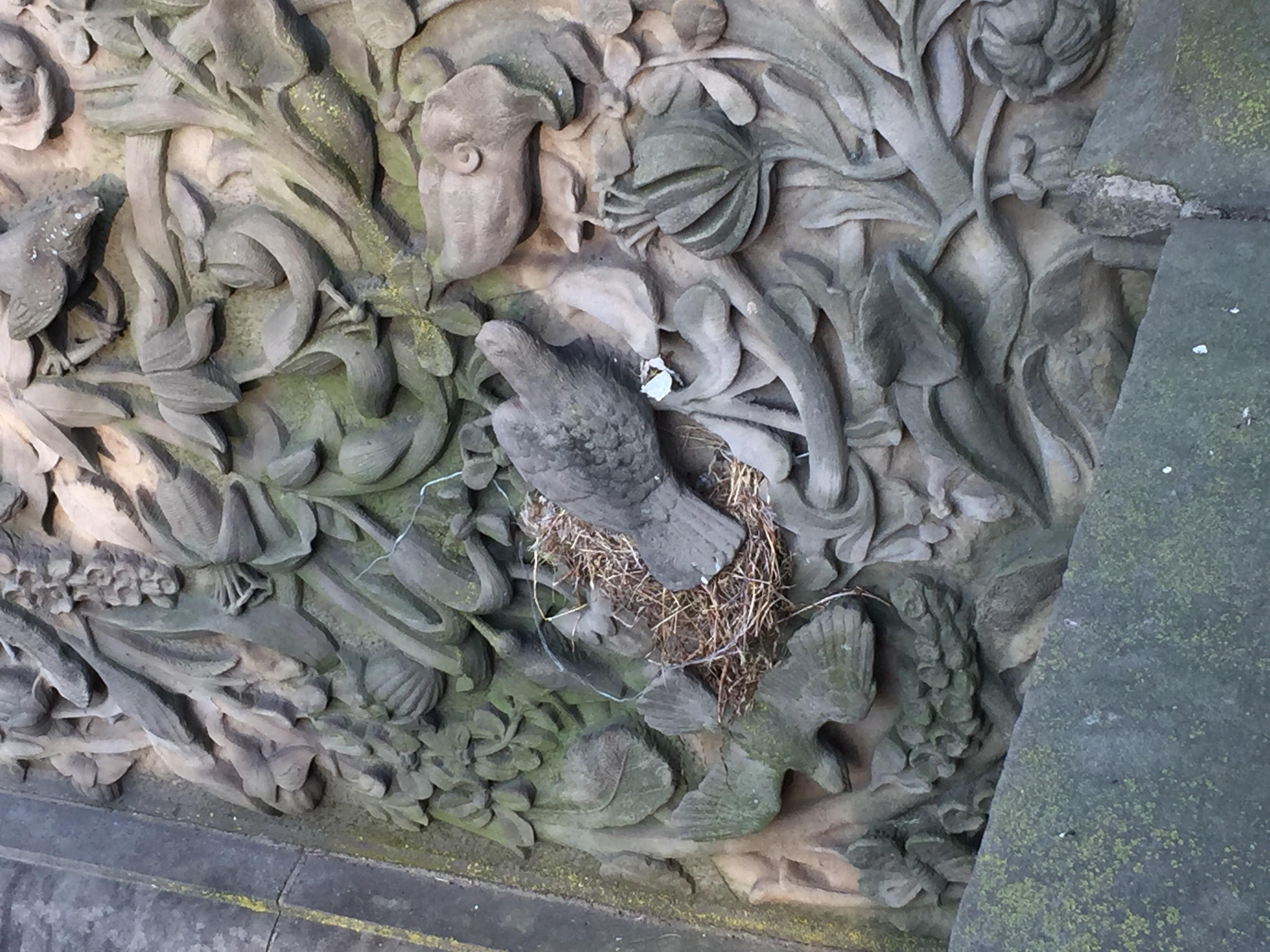
Actually, it's on the wall adjacent to the stairs in front of the fountain...
In case it's not clear, that's a stone carving of a bird... A real bird built a nest under it in such a way it looks like the stone bird is a real bird sitting in a nest.
It took me a second or two to realize I was looking at a fake bird... The real nest was confusing.
Clever critters birds are sometimes.
I'm impressed!

Dana
+1 lol
It's My Party and I'll Complain If I Want To Complaint ThreadBethesda Fountain at NYC's Central Park has a bird with a sense of humor... Or irony... I'm not sure which...
Actually, it's on the wall adjacent to the stairs in front of the fountain...
In case it's not clear, that's a stone carving of a bird... A real bird built a nest under it in such a way it looks like the stone bird is a real bird sitting in a nest.
It took me a second or two to realize I was looking at a fake bird... The real nest was confusing.
Clever critters birds are sometimes.
I'm impressed!
Dana
It's My Party and I'll Complain If I Want To Complaint ThreadBethesda Fountain at NYC's Central Park has a bird with a sense of humor... Or irony... I'm not sure which...
Actually, it's on the wall adjacent to the stairs in front of the fountain...
In case it's not clear, that's a stone carving of a bird... A real bird built a nest under it in such a way it looks like the stone bird is a real bird sitting in a nest.
It took me a second or two to realize I was looking at a fake bird... The real nest was confusing.
Clever critters birds are sometimes.
Make a living as a creator on Daz3d?...
...true, though here in the US many rural areas here have poor Net access and slow DL/UL speeds and if the place is too small to host a good market & such it can be a 30 - 50 (or more) mile drive to do your shopping.
Also living where it is warmer has it's drawbacks as well, like needing air conditioning in summer so your computer doesn't overheat, which really runs up the power bill. I lived in the south in the late 70s and with only 1 air conditioner running, our electric bill was around 75$ a month (which would be at least three times higher today). Also many homes and apartments in warmer areas are not well insulated (or insulated at all) and don't usually have central heating, so if there is a cold snap you feel it more than someone living in a northern location as you are not acclimatised to it (and those baseboard or "in wall" heaters are also very inefficient as well).
Wow that was cheap. We live in Ohio and our electric bill is around $250 a month due to TV's and computers running 24/7 cause the kids don't know how to shut them off.
...that was over forty years ago. All we had were the lights, a stereo, and the air conditioner. The kitchen stove and oven were gas (which cost us something like 5$ a month), Hot water was centralised for the entire building. In the fall when temperatures fell enough to where we didn't need the AC, our electric bill was around 20$. It rose to over 40$ in the winter because of the cheap inefficient "in wall" heaters the place had.
In the mid-90s my electric bill in Texas was $35 a month, also without my using air conditioning, so prices have went up by 16% - 30% so that's a pretty big increase really even if it has been 20 years.
Make a living as a creator on Daz3d?...
...true, though here in the US many rural areas here have poor Net access and slow DL/UL speeds and if the place is too small to host a good market & such it can be a 30 - 50 (or more) mile drive to do your shopping.
Also living where it is warmer has it's drawbacks as well, like needing air conditioning in summer so your computer doesn't overheat, which really runs up the power bill. I lived in the south in the late 70s and with only 1 air conditioner running, our electric bill was around 75$ a month (which would be at least three times higher today). Also many homes and apartments in warmer areas are not well insulated (or insulated at all) and don't usually have central heating, so if there is a cold snap you feel it more than someone living in a northern location as you are not acclimatised to it (and those baseboard or "in wall" heaters are also very inefficient as well).
Wow that was cheap. We live in Ohio and our electric bill is around $250 a month due to TV's and computers running 24/7 cause the kids don't know how to shut them off.
...that was over forty years ago. All we had were the lights, a stereo, and the air conditioner. The kitchen stove and oven were gas (which cost us something like 5$ a month), Hot water was centralised for the entire building. In the fall when temperatures fell enough to where we didn't need the AC, our electric bill was around 20$. It rose to over 40$ in the winter because of the cheap inefficient "in wall" heaters the place had.
Make a living as a creator on Daz3d?...true, though here in the US many rural areas here have poor Net access and slow DL/UL speeds and if the place is too small to host a good market & such it can be a 30 - 50 (or more) mile drive to do your shopping.
Also living where it is warmer has it's drawbacks as well, like needing air conditioning in summer so your computer doesn't overheat, which really runs up the power bill. I lived in the south in the late 70s and with only 1 air conditioner running, our electric bill was around 75$ a month (which would be at least three times higher today). Also many homes and apartments in warmer areas are not well insulated (or insulated at all) and don't usually have central heating, so if there is a cold snap you feel it more than someone living in a northern location as you are not acclimatised to it (and those baseboard or "in wall" heaters are also very inefficient as well).
My electric bill is $35 - $45 in the summer (I can't figure out why it varies that much it shouldn't actually but I don't use air conditioner) and in winter it is $55 - $65 but that is because I have gas heat which runs consistantly $45 - $65 in winter. In summer it can be above 100 some years and consistently gets for some days in the 90s. I the winter it have been -25 and -15 for a couple of days 2 of the 3 past winters! That sort of cold here used to be a every 30 year event. The flyers I get from the electric/gas company claim I have better energy savings than anyone else in my neighborhood but really that's because I don't use it not because the house is efficient. I need to re-insulate the entire house for it to be really improved. I think I will use Owens-Corning.
Make a living as a creator on Daz3d?...true, though here in the US many rural areas here have poor Net access and slow DL/UL speeds and if the place is too small to host a good market & such it can be a 30 - 50 (or more) mile drive to do your shopping.
Also living where it is warmer has it's drawbacks as well, like needing air conditioning in summer so your computer doesn't overheat, which really runs up the power bill. I lived in the south in the late 70s and with only 1 air conditioner running, our electric bill was around 75$ a month (which would be at least three times higher today). Also many homes and apartments in warmer areas are not well insulated (or insulated at all) and don't usually have central heating, so if there is a cold snap you feel it more than someone living in a northern location as you are not acclimatised to it (and those baseboard or "in wall" heaters are also very inefficient as well).
Wow that was cheap. We live in Ohio and our electric bill is around $250 a month due to TV's and computers running 24/7 cause the kids don't know how to shut them off.
Make a living as a creator on Daz3d?...true, though here in the US many rural areas here have poor Net access and slow DL/UL speeds and if the place is too small to host a good market & such it can be a 30 - 50 (or more) mile drive to do your shopping.
Also living where it is warmer has it's drawbacks as well, like needing air conditioning in summer so your computer doesn't overheat, which really runs up the power bill. I lived in the south in the late 70s and with only 1 air conditioner running, our electric bill was around 75$ a month (which would be at least three times higher today). Also many homes and apartments in warmer areas are not well insulated (or insulated at all) and don't usually have central heating, so if there is a cold snap you feel it more than someone living in a northern location as you are not acclimatised to it (and those baseboard or "in wall" heaters are also very inefficient as well).
Novica & Forum Members Tips & Product Reviews Pt 11@isidorn ... yeah, I'm thinking Serene Night is probably right that it's Ajax hair but like I said, between styles & morphs not shown in promos, and things we all do with hair products, like you say, splicing them together to get different looks, or turning off limits etc, you can go well off the map from how the base product looks. And I'm with you and @IceDragonArt about how hard it can be to remember exactly what ingredients you've actually used in your soup by the time you get done trying 50 different outfits, poses, material presets, lights, outfits, secret decoder rings. One thing I often wish is that Daz Studio would do like Photoshop and have an adjustable HISTORY LOG which depending on your preference and available memory to support it, could remember/undo/redo from 10 to ### many things you do in DS, and have a little panel where you could SEE the LIST of actions you've done, including what resources you clicked into the scene (and kept :) as well as the ones you swapped out. Even more glorious if you could just scroll through that list and click something you'd tried out but replaced much earlier and get that action/preset/etc back again instead of having to trawl back through the content system to find something over again, the same way pshop lets you instantly return to those prior states. Aside from the convenience while making try-out decisions for a scene, it'd be super to be able to see exactly what is present in the final scene in one central listing. ah... sweet dreams are made of this... :)
~GenI have been hanging around a while now, several thousand posts since 2004...happy 64th trip around our central main sequence stellar primary.
My Fun Thought For the Day! Thanks!
I have been hanging around a while now, several thousand posts since 2004...happy 64th trip around our central main sequence stellar primary.
RIP Men ContentHere's where it's not a fair test, fully.
There's a hundred reasons why it's not even test, at all. If we are going to put forth that the forum is 'too small' a sampling of the Daz customer base to warrant adding ANY CREDENCE to their opinions/desires/experiences --
(because, well, only on the Daz forum do concepts like Polls, Studies and Surveys not work)
-- then throwing up some free samples on your website and seeing who downloads them is WHAT?
---)) It's not always about comparing one thing to another. Because then, I should be able to argue against selling anything OTHER THAN women's skimpwear since SALES is your final measuring stick.
By that logic, we should remove Product Suggestions and NEVER ask for, suggest or mention interest in ANYTHING outisde of ladies-wear since it's obviuosly the only thing Daz sells in appreciable numbers.
(That and Stonemason sets. lol)
-----------------------------------------
On a more seious note, there's cross-buying purposes. Mayhaps, some of the other interests outside of character-driven portraits are here and buying stuff. My forum activity is tied to my central interest. If I'm a game developer, I might buy Daz assets, but I'm active on Gamer-design or 3D assets chucking forums and NOT the Daz forum. I don't care about iray or DIM or any of the things that befuddle the Daz forumites. I check the sales page when the email looks interesting....and other than that....
-------------
The big question I'd want to know is - is making male clothes profitable?
Not asking what sells more, but if it sells enough to be worth doing.
If that sounds confusing a think to consider- there are lots of vendors who make things that do not sell massive amounts of units.
And yeah, if your rent is paid by Daz Store sales maybe you don't decide to make Spoons as your staple. Silver Spoons, gold spoons, fancy spoons, toon spoons, medieval spoons, futuristic spoons, wooden spoons!
And then branch out. Spoon poses. A spoon stand...a LADLE! ...
The vendors have answered this in other threads but:
1) The big question I'd want to know is - is making male clothes profitable?... For most vendors, probably not.... Sickleyield has show her data for her own products and the female product generally sells at a 3:1 or 4:1 ratio so, in general, a vendor who makes a male product generally makes out of love. There are exceptions such as the vendors who make space suits and monsters but for seems to hold true for conventional clothes
2) Not asking what sells more, but if it sells enough to be worth doing. Maybe.... a cautionary tale would be Stonemason's clothing line which was beautifully designed, reasonably priced, and probably on a thousand wish lists but most people didn't buy it. Male-3dia once created a wonderful biracial chacter that used a new texture resource made just for him and I think I was one of the few people who bought it.
3) By that logic, we should remove Product Suggestions and NEVER ask for, suggest or mention interest in ANYTHING outisde of ladies-wear since it's obviuosly the only thing Daz sells in appreciable numbers. suggestions are nice when you keep in mind that they are suggestions and not bespoke orders.
and 4) The "spoons thing" is complicated because every time you make a spoon, all the people who asked for spoons tell you that it is either a horrible spoon and why don't you make a spoon that suites their specifc needs or tell you that it is a great spoon but they will buy it only when there is a matching fork. So you make the matching fork, and they only buy the matching fork and tell you that spoon doesn't suit their needs. Next you run into the bulk of the people who don't buy spoons and only use forks; they are will ing to buy forks at more profitable price points in three times the volume and are less critical about forks... You look at your unsold inventory of unsold spoons and your fellow vendor who sold loads of simple forks and din't have to field loads of complaints... and you get that complaint about why you don't make more spoons....RIP Men ContentHere's where it's not a fair test, fully.
There's a hundred reasons why it's not even test, at all. If we are going to put forth that the forum is 'too small' a sampling of the Daz customer base to warrant adding ANY CREDENCE to their opinions/desires/experiences --
(because, well, only on the Daz forum do concepts like Polls, Studies and Surveys not work)
-- then throwing up some free samples on your website and seeing who downloads them is WHAT?
---)) It's not always about comparing one thing to another. Because then, I should be able to argue against selling anything OTHER THAN women's skimpwear since SALES is your final measuring stick.
By that logic, we should remove Product Suggestions and NEVER ask for, suggest or mention interest in ANYTHING outisde of ladies-wear since it's obviuosly the only thing Daz sells in appreciable numbers.
(That and Stonemason sets. lol)
-----------------------------------------
On a more seious note, there's cross-buying purposes. Mayhaps, some of the other interests outside of character-driven portraits are here and buying stuff. My forum activity is tied to my central interest. If I'm a game developer, I might buy Daz assets, but I'm active on Gamer-design or 3D assets chucking forums and NOT the Daz forum. I don't care about iray or DIM or any of the things that befuddle the Daz forumites. I check the sales page when the email looks interesting....and other than that....
-------------
The big question I'd want to know is - is making male clothes profitable?
Not asking what sells more, but if it sells enough to be worth doing.
If that sounds confusing a think to consider- there are lots of vendors who make things that do not sell massive amounts of units.
And yeah, if your rent is paid by Daz Store sales maybe you don't decide to make Spoons as your staple. Silver Spoons, gold spoons, fancy spoons, toon spoons, medieval spoons, futuristic spoons, wooden spoons!
And then branch out. Spoon poses. A spoon stand...a LADLE! ...
How to solve shadows in wrong direction?I don't think I'm allowed to attach an image as the ones in question are designed for print on HD acrylic and are for sale, or will be once sorted. But an image won't tell you any more than I've already explained.
If you look at my icon which is just the centerpiece of a wider image there are front rails. In that image the main light which casts shadows - the sun or distant light - is to the right and so all shadows angle to the left correctly. In the image I mentioned above it's the same rails but they're more distant (plus I use another shader on them). When the sun is positioned centrally the shadows on the centre rails are as they should be - l l l l - but the ones on the left begin slant bt degrees to the right [/ / / /] while the shadows on the right slant by degrees to left [\ \ \ \]. As said above a foreground building on the left has its shadow angled right while a distant building on the left has its shadow angled left. I only get this effect when the sun/distant light is centred.
In 2 images I have which are for sale there a four characters in each. One image has the characters centred and facing forward in the mid-distance so the centred sun creates shadows approximately like this though not as extreme: / / \ \. In the other image the characters are evenly spaced and right in the foreground and the shadows are the same. Re these images the shadows create a dynamic effect and so are fine, but in all landscape images I've tried in which buildings, props and characters are smaller with a central sun the shadows just look wrong as they're / on the left and \ on the right. The solve is easy: change the position of the sun! But Id like to know why it is that I'm getting these oppositely angled shadows.Just make a simplified scene then, with your troublesome lighting and a few cube and cylinder primitives placed where the rails and buildings would be. A picture is worth a thousand words, you know.
How to solve shadows in wrong direction?I don't think I'm allowed to attach an image as the ones in question are designed for print on HD acrylic and are for sale, or will be once sorted. But an image won't tell you any more than I've already explained.
If you look at my icon which is just the centerpiece of a wider image there are front rails. In that image the main light which casts shadows - the sun or distant light - is to the right and so all shadows angle to the left correctly. In the image I mentioned above it's the same rails but they're more distant (plus I use another shader on them). When the sun is positioned centrally the shadows on the centre rails are as they should be - l l l l - but the ones on the left begin slant bt degrees to the right [/ / / /] while the shadows on the right slant by degrees to left [\ \ \ \]. As said above a foreground building on the left has its shadow angled right while a distant building on the left has its shadow angled left. I only get this effect when the sun/distant light is centred.
In 2 images I have which are for sale there a four characters in each. One image has the characters centred and facing forward in the mid-distance so the centred sun creates shadows approximately like this though not as extreme: / / \ \. In the other image the characters are evenly spaced and right in the foreground and the shadows are the same. Re these images the shadows create a dynamic effect and so are fine, but in all landscape images I've tried in which buildings, props and characters are smaller with a central sun the shadows just look wrong as they're / on the left and \ on the right. The solve is easy: change the position of the sun! But Id like to know why it is that I'm getting these oppositely angled shadows.How to solve shadows in wrong direction?Thanks for the feedback above folks! I'm rendering in 3DL re the images I have where shadows are noticeably as such when the sun is centre: /////llll\\\\ - but it's mostly on landscape images (not indoor). I'm not using a wide angle lens; Lens Distortion Type is "none"; and Headlamp Mode is Auto. An Off render is the same as Auto, but On has no effect on the shadows. All camera settings are default. On various images I'm using various lightings, some environment defaults but always with extra lighting and often altered diffuse/filter colours. Only the Sun is ever set to produce shadows. Shadow type, intensity, etc, makes no difference, plus I've tried altering numerous other parameters, but all to no avail. In all renders which have the Sun well off to left or right of centre the shadows all go in the same direction, so it's only when the sun is central or just off centre I get the left side shadows angled right and the right angled left.
Star Trek Builders Unite 7: The Continuing MissionKitbashed a uniform to make it close to the Discovery Era suits.
Here's a fun kitbash I just threw together...

She's a Free Worlds ship. According to FASA lore, the Alliance of Free Worlds (aka Baker's Dozen) is located between Federation, Klingon, and Romulan Space, with dozens of worlds contained within this neutral space. The AOFW has 12 member worlds, with a 13th World considering admission.
As the AOFW needs to defend itself from incursions, well they scrape together whatever they can. The Hanger pods were acquired as a result of a cross-dimensional accident...
Her name (Alliance) is a nod to her Federation Donor ship as well as an apt name for the flagship of the AOFW. She fromerly served in the Federation fleet under the registry NCC 2113 Alliance, a Federation Class Dreadnought. The AOFW recovered her saucer section from the scrap heap....
Much speculation has been made about what happened to the Alliance's original secondary hull... well I KNOW but that's a completely different kitbash...
This kitbash (of four different models, including the Ares tail section) was done almost entirely in Daz Studio, with the exception of the clamshell doors on the central shuttle bay, which I sent into Hexagon real quick. I needed to add some thickness to the primitive sphere I used, after I made some geometry deletions to said sphere into 'pie sections' in Daz Studio.
I used Photoshop for the AOFW logo textures and FWS Alliance tags, and of course a small amount of post work (weird lighting issue).
Anyways, enough silliness for now. Enjoy!
edit: Fixed a typo in the image
Looks like you used some parts from the Battlestar Galatica, too.
 dog 8 dog 8 woof woof we finally have a dog 8
thats said, Orchard Music relentlessly pursues me and other users on youtube for using public domain music even done by Kevin McCloud's Incompotech with the creative commons attribution
Well that's a case of Orchard Music needing a counter suite for frivolously abusing the public. Being a passive-agressive entity using cries of wolf to abuse and intimidate the innocent is illegal too. The jurisdictions in question, likely all in the USA and/or the EU I'm pretty sure, should have a central database of such activities and do some mathematical crunching on that database. They'd quickly figure out when places like Orchard Music are abusing the public with lawsuits that amount to lies.
V4/A4 Fox girl for the cat girl?Here's the Dog World on G2F - two outside figures are the wolf variants, central two the foxes.
 Star Trek Builders Unite 7: The Continuing Mission
Here's a fun kitbash I just threw together...
She's a Free Worlds ship. According to FASA lore, the Alliance of Free Worlds (aka Baker's Dozen) is located between Federation, Klingon, and Romulan Space, with dozens of worlds contained within this neutral space. The AOFW has 12 member worlds, with a 13th World considering admission.
As the AOFW needs to defend itself from incursions, well they scrape together whatever they can. The Hanger pods were acquired as a result of a cross-dimensional accident...
Her name (Alliance) is a nod to her Federation Donor ship as well as an apt name for the flagship of the AOFW. She fromerly served in the Federation fleet under the registry NCC 2113 Alliance, a Federation Class Dreadnought. The AOFW recovered her saucer section from the scrap heap....
Much speculation has been made about what happened to the Alliance's original secondary hull... well I KNOW but that's a completely different kitbash...
This kitbash (of four different models, including the Ares tail section) was done almost entirely in Daz Studio, with the exception of the clamshell doors on the central shuttle bay, which I sent into Hexagon real quick. I needed to add some thickness to the primitive sphere I used, after I made some geometry deletions to said sphere into 'pie sections' in Daz Studio.
I used Photoshop for the AOFW logo textures and FWS Alliance tags, and of course a small amount of post work (weird lighting issue).
Anyways, enough silliness for now. Enjoy!
edit: Fixed a typo in the image
Daz 3D is part of

Connect
DAZ Productions, Inc.
7533 S Center View Ct #4664
West Jordan, UT 84084Licensing Agreement | Terms of Service | Privacy Policy | EULA
© 2026 Daz Productions Inc. All Rights Reserved.