-
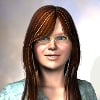
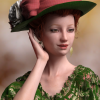
Star 2.0 for G3F!!! whoot!!
I was messing around with Growing Up to try and get a Cookie look and wound up with something completely different xD
The face could use some more morphing but I'm lazy. I really hope there'll be some Star specific morph packs like all the old adjustments classic Star had.
 Star 2.0 for G3F!!! whoot!!
Actually it's an optical illusion that she's watching you. It's because of her inverted eye whites.
Try searching for the morph EyeDisk-Inward, it's under pose controls>Head>Eyes>Star2>StarEyes>EyeDisk.
You'll want to use a negative setting and see if that helps...
Also can try Eye-Disk-Side from profile and straighten her gaze a bit... it makes her look crosseyed from head on, but from the side it looks more straight forward.I don't believe in optical illusions - her eyes are quite clearly following the viewer via magic!
Best result I've had is to position the camera first, then click on the anime eyes, go to the head bone, then use the Twist and Bend sliders to manually position the eyes.
Star 2.0 for G3F!!! whoot!!Actually it's an optical illusion that she's watching you. It's because of her inverted eye whites.
Try searching for the morph EyeDisk-Inward, it's under pose controls>Head>Eyes>Star2>StarEyes>EyeDisk.
You'll want to use a negative setting and see if that helps...
Also can try Eye-Disk-Side from profile and straighten her gaze a bit... it makes her look crosseyed from head on, but from the side it looks more straight forward.Oh, you used the Jesus Statue trick, you, uh, sly little fox.
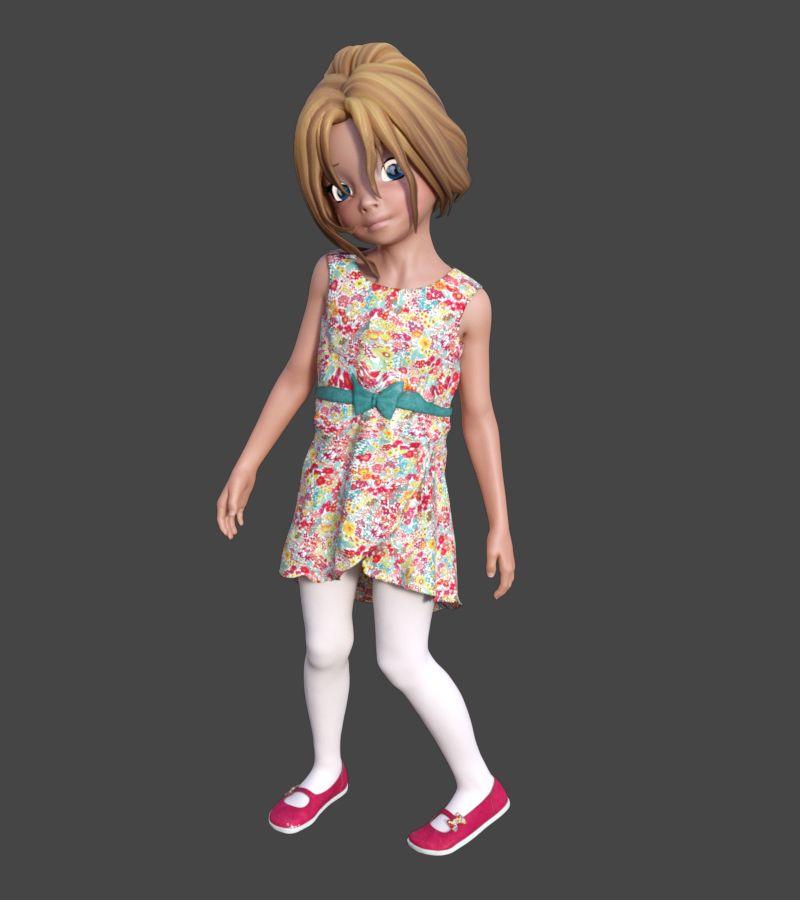
Here's Star at 25% with all Genesis 3 mats. With no expression, she looks a bit shocked.
 Star 2.0 for G3F!!! whoot!!
Actually it's an optical illusion that she's watching you. It's because of her inverted eye whites.
Try searching for the morph EyeDisk-Inward, it's under pose controls>Head>Eyes>Star2>StarEyes>EyeDisk.
You'll want to use a negative setting and see if that helps...
Also can try Eye-Disk-Side from profile and straighten her gaze a bit... it makes her look crosseyed from head on, but from the side it looks more straight forward.virtual penny 4 yor carrara thoughts ?what i thought was model level2 was only the smoothing,
1 - tail smooth-none
2 - tail smooth on, model lvl1
3 - tail smmoth on, model lvl2oh well. next is to try creating an ear morph test, in posed position!
Star 2.0 for G3F!!! whoot!!*beams* So glad everyone's enjoying her! Was a true labor of love and so many people helped out with her! THANK YOU ALL!!!
(and bless you, this sale is going to hopefully pay for my new computer... one I am desperately needing!)
So to answer some questions that I hadn't seen answerd yet...
Eyes aren't completely removed only hidden... with Star at full size though the eyes don't fit quite right . If you want to use the Star morph with other figures to mix and don't care about the anime eyes, you can just load the native Genesis 3 Female and her morph is in there to play with once you've installed her. Have many people who like the 50% Star and less even more than Star ;). Personally like mixing 25-25 Star and Girl, gives her a really spritely mix. In lower settings of star you can use the native G3F eyes without too much trouble. ;) I
Okay eyes following you... in the pose eyemorphs there are some eye disk dials that allow you to translate the disks forward. That should help with the appearance of her looking at you, though you'll need to manually adjust them depending on your pose because that can make the eye disks pop out of her head with some expressions ;P
She's instantly by far my favourite release of the year. She has so many extra things with her and morphs and expressions and things and ahhhh. Currently I like having the Star body setting to 0% while keeping the head and body proportions settings at 100% for a less bishoujou type figure, but I've only been testing her out for a few minutes so I'm sure I'll find more since she has about a billion settings and possibilites.
I can't find anything to translate the disks forward - there are side to side settings for them but that makes her cross-eyed, and settings in the anime eyes discs themselves that allow you to manually set the direction of the eyes - but in both cases they continue to follow you (at their new angle) as soon as you move the camera. Is there some sort of advanced setting making them do the following that we can mess with?
p.s. If you want Star but without the eyes, just load G3F or whoever and then dial in Star's morph afterwards. No messing around with anything needed then.
p.p.s. Cookie+Chip G3 please~
Star 2.0 for G3F!!! whoot!!*beams* So glad everyone's enjoying her! Was a true labor of love and so many people helped out with her! THANK YOU ALL!!!
(and bless you, this sale is going to hopefully pay for my new computer... one I am desperately needing!)
So to answer some questions that I hadn't seen answerd yet...
Eyes aren't completely removed only hidden... with Star at full size though the eyes don't fit quite right . If you want to use the Star morph with other figures to mix and don't care about the anime eyes, you can just load the native Genesis 3 Female and her morph is in there to play with once you've installed her. Have many people who like the 50% Star and less even more than Star ;). Personally like mixing 25-25 Star and Girl, gives her a really spritely mix. In lower settings of star you can use the native G3F eyes without too much trouble. ;) I
Okay eyes following you... in the pose eyemorphs there are some eye disk dials that allow you to translate the disks forward. That should help with the appearance of her looking at you, though you'll need to manually adjust them depending on your pose because that can make the eye disks pop out of her head with some expressions ;P
Star 2.0 for G3F!!! whoot!!So, a few questions before I purchase Star 2.0:
- Poses for Star 1.0 obviously won't work for Star 2.0 because she's technically G3F, right?
- Do old skins for Star 1.0 transfer over to Star 2.0?
- Technically speaking, it's possible to transfer Star clothing over to other generations by using a G3F clone, right? For example, Star->Star2.0/G3F->G2F?
Haven't tested specifically yet but:
As far as I understand it yes, although poses for Star 1.0 are compatible (with some fixing obviously) with V4 Genesis G2 Cookie etc. so they're still good. Also if you have a pose converter to G3 I imagine they'd be fine.
Looking at Star 2.0s UVs she has separate head body leg arms pages like G3 does so I don't think old skins will work?
No idea about the clothing but it seems feasible?
Star 2.0 for G3F!!! whoot!!I doubt that I'll ever use her "as is". A bit too extreme a morph for me. But I like what I see of the blended variants. And I definitely like the array of "Toon skins that she comes with. Will need to consider regarding the Anime Eyes package. I don't particularly like anime eyes, but at the more extreme end of the scale she doesn't look right without some version of them.
Body By Sublime IV Fantasy EditionIt's possible that each body morph uses maybe 1 of the characters - like, body 1 will use G3F and Girl 7 morphs, and body 2 will use V7 and Olympia 7. So the required products state ALL the iconics needed.
That's true. I'm not sure I want to risk it - as I might be able to recreate the shapes myself ...maybe. It's a tough choice - the shapes are adorable. heheh :D I'll have to think it over. I do want to support products and vendors that create characters/shapes with more diversity than just the normal Barbie-type figures, so I might end up getting it. I guess I'll have a few days to decide before it goes off the intro discount price.
I was on the fence as well as the forms are gorgeous, but **if it's dial spun, then no...(As I also have Zbrush) You could try and spin the body shapes yourself, you've seemed to have done quite a fine job yourself!
EDIT: **Well, it might not be dial-spun after all as it doesn't require G3's body/face morphs.
Star 2.0 for G3F!!! whoot!!So, a few questions before I purchase Star 2.0:
- Poses for Star 1.0 obviously won't work for Star 2.0 because she's technically G3F, right?
- Do old skins for Star 1.0 transfer over to Star 2.0?
- Technically speaking, it's possible to transfer Star clothing over to other generations by using a G3F clone, right? For example, Star->Star2.0/G3F->G2F?
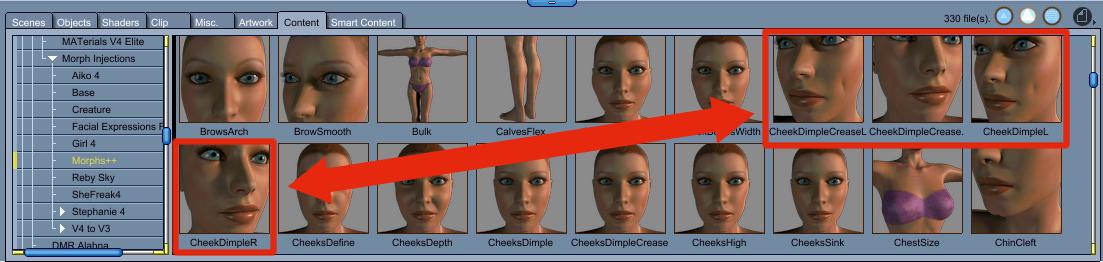
Post Your Renders - Happy New Year yall(by the way how could I make dimpled cheecks? is there a morph somewhere to be used?)
Morphs++ for Victoria 4 have two varieties: Cheeks Dimple and Cheeks Dimple Crease.
 Pose Sets
I almost never use expression poses, though if they're made into morph dials, those I may use, since I like to start with an expression dial at around 30-50%, and then adjust the individual facial parts to complete the expression I'm looking for.
Yeah, I do this with expressions, too. Having that starter expression as a dial really helps in the whole posing process. Expressions as morphs dials are a must, but if they don't come that way, turning expressions into a morph dial is a great skill to have for those of us that don't do expressions well!
Unwanted effect of shrink-wrapping. Any fix?I've found good success in exporting/re-importing clothing as OBJs then fitting as unsupported items with no projection template. Loss of morphs and rigging can be transferred back in through the transfer utility too.
I'd love to see a tutorial for newbies like me on how to do this! :D
1. Don't export to OBJ yet!
2. Without fitting/parenting the clothing item to your figure, use the built-in morphs, deformers, etc to approximate the fit to the figure. Doesn't matter if it's not exact; some parts can be fixed using mesh smoothing.
3. NOW we export as OBJ. Be sure to hide everything else aside from the clothing item. You can choose DAZ or Poser presets; it doesn't matter.
4. Re-import the OBJ using the same DAZ/Poser preset.
5. Fit the item to the figure in question. Choose unsupported and no projection map since we want to keep the current shape. The clothing item should now inherit the figure's bone structure.
6. Apply mesh smoothing as needed. You may want to re-export the mesh-smoothed version, re-import back as a morph or OBJ, then turn off mesh smoothing as it's not needed anymore.
And now...
- To get back the original morphs, first convert the new clothing OBJ back to a figure (Edit->Object->Rigging->Convert to Figure), then use the transfer utility to transfer the morphs from the original clothing. Be sure to click on Morph Targets and check "All" from Under Source.
- To get the custom bones back, SY has a bunch of tutorials with various methodologies:
http://sickleyield.deviantart.com/journal/Tutorial-Saving-Gen-4-Custom-Bones-on-Conversion-417250347
http://sickleyield.deviantart.com/journal/Tutorial-Custom-Bone-Rigs-G2F-to-Genesis-Convert-398192766
http://sickleyield.deviantart.com/journal/Tutorial-Keeping-Bones-On-TU-Conversion-Fast-Way-449218737
Oh awesome! Thank you! :D I've saved this and added it to my Daz tutorials and will be trying it out - I really appreciate you taking the time to explain how to do it! You rock!
Also keep in mind that this is pretty much the only way to re-use older generation stuff -- like Victoria/Aiko 3 clothing -- without mesh distortion due to the weight-map redistributions and re-projections. The V3 and A3 clones for Genesis don't work very well. There are, of course, 3rd party programs out there but this is my preferred way of doing it since it has a monetary expediture of exactly zero dollars :)
edit: I'll probably post a video of me doing this sometime in the future. Depends on how much time I have in the evenings now that I'm back from my summer break.
Pose SetsI'll use pose sets to some extent, but because I almost never use the figure morph at "full strength" I'm frequently adjusting them. I don't have the pose builder, I'll usually use the Right Click method instead.
Like Serene Night, I prefer gender neutral or at least not "Model" poses.
I almost never use expression poses, though if they're made into morph dials, those I may use, since I like to start with an expression dial at around 30-50%, and then adjust the individual facial parts to complete the expression I'm looking for.
Princess Asia dress on Genesis 2 FigureYou will need to edit the weightmaps, so that the sleeve tips are weighted for the arms (or new sleeve bones attached to the arms) and not the hips -adding weight for the arms will automatically clear the weighting for the hip. The Transfer Utility and AutoFit project from the nearest body part, so long, dangly elements (such as draped sleeves) or projections (such as high-heels) will always be problematic.
My Lease Is Nearly Up On The Complaint ThreadI was told I can make cool stuff in blender but I am not sure.
Try making an ice cube it's easy and cool.
Right now I would just do a cube primative and say that I am almost done with the project and call it a night. That is if I wanted to make an ice cube in blender.
An icy morphing cube would be way cool :0
What's the ice cube gonna morph into? A melted puddle of water? ROFL. :-)
Star 2.0 for G3F!!! whoot!!I noticed that 2.0 is a bit "bustier" than her original counterpart, but O.S. is "hippier".
Autofit for older Star content onto 2.0 also doesn't work perfect - particularly on hair and shoes (it never does). I suppose the slight poke through on the shoes is probably an easy fix.
The materials look great on the Star 2.0, OS looks very plasticy in the comparison there, is that the iRay materials?
The description for the Star 2.0 clone does state:
- FREEBIE: Star! clone for transfer of clothing from original Star! to Genesis 3 Female Body (Not recommended for hair or gloves)
That would explain why one of the G3S hair styles is from the original selection of OS hairs, shoes always seem to cause problems cross generation, although the shoe transfer there doesn't look too bad if you switch off the toes and or feet :)
It's the skin/shader she loads with as an "Actor" from Smart Content. She has a wonderful variety of settings - she has 20 skin settings and 20 eye settings.
Thanks for posting this divamakeup - a good selection for both iRay and 3Delight which is nice to have both options (especially with animation generally rendering faster in 3Delight, not that I've tried an iRay animation....YET!)
You're welcome! I'm glad I could help. :)
Ahhhh I love her so much! Now I get to make some cute toon characters with G3F - AWESOME!

G3F with Star body dailed in full with the leg and arm lengths lessened, Star head dailed in at 37%, V7 head dialed in at 38%, and some eye, mouth, and nose tweaks with the G3F face morphs.

@ divamakeup,
Omiga-wd! Those dialed character morphs are so cute! I love them!

Aww Thank you! :D She's very cute. I recommend saving her shape as a "shaping" preset then loading that into G3F. Otherwise any extreme morphs messes with Star's eyes. Saving her as a shaping preset though gets rid of that issue.
Ahhhh I love her so much! Now I get to make some cute toon characters with G3F - AWESOME!
G3F with Star body dailed in full with the leg and arm lengths lessened, Star head dailed in at 37%, V7 head dialed in at 38%, and some eye, mouth, and nose tweaks with the G3F face morphs.
@ divamakeup,
Omiga-wd! Those dialed character morphs are so cute! I love them!
Diva -- thanks for the renders with Star partially dialed in. She looks like your preferred toony style, and it's great to see that her shape goes well with, say, Girl 7. Toons! Yeah! I need more toons!
--MW
You're welcome. :D I'm having a lot of fun making toon characters with her shape! And you're right - it's totally my preferred toon style! lol
Star 2.0 for G3F!!! whoot!!I noticed that 2.0 is a bit "bustier" than her original counterpart, but O.S. is "hippier".
Autofit for older Star content onto 2.0 also doesn't work perfect - particularly on hair and shoes (it never does). I suppose the slight poke through on the shoes is probably an easy fix.
The materials look great on the Star 2.0, OS looks very plasticy in the comparison there, is that the iRay materials?
The description for the Star 2.0 clone does state:
- FREEBIE: Star! clone for transfer of clothing from original Star! to Genesis 3 Female Body (Not recommended for hair or gloves)
That would explain why one of the G3S hair styles is from the original selection of OS hairs, shoes always seem to cause problems cross generation, although the shoe transfer there doesn't look too bad if you switch off the toes and or feet :)
It's the skin/shader she loads with as an "Actor" from Smart Content. She has a wonderful variety of settings - she has 20 skin settings and 20 eye settings.
Thanks for posting this divamakeup - a good selection for both iRay and 3Delight which is nice to have both options (especially with animation generally rendering faster in 3Delight, not that I've tried an iRay animation....YET!)
Star 2.0 for G3F!!! whoot!!I noticed that 2.0 is a bit "bustier" than her original counterpart, but O.S. is "hippier".
Autofit for older Star content onto 2.0 also doesn't work perfect - particularly on hair and shoes (it never does). I suppose the slight poke through on the shoes is probably an easy fix.
The materials look great on the Star 2.0, OS looks very plasticy in the comparison there, is that the iRay materials?
The description for the Star 2.0 clone does state:
- FREEBIE: Star! clone for transfer of clothing from original Star! to Genesis 3 Female Body (Not recommended for hair or gloves)
That would explain why one of the G3S hair styles is from the original selection of OS hairs, shoes always seem to cause problems cross generation, although the shoe transfer there doesn't look too bad if you switch off the toes and or feet :)
It's the skin/shader she loads with as an "Actor" from Smart Content. She has a wonderful variety of settings - she has 20 skin settings and 20 eye settings.

Daz 3D is part of

Connect
DAZ Productions, Inc.
7533 S Center View Ct #4664
West Jordan, UT 84084Licensing Agreement | Terms of Service | Privacy Policy | EULA
© 2026 Daz Productions Inc. All Rights Reserved.