-
Novica & Forum Members Tips & Product Reviews Pt 11
Well I really decided to research every nit picky detail on laptops, I wanted one which wouldn't get obsolete quickly. In case anyone else is looking for a laptop, I thought I'd share what I read. I am NOT a technical person and can't explain all the specifics on these, but I'll be sharing some great articles for you which will assist in comparing those apples and oranges. I concentrated on LAPTOPS.
The MSI GT75 Titan RG is what I bought, with 32GB RAM and several more upgrades (better cooling, remove Windows bloat, pixel perfection check, eliminate backlight bleed) Here is the post regarding bloatware.
These bits and pieces have to be considered when buying a laptop no matter which one you are considering. And of course, this is just my logic and the conclusions I arrived at, and I can't possibly type all the findings which helped merge all this together.This is how I made my decision after I spent 6 days comparing laptops and researching all those crazy abbreviations. UGH. My first problem was not knowing if what I was seeing was the latest thing, or what I should be comparing it TO. So here's what I found to help with "compared to?" and "Is that good? Worth paying for?" and "What would be the best combination to maximize the output?" The goal was to blend aspects which complemented each other.
First, the operating system. I looked at Intel Core i7 7th or 8th generation or Intel Core i9 8th generation. Expect your price to increase of course for the i9. But if you want a most up to date system, this is where it starts. There are not a lot of laptops offering this but many allow upgrades. The i9 was released last summer and that link has a few explanations. This one by LaptopMag has a great comparison and read the section on Which One To Get? where it mentions doing art.
Edit: I also looked up another i9 which has 32% better performance (cost $1,800 just for it!) The i9 7980XE is one to watch in the future when prices drop. Here are the benchmarks between i9-8950HK (mine) and i9 7980XE This has the best comparison/pros and cons.
I also thought you may be interested in seeing how some of the i5, i7's do for gaming (bottom of page) and the best CPU's for gaming and an explanation of what they are.Here's another aspect- I looked at the GHz and the i9 was 2.90, while the i7's were 2.20 OR 2.60 for the CPU. The higher, the better. So if it was an i7, I looked at the GHz too. (Think speed.) I did go with the Intel Core i9 2.90.
Edit: But cores (CPU) and clock speeds- confusing at best when trying to decide what to prioritize, or what they mean. This is a great article!
Operating System- some offer Windows 10 Pro. (mine did) Find out if it is 64 bit (ASK) if you want that, as some may not be.
To get good results, the graphics card and operating system both need a healthy balance. So I went with the NVIDIA GeForce 1080. The 1080ti is even better- and costs more, and hard to find as a default, and I didn't see any options on the pages to upgrade. I think it requires calling and asking. Price difference here. (Shows benchmarks too.) Google says "the 1080 Ti is NVIDIA's latest flagship 4K VR ready GPU. It supersedes last years GTX 1080, offering a 30% increase in performance for a 40% premium." The other cards which are also very good are the 1060 and 1070.
Something to look for- I only went with dedicated graphics cards. This means they are not soddered into the motherboard and you can upgrade the graphics more easily. Can't afford a 1080, 1070, etc? Have to make a decision on RAM (memory) and graphics? Get a dedicated graphics laptop and you can get more RAM, then upgrade graphics later.
Screen: For the screen, most are 120Hz. Look for some with 144Hz, but those aren't the norm. Mine is 120Hz.
RAM/Memory: An explanation and those DDR's! This is a great article.
Here's another thought from SimonJM
Memory: This is where you do NOT want to scrimp, the RAM. 32GB is worth getting. Note DDR4 is the latest for laptops. DDR5 is not available for the memory, according to a few sites. This "allows higher clock speeds and therefore performs faster." When buying a laptop, if DDR4 isn't listed (mine says 32GB DDR4) call and ASK about the DDR.BTW, want to check to see if your RAM is still good? Here.
Cores: This relates to the processor. The CPU is the Central Processing Unit. How many cores determines the speed. Every program you open will work on its own core, so if the tasks are shared, the speeds are faster. I would recommend quad (4) or 6 Cores. I went with 6)Video Memory: Mine is 8GB GDDR5X The explanation of GDDR5X is here.
MemorySpeed This one, I read about in different forums. They tested it and said not that much difference in the DDR4 2400, 2666, etc. Mine is 2666
Memory Spec: What I read- It is better to split the memory into different channels so if one fails, everything isn't lost. You will see 16GB x 2 if it is split. This is a good thingStorage: When listing the GB or TB (gigabyte/terabyte) Look for SSD (Solid State Drive) or SSHD (Solid State Hybrid Drive, not as good) SATA is the least desirable. And even better, PCIe/NVIe I didn't even consider laptops without SSDs AND the PCIe or NVIe designations.
CPUs Cache L1, L2, L3 explained here. Mine has L3 listed with 12MB which apparently is a good size.
Chipset I definitely wanted the Intel CM246 and not HM370. One site said it is used by the new 8th generation core laptops having Xeon-E processors and is a "beefed up" version of the HM370. It supports 24 PCIe lanes, six USB 3.1 ports, 8 SATA ports etc Why the chipset is important- "it is the backbone of the motherboard- it's quality and capabilities define the qualities and capabilities of the computer."
Resolution: HD: 1366 x 768 is standard on mainstream laptops HD+ 1600 x 900h is fine for casual gaming/watching movies
1920 x 1080 is Full HD so you can see every detail. (Most laptops I saw were this)
QHD is even better, either 256s0 x 1440 or 3200 x 1800
Then there's 4k Ultra HD It has 4x the pixels as the 1080p (3840 x 2160) EDIT: Note I found conflicting information on if this does or does not have the G sync which stops flutter and lag.)LCD Features The higher the NTSC value, the better, so far as matching RGB colors. (Mine is 94%)
HDD RPM (Revolutions Per Minute) The higher the number, the faster the system works. This will be betweeen 5400 and 7200 (Mine is 7200)
*****************************
LAN This is just other forum sites' people testing it - the Killer Gaming Network tests showed little improvements over standard LAN. I didn't spend excess time on this. The AQC107 came across as more desirable but this quickly went out of my comfort zone. From businesswire.com-About the AQtion AQC107
The Aquantia AQC107 Multi-Gig Ethernet controller easily handles 10GbE performance with a x4/x2/x1 PCI Express interface. It incorporates Aquantia’s industry proven AQrate® PHY technology to deliver up to 10 GbE network connectivity speed through 100 meters of Cat 6a cabling enabling higher data rates with zero change to legacy cabling.
*******************
Turbo Frequency Wide range, it's a feature that automatically raises certain parts of the operating frequency and performance when demanding tasks are running. The higher ends I saw were 3.90 to 4.80GHz (Mine is 4.80)USB Look for Type C as that is going to be the "fits all" for the future. Also look for 3.1 instead of 3.0 as it doubles the transfer rate to 10Gbps. Try to get the 3.1 Generation 2
Bluetooth: Ask if it doesn't say 5.0 (the latest)
Other info/ terms you might encounter:
Difference in Windows and Windows 10 Pro
SPDIF in audio ports (A good thing)
Thunderbolt 3 transfer speeds up to 40Gbps for a port. Great for plug and play.
Subwoofers Better than just internal speakers
G sync Synchronizes display refresh rates to the GPU and eliminates stutter and input lagGaming Laptops- Best Brands (I got MCI)
Edit: This post explains all the Letters and Numbers in the MCI titles
Do you need a laptop cooling pad? Do they work? (One does, a LOT!) The link to the reviews are on that page.So with all that in my checklists, I ended up with MSI GT75 8RG TITAN 17.3” FHD 120Hz G-Sync Gaming Laptop | 2.9 GHz i9-8950HK, GTX 1080, 32GB DDR4/2666MHz RAM, PCIe 512GB SSD + 1TB HDD
See the reviews (videos) HERE and HERE Found these after I bought it, so I made a great choice apparently :) This one explains in more technical detail. Here's a written review of the GT75 8RG Titan. Another review comparing to other gaming computers. Another review
And anotherKeeping in mind the pricetag, I'd suggest cherry-picking and getting the aspects which give you the best bang for your buck. I wanted that chipset as it gives a "hefty" boost in performance over HM370's (which apparently many laptops have) You definitely want SSD or SSHD (hybrid) and NVIe/PCIe, a minimum 16GB RAM, and a dedicated graphics card.
Secondary would be the intel i9- if you get i7 look at the GHz and try for 2.60 instead of 2.20 You don't need a 4.80 Turbo Boost either, lesser amounts will do, and the Pro version of Windows 10 isn't needed. The quad cores instead of six will drop the price, and I'm really guessing but I think the CM246 chipset (if available for quad cores) would help make up for that.
Breaking all that down-In red are the things which made the decision for me:
It has the intel 9 2.90 GHz i9-8950 HK (that 8950HK is rated awesome!)
GTX 1080 32GB DDR4 / 2666MHz RAM Memory Spec- 16GB x 2 (two channels)
NVIe/PCIe 512GB SSD + 1TB HDDl
Windows 10 Pro 64 Bit Video Memory 8GB GDDR5X 6 core processor turbo boost 4.80GHz
Chipset Intel CM246 NTSC 94% Graphics- Dedicated card
HDD RPM 7200 LAN MultiGig AQC107 Bluetooth 5.0 (5) USB 3.1 Generation 2
Video Port Thunderbolt 3, MiniDisplay Port 2.1 Has the Thunderbolt, G-Sync, AQC107Edit: If you are wondering about the competition, the closest thing is the Aorus X9 with again, the same folks' review on the MSI GT75 Titan RG.
The Aorus runs HOT (130 degrees on the bottom after 15 minutes of extreme use compared to 113 of the Titan), the fans are loud and whiny, and the display is dark and not nearly as vibrant. But the Aorus does better at some things so it depends on what you like.Carrara Challenge 42 – PIONEERS – Dedicated to Eric Winemiller - WIPHey @ light of Heaven, glad you got that fixed.
Yes great job @Alberto - I'm very excited about the genesis bloat solver!!
Pleasure @UB
As an aside I'm hoping some one will use Proximity or Location to do a cut away version of eg a steam engine
I;ve been fiddling with Proximity - the easiet way to get your head around it is to make a central object eg cube then
add a spahere very close to the cube - and shade it with the proximity shader using the cube as the 'trigger' object
, then duplcate that sphere and move it a few steps away from the original and repeat till you have about ten
then do a test render and that will show you where the proximity shader is clicking in
(i guess you could also use the carrara measurements by themselves ;) )
here's a video showing shader in action (not mine)
https://www.youtube.com/watch?gl=SN&hl=fr&v=Nh1fjYeiatU
http://www.digitalcarversguild.com/plugin.php?ProductId=22
I've also been playing with camera projection and found that it obeys the alpha channel of the projected texture map
If You choose another camera apart from the rendering camera as the Camera Projection projector you can also use that to get interesting cutaways
sorry havent put much up I accidentally got a full time job.... (well 4 days a week ;) )
plus I have been busy finishing up a book (made with carrara) which my agent describes as 'phenomenal' (she never gives compliments) so hopefully I can get this one published.
It's My Party and I'll Complain If I Want To Complaint Thread..I miss talking sports with Ed.
Tonight, Milwaukee won it's second series against the Chicago Cubs in two weeks (as well as swept a series in between with the SF Giants), to move within 1 game of first place in the NL Central along with gaining another game on St Louis in the Wildcard race. Pitching (not usually Milwaukee's strong point) was exceptional tonight.
/sport
Renders Made Using Carrara PA products.Old post I just found
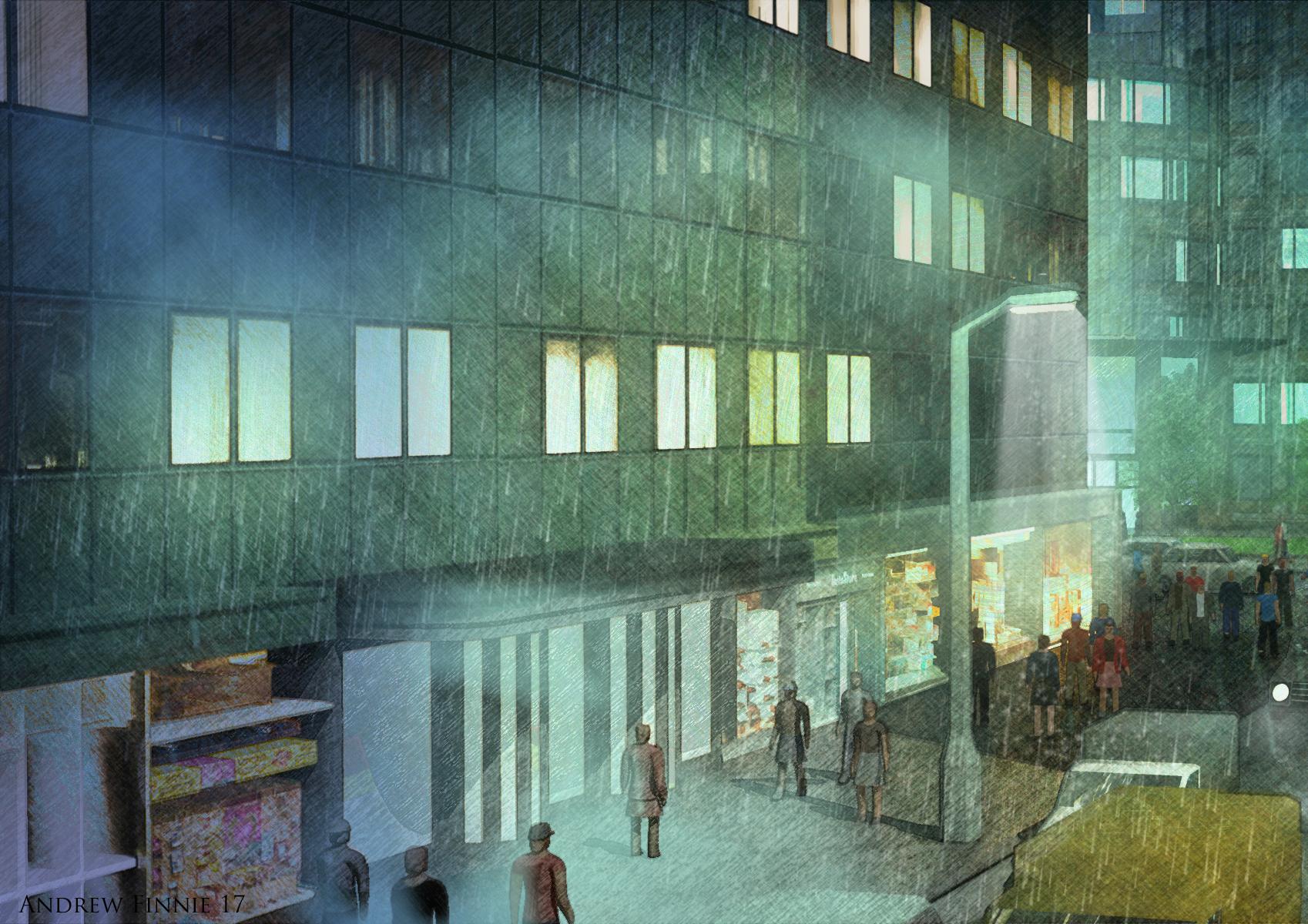
A few different treatments of PhilW's excellent City Central Night scene.
Rendered out firstly as a Toon1Part111 render, then rendered out several different passes and combined with postwork in post.
It renders very fast as you don't need anti aliasing on :)
Much use of the index pass to help isolate the different scene objects.

 When Reality Looks FAKE
Fake reality!...
Sorry... I couldn't resist.
Maybe "Naugareality"?...
About a month or more ago I went to NYC's Central Park with my family... By Bethesda Fountain there are some ornate architectural details that are part of a bridge over the grand stairway... I took this picture of an interesting detail I noticed...
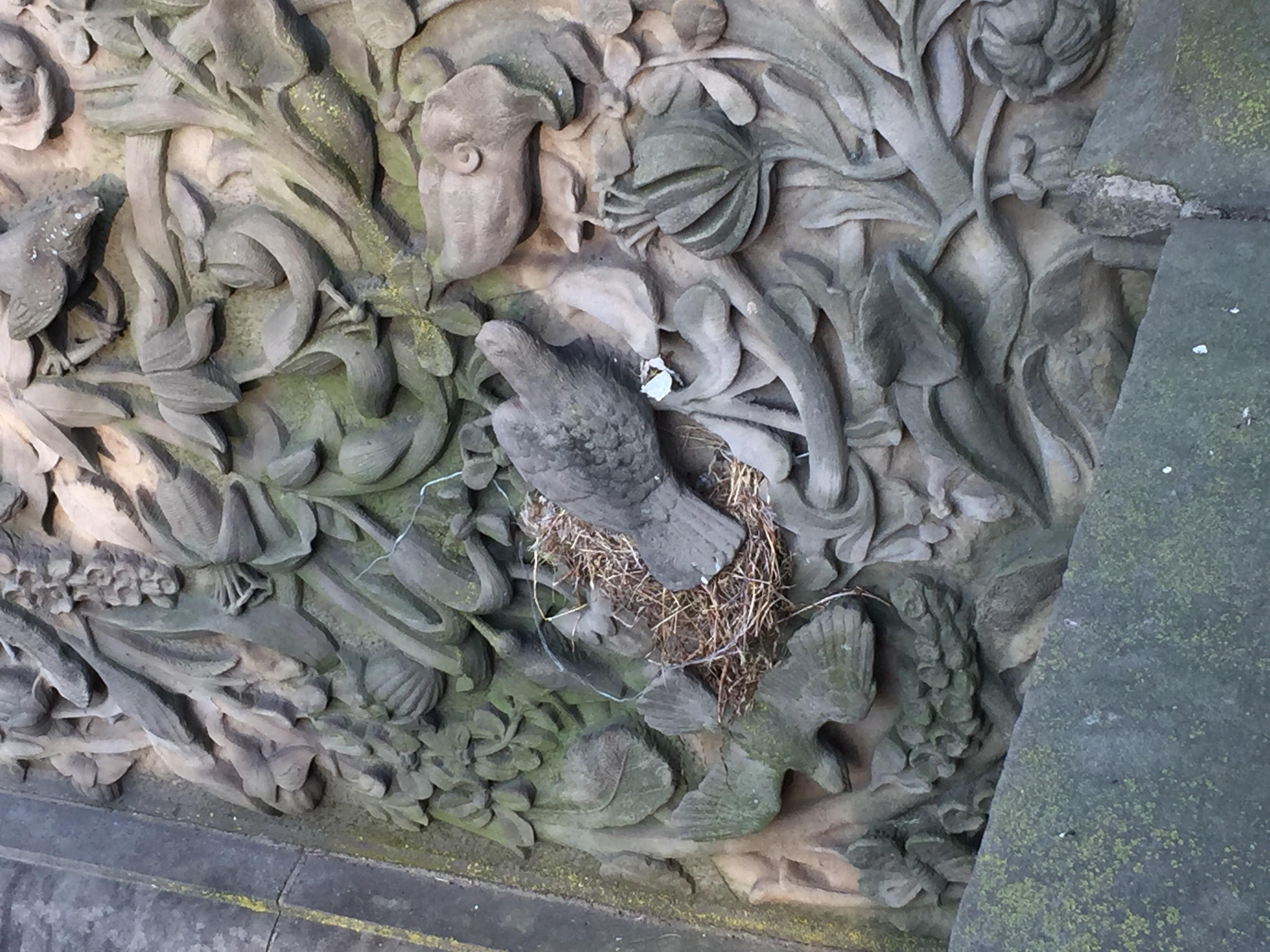
I'm not sure if it's obvious, but a real bird made a nest around a stone bird... If you look on the right side of the fake bird, you can see the spot the real bird was nesting in.
Love this! Reminds me of my childhood. I grew up in NYC and went to Central Park almost every day. Those pigeons bring back so many memories! My friend and I got detention in 6th grade for climbing out the ledge of our school window to see baby pigeons hatching on the windowsill LOL.
When Reality Looks FAKEFake reality!...
Sorry... I couldn't resist.
Maybe "Naugareality"?...
About a month or more ago I went to NYC's Central Park with my family... By Bethesda Fountain there are some ornate architectural details that are part of a bridge over the grand stairway... I took this picture of an interesting detail I noticed...
I'm not sure if it's obvious, but a real bird made a nest around a stone bird... If you look on the right side of the fake bird, you can see the spot the real bird was nesting in.
Report sales errors here. Missed it? No worries. "There's Always Another Sale™"It took about thirty minutes this morning when the site changed over (1am central, so about 1:30am) for the items to populate, the green banner was there immediately for me, and everything was working fine. I'm just getting back online after 15 hours and it's been broken for everyone? Wow, that's a step backward. I wonder why they break things when it's working for other people, and how can it work for some and not for others if it's not a cloudfare issue. If it is a module issue, it should do the same thing for everyone.
So is it working for you folks now?
Book CoversI'll try and make that one. lol If my time math is correct I think it will start at 5pm central time
I think it starts at 2pm Central time.
12 noon Los Angeles/Vancouver = 1pm Denver/Edmonton = 2pm Chicago/Winnipeg = 3pm New York/Toronto = 4pm Halifax = 8pm British Summer Time.
Helpful (with startlingly large numbers) time conversion page.
Thanks @vwrangler
Book CoversI'll try and make that one. lol If my time math is correct I think it will start at 5pm central time
I think it starts at 2pm Central time.
12 noon Los Angeles/Vancouver = 1pm Denver/Edmonton = 2pm Chicago/Winnipeg = 3pm New York/Toronto = 4pm Halifax = 8pm British Summer Time.
Helpful (with startlingly large numbers) time conversion page.
Book CoversI'll try and make that one. lol If my time math is correct I think it will start at 5pm central time
Standardizing a carrara textures folder? simsposium of content,freebie creatorsAny screenshots? I save custom textures (and I have made almost 500 or so by now) by category on my external drive. I used to put them in the project files that go there that had the car file and all textures. But I use the same texture for other characters/props/scenes in the same project related items or new ones, so it was not sensible to be going to one project's file for other projects, so I made a central one. I keep them as jpg or pngs. If I am hot and heavy into a project, I do drop the shader tree into the Carrara shader tab and give it the file reference as part of its name, but am always tweaking, so if I change it, I go into the shaders folder in Carrara and remove it to keep things tidy and move on. It can get confusing... I have about 20 versions of river water so far and they sort of look alike in the shader tab.
I am intrigued with your system, though and would like to see.
 SileneNovica & Forum Members Tips & Product Reviews Pt 11
What is Daz Midnight for us on the east coast? This always confuses me.
I totally missed it but if its on a night where I work the next day, I tend to not even try
Midnight in Utah is Rocky Mountain Time, so here's the breakdown for the continental US:
Eastern: 2:00am
Central: 1:00am
Rocky Mtn: 12:00am
Pacific: 11:00pm
Currently, that's Daylight Saving time…
ETA: Got this from Google, for the entire US, modified to reflect Daz Midnight:
Eastern Daylight Time (i.e. Washington, DC (GMT-4)) 2:00 am
Central Daylight Time (i.e. Chicago (GMT-5)) 1:00am
Mountain Daylight Time (i.e. Denver (GMT-6)) 12:00 am
Mountain Standard Time (i.e. Phoenix (GMT-7)) 11:00 pm
Pacific Daylight Time (i.e. Los Angeles (GMT-7)) 11:00 pm
Alaska Daylight Time (i.e. Anchorage (GMT-8)) 10:00 pm
Hawaii-Aleutian Standard Time (i.e. Honolulu (GMT-10)) 8:00 pmThanks. My sleep is more important than hoping to catch a fluke between 1:00AM - 2:00AM. Elementary students can be a challenge with being sleep deprived.
I'm guessing they can be challenging even with a good nights sleep!
Thank you very much for the break down L'Adair. Definitely not happening on a work night.
Novica & Forum Members Tips & Product Reviews Pt 11What is Daz Midnight for us on the east coast? This always confuses me.
I totally missed it but if its on a night where I work the next day, I tend to not even try
Midnight in Utah is Rocky Mountain Time, so here's the breakdown for the continental US:
Eastern: 2:00am
Central: 1:00am
Rocky Mtn: 12:00am
Pacific: 11:00pm
Currently, that's Daylight Saving time…
ETA: Got this from Google, for the entire US, modified to reflect Daz Midnight:
Eastern Daylight Time (i.e. Washington, DC (GMT-4)) 2:00 am
Central Daylight Time (i.e. Chicago (GMT-5)) 1:00am
Mountain Daylight Time (i.e. Denver (GMT-6)) 12:00 am
Mountain Standard Time (i.e. Phoenix (GMT-7)) 11:00 pm
Pacific Daylight Time (i.e. Los Angeles (GMT-7)) 11:00 pm
Alaska Daylight Time (i.e. Anchorage (GMT-8)) 10:00 pm
Hawaii-Aleutian Standard Time (i.e. Honolulu (GMT-10)) 8:00 pmThanks. My sleep is more important than hoping to catch a fluke between 1:00AM - 2:00AM. Elementary students can be a challenge with being sleep deprived.
SimTenero Randomizer2 (Commercial)A ground up re-imagining of an old favorite

Click here for the Store Page.
Click here to see the user guide.
More details are available on the Store Page, but here are some highlights for folks familiar with the original:
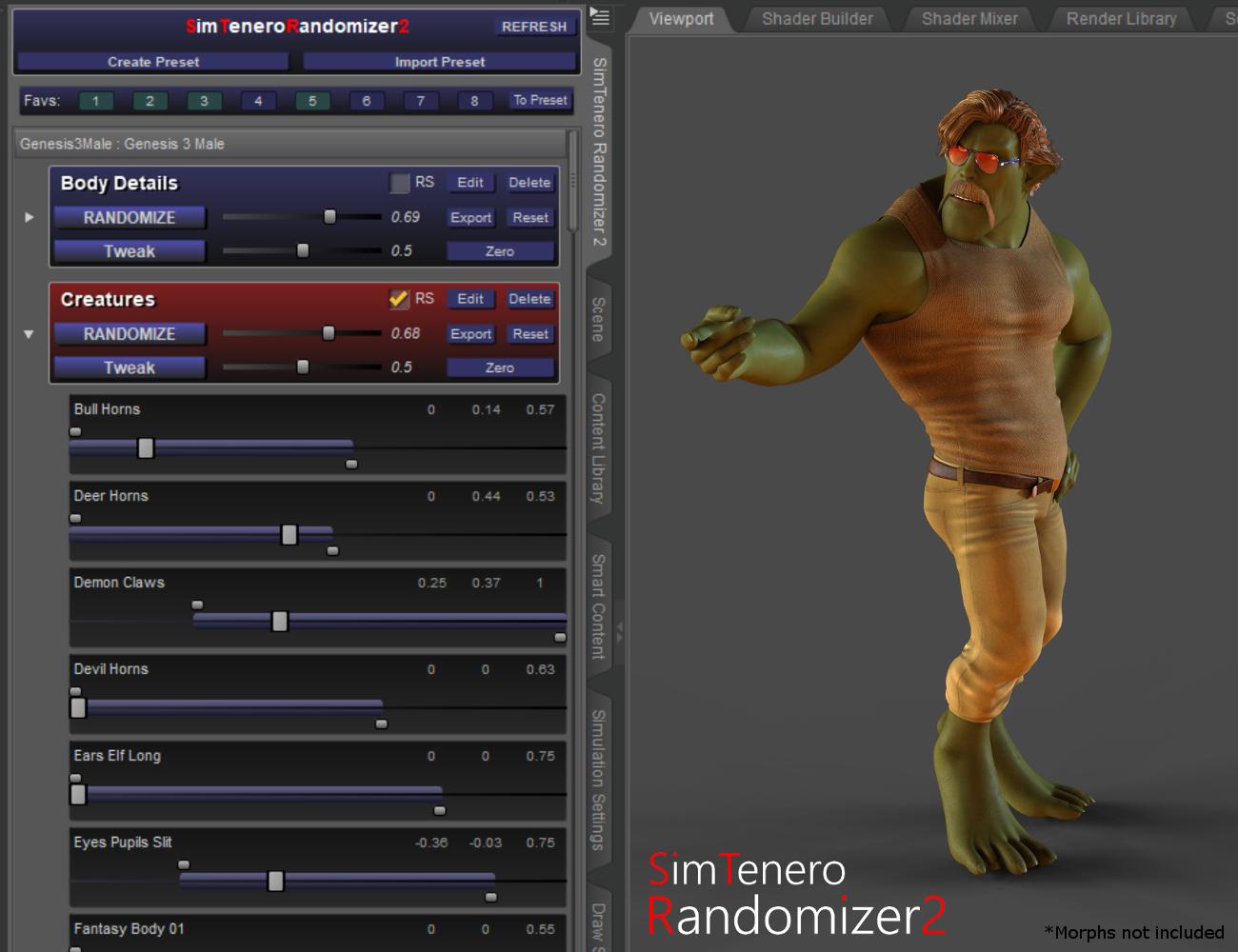
- Randomizer2 is a dockable plugin! This may be the single most significant change for people who do a lot of randomizing. Randomizer2 is always available, no need to exit and relaunch every time you need access to the viewport or to your other panes!
- The way presets are created and used has been completely rethought. Presets are now very central to the way you'll manage big libraries of morphs. It was always possible to save and load presets in the original, but 2 gives you access to all of those presets at once. This makes it super easy to, for example, randomize parts of the body and face independently of one another.
- Presets are automatically stored with the figure. When you load a figure or prop into a new scene, just select it and click "Refresh" in the Ranomizer2 pane and all of your previously created presets for that figure will load in! This can be a huge time saver, especially if you've spent a lot of time dialing in your perfect presets.
- Morphs can be tweaked right in the pane. This is a small detail, but it's still handy :-).
- Each morph in a preset has its own randomization range. In the original, it was possible to set a randomization range; a number between 0 and 1 that would limit the max amount of randomization for all of the morphs selected. Randomizer2 still has that master range, but also includes individual ranges for each morph! This dramatically increases the value and flexibility of preset creation. For example, I may want to include "Chest Scale" in a preset, but I don't want it to vary too much. After adding it to my preset, I'd expand the little arrow next to the preset name, find the "Chest Scale" morph and tweak its upper and lower limit sliders to maybe 0.2 and -0.2 respectively. Now, whenever I randomize, that morph will stay inside that range.
- You can "tweak" the randomization. In the original, there was a feature called "Zero before Randomizing." That concept is now baked into two separate buttons. The "Randomize" button will always start from zero. That means it will set each of the morphs in its preset to zero before assigning a new random value. Tweak, on the other hand, adds or subtracts a new random value.
- Full Undo and Redo support! The original allowed limited undo, but Randomizer2 integrates with Studios undo stack. So crtl-z ctrl-y away!
Believe it or not there's more! Head over to the store page for some additional details.
 Novica & Forum Members Tips & Product Reviews Pt 11
What is Daz Midnight for us on the east coast? This always confuses me.
I totally missed it but if its on a night where I work the next day, I tend to not even try
Midnight in Utah is Rocky Mountain Time, so here's the breakdown for the continental US:
Eastern: 2:00am
Central: 1:00am
Rocky Mtn: 12:00am
Pacific: 11:00pm
Currently, that's Daylight Saving time…
ETA: Got this from Google, for the entire US, modified to reflect Daz Midnight:
Eastern Daylight Time (i.e. Washington, DC (GMT-4)) 2:00 am
Central Daylight Time (i.e. Chicago (GMT-5)) 1:00am
Mountain Daylight Time (i.e. Denver (GMT-6)) 12:00 am
Mountain Standard Time (i.e. Phoenix (GMT-7)) 11:00 pm
Pacific Daylight Time (i.e. Los Angeles (GMT-7)) 11:00 pm
Alaska Daylight Time (i.e. Anchorage (GMT-8)) 10:00 pm
Hawaii-Aleutian Standard Time (i.e. Honolulu (GMT-10)) 8:00 pmIt's My Party and I'll Complain If I Want To Complaint Thread..TJohn, congratulations on your latest trip around our central main sequence stellar primary. May there be many more.
Novica & Forum Members Tips & Product Reviews Pt 11Well, for all of you who slept through it, this is what you missed for ALL the Genesis 2 items till about 2:08am Central time. (It's over now , and yes, it went that way in the cart too.)
In other words, everything on the page was free. I've never seen this percentage off before, quite interesting.
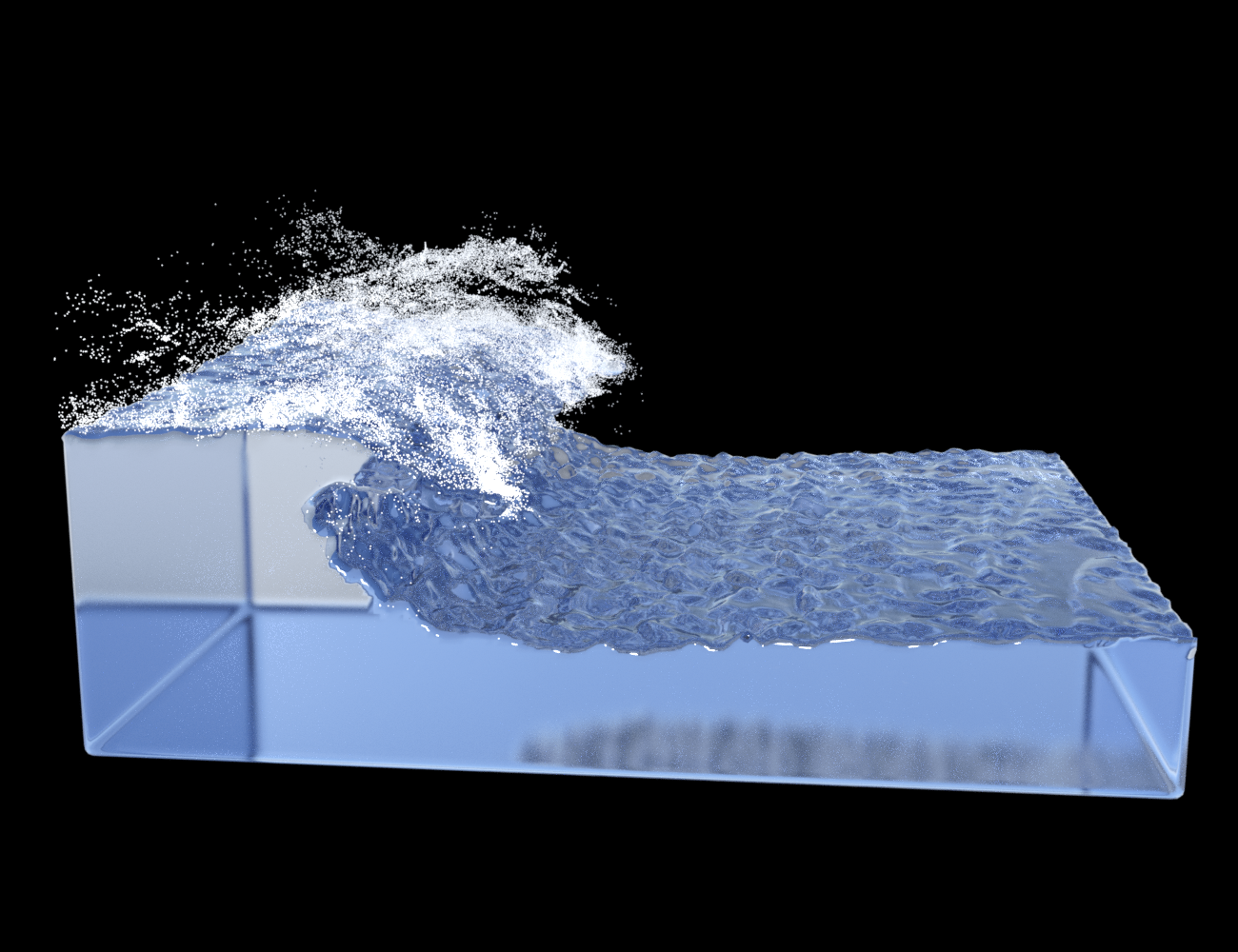
 [Updated to V1.3 - now MacOS support] FLUIDOS: a fluids simulator plugin for Daz Studio (commercial)
Is it as easy to use as dForce is (just press the 'simulate' button)?
Could a tidal wave be generated, so that we can finally depict surfing on a wave?
The workflow is this:
You have to add a Domain, that is, the 3D space where the fluid simulation operates. It's a void cube, but you can resize as you wish.
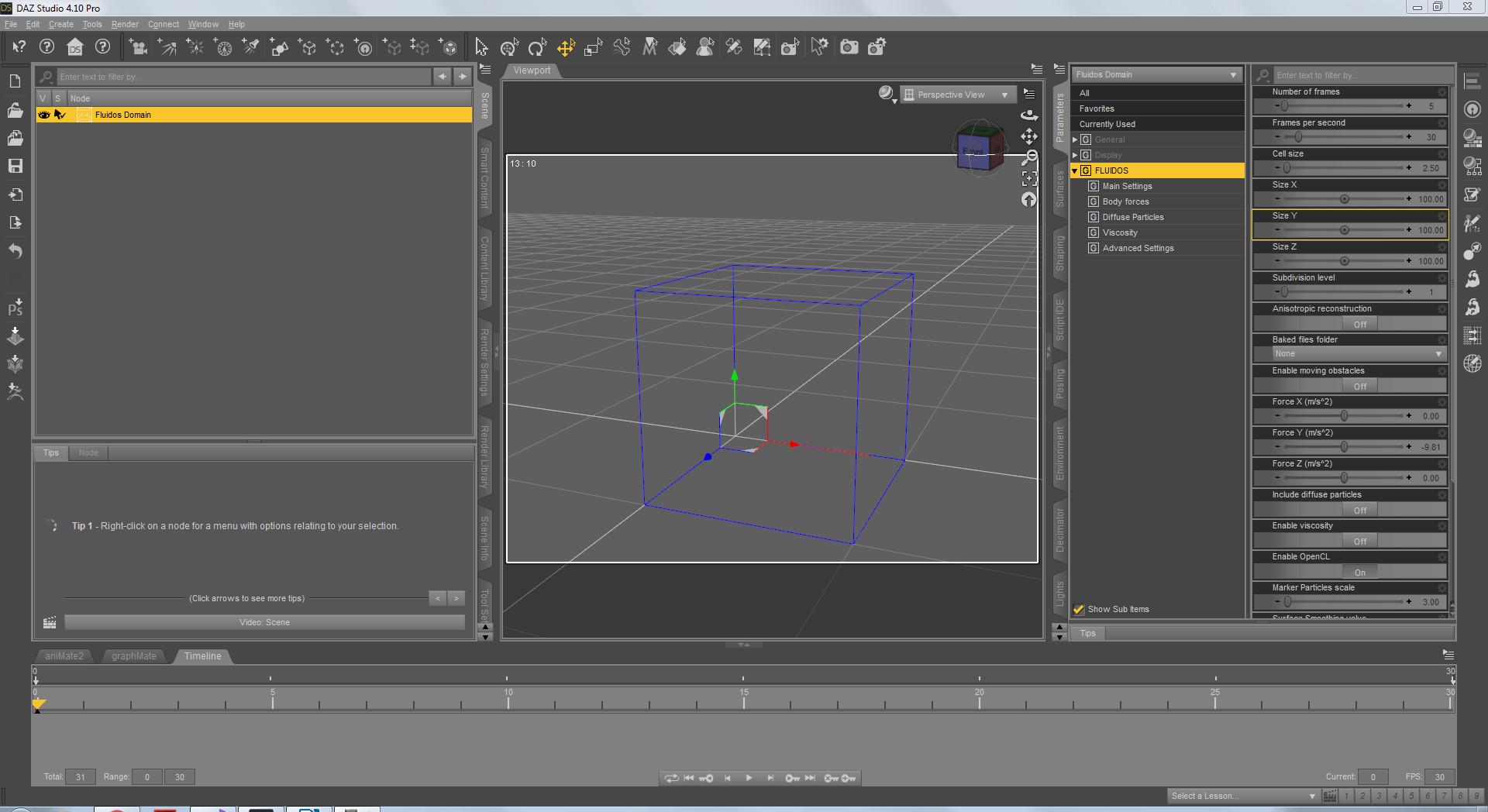
All the objects to be part of the simulation must be parented to the domain.
I added some scripts to aid in the setting of the central properties of the domain (only a click on one of them). You set the frames you wish to last the simulation.
For the simulation itself, yes, you press a button.
The results will be shown a Mesher you must add too.Don't worry. The package includes a manual, two example scenes, a recipes book and two video tutorials. And you can ask me too.
 OT: New Nvidia Cards to come in RTX and GTX versions?! RTX Titan first whispers.
So then to answer my own silly questions I've come up with the following:
1. Render speed should mean more than Vram. If a new card offers the same vram but double the performance speed, it is in my opinion easily worth double the price of the previous card. Deep down for every still render I've ever made I had a full movie in my head, or at least a short scene. Getting render times to the point that still scenes can become animations is a goal many of us assumed impossible long ago, and are unwuilling to reconsider. But the time may be coming for us to embrace animation workflows rather than disregard them. Double the rendering speed means at least a few more people willing to tackle animations, and that positions us to be more professional overall especially here at Daz3d.
2. Vram limitations are not going to be an issue forever. Octane and many other apps of this nature have out of core memory options that Iray might also get someday, perhaps even "Daz soon." However for the current atmosphere Vram is a central consideration. But still secondary to speed.
3. Obviously Nvidia isnt only interested in the gamers and miners, they've obviously considered the 3d rendering niche and see a potential for profit there, if nothing more than an offshoot of the gaming crowd. Lets not punish them by rejecting their preliminary efforts as not good enough. They'll just switch focus to a more grateful audience and officially forget about us.
Conclusion:
There is no such thing as a "smart" time to buy one of these damned chips. You are going to waste money no matter how you do it. One decides to either ride the front of the wave or the back. These chips aren't like a pair of shoes, that either fits or it doesnt. All of these card products "work" and perform their duties acceptably. If you buy a Turing chip today (no matter how much you payed for it) it will be irrelevant within 2 years because Nvidia makes money from selling new chips and will certainly improve on both hardware and software. But at least its new, has at least a 2 year life under warranty, and could probably last you up to 8 years. Waiting 2 years to buy last generations cards means you're always a step behind, which could be significant such as pre RTX vs post RTX. 6-8x performance is game changing. Warranties expire...applications become more advanced and move away from your legacy card's niche...
We know that cards are always overpriced when they are first released, so I see no reason to be offended by the price. I paid roughly 1K for each of my two Titan Blacks...still paying them off on the the credit card.... and they are a cruel joke now compared to what other cards more advanced can offer. I had no idea that a month after purchasing my Blacks Nvidia would release a brand new architecture with cards cheaper than mine that were double the performance. Without knowledge of the future, one will almost certainly waste money in this venture. I wasted money, but I get that this is how the game operates, and I for some reason still find myself wanting to play.
Carrara - where to next?Please remember
Not currently in development does not mean that it will not come back into the development system at a later date,
Thank you for the timely reminder, Chohole. You're quite right, of course.
The challenge is in deciding how likely that is to happen. Obviously, until DAZ says "Nope, Carrara is done done done, we're never touching that again," then there's a chance that it might be revived. At the moment, however, it seems as if DAZ is thriving on selling content. It doesn't really need to do much software development.
DAZ|Studio development, of course, will continue because it helps drive the content side of the business: expect more new features like dForce, and support for advances in iRay and NVidia's newest hardware. But for Carrara (and Bryce, and even Hexagon) to be actively developed, developing them would need to make commercial sense, which is to say that they'd need to be part of some new business model.
There are two possibilities. The first would be to have the product itself as the driver of a new revenue stream. DAZ would have to position Carrara (or Bryce, or Hexagon) as a something-killer: an app that is going to compete head-to-head with the current market leaders, and take away dollars from them in sufficient quantity to make it worth DAZ's while. "We'll make a new version and we'll sell a few copies, mostly to the people who own older versions," isn't going to cut it. They need a new, bigger market. The problem here is that it's challenging to take software that's been neglected for a few years (however good it was to start with) and make it compete with the current state-of-the-art so compellingly that users are going to want to make the switch.
The other option would be if Carrara (or Bryce, or Hexagon) offered DAZ the chance to sell additional content. I suppose Carrara 9 might drive a limited number of additional sales. Bryce, with its more idiosyncratic file formats, might drive some Bryce-only content sales. Hexagon, being a much lower-level tool, probably wouldn't sell much more than a few instructional videos. But overall, I can't imagine any of them forming the basis of an independent, profitable ecosystem in the way that DAZ|Studio is.
I may be wrong. I have no idea what DAZ's master plan for world domination looks like. Maybe they're just waiting to execute a ten-year strategy with Carrara as a central pillar. And maybe there's another business case I haven't thought of.
But while Chohole is right that nothing is set in stone, I am doubtful that we will see another version of Carrara. The odds, in my view, are against it.
Daz 3D is part of

Connect
DAZ Productions, Inc.
7533 S Center View Ct #4664
West Jordan, UT 84084Licensing Agreement | Terms of Service | Privacy Policy | EULA
© 2026 Daz Productions Inc. All Rights Reserved.