-
Should Daz3d split its software to Pro and Home additions.
3DL is still in DS. I see no reason for splitting DS. You can still use it and the older things for it, such as PWToon. I just used that yesterday!
Dana
Mollytabby's Art Workshop@Diomede_Carrara thank you so much! I really appreciate your kind comments

I haven't done very much with pwToon lately, I really should try something new.
Mollytabby's Art Workshop
Over on her thread @Novica has challenged us to convert something we'd already done to a toon. I totally misread this and created a toon and because I don't have Sketch Toon Edge and Art Style Shaders I used pwToon instead. Ah well, I should have re-read the challenge before I started, lol. I also used Manga Marker Shaders to change the eyes, brows and lashes before I did the pwToon shader work. The model is Dolly for Genesis 8 female.
It took me quite a few hours and I haven't really mastered the eyes with the pwToon shaders, but I'm happy with the way it turned out given this was a bit of relaxing fun.
I know I am way behind on your thread, but I wanted to say I love this. Well done.
Will future versions of Daz Studio have a "Comic Book Preview" like Poser 11?There are a few options for Studio w/ Iray...
And a few others which (I believe) use 3Delight...
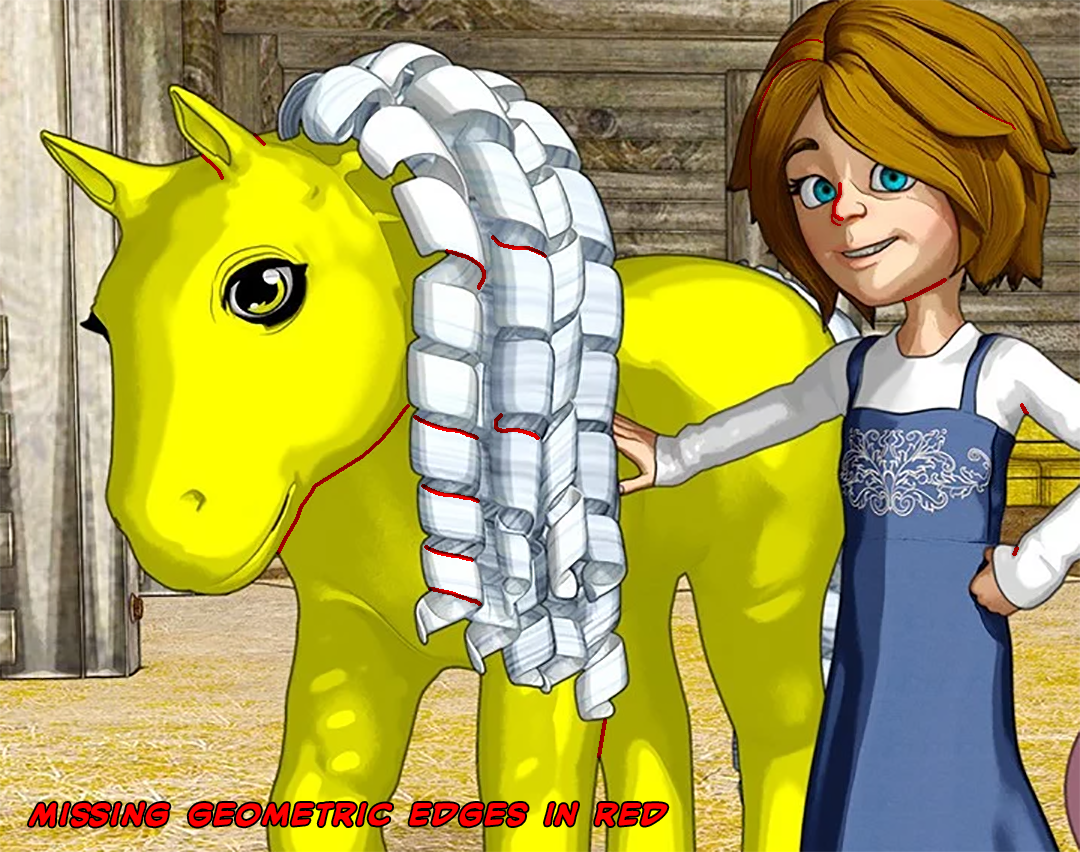
Thanks for the list. I have all three of the 3Delight products (plus LineRender 9000) and they are all okay for that they are, but none of them duplicate the ease and consistency of the Poser 11 Comic Book Preview. And even those that do a "decent" job fall short of true geometric edges If you take a look at this pic from the OSO Toon Shader, you will see that the outlines only appear when you have different materials overlapping (shirt over skin, dress over shirt, hair over skin). But when you have a single texture for two overlapping things, the outline isn't there. Look at the legs on the horse or the jawline on all the figures and you will see that the edge lines are missing.
Here's the original art from the OSO Toon Shader (which looks like a cool product, but it doesn't do what I need):
{clipped, see original post above}
Here's some highlighted edits to show you what's missing:
{clipped, see original post above}
Please note that I did not mark all of the missing geometric edges on anyone's hair. There was just too much there.
Yep, I see what you mean. Oso and I have had some discussions about the challenges of Iray MDL verses the good ole RSL that we have in 3Delight. Iray makes a lot of assumptions about what you're trying to render built into the engine; so determining things like light / camera angles is much more difficult in MDL than RSL. For instance, MDL doesn't make it very easy to access the underlying geometry of the object and is really picky about things like angle of incidence for a material. I think this is what you're seeing with the internal edge lines not being drawn the way you'd like.
I defer to your technical expertise on this. Although I do have a good general knowledge of the differences between 3Delight and Iray, I definitely am not well versed in the underlying technology. For me, it seems apparent that Iray is focused squarely on delivering photorealism (and in the right hands with the right shaders, I believe it achieves that goal admirably). I'm really focused on getting clean lines and that's not what happens when you use any of these shaders. If you look closely at the internal "lines" generated by the Toon shaders and you'll notice that they have rough, fuzzy edges. This is caused by they are not really lines, but intense shadows captured along the geometry (this is primarily what is happening when you use the old geoshell method of faking geometry. There's nothing wrong with that (you can simulate some nice varied-width lines that way), but it's just not what I'm after.
I think you're exactly right. MDL allows the author to detect when you're near the boundary of a material, which is why the outline of the horse looks okay, as does the inner ear (which is a different material). But within the 2D boundary of the material in the final image, it doesn't easily allow you to identify when the contour of the geometry should generate a new edge line. So things like where the neck and body connect are not well defined. You can try to "fake" it with shadows, but it won't look the same.
BTW: What does MDL and R[S]L stand for?
Material Definition Language (MDL) and Renderman Shader Language (RSL) ... the languages developed by Nvidia and Pixar to define materials and shaders to Iray and 3Delight respectively.
Will future versions of Daz Studio have a "Comic Book Preview" like Poser 11?There are a few options for Studio w/ Iray...
And a few others which (I believe) use 3Delight...
Thanks for the list. I have all three of the 3Delight products (plus LineRender 9000) and they are all okay for that they are, but none of them duplicate the ease and consistency of the Poser 11 Comic Book Preview. And even those that do a "decent" job fall short of true geometric edges If you take a look at this pic from the OSO Toon Shader, you will see that the outlines only appear when you have different materials overlapping (shirt over skin, dress over shirt, hair over skin). But when you have a single texture for two overlapping things, the outline isn't there. Look at the legs on the horse or the jawline on all the figures and you will see that the edge lines are missing.
Here's the original art from the OSO Toon Shader (which looks like a cool product, but it doesn't do what I need):
{clipped, see original post above}
Here's some highlighted edits to show you what's missing:
{clipped, see original post above}
Please note that I did not mark all of the missing geometric edges on anyone's hair. There was just too much there.
Yep, I see what you mean. Oso and I have had some discussions about the challenges of Iray MDL verses the good ole RSL that we have in 3Delight. Iray makes a lot of assumptions about what you're trying to render built into the engine; so determining things like light / camera angles is much more difficult in MDL than RSL. For instance, MDL doesn't make it very easy to access the underlying geometry of the object and is really picky about things like angle of incidence for a material. I think this is what you're seeing with the internal edge lines not being drawn the way you'd like.
I defer to your technical expertise on this. Although I do have a good general knowledge of the differences between 3Delight and Iray, I definitely am not well versed in the underlying technology. For me, it seems apparent that Iray is focused squarely on delivering photorealism (and in the right hands with the right shaders, I believe it achieves that goal admirably). I'm really focused on getting clean lines and that's not what happens when you use any of these shaders. If you look closely at the internal "lines" generated by the Toon shaders and you'll notice that they have rough, fuzzy edges. This is caused by they are not really lines, but intense shadows captured along the geometry (this is primarily what is happening when you use the old geoshell method of faking geometry. There's nothing wrong with that (you can simulate some nice varied-width lines that way), but it's just not what I'm after.
Right now my best hope is that, somehow, Poser will be able to add native support for the Genesis 8 figures (and above).
BTW: What does MDL and RDL stand for?
Will future versions of Daz Studio have a "Comic Book Preview" like Poser 11?There are a few options for Studio w/ Iray...
And a few others which (I believe) use 3Delight...
Thanks for the list. I have all three of the 3Delight products (plus LineRender 9000) and they are all okay for that they are, but none of them duplicate the ease and consistency of the Poser 11 Comic Book Preview. And even those that do a "decent" job fall short of true geometric edges If you take a look at this pic from the OSO Toon Shader, you will see that the outlines only appear when you have different materials overlapping (shirt over skin, dress over shirt, hair over skin). But when you have a single texture for two overlapping things, the outline isn't there. Look at the legs on the horse or the jawline on all the figures and you will see that the edge lines are missing.
Here's the original art from the OSO Toon Shader (which looks like a cool product, but it doesn't do what I need):
{clipped, see original post above}
Here's some highlighted edits to show you what's missing:
{clipped, see original post above}
Please note that I did not mark all of the missing geometric edges on anyone's hair. There was just too much there.
Yep, I see what you mean. Oso and I have had some discussions about the challenges of Iray MDL verses the good ole RSL that we have in 3Delight. Iray makes a lot of assumptions about what you're trying to render built into the engine; so determining things like light / camera angles is much more difficult in MDL than RSL. For instance, MDL doesn't make it very easy to access the underlying geometry of the object and is really picky about things like angle of incidence for a material. I think this is what you're seeing with the internal edge lines not being drawn the way you'd like.
Will future versions of Daz Studio have a "Comic Book Preview" like Poser 11?There are a few options for Studio w/ Iray...
And a few others which (I believe) use 3Delight...
Thanks for the list. I have all three of the 3Delight products (plus LineRender 9000) and they are all okay for that they are, but none of them duplicate the ease and consistency of the Poser 11 Comic Book Preview. And even those that do a "decent" job fall short of true geometric edges If you take a look at this pic from the OSO Toon Shader, you will see that the outlines only appear when you have different materials overlapping (shirt over skin, dress over shirt, hair over skin). But when you have a single texture for two overlapping things, the outline isn't there. Look at the legs on the horse or the jawline on all the figures and you will see that the edge lines are missing.
Here's the original art from the OSO Toon Shader (which looks like a cool product, but it doesn't do what I need):

Here's some highlighted edits to show you what's missing:
Please note that I did not mark all of the missing geometric edges on anyone's hair. There was just too much there.
Will future versions of Daz Studio have a "Comic Book Preview" like Poser 11?There are a few options for Studio w/ Iray...
And a few others which (I believe) use 3Delight...
More Non-photorealisitic Renders (NPR II)VSS was on sale yesterday, so I just had to.
Using my usual test girl for a couple of first attempts, with different lighting setups.
For whatever reason the shader takes its sweet time on transmapped anything, no matter what lighting is used.
The effect seems more dynamic with a default light as opposed to UE.
I'm gonna spend some time cracking this one open, the way I did with PWToon.
Asking about camera synch between Daz and poserHi guys ,just getting Poser 11 lasr week. I wonder about snycronize camera between Daz Studio and Poser but not yet found workaround to get same camera POV in both program . Reason why I need it because I want to overlay Poser Comic book preview render over Daz and Pwtoon If anyone have tips I woyld like to learn about it ThanksMore Non-photorealisitic Renders (NPR II)Robotech: Super Veritechs
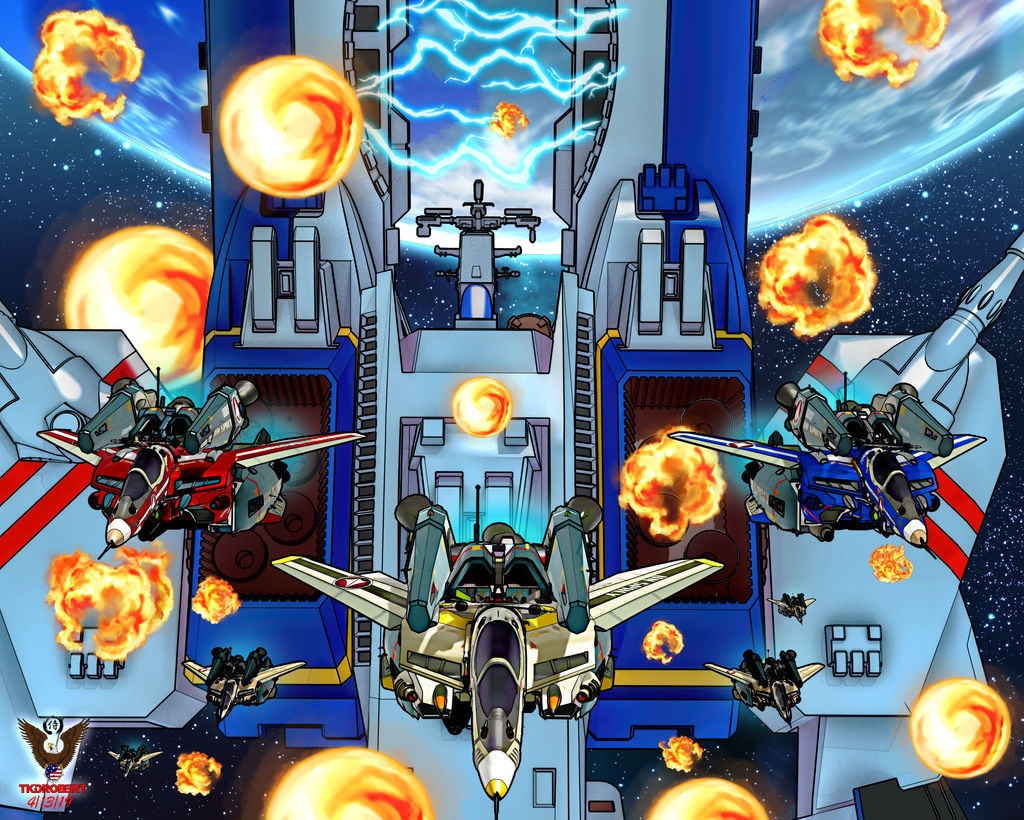
Awesome Render !!!
On the fighters, I used pwToon with your settings. Thank you for that. I've been playing with them and I'm please with the results I'm getting.
More Non-photorealisitic Renders (NPR II)Hi guys these my new NPR experiments. I'll posting in Gdrive the PSD file if you interest to look how flexible this method to generate multiple variation but still easy to cintrol
There is no filter use in these sample images Those composed by layering flat+ outline which you can get via default scripted outline render - AO pass and multiple shadow directions using white and grey PwToon settimg (handy if you want anothet options or feel)
Smooth transition created by blending AO and smooth PwToon grey render. Highlight parts also created with inverted shadow pass .
NOTE : These images and PSD file not intended for perfect final result NPR image but just to show you how flexible this method,at least for me ;) so ignore the foolish color I've used
https://drive.google.com/file/d/1YZwprAv-D0Rjqp5_Al4JevLiMcd9qqz6/view?usp=drivesdk
3D Comic Book Tips And Pictures'm still experimenting with styles. As predicted I found it far more difficult to get a good female result. I'm also finding it hard to replicate the same look for multiple panels/images.
The black and white female image was easy to create and I actually quite like the look of it. I'm going to try out a few different poses, and male characters as well and see what they look like on different backgrounds.
I may very well be meandering down a creative path and end up no where. But as long as it is fun, I don't mind.
How you workflow to create those images ?
I`ve been experimenting with this method in last 2 days , and it seems easier to handle and makes me focus doing editing in PShop ( and hopefully to refine the line art in Affinity Designer ) without spend too much time in DAZ studio ( re- render - adjust shader color - lighting etc)
All base (Flat - Outlines) done via DAZ default outline render script . After swtich tje render engine , there is COLOR ID shown in every surface /material . From there you can assign simple color to creating flat render or to mask every element you need to recolor/edit in PSHOP
After that I`m creating multiple shadow variation and AO . So I have multi option without rerender the scene again .
Note : Literally you can remove every texture in your scene when building those layer element , especially if you want to let PShop handles everthing than DAZ , although PwToon help me to create fast shadow and AO render , but in genereal those mapless
Here the screenshot my PS layer
That image is awesome, you've done a great job in creating a comic/cartoon style.
The shadows are the right colour in contrast to the base and they are clean/sharp but without being too digitised. I think you've done a great job of making this work.
The colours are chosen from a limited pallette, which always seems to work for comic images. If you were to apply a black and white filter, I'm pretty sure this would look like a good black and white manga image.
I like that you've done an AO pass. I've not considered ambient occlusion. I might experiment with that.
Your workflow looks similar to one of my techniques. I always work with selection flats, background mask and a colour pass. I also have shadow passes - usually several of them and I use those to paint in different colours.
I usually achieve my shadows by using a single spot light in Unity. I have no ambient lighting and I set the intensity for the spot light to something like 600,000. The light then renders only pure blacks and white, similar to a threshold filter, only you can obviously move the light around the scene.
If you are interested in my technique, I will send you a free coupon for my Udemy course. I mostly work in Unity, but there may be something you can take from that to experiment with in your workflow.
3D Comic Book Tips And Pictures'm still experimenting with styles. As predicted I found it far more difficult to get a good female result. I'm also finding it hard to replicate the same look for multiple panels/images.
The black and white female image was easy to create and I actually quite like the look of it. I'm going to try out a few different poses, and male characters as well and see what they look like on different backgrounds.
I may very well be meandering down a creative path and end up no where. But as long as it is fun, I don't mind.
How you workflow to create those images ?
I`ve been experimenting with this method in last 2 days , and it seems easier to handle and makes me focus doing editing in PShop ( and hopefully to refine the line art in Affinity Designer ) without spend too much time in DAZ studio ( re- render - adjust shader color - lighting etc)
All base (Flat - Outlines) done via DAZ default outline render script . After swtich tje render engine , there is COLOR ID shown in every surface /material . From there you can assign simple color to creating flat render or to mask every element you need to recolor/edit in PSHOP
After that I`m creating multiple shadow variation and AO . So I have multi option without rerender the scene again .
Note : Literally you can remove every texture in your scene when building those layer element , especially if you want to let PShop handles everthing than DAZ , although PwToon help me to create fast shadow and AO render , but in genereal those mapless
Here the screenshot my PS layer
More Non-photorealisitic Renders (NPR II)My Oolong + Cold Fusion, pwtoon.
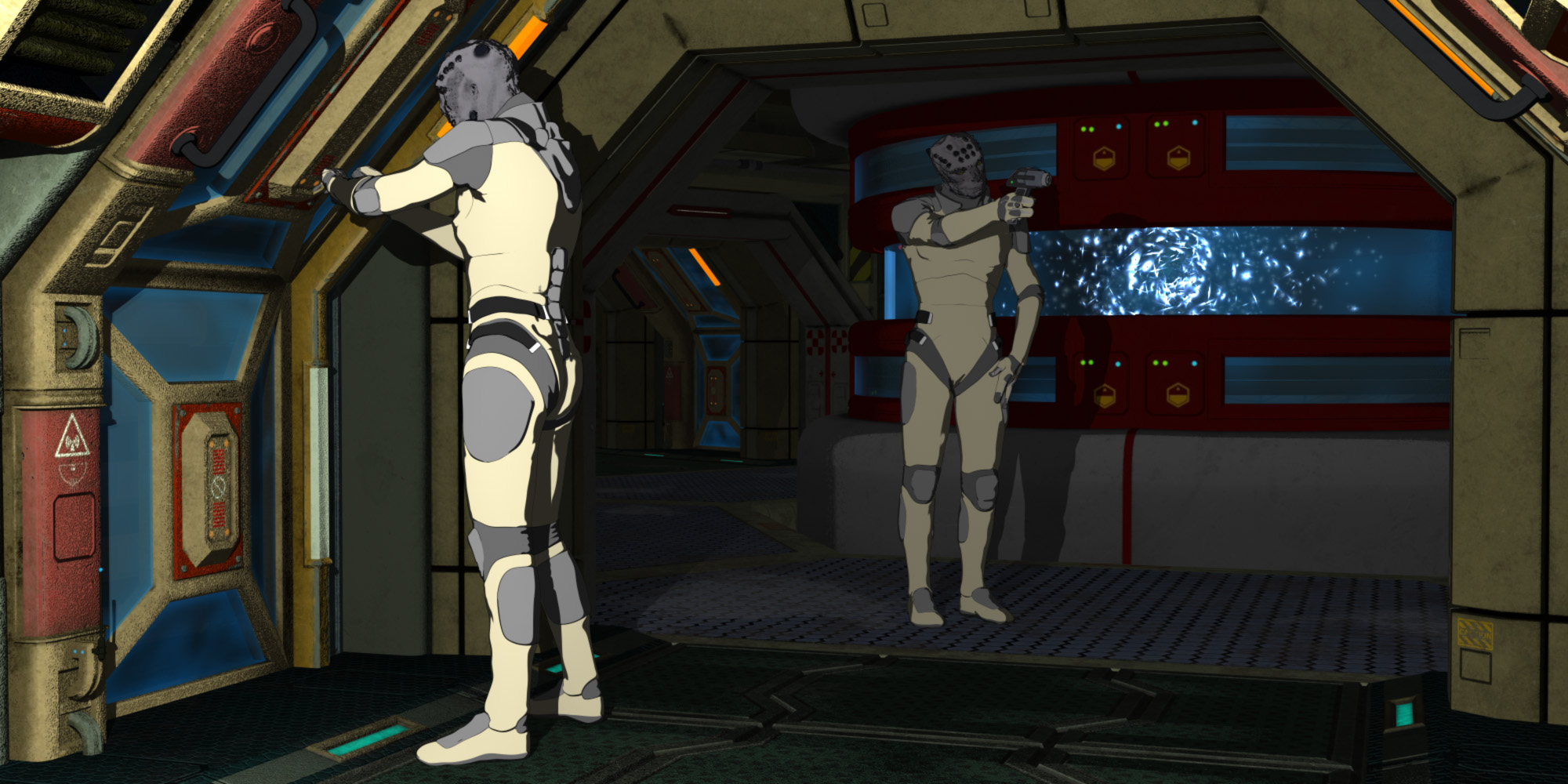 Is Daz going to make a "standard" Anime and Toon figure?
Right now, Sakura and Hiro 5 are my go to's. I also have H3 and A3 shapes for Genesis (1). I recomend getting Visual/Manga Style Shaders and/or pwToon as well. If you're not already aware, check out the Anime Cafe thread here for more help-: https://www.daz3d.com/forums/discussion/295231/anime-cafe#latest
How to make and render Animation in DAZ.Render in 640x480 size frames if you render in iRay. If you render in pwToon then go for UHD. You'll want to add voice and other sounds in Blender or some expensive 3rd party package so sorry, if you though you could avoid Blender you can't, even early silent films have music sound tracks. There are 100s if not thousands of videos on all aspects of Blender on YouTube that are much more skilled at Blender than I so I'm not going to waste time telling you the merits of Blender.
If you do actually render in DAZ Studio then search YouTube for DAZ 3D's own short tutorials on how to animate in DAZ Studio. It's not hard really but even if the tools were top notch; animation is lots of tedious correction of intended animation movements with your 'storyboarded scenes' serving as keyframes (the most interesting dramatic scenes you'd choose for DAZ stills to render) if you want to look at it that way. It is easy though to get mediocre animations very fast in DAZ Studio; much faster than in any other tool I've used for sure; although I've not used iClone that others have used. Although I haven't tried those animations you make in DAZ Studio should then be exportable as FBXes (without the skinning) for retargeting and refinement in Blender, for example.
I think you might be able to get iClone 6 for free if you want to try & animate in it before purchasing a full version of iClone so ask iClone support about that. iClone may be beyond your budget though a sround-tripping capable version is pretty close to a $1000 dollars.
Question about Terradome 3The ground shaders are custom, as they react to the terrain such as the overall height and the slope of the terrain, and the atmosphere wouldn't be useful either as it is included. Basically if you like the ground shapes it can create, and you already have ground and water shader presets for 3delight that you can use instead of what is included, you could make it work in 3delight, but it isn't going to look much like the promos. I've only used it in 3delight where I've used pwToon and am looking for an illustrated background effect, so I expect it to look quite a bit different.
Others might have recommendations of existing 3delight shaders that would work well with the geometry included in terradome.
Welcome to Hatsune Miku Anime Manga Cafe ☕One of my "Test girls" who's look eventually got folded into Joy Kinsey from my Mysterious Missouri comic.
Here she is rendered in PWToon, and ehanched by a quick CRT-style postwork I threw together. I love the late 80s/Early 90s anime aesthetic, she's basically my nod to that style.
She's also appeared in a very short animation I did in Moho w/Vegas Pro.
More Non-photorealisitic Renders (NPR II)It still needs just a bit of tweaking, but this dzDefault+Postwork combo I'm cooking up is nearly ready for a public tutorial release.
I would love to learn about your approaches since all about cel/Toon/Smooth Toon always my thing
I'm geniunely curious as to what advantages AoA lights have over regular lights, when using something like PWToon.
I`m just tinkering and see if tool I`ve used behave like I want or react with my simple logic LOL
First of all , I have very limited knowledge about how Nagic math behind shader and lighting in Daz Studio . So I`m not sure if I can give you proper and correct answers . And since I`m in process to reformat my HD I cant give you sample images , but I`ll be posting those render test after everything is done .
There are things which at I think AoA light sets give me leverage than another light sets
1. Tagging Features and Alternate Primitive Shadow
For tagging I can choose which item or materials I need to lit up or not . Sometimes I found some shader setting already Ok on its own but not OK (washed out/color shifted) when I did global lighting adjustment .Meanwhile Alternative Primitive shadow although only slightly makes differences but for Toon or Cel Shading I tend to get simplified shadow shapes . Thats mostly useful for Hair shadow in figure`s face - nose - Cloth or something like that
2 . Ambient lighting and For More define shapes
Lately I`m doing experiment to find solution to speed up my workflow to create NPR images. And one of the trick I found was using proper and finished background images to start with . I`ll be showing you in another post about how using Finished BG images can help you to get faster and better result without too much tinkering in Daz
Because of that method above , I need to have global light rig to makes my scene render closely at possible with my BG image. AoA Ambient light help me to get in there . Sometimes with AO on or OFF
My pwToon setup mostly depend on Rim features . AO function (at least for me ) help me to get better spread color /paint look in both main diffuse shading and Rim Bound . Another plus is to redefine slightly beveled or curved geometries shape which sometimes lost because most Toon Shader tend to work in Ambient domain
Thanks for asking
Daz 3D is part of

Connect
DAZ Productions, Inc.
7533 S Center View Ct #4664
West Jordan, UT 84084Licensing Agreement | Terms of Service | Privacy Policy | EULA
© 2026 Daz Productions Inc. All Rights Reserved.