-
Transfer Utility problem
If I spent a lot of time making a garment that I wanted to use on the Ogre HD model, I would:
- import the garment on Ogre HD
- ensure transformations are all baked (i.e., do not move/translate/scale the garment after importing it!)
- rig it using Transfer Utility (ensuring the reverse source shape option was ticked)
- if there is any weird pokethrough (expected to be relatively minor and perhaps no massive ballooing as described), then load the correct shape of the garment as a morph using morph loader pro
- dial in new morph corrective (potentially you can link the morph to the Ogre HD morph as a "Full Body Morph (FBM)" if you feel so inclined).
- Test if working when figure is posed
How to use DAZ Studio to create 3D-print physical miniatures?There are online "stores" with very high-end printers that will provide the fine detail you'd need for a decent model (single item). Most affordable "home/office" printers would struggle to produce facial-features etc.
Face Transfer plugin is for face transfers https://www.daz3d.com/face-transfer-2.
Neither of the george's will sue you if it's personal use - just like if you did a painting/portrait to hang on your wall
3D printing. You could do in "parts" and then glue them but usually they're printed as one model (like toy-soldiers) - the "stores" mentioned would prob do it like that
There's a Windows "component" that will allow you to import (obj, I think) and then links to stores that offer the printing eg https://learn.microsoft.com/en-us/shows/3d-printing/windows-10-imaterialise
Transfer Utility problemdefine 'ballooned up'. Or just post an image, as that would probably be helpful.
I dont think there is a problem using transfer utility that could not be very easily fixed with an additional corrective or geometry replacement.
[SOLVED] Subtle Distortion of Genesis 8 and 8.1 Female Figuresgregadams-studio262 said:
Send out an update to fix 8.1, this happens all the time when you DAZ update something else.
JUST FIX IT!!!!!!
Geenrally this is a product issue, not a Daz Studio issue, and the fix is to update the morph or character that has a non-zero value on loading. If it is from a product then it should certainly be reported to the store (if Daz) or vendor (for other stores) once identified.
Face Transfer 2 ErrorJust started getting the attached error message when using Face Transfer 2. Prior to this is worked perfectly. I tried using it with a Genesis 9 figure and Victoria 9 as well as different pictures. I get the same error message twice, click ok, and the face loads in.
I did install a Daz update for the Genesis starter pack prior to this so I'm not sure if that has something to do with it. Anyone else having this problem?
DAZ G8 => G9 => Diffeomorphic (Rest Pose issue)Optimize pose for IK was checked by default. Also, the tooltip mentions that is for the hand, and I'm talking about this happening right on the conversion to Rigify, not specifically IK. This happens before I try to pose anything.
All that said, I'm curious what "prebended" means, not familiar with that...but either way, that doesn't seem to affect the issue.
It really seems to be related to the morph changing the leg position. Basically, converting to Rigify "undoes" the translation of the legs that was applied in the morph. It puts the character back to the G9 A-pose, essentially. This wouldn't be a big deal on its own, but if I try to bring in clothes and change the armature to fit it to the character, this becomes a pain point.
Trouble creating morph for Gen9 using Blender 3.4
Got it, but still, there seems to be some problem as to why Daz thinks the vertex count is off. And nope, base resolution on and I removed everything, eyes ,eyelashes, hair, mouth etc. I ensured I export at 1% scale also. Not sure what else to try as like I said it won't even let me re-import the newly exported obj without even modifying it in blender.Richard Haseltine said:The count in DS is with SubD, but the morph needs to be on the base resolution - the reduced count would be correct. However, it looks too high which suggests you are including the additional fitted elements (eyes etc.) in the OBJ.
G8 male to female morphs and vice versa?Hello Guys!
Thanks for the info. I found the G8M morph for G8F and applied it at 100%. Then set the body morphs for both Sasuke and Sukura at 0%. Then I set the head morph for Sukura to 0% leaving just the Sasuke head morph at 100%. I also removed Sukura's eyebrows and eyelashes. Then I added the materials for Erik for G8M although I did this after putting him into the H-Suit so not sure how well that texture holds but kept Sasuke's eye textures. I Iooked through my content and I found I had already purchased the G8 uv-swap a while back so will play around with that later. Although I might have to tweak the eye size a bit. I have to say its so far turned out better than what I expected and wasn't as complicated than I thought it would be.
The image attached shows the modified Sasuke on the left and the original Sasuke on the right. In both cases it's the H-Suit for GM8. The pose is from Adama for G8M. Looking at the hands the fingers need to be tweaked a bit but I think with most poses and expressions that might be necessary.
Many thanks
Andrew :o)
Trouble creating morph for Gen9 using Blender 3.4The count in DS is with SubD, but the morph needs to be on the base resolution - the reduced count would be correct. However, it looks too high which suggests you are including the additional fitted elements (eyes etc.) in the OBJ.
Compatible figuresIt is a Genesis 3 character, but it also uses Monique 7 (lalso a Genesis 3 character) morph.
You will be able to use the product withoout Monique 7, but then the character will look differently.
Trouble creating morph for Gen9 using Blender 3.4I just noticed that in Daz my model has 1 million + verticies but when imported to blender that number changes to 34,654..?
confirmed in the log:
Vertex count mismatch in Morph Loader
Trouble creating morph for Gen9 using Blender 3.4I'm having the same problem with G9F to blender. I've watched every possible tutorial and tried what feels like every combination of import and export settings. I even tried importing to blender then saving an obj without changing anything or sculpting and i get this error. I even tried importing the original obj from Daz right back into the Morph loader and get this error....
DAZ G8 => G9 => Diffeomorphic (Rest Pose issue)So, I had a few G8 figures that I converted to G9 according to the method here:
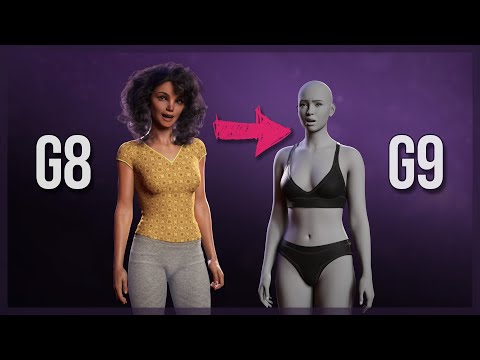
Basically, the end result is a G9 morph of the G8 character that you apply, then adjust rigging to shape (the G8 & G9 A poses are a little different), then ERC freeze on the morph to get the rig to follow the morph, at least so far as I understand.
I end up with a G9 figure with a morph that moves the legs. I get that into Blender w/ Diffeomorphic (using the latest one), which essentially works fine, but if I convert to Rigify, the legs move inward. I think what's going on is when it converts to rigify, somehow it's removing what the morph did to the position (not the features).
For some reason, it does not happen if converting to MHX.
I'm not sure if it's a Diffeomorphic issue alone or if I need to somehow "apply" the morphed position as a rest pose in DAZ or something. If the latter, I'd be most grateful for knowing how to do that...
puppy dog for daz?That depends. IF the wolf morph is for the Hivewire Big Dog, then I think you should be able mix the sliders like that.
puppy dog for daz?---
editl: aH WAIT WAIT I think I found a wolf! Can those items be mixed with the puppy morph? So like I buy the dog, buy the puppy morph and then the wolf and I can get a wolf cub?
puppy dog for daz?The Hivewire Big Dog at Renderosity has a nice puppy morph and various coat colors.
puppy dog for daz?Yeah, the Milenium animals are all pretty old. Roughtly around 2004, although the pup was a bit later.
The Hivewire animals are weightmapped figures and all come in Poser and Studio versions. There is a seperate puppy morph for their dog. Sparky, over on Philosopher's Egg has close to a dozen 3rd-party species and breed morphs for it. As well as a newborn puppy.
Most of the Hivewire lable products can be found over on Rendo.
"Mature Content" images blurredhttps://www.daz3d.com/fk-chrysalis-wings-for-genesis-9-8-and-81-females Shows up as mature from the sales page, but when you open it none of the images are flagged as mature. I didn't see anything in the description text that seems to be mature, unless the word "chest" is considered mature (for a wing morph). That's just a body part and should not be mature. I think the filters need a bit of tweaking.
Eyes popping out (Morph Loader Pro) (Solved)Edit>Figure>Rigging>Adjust rigging to Shape. You can then test it, assuming ti works you then use ERC Freeze to link the adjustments to the morph - right-click in the Parameters pane and check Edit Mode (if it isn't already), reset the pose, right-click on the slider for your morph and select ERC Freeze - look through the list of sub-components to make sure there are no interlopers, uncheck them if there are (you mainly should see joint centre adjustments), click Accept and test again to make sure everything worked, and that the figure goes back to normal when you zero your morph.
Transfer Utility problemWhat I meant is that I followed two tutorials. Both ended by me using the Transfer utility to make the shirts adhere to the figure.
The first one worked perfectly but the second one’s shirt ballooned up when I used the transfer tool.
I guess I will have to chalk this up as a learning experience. From now on I will periodically send the cloths that I make to DAZ and make sure that the transfer utility is working OK before continuing - I spent a lot of time on that second shirt getting it just right - what a waste of time since I can’t use it now. Oh well.
Richard - thanks for trying to help.
Daz 3D is part of

Connect
DAZ Productions, Inc.
7533 S Center View Ct #4664
West Jordan, UT 84084Licensing Agreement | Terms of Service | Privacy Policy | EULA
© 2026 Daz Productions Inc. All Rights Reserved.