-
Importing hand poses to Blender (DAZ to Blender bridge) – scale
Hi,
I've posed and keyframed a Gen 8 character in Daz, and now I need to import it to Blender. The figure is mostly animated with translations and rotations, but I have some necessary hand poses set on.
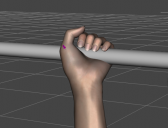
Whenever I tried importing it to Blender with DTB, the hand poses were not executed properly. From what I've found in other discussions, there are plenty of issues with the official Bridge and already came across the Diffeomorphic script, but as a Mac user, it's not an option for me. FBX results are terrifying, so I'm not going to even post them lol
I think scaling might be an issue, but I'm not sure. I've tried many settings, and here are the results for "Export Morphs" checked:
(morph sliders set on 0)
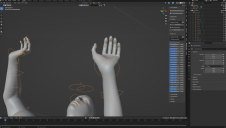
(adjusted morph sliders value)
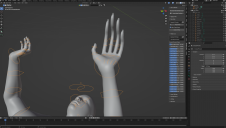
Now, "Export Morphs" unchecked:
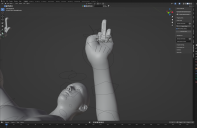
As you can guess, I'm not exactly happy with the results. Is there any way to fix it?
Export and import dForce dreadlocks hair from DAZ to BlenderHi there,
I have been spending days trying to export a Genisis 8.1 figure with a simple walking animation (from Mixamo) and Mehrloc Hair dreadlocks (https://www.daz3d.com/mehrloc-hair-for-genesis-8-and-81) from DAZ to Blender.
In Daz the hair is simulated and animates nicely, reacting to the walking animation. Now I am trying to get this to Blender

I tried the Daz To Blender bridge, the Diffeomorphic DAZ Importer and exporing/importing fbx files.
The only way I am able get the figure with the animation and hair from DAZ to Blender is by experting exporing/importing an fbx file.
However the physics on the hair do not work in Blender.

Is there a way to transport the hair animation to Blender?
Preferably also with the Beads in the hear which also animiate incorrectly (you can see them floating arround in the gif above) but I've been spending so much time on this I'm willing to just remove them from the figure.
Thanks!
Daz Install Manager (DIM) 1.4.0.94, Now Available! (*UPDATED*)I have had that happen a couple of times when CMS was not running (at the top, second-to-last icon). Somehow it got shut off. Installations were good, but no metadata. Re-installing with CMS running worked much better...
Daz Install Manager (DIM) 1.4.0.94, Now Available! (*UPDATED*)I downloaded a few days of purchases this morning on my laptop with DIM and it wasn't until I went to look at them in Smart Content that I found the first, an environment that was released in Feb 2022 had no metadata and I finally tracked it down in the Content Library. I looked at my installed tab of DIM and the other ten items that should have had a metadata checkmark were blank there. I first 're-imported metadata' for all, then uninstalled and reinstalled and the metadata tick showed back up.
I had looked at some of these items on two other systems on previous days and they had downloaded without issue. Not sure if this was a momentary glich or some went hicky in my DIM just then on the initial download, but I thought I should pass this on if someone else has trouble locating new purchases.
Diffeomorphic DAZ Importer version 1.6.0 releasedPadone said:
You can upload the duf file saved as pose preset, it should be a small file.
note. The pose preset is the same file you have to use with "import action", in case you loaded the scene file instead that could be your issue.
Sorry for the time I took to reply. I jumped deep into another project when this one hit a wall.
The I Miss the Old Days Complaint ThreadGordig said:
Rezca said:
Unrelated: Found I've been getting excellent results using the File-Export-FBX to get figures out of D|S with fully functional morphs buuuuut there's no way to fix the joint orientations which are all reset universally every time. Mmm always one thing or the other isn't it :P
*Edit to add that the "Fix Joint Orientations?" popup does nothing. The figures still import with bad joints. :(
How do you do that? I haven't put a lot of work into it, but I haven't been able to make it work for me.
Through the Export Rules menu in the FBX Export options,
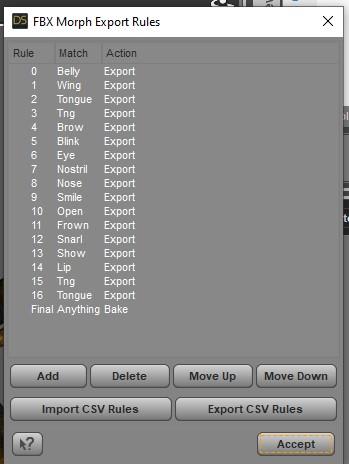
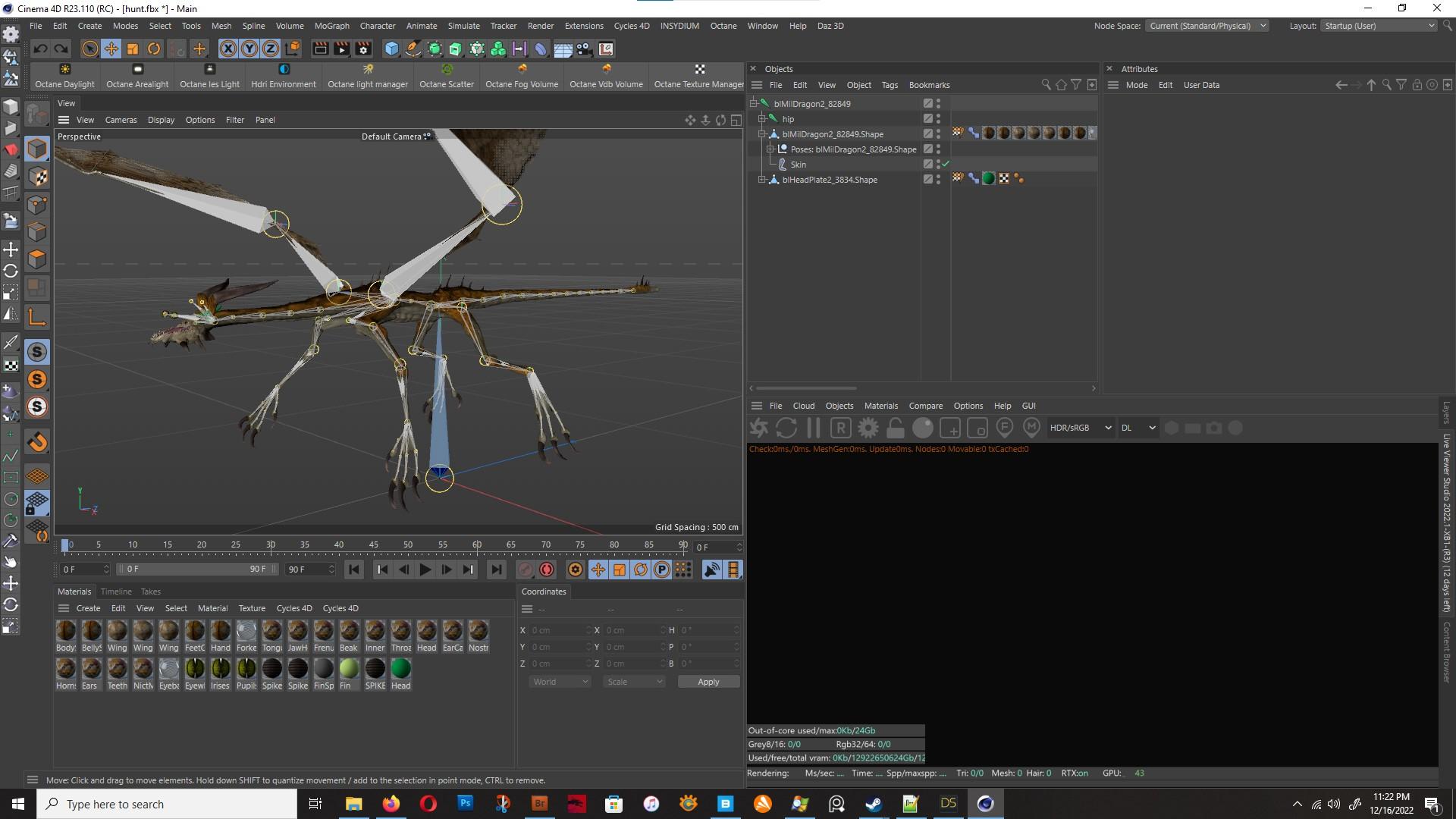
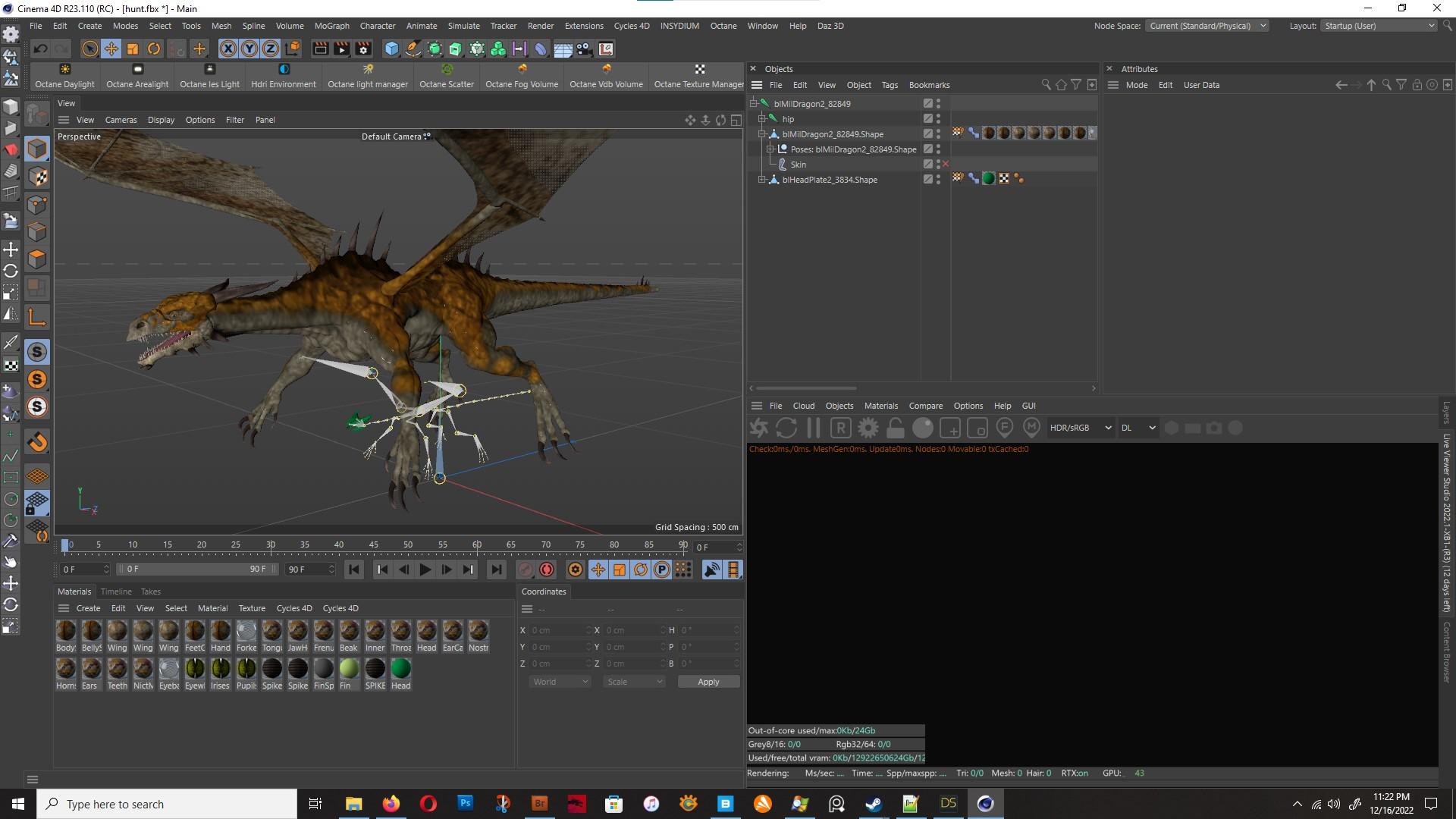
though with the MilDragon here it seems to only be taking the base morph into account since none of the head's morphs are present despite them being included in my export rules. Also once its imported, it ends up looking horribly deformed: If I reset the bind pose, then the mesh is now 'de-synched' with the Base Pose in the pose morph tag and so anything I do - scaling it, fixing joint orientations, etc - will have terrible results. If I leave it as it is then its this deformed mess.
 Expanding an object like a bracelet over clothes?
I don't think you can use mesh grabber to expand it, as it will expand it in one direction.
With Universal tool selected, have you tried to open Tool Settings and change the Coordinates when scaling?
In blender you can import the item, go to edit mode, select all and scale. If the item is uneven, then first place the 3d cursor in the center of the object and use the 3d cursor as pivot point. You can then reimport in DS and create a morph.
The I Miss the Old Days Complaint ThreadRezca said:
Unrelated: Found I've been getting excellent results using the File-Export-FBX to get figures out of D|S with fully functional morphs buuuuut there's no way to fix the joint orientations which are all reset universally every time. Mmm always one thing or the other isn't it :P
*Edit to add that the "Fix Joint Orientations?" popup does nothing. The figures still import with bad joints. :(
How do you do that? I haven't put a lot of work into it, but I haven't been able to make it work for me.
The I Miss the Old Days Complaint ThreadDanaTA said:
Rezca said:
Complaint: Grandpa's in the ER. From what I've heard it's nothing majorly serious, but it still has me a bit anxious.
I hope he is OK!
Dana
So far it seems like it, but still ... D:
Unrelated: Found I've been getting excellent results using the File-Export-FBX to get figures out of D|S with fully functional morphs buuuuut there's no way to fix the joint orientations which are all reset universally every time. Mmm always one thing or the other isn't it :P
*Edit to add that the "Fix Joint Orientations?" popup does nothing. The figures still import with bad joints. :(
Advice/Help - Multi-Model Look Bookit appear to me you just have to apply the next figure. These are 2 I just did..both G8.1. something happened to hair .. didn't really render but that is unrelated. The box shows my figure import setting.
Has anyone tried to render DAZ3D models in Lumion?Import garment from DAZ to Lumion, nothing was changed in Lumion, all textures are displayed correctly.
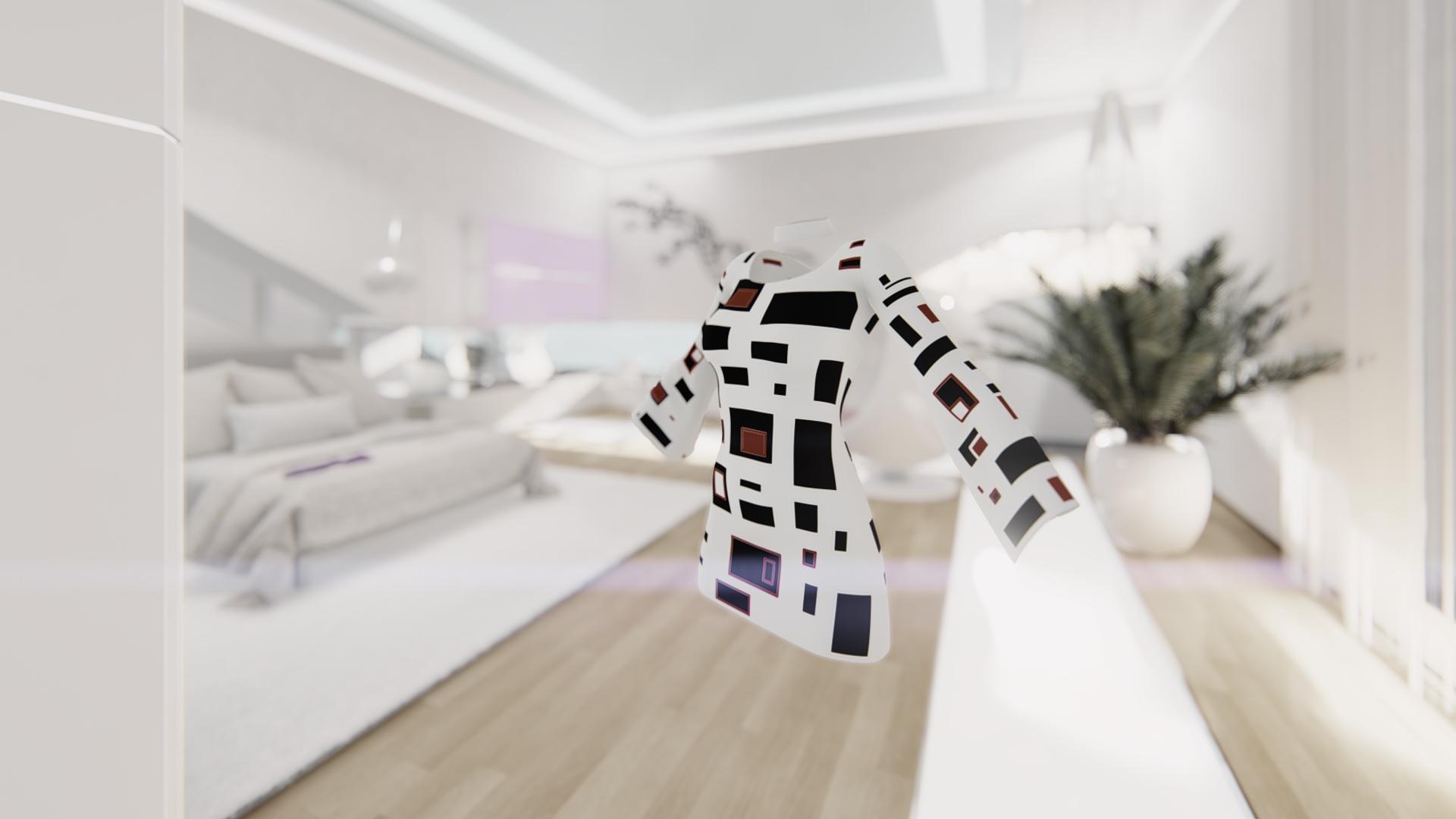
@ maybe I should use Lumion 10 instead.
Yes, try it, wish them good success
2D to 3DIs it possible to import two 2D photos that one has a slight different view angle to another and overlap each other to create a 3D image using Hexagon?
Thank you.
Has anyone tried to render DAZ3D models in Lumion?Hemm, hemmm, hemm....
Reapplying textures are something I would like to avoid. Because I have a personal project of mine that will have to render many images.
The problem with iray, it takes a lot of time. Meanwhile posing and controlling dresses in Marvelous Designer takes their portion of time.
I can only render a few images a day. 3-4 maybe.If lumion requires me to reapply textures everytime I import stuffs, it would not be time cost efficient either.
I guess lumion it's not suitable for my little project.
Anw, I don't have the lumion. My friend does. Don''t know what the license is. Why you asked?
AIUTO...CHI CONOSCE L’ITALIANO? PARTE TREDICIRuthven said:
arrivo a casa coi neuroni bolliti dal preparare buste paga)Ok, ora mi spiego meglio.

Nella lista "Lost & Found" tutti i prodotti hanno un metadata di base, se li strascini all'interno di una voce differente, tipo "Wardrobe", acquisiranno i metadata di quella sezione, apparendo in quella lista.
In genere la vecchia "cartella" dentro Lost & Found sparisce e rimane solo quella della nuova destinazione. In questo caso dvi modificare manualmente quella voce rimanente nel tab Content e suando il Content DB Manager. Per raggiungere la cartella giusta senza dover bollire il cervello ulteriormente, fai click destro sulla cartella vuota dentro lo Smart Content e clicca su "Show Category" e correggi o cancella le voci vuote.
Per una maggiore gestione puoi anche andare ad aggiungere dei Tag ai prodotti appena spostati, lo puoi fare direttamente dallo Smart Content dal tab Tags che appare di fianco a quello del negozio Content (la finestralla in fondo allo spazio dello Smart Content, se non la vedi clicca sulle tre lineette strette strette giù in fondo.
Ricorda che la vecchia categorizzazione viene perduta con questo metodo per cui ti consiglio di aggiungere ai tag il nome della categorizzazione precedente, giusto per sicurezza. Tuttavia le liste "Product" non vengono alterate per cui puoi ancora ricercare per prodotto se necessario.
Ah, dimenticavo: Puoi anche spostare l'intera categoria in un altra dal tab Content con "click destro-> Move category to" e mettendola in una di tua scelta.
[SOLVED] About clothes (and heels, since I expect a problem) and parenting for posesRichard Haseltine said:
Are you parenting or fitting (probably using the Transfer Utility to rig)?
Well... I'm not sure to understand what you mean.
From what' I've seen in a video, the clothes are imported and an operation is done, in Daz, on the geometry, afterwards. But... the video is already six years old and the pop-up window it shows never appears.
At this step, I don't know if I should parent in Blender, before, or not. In Blender parenting means "parenting clothes to skeleton" and then we can animate, change poses but... parenting and fitting in Daz sound to have different meaning. Currently, I really don't see at all what steps I should follow in Daz to get the same result. Fitting appears for the figure (I mean the genesis character) but it can't find the clothings (for which no fitting option appears).
EDIT : Ok, I've tested again, I see what you mean about the Transfer Utility. But now the scales and rotations are messed up. I guess I have to change the parameters in Blender during export.
EDIT 2 : Still messed up, whatever transfer parameters I'm using... Everything is properly displayed after import but transfer mess up things. I have no "ghost" from Blender since all transforms are applied and there's no "parents". But Transfer Utility change scales, rotations... Despair.
EDIT 3 : My bad... OK that's just it doesn't like clothings exported as FBX. Only wavefront format works fine. But... heels broke...
Help with a specific model!Gordig said:
The fur is LAMH, which doesn't render in Iray. If you have Catalyzer, you can use that to render the Catalyzer preset. Otherwise, there's a separate add-on that uses dForce hair, or you can export the LAMH as an OBJ, import that and render with whatever Iray settings you want.
So I installed the Catalyzer but it's not showing up in the windows panel?
Help with a specific model!The fur is LAMH, which doesn't render in Iray. If you have Catalyzer, you can use that to render the Catalyzer preset. Otherwise, there's a separate add-on that uses dForce hair, or you can export the LAMH as an OBJ, import that and render with whatever Iray settings you want.
DAZ achieves new lows in customer support (but appears to have ambitions to go lower still)Richard Haseltine said:
NorthOf45 said:
IceCrMn said:
Wouldn't they need to have different metadata? They have different folder structures?
Not sure about Central, but Connect certainly uses different names for the folders.
Asset location is one thing, the files cannot be ignored, but the associated data (Content Type, Default Category, Compatibilities, etc.) should be the same. I do not know how DAZ manages it, but if it doesn't come from a common source, there will be no end to the chaos.
And, what @Barbult said...

The files are in the same place relative to their content directory, the system doesn't need special metadata beyond isntallation method to tell it where to look in each case.
The difference I saw in the case I referenced,was a difference in data such as compatibility, category, etc., i.e. the guts of what makes Smart Content smart.
DAZ achieves new lows in customer support (but appears to have ambitions to go lower still)NorthOf45 said:
IceCrMn said:
Wouldn't they need to have different metadata? They have different folder structures?
Not sure about Central, but Connect certainly uses different names for the folders.
Asset location is one thing, the files cannot be ignored, but the associated data (Content Type, Default Category, Compatibilities, etc.) should be the same. I do not know how DAZ manages it, but if it doesn't come from a common source, there will be no end to the chaos.
And, what @Barbult said...
The files are in the same place relative to their content directory, the system doesn't need special metadata beyond isntallation method to tell it where to look in each case.
DAZ achieves new lows in customer support (but appears to have ambitions to go lower still)IceCrMn said:
Wouldn't they need to have different metadata? They have different folder structures?
Not sure about Central, but Connect certainly uses different names for the folders.
Asset location is one thing, the files cannot be ignored, but the associated data (Content Type, Default Category, Compatibilities, etc.) should be the same. I do not know how DAZ manages it, but if it doesn't come from a common source, there will be no end to the chaos.
And, what @Barbult said...
Daz 3D is part of

Connect
DAZ Productions, Inc.
7533 S Center View Ct #4664
West Jordan, UT 84084Licensing Agreement | Terms of Service | Privacy Policy | EULA
© 2026 Daz Productions Inc. All Rights Reserved.