-
Is there any desire/use for new Genesis 1 items?
While I'm pretty much a hardcore Genesis 2 stan (I use G3 from time to time after the GenX2 update, but only where absolutely necessary, since not all my morphs transfer 1:1), I still use Genesis to create alien/creature bases, then export with GenX2 to G2. I haven't come across any legit creature/alien morphs for Genesis that really push it that aren't made by RawArt or DarioFish, though. (But I do loves me some RA and DF. They make good stuff)
But I recall DarioFish teased some new alien/creature shapes for G1 a while back on their DeviantArt page, but they haven't said anything about releasing them yet. D;
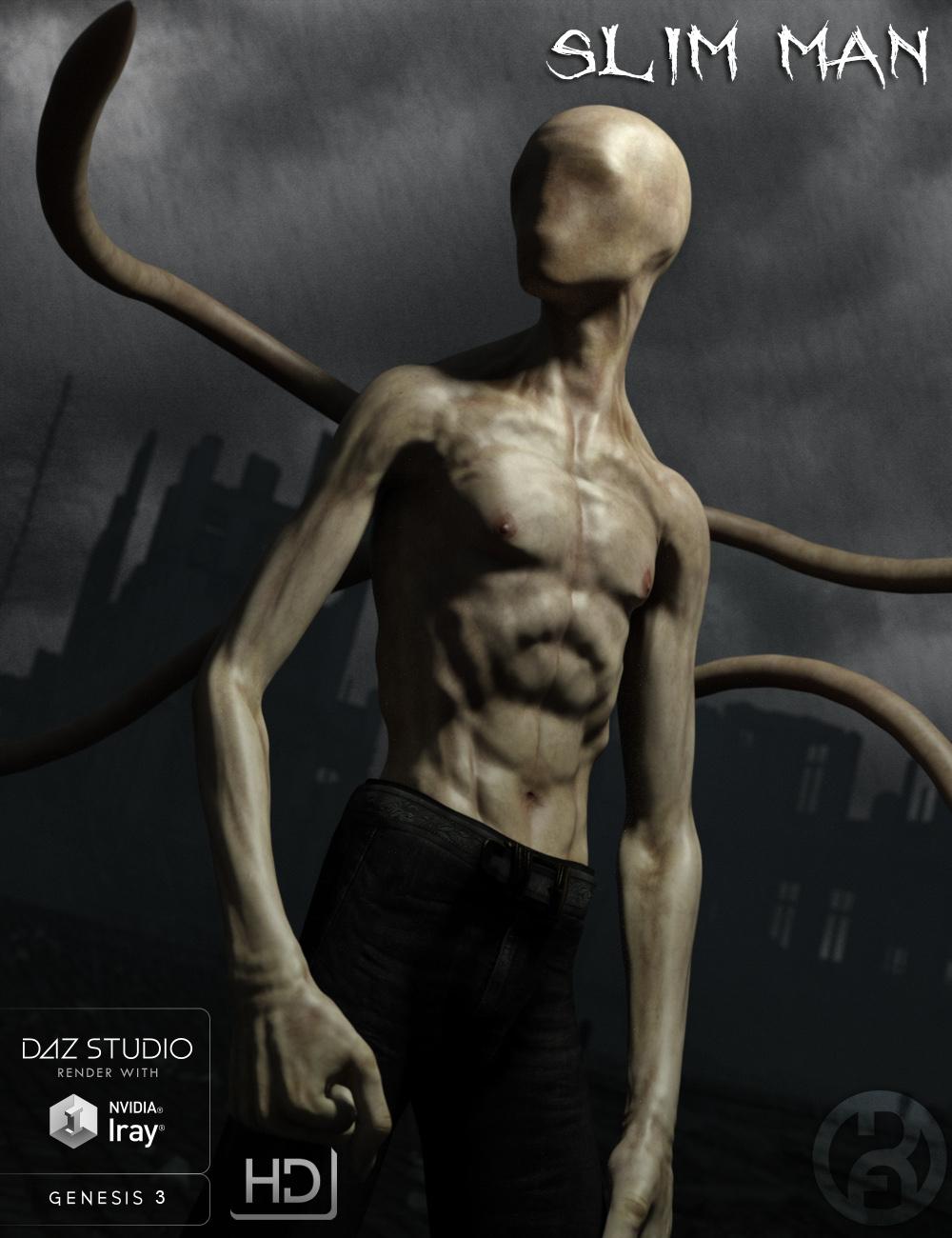
The Slim Man [commercial]The Slim Man
http://www.daz3d.com/the-slim-man-for-genesis-3-male
This faceless fearsome figure returns to haunt your nightmares. Vaguely human in appearance, but his featureless face and back tentacles reveal the supernatural horror he truly is.
Guard your children, stay out of the woods, he is always watching and waitingThe set comes complete with custom crafted High Definition Morphs, and a highly detailed texture set, suitable for Iray and 3DL
Product Includes:
One Slim Man Character Preset
One Slim Man Morph Preset
One Slim Man Face Geograft
One Slim Man Tentacle Geograft
Also includes IRAY and 3DL MAT files
 Differences Between V4, V4.2 & Genesis 2
There is no differences between Victoria 4 and 4.2, they use old Poser format rigging. Genesis 2 Female is the base female for DAZ's sixth generation figures, the Genesis and Genesis 2s use newer TriAx weightmap rigging that was developed by DAZ. Victoria 6 is a morph for G2F.
Does that make the V4 compatible with poser conntent?
Call Me An Idiot - But How Do I Use 'A4 and H4 for Genesis' ?So I've grabbed the free Genesis Anime Starter Bundle, downloaded the single manual install zip, unzipped it to a temporary content directory, cranked up DS4.8, loaded Genesis, and ...
errr....
Went back to the A4 and H4 for Genesis product page and noted the bit that says "This product contains no user facing files."
Checked the calendar - no, it's not 1st April.
Had another shufti - "...This morph pack for Genesis will allow you to take Hiro and Aiko...", "...This product works automatically with Genesis in Poser..."
Hmmm... so how do I get the A4/H4 morphs onto Genesis in DS4.8 ? (There's no readme or anything like that - just the stuff in the 'data' folder)
P3D Maria for Teen Josie 7I agree. I took a chance and purchased From Russia for Rune 7 without owning Rune on a chance, and the results on the base G3F figure were great! But it would be great if artists would provide the images up front so it wouldn't be such a gamble!
I know, I know, there's always a thirty-day return period, but you don't want to use it if you don't have to!
Yup, totally. And not to mention that if they feel you're abusing the return policy they can revoke it. So I definitely don't want to use it unless absolutely necessary. Taking a gamble on whether or not a character will look good without a base morph isn't something I want to do - given limited funds and not wanting to abuse the return policy. However if PAs where to provide a shot of what the character looks like without that morph, I think that would be a big help to many people in deciding if they want to get the character reguardless of if they own the base morph figure. I hope more PAs start doing this, I'm sure it would help them make more sales on their characters.
Totally agree; I've returned a few things recently, and would rather have sufficient info not to purchase in the first place.
P3D Maria for Teen Josie 7I agree. I took a chance and purchased From Russia for Rune 7 without owning Rune on a chance, and the results on the base G3F figure were great! But it would be great if artists would provide the images up front so it wouldn't be such a gamble!
I know, I know, there's always a thirty-day return period, but you don't want to use it if you don't have to!
Yup, totally. And not to mention that if they feel you're abusing the return policy they can revoke it. So I definitely don't want to use it unless absolutely necessary. Taking a gamble on whether or not a character will look good without a base morph isn't something I want to do - given limited funds and not wanting to abuse the return policy. However if PAs where to provide a shot of what the character looks like without that morph, I think that would be a big help to many people in deciding if they want to get the character reguardless of if they own the base morph figure. I hope more PAs start doing this, I'm sure it would help them make more sales on their characters.
Tween Julie 7As a mother of a 10 year old girl, the clothes are pretty desent except for the fact that there are no straight cut or boot cut jeans. the sad fact is that most kids clothes ape the style of their elders so most girl jeans in todays market are unfortunately are "almost" booty shorts or low cut skinny jeans.
Now that we have a "Tween" can we at least round this out with an actual child morph and a infant /toddler figure?
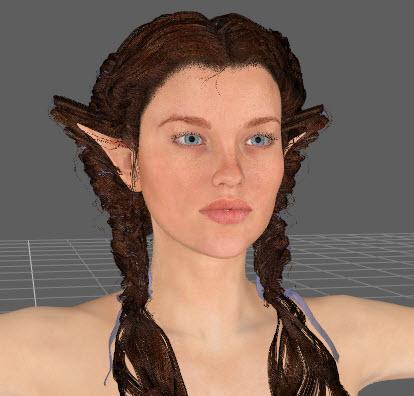
Aug 2016 New User Contest "General Render" (WIP-THREAD)Edited to add: Not sure why the hair morphed at the same time I morphed her ears can someone help me with that as well??
Yup, sure can. You are facing the dreaded Elf Ear Problem.
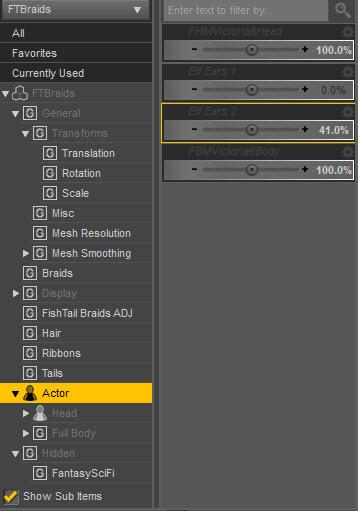
- Select the hair, then go to Parameters and open up Hidden. If you don't see Hidden, click the little menu icon for Parameters and click on Show Hidden Properties.
- You are looking for an Ears option, but for the hair. Sometimes it may be under Actor instead of Hidden - depends on the hair.
- When you open up ears, you will see the same morph values that the ears on your character has. This is because the hair is trying to follow the shape of the ears.
- Set all these to zero. Then the hair will return to normal.


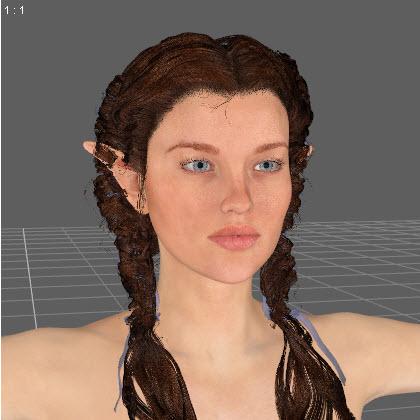 Tween Julie 7
Camdyn is a morph of Julie, and uses the Base Female UV. So, yeah, the skin is transferable.
The clothing is just clothing as far as I can tell? Seems to conform as usual.
Aging Morphs for Genesis 3 Female(s) and Male(s) (Commercial)I wanted it BEFORE I saw the morph list... now I NEED it!
Limited functionality for the price on just about everythingI still prefer well-made V4 clothes on all female Genesis models because of the extra controls. Things like wind morphs and tweaks for fitting. I wish content creators would add those to current clothes... I often get poke-through on G3 clothes on G3 models that aren't even heavily morphed or straight G3 or V7. And these are sometimes Daz originals or top PA products.
I agree Wonderland, although I love some of the styles for G2 and G3 I find them sadly lacking and it extremely frustrating as they don't have the most basic morphs.
I still prefer working with older V4 clothing and especially hair with wind morphs not just from the hair ends, many old V4s even have a hathair morph thrown in.
We can use D-formers but shouldn't have to use them for basic morphs......between the various retail outlets we're paying top dollar on many of the items so I expect to get a little more for the money.Tween Julie 7Thanks JOdel, I'm still learning the idiosyncrasies of DS LOL...
I think she's cute, like Thorne/Handspan morphs but she's definitely not realistic, more like a fairy character. And the eyebrows are too red so she looks odd as a brunette. The eyebrows for an original figure should probably be more neutral, especially since G3 adult textures all have the stylized eyebrows. Nothing I can't change in Photoshop, but still... Unless it was just the promos that made them look red... And, like Divamakeup mentioned, the eyes look strange... I will probably get her since I often do fairy characters (although I have enough to last a lifetime and all the Handspan morphs!) but I'm hoping I can morph her to look more realistic too...
How to export all animations to FBXHi all!!!
First, excuse me for my spaghetti English.
I'm new in this Forum, but not in 3D. I want to use some daz characters with animations with another program. The FBX export is the best solution, but I've some problems...
This is my export's procedure:
1) Create character
2) Animate it in aniMate using .gfa (also blink eyes or breath) and bake all animation in DAZ Timeline.
3) Add on specifics frame (always in Daz Timeline) some morphs (eyes, faces ecc)
4) Export in FBX file format with selected parameters in attached file (I'm using C4D and I see many tutorials for this).
The principal problem is that, when I import the FBX (I've used the 2010, 2011, 2012 and 2014 version) in C4D, there are only animations for legs, arms, head, but the blink eye, breath or expressions (that are "connected" with morph) that in DAZ was animated, aren't in C4D Timeline.
There are only control's morphs, but I must animate again in C4D.
I don't know if it's a problem of DAZ export, or an error of my export's settings...
P.S.: - Attached file is only a test with blink eyes from aniMate .gfa.
- Basically, when you bake aniMate's animation to DAZ Timeline, in FBX export's Staging animating morphs have Yes to Export as default, but I've wanted to add also in the Rules.
Thanks all for answers
My Project: Brash Lonergan adventures - Warning AI Discussion PossibleAnd despite the fact that I know it is a waste of time to create my own figures instead of making a genesis body morph
I don't see making your own figure as a waste of time,. it's a great learning process,. (even if it doesn't turns out as expected on the first attempt),. and it's often overlooked that we can now build a carrara figure which is technically as good as Genesis or Gen2. or even Gen3,. depending on the amount of face bones you want to add,. you could even go further and add more bones than genesis 3.
Looks good so far :)
Agreed, and...
Thanks for the encouragement, 3DAGE.
Yes, agreed! Very cool of you to chime in with that, 3dage! And it's an incredibly valid set of points!
GenX2 Update / Genesis 3 Add-On [Commercial]I uninstalled and reinstalled, it "sees", the genesis 3 figures now, but when I try to do the transfer (from genesis to genesis 3 male), I get this error now:
GenX - Transferring morphs.
Loading target figure ...
Loading figure ...
C:/Users/user/Documents/DAZ 3D/Studio/My Library/data/DAZ 3D/Genesis 3/Male/Genesis3Male.dsf
Creating clone morph ...
Could not find intermediate figure definition.
Error creating morph from clone.
New rigging as default - How ToI have a figure that I made a new morph for...I loaded the morph, and then adjusted Rigging to shape, and all works well.
What I want to do is to save that figure/rigging as a new default figure.
I tried save as...prop/figure asset, but it seems to still save the figure with the morph, versus as a new figure with that being the default. I am sure there is a process to do this.
For example, its similar to loading genesis, loading a morph, Adjust Rigging to Shape, and save as a new figure (...that was just an example, I will not be using anyone's proporietary/licensed figures, etc) Then when I load that new figure, it is just that figure.
I tried a few ways with Transfer Utility as well, but maybe I am hitting the wrong buttons...
The Venezia Suite (Commercial)I looked at the second preview image and thought "Wow, when did Stonemason visit my friend Gottardo's apartment?" Then I saw that the windows are actually full-length, the space inside is huge, and the owner apparently keeps a white tiger, so I decided it probably wasn't Gottardo's place after all. Still, it's unmistakably Venice.
Now all it needs is a water prop, and a morph that lets you set the water level to anything from "Below ground plane" to "Almost to ceiling".
I hope that kitty knows how to swim.
HD MorphsI am afraid I still do not quite understand from this thread what exactly the differences are to the vendor-only HD-morph capabilities in DAZ. Something I have needed and wanted to do for a long, long time now is to animate FACS (as in "Facial Action Coding System" accurate action units (that together compose facial expressions). I have been waiting and waiting (and still waiting) for any decent animateable HD-expressions with high-quality wrinkles (just think about the kind of wrinkles you would need for an accurate disgust expression, but basically pretty much all of them need many winkles all over the face to accurately reflect the skin mocing). From what I have seen of Vilter's Blender tutorial, it looks like it should in principle be possible make more realistic animatable expression morphs that way, and also combine them in the timeline(?). Or is that incorrect?
I would happily buy some good expressions but it seems like just no one is creating such a thing in DAZ - i.e., I can see essentially zero advancement in the quality of expressions in the store these last couple of years, and that's well.. not what I would have expected. Is this because it is too difficult to do? But why?
Tween Julie 7Just got it and it looks to me like a 14 yr old 3D Uni's rayn (Face) and (resembles, but not exactly) the stock genesis 3/Josie character (Body) that has zev0's GU morph applied at 32%...But in comparing the full characters this one is still a stand-alone, so no refunds for me!
Differences Between V4, V4.2 & Genesis 2There is no differences between Victoria 4 and 4.2, they use old Poser format rigging. Genesis 2 Female is the base female for DAZ's sixth generation figures, the Genesis and Genesis 2s use newer TriAx weightmap rigging that was developed by DAZ. Victoria 6 is a morph for G2F.
Daz 3D is part of

Connect
DAZ Productions, Inc.
7533 S Center View Ct #4664
West Jordan, UT 84084Licensing Agreement | Terms of Service | Privacy Policy | EULA
© 2026 Daz Productions Inc. All Rights Reserved.