-
JeanZ for Genesis 3 [Commercial]
Just a FYI. I have upload a version that works in 4.8 and has fixes for the LowRise morph in the male version of the JeanZ. It has to go through QA etc. so it is in the que but I can not tell you how long it will take before it is available.
Thanks for your patience.
Is there a way to keep the bones of autofit items, or do a partial auto-fit?Well, I'll be. There IS a "Convert Figure to Prop" command, I just didn't see it in Edit>Figure>Rigging. Had to go to the drop-down button at the top of the Scene Pane, Edit>Rigging. It lost the morphs, but I loaded the original hair again and used the Transfer Utility to copy the morphs over to the new prop (unchecked all Projection and Post Transfer options except Morph Targets, went into Extended Options, kept both boxes checked and selected "All" in the "From Source" drop-down). Dang that is cool; a workaround for the relatively large number of hairs that crash DS using other methods (which I think is largely owed to "merge hierarchies" not playing nicely with some (i.e., G3) rigs).The Slim Man [commercial]The head and body morphs are not seperate.
The morph can be used without the geograft although the facial textures are not detailed as it is designed to be used with the graft.
Aug 2016 New User Contest "General Render" (WIP-THREAD)Just for fun, I decided to take the theme a little more literally! This is a VERY early draft. Lighting was litearlly just thrown in to render. The whole thing will be toon style. The pirate who is looking for his eye will actually be missing an eye (either holding a hand over his eye, or creating a black hole, or some other method). Hair also needs adjustments. I will also be adding a background at a later time.
I'm throwing this out there to get some feedback on composition, storytelling, or anything else. Thanks!
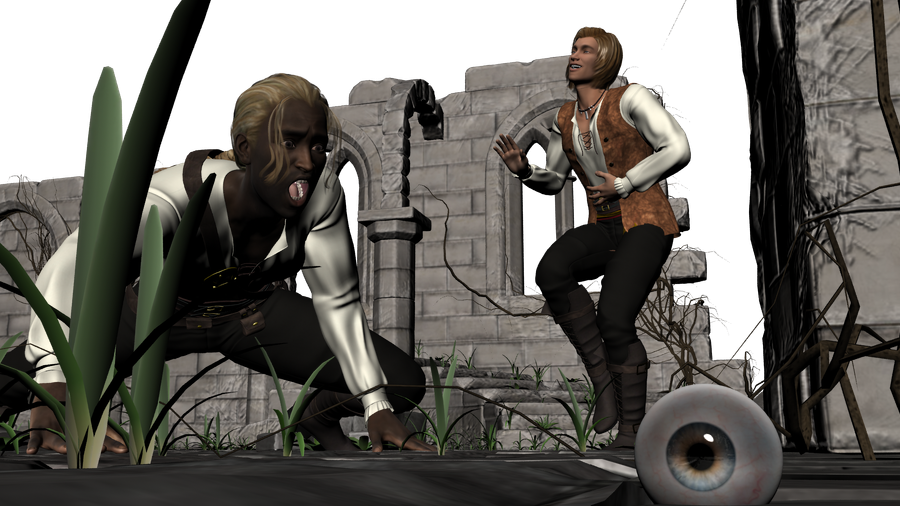
Love the idea and love the eye being right at the front.
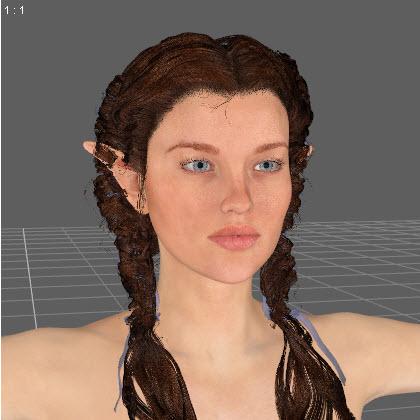
Edited to add: Not sure why the hair morphed at the same time I morphed her ears can someone help me with that as well??
Yup, sure can. You are facing the dreaded Elf Ear Problem.
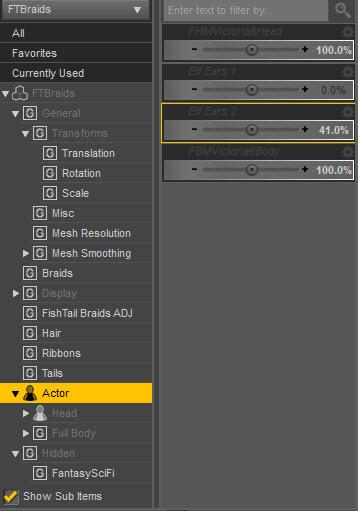
- Select the hair, then go to Parameters and open up Hidden. If you don't see Hidden, click the little menu icon for Parameters and click on Show Hidden Properties.
- You are looking for an Ears option, but for the hair. Sometimes it may be under Actor instead of Hidden - depends on the hair.
- When you open up ears, you will see the same morph values that the ears on your character has. This is because the hair is trying to follow the shape of the ears.
- Set all these to zero. Then the hair will return to normal.
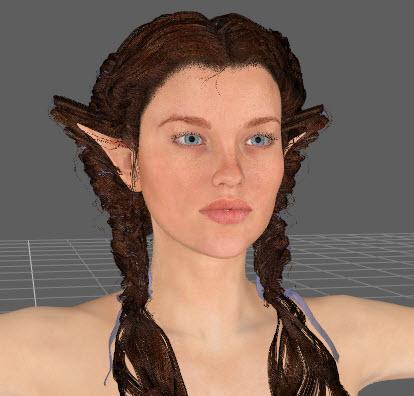


I could not remember how to do this the other day. Was a total blank so this is another thing this week you have taught me lol.
Can helpers be removed from geometry of M4 Skeleton?I am interested in using the M4 Skeleton in combination with a figure and then using the Simtenero Shape Reprojector: http://www.daz3d.com/simtenero-shape-reprojector
I am wanting to save it as a morph to make even more skeletal zombies. It worked except for the fact that I can only apply opacity to the handles. So, my biggest hurdle so far has been the fact that the script doesn't ignore the geometry just because it has no opacity.
Is there a way either in Daz Studio or perhaps in another program to remove all of those handles? I have Hexagon perhaps that might work. Does anyone have any advice?
The Slim Man [commercial]Will he have a fairly normal face without that face Geograft? I am asking because I would like to use the morph in combination with zombie morphs to make even skinnier zombies. So, if the face just looks gaunt, then it will work. Otherwise, can the head and body be two separate morphs? I will likely purchase regardless but either one of those would make it more useful in combination with other characters.
Call Me An Idiot - But How Do I Use 'A4 and H4 for Genesis' ?Thank you Kelderek, that seems to be spot on ! Just load Genesis and look in the right place - the Aiko 4 morph is on the Shaping tab under Genesis >Actor > Female > Stylized, and the Hiro 4 morph under Genesis > Actor > Male > Stylized.
:) happy dance (:
Differences Between V4, V4.2 & Genesis 2There is no differences between Victoria 4 and 4.2, they use old Poser format rigging. Genesis 2 Female is the base female for DAZ's sixth generation figures, the Genesis and Genesis 2s use newer TriAx weightmap rigging that was developed by DAZ. Victoria 6 is a morph for G2F.
Does that make the V4 compatible with poser conntent?
Victoria 4 is Poser content.
FM Gym: Sit-Up Benches & Poses [addon] [Commercial]Hey, just the obligatory "Set is released" before I hit the sack :)
The dumbbell handle between plates seem a little too long though. But I can scale it down along the axis in Daz Studio so no big deal.
This bugged me, so I added a "scale handle" morph for the smart props. That`s a bit more elegant than scaling the whole thing imo.
(It got updated about an hour after the set released, so if you grabbed it very early you may have to update)


 Call Me An Idiot - But How Do I Use 'A4 and H4 for Genesis' ?
If you load a Genesis figure, you should find A4 and H4 full body morph dials with which you can apply the A4 and H4 morphs.
I don't have this product myself, but that is my theory on how it works anyway :-)
"This product contains no user facing files." means that you will not find anything related to it in the Content Library... the product works directly on the Gensis figure by loading the relevant morphs.
Is there any desire/use for new Genesis 1 items?While I'm pretty much a hardcore Genesis 2 stan (I use G3 from time to time after the GenX2 update, but only where absolutely necessary, since not all my morphs transfer 1:1), I still use Genesis to create alien/creature bases, then export with GenX2 to G2. I haven't come across any legit creature/alien morphs for Genesis that really push it that aren't made by RawArt or DarioFish, though. (But I do loves me some RA and DF. They make good stuff)
But I recall DarioFish teased some new alien/creature shapes for G1 a while back on their DeviantArt page, but they haven't said anything about releasing them yet. D;
The Slim Man [commercial]The Slim Man
http://www.daz3d.com/the-slim-man-for-genesis-3-male
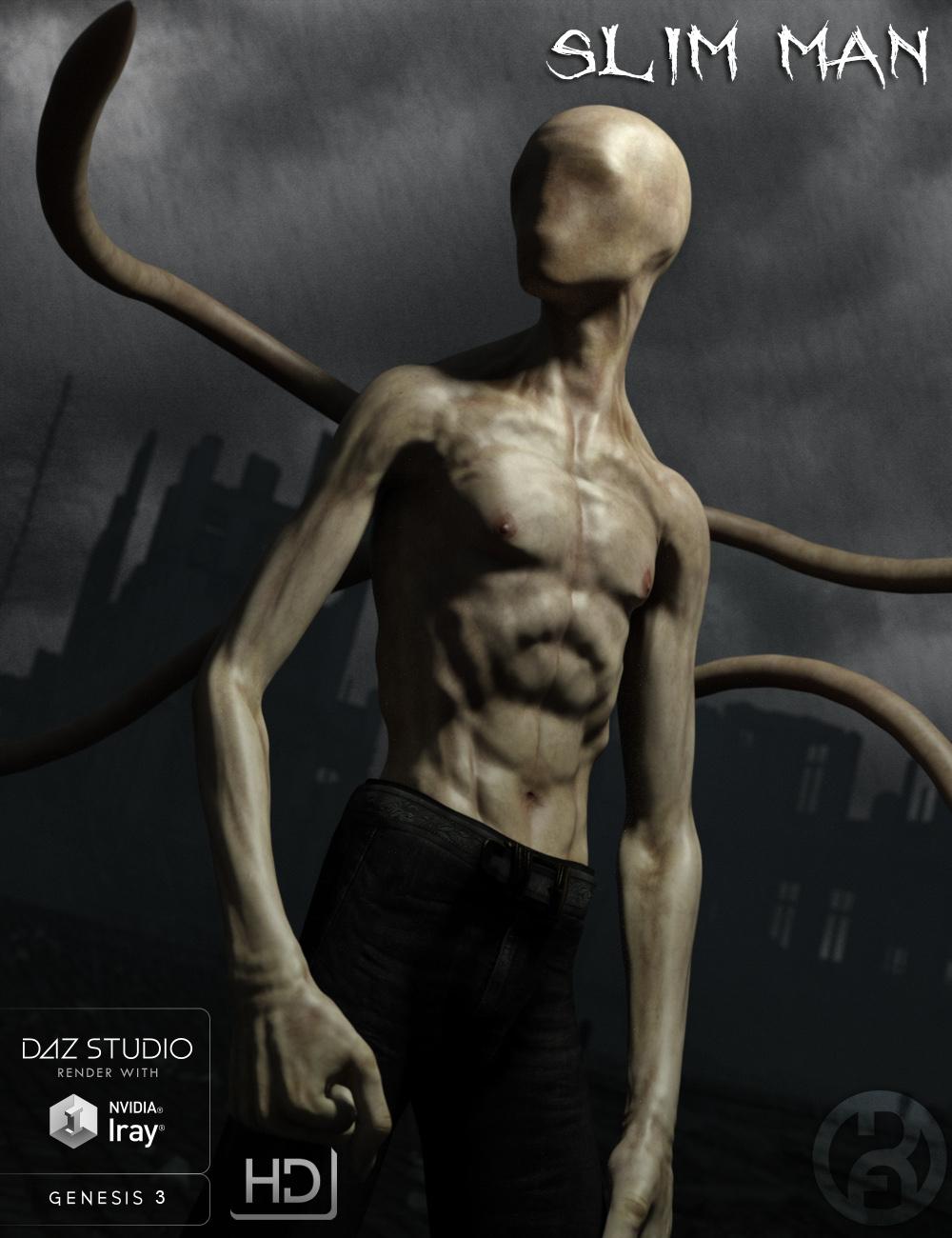
This faceless fearsome figure returns to haunt your nightmares. Vaguely human in appearance, but his featureless face and back tentacles reveal the supernatural horror he truly is.
Guard your children, stay out of the woods, he is always watching and waitingThe set comes complete with custom crafted High Definition Morphs, and a highly detailed texture set, suitable for Iray and 3DL
Product Includes:
One Slim Man Character Preset
One Slim Man Morph Preset
One Slim Man Face Geograft
One Slim Man Tentacle Geograft
Also includes IRAY and 3DL MAT files
 Differences Between V4, V4.2 & Genesis 2
There is no differences between Victoria 4 and 4.2, they use old Poser format rigging. Genesis 2 Female is the base female for DAZ's sixth generation figures, the Genesis and Genesis 2s use newer TriAx weightmap rigging that was developed by DAZ. Victoria 6 is a morph for G2F.
Does that make the V4 compatible with poser conntent?
Call Me An Idiot - But How Do I Use 'A4 and H4 for Genesis' ?So I've grabbed the free Genesis Anime Starter Bundle, downloaded the single manual install zip, unzipped it to a temporary content directory, cranked up DS4.8, loaded Genesis, and ...
errr....
Went back to the A4 and H4 for Genesis product page and noted the bit that says "This product contains no user facing files."
Checked the calendar - no, it's not 1st April.
Had another shufti - "...This morph pack for Genesis will allow you to take Hiro and Aiko...", "...This product works automatically with Genesis in Poser..."
Hmmm... so how do I get the A4/H4 morphs onto Genesis in DS4.8 ? (There's no readme or anything like that - just the stuff in the 'data' folder)
P3D Maria for Teen Josie 7I agree. I took a chance and purchased From Russia for Rune 7 without owning Rune on a chance, and the results on the base G3F figure were great! But it would be great if artists would provide the images up front so it wouldn't be such a gamble!
I know, I know, there's always a thirty-day return period, but you don't want to use it if you don't have to!
Yup, totally. And not to mention that if they feel you're abusing the return policy they can revoke it. So I definitely don't want to use it unless absolutely necessary. Taking a gamble on whether or not a character will look good without a base morph isn't something I want to do - given limited funds and not wanting to abuse the return policy. However if PAs where to provide a shot of what the character looks like without that morph, I think that would be a big help to many people in deciding if they want to get the character reguardless of if they own the base morph figure. I hope more PAs start doing this, I'm sure it would help them make more sales on their characters.
Totally agree; I've returned a few things recently, and would rather have sufficient info not to purchase in the first place.
P3D Maria for Teen Josie 7I agree. I took a chance and purchased From Russia for Rune 7 without owning Rune on a chance, and the results on the base G3F figure were great! But it would be great if artists would provide the images up front so it wouldn't be such a gamble!
I know, I know, there's always a thirty-day return period, but you don't want to use it if you don't have to!
Yup, totally. And not to mention that if they feel you're abusing the return policy they can revoke it. So I definitely don't want to use it unless absolutely necessary. Taking a gamble on whether or not a character will look good without a base morph isn't something I want to do - given limited funds and not wanting to abuse the return policy. However if PAs where to provide a shot of what the character looks like without that morph, I think that would be a big help to many people in deciding if they want to get the character reguardless of if they own the base morph figure. I hope more PAs start doing this, I'm sure it would help them make more sales on their characters.
Tween Julie 7As a mother of a 10 year old girl, the clothes are pretty desent except for the fact that there are no straight cut or boot cut jeans. the sad fact is that most kids clothes ape the style of their elders so most girl jeans in todays market are unfortunately are "almost" booty shorts or low cut skinny jeans.
Now that we have a "Tween" can we at least round this out with an actual child morph and a infant /toddler figure?
Aug 2016 New User Contest "General Render" (WIP-THREAD)Edited to add: Not sure why the hair morphed at the same time I morphed her ears can someone help me with that as well??
Yup, sure can. You are facing the dreaded Elf Ear Problem.
- Select the hair, then go to Parameters and open up Hidden. If you don't see Hidden, click the little menu icon for Parameters and click on Show Hidden Properties.
- You are looking for an Ears option, but for the hair. Sometimes it may be under Actor instead of Hidden - depends on the hair.
- When you open up ears, you will see the same morph values that the ears on your character has. This is because the hair is trying to follow the shape of the ears.
- Set all these to zero. Then the hair will return to normal.
Tween Julie 7Camdyn is a morph of Julie, and uses the Base Female UV. So, yeah, the skin is transferable.
The clothing is just clothing as far as I can tell? Seems to conform as usual.
Aging Morphs for Genesis 3 Female(s) and Male(s) (Commercial)I wanted it BEFORE I saw the morph list... now I NEED it!
Daz 3D is part of

Connect
DAZ Productions, Inc.
7533 S Center View Ct #4664
West Jordan, UT 84084Licensing Agreement | Terms of Service | Privacy Policy | EULA
© 2026 Daz Productions Inc. All Rights Reserved.