-
JeanZ for Genesis 3 [Commercial]
Ha, the Daisy Dukes are so popular :D
I wonder why?
 I was going to do something with the struggle pose, but had to try out the Daisy Dukes first. With this body morph and pose they didn't fit very well at first, but it could all be corrected with the provided morphs.
Thanks for a fun product!
Saving a character morph as a dial presetI'm looking to save a custom character for G2F as a dial. I've seen methods that save your character with other morphs listed in it, but I'm looking to save it as one singular dial. For example when you load G2F and you can move a dial to 1.0 and you get Victoria 6 or move another to get Mei Lin 6. It should be of note that this character is 100% for my own personal use, it won't be sold or distrubted for free to anyone else. This is so I can easily save and backup my character on another hard drive without copying over all of my daz runtime.
Is there an easy to read guide out there that will accomplish this? And where would the actual morph be saved so I can back it up. (Months ago I saw guide about the morph loader that when I tried it, saved a close but imperfect version of the character. I have no idea if that was the guide or my failure to understand it)
Tween Julie 7..
The faces of the girls doesn't seem right, they look weird I just can't describe it. I know they suppose to be a styles type, but to be honest she scares me, Brita seems alright.
All that is an easy fix by adjusting the face morphs. I've have downsized the lips and made the irises smaller too, so anything is possible. So there are workarounds. Plus, you can always dial out the face too and dail what-ever one you like. Unlike Skyler or Ryan.
I'm sure someone will come up with different face morphs for her here in the near future, so!
See the problem with that is that if I have to fix bits or buy additional things when they am I paying so much money for the main thing in the first place?
I like that the body shape actually has slender thighs which no morphs ever seem to cover, though I can't really think of any way to get that onto an adult shape, but something about the face bothers me, too. And it's not that big a deal in general, except that the "deal" for early purchase is asking for an awful lot of money. Maybe it's just Daz's strategies lately making me re-evaluate spending so much money here, but while I'd like to support the character, I'm going to have to pass for now.
..
The faces of the girls doesn't seem right, they look weird I just can't describe it. I know they suppose to be a styles type, but to be honest she scares me, Brita seems alright.
All that is an easy fix by adjusting the face morphs. I've have downsized the lips and made the irises smaller too, so anything is possible. So there are workarounds. Plus, you can always dial out the face too and dail what-ever one you like. Unlike Skyler or Ryan.
I'm sure someone will come up with different face morphs for her here in the near future, so!
See the problem with that is that if I have to fix bits or buy additional things when they am I paying so much money for the main thing in the first place?
I like that the body shape actually has slender thighs which no morphs ever seem to cover, though I can't really think of any way to get that onto an adult shape, but something about the face bothers me, too. And it's not that big a deal in general, except that the "deal" for early purchase is asking for an awful lot of money. Maybe it's just Daz's strategies lately making me re-evaluate spending so much money here, but while I'd like to support the character, I'm going to have to pass for now.
but isn't that the point to have a base....
A mold to work from to make what ever you want?
It's really no different from the base V4!
no one ever renders V4 from it's base form, right?!, someone always morpher her into what ever they want! Whether it's dial spun from the standard morphs or any thrid party morphs.
As I recall, you HAD to buy face and body morphs to get more option to morph the base into whatever.
It's the same thing that has been going on as far as I've been around. Grant it, I've only been doing this since 08 or 09. but that's the way I've always seen it.
Same thing applies here really!
It's a base to work from!
If you look at DA and other sites, it is surprising how many people use the default figure for their characters, ie default texture and shape, no extra morphs used. This is particularly true for male characters, I have seen the default M4 appear in countless images, but default V4 also appears. Some people are more intested in the story (or whatever) they are trying to express, rather than making the characters look unique.
Show Us Your Iray Renders. Part VThere is one texture map in this image, the cutout opacity of the far hills. Everything else is surface detail or procedural.
Funny, I'm working on a similar concept as we type. This was the first test render with everything pretty much in place. The idea has evolved somewhat, but I hope to finish it this weekend. Just learning to use the Fit Control app, and still working on the balance of a transparent helmet that lets you see the expression clearly enough, but still has some reflection. Love the retro space suit though; the one for men is way better, but tends to morph really weirdly around the breast area when you apply it to women. I'm using the planet X-2 HDR backgrounds though which are taking some going use to as you can't see the background unless you're in Iray texture mode. This one was a bit tougher than I expected.
Carrara Challenge #27: “Carrara 9, Give us a Sign” WIP Thread: Voting has started.I am very impressed with so much quality stuff rolling in already. Stezza, that is magnificent. Love the 9 as a collar. Headwax, great use of the Fenric plugin. Which reminds me, thank you Fenric for sponsoring. Wgdjohn, sometimes the choices in the shader tree have a scale box on a side tab. For example, the cellular shader under the natural tab has a scale option below intensity and above limits, MDO2010, great combination of functions. Love how you controlled the distribution of the glowing and darker spheres with replicators. Dart, great mixture of your terrains. I often use your terrain shaders as components in multi-channel mixers to try to get the look I want. Misty, Borg would be perfect. You can use replicators to populate a cube with electronics to get a scifi effect. Chickenman, I would hope that Carrara 9 would come with a Chickenman morph for geness 4 figures. Great theme.
Runtime DNA Merges With Daz 3DI can state with certainty that only my "base" Melody and Micah figures are listed, but none of the "Furries" add-on morph and texture sets.I also found the Fatima poses and the Silvina (or is it "Sylvina") texture set, I think all part of the original release batch. Plus all the Melody2 collection, which I think could maybe do with some more modern additions (hint, hint). Do we know if the Furries expansions are even being transferred?
On the previous page Beth Capsces herself stated, "I submitted versions of Furries without encoding or PMDs. Probably just take a bit to repack with updated versions." That was April 19, 2016.
So DAZ has the material in a standard it prefers, but has not yet opted to release them.
Sincerely,
Bill
Tween Julie 7Thanks for explaining the breast morph, Thorne.
Tween Julie 7OK, not sure if I'm missing something or it didn't install right. But I was looking thought the morphs on the promo page....
- Tween Julie 7 Character Preset (.DUF)
- Tween Julie 7 Full Body Shape
- Tween Julie 7 Head Shape
- Tween Julie 7 Fairy Ears
- Tween Julie 7 Breasts
I can find all the morphs but the breast morphs. Were those a last minute drop and not removed from the promo page?
I explained just above here how that happened, The original l breast morph got built into the base shape in the final version. The product page wasn't updated however, sorry about that.
Thanks for the explanation, Thorne. It's kinda disappointing that it got baked in, but I guess I'll get over it.
Yup.
I now won't be buying the product, as it is now less versatile.
Tween Julie 7OK, not sure if I'm missing something or it didn't install right. But I was looking thought the morphs on the promo page....
- Tween Julie 7 Character Preset (.DUF)
- Tween Julie 7 Full Body Shape
- Tween Julie 7 Head Shape
- Tween Julie 7 Fairy Ears
- Tween Julie 7 Breasts
I can find all the morphs but the breast morphs. Were those a last minute drop and not removed from the promo page?
I explained just above here how that happened, The original l breast morph got built into the base shape in the final version. The product page wasn't updated however, sorry about that.
Thanks for the explanation, Thorne. It's kinda disappointing that it got baked in, but I guess I'll get over it.
Tween Julie 7OK, not sure if I'm missing something or it didn't install right. But I was looking thought the morphs on the promo page....
- Tween Julie 7 Character Preset (.DUF)
- Tween Julie 7 Full Body Shape
- Tween Julie 7 Head Shape
- Tween Julie 7 Fairy Ears
- Tween Julie 7 Breasts
I can find all the morphs but the breast morphs. Were those a last minute drop and not removed from the promo page?
I explained just above here how that happened, The original l breast morph got built into the base shape in the final version. The product page wasn't updated however, sorry about that.
Tween Julie 7OK, not sure if I'm missing something or it didn't install right. But I was looking thought the morphs on the promo page....
- Tween Julie 7 Character Preset (.DUF)
- Tween Julie 7 Full Body Shape
- Tween Julie 7 Head Shape
- Tween Julie 7 Fairy Ears
- Tween Julie 7 Breasts
I can find all the morphs but the breast morphs. Were those a last minute drop and not removed from the promo page?
Closest thing I can find in the data folder is mcmtweenjulie7nipples.dsf, which appears to be a correction morph. Does anyone know what the breast morphs were supposed to do?
The promo morphs list was made before changes were made to the final figure. These changes included baking in the breast morph to the base body shape which originally did not have the breasts morphed. In the final version the base body shape includes the breast morph built in, so the separate breasts morph was no longer required. There was no additional breast morph in the final figure.
Each of these figures go through more than one version before the final is released, so it is seems the promo page did not get updated. Thanks for letting us know!
Tween Julie 7OK, not sure if I'm missing something or it didn't install right. But I was looking thought the morphs on the promo page....
- Tween Julie 7 Character Preset (.DUF)
- Tween Julie 7 Full Body Shape
- Tween Julie 7 Head Shape
- Tween Julie 7 Fairy Ears
- Tween Julie 7 Breasts
I can find all the morphs but the breast morphs. Were those a last minute drop and not removed from the promo page?
Closest thing I can find in the data folder is mcmtweenjulie7nipples.dsf, which appears to be a correction morph. Does anyone know what the breast morphs were supposed to do?
Knittingmommy's LaboratorySince this is my anniversary month with DAZ Studio (see previous post), I thought it would be nice to update my avatar. I made my current avatar with Sadie for Genesis and used the cat face dial in one of the morph packs for Genesis with a couple of slight modifications using some other dials to get the look that I wanted. I used the skin from Raw Art's Cat World Regenesis Jaguar to give her some the look and feel of a Jaguar. That image, btw, didn't use the LAMH preset for Cat World Regenesis Jaguar. At the time, I couldn't figure out how to get the Raw Art's preset onto my character so she was kind naked. I mostly just wanted to see if I could do it and what she would look like. I figured since they were both Genesis it should work. Yes, even back then, I experimented. I liked how she turned out and did a fairly good render in 3Delight. At the time, she was one of my best renders in 3Delight despite the fact I didn't know what the heck I was doing. She got a whopping 6 likes in the gallery. I fell in love with how she looked and that's how she became my avatar. I haven't really done all that much with her, despite ideas for several renders for her. I think it was mostly because she was a 3Delight type of figure and, at the time, I didn't want to do more with her until I could be sure I could do her justice in 3Delight. Of course, as most of you know, I fell in love with Iray and I didn't do as much in 3Delight after that.
Well, it is time to dust Jaguar Sadie off and give her some new life. That new life includes a new fur coat. For anyone unfamiliar with LAMH, it stands for Look At My Hair and it is a great plugin for Daz Studio by Alessandro_AM and Kendal Sears, both vendors here at DAZ. There is a Look At My Hair Free Player so that anyone who doesn't have the full version can still use LAMH presets that are available on some animals and figures available in the DAZ shop. In order to make your own presets, you need the full paid version of the plugin. I've learned a lot about using LAMH in Iray while working with AM's animals. I love his animals and I have most of them. Of course, my favorite is his Wolf 2. I use LAMH fairly well, but I've never made any of my own presets. I figured if I want to give Jaguar Sadie new life in Iray, she has to have the LAMH fur, too. So, I'm making her a preset. I've been playing around with it for a few hours and watched quite a few of Alessandro's videos showing how to use it. I have the manual easily accessible, too.
I thought it would be a cool idea to document the growth of Jaguar Sadie's fur here on the thread from start to finish. Anyone reading this should be able to follow what I'm doing and learn how to create a preset of their own, too. Once I'm done, I'll be doing a nice little photo shoot and getting a new picture for my avatar. First, though, I think you should see Jaguar Sadie in her original full size view. I posted her image in the Meet the Muses thread that @divamakeup started because she is my muse and she inspires me each day that I log into the forums. I figured I should show her off here, too. So, this is the original Jaguar Sadie image that became my avatar in full size.

As I said, I've been playing around with LAMH today just to get a feel for the interface and how to actually grow the hair. Up to now, the most I've done with it is take a figure with an LAMH preset into it for a little grooming. For anyone who has seen my wolves, you've seen a little of what I've done. I did some grooming and clumping of fur to give them an all over scruffy look and ruffled some fur so they looked like they had possibly just been in a tussle for dominance. I've learned a lot from grooming those wolves. Hopefully, I've learned enough to groom Jaguar Sadie in her new fur coat.
The following images show what I did today. It doesn't look great, but I didn't expect greatness. I just wanted to grow some fur and take a look at how I want to work on Jaguar Sadie's coat. I think I'll abbreviate her to JS as I'm already getting exhausted typing out her full name already. I can only image what I'll feel like after several posts!
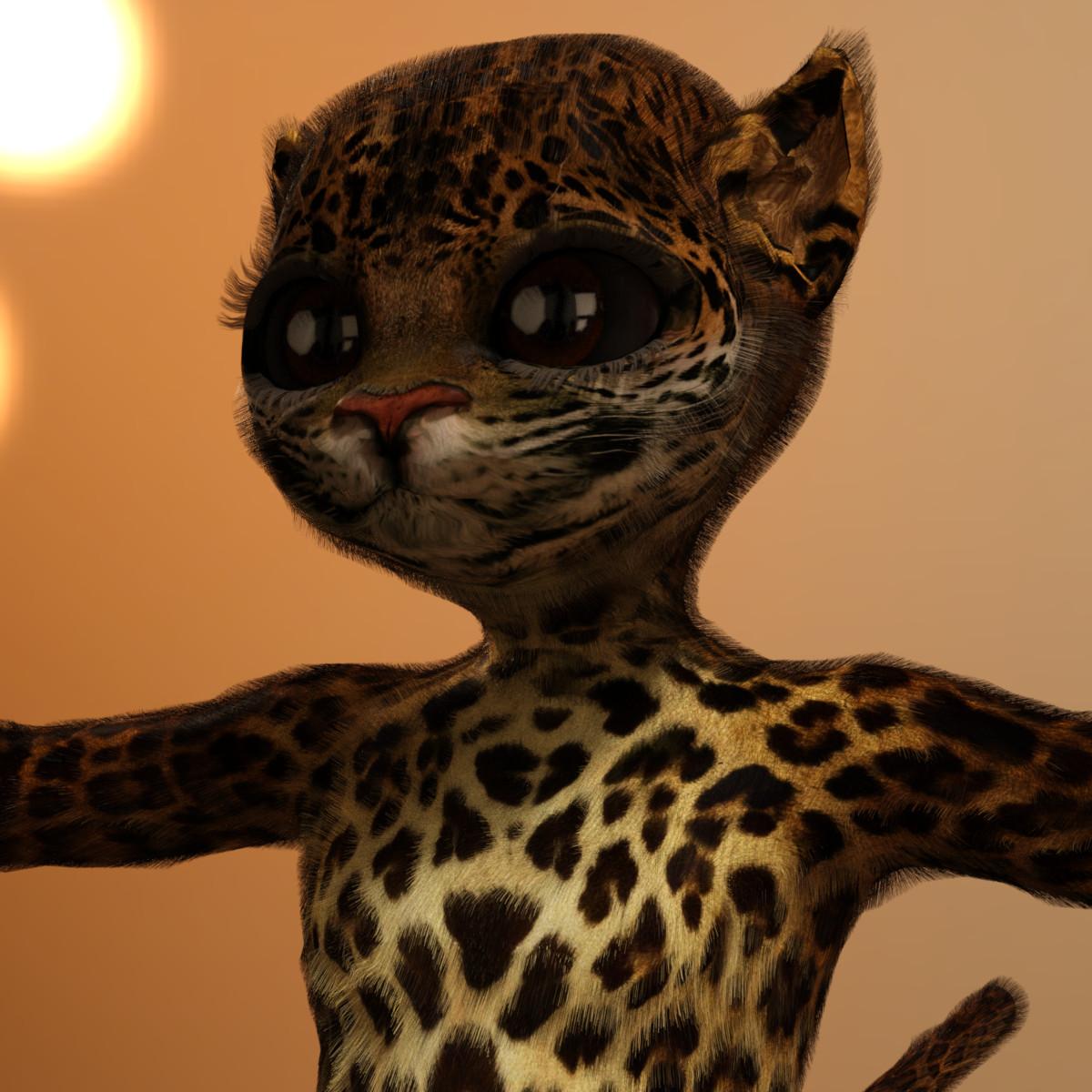
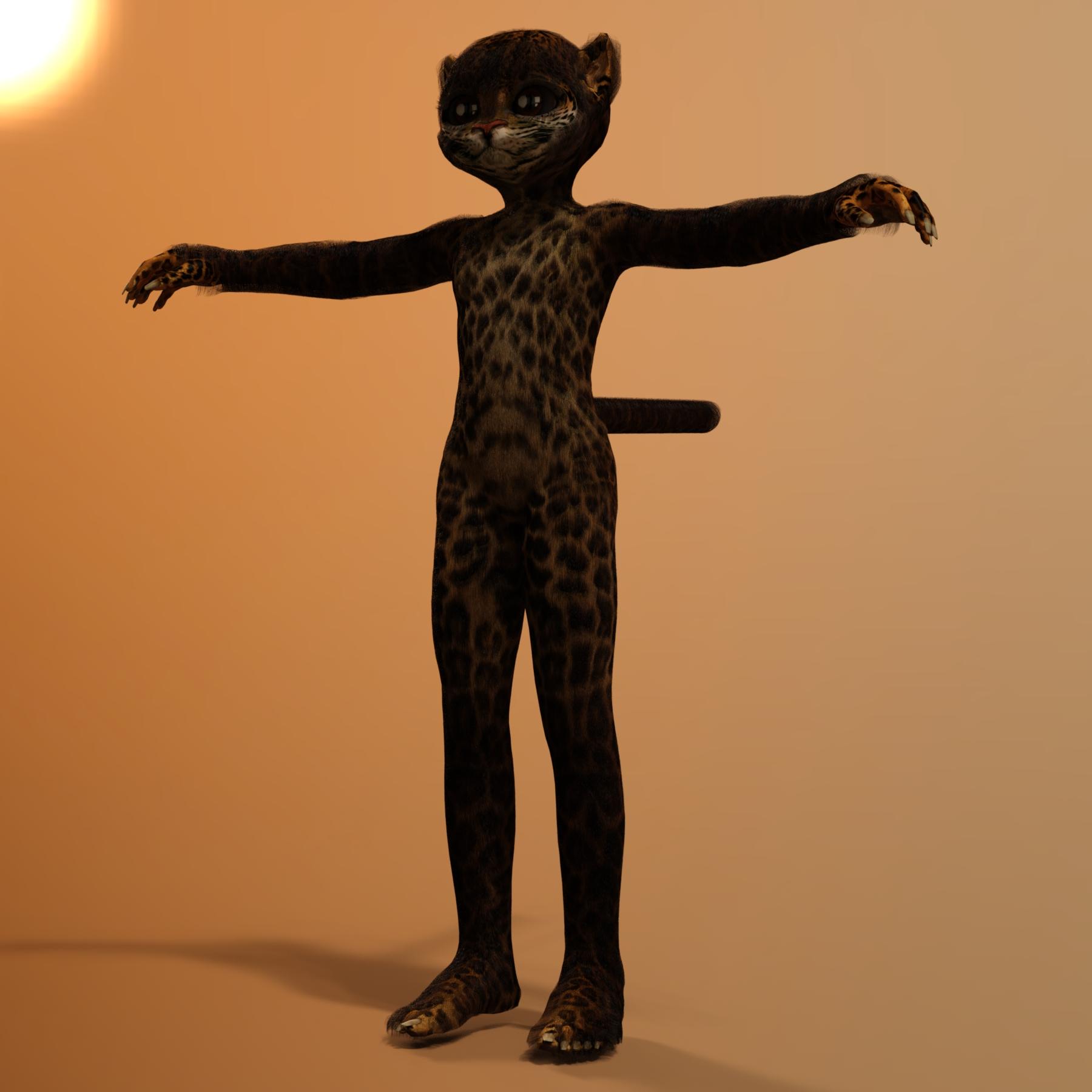
I've learned a few things with my preliminary playing. One, I need to split up the fur zones so that the body, arms, feet, tail, and face are each separate fur zones for more control when growing the fur and grooming. Two, I need to grow a lot more hair than I thought for a decent fur coat. Three, I need to make a density map for JS's face for more control over the fur in that area. Wacky things happen when you just use the face skin material. Fur gets in the eyes and stuff. I need more control than that so I'll have to use a density map. I'll need to figure that out as it isn't something I've in LAMH before. I may have to use more than one fur zone for her face, too. I think here nose needs to be separate from the rest of her face as that might help get a more realistic styling in line with the nose on a real cat and the fur needs to be shorter there than on the rest of her face. The close up of JS isn't the one with all the wacky fur in her eyes as I didn't do an image of that. The close up shows the basic fur with the full back of the head selected and just a few faces selected between the eyes and around the ears.
Hopefully, in a few days I'll have the next installment of JS's fur coat with screenshots of her inside LAMH.
Tween Julie 7..
The faces of the girls doesn't seem right, they look weird I just can't describe it. I know they suppose to be a styles type, but to be honest she scares me, Brita seems alright.
All that is an easy fix by adjusting the face morphs. I've have downsized the lips and made the irises smaller too, so anything is possible. So there are workarounds. Plus, you can always dial out the face too and dail what-ever one you like. Unlike Skyler or Ryan.
I'm sure someone will come up with different face morphs for her here in the near future, so!
See the problem with that is that if I have to fix bits or buy additional things when they am I paying so much money for the main thing in the first place?
I like that the body shape actually has slender thighs which no morphs ever seem to cover, though I can't really think of any way to get that onto an adult shape, but something about the face bothers me, too. And it's not that big a deal in general, except that the "deal" for early purchase is asking for an awful lot of money. Maybe it's just Daz's strategies lately making me re-evaluate spending so much money here, but while I'd like to support the character, I'm going to have to pass for now.
..
The faces of the girls doesn't seem right, they look weird I just can't describe it. I know they suppose to be a styles type, but to be honest she scares me, Brita seems alright.
All that is an easy fix by adjusting the face morphs. I've have downsized the lips and made the irises smaller too, so anything is possible. So there are workarounds. Plus, you can always dial out the face too and dail what-ever one you like. Unlike Skyler or Ryan.
I'm sure someone will come up with different face morphs for her here in the near future, so!
See the problem with that is that if I have to fix bits or buy additional things when they am I paying so much money for the main thing in the first place?
I like that the body shape actually has slender thighs which no morphs ever seem to cover, though I can't really think of any way to get that onto an adult shape, but something about the face bothers me, too. And it's not that big a deal in general, except that the "deal" for early purchase is asking for an awful lot of money. Maybe it's just Daz's strategies lately making me re-evaluate spending so much money here, but while I'd like to support the character, I'm going to have to pass for now.
but isn't that the point to have a base....
A mold to work from to make what ever you want?
It's really no different from the base V4!
no one ever renders V4 from it's base form, right?!, someone always morpher her into what ever they want! Whether it's dial spun from the standard morphs or any thrid party morphs.
As I recall, you HAD to buy face and body morphs to get more option to morph the base into whatever.
It's the same thing that has been going on as far as I've been around. Grant it, I've only been doing this since 08 or 09. but that's the way I've always seen it.
Same thing applies here really!
It's a base to work from!
My issue with the face is more texture based (I think; still not entirely sure to be honest) than morph based though. (Since there was a sale I did buy the bundle as seen in earlier posts testing things out and have had a chance to test things some more.)
I understand what you mean with customising but that requires a customisable base, and her mesh doesn't play particularly nicely with shrinking related morphs (although its fine with the scale up types from what I've seen so far.) If you want to make a younger child you're still best off with G3F base + Zev0's Growing Up. I don't think Julie's base figure offers anything that Growing Up doesn't already, other than being a base for Camdyn and Brita. The bundle has good stuff in it so that's fine, but the list price on the base figure is more than double regular figure shapes... and so far Aiko and Bethany are the only G3F models I've seen that really seem to justify that price. I'm not saying "it's not worth buying" or "don't do so" (I did buy it) but I really don't think anyone paying full price for an official figure is getting their money's worth in the majority of cases lately.
All base figures have fewer texture options, almost never have additional custom morphs anymore, and are more than double the price (compared to PA figures.) Why? I'm not certain there's a good answer to that question.
Tween Julie 7..
The faces of the girls doesn't seem right, they look weird I just can't describe it. I know they suppose to be a styles type, but to be honest she scares me, Brita seems alright.
All that is an easy fix by adjusting the face morphs. I've have downsized the lips and made the irises smaller too, so anything is possible. So there are workarounds. Plus, you can always dial out the face too and dail what-ever one you like. Unlike Skyler or Ryan.
I'm sure someone will come up with different face morphs for her here in the near future, so!
See the problem with that is that if I have to fix bits or buy additional things when they am I paying so much money for the main thing in the first place?
I like that the body shape actually has slender thighs which no morphs ever seem to cover, though I can't really think of any way to get that onto an adult shape, but something about the face bothers me, too. And it's not that big a deal in general, except that the "deal" for early purchase is asking for an awful lot of money. Maybe it's just Daz's strategies lately making me re-evaluate spending so much money here, but while I'd like to support the character, I'm going to have to pass for now.
..
The faces of the girls doesn't seem right, they look weird I just can't describe it. I know they suppose to be a styles type, but to be honest she scares me, Brita seems alright.
All that is an easy fix by adjusting the face morphs. I've have downsized the lips and made the irises smaller too, so anything is possible. So there are workarounds. Plus, you can always dial out the face too and dail what-ever one you like. Unlike Skyler or Ryan.
I'm sure someone will come up with different face morphs for her here in the near future, so!
See the problem with that is that if I have to fix bits or buy additional things when they am I paying so much money for the main thing in the first place?
I like that the body shape actually has slender thighs which no morphs ever seem to cover, though I can't really think of any way to get that onto an adult shape, but something about the face bothers me, too. And it's not that big a deal in general, except that the "deal" for early purchase is asking for an awful lot of money. Maybe it's just Daz's strategies lately making me re-evaluate spending so much money here, but while I'd like to support the character, I'm going to have to pass for now.
but isn't that the point to have a base....
A mold to work from to make what ever you want?
It's really no different from the base V4!
no one ever renders V4 from it's base form, right?!, someone always morpher her into what ever they want! Whether it's dial spun from the standard morphs or any thrid party morphs.
As I recall, you HAD to buy face and body morphs to get more option to morph the base into whatever.
It's the same thing that has been going on as far as I've been around. Grant it, I've only been doing this since 08 or 09. but that's the way I've always seen it.
Same thing applies here really!
It's a base to work from!
Brother and sister charactersYou could try mixing the same head morphs with Genesis Generation X2 with Genesis 3 addon which to me is a must have product beyond just this scenario. For examply apply 30-50% Victoria head morph to the Male base. The male base will look I like victoria counterpart but the male will have male features like the stronger jawline. You can also do the same vice versa or have a mix of 2 heads on both models with varying percentages.
Runtime DNA Merges With Daz 3DI can state with certainty that only my "base" Melody and Micah figures are listed, but none of the "Furries" add-on morph and texture sets.I also found the Fatima poses and the Silvina (or is it "Sylvina") texture set, I think all part of the original release batch. Plus all the Melody2 collection, which I think could maybe do with some more modern additions (hint, hint). Do we know if the Furries expansions are even being transferred?
Runtime DNA Merges With Daz 3DAny word yet on filters for the Product Library page to make it easier possible to find the RDNA transfers? I think I have all of my purchases moved over now, but when the only way to check is to try each one individually...
This one (currently free) can list them:
http://taosoft.dk/software/accm-daz/
Download your DAZ history, then select "Order #" under search options, enter "null" in the search field, and click Search. It will then list all products currrently transfered from RDNA. File > Export Data will export data for items currently shown in the list view, in CSV format.
Or you can wait until the transfer is complete, I'll write a (free) cross-reference tool then for checking what's been transfered and what not. You'll first have to create a product list from your RDNA account though to be able to use it, using this one (note that this must be done before the RDNA site shuts down):
http://taosoft.dk/software/freeware/cd-rdna/
Animated Shapes Separate MorphsOkay, one more question... So, I was able to get the separate head/body weight mapping process to work alright, and I even went ahead and adjusted the scale of the morph to of the base shape before .obj exporting so the head and body flow together (otherwise resulting in a funky neck stretch/crunch with the separate morphs applied). Now my last dilemma is trying to get hair and clothing to do the same...
Who said Blender was hard?lx:
Good point regarding what newbies need in that respect. However, your statement "What a beginner really needs to know is how to rearrange the windows (making fewer, making more) and that they can assign them to anything they want." is exactly what I, as a beginner, learned many years ago to create the custom layouts. I agree that it should be easier, or at least presented easier for beginners.
Knittingmommy:
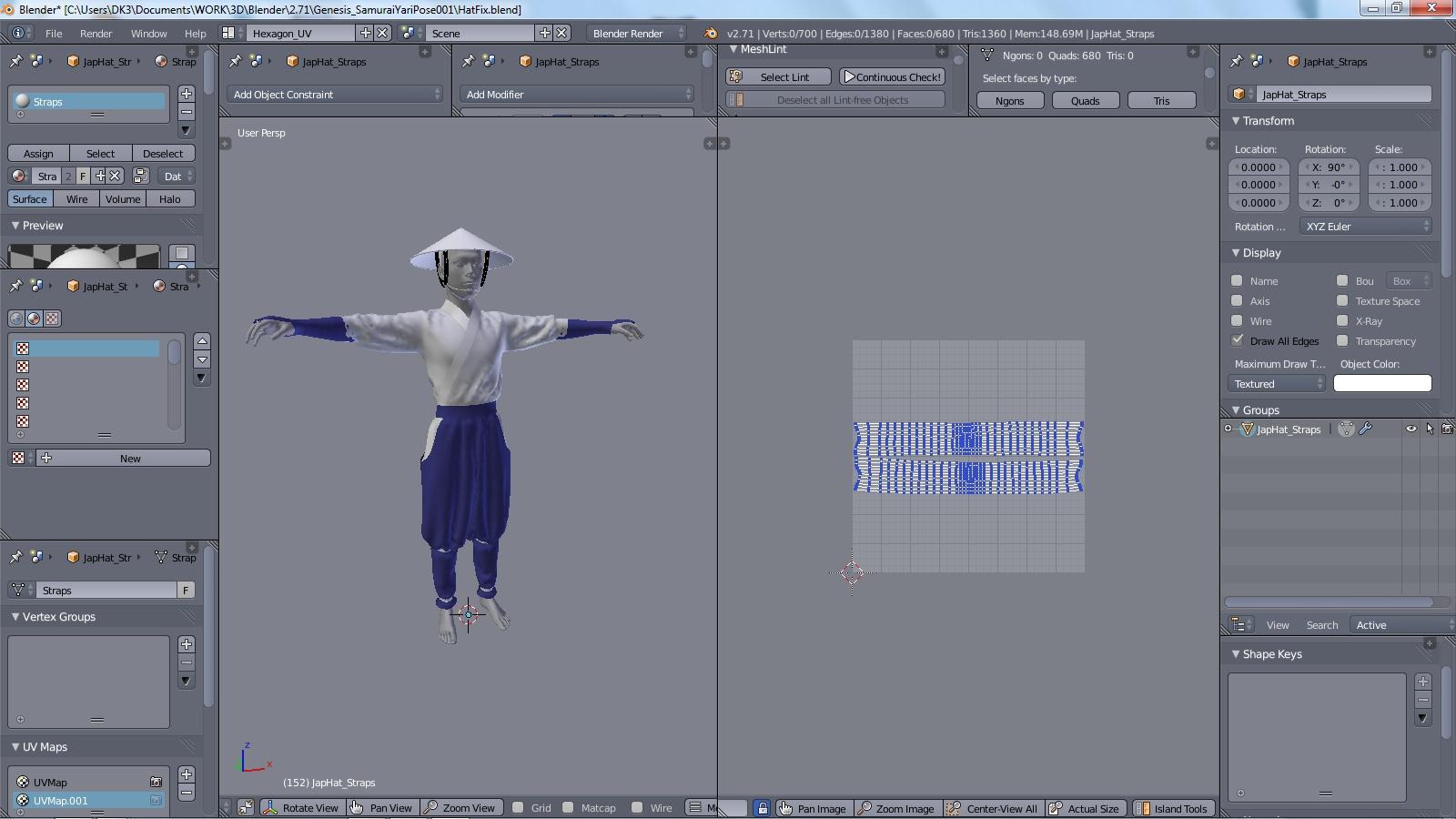
Nothing special, just Hexagon visual emulation. I don't have the time to implement scripting variations. I am dedicating my scripting time to my custom build. The MD emulation will be more environmental with the cloth simulation module combined with cloth pattern creation, and tessellation. There is still more cloth sim work that needs to be implemented, and currently someone is trying to add to what is available. But, there are a few needed parameters that need to make it into trunk before this can even be realized. I am mostly working on the pattern development side of it right now. You can view my Hexagon emulation images below...
AllenArt:
I agree, knowing how to model coming into Blender gives you a leg up for the modeling aspect of it. I was playing in Blender for many years, but never really did anything with it. We never clicked. I was a devout Wings3D modeler since it's inception, and was waiting patiently for Blender to catch up to the modeling tools, and better mesh technology (Bmesh implentation). Blender has now far surpassed W3D (in my opinion) for my work in modeling, and morph target work, but I still outsource some tasks to W3D through Blender bridging systems (quick in and out).
kyoto kid:
I know you are the stubbornest of holdouts, but we will eventually turn you to the dark side of Blender. Hopefully, easier UI, and control implementations are around the corner. Someday... You will join us....
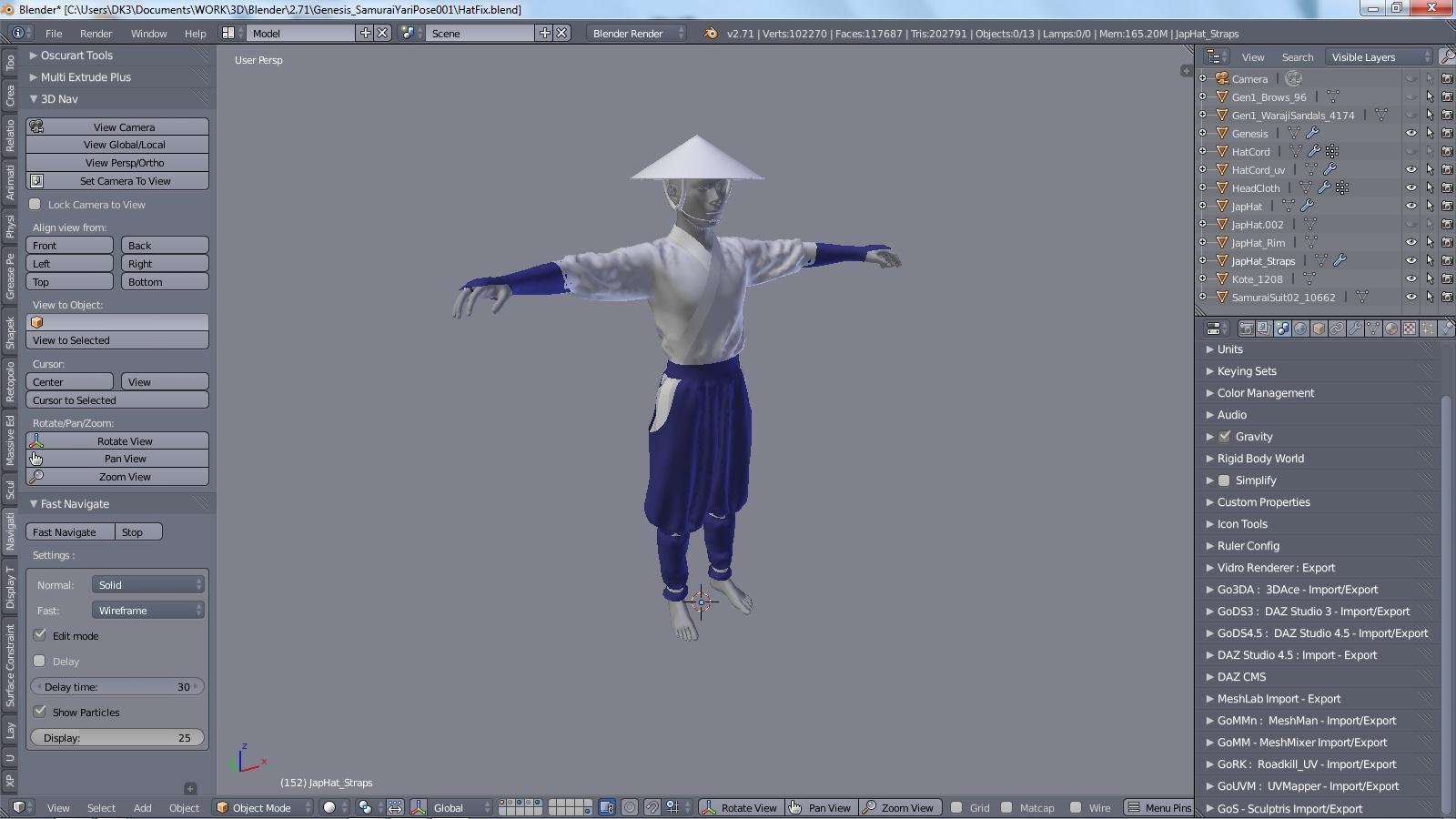
"...but, can you move around the workspace like in Hexagon with just a pointing device and no keyboarding?"
Why yes I can...
I created a one-click mouse use only toggle solution for each of the three movements with two locations in the UI. One in the Navigation Tab, and one on the main bottom header (similar to how it's located in Hexagon). I have even offered this to everyone here in the past in one of these Blender threads. You can see it in the images below.
Click for full size:
Daz 3D is part of

Connect
DAZ Productions, Inc.
7533 S Center View Ct #4664
West Jordan, UT 84084Licensing Agreement | Terms of Service | Privacy Policy | EULA
© 2026 Daz Productions Inc. All Rights Reserved.