-
Show Us Your Iray Renders. Part V
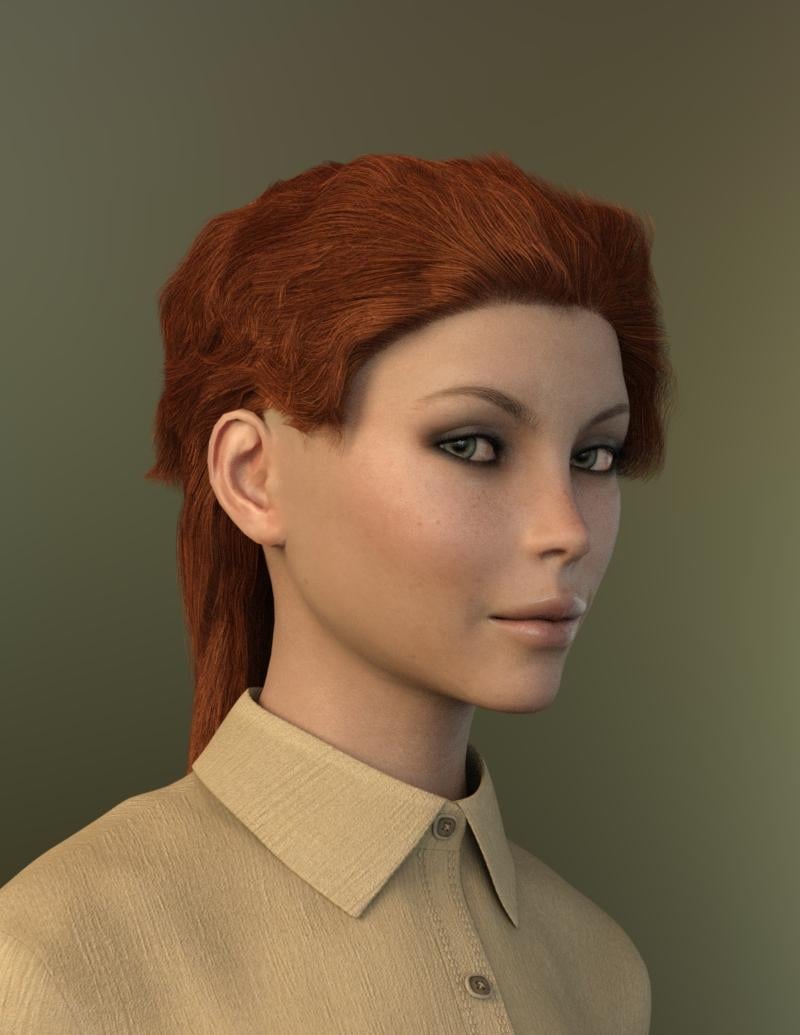
My latest Iray render. Sort of my own character from mixing morph dials. Bethany 7 skin. I was having a little fun with the morphs for the JeanZ for Genesis 3 that I picked up this week. I love the new Bobbity Hair as it has some nice morphs with it.
 Show Us Your Iray Renders. Part V
She's very lovely and has an intriguing face, J Cade! Great morph. I love the finished postworked image, too. I'm not familiar with Sargent, though, I believe I know who you are trying to emulate. John Singer Sargent, yes? Great artist. He was one of the artists I vaguely remember from the one Art History class I took.
Show Us Your Iray Renders. Part VAnd now for another round of guess which Sargent painting jcade's ripping off now! I'm really liking the morph, It still needs some more obsessive tweaking back in a modeller, but its 90% where I want it via dial spinning, custom morphs and some transferred Antonia (seriously)
Since this is the Iray thread not the lots of postwork thread I'm sticking up a comparison of low (just the background and tonemapping) and quite postworked versions

A larger version of the postworked version is also in my gallery
Morph Loading ProblemThe log file reports a "vertex count mismatch" — one common cause of that is the modelling program you used to create the morph didn't preserve the exact vertex arrangement, which is vitally important when you're adding a morph to a mesh.
Another possibility is that the morph mesh must be the complete object — previous DAZ figure models allowed only exporting/importing the body parts that are morphed, but all the Genesis figures are created as one undivided object, so morph modellers can't do that any more. Did you export the whole figure out of Blacksmith, or just the head?
GenX2 Update / Genesis 3 Add-On [Commercial]My victory was premature. For each morph, the Transfer log said: Warning! DSF file not found for morph. I was thinking, well, it's a .cr2. Why would it have a DSF file? But I could find no corresponding character preset in the morph list; so, I guess it didn't take. Any clues?
I was sure that I ticked conforming figure instead of base figure before (when saving my .cr2), but this time there was a flurry of disk activity and a lot of dsf files got saved. Finally got the transfer to happen, but where was my character morph? I repeated the process to no avail. Finally, I exited and restarted DS. And there, in the GenX folder of the Parameters tab was my morph. Then came the figuring out how much of Genesis 2 Male (none), Michael 4 (.5) and the M4 character (.5) would give me the closest approximation.
GenX2 Genesis 1 to Genesis 2 need tutorialHi im trying to transfer Genesis1 morph to Genesis2 is there any tutorial somewhere? I cant find any info how to do it, is it the same way as treansferring V4 to genesis?
also everytime i tried to select genesis1 as source i get this error
GenX - Loading figure: Genesis
Loading figure ...
E:/Library/DAZ 3D/Studio/My Library/data/DAZ 3D/Genesis/Base/Genesis.dsf
Error parsing geometry.
Morph Loading ProblemHello!
I've been trying to figure out how to export morphs from Blacksmith 3D into DAZ 3D. I created a quick head morph and then tried to export the morph and I keep getting an error message every time I try to actually import the morph. I created a video of the problem and put it on Vimeo to show you the steps that I am using just to make sure I'm not missing something along the way.
Link removed
Thanks,
Jason
Tween Julie 7OK, not sure if I'm missing something or it didn't install right. But I was looking thought the morphs on the promo page....
- Tween Julie 7 Character Preset (.DUF)
- Tween Julie 7 Full Body Shape
- Tween Julie 7 Head Shape
- Tween Julie 7 Fairy Ears
- Tween Julie 7 Breasts
I can find all the morphs but the breast morphs. Were those a last minute drop and not removed from the promo page?
Closest thing I can find in the data folder is mcmtweenjulie7nipples.dsf, which appears to be a correction morph. Does anyone know what the breast morphs were supposed to do?
The promo morphs list was made before changes were made to the final figure. These changes included baking in the breast morph to the base body shape which originally did not have the breasts morphed. In the final version the base body shape includes the breast morph built in, so the separate breasts morph was no longer required. There was no additional breast morph in the final figure.
Each of these figures go through more than one version before the final is released, so it is seems the promo page did not get updated. Thanks for letting us know!
Thorne, is it possible to add those morphs back into the package so that folks that want to change an adult version of G3F to have a smaller breasts?
Look at my Hair (LAMH) Official Thread: update 1.6.0.2 releasedI'm new to the while idea of hair in DS so I have some basic questions based on what I've read so far . I played around with the player a while back, probably in the old version and you couldn't change the character's pose or morph once you created an OBJ . Is that the way it's supposed to work, that creating your OBJ is the last step you do before render ? Since I'm considering buying the full version, will creating my mesh in the full version eliminate the need to create an OBJ? And can that be morphed or posed once you're back in DAZ studio? Also I see that you're supposed to create your hair using a base, lo-res figure. but you can change it once you're back in Daz studio right? Because putting hair on the base Genesis figure and never being able to change it isn't very useful. Not being able to turn my base dog into a beagle isn't very useful. And I'm really only interested in Iray renders, so if all the fantastic promos are 3Delight, it's a no-go. Just want to know what I'm getting into.
And Iray works just fine. The image below was rendered with Slosh's UHT shaders.
 GenX2 Update / Genesis 3 Add-On [Commercial]
I have attempted to load a Poser Michael 4 character using the methods described in the genx2.pdf. I dragged and dropped the INJ file (.pz2) to the Transfer tab without success. I tried the Load Figure button and the log said This is not a valid figure, (the default file type was .cr2). The Apply Pose button is italicized and dimmed/grayed out.
I can load the figure onto Michael 4 with no problem. I just can't get GenX2 to recognize the .pz2. What have I missed?
I have loaded Michael 4 / Victoria 4 characters into GenX2 before, but they were in the native Daz3D Library, not the Poser folder.
I had to File > Export > .cr2 the M4 shape so that GenX2 would accept it. I found clues here and here.
HD MorphsHello all.
I am releasing a series of Poser tutorials on youtube. Seach for "Poser2Blender2Poser".
Video 1 => The correct export - import settings between both apps. => Poser to Blender to Poser (hence the name of the series) LOL.)
Video 2 => Creating Full Body Morphs and High Definition Morphs, and combining both.
Video 3 => How to work with FBM and HD Morphs in ALL Poser versions (not just Pro, but ALL versions that have the Morph brush.)
Video 4 => Why deleting the object files that Poser saves fro you? => Follow on on the First video, here's the WHY !
Video 5 => To Morph? To JCM? Or not?
More are in the pipeline. Best regards all. TonyLook at my Hair (LAMH) Official Thread: update 1.6.0.2 releasedI'm new to the while idea of hair in DS so I have some basic questions based on what I've read so far . I played around with the player a while back, probably in the old version and you couldn't change the character's pose or morph once you created an OBJ . Is that the way it's supposed to work, that creating your OBJ is the last step you do before render ? Since I'm considering buying the full version, will creating my mesh in the full version eliminate the need to create an OBJ? And can that be morphed or posed once you're back in DAZ studio? Also I see that you're supposed to create your hair using a base, lo-res figure. but you can change it once you're back in Daz studio right? Because putting hair on the base Genesis figure and never being able to change it isn't very useful. Not being able to turn my base dog into a beagle isn't very useful. Just want to know what I'm getting into.
Once you output OBJ or FiberHair it is static. Leave the LAMH preset as the default until the very last step before rendering (except setting the figure to hires for 3DL if desired), then output OBJ or FiberHair. The default LAMH guides will compensate for posing and morphs.
Figures can be made "Hires" just before pressing render without causing problems for 3DL renders. Once the hair is in FiberHair or OBJ it doesn't matter when you set the figure to Hires. Edit: For closeups on human figures, Genesis 1-3 "shrinks" a bit when going from Base to Hires and a miniscule bit of up scaling on the figure is necessary to make the surface of the figure and the root of the hair match.
Kendall
Look at my Hair (LAMH) Official Thread: update 1.6.0.2 releasedI'm new to the while idea of hair in DS so I have some basic questions based on what I've read so far . I played around with the player a while back, probably in the old version and you couldn't change the character's pose or morph once you created an OBJ . Is that the way it's supposed to work, that creating your OBJ is the last step you do before render ? Since I'm considering buying the full version, will creating my mesh in the full version eliminate the need to create an OBJ? And can that be morphed or posed once you're back in DAZ studio? Also I see that you're supposed to create your hair using a base, lo-res figure. but you can change it once you're back in Daz studio right? Because putting hair on the base Genesis figure and never being able to change it isn't very useful. Not being able to turn my base dog into a beagle isn't very useful. And I'm really only interested in Iray renders, so if all the fantastic promos are 3Delight, it's a no-go. Just want to know what I'm getting into.
Morph WIP: Christopher Reeve for GenesisThanks! Here's a test of how he looks from a different angle and under different lighting. Does the morph still look as good or better?
Saving a character morph as a dial presetContent Gatherer has worked for me to transfer a scene and everything that it requires to a second computer. In fact, now that I think of it, it is probably just what the OP needs to back up the character. Just put it in a scene by itself and save the zip created by Content Gatherer as a backup.
Post-Morph Loader Pro Fitting HelpThis is more or less a spin-off of my Animated Shapes Separate Morphs thread, where I was trying to figure-out how to create head and body separate morphs for a character that didn't any. Since this is technically a different issue (and since no one was really responding anymore), I decided that it deserved it's own place of discussion.
Now that I have a set of created morphs and scaled to appropriate proportion of the base mesh, I'm now trying to get fitted to conform with the applied shapes. The previously mentioned thread is provided for reference as to how I came to this point, the following attachment is where I currently stand in the process of things:Saving a character morph as a dial presetDoes the ERC controller method satisfy the OP's original request: '"This is so I can easily save and backup my character on another hard drive without copying over all of my daz runtime." Wouldn't it still be necessary to backup all the controlled morphs as well as the new controller morph?
I did not notice that part and Barbult is quite right you would need to add the morphs to any new/2nd machine for the controller to function & you would also need the base figure & any textures, poses, clothing you want to apply.
To be honest if you want to use the character on another PC there will always be some transferring needed so even if you went the none recommended way that Richard touched on earlier you would still need the base figure, textures etc & you would lose all your correction morphs by exporting as object files.
I guess if using 4.9 & Connect on the second machine you could just transfer your own morph controller to the second PC & use connect to download the other things as needed rather than transfer all your runtimes.
Saving a character morph as a dial presetI think it comes pretty close as Totallou shows the window that shows all the morph and other products the OP should pay attention to if they want to use those products and that preset to recreate their product on again just by backing up the lists products. I don't know that the OP would call that easy though. A full backup would be easier.
Saving a character morph as a dial presetDoes the ERC controller method satisfy the OP's original request: '"This is so I can easily save and backup my character on another hard drive without copying over all of my daz runtime." Wouldn't it still be necessary to backup all the controlled morphs as well as the new controller morph?
ZDG random Daz Studio discoveries and questions.Then I'm missing something. There is only two Eve's, the one I keep using and a younger version.
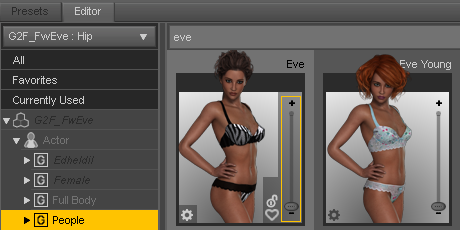
with a separate ear morph.
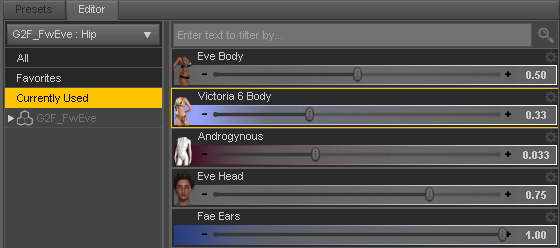
There is some variations possible as well with the separate head and body dials.
Daz 3D is part of

Connect
DAZ Productions, Inc.
7533 S Center View Ct #4664
West Jordan, UT 84084Licensing Agreement | Terms of Service | Privacy Policy | EULA
© 2026 Daz Productions Inc. All Rights Reserved.