-
Zbrush remembers rigging of G3F?
If it is a temporary morph where the figures pose is already decided and you just want to do some editing for a render, then there is no need to rig the goz morph and your existing rigging in studio should be fine. But, if you change pose and your morph is still present you might want to rig it if its a change you plan on keeping and the area you are changing pose has the morph present in the same location. It also depends on what area it is, some might not require rigging. If you do a morph via GoZ, the rigging does not auto adjust to the new modification when sent back to Studio. If you want to save it, what you should do is save the GoZ morph as whatever you want, reset figure to Default, dial up only that modification, then rig that then save. Again this depends on what area it is. If for example it is a modification on the face, then rigging is definately needed or the facial bones will not follow your morph.
Now whenever you dial it with whatever other morph, the rigging will always follow correctly. Always look at what the figure bones do. If they do not follow your modification, it is not rigged. I never reverse deform because the GoZ sessions only brings back the changes you made so there is no need to use reverse deformations when using GoZ, because the modification is already isolated and does not need to be reversed out of any shape.
DAZ Studio and memory overclocksI'd expect a memory OC to help with faster transfers of data.
Since Iray only does that one large transfer to fit the whole scene onto the card, what you're seeing sounds right.
FBMExpandAll?Yes, it's much faster than collision detection, but, not all items seem to have it.
Does anyone know if this morph is created within Daz Studio, or must users create it outside of DS ?
I would like to create a FBMExpandAll morph for an item that doesn't have one.
I'm interested in knowing how the Daz content creators make it themselves.Zbrush remembers rigging of G3F?Yes, if it's just for a temporary morph (one pose for a render), just leave the Popup windows that appears when you use GoZ on ZB to send it to DS, and just, as Midnight Stories has said, tick Reverse Deformations (I think that's the name). And then, on the parameters tab, you'll see a new Zbrush subtab, click on it, and dial the Zbrush morph, and you get it exactly as you fixed it on ZB.
If you have made a morph, that you want to keep it, on the options when importing back to DS from ZB, type a name for the morph, choose or create a property group (this will tell DS where to show the morph on the tabs), reverse deformations again, and then, to store it, select the item that got the morph, and choose, save as > support asset > Morph Asset, then browse to the property group that you have chosen/created, and click on the morph(s), it will be there the next time you load DS.
Little Ones for Genesis 3 FemaleStupid question, but how do you make an extra dial? Can you also make separate head/body dials from a single character morph?
There is a tutorial here:
http://www.digi-dotz.com/index.php/free-poses/tutorials/daz-studio-tutorials/47-morph-in-daz-studio
And AFAIR you can't make e.g. a head morph from a single character morph that way (I think you have to mess with the mesh to do that).
Thank you!

I played around with the dials a bit yesterday, and the Little ones really add massively to the realistic "tween" gene pool. Not that they aren't cute by themselves. A really versatile product. I'm happy!
 Pose needed for AM Wolf
No, I have it in my wishlist. Just cannot afford it right now.
It's worth every penny. There's also a Husky morph by CGNZ and an expansion set by Design Anvil. There will be a PA sale in a month or two's time so you will be able to pick them up cheap then.
Cheers,
Alex.
Legacy UVs for Genesis 3: Separate ProductsIs it possible to get just individual versions of the Legacy UVs for Genesis 3: Genesis Pack? I haven't bothered with any of the other characters so far and I'm not interested in buying an incomplete set where two of them are vendored on a different site and another two are completely excluded from production. I was planning on getting all the other ones (G2F, G2M, V4, M4, V5, M5, V6, M6, basically all the ones that we've seen/expect to see defaultly supported on the Genesis figures) in one swoop after they came-out. However, M5 is part of the pack and I'm not too keen of getting other G1 characters like S5, D5, and A5 if there's no H5 or F5.
Looking at the price compared to the previous prices of the other UV prices, you're getting basically 4 for the price of one with the latest product. Also the V4 product on the different site is probably to keep his store open at rendo as a backup for products not accepted here. Nothing wrong with that. If you want it, I wouldn't ask him to close his store just so you can get items in one place.
Also with H5 and F5, I can understand that as well as both only had one texture with no gens and related products fell back on either M5 or M4. I would just map transfer tool those. D5 had at least 3 textures. A lot of textures for G2F and G2M ended up being M5 or V5 to leverage them to genesis 1 as well.
GoZ-like workflow for other modeling toolsAnother PA in another thread confirmed what I was thinking, and that's to use reverse deformation if you're using a posed figure (in Morph Loader Pro). If you use GoZ, you don't need to do this.
Genesis 3 SuperheroesAnyone else getting major poke-through with Gianni 7? I'm wondering if the FBMs on the male suit have been made for the HD versions of the characters. I'm seeing lots of poke-through for the Gianni 7 base, but it mostly (not completely) goes away with the HD morph dialled in. Ivan 7 also has poke-through on the base model.
The Guardian suits fits perfectly, but not so the base suit :(
Tween Julie 7Yeah, she does seem to have a 10 yr old's face/head on a 14-15 yr old body...I had to apply 25% of Zev0's GUMorphs for the character to be considered an actual 9-13 yr old meh, no biggie as I detest default settings as a general rule, so yeah, had to deflate the mini-life preservers and adjust the eye forward and give her an actual realistic nose...But still, it's a great base to start!
I would even say Julie 7 has a 6-7-year old's face. I don't know why Daz always makes those baby faces for teens or 'tweens'; the whole character lacks credibility if head and body don't match. Okay for Toon- or Anime-figures, but not for 'realistic' characters.
I didn't buy Julie, but I bought P3D's Brita - applied to G3F this character makes a very interesting, strongwilled looking young lady!
..so Brita doesn't actually "need" Julie7 as mentioned?
kyoto kid said:
Yeah, she does seem to have a 10 yr old's face/head on a 14-15 yr old body...I had to apply 25% of Zev0's GUMorphs for the character to be considered an actual 9-13 yr old meh, no biggie as I detest default settings as a general rule, so yeah, had to deflate the mini-life preservers and adjust the eye forward and give her an actual realistic nose...But still, it's a great base to start!
I would even say Julie 7 has a 6-7-year old's face. I don't know why Daz always makes those baby faces for teens or 'tweens'; the whole character lacks credibility if head and body don't match. Okay for Toon- or Anime-figures, but not for 'realistic' characters.
I didn't buy Julie, but I bought P3D's Brita - applied to G3F this character makes a very interesting, strongwilled looking young lady!
..so Brita doesn't actually "need" Julie7 as mentioned?
If you want to use her at "normal size" yes, but you can apply the morph to G3F and use it without her if you want to.
...so I imagine then that the Growing Up Moprhs should work as well.
Genesis 3 morph seperately issuesWhat you can do with G3 is play around with the Upper Face Rig which has quite a few eye contols & might get the look you are looking for
Click on G3 making sure you have "Show Hidden Nodes" checked
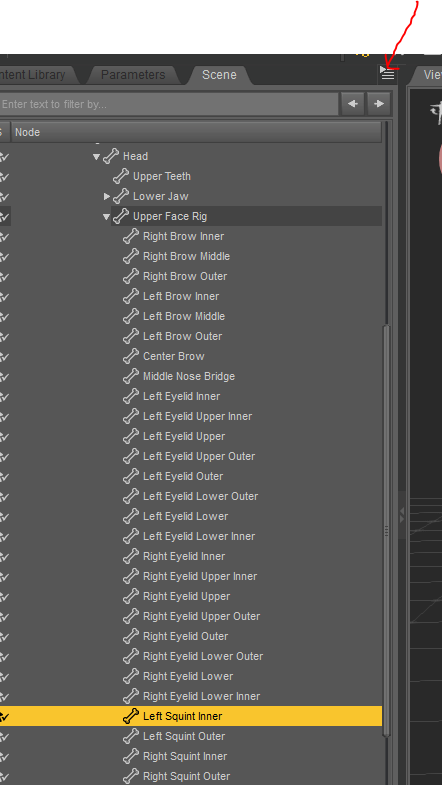
I transferred the free morphs to G3M with genux - You could also transfer morphs you have for g2 to g3
http://www.daz3d.com/genx2-addon-for-genesis-3
FBMExpandAll?I've seen the FBMExpandAll morph (Full Body Morph) on several different items, but I don't know where it comes from, originally. So, where does it come from? How it is created? Some items have it, some don't.
How do you create a FBMExpandAll morph for item that doesn't have it? Is it custom made?
Genesis 3 SuperheroesOne more quick comment before bed. With some TLC I got the long cape handling pretty rad. But it does seem to lean towards lumpy in its default state (though upping the smooting can mitigate a lot of the problems, as does fitting it to the supersuit rather than the figure). The problem isn't the rigging but the morphs being projected out. Projected morphs get funky when they apply to things that are further away. I mean, logically a morph that changes the shape of Genesis3's knees certainly isn't going do anything useful projected on a cape.
What helps the most is a rigidity group, I set one up in, like, 7 minutes, but I'm pretty used to doing it at this point, and I know not everyone is.
But one thing that requires less special knowledge and really helps is selecting the cape turn on "show hidden properties" and zero out any non necesary morphs, in particular the corrective morphs. There's a shin bend morph that creates a particularly hideous lump (I had to do this even with my rigidity group, apparently it doesnt mask corrective morphs, Who knew? I learned something new today)
But 15 or so minute of fudging and I now have a nice pretty and lumpless cape that I can save as a wearables preset never have to worry about again.
Ice Dragon Art WIP'sTaisha - Half Elf
Genesis - Rapture Morph and Mats
Mitsu Hair - UHT2 Hair Salon
MFD - Reign
She is a character for the story I am putting together - I will be posting the pictures with the very short stories that go with them on my deviant art account.
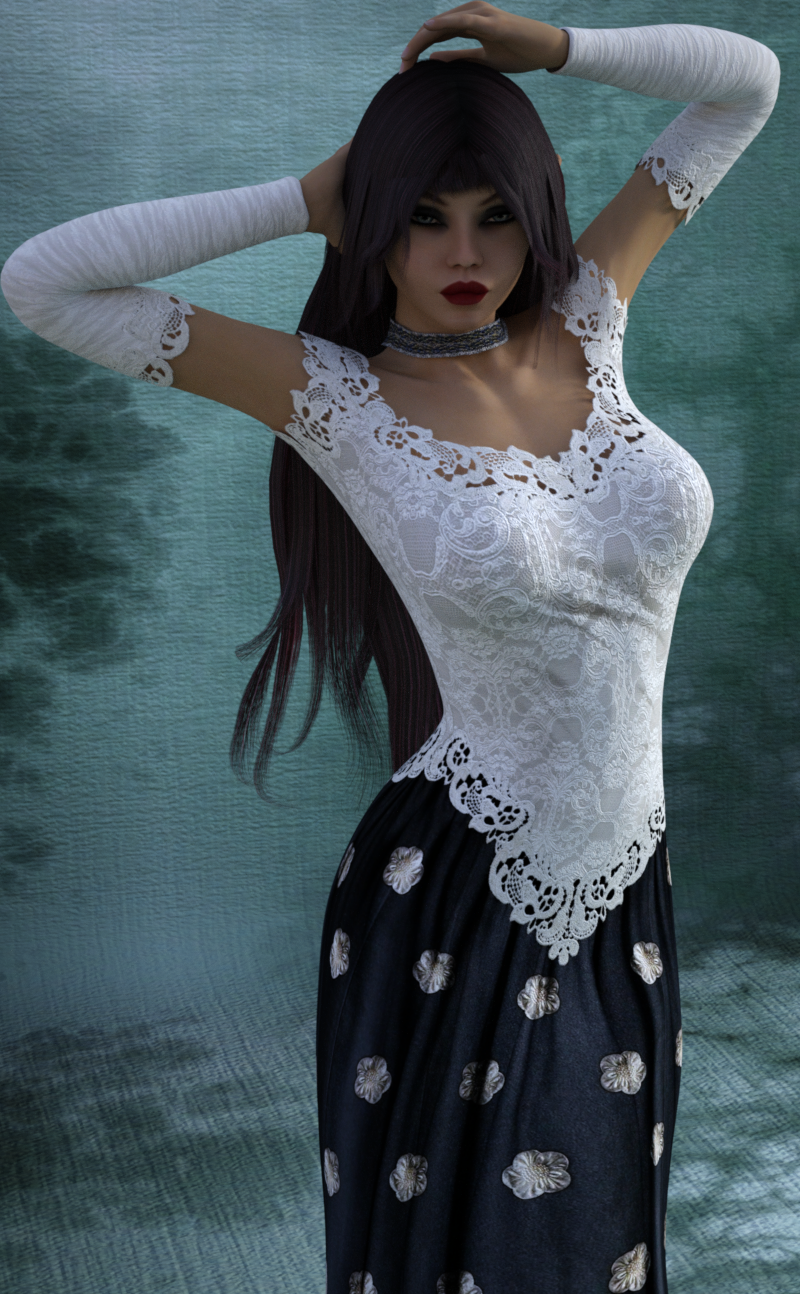
She looks great! I really don't play with the MFD as much as I should considering all of the texture sets and differing looks that outfit can have. I love the character. Is she one of your Randomized characters? She has an intriguing face. Really nice render.
Thanks! This character is Rapture - I picked her up in the Genesis sale yesterday for $2.60. No changes its all her morphs and make up. She has some lovely make up too including a full lacy eye mask.
Ah, well, at some point, I bought her. I don't think I've ever rendered her. I really need to stop buying so much until I render a substantial amount of my already full library! Of course, now that I have two more kids who will be getting braces in the next month or so, my spending is going to be cut dramatically so I will be rendering what is in my library more anyway. I think the only spending in my future will be PC+ club stuff.
Zbrush remembers rigging of G3F?Tick reverse morph when importing !
Genesis 3 SuperheroesThis thread needs some renders, especially since the promos were so bland.
So here's a shiny, shiny, Nightwing. (the boots are actually from the Gen 2 Regency set)
The texture's by me because I can (sort of) do that. What I can't do are really nice consistent wrinkle morphs so I'm liking the morphs that come with the suit. Also, all the geografts are a nice way to have things end at a bunch of different lengths with nice proper turned edges.
The advantage of the Genesis supersuit was the numerous addons, this could certainly use some, I'd love some belts and body armor bits, On the other hand the Genesis Supersuit was a bit to reliant on shaders for my taste. the detail always seemed more painted on, wheras this version has nice mesh detail via morphs particularly for the cowl.
@timbales The suit comes with fit morphs for the shoes with them applied I tried a bunch of morph and couldnt set pokethrough. my guess is one of the fit morphs wasn't applied.
Weird uses of contentI am a bit of a fan of extreme transferring
Whats fun about this render? Well... the hair is from Genesis, the clothes Gen 2, the textures are V4, and the morph is a mix of David 5 and Antonia (seriously, that Antonia). The textures and Morphs were transferred in blender.
I need to find some Generation 3 stuff in my library to add to it, I think.
How did you get an Antonia morph off of, uh, Antonia and onto something like a Genesis 1 base?
--MW
Really manually. Basically I posed and scaled the figures so they lined up as best I could, exported them into blender and made a morph for Gen 3 using the shrinkwrap modifier and a lot of hand tweaking and sculpting.
Creating Morphs in Hexagonon the right side of Hexagon where it has the name of the object selected, make sure that name matches the name of your shoes in Daz. When it has the same name, then Daz will ask if you want to create a new object or morph.
Weird uses of contentI am a bit of a fan of extreme transferring
Whats fun about this render? Well... the hair is from Genesis, the clothes Gen 2, the textures are V4, and the morph is a mix of David 5 and Antonia (seriously, that Antonia). The textures and Morphs were transferred in blender.
I need to find some Generation 3 stuff in my library to add to it, I think.
How did you get an Antonia morph off of, uh, Antonia and onto something like a Genesis 1 base?
--MW
Weird uses of contentI am a bit of a fan of extreme transferring
Whats fun about this render? Well... the hair is from Genesis, the clothes Gen 2, the textures are V4, and the morph is a mix of David 5 and Antonia (seriously, that Antonia). The textures and Morphs were transferred in blender.
I need to find some Generation 3 stuff in my library to add to it, I think.
Daz 3D is part of

Connect
DAZ Productions, Inc.
7533 S Center View Ct #4664
West Jordan, UT 84084Licensing Agreement | Terms of Service | Privacy Policy | EULA
© 2026 Daz Productions Inc. All Rights Reserved.