-
Christian 8
The banner said the content had to be in the basket at the same time as the pro bundle at 1:48am Central time this morning.
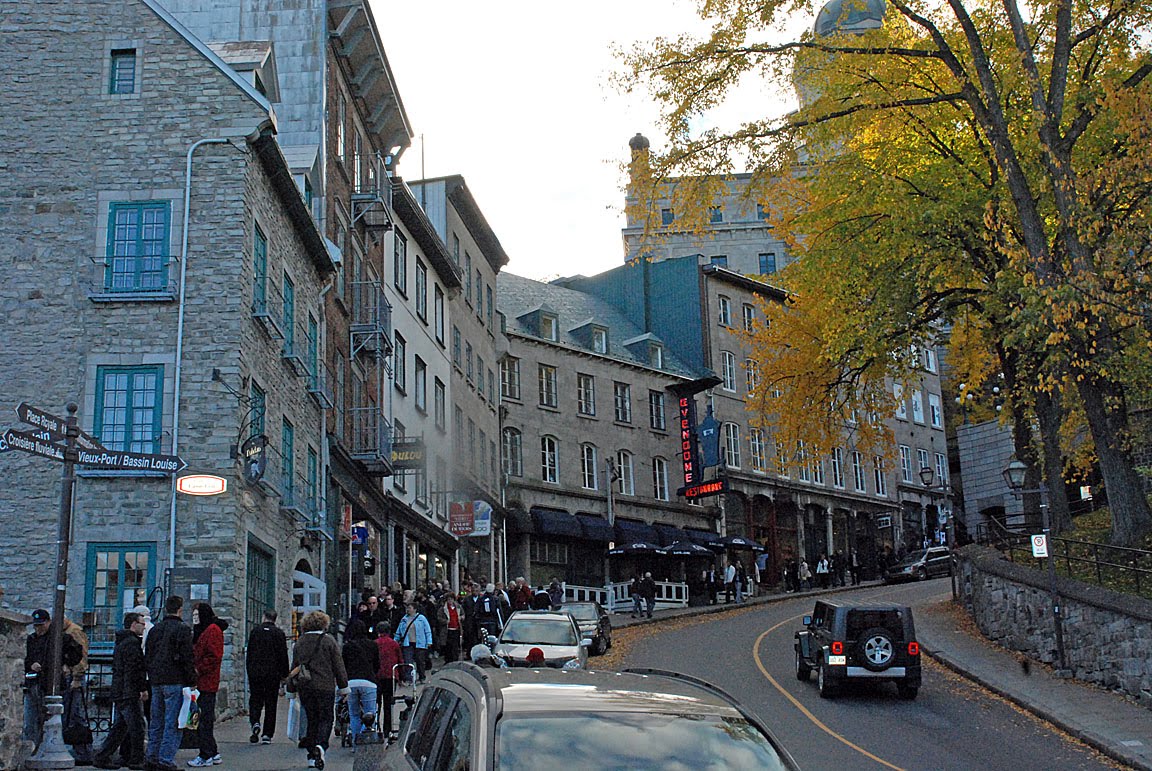
Creating Big City Scenes in DAZ StudioNew to this thread. I've been looking for a cityscape 3D model like the ones by Dreamland, Powerage and Stonemason - some of whose products I've alrerady purchased - but on a steep hill or slope overlooking or next to a big central business district, as seen in the ones found in the attached pics:
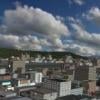
San Francisco:


Quebec City:
Hong Kong:

Some products come close, but still no cigar. I'd gladly make one if I had the time and expertise:
https://www.renderosity.com/mod/bcs/goldenwood-vol1/109748/
https://www.renderosity.com/mod/bcs/goldenwood-vol2/109919/
https://www.renderosity.com/mod/bcs/the-dirty-street-for-ds-iray/128425/
https://www.renderosity.com/mod/bcs/italian-street-for-daz-studio/129290/
https://www.renderosity.com/mod/bcs/harbour-town/116970/Tynkere's Toying & Rendering TopicSomething I’m messing around with right now. Have to tweak water color & opacity before I do a ‘Gone Fishing’ scene using props by that name.
Suggestions on how to make wet looking skin surface for frog? Many products at HW are still 3DL only. Dual lobe settings in IRay just have skin looking oily or waxy-- not really wet if that makes any sense.
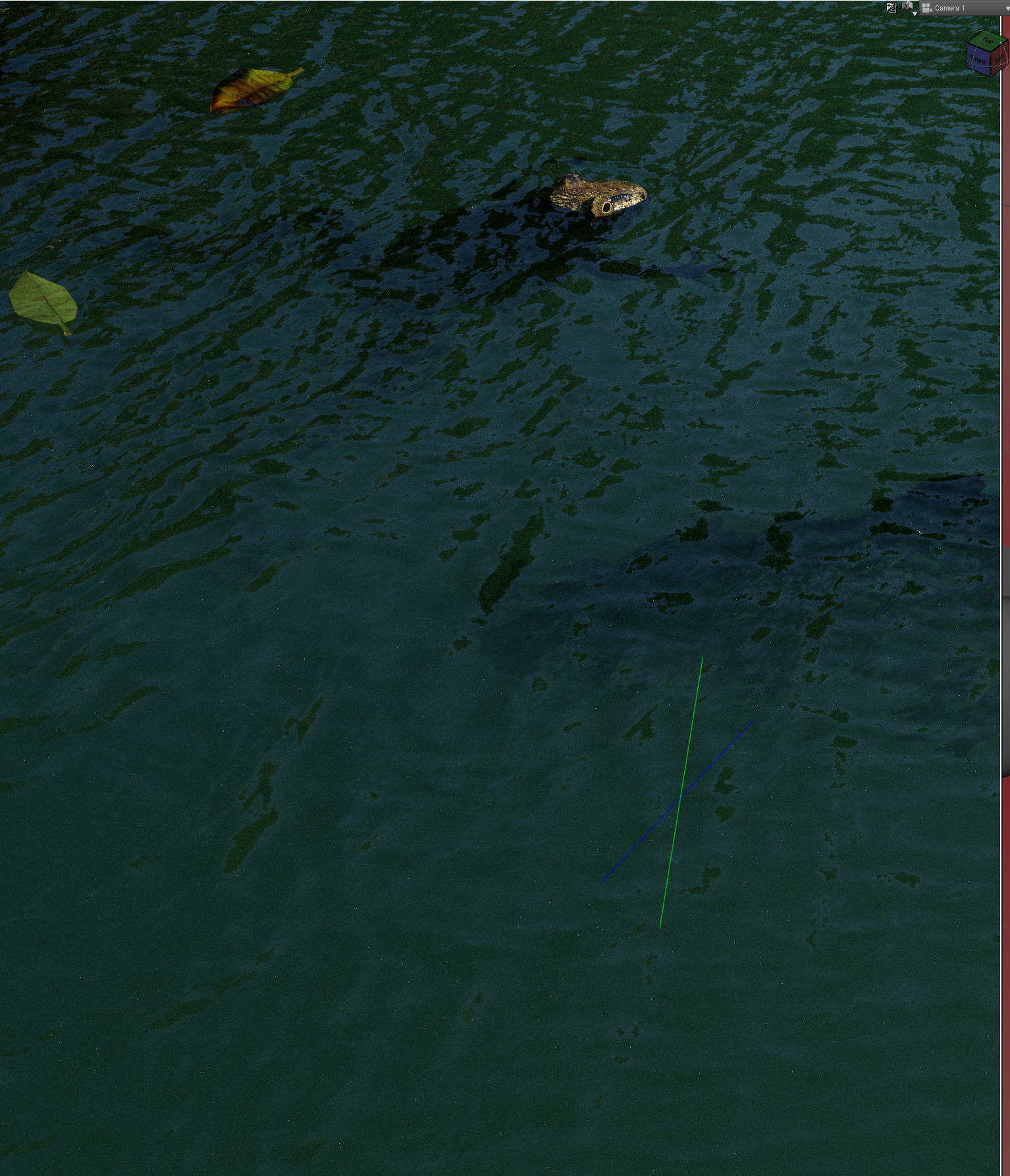
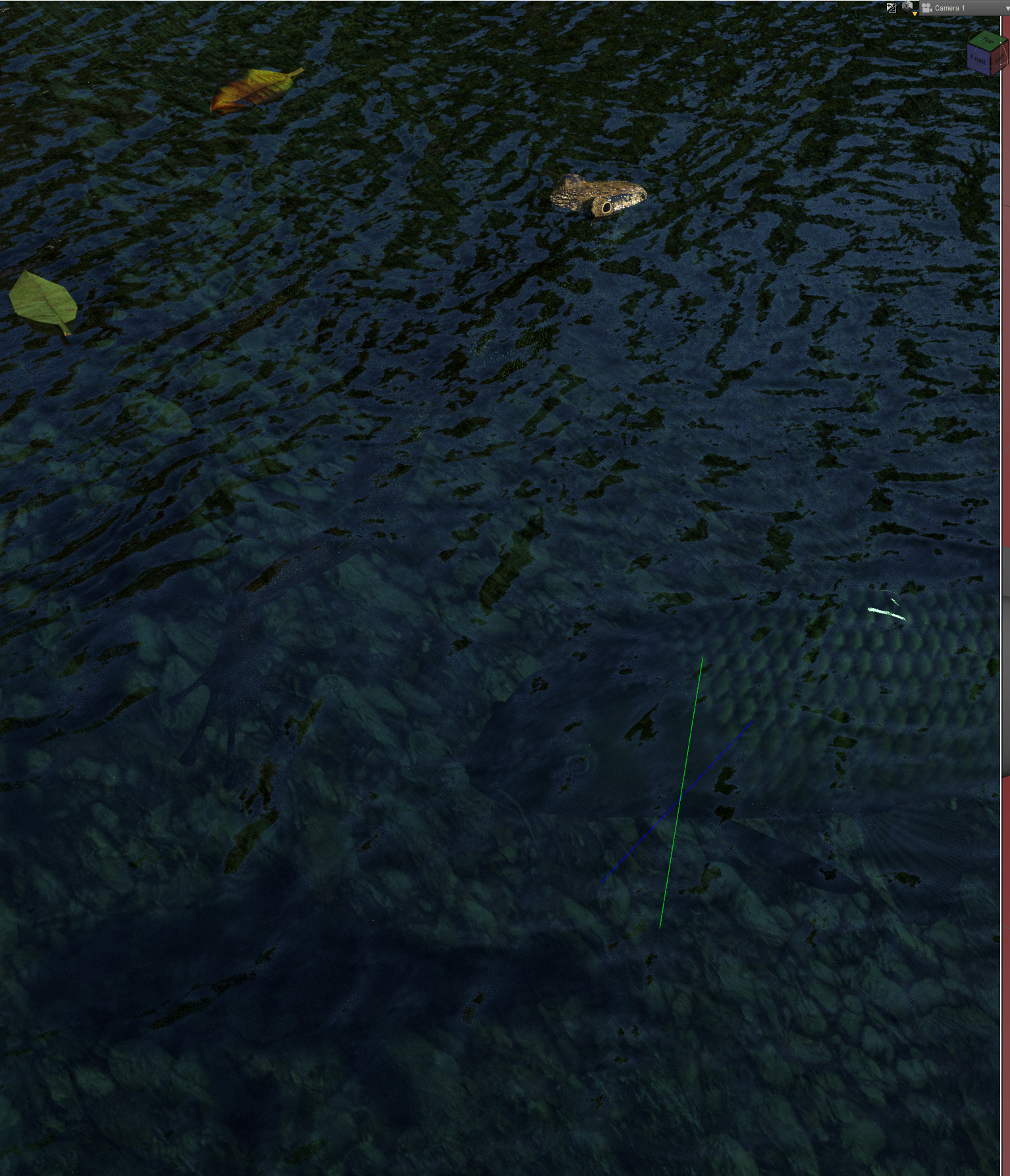
Color tweaks to "Fern Lake" water to get it more greenish as found in central & west Texas
Refract Color: .12 | .22 | .16 (99-128-112)
SSS Amount: .0010Cutout opacity: 1 | (opaque looking water)
Cutout Opacity at .9990 | (clear looking water. Can see gravel, fish, fish shadow, etc.)As said, suggestions for frog skin and water opacity/color greatly appreciated.
[Released] RSSY Clothing Converter from Genesis 2 Male to Genesis 8 Male [Commercial]So, I've tried to convert the cape from this item: https://www.daz3d.com/dm-suit-for-genesis-2-male-s-and-michael-6
The main suit went just fine, even the hat. It failed on the gun smart props, but that was fully expected, since it's not supposed to handle them. The cape, on the other hand...
I switched the converter -- which loaded in with Conformer Bodysuit M for the item -- to the cape conformer.
I've unchecked "Check Content Type".
I've tried Execute, which failed. I tried both Convert Item and Force Convert on the original -- remembering to select the item as well as check the box before clicking the relevant button -- which also failed.
I then resaved the item -- which seemed to have perfectly good metadata -- making sure to save it as Follower/Wardrobe/Outerwear/Top, under the name "Dark Man Cape" (the original is "DM Cape"). All three options failed on the newly-saved version as well.
Every time, it fails with the message "The item is not a Genesis 2 Male clothing item."
There's no directory path or other issue that I can easily identify. It's just wrong, and I don't know what to do to make it figure things out.
Is there anything I can do to either get it to recognize that the item is in fact a Genesis 2 Male clothing item or to stop caring?
Relevant log items below, if that will be helpful.
21:58:42 GMT-0600 (Central Standard Time): Converting clothing from G:/DAZ 3D/Studio3/content/People/Genesis 2 Male/Clothing/Dark Man/DM Cape.duf to G:/DAZ 3D/Studio3/content/People/Genesis 8 Male/Clothing/Dark Man/DM Cape.duf
21:58:43 GMT-0600 (Central Standard Time): Generation and Gender of DM Cape Clothing item:
21:58:43 GMT-0600 (Central Standard Time): DM Cape is not a Genesis 2 Male clothing item
21:58:45 GMT-0600 (Central Standard Time): Execution Complete.
21:59:30 GMT-0600 (Central Standard Time): Adding Files...
21:59:30 GMT-0600 (Central Standard Time): Adding "Follower/Wardrobe/Unknown" file: G:\DAZ 3D\Studio3\content\People\Genesis 2 Male\Clothing\Dark Man\Dark Man Cape.duf
21:59:55 GMT-0600 (Central Standard Time): Executing Script
21:59:55 GMT-0600 (Central Standard Time): Selecting Preset: G:\DAZ 3D\Studio3\content\People\Genesis 2 Male\Clothing\Dark Man\Dark Man Cape.duf
21:59:55 GMT-0600 (Central Standard Time): Converting clothing from G:\DAZ 3D\Studio3\content\People\Genesis 2 Male\Clothing\Dark Man\Dark Man Cape.duf to G:/DAZ 3D/Studio3/content/People/Genesis 8 Male/Clothing/Dark Man/Dark Man Cape.duf
21:59:56 GMT-0600 (Central Standard Time): Generation and Gender of DM Cape Clothing item:
21:59:56 GMT-0600 (Central Standard Time): DM Cape is not a Genesis 2 Male clothing item
21:59:58 GMT-0600 (Central Standard Time): Execution Complete.
22:00:43 GMT-0600 (Central Standard Time): WARNING: Forcing Conversion of Clothing Items
22:00:43 GMT-0600 (Central Standard Time): Executing Script
22:00:43 GMT-0600 (Central Standard Time): Selecting Preset: G:\DAZ 3D\Studio3\content\People\Genesis 2 Male\Clothing\Dark Man\Dark Man Cape.duf
22:00:43 GMT-0600 (Central Standard Time): Converting clothing from G:\DAZ 3D\Studio3\content\People\Genesis 2 Male\Clothing\Dark Man\Dark Man Cape.duf to G:/DAZ 3D/Studio3/content/People/Genesis 8 Male/Clothing/Dark Man/Dark Man Cape.duf
22:00:44 GMT-0600 (Central Standard Time): Generation and Gender of DM Cape Clothing item:
22:00:44 GMT-0600 (Central Standard Time): DM Cape is not a Genesis 2 Male clothing item
22:00:46 GMT-0600 (Central Standard Time): Execution Complete.
When the script loads the clothing item, it is looking at its preferred base (Edit->Scene Identification). This is blank in this case.
[Released] RSSY Clothing Converter from Genesis 2 Male to Genesis 8 Male [Commercial]So, I've tried to convert the cape from this item: https://www.daz3d.com/dm-suit-for-genesis-2-male-s-and-michael-6
The main suit went just fine, even the hat. It failed on the gun smart props, but that was fully expected, since it's not supposed to handle them. The cape, on the other hand...
I switched the converter -- which loaded in with Conformer Bodysuit M for the item -- to the cape conformer.
I've unchecked "Check Content Type".
I've tried Execute, which failed. I tried both Convert Item and Force Convert on the original -- remembering to select the item as well as check the box before clicking the relevant button -- which also failed.
I then resaved the item -- which seemed to have perfectly good metadata -- making sure to save it as Follower/Wardrobe/Outerwear/Top, under the name "Dark Man Cape" (the original is "DM Cape"). All three options failed on the newly-saved version as well.
Every time, it fails with the message "The item is not a Genesis 2 Male clothing item."
There's no directory path or other issue that I can easily identify. It's just wrong, and I don't know what to do to make it figure things out.
Is there anything I can do to either get it to recognize that the item is in fact a Genesis 2 Male clothing item or to stop caring?
Relevant log items below, if that will be helpful.
21:58:42 GMT-0600 (Central Standard Time): Converting clothing from G:/DAZ 3D/Studio3/content/People/Genesis 2 Male/Clothing/Dark Man/DM Cape.duf to G:/DAZ 3D/Studio3/content/People/Genesis 8 Male/Clothing/Dark Man/DM Cape.duf
21:58:43 GMT-0600 (Central Standard Time): Generation and Gender of DM Cape Clothing item:
21:58:43 GMT-0600 (Central Standard Time): DM Cape is not a Genesis 2 Male clothing item
21:58:45 GMT-0600 (Central Standard Time): Execution Complete.
21:59:30 GMT-0600 (Central Standard Time): Adding Files...
21:59:30 GMT-0600 (Central Standard Time): Adding "Follower/Wardrobe/Unknown" file: G:\DAZ 3D\Studio3\content\People\Genesis 2 Male\Clothing\Dark Man\Dark Man Cape.duf
21:59:55 GMT-0600 (Central Standard Time): Executing Script
21:59:55 GMT-0600 (Central Standard Time): Selecting Preset: G:\DAZ 3D\Studio3\content\People\Genesis 2 Male\Clothing\Dark Man\Dark Man Cape.duf
21:59:55 GMT-0600 (Central Standard Time): Converting clothing from G:\DAZ 3D\Studio3\content\People\Genesis 2 Male\Clothing\Dark Man\Dark Man Cape.duf to G:/DAZ 3D/Studio3/content/People/Genesis 8 Male/Clothing/Dark Man/Dark Man Cape.duf
21:59:56 GMT-0600 (Central Standard Time): Generation and Gender of DM Cape Clothing item:
21:59:56 GMT-0600 (Central Standard Time): DM Cape is not a Genesis 2 Male clothing item
21:59:58 GMT-0600 (Central Standard Time): Execution Complete.
22:00:43 GMT-0600 (Central Standard Time): WARNING: Forcing Conversion of Clothing Items
22:00:43 GMT-0600 (Central Standard Time): Executing Script
22:00:43 GMT-0600 (Central Standard Time): Selecting Preset: G:\DAZ 3D\Studio3\content\People\Genesis 2 Male\Clothing\Dark Man\Dark Man Cape.duf
22:00:43 GMT-0600 (Central Standard Time): Converting clothing from G:\DAZ 3D\Studio3\content\People\Genesis 2 Male\Clothing\Dark Man\Dark Man Cape.duf to G:/DAZ 3D/Studio3/content/People/Genesis 8 Male/Clothing/Dark Man/Dark Man Cape.duf
22:00:44 GMT-0600 (Central Standard Time): Generation and Gender of DM Cape Clothing item:
22:00:44 GMT-0600 (Central Standard Time): DM Cape is not a Genesis 2 Male clothing item
22:00:46 GMT-0600 (Central Standard Time): Execution Complete.
Fern Lake: Water Color & TransparencyHow do you make the water in this set more transparent and maybe less muddy looking?
I’ve loaded the Iray version & cutout opacity seems all or nothing. It is at .90 in the screenshot. Shows a little surface reflection, but the gravel on the bottom too visible for what I had in mind.
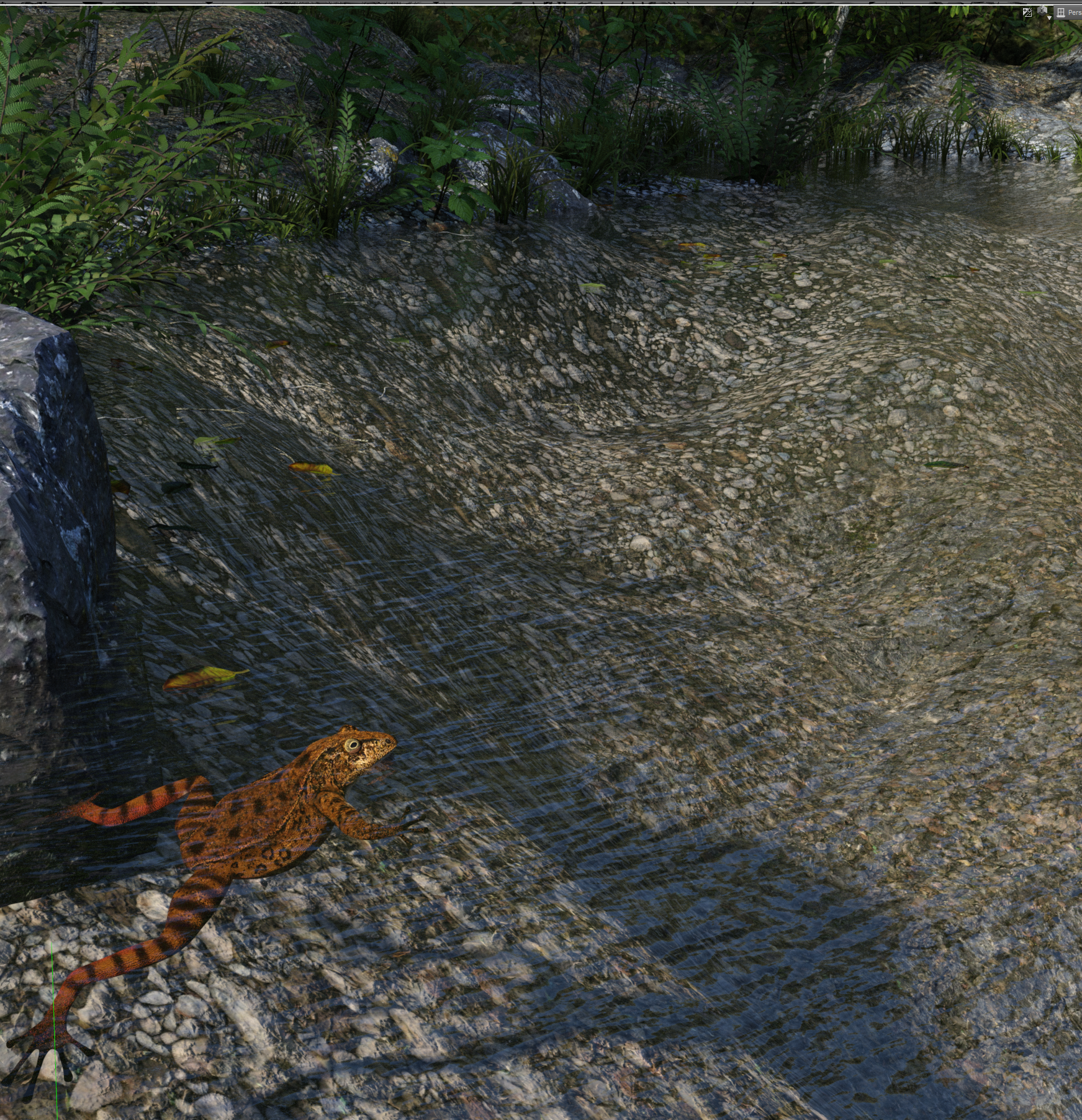
In central Texas, even a pond fed by artesian spring water would have algae in it & so a kind of greenish tint.
Suggestions? I would alter the RGB values in Reflection color? Top Coat color?
Looked at the commercial topic but it’s sometimes unclear whether they were talking about iray or 3DL.
Hopefully I can get a some good Iray based scenes once water tweaked.
thanks for reading
--Bruce
The Things Which Could Be Worse Need Cats To Make Them Better Complaint Thread...wow that is pretty scary. They were going to keep me there one more night but the tests and evaluations determined it was OK for me to be released yesterday evening. I feel much better being at home.
Glad you're back home!
Dana
...yeah feels good sleeping in my own bed, making my own food, not being woken up every couple hours, and not having to ring the nurse when I needed to use the dunny (as they had to disconnect a couple hookups each time). Though I sort of miss this neat device they had to stimulate circulation while I was laying down which was kind of like a pneumatic leg massage that had these soft leggings which would inflate every so often to prevent blood pooling, kind of like what the lower part of a fighter pilot's G-suit does.
Going to the hospital is always a risk. Their job is to find something wrong. I was in the hospital for a couple days a few years ago. I'd gone to the emergency room because of an abdominal pain for which they probed me with all sorts of sticks, stones, and invisible rays and could find nothing wrong with my gastro system. But needing to justify their time looked elsewhere in me and in the process discovered my heart going wonky. Which was not unexpected to me, because I've lived with Atrial Fibrillation (Afib) for years. But they seemed to think it was worth studying and they brought in crowds of not-yet-doctors to watch my heart rhythms and who pointed out things apparently interesting to them. Saying things like "Oh, look he has no 'P' wave". And since I was such an interesting object they "invited" me to stay with them for a couple of days to "watch" me. Which turned out to mean they wired me up to a wireless transmitter sending my vital statistics to a machine in the central nurses corral. I could hear the symphony of noises coming from the corral while lying in my bed and if I moved, my heart rhythms changed and their machine that goes "ping" would start going "ping" and a nurse's head would shortly poke in the door of my room to see if I was still alive enough to be charged bed rent.
 I was.
 And, of course, I was also connected to tubes and bags of fluid hanging on a wheeled coat rack. So, later in the day when nature called, and being an independent sort of person and not feeling at all ill anymore (my stomach pain had disappeared already) I hopped out of bed, and being an educated man and understanding the nature of gravity, topology and long tubes dangling from coat racks, I dragged my coat rack with me to the bathroom and proceeded to do my business. About mid-extrusion my bathroom door pops open and the nurse came in, I'm sure expecting to see a gasping 230 pound pile of writhing flesh on the floor. But, 'twasn't to be, and I told her I was fine and ordered her to "Close the f'n door!" Apparently I am not a patient patient. She waited outside the bathroom and escorted me back to my bed when I emerged, admonishing me for not calling for help pooping. What was she going to do? Carry me to the throne and squeeze me in the right places?

But they were concerned enough that they called my regular cardiologist and "invited" me to stay in the hospital until he arrived and examined me. Many hours later but right after I had figured out how to use my credit card to pay for a minimum of 3 days of ridiculously expensive TV Cable service to my television, my cardiologist arrived and decided he wanted to try an experiment and give me another heart rhythm controlling drug. OK, so they hook me up to another bag of some liquid but 30 minutes later I'm enjoyably hallucinating and am pass-out woozy and my cardiologist (who was thankfully still in the hospital) rushes back to me and says something like "well, I guess that didn't work" and disconnects me from the joy juice and put me back on my regular medications but with a slight modification of dosage. That seemed to do the trick and I think I finally got out of the hospital 18 hours later leaving behind all that pre-paid TV cable service.

...things seem to have changed with time. My IVs were small tubes of concentrated meds rather than being tethered to a coatrack of bottles or pouches. I did have a thimble attachment on a finger that relayed a signal to a unit in the room (that only went "ping" when it was removed) which sent data to their central monitor. They took a couple blood sugar tests, a concussion test (which I passed) and a memory test, then gave me some insulin (as Metformin has a reaction with one of the meds they put me on). They used a small epi-pen like device for administering insulin instead of a syringe, which could be injected in the arm instead of midsection, didn't feel a thing (wonder what those cost if I ever need to shift to insulin).
Overall the staff who attended to me was very accommodating and personable which made the situation better.
Yeah there was a big flatscreen in the room, never thought to turn it on even to watch the Green Bay game as I was too sleepy. Not having a television for something like 16 years, don't really miss it.
The Things Which Could Be Worse Need Cats To Make Them Better Complaint Thread...wow that is pretty scary. They were going to keep me there one more night but the tests and evaluations determined it was OK for me to be released yesterday evening. I feel much better being at home.
Glad you're back home!
Dana
...yeah feels good sleeping in my own bed, making my own food, not being woken up every couple hours, and not having to ring the nurse when I needed to use the dunny (as they had to disconnect a couple hookups each time). Though I sort of miss this neat device they had to stimulate circulation while I was laying down which was kind of like a pneumatic leg massage that had these soft leggings which would inflate every so often to prevent blood pooling, kind of like what the lower part of a fighter pilot's G-suit does.
Going to the hospital is always a risk. Their job is to find something wrong. I was in the hospital for a couple days a few years ago. I'd gone to the emergency room because of an abdominal pain for which they probed me with all sorts of sticks, stones, and invisible rays and could find nothing wrong with my gastro system. But needing to justify their time looked elsewhere in me and in the process discovered my heart going wonky. Which was not unexpected to me, because I've lived with Atrial Fibrillation (Afib) for years. But they seemed to think it was worth studying and they brought in crowds of not-yet-doctors to watch my heart rhythms and who pointed out things apparently interesting to them. Saying things like "Oh, look he has no 'P' wave". And since I was such an interesting object they "invited" me to stay with them for a couple of days to "watch" me. Which turned out to mean they wired me up to a wireless transmitter sending my vital statistics to a machine in the central nurses corral. I could hear the symphony of noises coming from the corral while lying in my bed and if I moved, my heart rhythms changed and their machine that goes "ping" would start going "ping" and a nurse's head would shortly poke in the door of my room to see if I was still alive enough to be charged bed rent.
I was. And, of course, I was also connected to tubes and bags of fluid hanging on a wheeled coat rack. So, later in the day when nature called, and being an independent sort of person and not feeling at all ill anymore (my stomach pain had disappeared already) I hopped out of bed, and being an educated man and understanding the nature of gravity, topology and long tubes dangling from coat racks, I dragged my coat rack with me to the bathroom and proceeded to do my business. About mid-extrusion my bathroom door pops open and the nurse came in, I'm sure expecting to see a gasping 230 pound pile of writhing flesh on the floor. But, 'twasn't to be, and I told her I was fine and ordered her to "Close the f'n door!" Apparently I am not a patient patient. She waited outside the bathroom and escorted me back to my bed when I emerged, admonishing me for not calling for help pooping. What was she going to do? Carry me to the throne and squeeze me in the right places?
But they were concerned enough that they called my regular cardiologist and "invited" me to stay in the hospital until he arrived and examined me. Many hours later but right after I had figured out how to use my credit card to pay for a minimum of 3 days of ridiculously expensive TV Cable service to my television, my cardiologist arrived and decided he wanted to try an experiment and give me another heart rhythm controlling drug. OK, so they hook me up to another bag of some liquid but 30 minutes later I'm enjoyably hallucinating and am pass-out woozy and the machine that goes "ping" was playing a jazz tune and my room fills up with nurses and doctors. And my cardiologist (who was thankfully still in the hospital) rushes back to me and says something like "well, I guess that didn't work" and disconnects me from the joy juice and put me back on my regular medications but with a slight modification of dosage. That seemed to do the trick and I think I finally got out of the hospital 18 hours later leaving behind all that pre-paid TV cable service.
WinterMoon Wants Attention.
This is another one of my old Original Characters. His name's Andre. He wasn't the character I was trying to make, this was more of a happy accident. Yeah, he's kind of a pretty-boy, and doesn't he look so, so innocent? In reality, he's rather impulsive, unpredictable and not always... really all there. Sometimes, his behaviour can seem strange and even creepy. He doesn't seem to be aware that he's quite strong, and has almost ended up injuring others, on a couple of occasions. While he frequently shows signs of being intelligent and insightful, he often lacks the ability to predict the consequences of things he says and does. He's not malicious, he's just not quite as he should be.

After having successfully accidentally made Andre, I wondered if I'd be able to tweak the model into his look-alike from the same story. This is at least partial success. I used the same hair and skin in these pictures, to be sure I really did get their features to look different.
Lucas is more of a central character in the story. Andre and him are sometimes mistaken for each other, which has led to some not-so-great situations for both of them. They're similar in appearance, but almost opposites in behaviour and personality. Lucas has grown up being told in the vaguest possible terms that he really does have something wrong with him, and any odd or unexpected thing he's done, basically from infancy, has caused some minor crisis for his mother. As a result, he's learned to be a rather quiet and passive person, who has some problems taking initiative. While he's calm on the outside, his thoughts and emotions are raging in a constant tempest under the surface. Now and then he fails to control his reactions to something, and just snaps. For every time it happens, things get a little worse afterwards.

Have a shirtless picture, because why not.
 2018 Holiday Loyalty Rewards Sale
Magento has cleared up on my end.
As of 1:30am Central, 12:30am Mountain, there's something wrong with the new Traction Engine on the rewards page. From the Loyalty sale page, the link from the card item goes to www.daz3d.com top level rather than to www.daz3d.com/traction-engine. And on the Traction Engine's own page, the price is showing as $undefin.ed rather than whatever it's supposed to be. (In the cart, it shows as $12.95 after the 30% discount (but no loyalty discount); on the Loyalty sale page, at the moment, it shows as free.)
I'm guessing the Traction Engine is not free and that's a mistake on DAZ's side. If that were the case, you'd be able to get all featured DAZ Originals less than $20 for free since the Traction Engine is a debut item.
We've sent in an inquiry.
2018 Holiday Loyalty Rewards SaleAs of 1:30am Central, 12:30am Mountain, there's something wrong with the new Traction Engine on the rewards page. From the Loyalty sale page, the link from the card item goes to www.daz3d.com top level rather than to www.daz3d.com/traction-engine. And on the Traction Engine's own page, the price is showing as $undefin.ed rather than whatever it's supposed to be. (In the cart, it shows as $12.95 after the 30% discount (but no loyalty discount); on the Loyalty sale page, at the moment, it shows as free.)
I'm guessing the Traction Engine is not free and that's a mistake on DAZ's side. If that were the case, you'd be able to get all featured DAZ Originals less than $20 for free since the Traction Engine is a debut item.
I'm guessing FWSA Ryker will be the best selling item for the day.
2018 Holiday Loyalty Rewards SaleAs of 1:30am Central, 12:30am Mountain, there's something wrong with the new Traction Engine on the rewards page. From the Loyalty sale page, the link from the card item goes to www.daz3d.com top level rather than to www.daz3d.com/traction-engine. And on the Traction Engine's own page, the price is showing as $undefin.ed rather than whatever it's supposed to be. (In the cart, it shows as $12.95 after the 30% discount (but no loyalty discount); on the Loyalty sale page, at the moment, it shows as free.)
I'm seeing almost the same issue (slightly lower price in my cart)
2018 Holiday Loyalty Rewards SaleAs of 1:30am Central, 12:30am Mountain, there's something wrong with the new Traction Engine on the rewards page. From the Loyalty sale page, the link from the card item goes to www.daz3d.com top level rather than to www.daz3d.com/traction-engine. And on the Traction Engine's own page, the price is showing as $undefin.ed rather than whatever it's supposed to be. (In the cart, it shows as $12.95 after the 30% discount (but no loyalty discount); on the Loyalty sale page, at the moment, it shows as free.)
Released, Modern Commuter Carriage. [Commercial]At some point in early 2019 I must get the The Old railway set updated with iray materials.
That would be great (western?)
Yeah, they need updating, Prince Charles came into Cardiff yesterday on a steam train
33rd Daz3D Bryce Render challenge *****Celebrate Winter*****33rd Daz3D Bryce Render challenge
Now Sponsored by Daz 3D
Theme for this challenge is ***** Celebrate Winter *****











So how do you Celebrate
Bodhi Day, Modraniht, Eid, Saturnalia, Yule, Winter Solstice, Pancha Ganapati, Santa Lucia, Hanukkah, Christmas day, Koliada, Kwanzaa, Feast of Saint Stephen, Dongzhi Festival, Hogmanay, New Years Eve, Watch Night, 12th night, Chinese new year.
Or Maybe you would rather choose a fictional one
Erastide in the Belgariad, Midwinter Fair in Velgard amongst the Heralds and their Companions, HogsWatch on the Discworld, Turn's End on Pern, The Feast of Winter Veil in WoW, Festivus is secular Any other one you can think of
******* Just remember *******
Winter is Coming 
The Choice is yours
Your imagination is the only limit
This thread is the WIP thread, so you can post here to show us how things are coming along before the render is transferred to the actual Contest thread for judging. You don't have to do that.we collect up all the finished ones and make the thread, with each render given a number and title, but no artist name shown, so it's a blind judging thread for the judging panel.
Rules
-
All renders must be new renders. -
You can enter up to 3 renders. -
You must abide by the DAZ 3D forum TOS -
Imported content is allowed, but the render must be obviously a Bryce render. -
Post Work permitted, but please keep it to a minimum. -
Rules may be changed for subsequent Challenges, depending on the theme and the person who has selected it.
Please don't post your entry renders anywhere else until after the Challenge is judged, as judging is done in a blind judging thread, so the Judges don't know who has done which image.
Challenge ends January 31st 2019:- Midnight DAZ 3D time.
DAZ 3D Sponsorship, in the form of Store credit
Ist place $30 2nd place $20 3rd place $15
In addition DAZ 3D Store Credit will be given to the people whose renders are selected as the Honourable mentions,
$10 for each of 3 honorable mentionsWe will also be offering a special prize for the render judged the best from a Bryce New User. DAZ 3D will add $10.
Judged by a poll which will be set up at closure of the challenge.
By entering this contest, you agree to allow DAZ3D to use any artwork you submit in any promotional materials they may choose.
Easy Environments: Wuxia Mountains (Daz Studio) [Commercial]I grew up in an area of North Central Montana that looks remarkably like this in the Winter (as well as the late Fall and early Spring:) It will be an instant buy for me.
Partially reflective groundSo, I have this quarry background, and the floor surface is reflective when seen with a low enough angle. At first I thought that it was supposed to be water on the ground, but the position (or even complete absence) of the reflection depends on the position of the camera. Viewed from an high angle, the surface isn't reflective. Lowering the camera, the floor becomes reflective on the side of the image opposite to the camera. See pictures (on the first one from above, there's no reflection, on the second one there's a reflection on one side of hte central "mound", and on the last one, after moving the camera on that side, the reflection appears on the other side.
What causes this and how to fix it? (The floor has no reflection or refraction value)
Infinito 1.1 - Display problemsHello,
after the sale, I know have a licence for INFINITO 1.1 by Alessandro AM.
Problem is: It comes with a technical issue... The Terraform-Preview doesnt work, the preview screen just doesnt show anything, or any changes I make. Also previews dont show up, neither in the central window, nor in the deformer, nor in the input-fields. When I hit TERRAFORM!, it works, so I assume a display-issue.
Can anybody help?
If it matters, heres the setup:
- Windows 10 x64 pro
- i7 7820X@3,6Ghz
- 64GB RAM
- nVidia Geforce 1080ti
- nVidia Geforce 780GT*
- DAZ Studio 10 (no Beta)
* the smaller card is for providing additional monitors and its not used by DAZ
Waited Too Long – 1080ti UnavailableNo, idea where you are. It's effectively sold out in North America. The only cards are grossly overpriced. EU sources seem to show the same thing.
Hungary, Central Europe.
Creating Big City Scenes in DAZ StudioGlad you got things saving faster. Hope you share your progress if you design your own city!
The railroad is a good idea. I haven't tried to incorporate one yet, same for shopping mall - there's a good interior for a mall in the store but I haven't seen any exterior sets. Probably requires kitbashing or model creation.
The Mountain Valley buildings are grouped in six "quarters". The Tribunal building (large central structure) is separate. For each quarter, you can hide building surfaces in the Geometry Editor. They are labeled by building number and the first one I tried left the adjoining building intact (I was concerned they might share surfaces or walls). A second one I tried did share some surfaces. So with a little bit of effort you may be able to get some individual buildings via the geometry editor. You can delete the hidden geometry then save the building as an individual prop if you wanted to.
Daz 3D is part of

Connect
DAZ Productions, Inc.
7533 S Center View Ct #4664
West Jordan, UT 84084Licensing Agreement | Terms of Service | Privacy Policy | EULA
© 2026 Daz Productions Inc. All Rights Reserved.