-
Translucent skin
[Translucent skin] The title isn't really descriptive so let me explain:
See the picture below:
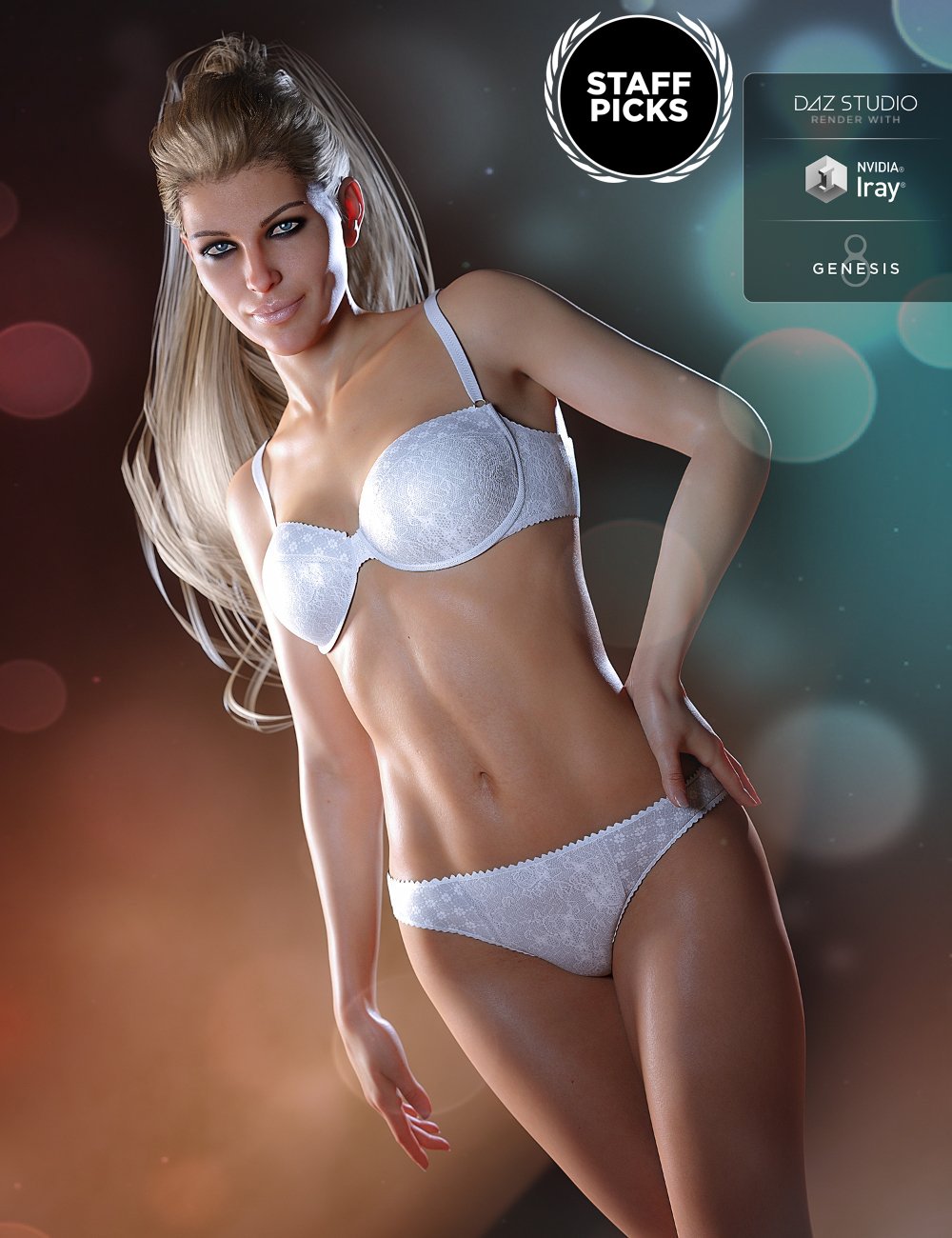
You can see light passing through the fingertips, ears, toes and nose etc. which makes them appear slightly reddish. I've been trying to get the same effect on Genesis 3 but can't seem to get it right. I tried changing the SSS/Transmitted color and the related properties in the subgroup but it seems to affect the entire figure and not just the areas that I mentioned.
Is there a way to restrict the effect to only affect specific areas (like by using a mask of some sort)? How is this effect achieved with Genesis 8? It's obviously not the mesh (?) affecting the amount of light transmitted, right? Is this a combination of Translucency/SSS settings?
Can someone explain how I'm supposed to get the right settings here?
Thanks!
Wilbur HD G8M = Seb HD G8M?3D Vitality said:
Hi,
they seem to be pretty similar to me, perhaps they use the same skin ressource...
It would be really nice if we could get more characters with a (fast) recognizable difference / diversity, male and female.
Who actually checks it when the product is submitted? Is there a similarity test at all?
Just curious ...
I don't think this would ever happen, but trying to filter out characters to make sure they're very different would probably have the opposite effect.
- Vaguely similar outliers are more likely to be viewed as overrepresented if there's more than one of them, and slight differences in a homogenous group are more likely to slide. As an example, many of the younger white female DO core characters have similar face shapes and skin tones but are differentiated by theme (she's a mom! She's a spy! She's a sophisticated fashion model! She's a more alt fashion model! She's feisty!), while many of the other female core characters are differentiated by ethnicity/age and only represented once or twice at most. Whether or not you think this is by design or whether you believe it's justified--and I do think it's getting better--it's a thing that happens at the level where Daz makes a choice of what to offer in the store.
- The rejoinder to that is usually, "Well, Daz takes what sells!" and that's kind of the problem--if you know people are going to buy 1,000 variations on one type of model and not another, there probably still won't be a noticeable increase in model diversity unless Daz decides to stop selling as many of the models they've historically sold tons of. So there's a nonzero chance that the person making the call of what to reject will think Elysia and Dallas are different enough that people will want to buy them, but scrutinize Darya and Zola more closely if they think it's more or less possible to recreate Darya by combining Zola with other options available in the store.
- It could lead to a burst of wild innovation among vendors, or it could lead to people feeling it's a bigger risk to try to create certain types of characters, or to offer characters at all. I bought Seb, but would probably not buy Wilbur--not because they're too similar (I don't think they are) but because I prefer one artist's approach over the other. If "similar concept, different execution" was enough for stuff to get rejected, it'd probably just mean the figure market wouldn't be very good money.
Replace Input Presets or Add New Presets to file list? (Riversoft V4 to G8 Clothing Converter)https://www.daz3d.com/rssy-clothing-converter-from-victoria-4-to-genesis-8-female
When I follow the instructions I get a dialog with Replace/Add/Ignore and the text: Replace Input Presets or Add New Presets to file list?
I can't find anything referring to it.
Anyone have a tip?
Thanks!
What's up with all the Ken and Barbie modelsthere is a big choice for anatomical elements available on the internet. those supplied with Daz models are not really that popular
look for "new genitalia for victoria" or "golden place" for women
and maybe dictator for men (and women too LOL) , although that one is not really anatomically correct and using Daz supplied model may be preferable
the benefit of those third party models is that you can fit them on anything and most figures on Daz store don't have textures for Daz anatomical elements also it will be cheaper than pro bundle.
API for DIM, or other ways of targeting specific content typesGreetings,
Is there any chance I can ask for the data sources and API used by DAZ Install Manager?
I've reached a point where my total Library is taking up too much of my Macbook Pro's 4TB internal drive, and I want to eliminate all V4 and Genesis (but not Genesis 2, 3, or 8 based items, and not environments, etc.) from my library to free up space.
There's no way to do that within DAZ Install Manager, even though a dataset _is_ available to do that from the DAZ store site, easily downloadable. (https://www.daz3d.com/dazstatic/slab/getFilters?all=true) I'd like to build myself a trivial tool, obviously nothing as powerful as DAZ Install Manager, that lets me filter my installed items by compatible figure, so I can at least have an idea which ones I need to remove.
Since I get the feeling that major changes to DAZ Install Manager are unlikely, now that DAZCentral is out, and DAZCentral is unusable to me (too large a collection, and non-Windows use) I'd really like it if the PTB would pass along information about how to implement some of the stuff ourselves.
I'll acknowledge, it's a little frustrating, because the local database side is problematic. I feel like I'm not going to be able to remove the smart content rows from the Postgresql database, even if I can
- Find the list of V4 compatible items (for example)
- Cross reference them with still-installed Manifestfiles for those SKU's
- Cross reference files mentioned inside those Manifestfiles with ones installed in my various 'My Library' locations
- Decrement the counts for each file in the related InstallManagerFileRegister.json
- Removing the file if the counts got to zero for each file
- Removing the Manifestfiles so they don't show up as installed anymore.
After all that, Smart Content will still have the data, but with broken icons, because the database is still relatively opaque to me, unfortunately. I'm not sure if there's a parent row that I can delete, where the deletion will `cascade` to the subsidiary tables. I need to do more investigation there... If the foreign keys to a central SKU table are set up as 'ON DELETE CASCADE' then this'll work really well. If not, then I'm going to have to figure out all the related tables...
Optimally, DAZ Install Manager would allow filtering by compatible product by using the openly available JSON containing that data, but that would take a lot of work on someone's part. In lieu of that, if we could have API information about how to retrieve the Manifestfiles for things we've purchased (presumably there's a 'signin' method, and then a request to download owned SKUs, and then a way to request individual manifest files for each sku, and then a way to download the .zips for selected skus) that would make it a lot easier for me to build myself my own tool to manage my library. This would let me create a tool that only downloads the zips for items that meet the filters I want to build (like 'NOT (Gen3 OR Gen4 OR Genesis)'). I can then use InstallManager to (1) hide the items that I don't care to see right now, and (2) install the already-downloaded ZIP files for the newer products.
For what it's worth, I've already removed nearly everything identified by 'V4' or 'Victoria 4', but there's a significant number of items (and worse, _textures_ for those items!) which don't have the compatible item in their title, and thus are not searchable-for in the filter. And the problem gets worse in Genesis, especially because the textures got larger.
ne solution was to use filter-by-SKU-range. Unfortunately, I want a significant number of the environments within the lower SKU ranges, because they can be up-shifted to Iray relatively well. I really like environments, so I don't want to delete or avoid those, but manually working through hundreds, and in some cases thousands, of items is exhausting, and frustrating, and I know I'm missing things, and it's especially galling when the data is...right there, loaded the first time you pull up the DAZ store page, and stored in localstorage in the browser, or available via a trivial GET request.
Thanks very much for any information anyone can pass along.
-- Morgan
This is highly unlikely. What may help is the ability to filter by package content - see http://docs.daz3d.com/doku.php/public/software/install_manager/referenceguide/interface/filter_field/advanced_filtering#file
API for DIM, or other ways of targeting specific content typesGreetings,
Is there any chance I can ask for the data sources and API used by DAZ Install Manager?
I've reached a point where my total Library is taking up too much of my Macbook Pro's 4TB internal drive, and I want to eliminate all V4 and Genesis (but not Genesis 2, 3, or 8 based items, and not environments, etc.) from my library to free up space.
There's no way to do that within DAZ Install Manager, even though a dataset _is_ available to do that from the DAZ store site, easily downloadable. (https://www.daz3d.com/dazstatic/slab/getFilters?all=true) I'd like to build myself a trivial tool, obviously nothing as powerful as DAZ Install Manager, that lets me filter my installed items by compatible figure, so I can at least have an idea which ones I need to remove.
Since I get the feeling that major changes to DAZ Install Manager are unlikely, now that DAZCentral is out, and DAZCentral is unusable to me (too large a collection, and non-Windows use) I'd really like it if the PTB would pass along information about how to implement some of the stuff ourselves.
I'll acknowledge, it's a little frustrating, because the local database side is problematic. I feel like I'm not going to be able to remove the smart content rows from the Postgresql database, even if I can
- Find the list of V4 compatible items (for example)
- Cross reference them with still-installed Manifestfiles for those SKU's
- Cross reference files mentioned inside those Manifestfiles with ones installed in my various 'My Library' locations
- Decrement the counts for each file in the related InstallManagerFileRegister.json
- Removing the file if the counts got to zero for each file
- Removing the Manifestfiles so they don't show up as installed anymore.
After all that, Smart Content will still have the data, but with broken icons, because the database is still relatively opaque to me, unfortunately. I'm not sure if there's a parent row that I can delete, where the deletion will `cascade` to the subsidiary tables. I need to do more investigation there... If the foreign keys to a central SKU table are set up as 'ON DELETE CASCADE' then this'll work really well. If not, then I'm going to have to figure out all the related tables...
Optimally, DAZ Install Manager would allow filtering by compatible product by using the openly available JSON containing that data, but that would take a lot of work on someone's part. In lieu of that, if we could have API information about how to retrieve the Manifestfiles for things we've purchased (presumably there's a 'signin' method, and then a request to download owned SKUs, and then a way to request individual manifest files for each sku, and then a way to download the .zips for selected skus) that would make it a lot easier for me to build myself my own tool to manage my library. This would let me create a tool that only downloads the zips for items that meet the filters I want to build (like 'NOT (Gen3 OR Gen4 OR Genesis)'). I can then use InstallManager to (1) hide the items that I don't care to see right now, and (2) install the already-downloaded ZIP files for the newer products.
For what it's worth, I've already removed nearly everything identified by 'V4' or 'Victoria 4', but there's a significant number of items (and worse, _textures_ for those items!) which don't have the compatible item in their title, and thus are not searchable-for in the filter. And the problem gets worse in Genesis, especially because the textures got larger.
ne solution was to use filter-by-SKU-range. Unfortunately, I want a significant number of the environments within the lower SKU ranges, because they can be up-shifted to Iray relatively well. I really like environments, so I don't want to delete or avoid those, but manually working through hundreds, and in some cases thousands, of items is exhausting, and frustrating, and I know I'm missing things, and it's especially galling when the data is...right there, loaded the first time you pull up the DAZ store page, and stored in localstorage in the browser, or available via a trivial GET request.
Thanks very much for any information anyone can pass along.
-- Morgan
Looking for mature female characters 30's and early 40'sPenny 8 is more mature, and you could dial in either an aging morph or an older character if you want to age her a little more.
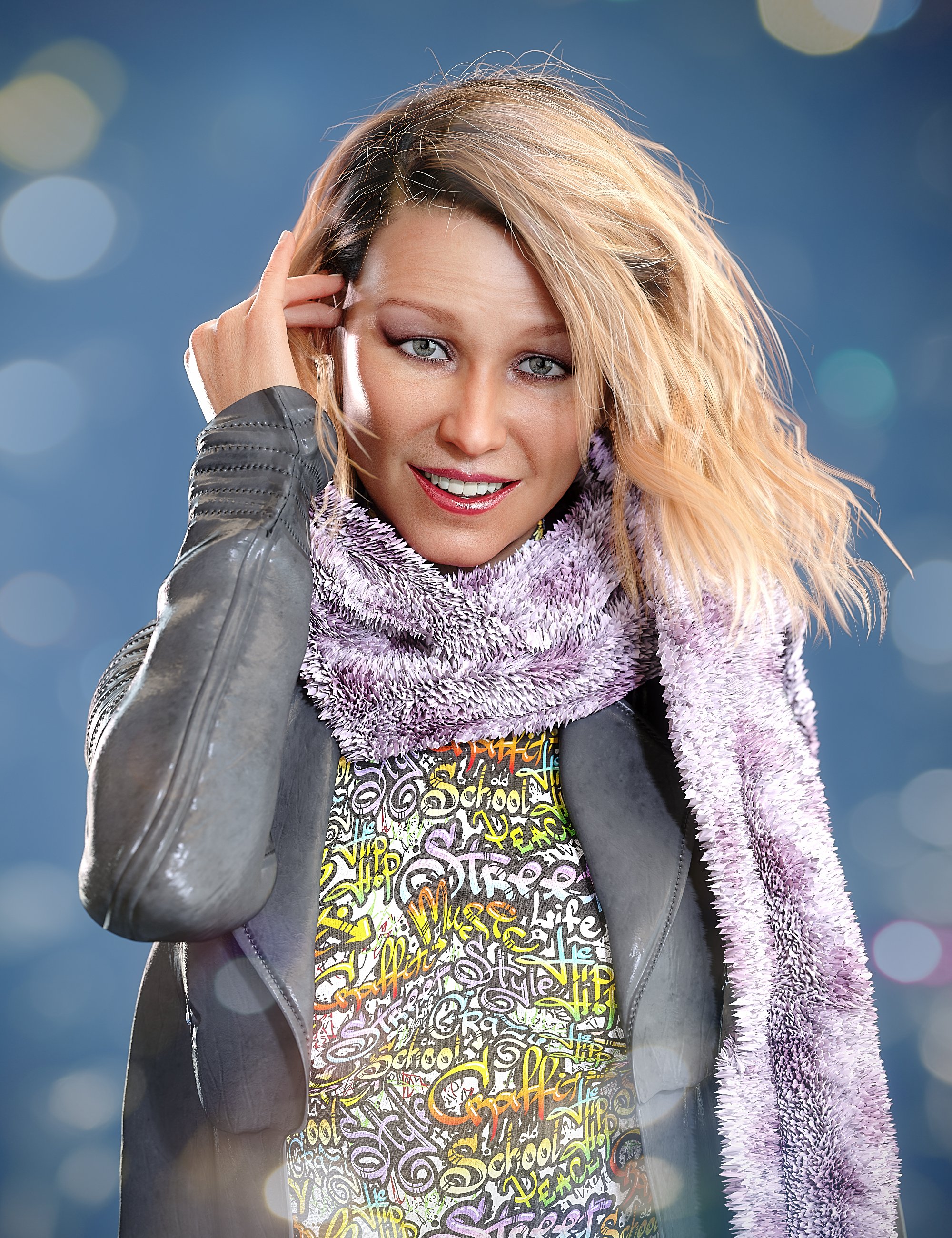
Aubrey 8 is a great 30s character.
Frida is a little older, in her 50s maybe.
Aubrey:
 DELETE
daveso, I'm sorry you're experiencing those troubles.. A long time ago I tried something similar to what you're trying. I learned the best way to uninstall and reinstall DAZ Studio is by using DIM.
I've switched computers a few times, even going from PC to Mac, and back to PC again. I've been able to copy everything from a PC to a Mac hard drive, and back again. I only needed to tell DIM and DAZ Studio where to find stuff. I've never bothered with Lost and Found, Smart Content, etc. Michael 4 and Victoria 4 have always worked. However, the Poser format files are splattered all over the place. It's been like that from the beginning.
It really sound like right now is a bad time to try fixiing things. It sounds like the DAZ Store and DIM are still having troubles. Why not take a break, and do something that makes you happy?! I wish you all the best.
dForce Medieval Barmaid for Genesis 8 Female - not medievalRavenhair has provided us with many wonderful outfits over many years - and this one is also very nice again. Therefore I gladly forgive her for the mistake, although I am at least as strict as cherpenbeck in this respect.
Maybe it wasn't Ravenhair's fault; maybe the name comes from Daz; 'Middle Ages' always sells well... What I have seen under this designation in various shops is hard to believe. For some people, the Middle Ages seem to begin with Caesar and end with Queen Victoria... LOL
Thanks to cherpenbeck for the informations, which hopefully will prevent some misunderstandings about medieval clothing from being spread.
Daz Middle Ages apparently had cyborgs too.

https://www.daz3d.com/medieval-cyborg-chariot-for-genesis-8-male
dForce Medieval Barmaid for Genesis 8 Female - not medievalRavenhair has provided us with many wonderful outfits over many years - and this one is also very nice again. Therefore I gladly forgive her for the mistake, although I am at least as strict as cherpenbeck in this respect.
Maybe it wasn't Ravenhair's fault; maybe the name comes from Daz; 'Middle Ages' always sells well... What I have seen under this designation in various shops is hard to believe. For some people, the Middle Ages seem to begin with Caesar and end with Queen Victoria... LOL
Thanks to cherpenbeck for the informations, which hopefully will prevent some misunderstandings about medieval clothing from being spread.
Iray Stand Kit [Commercial]My latest product, Iray Stand Kit has gone live.
This product's creation was born from my desire to create Iray renders of simplified and clean Stands and Displays featuring existing 3D environments. Environmental elements that are sized and placed within the Stand Kit base's boundaries create a display or stand for characters and any part of the environment outside of the base isn't rendered in Iray. With the use of carefully set up Iray Section Plane Nodes, Iray Stand Kit takes the guesswork out of where Iray Section Plane Nodes should be placed. Simply keeping the scene's desired Geometry within the Stand Kit Base's Borders allows the geometry within to be seen upon Iray Rendering and all geometry outside the base to not be seen in Iray Render. The Stand Kit's base gives a more firm visual field of where the Iray Section Plane Nodes will be active.
This kit allows one to use their favorite environments as simplified backdrops or displays for their characters in Iray Render. The creation of Iray Stand Kit also helped me to solve a problem I kept having with lighting interior scenes. I LOVE using HDRI light for scenes and it's such a simple and elegant solution to lighting which often creates nice results. The ease of use of HDRIs makes it my "go to" lighting and Iray Stand Kit helps facilitate that by "hiding" any geometry that is outside of the Stand Kit Base's borders - allowing HDRI light into the scene.
For that reason, I've set up additional Iray Stand Kit load options that load a camera with the Iray Stand Kit parented to the camera and sized up to be outside of the camera's view. This helps hide scene geometry that is outside of the camera's view. So upon moving the camera the Stand Kit moves with it (if left parented to the camera), allowing one to navigate the camera around the scene, bringing the Stand Kit Base (with it's Iray Section Plane Nodes) together with it.
I hope that Iray Stand Kit will be helpful to you guys! If you have any questions please feel free to ask and I will do my best to answer.
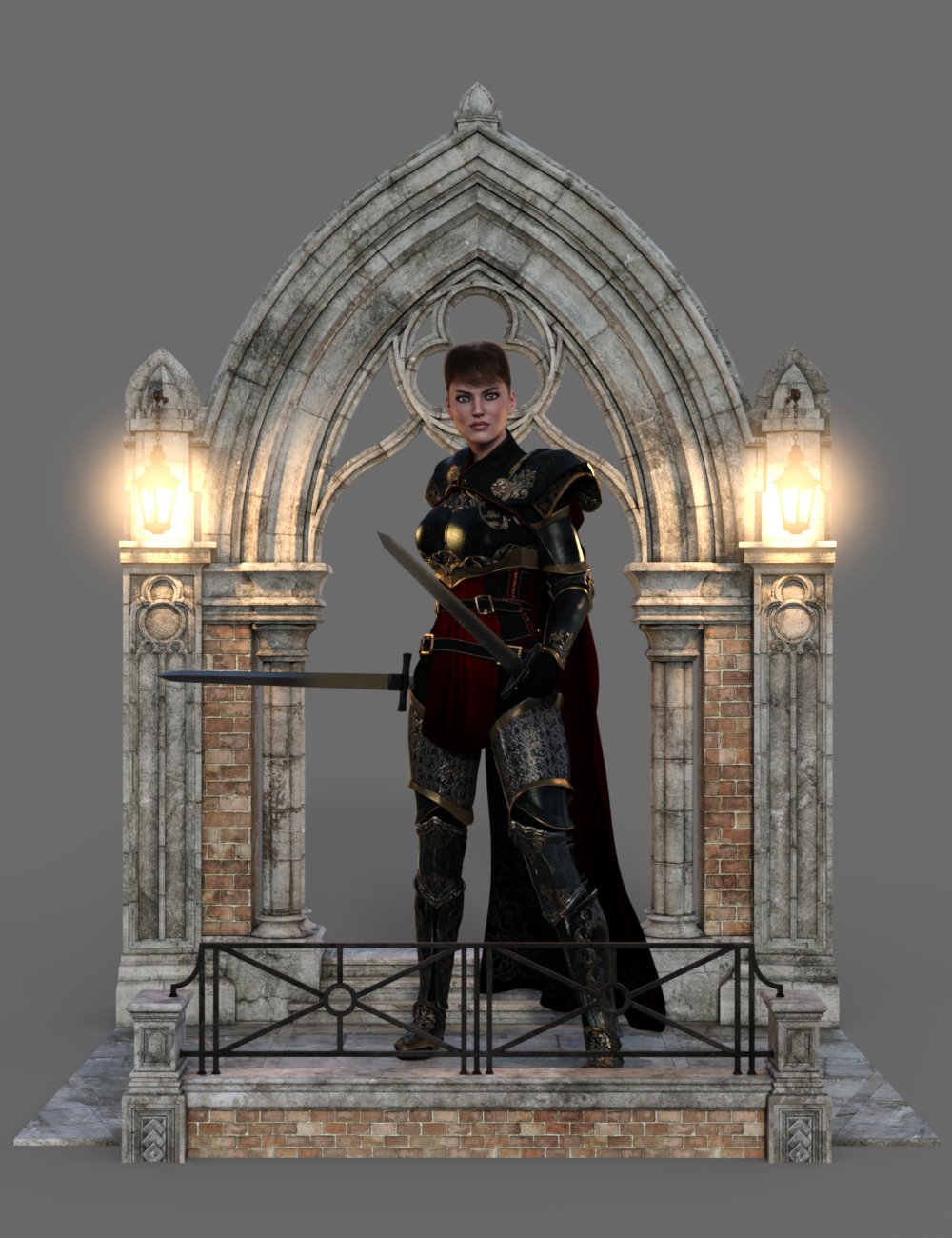
(Stand/Display created using Iray Stand Kit with Jack Tomalin's beautiful Balneae.)
Here's a quick video I did to show how the product works:
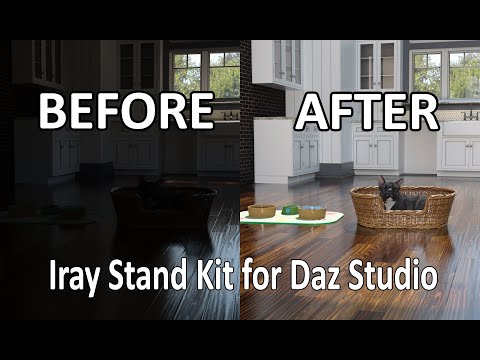
Oh and a side note - I had included the list of products used in the promos when I submitted the product but for some reason the list didn't get added to the Store Page for the product. I've sent in a support ticket asking for it to be added to the store page so Hopefully it will be updated and added as I know many of you often wonder about what products are used in promotional images. Until it (hopefully) gets updated, here's the list of products I used in the Promotional Imagery:
Posh Hair
Toon Rocket and Moonscape
Lorelei Mertail for Genesis 2 Female(s)
Anemone for Genesis 2 Female(s)
Wasteground Vignette
Bobbity Bo Hair for Genesis 3 Female(s)
Cafe Luca
The Mystery Solver Outfit for Genesis 3 Female(s)
Chevaleresse Armor for Genesis 3 Female(s)
Pavel for Ivan 7
Balneae
Baroness Hair for Genesis 3 Female(s)
Urban Survivors for Genesis 3 Male(s) and Female(s)
Santa Beard for Genesis 3 Male(s)
Topmodel Updo Hair and OOT Hairblending 2.0 for Genesis 3 Female(s)
Jenn HD for Victoria 7
Hands Dial-up for Genesis 8 Female
Axel Hair for Genesis 8 Male(s)
Mage Tower Iray
Night Spy Outfit for Genesis 8 Female(s)
Concordia Rotunda
Youngblood Hair for Genesis 3 and 8
Alien Corridor
dForce Wizard Lore Outfit for Genesis 8 Male(s)
Aguja Undersea Environment
KamilyAnn for Zelara 8
Luca for Genesis 8 Male
dForce Universal Dress for Genesis 8 Female(s)
dForce Blacksmith Outfit for Genesis 8 Male(s)
Nix 8
Easy Light and Render - Spectrum Studio
Biker Hair and Beard For Genesis 3 and 8 Male(s)
dForce Eloise Outfit for Genesis 8 Female(s)
Betty Fashion Outfit for Genesis 8 Female(s)
Babina 8
Regal Protector for Genesis 8 Male(s)
Trearchi Folly
Tearchi Dalliance Poses for Genesis 8
YouMei Hair for Genesis 8 Female(s)
Ping the Ringtail - Plushies 2.0
Sci-Fi Retro Space Suit for Genesis 8 Female(s)
Let me know if you have any questions. :)
what happened here to the skin colour?So I went ahead and added 'new victoria 7 genitalia' to my G3F character and the morph seemed to work fine but for some reason now I'm getting a white shade of skin around the area where it was applied, please see pic I put the black squiggly lines over her 'womanly area's' to keep the image modest. How can I get my normal skin tone back pls with the morph change and why did it do this?
You need to apply a material preset to the Anatomical elements. Preferably one from the model you have loaded (given it has any). You can use a different one, but the skin tone may not match.
It works like this:
1) load a figure (Genesis 3 Female)
2) add the Anatomical Elements to the figure (I see those under Genesis 3)
3) add Anatomical Elements material preset to the figure (I don't have Victoria 7, so I attached an image of how the menu icon looks like for Victoria 8)
what happened here to the skin colour?So I went ahead and added 'new victoria 7 genitalia' to my G3F character and the morph seemed to work fine but for some reason now I'm getting a white shade of skin around the area where it was applied, please see pic I put the black squiggly lines over her 'womanly area's' to keep the image modest. How can I get my normal skin tone back pls with the morph change and why did it do this?
DELETEIf you have any Victoria 4 stuff that was working, it's not going to work after the reinstall. I had a heck of a time getting my favorite V4 characters back after switching to a new computer.
Looking for mature female characters 30's and early 40'sI like Benita from Saiyaness, as a figure that is obviously mature out of the box.
https://www.daz3d.com/benita-for-victoria-8
In my renders she looked older than in the promos, but you can easily make her 10 years younger too. In my experience that works better than making a 20yo look 30.
And I'm currently looking at 'Sunshine'.
https://www.daz3d.com/sunshine-hd-for-genesis-8-female
I like Colm Jackson's stuff (except that the skins are a bit chalky next to the usual figures).
Looking for mature female characters 30's and early 40'sWell, I posted picture references in my first post?
Ellitha 8 which Hylas posted is also a good example for a late 30's character in my humble opinion.
These are the only ones which I know of.
As already stated...most of the G8 base characters can easily pass for 30's or early 40's. There's really not much difference in how a woman looks from her 20's to 30's and even into her 40's if she takes care of her skin. Victoria 8, Tasha 8...these could easily be women in their 30's.
As Servin has suggested, I would post picture refrences...real-world picture references. The characters you linked above represent a rather wide gamut of ages.
Looking for mature female characters 30's and early 40'sYour concept of what 30s looks like seems off. Alexandra reads late 40s at the youngest and most of the main daz characters pass just fine as 30s
Victoria, Eva, Alawa, Angharad, Celani, Josephene, Gabriella, Sahira could all easily pass for mid 30s
Looking for mature female characters 30's and early 40'sLike mentioned in the title I am looking for older characters like Abrey 8 or Alexandra 8 or monika (in the age range from 30's to early 40's) for example:
https://www.daz3d.com/fwsa-monika-hd-for-victoria-7-and-her-jewelry
https://www.daz3d.com/alexandra-8
https://www.daz3d.com/aubrey-8
There seems to be a distinct lack of characters in this age range. The characters are either pretty young or pretty old (daz improved in that regard and there are some good grandma-characters).
But in the age range I mean, the situation seems pretty dire.
Do you know some female characters who would fit into that age range?
The problem I've noticed is that whenever you see someone say "oh this character looks to be in their 30's or 40's," they're pointing to a woman who is easily in their 60's or 70's. (Ok, that's a bit of an exageration, so let's say 50's or higher...)
Most women in their 30's don't look that much different than they did in their 20's...unless they baked under UV rays like a fiend in their youth. I'll be 40 next year and my skin hasn't changed all that much. No wrinkles. No age spots. No sagging. (And I'm pretty much as white as you can get genetically...half Swedish and half British). My mom is in her early 60's and she looks younger than a lof of the women folks on this site point to as being in their 40's, lol.
Elitihia, as linked above, I would say is a good one...and oddly enough I just noticed that she looks a heck of a lot like the woman who played Amara on Supernatural.
Alexandra I would put more towards late 40's to early 50's.
Looking for mature female characters 30's and early 40'sLike mentioned in the title I am looking for older characters like Abrey 8 or Alexandra 8 or monika (in the age range from 30's to early 40's) for example:
https://www.daz3d.com/fwsa-monika-hd-for-victoria-7-and-her-jewelry
https://www.daz3d.com/alexandra-8
https://www.daz3d.com/aubrey-8
There seems to be a distinct lack of characters in this age range. The characters are either pretty young or pretty old (daz improved in that regard and there are some good grandma-characters).
But in the age range I mean, the situation seems pretty dire.
Do you know some female characters who would fit into that age range?
PW Abandoned mine station... Seriously 4.3GB??!!Just my opinion... but since DAZ was changing the store anyway, adding file size to the product information would have been a good idea.
I think at this point I've seen the issue of file size complained about so much over the years, it's kinda one of those things people would want displayed there where you can see it, not somewhere else where you have to research it or ask someone.
I believe at one point the idea behind not doing it was "you'd have to do it for every product"... Maybe that made sense once, because the store still had tons (virtual tons... 1 CGI ton = 0.00 metric tons) of old stuff like vintage Zygote stuff from the Cold War and Victoria 1's great, great, grandmother Muriel 1. Which was probably fine because it would have been too expensive given that there was a pixel shortage going on at the time and DAZ was paying a ridiculously high price per pound for their website pixels and it wouldn't be worth it to invest in pixels to include in information on old products rotting away on shelves in the back room at DAZ's content warehouse in the salty Utah desert... (I'm assuming it was salty, it's Utah)
But these days pixels are a dirt cheap and the handful of them it would require to say "4 Terabytes" is like totally a steal... and I'm sure the tons of them they are saving by replacing forum icons with vague squares would free up room for this... and people would definitely be like- "Oh, holy shiznit... Dang! That's so cool, like I totally love everyone at DAZ and am going to give up food and spend all my remaining cash here because I now know for sure DAZ loves me as much as I love them and I'm no longer ashamed of all my DAZ tattoos and will no long wear a burlap sack over my body at the nude beach!!"...
Maybe that's a little bit much, but if 2020 showed us anything, there is at least one person out there who will say exactly that... but that's besides the point... Adding file size is something people and polydactyl cats really would appreciate seeing and DAZ, if you aren't going to do it for people, think of the cute kitties with their multiple digits and weird extra toes they use like thumbs... they went through the difficulty of evolving extra toes which we've all seen them use like fingers in various cat videos and if you think they are going to be benevolent overlords then you better take a close look at the calendar, in particular the year part, then look out the window at the murder hornet sitting on the glass and wonder aloud if it can get crazier and weirder or if everything is going to be fine.
No, don't pick the last one... what the hell... did you not... ugh...
Whatever...
Jeez... well, that's just my opinion and I don't know anything... but I'd say it would be great time to start adding file size to new products.
I know someone out there probably will say "that's not important" or "that information is out there in the product material data safety sheets that OSHA requires to be sent by owl if you really, really wish hard"... but I say even if it is "out there" ... "somewhere"... it's not here in front of our eyeballs where it really counts.
Thats all...
Or is it?
No... that's all.
Daz 3D is part of

Connect
DAZ Productions, Inc.
7533 S Center View Ct #4664
West Jordan, UT 84084Licensing Agreement | Terms of Service | Privacy Policy | EULA
© 2026 Daz Productions Inc. All Rights Reserved.