-
Australian common brushtail possum
if you want to try creating one, I would start with the housecat
(I am not the best at sculpting and even worse at doing any correctives needed on the ERC frozen imported morph so not even going to try for others but as an Aussie might look at it for myself)
I have Zbrush and have attempted crazier things
 gen 9 to gen 8.1 or gen 8 converters
FSMCDesigns said:
Like what?
To go back to my first post: "JCMs (and, indeed, anything that requires control links to function properly), geografts, anything that uses a custom UV and scripts that are locked to only work on specific base figures". To which I should also add "dForce add-on meshes", which aren't converted correctly by autofit or RSSY's converter.
There is right now no Centaur 9, for example. If I wanted to do a Vicky 9 centaur, getting the existing centaur graft to work with G9 would either be a huge amount of technical effort to get it to work properly, or require a lot of fudging... so, in many ways, it would be far, far more practical to do a V9 centaur by converting V9 back to G8, because that's just a matter of converting a morph and a skin rather than trying to make a geograft work with a new geometry. (It was reasonably possible G3 to G8, but those were such similar figures).
Hell, for the sake of the argument, I have indeed just done a G8 conversion of V9, because I have my own tools that let me do that, so I can now have her as a centaur:
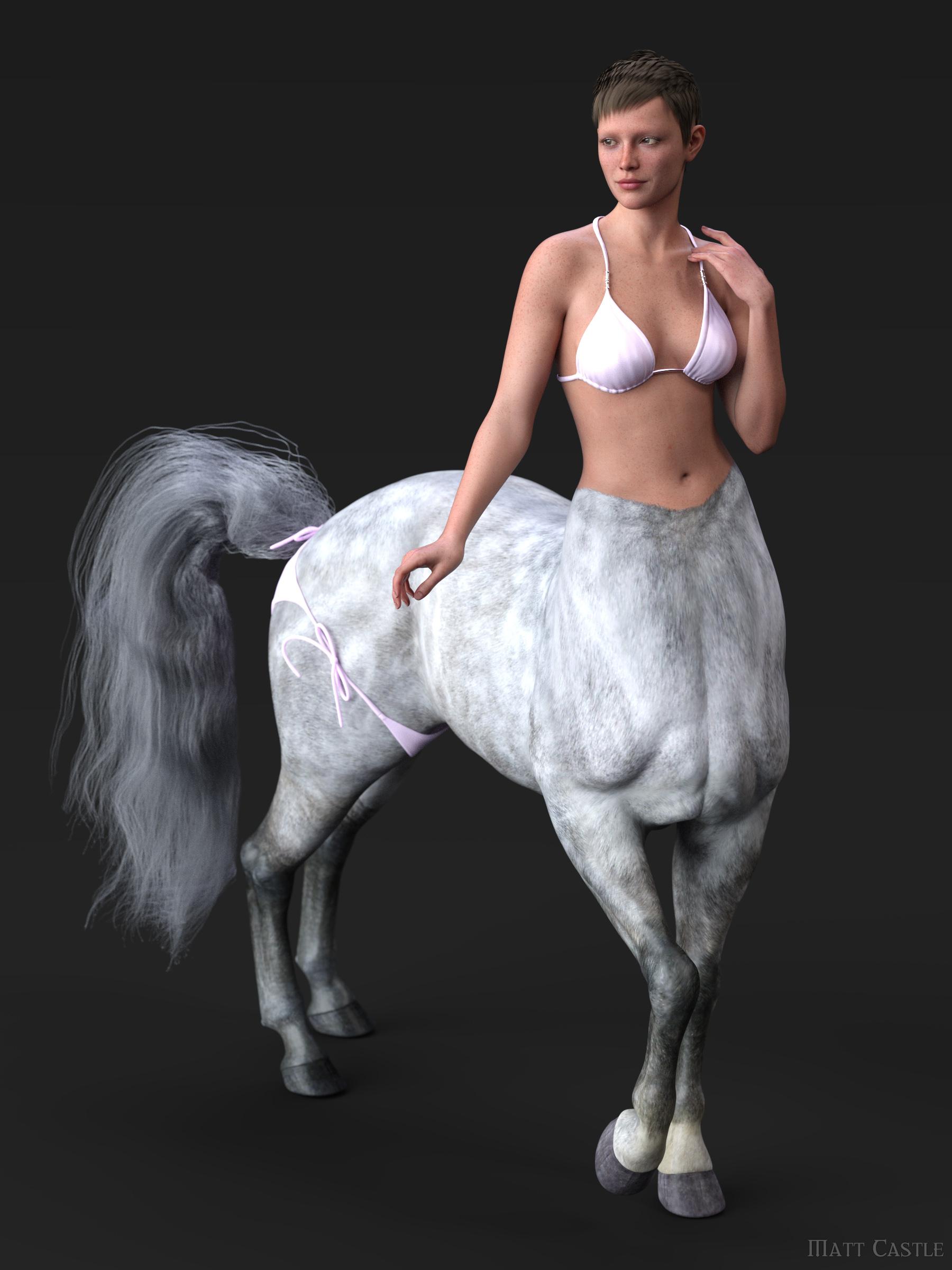
If anyone fancies trying to do a proper G9 conversion of the centaur body - one that doesn't have to be constantly adjusted or have problems patched up in photoshop - I wish them luck, because I don't have the patience for that, and I've already seen some fairly wonky Frankensteining attempts on DeviantArt.
We're definitely not in the position that we can properly convert all G8 assets flawlessly to G9. That's not to say that I necessarily think that G9 to G8 products would necessarily be productive things for PAs to provide, but as some stuff can't be practically converted, having the option to convert the stuff we can convert in either direction gives more capacity to get around the parts that are troublesome or impossible to convert properly.
johnbuckeridge said:
What are JCMs?
"Joint Controlled Morphs" (which became CBs, Corrective Blendshapes, on G9). They're morphs that are automatically dialled in based on how the figure is posed, and they're used to correct problems with how the figure poses. The base figure has some to correct how it poses, but when you morph the figure, you need new morphs to recorrect the pose for the new shape.
At present, I don't believe any of the character converters can adapt JCMs correctly from G8 to G9, nor do all of the linking of the parameters to make them work.
The right way to export Victoria 4 into, and out of Daz?What is the right way to export Victoria 4(.2) into, and out of Daz?
This whole thing has been driving me mad for months.
Grab a coffee, this could get confusing, and monotonous (plus, I'm in a library, and I hate the keyboards here).
Like with G8 you have to delete eyelashes. Does anything of V4 need to be hidden or deleted? Does her resolution need to be set at "Base"? Does her Sub-D need to be lowered? What settings to I use in Blender when I'm importing and exporting her? (Are the setting that I use for G8 good enough?) What settings do I need the importer and exporter do I need Daz to be set at (is it the Poser option, or does it not work anymore, like Blender's setting from the drop-down menu)?
I'm trying to create a morph for V4(.2) in Faceform Wrap. The mesh wrap with no issues. The only issue is getting the morph back into Daz without having a delta go missing.
One Wrap failed because the eyes failed to morph with the figure (the figure morphed, but the eyes stayed in place). Then there's the eyelashes that don't morph with the morph (i.e. either get bigger or smaller with the size of the eye, or conform to the shape of the eye).
I'm probably mad for trying to do this. But what's driving me is that I know that it CAN be done.
How to keep the thickness of clothing?Another approach is to export to blender then simulate there. In blender you will simulate a low resolution proxy that you can easily get with a decimate modifier, then transfer the animation to the high resolution outfit via a surface modifier, keeping your thickness and whatnot.
G8.1 Morphs visible in parameters but don't workMaking the G8 base expressions (and any expressions that are using them) work on G8.1 requires removing dummy/placeholder expressions that are installed to G8.1 morph folders - These dummy/placeholder expression files have no other function than to prevent the base G8 expressions from loading.
The dummy/placeholder files are located in;
...\Data\DAZ 3D\Genesis 8\Female 8_1\Morphs\Daz 3D\Base Pose Head\ (255 files, can be more if you have additional DAZ expression packs)
...\Data\DAZ 3D\Genesis 8\Female 8_1\Morphs\Daz 3D\Expressions\ (24 files, can be more if you have additional DAZ expression packs)
...\Data\DAZ 3D\Genesis 8\Male 8_1\Morphs\Daz 3D\Base Pose Head\ (255 files, can be more if you have additional DAZ expression packs)
...\Data\DAZ 3D\Genesis 8\Male 8_1\Morphs\Daz 3D\Expressions\ (24 files, can be more if you have additional DAZ expression packs)Please make sure you are removing the files from G8.1 morph folders and not G8 morph folders.
Note 1; If you are logging in to DS and letting DAZ Connect (within DS) to install/update your content, you may have these also in an other location that has "\Data\Cloud\" in it's path
Note 2; Do not remove any files from "FACS" or "FACSExpressions" foldersHelp with ClothingContent creators have no way to make and fix FBM / PBM on the wearables for the character's shape that users customize... If you do need that shape, you have to always fix the distortion yourself.
If the geometry in the area of cleavage / under breasts are badly distorted, a better way is always to export the wearable to external modeling software for fixing and import back OBJ to update the generated FBM / PBM on the wearables, or make a corrective morph.
Face Transfer 2 Missing [SOLVED, Menus Merged into one]Deecey said:
One more question .... I've reformatted my hard drive and am reinstalling. I can't remember where to enter the Face Transfer 2 serial. Can someone help? TIA!
Help>About Installed Plug-ins - though theya re not stoed with the DS code, so if it was only a content drive that you reformatted you may not need to reenter the serial.
Help with ClothingIt needs a custom morph - and ideally it probably needs remapping and retexturing. Currently the morphs in the figure are being projected into the clothing, moving the vertices of the clothing so that they stay in the same position relative to the nearby vertices of the base figure as they had before the morph was applied. The surfaces of the breast have been moved out, but the sternum has not moved - as a result some parts of the clothing have stretched out relative to others. Extreme shapes will always be a problem for any kind of auto-generated morph. You could try aplying a Smoothing Modifier (Edit>Figure>Geometry) to the clothes and then set the Smoothing Type to Generic in the hope of reducing the pinching effect, or you could try applying a dForce modifier and runing a timeline Simulation from the base shape to your shape, but really you need to export the model as OBJ and then use a modelling tool to pull the surface into a more sensible configuration, then load that a new morph (Edit>Figure>Morph Loader Pro - ideally one for each of the morphs used to achieve that shape, being careful to make the morph name and OBJ name match so that the morphs are auto-aplied as needed).
bend control for Genesis 9?I made an example in the attached screenshots for your ref.:
When importing corrective morph with MLP, you set "Yes" to Reverse Deformations, "Deltas Only" to Overwrite Existing. Then with Edit Mode, set ERC Links for the corrective morph (cbs) in Property Hierarchy. Remember to set Scalar value to -1 as this YRotate value on Left Forearm is negative...
Help with ClothingHello everyone,
i hope everyone is having a great day. I just came by to ask how can you "fit" clothing on a model. i dont mean using gen 4 with gen 9. i mean to fit the clothing on the asset tha it is made for.
Gen 8 model that has some big assests. the clothes i bought and use on a normal model looks fine but is deformed on the model with more of a porportion and the clothes/morph make the clothing look deformed(i had to expand the arm to clear the clipping and the chest..well, i want it to look like on the normal model).
PS: i know theres some clipping on the wrist, I mot completely done witht he render, still need some work.
Face Transfer 2 Missing [SOLVED, Menus Merged into one]One more question .... I've reformatted my hard drive and am reinstalling. I can't remember where to enter the Face Transfer 2 serial. Can someone help? TIA!
Let's appreciate/discuss today's new releases - ongoing threadAlmightyQUEST said:
I don't have the product myself yet. However both the product page and the product documentation page list the burnout marks and the tail lights, so I'm not sure where it's missed, other than one spot referring to tire marks and one referring to burnout marks, but both are listed with their morphs (turn mirror, turn, width). It's entirely possible this was added to the page since your first post? It's there now.
I think I'm mainly confused about the burn/tire marks, and I didn't quite understand the way the morph descriptions were meant. But I think I got it now, thanks! Bought it anyways, just a minute ago.
bend control for Genesis 9?New update.. I try to follow the tutorial but it seems that there is something wrong with my figure.. when I load the morph to correct the figure, this morph breaks.
how do i make a genesis 8 face transfer?pretty new to daz, so this might be a stupid question but when i am using the face transfer the only option for base is genesis 9, and i want genesis 8. is there anyway to fix this?
gen 9 to gen 8.1 or gen 8 convertersjohnbuckeridge said:
FSMCDesigns said:
...or just use G9. There are already converters to get all your G8 and G8.1 content (except HD) over to G9
It's an improving picture, but not everything has been covered by converters so far, Michael.
Like what? I have everything I need for G9, clothing converters and clones, hair converter, texture converter, morph converter. The only thing I can't convert are the HD morphs and heels (always a problem)
Celebrity Look-a-Likes for 3D figures Part 4AOBB continues their excellent work on celebrity morphs. This time it is a Blade Runner series for Genesis 9.
Dandy - Edward James Olmos
Deadly Dame - Joanna Cassidy
Detective - Harrison Ford
Lady Noir - Sean Young
Punkette - Daryl Hannah
Tycoon - Joe Turkel
Warrior - Rutger Hauer
New! Novica & Forum Members Tips & Product Reviews Pt 14Fishtales said:
You can see the straps aren't on the shoulders in the main picture on the shop page.
You are right. You can say the same about no strap adjustment morph being included. I didn't examine it critically enough. Fortunately Daz return policy is good, and I have already received my refund, and I no longer have this in my library.
It wasn't just the high strap and lack of adjustment that made me finally give up on this dress. I can make my own morph. However, when I imported it to Blender to make a morph, I really discovered all the other issues in the product (unwelded garment pieces, dense triangles instead of quads, not designed to support DS smoothing or subD, floating modeled topstitching).
bend control for Genesis 9?crosswind said:
You're already good at sculpting with ZB, then you just need to learn how to bring in the morphs and well set them up in DS...
do you have tutorial? I try to paste the morph in Property Hierarchy but Daz Studio freezes... I don't know how to do this, I can't find any tutorials either. Nor is there Bend control to buy in the store.
bend control for Genesis 9?crosswind said:
You're making muscular morph(s) on G9... so you still have to make corrective morphs (cbs) for bending joints while the muscular morph(s) are dialed.
The standard workflow: Show Hidden Properties in Parameters pane, you can find G9's default cbs for this forearm bend. Then make (with external sculpting software) and import corrective morph, and ERC Link it (Multiply, 2nd Stage) to the muscular morph in Property Hierarchy.
It seems to be more complicated than it seems... I already got confused and didn't understand anything hahaha
bend control for Genesis 9?You're making muscular morph(s) on G9... so you still have to make corrective morphs (cbs) for bending joints while the muscular morph(s) are dialed.
The standard workflow: Show Hidden Properties in Parameters pane, you can find G9's default cbs for this forearm bend. Then make (with external sculpting software) and import corrective morph, and ERC Link it (Multiply, 2nd Stage) to the muscular morph in Property Hierarchy.
Daz 3D is part of

Connect
DAZ Productions, Inc.
7533 S Center View Ct #4664
West Jordan, UT 84084Licensing Agreement | Terms of Service | Privacy Policy | EULA
© 2026 Daz Productions Inc. All Rights Reserved.