-
Black featureless Toon character
can you apply a 3delight material to a character and render it in it IRAY... that'll take all the feature right out of it... I did it to make "Shadow Armor" Looks awesome especially when I put two glowing green eyes in the skeleton... OMG my D&D players almost lost it...
Not sure about that, but if I try Iray material in 3delight, it shuts my system down. Years ago for a high-level sewer incursion, I made a rather "warped" version of a Beholder: Behinder, Sphere of Many Rears, Ass Tyrant, Elderberry Orb, Hindsighter, etc., which was capable of spewing different gases in a cone from it's large central "rear-end" and its 10 "butt-stalks"(which each also had 2 legs that could deal kicking/stampede damage). I was considering trying to make it in Daz, but(no pun intended) I would probably have to do it from scratch and is probably well beyond my 3d modeling skills. If I recall correctly, one of the key defenses against its breath weapons was a higher level variation of Zone of Sweet Air.
Bryce and parallels or similarThanks for the reply I have decided to go with virtualbox as its free. Does bryce run ok on windows 10?
In my experience, yes. I haven't tried the VirtualBox/Windows 10/Bryce combination, but Windows 10 and Bryce seem to get along OK under Parallels.
Your mileage may, of course, vary, but Bryce has worked pretty well for me under emulation. There are some very minor glitches -- the Sun azimuth/pitch control is a little hard to control with the mouse because it responds too quickly, the color picker can sometimes not give the colors you expect (but if you option-click you get an RGB picker, which works fine), etc. But everything I've encountered so far has been at the level of minor annoyances rather than show-stoppers.
I have a vague memory that someone in another thread recommended installing Bryce manually, rather than letting the DAZ Install Manager do it.
I have tried both windows 10 and osx snow leopard and the programme seems to run ok. There is a problem with moving the camera though, once you start moving in a direction you cant change it to the opposite direction it just keeps going in one direction, as this is happening on both platforms it has to be an issue with parallels or the mouse i am using but all other functions work fine. If i cant solve this issue i wont be using parallels i will just have to keep using my old macbook pro running snow leopard.
I hadn't encountered this before, but I think I see what you mean.
What I find is that the camera seems to have some momentum -- if I click on one of the cross-shaped controls on the left of the interface, then drag, it starts moving in one direction. If I drag in the other direction, it resists moving in that direction, at least at first. If I continue to drag, I can eventually get it to respond.
I get better control if I click on the arrow-shaped tips of the controls, rather than the central sphere. Releasing the mouse button also makes it easier to get the camera moving the other way.
I get this effect with both a mouse -- Logitech G302 -- and a trackpad -- Apple Magic Trackpad. So I can definitely see the problem, but at least on my setup it's possible to work around it.
Carrara Challenge 45: Extinction and De-extinction! Voting Thread:Entry #21
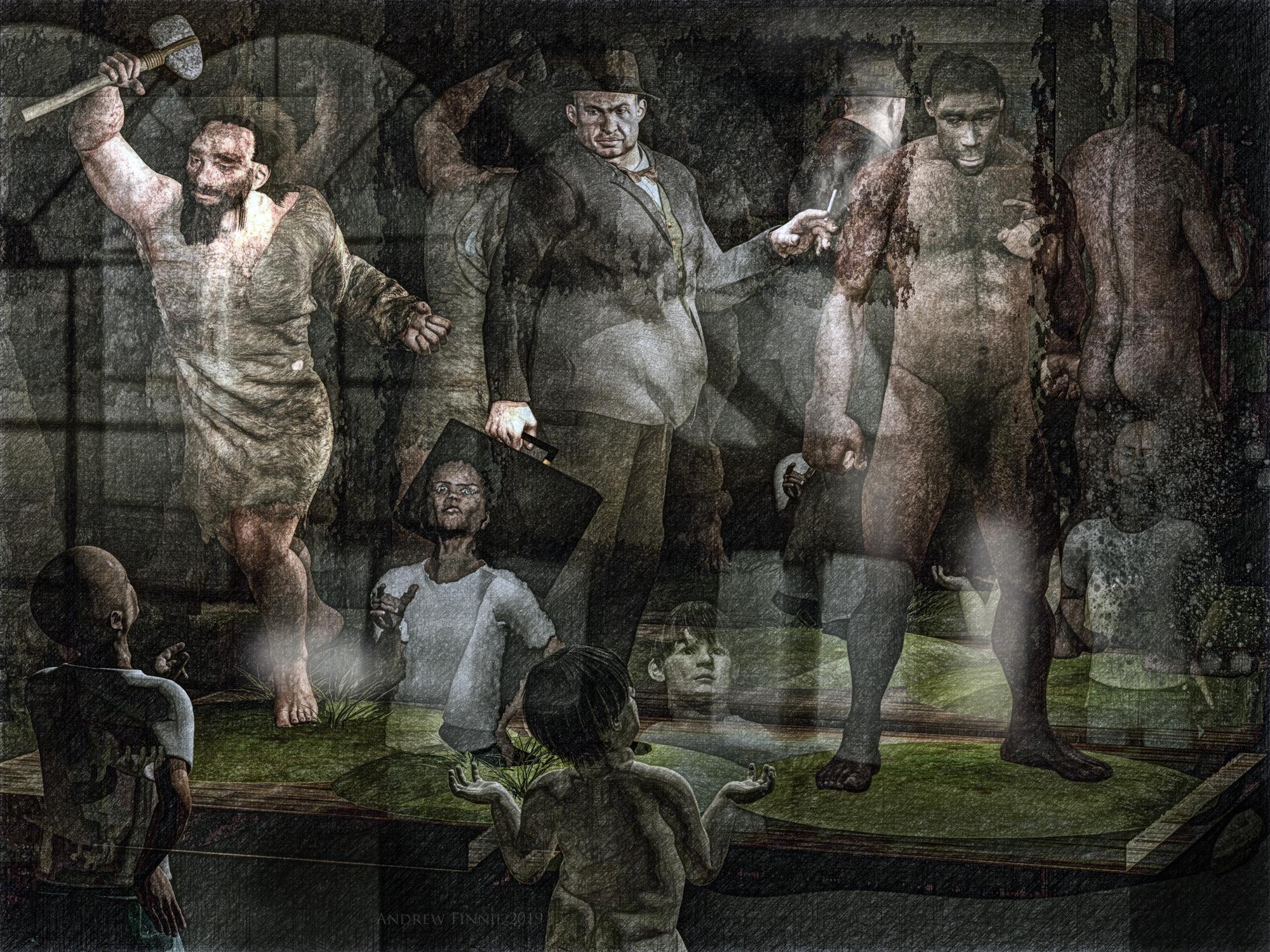
Title 'Three Extinct Homo's - (From left to right) Homo Neanderthalensis, Homo 1930's Businessman and Homo Erectus."
Artist headwax
Category A extinctionLinks to WIP threads https://www.daz3d.com/forums/discussion/comment/4362446/#Comment_4362446
https://www.daz3d.com/forums/discussion/comment/4357531/#Comment_4357531
Dicussion - central chap is M4, wearing 1930's clothes - they wouldn;t fit the fat man so I injected morphs via poser then draped all the clothes with VWD. Neaderthal and Erectus are m4 moprhs here at Das- customised them and their texturtes a bit and added Carrara hair to both. The little kids are Ben's. I made the museum case .Postwork in photodonut and affinty photo for tome mapping.
 Active Buyer coupon
...and the ones they email always include an expiation date/time based on their locale (Central Time Zone).
Just got a 35% one, and have a few things on my wishlist there I could use that on.
Active Buyer couponMaybe it's the "three days" thing? I didn't buy anything new since Friday, so today would be more than three days without a new purchase...?
would be a bit tough, as the message seems to have been sent on the 15th but arrived in my inbox only today... so I'm not being able to use that code due to the message being delivered late?
Yes, it only popped up here today as well, or I would've used it on my purchase then.
But I guess the best is to wait and see until the guys and gals in DAZ-Central ride into the office and sort this out.
Moving my Charaters within a sceneYou can select the character in the scene Pane/Tab. You do not have to use the menu to open it. The Scene tab will be docked to a column on either the left or the right. (On the right if you are using the default layout.)
To move the character, select it in the scene. You should now see some sort of indication in the viewport that your character is selected. It's been a few years, but I think the Universal Tool is used by default. The image below shows a selected character, with the icon for the Universal Tool highlighted in the bar above the figure, and tool at the base of the figure. The Universal tool can Translate, Rotate and Scale. It might be a little easier to use the Translate tool for now.
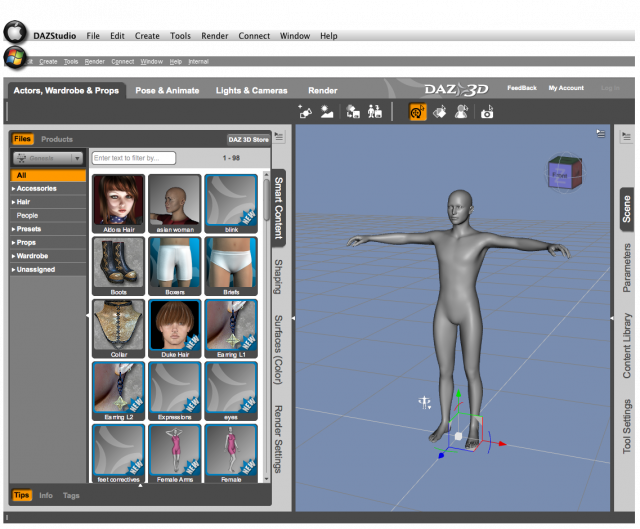
Depending on your layout, all of the tools might be accessible via an icon in the Toolbar above the Viewport, however, all the tools are available via the Main Menu. Select Tools from the menu and you'll get a drop-down list which shows the icons to the left of the tool name and the keyboard shortcut to the right. Trust me, it won't be long before you don't need to use the Tools menu to find the tool you need. But it's still a handy reference from time to time.

The little white triangles of the tool will allow you to Translate on two axes at once. The arrows only move on one axis. The easiest way to move a figure with this tool is the traingle on the floor. It moves in the X and Z axes, (front, back, side-to-side.) The other two combine the Y axis with one other axis, and it's not always easy to see where you put the figure, unless your camera/view is perpendicular to the triangle you want to move. Anyway, using either the Translate tool, or the Universal tool is how you move anything around the scene.
Now for an "advanced user" tip: Many of us have found it better to move the environment to the central figure, rather than moving the figure to a point on the set. This is a virtual world, and the for whatever technical reason, (which I don't know,) we get better results when the object is at World Center, (X-, Y-, Z-Axes of 0, 0, 0.) Of course, for a very large, sweeping scene, it may not matter. It wasn't necessary in my last published render, (here,) but it was important in this render, because of the focus on the primary figure, who is in World Center.
Here's an image showing you what each of the Transform tools look like in the viewport. I added a black background so the colors and white areas will stand out more.
 I Forgot What My Complaint Was - Complaint Thread
...Non-complaint: Wheee... temperature outside is 50F. It's "no jacket" weather.

...53° currently here after a cold rainy sometimes rainy blustery day yesterday. Might be pushing 70° by next week.
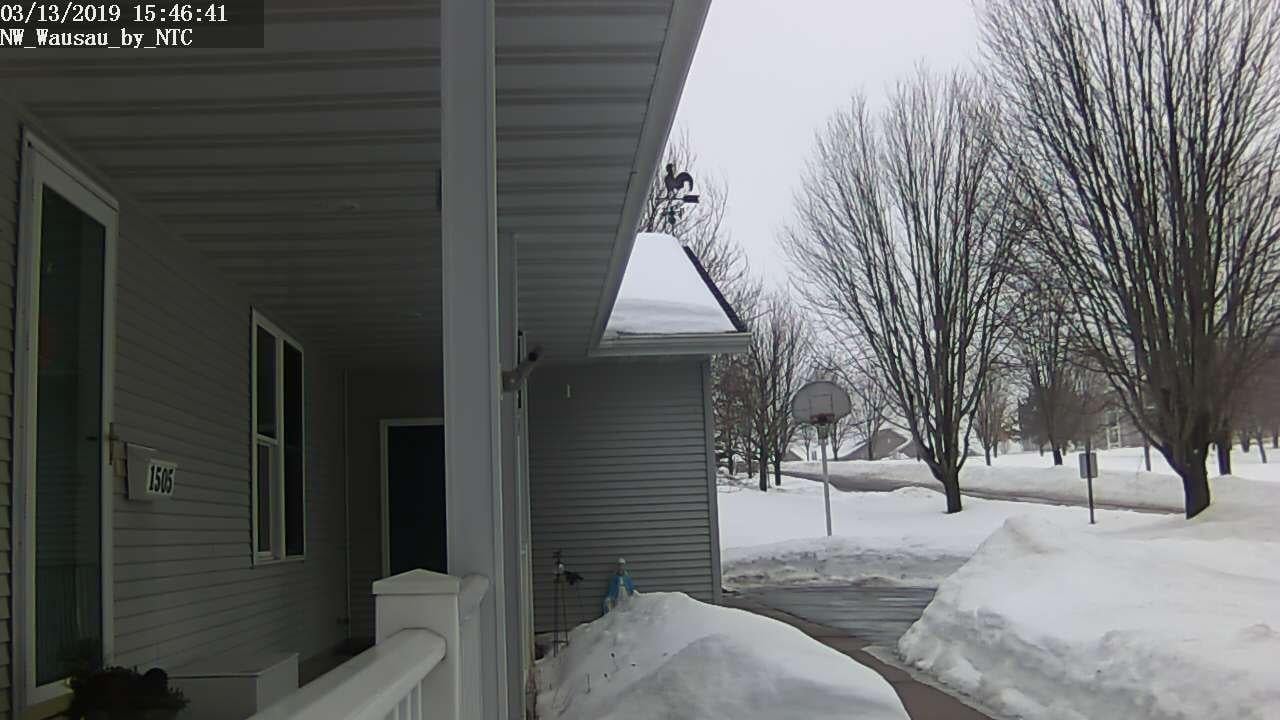
Meanwhile, in North Central Wisconsin (Stevens Point/Wausau area)
.
53 now, 70 next week--are you in Arkansas too? Oh wait...Arkansas is 70 one day, 50-odd two days later, 70 the third day, & 30s next week.
..nope, Oregon.
I Forgot What My Complaint Was - Complaint Thread...Non-complaint: Wheee... temperature outside is 50F. It's "no jacket" weather.
...53° currently here after a cold rainy sometimes rainy blustery day yesterday. Might be pushing 70° by next week.
Meanwhile, in North Central Wisconsin (Stevens Point/Wausau area)
.
53 now, 70 next week--are you in Arkansas too? Oh wait...Arkansas is 70 one day, 50-odd two days later, 70 the third day, & 30s next week.
I Forgot What My Complaint Was - Complaint Thread...Non-complaint: Wheee... temperature outside is 50F. It's "no jacket" weather.
...53° currently here after a cold rainy sometimes rainy blustery day yesterday. Might be pushing 70° by next week.
Meanwhile, in North Central Wisconsin (Stevens Point/Wausau area)
.
Enlarging model viewing areaThe Viweport, by default, takes up the central area that is not used for other panes. Collapsing pane groups (by clicking the tab of the active pane) will free up space. Or do you mean the area within the Viewport that renders? You can do that by adjusting the size or proportions in the Editor tab of Render Settings (after turning off the option to constrain proportions) but that will also, of course, chnage the shape of the render itself.
New York Stores -- Wow!Wow, this does look amazing! I hope @Aurelio does Central Park with horse & Carriages, the Sunset Strip & Robertson Blvd (LA) next! I didn’t even know someone besides Stonemason could do something like this!
Heh-heh, my initial reaction when seeing the small promo thumbnail on today's sale page was "Hey look, Stonemason has created Streets of New York".
 It's that level of quality. So congrats to Aurelio !
Thanks to folks for reporting their rendering experiences, much appreciated. I guess it's time to abuse the ol' credit card once again.
New York Stores -- Wow!Wow, this does look amazing! I hope @Aurelio does Central Park with horse & Carriages, the Sunset Strip & Robertson Blvd (LA) next! I didn’t even know someone besides Stonemason could do something like this!
Bridget 8BTW, I have a blonde blue eyed friend who married an Asian man and they don’t have kids but I bet they’d look amazing! In DS, we can create all sorts of fascinating ethnicities that may or may not yet exist, and that again, adds to the creativity...
I lived in Singapore for 13 years, and all of the white people were married to Asians. Their children? They could go to any nation in Central Asia or South America---where these mixtures took place hundreds or thousands of years ago---and be taken for locals.
March Madness 2019Only Daz knows what percentage of their sales comes from what time zones. Without this information, I don’t see how one could determine whether or not it’s worthwhile to have 24 hour customer service.
In any event, adding a second and third shift for 24 hour coverage would surely jack up the prices of content, don’t you think?
- Greg
Time Zones don't really even factor into it as long as DAZ releases all new product at midnight every single night. I'm in the Central Time Zone and check on the new sales every night. So do a lot of people. But I rarely BUY then because the sales are so frequently not working right. Has there been a single day of March Madness that hasn't had at least one issue? That alone would go a good ways to covering the cost of covering the late shift, and then there's the reduction of the costs to customer service.
March 2019 - Daz 3D New User Challenge - PosingHere's my start. Once I'm closer to the referance, I'll think about environment for him.
edit- I found the referance here.
Shinji nice pic, firefighters deserve respect. I think you would help yourself if you resize the plane with your original to normal , he looks a bit sqished there so it gets harder for you to get the details.
You're already getting close, with your figure but note that the firefighter looks exactly where his hose points at, so the head needs to get nore down and the body is bet sideways and twisted as well. His left arm is far more behind the body leading the hose around. I think the central difference is that your guy shows "I'm alert, ready to shoot" while the firefighter is concentrated, taking care. I would like to see that in your figure as well, I know you can do that ;)
ot Blizzardy Warning? whiskey tango foxtrotOnly a couple of weeks until spring but ...
Wintry mix of precipitation expected Monday night into Tuesday.
A low pressure system will approach Newfoundland on Monday. Snow and blowing snow will begin in the southwest late in the day on Monday, and then spread elsewhere by overnight. Snow will change to rain over most areas of the Island by Tuesday morning as temperatures begin to rise, with a period of freezing rain or ice pellets during the transition.
In central and western parts of the Island and over the Great Northern Peninsula, 15 to 25 cm of snow is possible. Over southern and northeastern Newfoundland, we are generally expecting 10 to 15 cm. In the southeast, 5 to 10 cm of snow will fall, with potential for a period of 4 to 6 hours of freezing rain afterwards.
Conditions are forecast to improve throughout the day on Tuesday as the system moves away. However, strong westerly winds developing behind the system may continue through into Tuesday night, generating blowing snow and reduced visibilities over some areas, especially over the west coast where persistent flurries and snow squalls are likely to develop.
Please continue to monitor future updates for this system, as details will become more clear as the event approaches.... is what I'm looking forward to at the moment.
 Places you'd love to see made into a 3D environment
On NYC.. I'd like to see the West Village, the Meatpacking district with the High-Line. The rocks in Central Park. For crime and action scenes rooftops with the classic old wooden water tanks. There are so many good places.
Places you'd love to see made into a 3D environmentNot sure of the legality but I’d love NYC icons like the Plaza Hotel and the big fountain in front of it, Central Park, the horse and carts, hot dog and pretzel carts (assuming they are still there, it’s been a while since I’ve been back...) those brown walls around the park, benches with pigeons, Rockefeller Center skating rink and huge Christmas tree, actually all of Central Park & NYC lol, it’s where I grew up.
Mark IX Hawk for Poser is up.Just found an actual hiccup in the materials. The Booster Engines .obj doesn't have a .mtl file, and the .mtl for the Central Section has all materials light grey with no named texture file.
Ah well, it all works — got all the bits converted to .duf, applied all the textures, and did a quick test render. I think I like it.
 The Things Which Could Be Worse Need Cats To Make Them Better Complaint Thread
...hmm, but will you get any 3D work done then?
Part of the reason I don't deal with computer games. The other part is most are just "shoot/slice/cast magic at em ups" which get's boring after a while.
Would love X-Plane (which is an aircraft simulator) but I'd have to be pulling in a lot more than I do to get the large screen triple display system, up to date GPUs, and the actual aircraft flight control interfaces (control yoke, central console [with throttles and flaps controls for transport aircraft], axillary throttles, mixture control, and carburetor heat for vintage light aircraft, rudder pedals, etc, etc, etc...) as well as one of those expensive gamer chairs. Just doesn't give one the proper "feel" and experience doing it with a game controller or using the keyboard, particularly after flying a real plane.
Of course, still wouldn't mind that pipe organ simulator I posted pics of a while back either
Daz 3D is part of

Connect
DAZ Productions, Inc.
7533 S Center View Ct #4664
West Jordan, UT 84084Licensing Agreement | Terms of Service | Privacy Policy | EULA
© 2026 Daz Productions Inc. All Rights Reserved.