-
Nasolabial Folds?
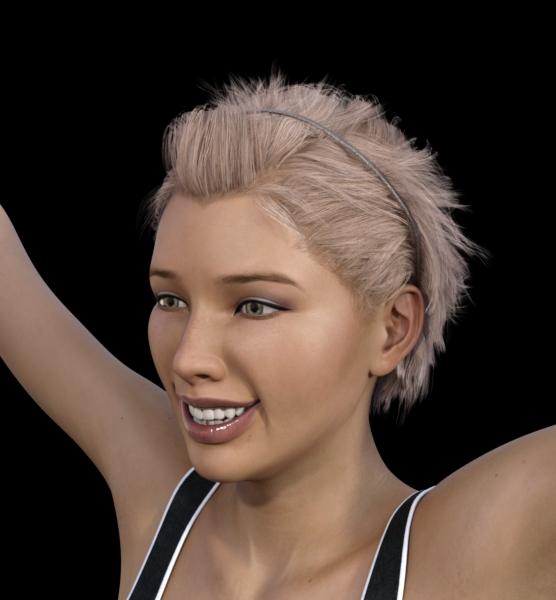
I managed to get this using the 200-Plus (and a few others). There was one morph called Marionette Lines. I'm not sure if that came from somewhere else or not but it worked well. No base characters - just G3F and morphs.
 Show Us Your Iray Renders. Part V
Thanks, that's a nice looking morph. I would certainly buy any Disney-esque morphs for G3, including a Callie 7.
Show Us Your Iray Renders. Part V@nonesuch photoshop filters > camera raw > noise reduction. As you might guess from the name, also can clear up a good bit of grain. I abuse it so much. As for Star2.0's texures the only difficulty you might run into are the eyebrow textures, they can look a bit odd on non-Star figures.
@C3PO Betty Boop was definitely an influence, particularly in regards to the very low bouth and as near to a lack of chin as I could get.
@snowsultan the main base is my perpetually 75% done disneyesque morph (as seen below). One of these days I'll actually put my nose to the grindstone and finish it. A lot of the dialed tweaking is Dogz' 200 face morphs, they have a lot of general proportioning morphs wich are great for completly changing the general shape of the head.
There's also a bit of custom converted callie's body and a head morph based on decoco (pre-genesis original anime figure),
Is it possible to save the results of smoothing as a morph.If you talk about smooth modifier, yes.
1 change the figure or obj which you need to make smooth morph , as base resolution..
if your figure already posed and the item are parented, you must need un-parent the item which make morph. (keep the position)
2 check "on" "interective update" in parameter tab>meshsmoothing keep collision target,
3 export as obj, (keep default scale and axis).
4 remove smooth modifier defomation,, then import the morph.obj by morph loader pro. must set, Reverse defomation = yes.
5 it make new morph, then when you set 100% , it deform, as if it is applied smooth modifier.
you may retrun subdivide, to see better smooth effect, (if the item was sub-D and high resokution before)
it may not perfectly same (because, we need to keep base resolution,,) but almost same, and actually I often use the way.
the good thing is you can controll the strenght as morph too. (eg you can change limit, then set as 1.3, )
but at same time,, smooth modifier often fit current pose only. (then it should up-date for each pozing,,)
then mostly work about current pose and scene only.. but if you make these smooth morph with zero pose,, it may be usefulu for many purpose.
you can apply this morph with keep smoothing modifier, with different pose,, it often make more easy to fit and smooth with collision target.
=====
wuu I need to open my shop ><; good day.
Is it possible to save the results of smoothing as a morph.Is it possible to save the results of smoothing as a morph? Smoothing is nice but it slows down workflow significantly. When posing I either have to select everything which takes a minute and turn off smoothing on everything or I get a delay everytime I pose something. So is it possible to save the results of smoothing so it doesn't have to recalculate all the time.
Modeling with Lady LittleFoxI got her Hair one way back when.
She uses modo, but its not "how to model in modo" its much more "the general principles of how to model for the Daz figures" what that means is there's no "click here on the screen for what you want" but "use x tool or its equivalent in your program of choice" so you do need basic familiarity with the program you're using. (I am completely unfamiliar with carrara and hexagon personally as I am a blender user, but as long as they can do loop cuts you should be fine)
The rigging is legacy v4 style, but again because its more about the methodology and principles some of the information is still applicable (less than the modeling though) The good news is that rigging for the geneses is by and large easier than v4, a good number of things you can get away with just using the templates in transfer utility with no to minimal tweaking and this is one time the Daz wiki is actually quite useful!
So, in conclusion, If you're looking for something completely step by step for someone who's never used a modeling program, you might get a bit lost. However even if you are a beginner, as long as you're willing to supplement it with outside information and experiment a bit, theres still a lot of very useful info (particularly in regards to modelling). And at $4 its certainly not a big risk.
Novica & Forum Members Tips & Product Reviews Pt 7Okay, I may have a genius idea- or maybe not. I asked a week or so ago (and ahem, no one answered...) When doing kids from adults, the fingernails are too long. I asked how to shorten them, if there were any morphs for the nails.
So wouldn't Lune Nails work? If there's different material zones, just apply the ones with two tones, and then in Surfaces, cutout opacity the tips and you have short nails!
OR
Just use negative values (do the cog, undo the limits if needed.)
Anyone have Lune Nails and Growing up that can test on Genesis 3 females?
The only morphs for Lune Nails make them longer / round / square. And there are no additional material zones. They're just morphs for the existing nails. The idea to use negative values with the Lune Morphs, however, does work. I got the best results making the Lune Square morph negative (because that's essentially the shape of the default nail), but your mileage may vary.
Runtime DNA Merges With Daz 3DLooks like most of the "Furries for..." add-on presets and texture additions have finally appeared in the store. Of course, the "face poses" won't be of much use until the base "Furries for Melody" and "Furries for Micah" are finally listed as they contain the actual morph dials.
At least we're getting closer.
Sincerely,
Bill
Show Us Your Iray Renders. Part VAnd here's a closeup.
This is a combination of Creature morphs, the usual 'general G2M morph pack,' DieTrying's awesome freebies, and a bit of Dental Plan (namely, in making the teeth a little longer).
Selbsthilfegruppe DAZ Studio - Beispiele, Fragen, Diskussion und sonstiges GequatschePrima! Ich freu mich, dass Du jetzt loslegen kannst! (Hoffentlich reichen die 500GB Festplatte...
 )
)Die Libraries anlegen geht ganz einfach...
Du kaufst erst mal Artikel bei anderen Anbietern. Dann legst Du auf deinem gewünschten Laufwerk einen Ordner dafür an. Ich habe mit z:B. auf meinem G-Laufwerk für die verschiedenen "Kaufplätze" entsprechende Unterordner angelegt.
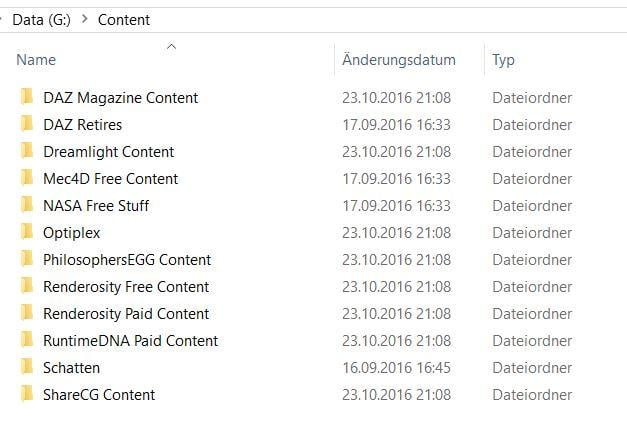
In die hinein entpackst Du jetzt deine Artikel, wobei Du darauf acten solltest, eventuelle "überordner" nicht mitzunehmen. Also, wenn das ZIP-Verzeichnis einen Unterordner "Content" enhält, wie im folgenden Beispiel, entnimmst Du nur alles was direkt darunter liegt, also hier "People/Readme/Runtime" einschließlich derer diverser Unterverzeichnisse.

Am Ende sieht das dann ungefähr so aus, z.B. für den Renderosity-Content:
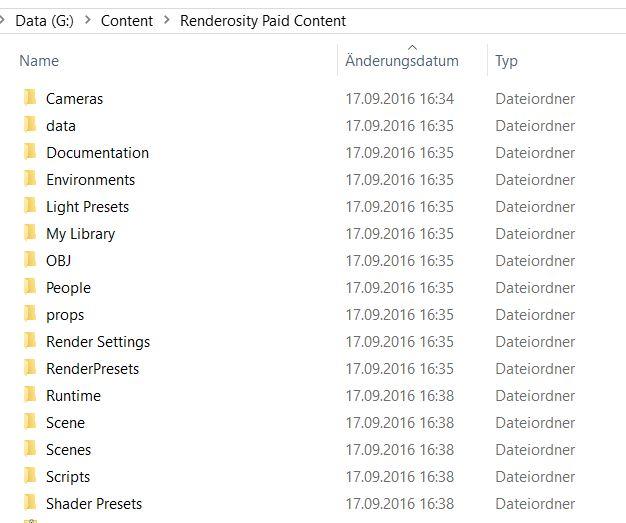
Danach musst Du dann nur noch in DS, wie weiter oben beschrieben, die Verzeichnisse im Content Directory Manager bei DAZ und Poser Format einrichten. Allerdings hat das ganze Limits - einige Morph und Anwendungen funktinionieren nur, wenn man sie im "Hauptteil", also im DAZ-Ordner installiert.
Proper tutorial to create products?Hi all, here's the situation: I have modeled some clothing, managed to transfer utility it to turn into a proper DAZ item, added morphs, but how do I turn it into a content library item? The official tutorials are very limited and not up to date, I hope to learn how to create professional items, with morphs, texture presets and all.
Thanks for your help.
Switching off mesh smoothingHi,
I have a simple item of clothing which I've modeled and fitted to the base G2F female. I've also imported a few morphs for the clothing via Morph Loader Pro.
One of these morphs looks better when the clothing's mesh smoothing modifier is turned off. Otherwise I'd prefer smoothing to stay on. Is there a way to
switch smoothing off when the morph's dial reaches 100% and to switch it back on when it's at 0%?
Tiny Petite G3Fs?In terms of morphs, in addition to height, don't forget the leg length morph. The DAZ figures tend to be pretty leggy, and shorter folks tend to have shorter legs relative to their torso (I know I do anyway)I believe that is where the significant difference is.
Tiny Petite G3Fs?In terms of morphs, in addition to height, don't forget the leg length morph. The DAZ figures tend to be pretty leggy, and shorter folks tend to have shorter legs relative to their torso (I know I do anyway)Apparently the normal ratio for legs to height measurment is 45%, so someone who is 5 ft tall (ie 60") would on average have a 27" inside leg measurment. I am spot on with that, so as long as a style is made with 27" inside leg I can buy trousers to fit off the peg.
Nasolabial Folds?I've got that morph pack and there is no specific morph for them,In that case, the Laugh Lines HD morphs (Laugh Lines 1 HD) in Aging Morphs 3 for Genesis 3 are probably what you're after.
http://www.daz3d.com/aging-morphs-3-merchant-resource-for-genesis-3-female-s
Thanks! I hadn't thought to look at that one, will have to buy it this evening and have a play with it.
Nasolabial Folds?I've got that morph pack and there is no specific morph for them,In that case, the Laugh Lines HD morphs (Laugh Lines 1 HD) in Aging Morphs 3 for Genesis 3 are probably what you're after.
http://www.daz3d.com/aging-morphs-3-merchant-resource-for-genesis-3-female-s
Are there alternate textures for Western Outlaw for G2F?...well turns out the whole idea is a wash as when I load the duster on one of my G3F characters, there is a noticeable distortion in the back of the coat just above the character's butt. Tried everything I could do to smooth it out but no good. It isn't caused by the gunbelt as the holster is on the right side. Even removing the gunbelt doesn't help.
So I went to plan "B", created wearables presets for the old Wanted DOA set using Genesis (set up as a female) as the base then applied them to my G3F figure, and it looks much better. As I have western boots that fit G3F, didn't need to transfer the DOA boots (Seems when I try to autofit pre Genesis footwear, it distorts badly when I try to fit it to the Genesis base), The only items I kept from the Outlaw set were the hat and gloves. and I adjusted the colours on them (figured out how to do it in Gimp).
I actually like it as it sort of gives her that "Doc Holliday" look from the film Tombstone. (need to find a tin cup).
Nasolabial Folds?200 Plus Head & Face Morphs has them.
http://www.daz3d.com/200-plus-head-face-morphs-for-genesis-3-female-s
I've got that morph pack and there is no specific morph for them, it is the way that you apply the shapes to the other parts of the face that creates them and they are barely noticeable unless you make the cheeks pretty chipmonk like.
Oh well, looks like I've got to add learning ZBrush to my ever expanding list!
Whip out your WIPsWorrks for armour as long as it's not in the torso. That's always a bugger to make rigid because there are so many weightmaps that overlap and parenting things to the abdomen and chest bones means the bones always move at 100% of the parent's rotation even if the associated mesh doesn't.
And in other news. Working on an outfit for the male morph for my chibi figure.
Tiny Petite G3Fs?In terms of morphs, in addition to height, don't forget the leg length morph. The DAZ figures tend to be pretty leggy, and shorter folks tend to have shorter legs relative to their torso (I know I do anyway)...yeah this has been a n issue since the early days. I always had to shorten Vicky's legs to get more appropriate proportions. That is why I liked Steph 4 as she seemed more "realistically" proportioned.
I like Josie7's face and softer features but like Vicky, she's very leggy especially for a teen. In the G2 version of Growing Up, there is one slider titled "Adult Proportion" which apparently was replaced by one called "Youth Proportions Adjust" in the G3 version. The latter sort of does the same but also affects the head propagation as well.
Daz 3D is part of

Connect
DAZ Productions, Inc.
7533 S Center View Ct #4664
West Jordan, UT 84084Licensing Agreement | Terms of Service | Privacy Policy | EULA
© 2026 Daz Productions Inc. All Rights Reserved.