-
Sydney 8 ... Chest morphs... Really?!
What I miss about the base morph packs is that you used to get all kinds of ethnic morphs with it - Native American, African, East Indian noses, etc. But I digress ;)
Laurie
That is one thing i really don't miss.... I remember those silly face dials for "Bridget" and "Elizabeth" as if Irish and English people look radically different while a single dial would be for the "ethnic" character ignoring that Africa is larger than Europe and most of Asia combined and that a Bedoin looks lothing like a Twa.... The Native American dial was the funniest. I had a conversation with a friend about an American presidentil candidate who took a genetic test to prove her ancestry but the test consisted of mainly Central and South American samples. I explained the distance between Chicago to Rio is roughly London to Beijing... one wouldn't use genetic samples of someone from Bristol to ask genetic questions about someone from Shanghai.... Hurrah for more specific morphs.
I Forgot What My Complaint Was - Complaint ThreadI used to complain about the noise until I moved away from the Interstate highway and realized it was too damn quiet to sleep.
 If there's no ambient noise around me when I'm trying to sleep I hear that incessant high pitched ringing in my ears and the more I try to ignore it, the louder it gets. That's why my radio or my room fan runs all night. Something to mask the tinnitus. It was clearly a case of me doing too much listening!
..it's been pretty quiet since the central postal distribution centre across the street closed down and moved out by the Airport. There was speculation Amazon might buy the property for a fulfillment and distribution warehouse but that was only rumour. Instead as I understand the property will be used for a housing development (hopefully a low income one).
Viewport gone white, then grey, then everything gone!I suspect that you have closed the Viewport pane - is its tab gone from the top of the central section of the interface? If so go to Window>Panes (Tabs)>Viewport, then drag by the top bar to the top of the empty docking area and release the mouse when you see a line of highlight colour across the top of the space.
If you still have a white-out, it may be that you have a backdrop colour set (Window>Panes (Tabs)>Environment) or you may have chnaged the viewport colour (Window>Style>Customise Style)
MRL Warrior Hair Product Page InaccessibleDefinitely some major internet problems today in the US. Most companies that have outage maps show similar areas with high outage problems, with the east coast, LA area, and central Texas seeming to be the most common areas on all maps. Just for fun, I tried several other US locations, and they all have varying bad urls for these for products. I went back to Toronto, and some items no longer had the proper url, Mexico had problems as well. With the exception of the UK, all the locations I tried outside North America seemed to have no problems with the URL. I looks like there is a bit of cunfusion with the North American servers where one gets updated with "good" data, then it gets some partially good data, then it gets bad data, etc.. Will probably be a while before everything gets back in sync due to the number of partial outages we are experiencing.
dFlatable Donkey Price CheckThey come up with some fun stuff every year. There was the DAZ Central building, and the nose hair (which is rather useful for some renders!), and the legendary Instant Art button.
skin presets for luxus carrara?all my carrara swag - that has the word carrara in title
- BVH/PZ2 Exporter for Carrara
- Carrara Enhanced Remote Control
- Country Ford for Daz Studio and Carrara
- Cloud Nine Atmospheric Clouds For Carrara
- Carrara BMF Clouds and Tropics
- Central Business District for Carrara
- Venice for Carrara
- Luxus for Carrara Resource Pack
- Carrara's Waldon Park
- DP Monique 6 Carrara Shaders
- DP Carrara Master Collection Shaders
- Luxus for Carrara
- DP Veloute Materials For Carrara
- Pose Helper for Carrara
- Create a Walk Cycle in Carrara
- Neon Glow Lights for Carrara
- Carrara Surface and Skin Shaders
- Shader Power Tools for Carrara
- aniMate aniBlock Importer for Carrara
- Bryce, Carrara & Daz Studio Iray HDRI
- Carrara Realistic Seas
- Carrara's Island Butte Cafe
- Carrara Skies Lightdomes 1
- Carrara Skies Lightdomes 2
- Carrara Skies Volume 1
- Carrara Skies Bundle
- Carrara Skies Lightdomes Bundle
- Carrara Skies Volume 2
- DP DAZ Dragon 3 Carrara Shaders
- Mimic Pro for Carrara
- Carraracters Delphinia
- Harpsburg for Carrara
- Starry Sky for Carrara
- Carrara's Mystic Gorge
- DP Ambie Carrara Skin Shaders
- Carrara Modeling Tutorials
- Learning Carrara 8.5 Tutorial Videos - New Features - Instant Digital Download
- Carrara Hair Caps for Genesis and Genesis 2
- Carrara 8.5
- Carrara 8.5 Pro
- Carrara 8.5 Pro Native Content
- Carrara 8 Native Content
- Carrara 8.5 Native Content
- Carrara 8.5 Pro BETA (PUBLIC BUILD)
- M4 Elite Jeremy Carrara Shaders
- M4 Elite Lee Carrara Shaders
- Carrara Hair Caps
- M4 High Res Shaders for Carrara 7
- Carrara 7 Pro - Download Version
- V4 High Res Shaders for Carrara 7
I Forgot What My Complaint Was - Complaint Thread...MM Complaints: Oregon lost to Virginia last night after hanging tough pretty much all game (so my last dog is out), Sparty defeated LSU, and Duke is ahead of Va Tech by 5 after trailing most of the first and part of the second half with seven minutes and change to go (by all rights Duke should have lost to Central Florida last Sunday).
MM Non Complaint: #3 Purdue came back in overtime to defeat #2 Tennessee yesterday.
__________
ETA: Ugh, Duke squeaked it out again.
Ahem. My normal headwear (wearing one now).

..this is mine,
sadly they went out in the first round to Oregon (which I also consider a "home team") , who narrowly lost to Virginia on Thursday.

So now it's...
...or nothing.
Tango Whiskey Oscar Papa
 shoulda turned left at albaquerqeeI Forgot What My Complaint Was - Complaint Thread
...MM Complaints: Oregon lost to Virginia last night after hanging tough pretty much all game (so my last dog is out), Sparty defeated LSU, and Duke is ahead of Va Tech by 5 after trailing most of the first and part of the second half with seven minutes and change to go (by all rights Duke should have lost to Central Florida last Sunday).
MM Non Complaint: #3 Purdue came back in overtime to defeat #2 Tennessee yesterday.
__________
ETA: Ugh, Duke squeaked it out again.
Ahem. My normal headwear (wearing one now).
..this is mine,
sadly they went out in the first round to Oregon (which I also consider a "home team") , who narrowly lost to Virginia on Thursday.
So now it's...
...or nothing.
Ghost lights and reflections?Wow! A serious testing:-)
Is render 4 still with headlamp ON?So - the main question - it appears for the mesh lights to "cast" reflections they need very high luminance and thus their size must be reduced repectively and the option for luminance per sqm changed respectively? Definitelly will try it ASAP. Basicly I was making the mesh light larger to ensure more equal luminance on the whole scene to evade the dark spots but as the props are easily rendered having darker spots should ne be a problem.
As for what you wrote in the top of the topic about using spotlights for reflection - aren't the spot light too "concentrated" on small area and thus making it hard to achieve enough light for a close up figures?
For Image 4, the Headlamp is Off. The mesh lights have been turned to face the figure, and moved up so the bottom edge is on the floor. For Image 5 the planes are not moved, but by making them smaller, the bottom edge is higher in the scene.
Spotlights can be highly conentrated, but they can also cover a large area.
- Add a spotlght to your test scene.
- Go to the Camera drop-down, (where the default is Perspective View if there are no cameras in your scene,) and
- Select the spotlight. You will then see the scene as if the spotlight were a camera. If the Spotlight is also selected in the Scene tab, you will see guidelines superimposed over the Viewport.
- Now move the light around the scene as you would a camera, selecting where the center of the light will hit the scene, and how far away the spot will be from the object(s), the same as if it were a camera.
- While viewing through the spotlight, if you select the object you want the light to hit, or the material zone of the object, (like a head, for example,) and then use the keystroke combo of "Ctrl+Shift+A", the selected area will shift to the center of the viewport and the rotation tools in the upper right of the viewport will rotate the spot around the selected area.
In the Parameters tab, you can also control other aspects of the light. In this image I recently created, I wanted the light to be concentrated on the central figure, but not spill out over the rest of the image. I'd never done it before, so it was all experimentation. It seemed a bit counter-intuitive to me The larger the Spread Angle, the more the light is distributed across the scene and the less bright the light emitted. But then increasing the Beam Exponent made the center brighter, and actually shrunk the area that was lit.
I recommend you take some time to do some experimenting on your own. I've been working with Daz Studio for more than 4 years, and yet I only discovered the Spotlight could do this effect in the past month!
I Forgot What My Complaint Was - Complaint Thread...MM Complaints: Oregon lost to Virginia last night after hanging tough pretty much all game (so my last dog is out), Sparty defeated LSU, and Duke is ahead of Va Tech by 5 after trailing most of the first and part of the second half with seven minutes and change to go (by all rights Duke should have lost to Central Florida last Sunday).
MM Non Complaint: #3 Purdue came back in overtime to defeat #2 Tennessee yesterday.
__________
ETA: Ugh, Duke squeaked it out again.
Ahem. My normal headwear (wearing one now).
Now I understand.
I Forgot What My Complaint Was - Complaint Thread...MM Complaints: Oregon lost to Virginia last night after hanging tough pretty much all game (so my last dog is out), Sparty defeated LSU, and Duke is ahead of Va Tech by 5 after trailing most of the first and part of the second half with seven minutes and change to go (by all rights Duke should have lost to Central Florida last Sunday).
MM Non Complaint: #3 Purdue came back in overtime to defeat #2 Tennessee yesterday.
__________
ETA: Ugh, Duke squeaked it out again.
Ahem. My normal headwear (wearing one now).
I Forgot What My Complaint Was - Complaint Thread...MM Complaints: Oregon lost to Virginia last night after hanging tough pretty much all game (so my last dog is out), Sparty defeated LSU, and Duke is ahead of Va Tech by 5 after trailing most of the first and part of the second half with seven minutes and change to go (by all rights Duke should have lost to Central Florida last Sunday).
MM Non Complaint: #3 Purdue came back in overtime to defeat #2 Tennessee yesterday.
__________
ETA: Ugh, Duke squeaked it out again.
Black featureless Toon charactercan you apply a 3delight material to a character and render it in it IRAY... that'll take all the feature right out of it... I did it to make "Shadow Armor" Looks awesome especially when I put two glowing green eyes in the skeleton... OMG my D&D players almost lost it...
Not sure about that, but if I try Iray material in 3delight, it shuts my system down. Years ago for a high-level sewer incursion, I made a rather "warped" version of a Beholder: Behinder, Sphere of Many Rears, Ass Tyrant, Elderberry Orb, Hindsighter, etc., which was capable of spewing different gases in a cone from it's large central "rear-end" and its 10 "butt-stalks"(which each also had 2 legs that could deal kicking/stampede damage). I was considering trying to make it in Daz, but(no pun intended) I would probably have to do it from scratch and is probably well beyond my 3d modeling skills. If I recall correctly, one of the key defenses against its breath weapons was a higher level variation of Zone of Sweet Air.
Bryce and parallels or similarThanks for the reply I have decided to go with virtualbox as its free. Does bryce run ok on windows 10?
In my experience, yes. I haven't tried the VirtualBox/Windows 10/Bryce combination, but Windows 10 and Bryce seem to get along OK under Parallels.
Your mileage may, of course, vary, but Bryce has worked pretty well for me under emulation. There are some very minor glitches -- the Sun azimuth/pitch control is a little hard to control with the mouse because it responds too quickly, the color picker can sometimes not give the colors you expect (but if you option-click you get an RGB picker, which works fine), etc. But everything I've encountered so far has been at the level of minor annoyances rather than show-stoppers.
I have a vague memory that someone in another thread recommended installing Bryce manually, rather than letting the DAZ Install Manager do it.
I have tried both windows 10 and osx snow leopard and the programme seems to run ok. There is a problem with moving the camera though, once you start moving in a direction you cant change it to the opposite direction it just keeps going in one direction, as this is happening on both platforms it has to be an issue with parallels or the mouse i am using but all other functions work fine. If i cant solve this issue i wont be using parallels i will just have to keep using my old macbook pro running snow leopard.
I hadn't encountered this before, but I think I see what you mean.
What I find is that the camera seems to have some momentum -- if I click on one of the cross-shaped controls on the left of the interface, then drag, it starts moving in one direction. If I drag in the other direction, it resists moving in that direction, at least at first. If I continue to drag, I can eventually get it to respond.
I get better control if I click on the arrow-shaped tips of the controls, rather than the central sphere. Releasing the mouse button also makes it easier to get the camera moving the other way.
I get this effect with both a mouse -- Logitech G302 -- and a trackpad -- Apple Magic Trackpad. So I can definitely see the problem, but at least on my setup it's possible to work around it.
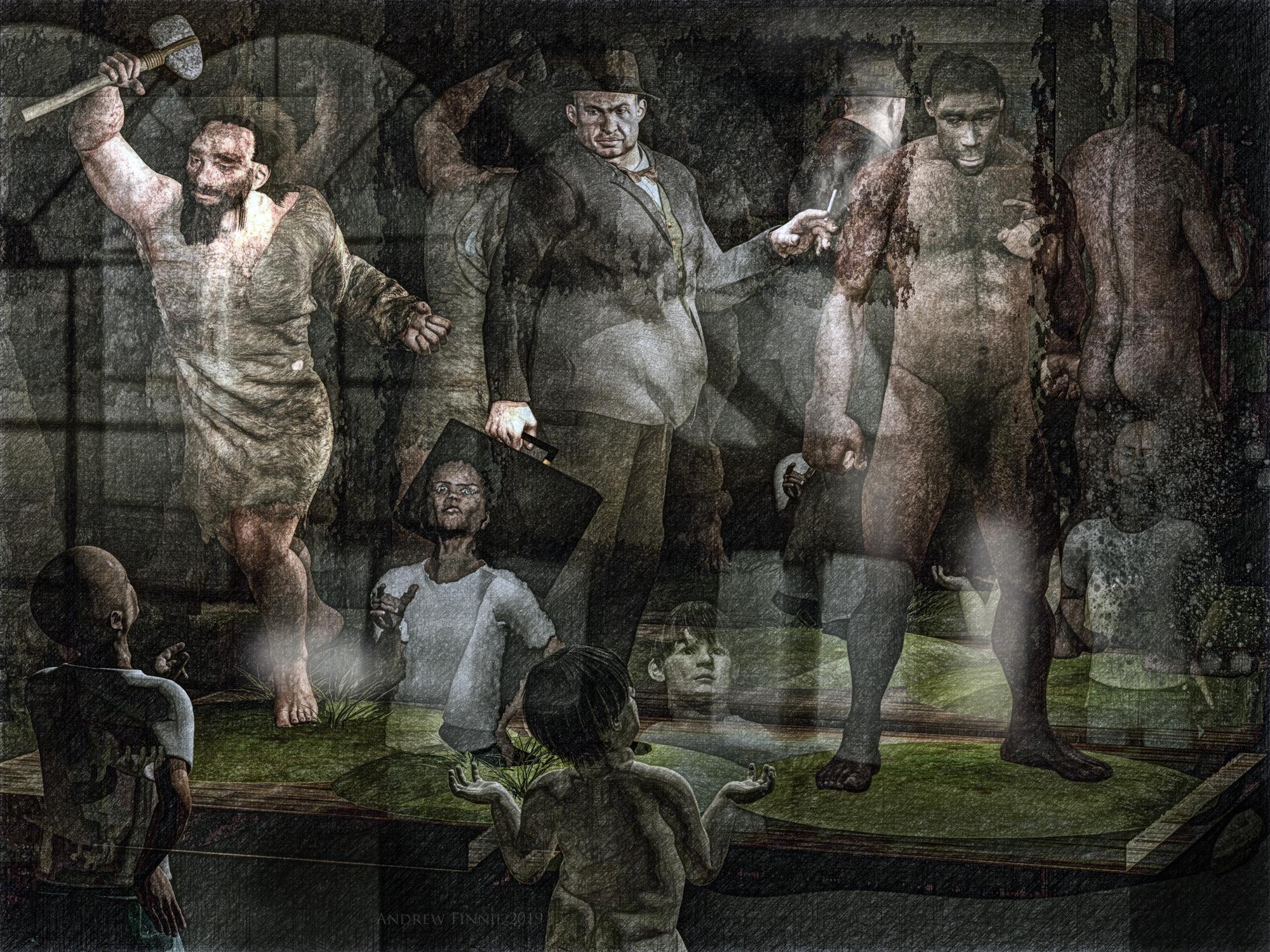
Carrara Challenge 45: Extinction and De-extinction! Voting Thread:Entry #21
Title 'Three Extinct Homo's - (From left to right) Homo Neanderthalensis, Homo 1930's Businessman and Homo Erectus."
Artist headwax
Category A extinctionLinks to WIP threads https://www.daz3d.com/forums/discussion/comment/4362446/#Comment_4362446
https://www.daz3d.com/forums/discussion/comment/4357531/#Comment_4357531
Dicussion - central chap is M4, wearing 1930's clothes - they wouldn;t fit the fat man so I injected morphs via poser then draped all the clothes with VWD. Neaderthal and Erectus are m4 moprhs here at Das- customised them and their texturtes a bit and added Carrara hair to both. The little kids are Ben's. I made the museum case .Postwork in photodonut and affinty photo for tome mapping.
 Active Buyer coupon
...and the ones they email always include an expiation date/time based on their locale (Central Time Zone).
Just got a 35% one, and have a few things on my wishlist there I could use that on.
Active Buyer couponMaybe it's the "three days" thing? I didn't buy anything new since Friday, so today would be more than three days without a new purchase...?
would be a bit tough, as the message seems to have been sent on the 15th but arrived in my inbox only today... so I'm not being able to use that code due to the message being delivered late?
Yes, it only popped up here today as well, or I would've used it on my purchase then.
But I guess the best is to wait and see until the guys and gals in DAZ-Central ride into the office and sort this out.
Moving my Charaters within a sceneYou can select the character in the scene Pane/Tab. You do not have to use the menu to open it. The Scene tab will be docked to a column on either the left or the right. (On the right if you are using the default layout.)
To move the character, select it in the scene. You should now see some sort of indication in the viewport that your character is selected. It's been a few years, but I think the Universal Tool is used by default. The image below shows a selected character, with the icon for the Universal Tool highlighted in the bar above the figure, and tool at the base of the figure. The Universal tool can Translate, Rotate and Scale. It might be a little easier to use the Translate tool for now.
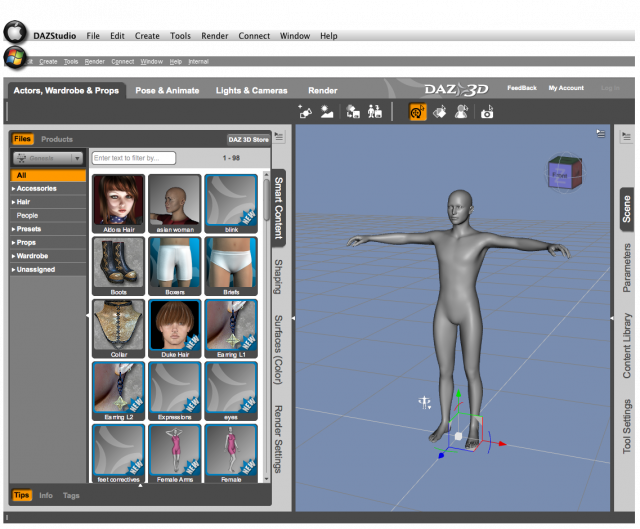
Depending on your layout, all of the tools might be accessible via an icon in the Toolbar above the Viewport, however, all the tools are available via the Main Menu. Select Tools from the menu and you'll get a drop-down list which shows the icons to the left of the tool name and the keyboard shortcut to the right. Trust me, it won't be long before you don't need to use the Tools menu to find the tool you need. But it's still a handy reference from time to time.

The little white triangles of the tool will allow you to Translate on two axes at once. The arrows only move on one axis. The easiest way to move a figure with this tool is the traingle on the floor. It moves in the X and Z axes, (front, back, side-to-side.) The other two combine the Y axis with one other axis, and it's not always easy to see where you put the figure, unless your camera/view is perpendicular to the triangle you want to move. Anyway, using either the Translate tool, or the Universal tool is how you move anything around the scene.
Now for an "advanced user" tip: Many of us have found it better to move the environment to the central figure, rather than moving the figure to a point on the set. This is a virtual world, and the for whatever technical reason, (which I don't know,) we get better results when the object is at World Center, (X-, Y-, Z-Axes of 0, 0, 0.) Of course, for a very large, sweeping scene, it may not matter. It wasn't necessary in my last published render, (here,) but it was important in this render, because of the focus on the primary figure, who is in World Center.
Here's an image showing you what each of the Transform tools look like in the viewport. I added a black background so the colors and white areas will stand out more.
 I Forgot What My Complaint Was - Complaint Thread
...Non-complaint: Wheee... temperature outside is 50F. It's "no jacket" weather.

...53° currently here after a cold rainy sometimes rainy blustery day yesterday. Might be pushing 70° by next week.
Meanwhile, in North Central Wisconsin (Stevens Point/Wausau area)
.
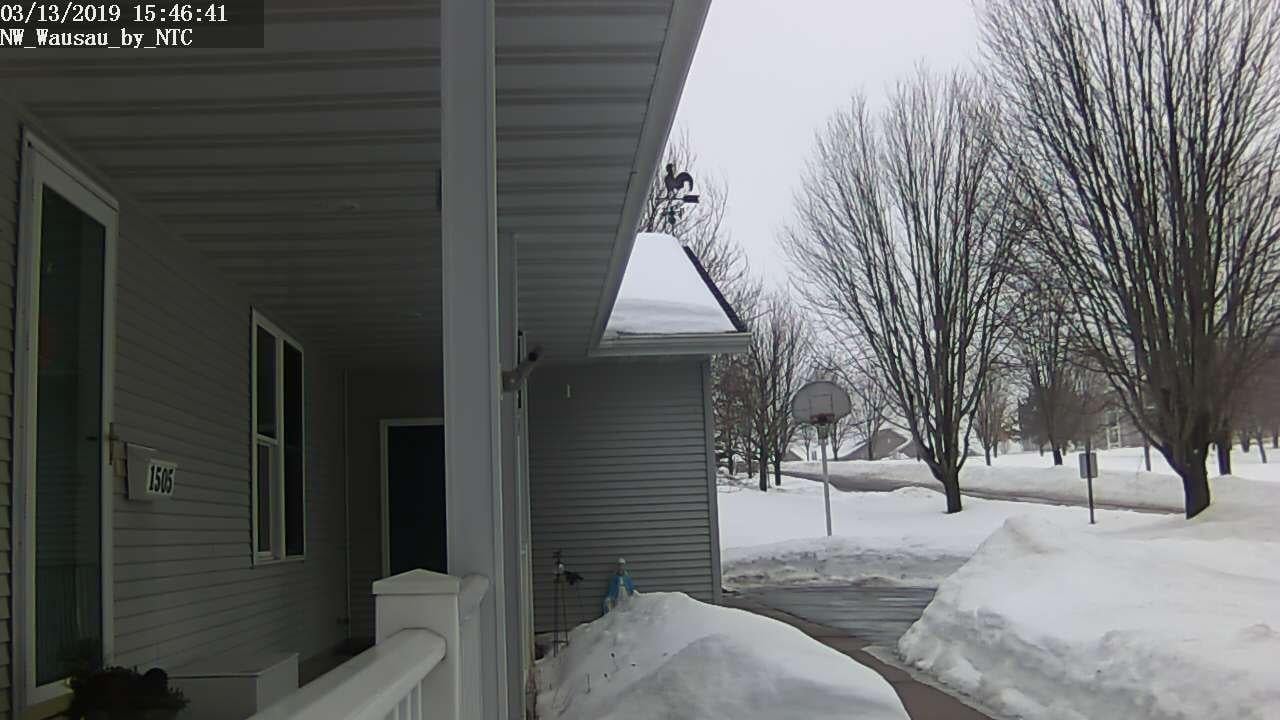
53 now, 70 next week--are you in Arkansas too? Oh wait...Arkansas is 70 one day, 50-odd two days later, 70 the third day, & 30s next week.
..nope, Oregon.
I Forgot What My Complaint Was - Complaint Thread...Non-complaint: Wheee... temperature outside is 50F. It's "no jacket" weather.
...53° currently here after a cold rainy sometimes rainy blustery day yesterday. Might be pushing 70° by next week.
Meanwhile, in North Central Wisconsin (Stevens Point/Wausau area)
.
53 now, 70 next week--are you in Arkansas too? Oh wait...Arkansas is 70 one day, 50-odd two days later, 70 the third day, & 30s next week.
Daz 3D is part of

Connect
DAZ Productions, Inc.
7533 S Center View Ct #4664
West Jordan, UT 84084Licensing Agreement | Terms of Service | Privacy Policy | EULA
© 2026 Daz Productions Inc. All Rights Reserved.