-
Morph bar help
No, the closest you'll get is the Genesis Create Morph Bundles. That is the original Genesis, when male & female were one mesh.
http://www.daz3d.com/genesis-creature-creator-bundle
Then you could do your own morph additions and improvements once to dialed to the cat features as much as they'll go to be more like a real cat. I think probably you'd have to do a lot of additional morph modeling to get the body from human to truly cat like.
Morph bar helpIs there any way to morph a human into a cat? like some kind of slider bar for that? Is there an addon or something that can be downloaded, if so, can you post a link to it? preferably a free download link to it. I seen enough of those $100 links and such. Thank you for time.
Selective autofollow? (beard vs. teeth - hair vs. ears)You can save the null-morphs from option 2 via File>Save as>Support Assets>Morph Asset.
It would, I think, be possible to write a script that would generate null parameters for all morphs with a set path - though the moprhs would need to be zero to start with. Not going to say I will do so, however - my list of things to be done is growing faster than I can do them.
Iray revelation!Also remember that the scene file does not contain the textures or the assets (the figure and morph data, etc.) so it is a totally ineffective indicator of memory use.
No one asked me - Diomede screenshots on whatever - Warning AI Discussion OKVicky is wearing a combination of the VAL Helen and the Tanya outfits, both for V4 and converted for use with G2F using the Studio transfer utility. The G2F is 1/3 V4, 1/3 V5 and 1/3 V6. The set is DM's circle of light, which is washing out the scene as if I had ambient too high. Suggestions for the lighting most welcome. Vicky's hair is Carrara dynamic and I think it is worth posting the workflow.
Selective autofollow? (beard vs. teeth - hair vs. ears)Hi all,
Digging though the forums I've found pieces of the answers but hope someone can help bring it all together for me and future generations... this is a bit long because it also serves as a summary of options/trade-offs that may be useful to others that run into this.
Base Issue:
I don't want the teeth to autofollow the face morphs, but I do want the beard to autofollow... Fixing one seems to break the other.
Context:
DS48, Blank Genesis1 base w Evolution morphs available, Toon Amy Teeth (http://www.daz3d.com/toon-amy-for-genesis-character-hair-1) , Unshaven Beard for Genesis (http://www.daz3d.com/unshaven-beard-for-genesis).
Related Uses:
Any head related figure elements that you may wish to adjust/disable/enable the interactions w/ auto-follow, e.g. hair-vs-expressions, eye-brows, ears-vs-hair, masks, etc.
What I 'know':
To turn off the autofollow in parented/autofit children figures (e.g. teeth), I've found three ways (tnx mr. haseltine/bejaymac):
- option1: I can load a Genesis1, add the teeth, add the beard, crank up all of the offending facial morphs on the genesis1 figure, then on the teeth, unhide the hidden morphs in the prameters tab and slide the offending morphs back to zero, and somehow(?) save it for future use. (Is it possible to save the teeth-only with these zero-d settings for arbitrary future use on other characters? - so far, all of my teeth-only saving efforts lose the 'zero-ing' steps).
- option 2: On the teeth, I can create a set of 'empty' morphs as place-holders using the same 'name' (and label?) of the offending genesis1 facial morphs, that then prevent the DS auto-follow from creating its autofollowing morphs in the added item (e.g. teeth) - this is a bit cumbersome, but viable - not certain how to save this correctly, but I gather I end up creating a new set of teeth (preset and assets) in my library - I don't want to break/update the original teeth)
- option 3: On the base genesis1 character, *before* I 'attach' the teeth (parent w/ autofit?), I can disable the autofollow on all of the genesis1 figure's offending facial morphs in the parameters tab (edit mode), and then when I attach the teeth, those morphs won't transfer autofollow to the teeth. (I don't know how to best save/access a new genesis1 figure that has been tweaked this way as an 'asset' without mucking up the real genesis1 character, nor can I figure out how to save just the new non-auto-follow teeth with the desired zero'd settings)
So. If my three options are accurate (?):
The first option is OK, but I can't seem to save those teeth settings in a re-useable way. Without disabling autofollow in all of the offending base genesis1 figure's facial morphs each time I load it, any version of my saved teeth that I re-add still seem to auto-follow (bad). I would guess saving a scene (or subset) of the adjusted genesis1 with the added/zero'd teeth would work, but loading that later, and adding something like the beard to that would break the auto-follow on the beard.
The second option is probably the way I have to go - adding null-morphs - but this suffers from the possibility that any future facial morphs added to genesis1 in any of my libraries would also need to be manually added to my tweaked teeth as null-morphs as well, right? Viable, but easy to forget - is there a tool (e.g. D3D util) that makes this easier for adjusting groups of all of the face shaping morphs that I may use now or later?
The third option (disabling autofollow in some of the base figure's morphs) would work for fixing the teeth issue, but the beard or any other facial add-ons would also not inherit the desired facial morphs. Unless maybe order matters, and I 'attach' the beard *before* disabling autofollow in the genesis1 figure (beard gets auto-follow), then disable the genesis1 autofollow morphs, then add the teeth... (?) Can I save all of this character adjustment as a scene-subset (with figure, teeth, beard, etc.) and use it later...?
I could try these options and report back here, but maybe I've missed an obvious best-practices approach/tool, etc. for this, so I'm looking to any experts for guidance or pointers before hacking through the options.
Thanks in advance,
--ms
Morph editingChanges made and not saved as a morph asset should be local, affecting only that scene.
Poke Away 3 For Genesis 3Hi Daywalker03, there are indeed tools in DS which can be used to fine tune the fit of a clothing mesh to a figure mesh, each has its strengths and weaknesses:
1) Autofit: This is automatic and works well if there is not much difference between the morphed figure and the original figure that the clothing was made for. If the difference is large then autofit can cause considerable distortion to the mesh.
2) Apply a Smoothing Modifier: This is usually very good but cannot always cope with the distortions caused by Autofit. It does have two parameters which can be changed which generally improve things a bit, namely Number of Smoothing iterations and Number of Collision Iterations. Increasing these can help but also require resourses and can cause lag, so best only use them prior to render... if they achieve the desired results.
3) deformers: Useful for performing localised mesh changes. The problem here is that the region of influence is always a sphere witha fixed rate of falloff. This means that multiple adjustments (eg poke-throughs) requre multiple deformers. This is doable but time consuming and adds to the complexity of the scene which can affect the performance of DS. The deformer is limited to scale, move and twist. For most purposes this is ok, but if the mesh has been badly distorted due to "extreme" pose positions or Autofit (bless it's cotton socks) then a deformer may not help much or even make maters worse.
4) Weight maps; theoretically you could make a weightmap to correct poke-through. Good luck.
What is missing from this tool box is a set of brushes that could be used to directly paint away mesh distortion in real time. In addition to the usual "push and pull" brushes there are also a couple of brushes which could quickly solve problems that none of the above tools seem to be able to; namely a proper "smooth" brush to get rid of mesh distortion, a "shrink to target" brush to make clothing tight fitting in the places you want it to be tight fitting, a "loosen" brush which would do the opposite of shrink, that would be great for poke-through, and maybe a "Wrinkle/Crease" brush which would allow you to put wrinkles, creases or folds into clothing. Brushes would be quick and easy to apply and get instant results with no extra overhead for DS to cope with, as the brushes would create a new morph.
Morph editingThank you!
Option number 1 works independently though I understand now when you say a smooth transition might be an issue. But I notices that the modification has effect outside of the favorites scope. If I save the project, will the morph modification be permanent or just affect that scene? I'm guessing that I'll have to work on option 2 in order to make that morph stand alone a to be able to save it independently for future use? I'll look around the web for instruction on how to use the morph loaded pro.
Very helpful Richard, thanks again.
Poke Away 3 For Genesis 3A much better solution would be to make a morph in Hexagon or Blender or Zbrush and then apply that in DS. Repeat that untill all the poke throughs are gone. This works but is time consuming.
This is how PA's make fits for specific body shapes of items they sell, though they actually export specific shapes to their modeling tools, then create a slightly modified version of the original mesh that fits without poking through and import that as a "morph" for the item mesh.
An even better solution would be to have a plugin for DS which provides mesh brushes so that in real time in DS you can brush away the poke through by moving, smoothing, expanding (as appropriate) the clothing mesh. It would take seconds and provide immediately visible results. Unfortunately, neither DAZ3d nor a PA has made such a plugin. A pity really!
This is probably because the fine tuning of the mesh can already be done in DAZ Studio with existing tools, since poke-through is often a misalignment of the item's weight mapping compared to the non-standard (or unsupported) morph of the base figures.
Gen3 Rigging Adjustment ProblemsThe problem is, mostly about Gen3 facial rigs around eye. it never happen about gen2 or gen2,, because,, only genesis3 have those facial rigs.
there are group about upper and bottom , eylids rigs. then about under eyelids rigs are orientate z 180 alerady..
(I can not see any practical meanig, to set under eye rigs like that)
even though you select only about r eye (influenced node) , or l eye, those rotation often return 180 to around 0, when you adjust rigging to the shape.
then when you add morph, those rigs rotate with Z axis. maybe there are still some nodes,, z orientated 180 around,, (without clear reason) or,, about x, y. such way. then when adjust rigts to the shape,, they turn oposit.
That's pretty much it. I would also add that after fiddling with it for a while I've spotted which ones get messed up. Basically, there are eight bones around each eye: inner, upper inner, upper, upper outer, outer, lower inner, lower and lower outer. Out of these the upper trio have proper behavior after ERC freeze, other prefer to perform pirouettes every time I move the dial. I've only managed to deal with them by making manual adjustments.
Are you adjusting the eyelid bones separately? If you are adjusting those rigs with other facial bones, they are going to flip when adjusted. That's why I mentioned to do the facial bones in passes.
Runtime DNA Merges With Daz 3DYeah, the "head poses" in the add-on presets like "Fox and Wolf", "Rabbits and Mice", "Bears", etc. are rather useless without the base package Kerya referenced above. Of course, the textures will apply, but Melody and Micah will retain their base kitty/mousie features. Conversely, one can obtain the various "orders" and "families" with the base package as it comes with the morph data and a crapload of "preset" face and tail poses without needing the "add-ons". (You just don't get the textures.) that may be one reason the "add-ons" were released first, hoping to obtain a few more sales that might have been lost if the base morph set was released earlier.
Really, they kinda' need to go "hand in hand", but what is one to do?
Sincerely,
Bill
A greatly underrated DAZ creature...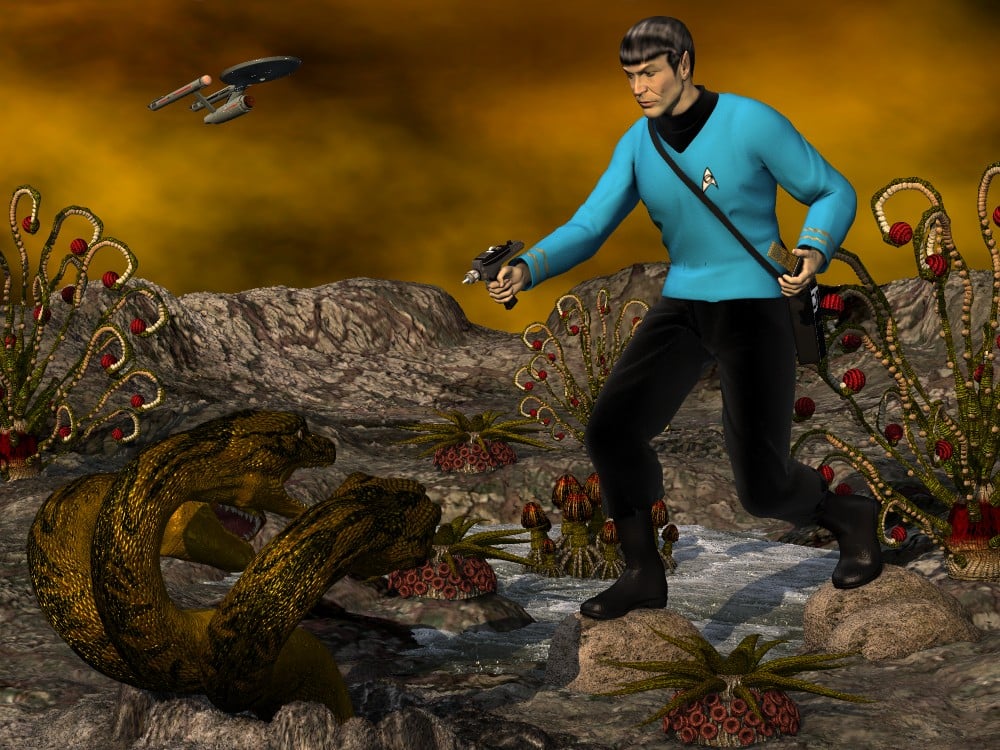
When Leonard Nimoy passed away, I felt motivated to complete a scene that had sat unfinished for quite some time. My goal was to interpret the 1974 model kit (designed by Aurora (known for its various movie monster kits) and distributed by AMT in the US), expanding upon and enhancing the elements of the kit. Yes, the original version of the assembly kit included a 3 headed space hyrda and Mallen Lane's mythological beastie proved the best choice. Funny enough, Lane's Sea Dragon would also have worked as the head and its morphs are nearly identical to those of the Hydra. Because the model kit depicted the monster's heads all springing from a central neck, I had to use three copies anyway, hiding all body parts except for the central neck and head.
Credits
Michael 2 P4...DAZ.com
Face morph...Porthos
Uniform tunic...XCalPro
Uniform pants...XCalPro
Uniform boots...XCalPro
Tricorder...XCalPro
Phaser...MechMaster
Communicator...MattyManx/Sgreco
Spock hair...Mylochka
Dragon's Keep...AntFarm
Twister sky-dome...AntFarm
RDNA XenoFlora...Traveler
Hydra...MallenLane
Enterprise...MattyManx/David Metlesits*** *** ***
Sincerely,
Bill
How to delete a morph knowing his name ?thanks Richard,
well it looks like it's more a property here that drives a morph
when I import a morph from Zbrush, Daz creates a group, let's call it Zbrush, and put inside the name of the morph
if I go in edit mode I can delete the property with Delete Selected Property
is there a way to do the same with scripting ?
thanks
Poke Away 3 For Genesis 3Poke Away works by using magnets/deformers to shrink parts of the figure back below the clothing, if I am not mistaken. Whilst this is obviously one solution to the problem, it does not give very good results if the clothing is translucent. I'm also not sure how precise the changes are. An alternative method is to simply make the body part, which is poking through the clothing, invisible. However this does not always work if the clothing only covers part of the body part.
A much better solution would be to make a morph in Hexagon or Blender or Zbrush and then apply that in DS. Repeat that untill all the poke throughs are gone. This works but is time consuming.
An even better solution would be to have a plugin for DS which provides mesh brushes so that in real time in DS you can brush away the poke through by moving, smoothing, expanding (as appropriate) the clothing mesh. It would take seconds and provide immediately visible results. Unfortunately, neither DAZ3d nor a PA has made such a plugin. A pity really!
Toddler clothes for Genesis 3Thanks Zylox. OK, so there is your answer dtinc88, if there is no Toddler for genesis 3, no one will make toddler clothing. If you make your own Toddler morph for Genesis 3, then autofit will try to make clothing items fit, but in all likelihood it will look awful. The difference between a Toddler and adult Genesis 3 is too big for autofit to handle... it even messes up with teen figures. Then of course it would be "adult" clothing on a child, mostly it would look very strange. If you can persude DAZ3d to make a Toddler figure based on genesis 3 then the PAs might make clothing items specifically for that figure. In the meantime, you're on your own! You might try making your own Toddler morph and then making toddler specific clothing yourself in a program like Marvelous Designer. However, that is a considerable time and money investment.
Modifying/Morphing Clothing for Morphed CharactersIn general, a clothing morph made in a 3rd party program like Hexagon, Blender or Zbrush should work fine when applied to the clothing in DS. Especially if using the DS feature of "Send to..", like the GoZ feature for Zbrush. However, I have come across situations like you describe where the morph seems to be over-ruled by something else going on in DS. One such case was when making a morph to flatten the breasts on a dress to make it suitable for a child character based on genesis 3. Normally auto fit will try to do this automatically but usually makes a pretty poor job of it, screwing up the clothing mesh quite badly. On a number of such occasions I have found that even though the morph I made in Zbrush was perfectly fitting the shape of the morphed Genesis 3 figure, when that clothing morph was applied to the clothing item in DS (via GoZ or not) the center of the chest of the clothing stood out away from the figure's chest. Even a deformer added in DS would not change this. No one could explain why this happened or what to do about it.
Perhaps it was a specific issue with the rigging of the clothing. The same may be true for the clothing you have mentioned. Sometimes DS does wierd things.
One possible way around this would be to have mesh brushes that work in real time within DS (such as those in Poser and Blender), so that you could manipulate the mesh in DS and see immediately if the results are what you want. Unfortunately, no one has made a plugin for such mesh brushes in DS yet. Personally, I think they would be very popular and would help to solve a lot of these problems. In the meantime... good luck with your outfit morphing problem.
Runtime DNA Merges With Daz 3DLooks like most of the "Furries for..." add-on presets and texture additions have finally appeared in the store. Of course, the "face poses" won't be of much use until the base "Furries for Melody" and "Furries for Micah" are finally listed as they contain the actual morph dials.
So that's why I was going mad trying to make them work just now. Thank you! I'll hope it's soon.
DAZ really should update the informationon on those pages. The pics talk about RTE still being needed, and they don't say that we need the "Furries for..."Amusingly - or not so much: http://docs.daz3d.com/doku.php/public/read_me/index/24993/start
I had bought Furries for Melody at RDNA and it showed up in DIM, it has a new Readme - but it's not in the store ...
Gen3 Rigging Adjustment ProblemsTo said more detail, about each facial rigs, may beyond my English skill,,
But about those eyelids rigs, I recommend, only , remove Z orientation ERC ,, if you hope to keep X, Y, orientation.. (yes it may help sometime to arrange well with current face mesh,,
I said, there is almost no meaning add ERC about orientation Z about those facial rigs.
to be frankly said,, those eye lids arrange ment is something srange at start point,, all eye rids node ,center point start almost same positon, then they arrange very narrow,
it cause real difficulity when I select nodes in the 3d view, as I like, ,,, maybe DAZ think,, we use parameter with scene tab, or use expression which daz sell, but the strong point of facial rigs
is ,,User can easy tweak detail by select and move bone t, who arrange eye lids rigs like that, if you plan pose manually ?? (and daz do not offer posing sheet still)
then we many buy expression morph product .
Gen3 Rigging Adjustment ProblemsThe problem is, mostly about Gen3 facial rigs around eye. it never happen about gen2 or gen2,, because,, only genesis3 have those facial rigs.
there are group about upper and bottom , eylids rigs. then about under eyelids rigs are orientate z 180 alerady..
(I can not see any practical meanig, to set under eye rigs like that)
even though you select only about r eye (influenced node) , or l eye, those rotation often return 180 to around 0, when you adjust rigging to the shape.
then when you add morph, those rigs rotate with Z axis. maybe there are still some nodes,, z orientated 180 around,, (without clear reason) or,, about x, y. such way. then when adjust rigts to the shape,, they turn oposit.
That's pretty much it. I would also add that after fiddling with it for a while I've spotted which ones get messed up. Basically, there are eight bones around each eye: inner, upper inner, upper, upper outer, outer, lower inner, lower and lower outer. Out of these the upper trio have proper behavior after ERC freeze, other prefer to perform pirouettes every time I move the dial. I've only managed to deal with them by making manual adjustments.
Daz 3D is part of

Connect
DAZ Productions, Inc.
7533 S Center View Ct #4664
West Jordan, UT 84084Licensing Agreement | Terms of Service | Privacy Policy | EULA
© 2026 Daz Productions Inc. All Rights Reserved.