-
Gen X2 question
I have the following "morphs" that I would like to use on G3M...I have DarioFish HFS shapes for Genesis and I have Midnight-Stories Lycan...will those transfer over to G3M? I just want to add some flexibility to the G3 lineup and if I can use what I've already bought that would be fantastic.
Folded Clothes Optionthere are other dynamic solutions for sale at Renderosity inc Virtual World dynamics and Poser is on special too.
I cannot link but you can google search.
Most PA' s use Poser to create draping morphs.
you can use primitives in Poser to guide clothes into folded positions.
Also using hybrid dynamics can be useful as rigging is maintained if using Poser compatable figures/clothes even DSON imports.
Then export the obj as a morph for morph loader.
Folded Clothes OptionIt is possible to find a number of morphs that turn human figures into different kinds of beasts/deamon/zombies.
What if someone made a morph that gave the figure a flat chest with adjustable thickness and curved shoulders (to match many chairs) and a strange shoulder/neck morph (to match a wardrobe hanger).
Auto fit the clothes to this figure and make the figure invisible in the render.Does http://www.daz3d.com/make-a-mess . work with g3f and g3m clothes?
Meet the MusesThese 2 have become my 2 favorites to use in renders, they're both G3F with morph dials.
What I Like the most about using these 2, they work great with the Youth morph dials, so I can dial them down to Young teens and back up to Young adults (as seen here)
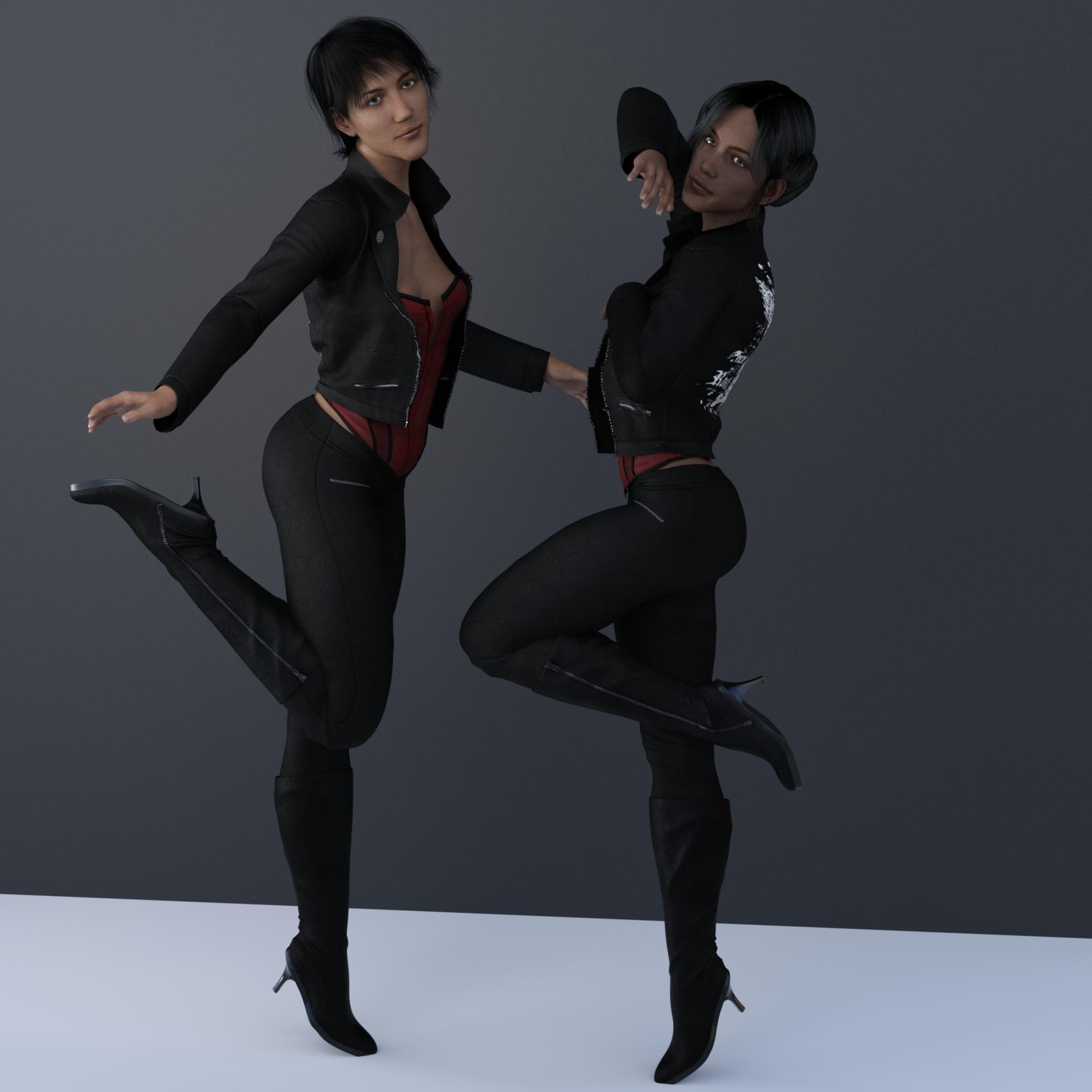
Nice! they look like real interesting women, I like what you did with their faces!
Gen X2 questionLike Knittingmommy said, you can transfer any morphs from Generation 3 through to Genesis 2, as long as you have the relevant plug-ins. The only exceptions are the HD morphs, they can not be transferred.
Dark Elves and Midnight Huntress [Commercial]Minimally you need this...
http://www.daz3d.com/victoria-6
And there doesn't seem to be anything that would prevent applying the Iray shader. The character is using images for the skin texture, so they will transfer over. You may need to manually tweak the settings.
Thanks for your reply, @mjc1016. I wish Victoria 6 was listed as a required product at the top of the product page. It only says that the compatible figure is Genesis 2 female, which I do have. Since I would only be buying Victoria 6 to use for this one product Dark Elves for G2F, I may need to rethink my purchase. I already have V7. Bummer! I really like it too.
Dark Elves and Midnight Huntress [Commercial]Minimally you need this...
http://www.daz3d.com/victoria-6
And there doesn't seem to be anything that would prevent applying the Iray shader. The character is using images for the skin texture, so they will transfer over. You may need to manually tweak the settings.
Meet the MusesThese 2 have become my 2 favorites to use in renders, they're both G3F with morph dials.
What I Like the most about using these 2, they work great with the Youth morph dials, so I can dial them down to Young teens and back up to Young adults (as seen here)
Gen X2 questionDepending on which Add-ons you have, you should be able to transfer any Genesis Generation 3, M4/V4, Genesis and Genesis 2 morphs to the Genesis 3 figure including any creature morphs. You can even transfer morphs from male to female and female to male if you wish.
N.G.S. Anagenessis II - Revolution [Commercial]I've been testing N.G.S. on a bunch of G2F FW skins, and I'm getting (some) lacrimals that are grey to greenish. I change the Glossy Color, but I can't get rid of the grey/green in the larger part of the lacrimal. Help?
I found this with Olympia 7, but once I switched her surfaces back to the correct UV (Olympia 7) then the lacrimal looked correct, so perhaps worth checking the correct UV for the character maps is selected.
Bless you, my dear Redz, that may be the issue. But where do I find the character map? (in > > > flow) I clicked on the Surfaces tab, and looked through Map Transfer and Load UV Set, but I can't find anything.
The cause of the green/grey tint on the lacrimals was the Top Coat Color. However, after changing it to a more pinkish hue, the lacrimals took on a metallic tone, although not any more glittery than the skin.
Gen X2 questionI understand that the GenX2 product will allow me to take Genesis morphs and add them into the Genesis 3 frame. Is that just for standard Genesis figure and people character morphs? What about the Creature/alien morphs, will the GenX2 allow me to move those over to Genesis 3? Like DarioFish's sculpted aliens, will they transfer ok to the Genesis 3 figure using the GenX2 program? Or will the mesh fall apart? :) I want to have the flexibility to add a little of this and that in a figure, which was nice with these morphs but Genesis 3 is lacking in that category imo. I thought by now we'd have a creature morph package out for the G3 crew.
Is it over for G1,G2F,G2M content?Sadly I use G2 as much as possible, genesis 1 rarely and v4/m4 if I have to. I'm pretty much refusing to go to G3 yet as I'm really only about halfway through my G2 use. There are more and more products to get v4/m4/g1 and g2 to g3, but I would really love to see stuff to go from g3 down to g2. I know I can lose special morphs on clothes and use the rigging transfer to get them to g2, but then there's poses, skins and morphs (which could probably work with genx but I don't have that yet)
Program to convert Genesis poses to G2M and G3MThanks. I have the V4->Genesis/G2F and the G2F->G3F, so I can try. But there is nothing for the males (grrrrr), and the poses I want to convert are for Genesis Male. Guess they'll have wonky arms and hands that will have to be fixed. Appreciate the information!
Remember, Genesis is a unisex figure so its poses should transfer equally well (or poorly, depending on your perspective) to both G2M and G2F. Many Genesis poses I've tried can be used directly on G2F and G2M with almost no manual reposing on my end. Regarding transfering to G3M, on the other hand you might want to try this freebie script:
http://www.sharecg.com/v/76667/gallery/8/Script/Updated-Daz-Studio-Posing-Scripts-now-for-G3F
Yes it says "G3F" but I find that in general poses made for G3F can be used on G3M (and vice versa). Hands are going to give you grief as hand poses don't transfer well to G3 at all. You'll have to manually repose the hands, more often than not.
I hope that helps!
Is it over for G1,G2F,G2M content?I enjoy G1 and G2 primarily. The nice thing about V4/M4 stuff is that I can usually use the skins, and most of the time transfer interesting morphs over.
Daz store does look to be moving mostly to Genesis 3. This is somewhat disappointing for me, but on the other hand I have a VERY robust figure collection already and I have hundreds of non-figures I'm interested in getting at some point.
Would it be easier to call the next Generation 8 - Genesis 8?As a newcomer to 3D art and the different generations of figures, I'm still quite confused. I really wish that people WOULDN'T talk about "generations" - as, to me, THAT is confusing. I get V3, V4, V5, V6, V7 - I understand that, it's clear, concise, to the point and understandable. When people start throwing in "generation 3" and "generation 4" into the conversation it suddenly gets very unclear. Which figures are they talking about when they say generation 4? Are they talking about the V4 generation? The V5 generation? I just don't know, and you pretty much need a chart to understand it all.
Collectively, as a community, I think there needs to be a clear way to talk about figures, current and past, without using confusing terms that those of us who haven't been around for ages don't understand.
Can we say "the V4 generation"? Or "the M4 generation" if you like that better? To me that's much clearer than "generation 3" or "generation 4" when people who haven't been around for years and years don't know what that means. When someone says "generation 3" I don't know if people mean the V3 line of figures or do they mean Genesis 3 figures? Or do they mean something else entirely? I just don't know, and I doubt I'm the only newer person to 3D art that is confused by that terminology.
Since all the generation 4 figures (V4, M4, K4, A4 etc) are based on a single mesh and share a lot of underlying technology, people often want a way to refer to all those figures collectively, which is why the term generation 4 is used and is relevant. As stated above the core of the confusion is that Generation and Genesis both have the same short form. When you say V4, you are talking about a specific morph of one generation, not generally about the whole generation, so saying V4 alone can also be confusing to people.
What made you think I want people to say "V4 alone"? If you'd taken the time to read what I wrote, I clearly said: "the V4 generation" or "the M4 generation".
Or you would even be more clear by saying "the V4/M4 generation". Or "the V6/M6 generation".
I would prefer people said Generation 4 over the V4 generation or the V4/M4 generation, what we really need to avoid using is the short form gen, unless it is clear from the rest of what someone has said which set of figuers they are refering to.
Edit: I should add that I agree with the OP that the next set of figures should be called Genesis 8, otherwise the confusion will never end.
Would it be easier to call the next Generation 8 - Genesis 8?As a newcomer to 3D art and the different generations of figures, I'm still quite confused. I really wish that people WOULDN'T talk about "generations" - as, to me, THAT is confusing. I get V3, V4, V5, V6, V7 - I understand that, it's clear, concise, to the point and understandable. When people start throwing in "generation 3" and "generation 4" into the conversation it suddenly gets very unclear. Which figures are they talking about when they say generation 4? Are they talking about the V4 generation? The V5 generation? I just don't know, and you pretty much need a chart to understand it all.
Collectively, as a community, I think there needs to be a clear way to talk about figures, current and past, without using confusing terms that those of us who haven't been around for ages don't understand.
Can we say "the V4 generation"? Or "the M4 generation" if you like that better? To me that's much clearer than "generation 3" or "generation 4" when people who haven't been around for years and years don't know what that means. When someone says "generation 3" I don't know if people mean the V3 line of figures or do they mean Genesis 3 figures? Or do they mean something else entirely? I just don't know, and I doubt I'm the only newer person to 3D art that is confused by that terminology.
Since all the generation 4 figures (V4, M4, K4, A4 etc) are based on a single mesh and share a lot of underlying technology, people often want a way to refer to all those figures collectively, which is why the term generation 4 is used and is relevant. As stated above the core of the confusion is that Generation and Genesis both have the same short form. When you say V4, you are talking about a specific morph of one generation, not generally about the whole generation, so saying V4 alone can also be confusing to people.
What made you think I want people to say "V4 alone"? If you'd taken the time to read what I wrote, I clearly said: "the V4 generation" or "the M4 generation".
Or you would even be more clear by saying "the V4/M4 generation". Or "the V6/M6 generation".
Would it be easier to call the next Generation 8 - Genesis 8?As a newcomer to 3D art and the different generations of figures, I'm still quite confused. I really wish that people WOULDN'T talk about "generations" - as, to me, THAT is confusing. I get V3, V4, V5, V6, V7 - I understand that, it's clear, concise, to the point and understandable. When people start throwing in "generation 3" and "generation 4" into the conversation it suddenly gets very unclear. Which figures are they talking about when they say generation 4? Are they talking about the V4 generation? The V5 generation? I just don't know, and you pretty much need a chart to understand it all.
Collectively, as a community, I think there needs to be a clear way to talk about figures, current and past, without using confusing terms that those of us who haven't been around for ages don't understand.
Can we say "the V4 generation"? Or "the M4 generation" if you like that better? To me that's much clearer than "generation 3" or "generation 4" when people who haven't been around for years and years don't know what that means. When someone says "generation 3" I don't know if people mean the V3 line of figures or do they mean Genesis 3 figures? Or do they mean something else entirely? I just don't know, and I doubt I'm the only newer person to 3D art that is confused by that terminology.
Since all the generation 4 figures (V4, M4, K4, A4 etc) are based on a single mesh and share a lot of underlying technology, people often want a way to refer to all those figures collectively, which is why the term generation 4 is used and is relevant. As stated above the core of the confusion is that Generation and Genesis both have the same short form. When you say V4, you are talking about a specific morph of one generation, not generally about the whole generation, so saying V4 alone can also be confusing to people.
What Character Is This?This looks like the artist's own character. Some artists create their own characters they use solely for their own promo images and Neftis is one of 'em.
The morph that is. That tattoo should make the texture recognizable (it's Dimitri, by Darwin's Mishap).
Thank you both!
Knowing the texture is very helpful. . . as well as knowing that some artists use creations not available. I'm fairly competent at "sculpting" a new look for the models, but some skins don't render with really clear, life-like detail like this.
Have a great day!
Morphing trouble on ZbrushEdit: I dont use GoZ .. doesnt seem to work. Instead I use the morph loader pro.
And also, The morph works well when the suit is not fited to the figure.
Morphing trouble on ZbrushHey! I just gor Zbrush which is awesome. I did a morph of a body suit for one of my character that had sticky clothe on breast (u kno what I mean). I'm very happy with the morph result. I import it in Daz, pull on the slider and it doesn't do at all what I sculpted.. Is it possible to morph something which is not zero shaped?? :/
thx a lot
Daz 3D is part of

Connect
DAZ Productions, Inc.
7533 S Center View Ct #4664
West Jordan, UT 84084Licensing Agreement | Terms of Service | Privacy Policy | EULA
© 2026 Daz Productions Inc. All Rights Reserved.