-
Morph export rules - Just Mouth
Hi Everyone
I'm exporting a character for use in Unity3d.
When using "edit morph export rules", I know I can enter 'head' under 'match' to export all of the head morphs, but the amount of morphs exported are just too much (and having that many morphs seems to mess with the character in game).
What would I enter into "edit morph export rules" to just export the mouth morphs? So the base, the visemes, and the emotions from Morphs++ (happy, sad, etc).
This is with M4 and V4 figures.
Thanks.
EDIT : or alternatively, where can I view a complete list of the morph files? I'm guessing head works because it then exports every morphs with 'head' in it's name, so if I could see a complete list of the file names, I could probably work it out myself.
Transferring Weight MapsAn automated process will never be perfect - is my usual answer to such things.
Someone more in the know can probably explain this better than me - but the main idea is that Transfer Utility in a lot of cases is "guessing" where to put its stuff. It will never be 100% perfect, especially if the mesh of the Source figure does not match the mesh of the Receiver EXACTLY. (meaning that even the position of each point is precisely that of the source figure).
Transfer Utility is there to do "most of the work" but you will always have to fix stuff.
Transferring Weight MapsI have one figure (Figure 1) dialed into the shape of a completely different figure (Figure 2). If I use the transfer utility to transfer the weight maps (with merge heirarchies on), shouldn't the transferred weight map be accurate, give or take a few minor inaccuracies? Most of the weight maps transferred over correctly, but some vertices were completely missed or just plain wrong -- around the mouth, for instance. I was under the impression that weight maps were transferred by projection and would interpolate itself to nearby vertices...
I got around this issue by manually fixing the errors post-transfer, but I'm trying to figure out why the transfer didn't work as expected.
edit: I've tried using adaptive tolerance and near vertices, but they crash DAZ Studio...
Unusual or rare facial expression MORPHS?CakeOne has a number of custom expressions, including the "More" series like http://www.daz3d.com/more-expressions-for-genesis-2-female-s ; and a number of biting morphs that are included with the Fangtastic series. Zev0's Tongue Control includes several unique mouth shapes, The Wicked has some free ones on ShareCG, as does SicklYield, whose converted DieTrying's 182 V4 morphs to Genesis contains a number of unique morphs.
And, just as an FYI, if you have Generation X or X2, you can transfer any existing V4/M4-G2 expression to a Genesis 1-3 figure as a dial, which is a great way of getting a lot of unique expressions.
Thanks for the suggestions. I'll take a look at them. I have most of the Generation X products (they're great) - do you mean transfer packaged expression morphs, or do you mean dial an expression myself on a Generation 4 figure, then transfer that?
Purchase suggestions?The Genesis 1 and 2 figures work in Carrara, but not Genesis 3. Most content works in Carrara, but there are some exceptions. For example, most G1 and G2 morphs work in Carrara, but not the HD morph packs. Geografts (special category of body replacement parts) do not work in Carrara. Most shaders need to be adjusted, but they have the information to work. For example, reflection maps may come in too strong or bump maps might not load. You may have to do a one-time adjustment to shaders the first time youload, and then save the result to your shader browser for one-click correction in the future.
Unusual or rare facial expression MORPHS?CakeOne has a number of custom expressions, including the "More" series like http://www.daz3d.com/more-expressions-for-genesis-2-female-s ; and a number of biting morphs that are included with the Fangtastic series. Zev0's Tongue Control includes several unique mouth shapes, The Wicked has some free ones on ShareCG, as does SicklYield, whose converted DieTrying's 182 V4 morphs to Genesis contains a number of unique morphs.
And, just as an FYI, if you have Generation X or X2, you can transfer any existing V4/M4-G2 expression to a Genesis 1-3 figure as a dial, which is a great way of getting a lot of unique expressions.
SOLVED - What Am I Doing Wrong With These Emotion Morphs?I've sometimes found with the older figures you have to actually drill down into the figure to select the body part itself that you want to morph for the controls to show up, instead of just the root figure (ie - Genesis/Abdomen/Neck/Head).
JACKPOT! Thank you Stryder87! That was the solution.
From your first screenshot it looks though as if you did have the Head selected then, as the Head folder shows there (it only does that if the Head is selected). I suspect there is a bug in DS where things sometimes suddenly disappear temporarily as I and several others have experienced similar things.
G3 MorphsCan someone point me in the direction of the morph package for G3? I can't seem to find it, and I want to be able to change her body shap from basic mannequin. You'd think they'd make it easier to find this thing.
SOLVED - What Am I Doing Wrong With These Emotion Morphs?I've sometimes found with the older figures you have to actually drill down into the figure to select the body part itself that you want to morph for the controls to show up, instead of just the root figure (ie - Genesis/Abdomen/Neck/Head).
JACKPOT! Thank you Stryder87! That was the solution.
SOLVED - What Am I Doing Wrong With These Emotion Morphs?I've sometimes found with the older figures you have to actually drill down into the figure to select the body part itself that you want to morph for the controls to show up, instead of just the root figure (ie - Genesis/Abdomen/Neck/Head).
Questions about upgrading to a new computerThey will have Auto generated asset files in the Data folder, if you hadn't explicitly saved them as morph assets. Did you bring over the \Data folders from all of your old content directories?
Need help with a productI recently got the product Foxy and Wolfie for Genesis, but the Cat Face morph it has is not affecting my Genesis at all. Also, my install manager is saying that ll my content needs to be redownloaded and reinstalled, even though I can clearly access it in Daz. Help?
ZBrush Core - Any DAZ plans for a compatible GoZ for all products?GoZ is a conveninece, the stuff it does can be done with OBJ export and OBJ import or Morph Loader Pro.
Building Alan RickmanMorph for Apollo Maximus http://trekkiegrrrl.dk/char2.htm
My Lease Is Nearly Up On The Complaint ThreadGood morning, are we all still here or have we been split?
Today is Tuesday, one of my regular micro-adventure days. I only allow myself two per week during the summer. I let myself drive the car. On these much anticipated days I take the garbage to the transfer station. Yea! Go to the drugstore. Yea! Eat in a real person restaurant. Yea, Yea! and come home. The excitement is often too much for me and I have to take a nap and soak my feet.
 Genesis 3
Can you do the following, select the character in the scene tab, go to the shaping tab, and check under People if the character slider is there? If the character slider is there, then can you try sliding it and see if it does anything?
(Also, which character are you using, exactly? Some need other characters to look like in the promo image, like http://www.daz3d.com/fwsa-alysa-hd-for-victoria-7-and-lf-little-mystery she needs V7). Additional morph packages are only needed if they are stated in the "Required" section in the shop here; it can differ in other shops. Still, a morph should still work (even if it won't look exactly like the one in the promo), without the base character.
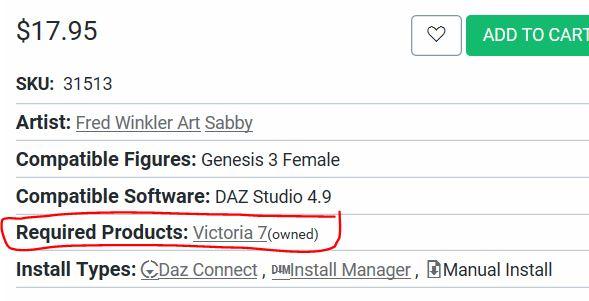
As for the extra morphs, they are recommended, as they allow you a much wider range for non-puchased character creations. But they are optional, really.
- http://www.daz3d.com/genesis-3-male-body-morphs
- http://www.daz3d.com/genesis-3-female-body-morphs
- http://www.daz3d.com/genesis-3-female-head-morphs
- http://www.daz3d.com/genesis-3-male-head-morphs-22924
- (also recommended) http://www.daz3d.com/200-plus-head-face-morphs-for-genesis-3-female-s
EDIT: I found her over at Rendo. According to the product Readme, she needs "Miss You for Genesis 3 Female(s)". It also has a file list, that says where all the files are supposed to be. Can you please check out if all the files are existing, and in the correct place? Here's the URL to the readme:
Mods: I hope it's okay to post to the Rendo Readme. If not, please delete the link.
Post Your Renders - Happy New Year yallThanks! He looks a lot like the M4 version, like I say, less heroic beef ~ and now he has my goatee too, which I like. ;)
The major difference comes when:
Downside - I try to find clothes to fit
Upside - I proceed to emote his face
I thnk that the upside outweighs the downside for me. I'll find more, but I already have the V4 Bodysuit, Raiver, and Miss Deanna Jones, which all support the Male shape (sounds funny the more often I type that) - LOL it's like the reverse of Genesis!
Before finding that those supported the shape morph, I was trying to conform M4 clothing and I think that will even work pretty well. Not sure... It's not like Dart changes his attire much anyways.
Animators Club for Carrara wip thread . First animation, Week 1 . The Final Gesture.I will work on the grass over the grave. I will have morph targets so the grass opens up and then can close again. If someone wants to do a couple of headstones then we are basically ready to animate.
Unusual or rare facial expression MORPHS?I found the new "Xtreme Expressions HD for Genesis 3 Female(s)" interesting, as it includes custom HD expression morphs split into upper and lower face morphs, I don't remember seeing a similar set yet, so I purchased today but did not yet try. The morph package alone has a download size of 134MB, maybe worth to have a look if you use G3F ;)
http://www.daz3d.com/xtreme-expressions-hd-for-genesis-3-female
Cats?Peope have been begging for updated cat and dog models for the last few years. There are fairly well-supported rumors of AM doing a new cat and s new dog with LAMH fur. And Hivewire is definitely in the process of doing their version of a new cat and dog. With WiP shots on display in threads in their forums.
No ETA on either, although the Hivewire house cat is probably going to get its inital release before the end of the year. (With additional morphs -- like a kitten morph -- and textures to be released later.)
Daz 3D is part of

Connect
DAZ Productions, Inc.
7533 S Center View Ct #4664
West Jordan, UT 84084Licensing Agreement | Terms of Service | Privacy Policy | EULA
© 2026 Daz Productions Inc. All Rights Reserved.