-
Cake One's Fantasy Features for Genesis 3
I have these & for me the Aiko 7 Morph has the same thing as yours but G3F seems to work
Low definition/smoothingFirst, I have to check that you are using the content in accrdance with the terms of the license - if the trophy is to be given to someone else, or used as part of a commercial enterprise, then you need to open a Sales Support ticket to sort out the licensing terms http://www.daz3d.com/help/help-contact-us
DS does have the Decimator plug-in, but that is not free and I'm not sure how well it would work towards a 3D printable output (in order to ptint you need to use the additional water-proofing GeoGrafts, and those are critically dependent on the vertices around the graft site matching). Alternatively there are a few store products that smooth the face out - RawArt has at least one of them. If neither of those options are suitable you can make your own morph, but that involved using an external modelling application.
Cake One's Fantasy Features for Genesis 3I bought the bundle so I have both male and female and I'm having a problem with both. The Brows 2, which create the side pointy brows shown in the main promo for Genesis 3 Female set are breaking the mesh. I tried increasing the SubD level to 3 but it didn't do any good and it didn't render out. I thought maybe Aiko 7 was too extreme so I turned off the head morph but it did the same thing with default G3F. I finally found the only head that works correctly is Victoria 7. But the product says it's a merchant resource for Genesis 3 Female(s), not just V7. Is there a problem with the product? Am I doing something wrong?
Combining displacement and a morph from ZBrush to DSOk,
A small test on the Genesis 2 butt.
First images shows:
Left image,model at base resolution in zBrush.
Mid image, model subdivided 4 times with Smt turned of..
Right image, model at sDiv level 5 with displacement done.Second image shows the generated displacement map.
It looks strange to me, why are all polygon edges white.
To me that indicates some kind of movement.
Or?Image 3 shows what happens if I apply that map to the hip in DAZ.
Was the issue of the mesh lines appearing as displacement solved?
I have the same issue. I'm making a skinny ribs morph and the corresponding displacement map exported by Zbrush has the lines of the mesh as displacement (see attached image).
So, when the displacement map is applied, the ribs apear but the mesh lines are also displaced. I assume there is a way to stop Zbrush from exporting mesh lines as displacement.
RDNA Product Transfer? Too Late?Ok, so somehow I missed the RDNA account product transfers. Actually I kind of thought I just lost them with the move. However I just found out they should have transferred. My email was different at RDNA than it is here at DAZ. My question is, is it too late to have them moved and if not how do I go about doing this?
Art Nouveau Bathroom ~commercial~Gorgeous looking set.
It isn't going to stop me from buying if the answer is no, but is there a close morph for the curtain around the tub?
No sorry, but you can totally remove the shower features so you just have an open bathtub.
Thanks, as I said it isn't a make-or-break thing - and in principle (in principle
 ) I should be able to add my own morph(s) if needed.Art Nouveau Bathroom ~commercial~
Gorgeous looking set.
It isn't going to stop me from buying if the answer is no, but is there a close morph for the curtain around the tub?
No sorry, but you can totally remove the shower features so you just have an open bathtub.
Art Nouveau Bathroom ~commercial~Gorgeous looking set.
It isn't going to stop me from buying if the answer is no, but is there a close morph for the curtain around the tub?
Eyebrows!...one issue I had using the Brow Remover and then Real Brows for G3F was after saving the file and opening it in Daz later I got one of those "cannot find" errors (like what happens when a path to a texture or morph is messed up) that opened up a totally unrelated folder when I clicked on the "search" button. I cancelled which required re-applying the original face map. The Real Brows I created were still parented to the character but obscured by the painted on brow from the original face map so it made me wonder what I may have done wrong when removing the original brows (I followed all the steps in both tutorials).
Hello, I am not sure what is the problem at present... Does this problem also occur when you use Brow Remover or Real Brows alone?
...I just ran a test using only the Brow Remover and that seems to be thge culprit as I get the following error when loading the character again:
Could Not Find File C:/Users/<Username>/App Data/Roaming/Daz 3D/Studio4/Temp/d36.jpg
I have a dual drive setup with all my content on a separate larger drive (D:) as I don't use the "My Documents" folder in Windows for anything. Looks like this is a hard coded path so I'm not sure what to do.
In the DIM is shows the package installation path as being the Scripts folder in Content: Does this not go into the Daz 3D/Studio4/Library Folder?
Hi,
'C:/Users/<Username>/App Data/Roaming/Daz 3D/Studio4/Temp/' is the default temporary folder of DAZ Studio. I think you can open the Preferences window and try to use another folder as the temporary folder. Or you can try to run DAZ Studio as administrator. I am not sure if they can reslove your problem, because this problem should not happen in normal condition.
Every time after you use LIE to generate or edit a Layered Image, LIE will covert this Layered Image to a real image and save it to the temporary folder, for example, 'C:/Users/<Username>/App Data/Roaming/Daz 3D/Studio4/Temp/d36.jpg'. So in fact you use d3d.jpg for rendering. This file is temporary, If you close DAZ Studio, all the files in the temporary folder will be automatically deleted. But next time when you open the scene, LIE will covert the Layered Image again and create a new temporary file.
Cute and girly anime dollsThe middle picture is Kiki. Probably with the Capsces morphs (I don't recall the name of the set)
http://www.daz3d.com/kiki_1615
In general, look at any of the Lady Little Fox characters and the corresponding Capsces morphs and you can get pretty close to that look. All of these characters are older and were probably designed for poser, so they may take some tweaking.
***
Actually, Now that I look for it, the Capsces morph was called "Posey" but it looks like it didn't make it over from RDNA. Fortunately, it looks like the nose in the left pictures is actually Kiki's so you may not need the morphs.
Eyebrows!...one issue I had using the Brow Remover and then Real Brows for G3F was after saving the file and opening it in Daz later I got one of those "cannot find" errors (like what happens when a path to a texture or morph is messed up) that opened up a totally unrelated folder when I clicked on the "search" button. I cancelled which required re-applying the original face map. The Real Brows I created were still parented to the character but obscured by the painted on brow from the original face map so it made me wonder what I may have done wrong when removing the original brows (I followed all the steps in both tutorials).
Hello, I am not sure what is the problem at present... Does this problem also occur when you use Brow Remover or Real Brows alone?
...I just ran a test using only the Brow Remover and that seems to be thge culprit as I get the following error when loading the character again:
Could Not Find File C:/Users/<Username>/App Data/Roaming/Daz 3D/Studio4/Temp/d36.jpg
I have a dual drive setup with all my content on a separate larger drive (D:) as I don't use the "My Documents" folder in Windows for anything. Looks like this is a hard coded path so I'm not sure what to do.
In the DIM is shows the package installation path as being the Scripts folder in Content: Does this not go into the Daz 3D/Studio4/Library Folder?
Where are you seeing this in DIM?
Eyebrows!...one issue I had using the Brow Remover and then Real Brows for G3F was after saving the file and opening it in Daz later I got one of those "cannot find" errors (like what happens when a path to a texture or morph is messed up) that opened up a totally unrelated folder when I clicked on the "search" button. I cancelled which required re-applying the original face map. The Real Brows I created were still parented to the character but obscured by the painted on brow from the original face map so it made me wonder what I may have done wrong when removing the original brows (I followed all the steps in both tutorials).
Hello, I am not sure what is the problem at present... Does this problem also occur when you use Brow Remover or Real Brows alone?
...I just ran a test using only the Brow Remover and that seems to be thge culprit as I get the following error when loading the character again:
Could Not Find File C:/Users/<Username>/App Data/Roaming/Daz 3D/Studio4/Temp/d36.jpg
I have a dual drive setup with all my content on a separate larger drive (D:) as I don't use the "My Documents" folder in Windows for anything. Looks like this is a hard coded path so I'm not sure what to do.
In the DIM is shows the package installation path as being the Scripts folder in Content: Does this not go into the Daz 3D/Studio4/Library Folder?
Pseudo-G2F to G3F conversion (deprecated)... and I've already spotted something I should add into the tutorial. It'll make it to the next revision.
edit: To-Do list:
- Detail differences between loading morphed figure prior to fit and/or using None/None
- Geometry Editor hide/show doesn't stick upon restart
- OBJ and Figure differences?
- No more jaggies, nor is the morph/smoothing needed in some test runs... why?
How do I Unmagetized part of a comforming figure?I'm trying to use a Genesis Hair on Genesis 3 but part of the hair is stretched out around the neck area. I thought if I created a bone and assigned general weights to it I could make that part of the hair independant and restore its original shape but that hair is still stuck and strectched to stick to neck. My question is how do I make that part of the hair go back to its original non-comformed obj shape.
I vaguely remember new feature in 4.8 or 4.9 that did partial morph reset. If anyone can find that, it might help.
Novica & Forum Members Tips & Product Reviews Pt 7Thanks. That's V4 with one of Maddelirium's skins and a couple of things from various stores rendered in Poser. The roses are the Sugar Roses here at DAZ. Can't remember what morph I used, though it's probably one by Surreality. :)
can someone help me with this daunting error occured?Khung, you need to load a genesis 3 female first. Only after that, you can apply an age morph, or ny other morph.
The error you got in the first post always happen when you try to apply something, without having the proper item selected.
EDIT: Have you installed the Genesis 3 Starter Essentials, which give the G3F base figure?
Also, you installed your content using Connect, which it why it is very difficult for you to find anything in the Content directory..
It might be easier for you to find your content if you use smart content.
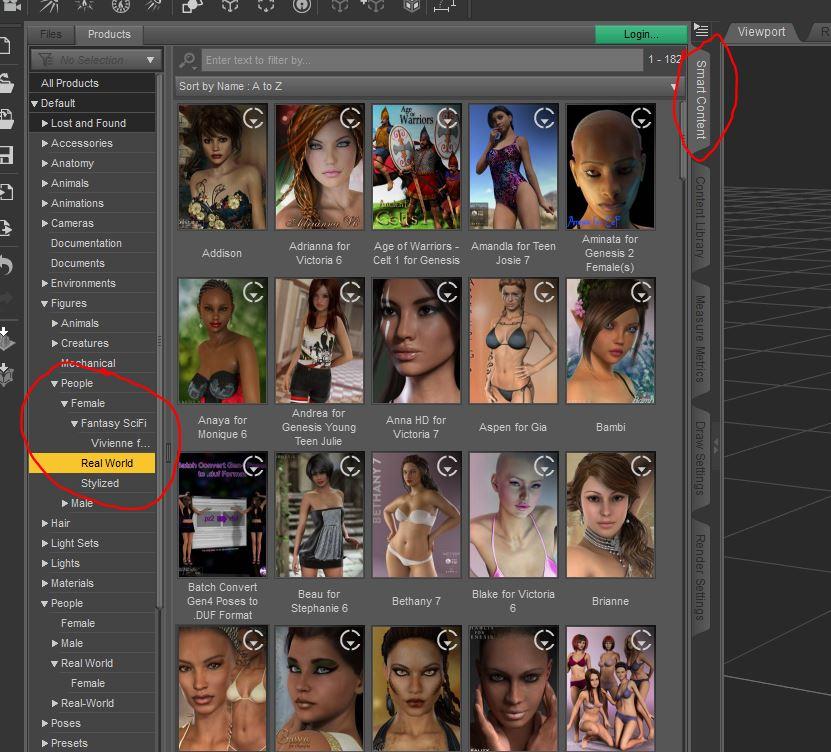
I still have described the process going from a non-Connect installation of the files.
In my example, I want to use the shape of Amanda.
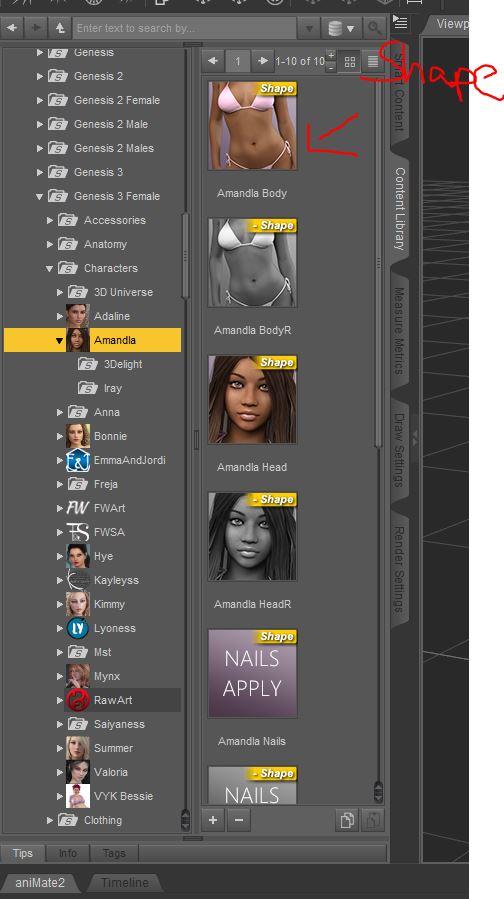
Because she is just a shape morph, and not an "actor", I first have to load G3F into the scene. I find G3F on the "top level" of my Genesis 3 Female content.
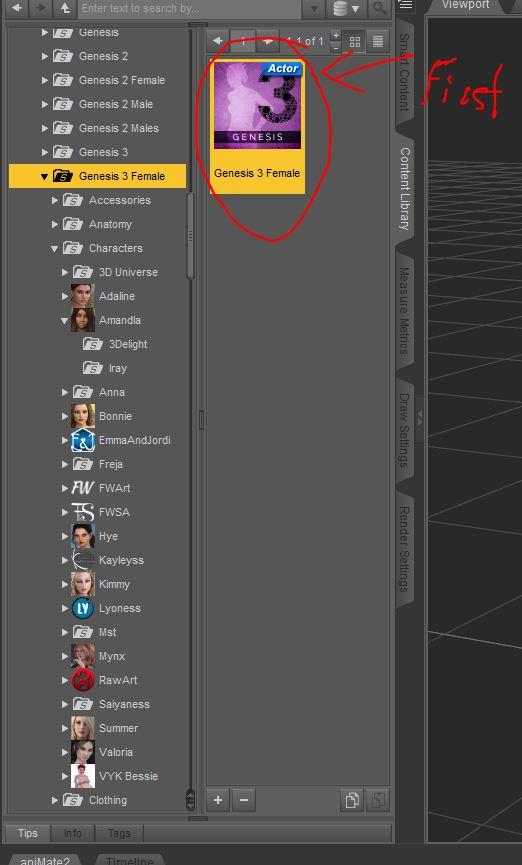
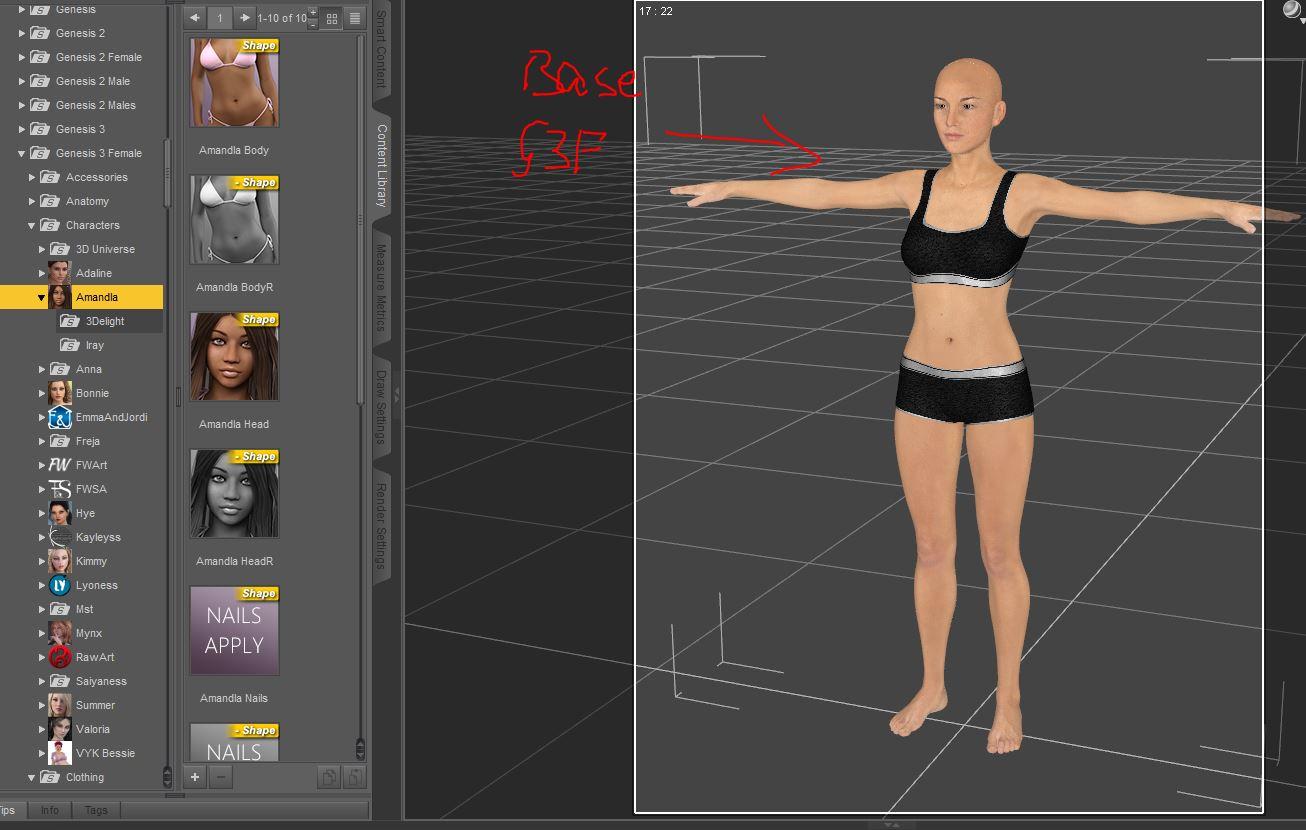
Here you can see G3F loaded before I apply the shapes. I put on some clothes for modesty.
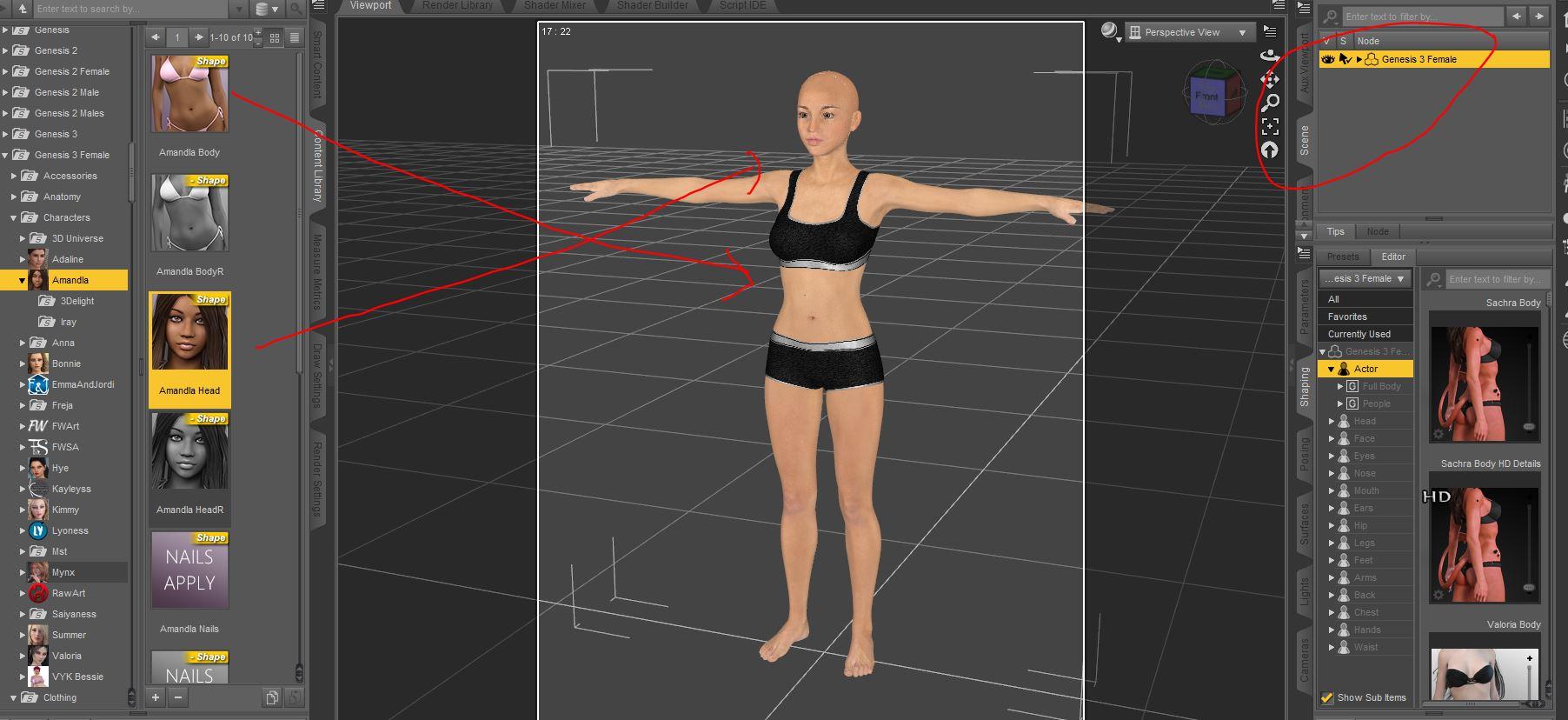
In the scene tab, Inow select G3F. Then,I apply the shape morphs. You can see the shape of the head and body changed:
 back from zbrush as one mesh
Although the mesh in ZBrush is unrigged it should come back across as a morph, as long as the vertex count still matches the base. Please post screenshots of the dialogue boxes you are getting. Also, it may help to check the path for Daz Studio in Preferences>Plug-ins>GoZ in ZBrush.
back from zbrush as one meshSo how I am suposed to get it back with polmesh? The best video I have found dont speak about going back to daz but he has polimesh in zBrush.
I'm trying to do my own character in daz so I need a full body morph I guess.
Young Teeth morphsTeeth morphs are a real pain in the posterior...you need to make so many of them. And load/save out each one individually. Something as simple as a shrink morph needs to be done 32 times. If you don't do them individually you start getting odd additive effects when mixing several of them at once. Then after they are all done you can link groups of them.
Real Jammin Treadz -commercial-One of my favourite Genesis products! And thank you so much for continuing with the ability to morph in/out a high heel, as we choose! That's a feature something I would have thought would be standard for boots, by now.
Yeah, that's the3dwizard's credit.... he reimagined the boots and even added additional material zones to the boots. This is why I've had to rework my previous sets, as the base products have been all improved and reworked.
Daz 3D is part of

Connect
DAZ Productions, Inc.
7533 S Center View Ct #4664
West Jordan, UT 84084Licensing Agreement | Terms of Service | Privacy Policy | EULA
© 2026 Daz Productions Inc. All Rights Reserved.