-
Too smooth lips
For lips, she haves and loads with Mouth Realism HD morph at 100%. In parameters tab, you need to set Render SubD Level (Minimum) at least to 3 to see its effect in IRay.
HD morph plug inUnfortunately, RobotHeadArt is probably right. Let's get this clear though, the HD technology for DAZ figures belongs to DAZ3d and they can do with it whatever they want. However, I personally think their business decision on this matter is a wrong one. By limiting access to HD to PAs only, DAZ3d does ensure they get a slice of the pie for every HD item sold. However, they also antagonise many of their clients (such as kitakoredaz) who want to use the HD technology for their own non-commercial projects.
There are many people who would be happy to pay for plugins which gave the user access to high end features such as the abilty to make HD morphs for one and the use of morph brushes within DS for another. Surely the revenue brought in by such plugins licenced for non-commercial use only would out-weigh any lost revenue by those few individuals who might try to break the licence agreements. Plus there is always the opportunity to sue such individuals.
It seems to me that the current DAZ3d attitude to its HD technology is in opposition to it's attitude towards it's 3d figures. You can buy a licence to use a figure, such as the Genesis 3 series and you can do what you want with it. You can make morphs, clothing, expression, poses etc, if you want to put the effort in. However DAZ3d knows that most of us, even if we make some stuff ourselves, will still buy such things from the DAZ3d Store, either because it's quicker or what is available is better than what the average user can make. As kitakoredaz pointed out most of us are hobbyists, we do not have a lot of time to spend, though we are willing to spend some of our free cash to have fun!
I don't know what can be done to persuade DAZ3d that they have adopted the wrong business model with respect to their HD technology, but it won't hurt to have lots of clients complaining about it!
Too smooth lipsI find that face and lips need highest values for bump maps of all (IRay G3F) surfaces. On the image face and lips have bump map value at 15, plus normal map value of 0.25 for the face and 0.5 for the lips. Arms have bump 7 with normal map at 0.6 and torso has bump 4 with normal map at 0.5.
Did you use HD morphs for that render?. Is there an HD morph for the basic G3?
How to? Custom Star Wars morphs for M4 and V4I could rig/Frankenstein another model, but I thought it'd be better and more funnerer :) to do an actual M4 morph, since things like the Gungan head are so much different from the standard human head. (ie: It's a challenge.) I can do some pretty basic textures, no problem. They wouldn't necessarily be something of saleable quality, IMO, but they'd be fine for expanding on in GIMP/PS or for medium/simple renders. I'll work on the Gungan a bit more on Sat/Sun and should have something to show by then. I have yet to decide on the eyes and whether or not to use the originals as that'll require a morph that adjusts the rigging, too, and I have to read up on that. Either way, it'll be fine and if I use new eyes, I'll try to UV them so they can accept default M4 eye textures in a pinch.
If it turns out easier than I thought, I could probably cobble together a simple Gungan outfit, too. A full body morph might not be out of range, either, but it's prob best to leave that for another time.
(Still keeping it on the down-low... Words like "probably" and "maybe" seem to placate the Freebie Gods and encourage them to ignore me... ;) )
Animation Club for Carrara , Week #2 - Spooky Hollow. Ready To watch..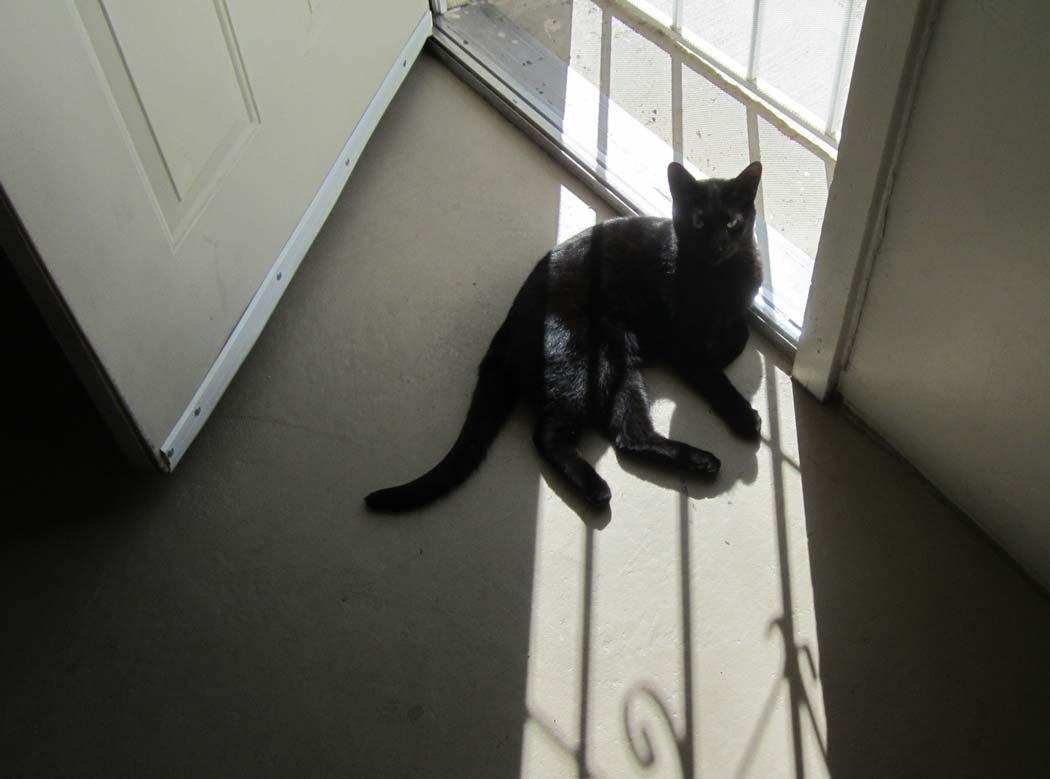 I'll go out on a limb here and volunteer to model the cat. We have a jet black stray who adopted us last year and he is a perfect Halloween cat. I can video him and get screen grabs for reference images. I am looking forward to it (after biting my nails for a few minutes.) Here's a very recent picture of him.
Awww!!! He's Awesome!!!
Looks just like our little "Shadow"! ;)
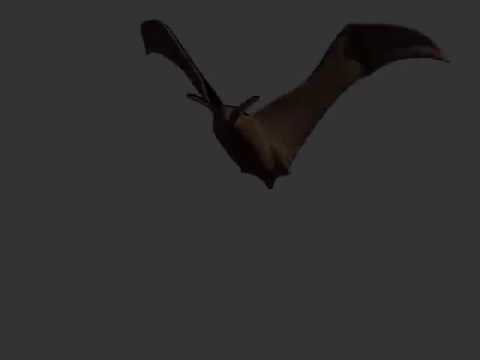
Here is a simple bat model with morph targets to make the wings flap.
Here is a quick animation of the flying bat.
Oh Rock On, Mike!!! Love it!!!
LY Flannery - Thanks LyonessI suppose the alien head morph is all one application. You can't dial in individual alien features. Or dial them out (lumpy forehead being the issue in question). Like the alien face otherwise, but the forehead puts me off a bit.
(Will probably get the character. It's a very broadly usable package.)
nope. the alien head is all one morph.
the girl is a full set and I love the skin on both of them. Think of it as a girl plus a few extras.
Animation Club for Carrara , Week #2 - Spooky Hollow. Ready To watch..Here is a simple bat model with morph targets to make the wings flap.
DesertDude-that is a perfect cat for this.
wgdjohn, sounds good , you could model this in your modeling thread that you have going here at daz.
chickenman, good idea for the broom.
Here is a quick animation of the flying bat.
Converting clothes that require morphs?You know, like when there's a corset for V4, and to make it fit, you have to inject the corset morph into V4. Just curious what strategies you use for this. My first guess is I'd use GenX to convert the corset morph to the target figure. But maybe someone has another method?
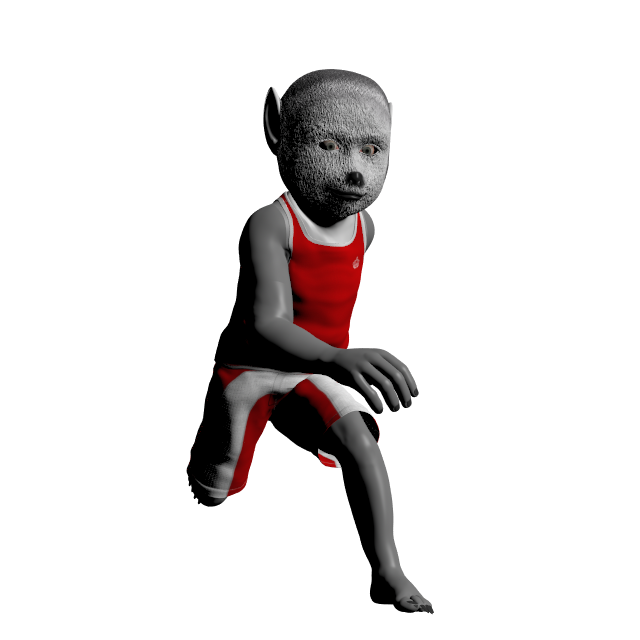
Toon style baby monsters kids book (completed)Not sure if you can use him...but I dusted off one of my old Genesis morphs I never completed and did a little more work on him. I still have the eyes and teeth to finish along with the texture (mostly done) and to package him...if you do want him, I can try and finish him up over the weekend.
He's really a morph for the Genesis Basic Child. One advantage is a very large wardrobe...
 LY Flannery - Thanks Lyoness
I suppose the alien head morph is all one application. You can't dial in individual alien features. Or dial them out (lumpy forehead being the issue in question). Like the alien face otherwise, but the forehead puts me off a bit.
(Will probably get the character. It's a very broadly usable package.)
Modeling with arms downYou can bake rotations on the figure to make the pose that matches the clothing the zero state, use the Transfer Utility from that, then apply the reverse pose to the newly rigged clothing and bake the rotations there. Bake Joint Rotations is in the Edit sub-menu of the Joint Editor tool's option menu.
That sounds like it might be a way to get around the dreaded stretchy gloopy shoulders on custom clothing that's transferred in T-pose. Thanks.
Tiny Petite G3Fs?...Steph 4 was one of my favourites as she loaded in at something like 5' 4" or so. Her physique was more reasonable as well. She filled a nice gap from the mid teens (as there was no Gen4 teen figure), to adult and the NPM breast morphs gave more range in being able to adjust breast sizes.
The Gen5 version of her seemed to lose the "petite" element as it had three shapes, the Base - which was small in stature but more stocky than the Gen4 version, Curvy - which was a bit taller and more voluptuous like a "pinup" girl, and Fashion Model - which was taller and more"leggy".
Steph 6 had a slightly a more lithe physique, especially with the Slender Steph morph add on. However, she also had competition from Gieslle 6 which while a fey based figure, worked pretty well for a slender more petite character with the proper morphing..
As to a Gen7 version, it's anybody's guess.
Total agreement-
S4, S5 Curvy/Base and S6 all have their uses to fill in my petite characters that don't look like children. I am just hoping for an S7 at some point. Hopefully soon.
HD morph plug inI doubt you will see the HD morph tool offered unless serious professionals begin pressuring DAZ to do so. Since DAZ makes it only available to to PAs under a specific agreement, the DAZ store becomes the only place on Earth to buy HD morphs and therefore DAZ can charge as they please for them. If they let people buy the tool the users could make HD freebies or sell them at other stores.
Also since users can't make the HD morphs it locks them into the upgrade cycle since you can't GenX transfer them, allowing DAZ to resell HD morphs for future generations of figures.
Battle Bundle - VikingsHey all... *waves*
After loooads of Confusion, all 10 products are in the Bundle, the only reason they are not listed is because the seperate packs by Anna,Dave and Loraly have not yet gone live in the store from the transfer over from DNA..
Our 5 packs are in it, plus
Deerstalker (27)
Hinterland (52)
Skuldelevery (14)
Sojourner (54)
Valborg (100)This huge bundle originally released at RuntimeDNA, which is why the original artworks are in place with the old dates, but at $4 only I'm sure you'll forgive Daz for not changing that :D
Sorry it caused confusion folks
Big Hugs
Tracey and Andrew
x
I'm niot sure if I am seeing all of the products in the bundle. Of the 5 procts listed on the product page I already had the 3 I was most interested in so I was on the fence about buying the bundle. But when MV said thje other 5 were also included I I ran to grab it while it was still on sale.
With a quick look at the icons in product I do see Valborg and IGD poses in the bundle I'm not sure about other ones such as Skulelvery and Hinterland. I don't see those specific names but they may just be poses with other names.
Hinterland can be found here: \Runtime\Libraries\Pose\AHB_Herne_Exp
Skulelevery is here: \Runtime\Libraries\Pose\Brahann\Skuldelevery
Nice render, Kerya I'm looking forward to trying the bits and pieces out with some new shaders. Great bundle (especially at that price)!
Modeling with arms downSorry, don't save the baked Genesis figure - just use it to transfer, then delete it. Reload a plain version of the figure for any further work. You also don't save the clothing figure until you have baked its rotations to match the standard figure.
Unwanted JCMsIf you export the moprh as an OBJ and then reimport it (with the same name, so you replace the existing deltas) you can set up a weight map to modulate the moprh (use a do-nothing DForm to create the weight map) and then apply that as you load the morph - it's the last or last but one option in Morph Loader Pro.
Modeling with arms downYou can bake rotations on the figure to make the pose that matches the clothing the zero state, use the Transfer Utility from that, then apply the reverse pose to the newly rigged clothing and bake the rotations there. Bake Joint Rotations is in the Edit sub-menu of the Joint Editor tool's option menu.
Modeling with arms downYes, that defintiely makes sense for Dynamic clothing, but I would like this to be confirming, so I need to be able to transfer the rig to the prop. I found the below in another thread, I am going to try it.
You could try to use Transfer Utility with Item Shape set to Current.
I know that I will run into the same problem sooner or later ;-) so it would be nice to hear if it works.
Edit: Sorry, forgot to mention that Figure should be posed in A-Pose, too. After using the Transfer Tool, pose Figure back to T and the sleeves should follow (theoretically)
Modeling with arms downIs it possible to transfer the rig of G2F/G3F to a model that was modeled with arms down (not t-pose)?
Reason I ask is that I am trying to model something that has like a rubber band around the body (with arms against sides), and it is better for that mesh to "stretch", versus pinch, as the arms move out from the body. I can't figure out a way to do model that with the T-Pose, that will look good then when I fold arms down to the sides.
I appreciate any ideas, methods or the settings to make that transfer possible (like with arms bent at about +/-70)! :)
Battle Bundle - VikingsHey all... *waves*
After loooads of Confusion, all 10 products are in the Bundle, the only reason they are not listed is because the seperate packs by Anna,Dave and Loraly have not yet gone live in the store from the transfer over from DNA..
Our 5 packs are in it, plus
Deerstalker (27)
Hinterland (52)
Skuldelevery (14)
Sojourner (54)
Valborg (100)This huge bundle originally released at RuntimeDNA, which is why the original artworks are in place with the old dates, but at $4 only I'm sure you'll forgive Daz for not changing that :D
Sorry it caused confusion folks
Big Hugs
Tracey and Andrew
x
I'm niot sure if I am seeing all of the products in the bundle. Of the 5 procts listed on the product page I already had the 3 I was most interested in so I was on the fence about buying the bundle. But when MV said thje other 5 were also included I I ran to grab it while it was still on sale.
With a quick look at the icons in product I do see Valborg and IGD poses in the bundle I'm not sure about other ones such as Skulelvery and Hinterland. I don't see those specific names but they may just be poses with other names.
Daz 3D is part of

Connect
DAZ Productions, Inc.
7533 S Center View Ct #4664
West Jordan, UT 84084Licensing Agreement | Terms of Service | Privacy Policy | EULA
© 2026 Daz Productions Inc. All Rights Reserved.