-
Modeling with Lady LittleFox
I got her Hair one way back when.
She uses modo, but its not "how to model in modo" its much more "the general principles of how to model for the Daz figures" what that means is there's no "click here on the screen for what you want" but "use x tool or its equivalent in your program of choice" so you do need basic familiarity with the program you're using. (I am completely unfamiliar with carrara and hexagon personally as I am a blender user, but as long as they can do loop cuts you should be fine)
The rigging is legacy v4 style, but again because its more about the methodology and principles some of the information is still applicable (less than the modeling though) The good news is that rigging for the geneses is by and large easier than v4, a good number of things you can get away with just using the templates in transfer utility with no to minimal tweaking and this is one time the Daz wiki is actually quite useful!
So, in conclusion, If you're looking for something completely step by step for someone who's never used a modeling program, you might get a bit lost. However even if you are a beginner, as long as you're willing to supplement it with outside information and experiment a bit, theres still a lot of very useful info (particularly in regards to modelling). And at $4 its certainly not a big risk.
Novica & Forum Members Tips & Product Reviews Pt 7Okay, I may have a genius idea- or maybe not. I asked a week or so ago (and ahem, no one answered...) When doing kids from adults, the fingernails are too long. I asked how to shorten them, if there were any morphs for the nails.
So wouldn't Lune Nails work? If there's different material zones, just apply the ones with two tones, and then in Surfaces, cutout opacity the tips and you have short nails!
OR
Just use negative values (do the cog, undo the limits if needed.)
Anyone have Lune Nails and Growing up that can test on Genesis 3 females?
The only morphs for Lune Nails make them longer / round / square. And there are no additional material zones. They're just morphs for the existing nails. The idea to use negative values with the Lune Morphs, however, does work. I got the best results making the Lune Square morph negative (because that's essentially the shape of the default nail), but your mileage may vary.
Runtime DNA Merges With Daz 3DLooks like most of the "Furries for..." add-on presets and texture additions have finally appeared in the store. Of course, the "face poses" won't be of much use until the base "Furries for Melody" and "Furries for Micah" are finally listed as they contain the actual morph dials.
At least we're getting closer.
Sincerely,
Bill
Show Us Your Iray Renders. Part VAnd here's a closeup.
This is a combination of Creature morphs, the usual 'general G2M morph pack,' DieTrying's awesome freebies, and a bit of Dental Plan (namely, in making the teeth a little longer).
Selbsthilfegruppe DAZ Studio - Beispiele, Fragen, Diskussion und sonstiges GequatschePrima! Ich freu mich, dass Du jetzt loslegen kannst! (Hoffentlich reichen die 500GB Festplatte...
 )
)Die Libraries anlegen geht ganz einfach...
Du kaufst erst mal Artikel bei anderen Anbietern. Dann legst Du auf deinem gewünschten Laufwerk einen Ordner dafür an. Ich habe mit z:B. auf meinem G-Laufwerk für die verschiedenen "Kaufplätze" entsprechende Unterordner angelegt.
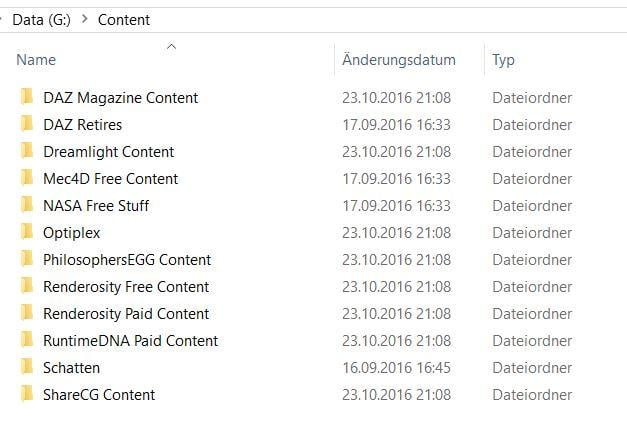
In die hinein entpackst Du jetzt deine Artikel, wobei Du darauf acten solltest, eventuelle "überordner" nicht mitzunehmen. Also, wenn das ZIP-Verzeichnis einen Unterordner "Content" enhält, wie im folgenden Beispiel, entnimmst Du nur alles was direkt darunter liegt, also hier "People/Readme/Runtime" einschließlich derer diverser Unterverzeichnisse.

Am Ende sieht das dann ungefähr so aus, z.B. für den Renderosity-Content:
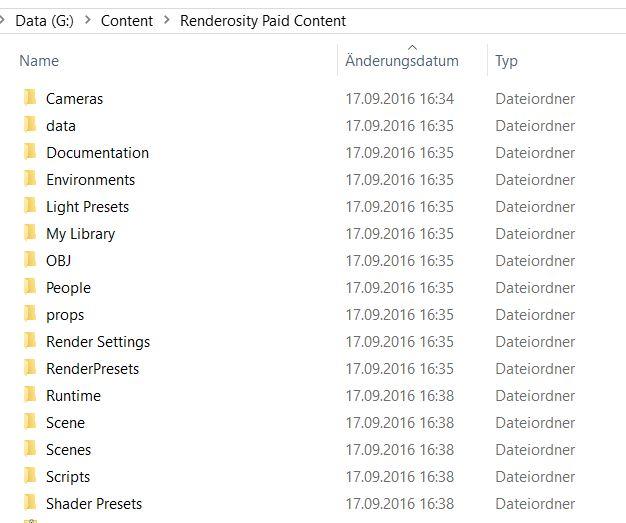
Danach musst Du dann nur noch in DS, wie weiter oben beschrieben, die Verzeichnisse im Content Directory Manager bei DAZ und Poser Format einrichten. Allerdings hat das ganze Limits - einige Morph und Anwendungen funktinionieren nur, wenn man sie im "Hauptteil", also im DAZ-Ordner installiert.
Proper tutorial to create products?Hi all, here's the situation: I have modeled some clothing, managed to transfer utility it to turn into a proper DAZ item, added morphs, but how do I turn it into a content library item? The official tutorials are very limited and not up to date, I hope to learn how to create professional items, with morphs, texture presets and all.
Thanks for your help.
Switching off mesh smoothingHi,
I have a simple item of clothing which I've modeled and fitted to the base G2F female. I've also imported a few morphs for the clothing via Morph Loader Pro.
One of these morphs looks better when the clothing's mesh smoothing modifier is turned off. Otherwise I'd prefer smoothing to stay on. Is there a way to
switch smoothing off when the morph's dial reaches 100% and to switch it back on when it's at 0%?
Tiny Petite G3Fs?In terms of morphs, in addition to height, don't forget the leg length morph. The DAZ figures tend to be pretty leggy, and shorter folks tend to have shorter legs relative to their torso (I know I do anyway)I believe that is where the significant difference is.
Tiny Petite G3Fs?In terms of morphs, in addition to height, don't forget the leg length morph. The DAZ figures tend to be pretty leggy, and shorter folks tend to have shorter legs relative to their torso (I know I do anyway)Apparently the normal ratio for legs to height measurment is 45%, so someone who is 5 ft tall (ie 60") would on average have a 27" inside leg measurment. I am spot on with that, so as long as a style is made with 27" inside leg I can buy trousers to fit off the peg.
Nasolabial Folds?I've got that morph pack and there is no specific morph for them,In that case, the Laugh Lines HD morphs (Laugh Lines 1 HD) in Aging Morphs 3 for Genesis 3 are probably what you're after.
http://www.daz3d.com/aging-morphs-3-merchant-resource-for-genesis-3-female-s
Thanks! I hadn't thought to look at that one, will have to buy it this evening and have a play with it.
Nasolabial Folds?I've got that morph pack and there is no specific morph for them,In that case, the Laugh Lines HD morphs (Laugh Lines 1 HD) in Aging Morphs 3 for Genesis 3 are probably what you're after.
http://www.daz3d.com/aging-morphs-3-merchant-resource-for-genesis-3-female-s
Are there alternate textures for Western Outlaw for G2F?...well turns out the whole idea is a wash as when I load the duster on one of my G3F characters, there is a noticeable distortion in the back of the coat just above the character's butt. Tried everything I could do to smooth it out but no good. It isn't caused by the gunbelt as the holster is on the right side. Even removing the gunbelt doesn't help.
So I went to plan "B", created wearables presets for the old Wanted DOA set using Genesis (set up as a female) as the base then applied them to my G3F figure, and it looks much better. As I have western boots that fit G3F, didn't need to transfer the DOA boots (Seems when I try to autofit pre Genesis footwear, it distorts badly when I try to fit it to the Genesis base), The only items I kept from the Outlaw set were the hat and gloves. and I adjusted the colours on them (figured out how to do it in Gimp).
I actually like it as it sort of gives her that "Doc Holliday" look from the film Tombstone. (need to find a tin cup).
Nasolabial Folds?200 Plus Head & Face Morphs has them.
http://www.daz3d.com/200-plus-head-face-morphs-for-genesis-3-female-s
I've got that morph pack and there is no specific morph for them, it is the way that you apply the shapes to the other parts of the face that creates them and they are barely noticeable unless you make the cheeks pretty chipmonk like.
Oh well, looks like I've got to add learning ZBrush to my ever expanding list!
Whip out your WIPsWorrks for armour as long as it's not in the torso. That's always a bugger to make rigid because there are so many weightmaps that overlap and parenting things to the abdomen and chest bones means the bones always move at 100% of the parent's rotation even if the associated mesh doesn't.
And in other news. Working on an outfit for the male morph for my chibi figure.
Tiny Petite G3Fs?In terms of morphs, in addition to height, don't forget the leg length morph. The DAZ figures tend to be pretty leggy, and shorter folks tend to have shorter legs relative to their torso (I know I do anyway)...yeah this has been a n issue since the early days. I always had to shorten Vicky's legs to get more appropriate proportions. That is why I liked Steph 4 as she seemed more "realistically" proportioned.
I like Josie7's face and softer features but like Vicky, she's very leggy especially for a teen. In the G2 version of Growing Up, there is one slider titled "Adult Proportion" which apparently was replaced by one called "Youth Proportions Adjust" in the G3 version. The latter sort of does the same but also affects the head propagation as well.
Issue Parenting Genesis Figures to another figure/objectFor some reason when I am trying to parent a Genesis figure (I tried both G2F and G3F with same results) to another object (like a bike or horse saddle, stuff like that) it literally takes no less than 5 minutes (usually more) for it to actually parent. I get the whole spinning wheel and the "Not Responding" message through the whole time. I originally thought I had a messed up morph so I moved out numerous folders at a time to see if I could isolate the one that may have been causing the issue. When I just had the one daz folder in the morphs section the parenting went quick but there was still a noticable lag.
I reinstalled Daz 4.9 and with just the basic morphs i got the same result (quick parenting, but noticable lag). As soon as i put all the morphs back in to the morph folder the 5+ minute parenting returned.
The odd thing is I have a older laptop that has Daz 4.7 on it. I purchased this new laptop because it had the specs to handle IRAY and I just use the old one as a back up for my daz library. So the old laptop has all the exact files on it that the new laptop has but it is running Daz 4.7. I tried to parent the exact same figure to the exact same prop there and the parenting was instantaneous like it always had been previously so now I am thinking it may be an issue with my DAZ 4.9. My current laptop specs are:
Intel core i7 2.6
16 gig ram
nvidia gtx 960M
64 bit operating system
Any assistance would be appreciated.
EDIT: Oh and I should add that parenting things to the genesis figure is fine. Its just when I try to parent the genesis figure to something.
Tiny Petite G3Fs?In terms of morphs, in addition to height, don't forget the leg length morph. The DAZ figures tend to be pretty leggy, and shorter folks tend to have shorter legs relative to their torso (I know I do anyway)Is there a way to autosave DS scenesthanks,, mike,,, I know there is already user request as support ticket,,
then may hope ds 5 will release with Auto-save option, and,,, HD morph plug in.
 3D Art Freebie Challenge -- October: Double Bubble Toil and Trouble -- Main Thread
Hi. Haven't tried the freebie challenge before. Here is a work in progress but please tell me if I am doing anything wrong. It is titled "Witch's Brood"
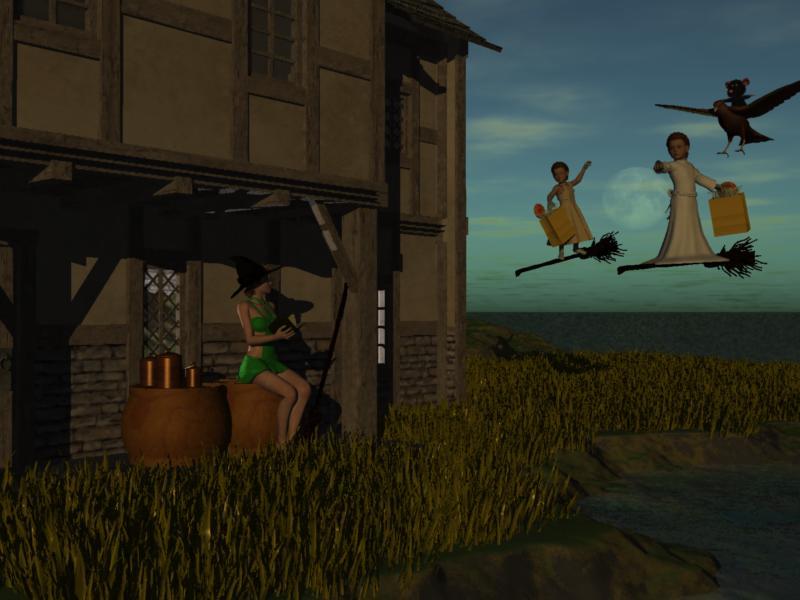
Here is my list of freebies and purchased products. In additiion, I used a primitive cube and a primitive cylinder, a terrain, and a realistic sky in Carrara. Do those count against me? If so, are they freebies if they came with the program?
Freebies from website requiring registration and sign in.
Jims Book https://www.sharecg.com/v/66786/browse/11/Poser/20-Page-Poseable-Book
Galadrieal Dress for K4 https://www.sharecg.com/v/43305/browse/11/Poser/Kids-4-Galadriel-Outfit-Dress-or-Tunic
Fantasy House 3 https://www.sharecg.com/v/59807/browse/11/Poser/Fantasy-House-3
Ratty Mouse http://www.sharecg.com/v/47414/browse/11/Poser/Ratty-Mouse
Hawk and Poses http://www.sharecg.com/v/49422/related/1/3D-and-2D-Art/3D-Hawk-Model-Still
Endor Braids for V3 and V4 http://www.sharecg.com/v/64115/browse/11/Poser/Endor-Braids-for-V3-and-V4
Easter Sunday Dress for K4 http://www.sharecg.com/v/61167/browse/11/Poser/Easter-Sunday-Outfit-for-Kids-4
Freebies From Daz
The Callie Outfit for V4 http://www.daz3d.com/the-callie-outfit
Cannisters and Pans http://www.daz3d.com/canisters-and-pans
From that other store's freebie section
Witch's hat and broom https://www.renderosity.com/mod/freestuff/witchs-hat-and-broom/76676
Helloween candy https://www.renderosity.com/mod/freestuff/hell-o-ween-candy/76585
From Most Digital Creations
V4 Halloween Head Morph (not in this WIP yet) http://www.most-digital-creations.com/free_poser_poses_textures_morphs_props_15.htmPurchased
Travelers Plants http://www.daz3d.com/rdna-foliage-grass-clumps-1
Base figures
2 K4s and 1 V4.
Hunt or be Hunted Bundle... Wow!I have submit an update for the gwenbleiz character and the hunter gear . Once it will online I will put a note here on this thread.
Gwenbleiz:
-Remove the IRC links for the eyes, scars and HD morph.
-Put the correct tint for the hair in the character with hair presets
-ADD the glowing eyes effect used on one of my render in my gallery ( it should works with all genesis 3 character I guess they have the same UV for the eyes)
Hunter Gear:
-Corrected the duplicate issue on the belt when load a saved scene
-ADD an unparented scabbard if you to autofit or export the files
Daz 3D is part of

Connect
DAZ Productions, Inc.
7533 S Center View Ct #4664
West Jordan, UT 84084Licensing Agreement | Terms of Service | Privacy Policy | EULA
© 2026 Daz Productions Inc. All Rights Reserved.