-
Decimator for Daz Studio
Pls confirm one thing beforehand : You want to use this decimated Alien as a normal G3M figure in DS ?
1st, Decimator plugin is used for decimate figure and export it to other format for use in non DS application (gaming, movie... etc.). And AFAIK, DS cannot save decimated resolution in any DUF format files and cannot correctly load in LOD mesh. So that's why you saw nothing after dialing it.
2nd, if the answer to the above question is Yes.( Though I vaguely see less benefit that you may get from it... ). You cannot make it in the above way. Instead, you can :
- Import Alien30% OBJ into the scene, rig it on the original Alien with the settings in ss1. Unfit it.
- Import Alien30% OBJ again onto the rigged Alien with MLP (Reverse + Delta Only). Dial the morph and Lock it.
- Adjust Rigging to Shape and ERC Freeze the fixing morph. Now you can use this decimated Alien as a G3M ~The cons is that you might have to make some necessary corrective morphs on this Alien30%, for the purpose of posing it correctly ~~
Is there a way to partially remove morphs from an item?I saw a tutorial for that on https://www.versluis.com/2024/05/attenuating-a-morph-with-a-face-group-in-daz-studio/ and I can't see why you could not go even further using weightmap influence to control the fall-off. Asssuming you want a smoother transition.
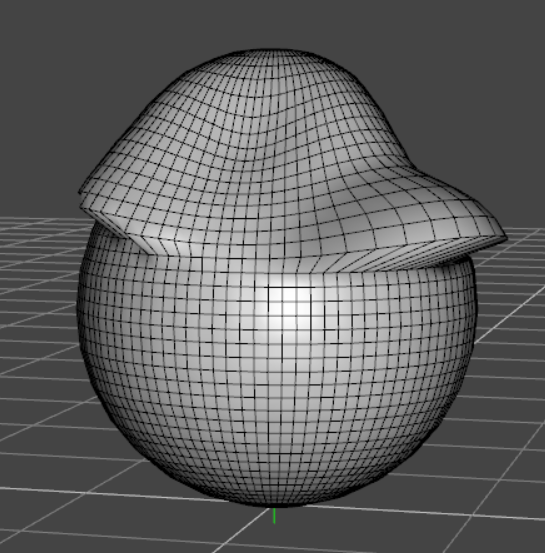
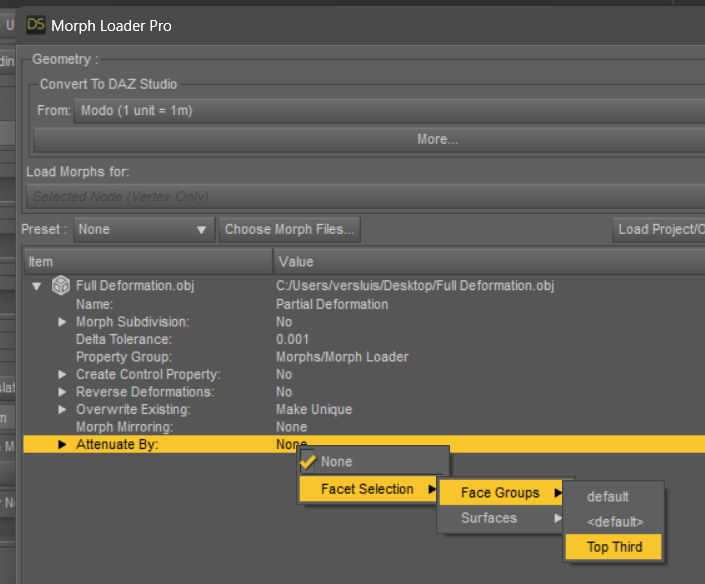 SOLVED - Exporting Multiple Morphs from Daz Studio at Once
Okay. I'm still a ways off from rendering in Blender, so that'll do fine. I already have DTB setup. Thanks! At some point I'll follow up on blender batch exporting (daz studio figure morph) shape keys. Plenty of tutorials came up on google.
SOLVED - Remove ERC Freeze From Multiple MorphsWell, actually it's pretty easy if you want to remove ERC formulas in DSF file:
- Open one of your DSF file, search "formulas" or just scroll down a couple of lines. You'll find it.
- Click LMB to place the cursor at the beginning of that line. Scroll down (or drag scroll bar downwards) to the line of "morph" coding block. Hold Shift key, click the line before "morph". Now the formula coding block is fully selected. Hit Delete key twice !Then Ctrl + S to Save the file. Reload your Base figure. You'll see frozen ERC are removed. So even if you have 100 morphs, such a job could be done within 15 minutes ~~
SOLVED - Remove ERC Freeze From Multiple Morphs1st, there's no way of doing batch ERC Bake or ERC Freeze, you have to do it on the moprhs one by one.
2nd, I assume you're using the older version of DS... with the latest version of DS, DS has a mechanic of creating unique urI for each morph the user creates. So I don't think you'll get duplicate formulas with the latest DS version. And even if you use the older version, as long as you name the morph uniquely, you shouldn't get duplicate formulas either.
3rd, You have no way in DS to refreeze ERC on a morph property with frozen ERC, ERC Bake has to be done firstly. But as you said, yes, you can manually edit DSF file by removing the coding block of all formulas. Then reload your Base figure. That'll be much faster ~~
Finally, a script may always be able to automate these process... but that would be another topic ~~
SOLVED - Remove ERC Freeze From Multiple MorphsYeah, those are the normal steps, but you have to do it manually one morph at a time. All of the morphs on the G8F shaped GF2 mesh look fine, but adjusting the rigging to account for the new base shape is a slow enough process without the addded step of clearing the old formulas. If I just adjust the rigging and freeze, I'll end up with duplicate formulas on every morph. If I don't make the right changes, the rigging will distort all the morphs. Even if I go with the third option, which I was already considering, there is still the hassle of exporting and reimporting all those morphs.
I really wish there was a more automated way to do these things. I've always wished that there was an option to over-write ERC's if you refreeze.
SOLVED - Remove ERC Freeze From Multiple Morphs1stly, I'm not 100% sure but you're making a G8F's clone on G2F, is that correct ?
2ndly, to clear the frozen ERC on a morph property, you can do it with ERC Bake (Delta Add, Add, Substract)... which is just under ERC Freeze menu item in Edit mode. Then, re-rig it, refreeze ERC and re-save morph asset(s).
Just in case... if you encounter errors for whatever any reason when processing ERC Bake, you also can: with the morph dialed, export the figure to OBJ file. Delete the morph property as well as the saved DSF file in data folder. Import OBJ with MLP, then rig it and ERC Freeze...
[Released] Turbo Loader for Genesis 8 and 8.1 [Commercial]I have had this for some time now and only today I am really trying to get into understanding how this works.
Reason being, it took me almost 20mins just now to Zero a Figure pose and then it hit me that I had grabbed Turbo Loader on sale a while back (Order Date: 2023-07-29).
I initially have a G8F and G8M in the scene and I filtered for the morphs used after running the full scan > Uncheck all > Tick only the G8F character I have in the scene > Exceute > it now disabled all the other morphs I left unticked > worked as expected? > I closed Daz > reopen > load scene again > but now it showed me like a Full 2-3 scroll-downs of a page of missing items required for the scene.
Is this how it should be? or I screwed up somewhere and its normal that some characters use morphs files from a bunch of other characters (the G8F was a SASE character, only searched for the 1 character and ticked that to "Enable" the morph in the TL scanned list while leaving all other morphs Unticked).
Sorry if this isnt a Tech Support place for this product.
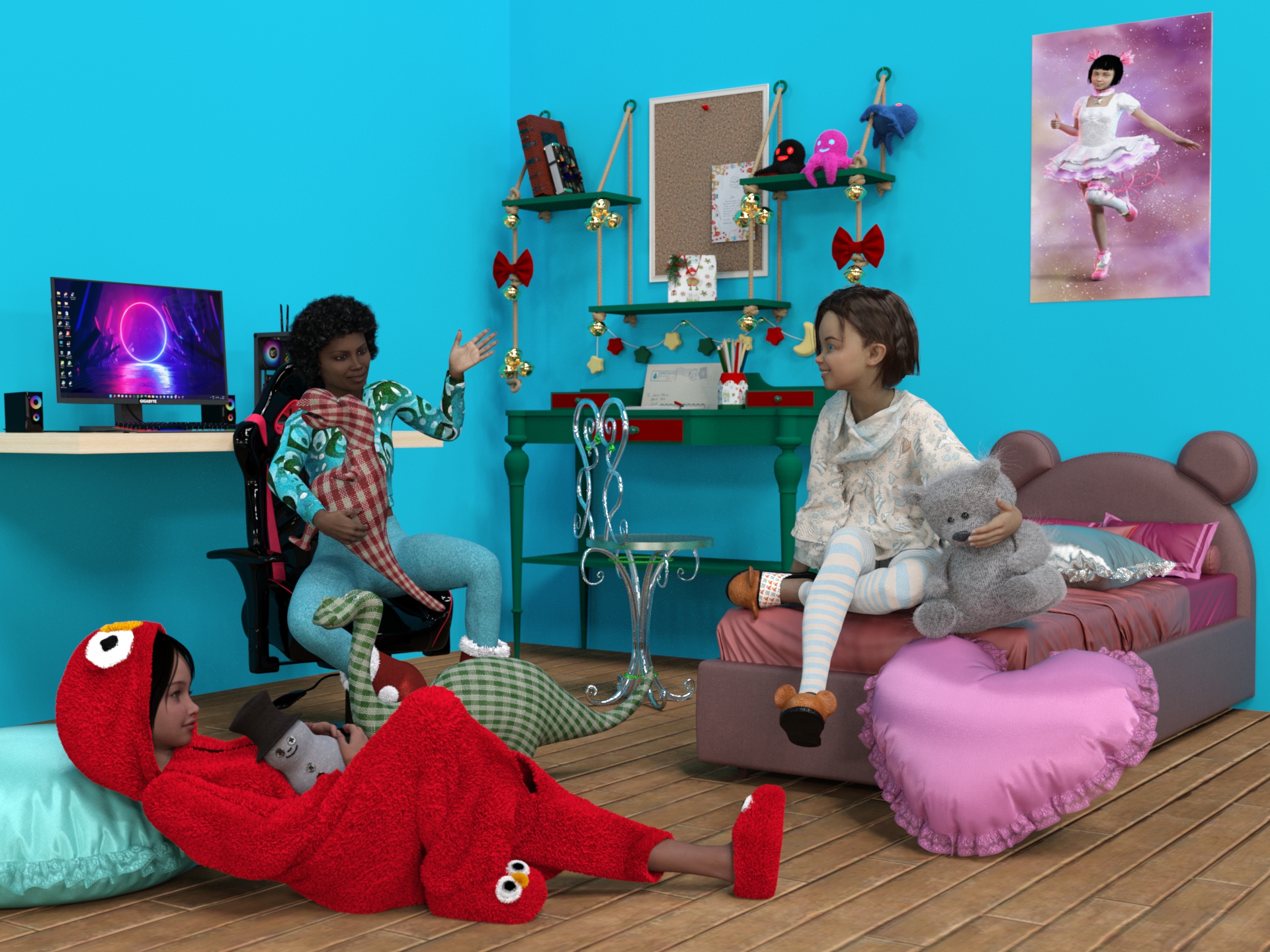
Freebie Challenge April/May 2024 - "Soft as Plush, Smooth as Silk" - Main ThreadPlush party
A fantastic pajama party with friends and favorite plushies among soft cushions.
April-May 2024 free Challenge 2 entry
Freebies
PB Snowman Plushie
https://sharecg.com/v/101134/browse/21/DAZ-Studio/PB-Snowman-PlushieMy Son Bed by teknology3d (wall and floor)
https://www.renderosity.com/freestuff/items/77693/my-son-bedTeddy Bed
https://www.renderhub.com/humanxystudio/teddy-bed"Gaming Desktop PC" (https://skfb.ly/or88C) by Yolala3D | Y3D is licensed under Creative Commons Attribution (http://creativecommons.org/licenses/by/4.0/).
https://sketchfab.com/3d-models/gaming-desktop-pc-d1d8282c9916438091f11aeb28787b66"Gaming Chair [FREE DOWNLOAD]" (https://skfb.ly/6QZop) by Karlos is licensed under Creative Commons Attribution (http://creativecommons.org/licenses/by/4.0/).
https://sketchfab.com/3d-models/gaming-chair-free-download-bcb13eb7ef9e4c3c9499aacff6c79757Freebie - SmidA - Dino2
https://www.deviantart.com/smida460/art/Freebie-SmidA-Dino2-921283896Freebie - SmidA - Dino1
https://www.deviantart.com/smida460/art/Freebie-SmidA-Dino1-921283670Prop - Morphing Poster by squarepeg3d
https://www.renderosity.com/freestuff/items/87552/prop-morphing-posterFantasy Chair by Chaosqueens-World
https://www.renderosity.com/freestuff/items/83991/fantasy-chairHolly Desk
https://sharecg.com/v/98492/related/21/DAZ-Studio/Holly-DeskXmas Teddy
https://sharecg.com/v/98457/gallery/21/DAZ-Studio/Xmas-Teddy
https://www.renderosity.com/freestuff/items/90164/xmas-teddyPillow
https://sharecg.com/v/93157/browse/21/DAZ-Studio/Pillow-PropsOld Book
https://www.deviantart.com/mysticartdesign/art/Old-Book-881819949Magigbook for Dazstudio iray
https://www.deviantart.com/kalhh/art/Magigbook-for-Dazstudio-iray-910339363Nanami Genji Anime Charachter For Genesis 8 Female free 3D model
https://www.cgtrader.com/free-3d-models/character/fantasy-character/nanami-genji-anime-charachter-for-genesis-8-femaleTwizted Character Creation Kit by TwiztedMetal
https://www.renderosity.com/freestuff/items/81217/twizted-character-creation-kitAlysha for Genesis 8 Female by emotionaldreams
https://www.renderosity.com/freestuff/items/83613/alysha-for-genesis-8-femaleKristen for Genesis 9 Female by pixeluna
https://www.renderosity.com/freestuff/items/93828/kristen-for-genesis-9-femaleXmas Bundle by Leilana
https://www.renderosity.com/freestuff/items/84013/xmas-bundlePajamas for Genesis 3 Female Free 3D model (slippers)
https://www.cgtrader.com/free-3d-models/character/clothing/pajamas-for-genesis-3-femaleEveryday G8
https://www.renderhub.com/teknology3d/everyday-g8
https://www.renderosity.com/freestuff/items/83138/everyday-outfit-genesis-8Everyday Outfit - additional textures by eblank
https://www.renderosity.com/freestuff/items/91369/everyday-outfit-additional-texturesSanta Costume Mega Bundle by Yashiro Amamiya (shoes)
https://www.patreon.com/posts/santa-costume-by-45417296Kigurumi for G9
https://sharecg.com/v/100853/gallery/21/DAZ-Studio/Kigurumi-for-G9Jill For G8F DL (hair)
https://www.deviantart.com/checkertoo/art/Jill-For-G8F-DL-852699253Hair 1 for Daz 3D Genesis 9 by amyaimei
https://www.deviantart.com/amyaimei/art/Hair-1-for-Daz-3D-Genesis-9-935744713Genesis 8 Young Child Pose 4-12 (Just Kids 4 ) by BBarbs
https://www.renderosity.com/freestuff/items/86827/genesis-8-young-child-pose-4-12-just-kids-4Genesis 8 Teen Pose 43 by BBarbs
https://www.renderosity.com/freestuff/items/85799/genesis-8-teen-pose-43School Time Genesis 8 by
https://www.sharecg.com/v/90137/HDRIs / Indoor / Dancing Hall
https://polyhaven.com/a/dancing_hallIn the poster:
Lily Character Morph For G8 and G8-1 Female Free 3D model
https://www.cgtrader.com/free-3d-models/character/woman/lily-character-morph-for-g8-and-g8-1-female
https://www.renderhub.com/humanxystudio/lily-character-morph-for-g8-and-g8-1-femalePlatinum Girl for G8F
https://sharecg.com/v/92997/related/21/DAZ-Studio/Platinum-Girl-for-G8FFree: Bob haircut for Genesis 8
https://www.deviantart.com/perlk/art/Free-Bob-haircut-for-Genesis-8-887913550Daz-Iray-Shaders-and-Lights
https://github.com/Astuceman/Daz-Iray-Shaders-and-LightsFREEBIE Posepack3 by dividebyzero718
https://www.deviantart.com/dividebyzero718/art/FREEBIE-Posepack3-901112132FREEBIE Painted Backdrop Pack 3 by dividebyzero718
https://www.deviantart.com/dividebyzero718/art/FREEBIE-Painted-Backdrop-Pack-3-906835561No count?
Ena hair by Prae: no longer available (It was a Christmas gift from Fantasieattic in 2021)ASINA (KA freebie april 2024, still free)
https://www.daz3d.com/asina
https://www.daz3d.com/forums/discussion/680206/asina-april-fools-competition-2024/p1
Paid:Growing Up Bundle for Genesis 8 Female(s) and Male(s)
https://www.daz3d.com/growing-up-bundle-for-genesis-8-female-s-and-male-sTime Machine for Genesis 9
https://www.daz3d.com/time-machine-for-genesis-9Diffeo - problem with thigh bending bulgeIt gets worse when i dial in the Nina G9 body morph (right is DAZ viewport):
Long Load Times – Why is this still a problem?marble said:
My scenes rarely take more than 5 minutes to load. A single G8 figure takes maybe a minute. However, sometimes it does get a little stuck and I sit staring at the screen. Generally I find some other activity to distravt me for a few minutes. Having said that, the sooner DAZ come up with a better way of loading scenes, the happier I will be. I don't have hundreds of characters but I do have a lot of morph packages because that's how I create my own characters. Maybe there's a lesson there?
I'll be even happier if they find a way to reduce the lag between closing DAZ Studio and being able to reopen it. That can take much longer than the load times
Np kidding. It routinely takes 5 minutes for the program to close. That is absurd. The scene loading mechanism is really awful. Every scene that I load has hundreds if not thousands of errors in the log. Surely there must be a better way to do that.
XTransfer - Genesis 3 to Genesis 8 problemscrosswind said:
I've seen quite a few folks ever complained about this product or reported issues from time to time... It seems that you have to fix a few things after running the conversion...
However, no pose is there, so it should not be an issue related to adjust rigging to shape. Since you said DS crahsed when the process was nearly completed, I assume the script failed to completely and correctly write geometry data to the morph file(s). Better re-run the conversion... if the crash as well this issue persists, try it with the latest DS Public Build. And send a ticket if they both fail you... for requesting support or refund as you wish...
Actually you may not need such a product... Jay's "fit suit method" can convert these figures across the generations... - https://youtu.be/jROlY34tNNU?si=diIa3nr850Q8y1Y8
Sorry, but I am not trying to convert to Gen 9, but get Gen 3 to Gen 8
Coming soon: Mesh Grabber 4.0 [Commercial]ManFriday said:
Loony said:
Mart1n71 said:
This looks like such a great update. Will I be able to save any edits to strand based hair as a morph? Something I think is currently a PA only tool.
When you can edit it, this should be possible. Btw. @MF why is it still not released? Does Daz3d plan to include it into a bigger announcement or are you still working on it?All I know is that it's in the queue at Daz. The queue is rather long at the moment, so I don't know when it will be released. Might be another couple of weeks.
Today, May 26, my last product was released. I submitted it on April 25th and had no issues. So, it's about one month to wait
Genesis 8 model without facestem_athome said:
Per request. G8 female no_face morph.
Where do I paste this file in my daz library? I tried in gen8/male/ morph. But its not showing
LIVE! In the store NOW!! LowPi - the Low Poly Figure, and Crowd Creator ScriptsLyrra Madril said:
well I know that I corrected the left side to side bend at least twice. Feel sorry for my tester becasue we went through QA about six times just for Lowpi. I think he got very tired of us. I'll go check my archive version of Lowpi adn the store version and send in a patch.
I did try very hard to put the morphs in the same place, but DS got very stubborn. It does make no change to function, just a tiny bit messy.
LM
It's a very complex product bundle. There are bound to be some mistakes along the way. Users always find things that the most diligent PAs and testers don't notice. The important thing to me is that errors get fixed, so thanks for sending in a patch.
I looked at the DIM package to be sure I didn't accidentally delete the missing left thigh morph, but no, it is not in the DIM package. When searching the DIM package for that morph, I think I see other missing morphs. Please look at this list from the DIM contents. Dress Template and Dress have left thigh morphs but no corresponding right thigh morphs. I only searched for "88" so it is possible that other things got left out, too.
Line 94: /data/Lyrra Madril/LM LowPi/LP Dress Template/Morphs/Lyrra Madril/Base/CBS_body_lThigh_p88.dsf
Line 105: /data/Lyrra Madril/LM LowPi/LP Dress/Morphs/Lyrra Madril/Base/CBS_body_lThigh_p88.dsfI'm trying to understand the LowPi ecosystem and create my own LowPi clothing and poses, wear kits, pose kits, etc, so I am probably digging deeper into the product details than many casual users. I can tell that a tremendous amount of thought and work went into this! Thank you.
Back on G8 geoshells on G9AndrewJJP said:
...If I'm understanding correctly:
- Neither product (the Material Suit and the Legacy UVs) would support HD maps. (The material suit at would do the nipple and navel.morphs but nothing else.)
It's HD morph not HD map... Material Suit doesn't support to show HD morphs that you dial. Legacy UV products can show HD morphs but not flawless.
- The material suit would limit me to using G8 textures.
No, it doesn't limit you to using G8's textures no matter they're are G8 skin textures or G8 shell textures, with either the suit itself, or a geo-shell or LIE layers on the suit surfaces.
- It is possible to alter Legacy UVs to do it without restricing it to G8 textures, but you need to make alterations to the product.
Yes, sort of remaking the Legacy graft to support both G8 and G9's UV sets.
- There would be issues with Legacy UVs if I used geografts on Genesis (although I don't think I've ever done that).
That depends on the graft you use but more or less... and Legacy UV itself is a geo-graft. Some flaws are shown in the attached screenshot.
...[Released] RSSY Character And Material Conversion Bundle Genesis 8 to Genesis 9 [Commercial]Edit.
The script works OK for characteras other than those I have customized, which is the only reason why I bought it ... to transfer the morphs of those characters. I am also getting the folding phenom, but I have nothing contacting any part of the face, so I am puzzled.
Why Does It Take So Long To Load Figures? ("Solved", with GUIDE)tonyjas46_1cccd9144e said:
Everything stays the same....
Basic problem that is always ignored by the programmers at Daz. Daz Studio needs an algorithm written into the program that 1. does not load mophs by default (to says that it dosen't makes a lie of Turboloader, which is the best current option) 2. Checks the .duf file on loading to see what morphs are actually required for that character and then only loads those morphs (this alone would same endless hours of frustration with genesis 8 and 9 long loading times and odd deformations that occur when content providers can't get their [act] together and insist on all their morphs loading and affecting every character that is loaded into the scene). 3. Unloads the morphs if the figure is deleted or the file/program is closed.
Checking the .duf file for a morph that was being applied would identify only links created for and saved with that morph, it would not identify other morphs with links to or from it where the link is saved in the other morph's file.
Carrying out the link-building at load-time, even ignoring the previously noted issue, would make morph application slower in order to speed character loading - but character loading affects only the initial load of the figure, and can be waited out fairly easily, while delaying morph loadign would impact evey manual adjustment or preset application, likely to be much mor disruptive for users.
Some "morphs" need to load with non-zero values. When something that should load zeroed doesn't then that is a bug, and should be fixed.
Unloading a figure is already done - when it is no longer needed (don't forget the undo stack). But clearing up all that data is not an instant process, so this would certainly not be a way to improve speed if it wasn't already implemented.
Modesta Promo Socks/Sneakers IDFaeryl Womyn said:
I own both the toon bundle and the chungdan sneakers, so would love to know how it turns out.
Fail. I tried my usual geometry editing / smoothing modifier trick to no avail. Socks geometry edited fine, but the chungdan sneakers' shoelace freaked out when I added smoothing modifier to it 3x in a row with nothing but G8.1F and the socks in the scene. Short of a Blender morph, this won't be happening. Suddenly the TG sneakers don't look that toony.
Why Does It Take So Long To Load Figures? ("Solved", with GUIDE)Lates DS versions bring 50~60% time saving in terms of assets loading, so we're pretty happy with that.
Besides, with the latest DS version, when creating a morph asset, DS generates a unique Uniform Resource Indicator for it. So, as long as the vendors / users don't wrongly edit the urI in DSF file(s), there shouldn't be any new "duplicatre formulas".
Daz 3D is part of

Connect
DAZ Productions, Inc.
7533 S Center View Ct #4664
West Jordan, UT 84084Licensing Agreement | Terms of Service | Privacy Policy | EULA
© 2026 Daz Productions Inc. All Rights Reserved.