-
[Released] Character Converter from Genesis 3 Female to Genesis 8 Female(Now Conv JCMs) [Commercial]
I am not sure what the error messages are looking for. Are they looking for the Victoria 7 HD morphs and a character named Makena? If so that is odd because the character requirements only list Victoria 7 for the head morphs and make no mention of a character named Makena (which is a separate character for G3F that also uses Victoria 7).
nabob21
[Released] Character Converter from Genesis 3 Female to Genesis 8 Female(Now Conv JCMs) [Commercial]nabob21 said:
Hello again RiverSoftArt. I did as you suggested and tried to convert a G3f?V7 based character with the "Convert Corrective Morphs (JCMs and MCMs)" option unchecked and this time it completed successfully in just over 28 minutes. So it seems that the big issue is converting a G3F/V7 character with the "Convert Corrective Morphs (JCMs and MCMs)" option left on. Thanks for the help.
I have attached the log file to this post so that you can check it. I wonder if I am the only one having such slow conversions with characters using a G3f/V7 combined base? And why it is so very slow to convert the corrective morphs on these characters?
In any case both methods do seem to work, so if the quicker option doesn't produce the results I am hoping for I can leave the convert corrective morphs option checked and let the process run overnight.
It is not slow because they are JCMs, but because it adds to the number of morphs to convert. Converting morphs takes time. Converting 40 of them is a lot slower than converting 6. You also have a speed issue because all of those:
Could not find output property for formula: Genesis3Female:/data/DAZ%203D/Genesis%203/Female/Morphs/DAZ%203D/Victoria%207/FBMVictoria7HDLv4.dsf#FBMVictoria7_HD_v1?value in file : /data/DAZ%203D/Genesis%203/Female/Morphs/FWSA/Makena/FBM-FWSAMakena.dsf
slow loading a figure down. Fixing those would speed up loads of G3F.
Possible to attenuate effect of character FBM on specific regions using weight map?The first image is default G8F with a dress. Notice how each side of the top looks like one natural piece of cloth that is being pushed out by the curve of the breast, because the vendor created it to look this way on the default G8F.
The second image has the Victoria 8 shape applied to the character. The vendor included a morph in the dress to account for Victoria 8. So if you apply V8 to the figure, the clothing will use the vendor's hand-crafted morph, and it still looks natural. It even works with a large breast morph like breasts heavy, (third image), because the vendor included a hand-crafted morph in the dress for it.
But if you apply a character FBM that the vendor didn't account for, basically anything that isn't an iconic Daz character like V8 or Olympia 8, the dress tries it's best to follow the FBM morph. This creates problems with the shape of the dress, as seen in the fourth image (with Aurure for G8F applied to the body as an example). Sure, this can be fixed with a lot of smoothing and some adjustments using Fit Control, but it is very difficult to get the same quality of result as you do with the hand-crafted morphs. What I usually do in this situation is zero out the character FBM in the dress, and then use the dress's adjustment morphs (I did quickly in image five, but didn't take a lot of time with it). But this can cause other problems as seen in that same fifth image. The dress doesn't fit right anywhere else now, like the collars, the waist, the hips, etc. because I've had to zero out all of the effects of Aurure on the dress, not just the breast area. All of the non-breast areas fit much better in the fourth image when it was following the Aurure body morph.
So what I was hoping for was that there was some way to edit the FBM that was transferred to the clothing. In this case, for example, I would be hoping to be edit the FBM Aurore that was transferred to the dress to eliminate or reduce the effect it has on the breast area, so that the natural form of the original version of the dress is recovered. And then I can use adjustments and Fit Control to make it fit over Aurore's breasts without too much distortion. But it sounds like the only way to do this is to create a new version of the FBM and reload it using Morph Loader Pro with a d-former weight map used to attenuate the effect where I want it attenuated.
dForce isn't a cure all for this, either, even for dForce dresses, because the mesh is still distorted by the character morph. It will flow better if it's pulled down by gravity, but it will still have creases and the width will be inconsistent, plus the extra material added to the top by clinging under the breasts will lead to the waist falling lower than it should in the dForce simulation.
"There's Always Another Sale™" Sales thread: Report Issues HereGeoffreyHawkins said:
Does anyone have a list of all the Blink Bundles offered so far? There are a couple G8 bundles I'm interested in but if they've already been featured, I don't want to be needlessly checking every two hours. Thanks.
Michael 8 Pro
Victoria 8 Pro
Tara World Adventurer Megabundle
Sydney 8 Pro
Aiko 8 Pro
Daisy 8 Pro
Charolette 8 Pro
Landon 8 Pro
Owen 8 Pro
Genesis 8 Centaur 8 Pro
Jenni 8 Pro
Girl 8 Pro
Sakura 8 Pro
Lee 8 Pro
Silas 8 Pro
Teen Raven 8 Pro
Tasha 8 Pro
Robyn 8 Pro
Kala 8 Pro
Mr Woo 8 Pro
Mei Lin 8 Pro
Bridgete 8 Pro
Olympia 8 Pro
Edward 8 Pro
The Brute 8 Pro
Elithia 8 Pro
Christian 8 Pro
Floyd 8 Pro
Tristan 8 Pro
Kanade 8 Pro
CJ 8 Pro
Zelara 8 Pro
ExpansiveAPESuit Bundle
Teen Kaylee 8 Pro
Darcy 8 Pro
Nix 8 Pro
Note: At the changeover DAZ midight 30 to 31 Dec The blink sales have been changed to a "Progressive" format and the added bundles seem to be repeats. Accordingly, I do not plan to update this list further.
"There's Always Another Sale™" Sales thread: Report Issues HereFenixPhoenix said:
jukingeo said:
GeoffreyHawkins said:
Does anyone have a list of all the Blink Bundles offered so far? There are a couple G8 bundles I'm interested in but if they've already been featured, I don't want to be needlessly checking every two hours. Thanks.
Yes, I am interested in a list of the G8 bundles that came up on today's blink sale as well, since I can potentially get a pro bundle for $20! I am waiting for Celani 8, but I hate to hold out for her, especially if she came up already. Can someone tell me if she came up already? So having a list is valuable.
Here is my contribution, as so far I have seen these come up already:
The Girl 8.
Salias 8.
Tasha 8
I would take Tasha as this one is currently running, but if Celani didn't come up yet, I want to hold out for her.
Here is the list: Michael 8 Victoria 8 Tara 8 Sydney 8 Aiko 8 Daisy 8 Charlotte 8 Landon 8 Owen 8 Centauros 8 Jenni 8 Girl 8 Sakura 8 Lee 8 Silas 8 Raven 8 Tasha 8Looks like celani hasn't come up yet. Many thanks to you for keeping track up to now, this is a HUGE help."There's Always Another Sale™" Sales thread: Report Issues Herejukingeo said:
GeoffreyHawkins said:
Does anyone have a list of all the Blink Bundles offered so far? There are a couple G8 bundles I'm interested in but if they've already been featured, I don't want to be needlessly checking every two hours. Thanks.
Yes, I am interested in a list of the G8 bundles that came up on today's blink sale as well, since I can potentially get a pro bundle for $20! I am waiting for Celani 8, but I hate to hold out for her, especially if she came up already. Can someone tell me if she came up already? So having a list is valuable.
Here is my contribution, as so far I have seen these come up already:
The Girl 8.
Salias 8.
Tasha 8
I would take Tasha as this one is currently running, but if Celani didn't come up yet, I want to hold out for her.
Here is the list:
- Michael 8
- Victoria 8
- Tara 8
- Sydney 8
- Aiko 8
- Daisy 8
- Charlotte 8
- Landon 8
- Owen 8
- Centauros 8
- Jenni 8
- Girl 8
- Sakura 8
- Lee 8
- Silas 8
- Raven 8
- Tasha 8
[Released] Character Converter from Genesis 3 Female to Genesis 8 Female(Now Conv JCMs) [Commercial]nabob21 said:
Hello,
I am trying to convert some G3F characters that use Victoria 7 as well as the G3F base figure. When I do a conversion using the Convert Scene Character method it does the conversion in a relatively shoert period of time. However, it doesn't seem to create character morph dials that I can turn off and on, or dial back as I see fit. And like it states in the PDF manual, this method doesn't create character presets.
I have converted some characters that use only the base G3F figure using the "Convert Character" method and it does create character morph dials and the character presets which is what I ultimately want to do. In these cases the character conversion is done in a relatively short period of time.
However, when I try to use the "Convert Character" method to convert a G3/V7 character that I can convert using the "Convert Scene Character" method, the conversion method now takes hours and hours to run. So long in fact that I have had to cancel the script (my last attempt ran for over 7 hours and was still not near completion).
Does anyone know why this is happening, and if I am doing something wrong?
Thanks in advance for any help.
nabob21
My first thought is that somehow the script has detected a lot of changed morphs. Without seeing the Daz log, I cannot say much more.
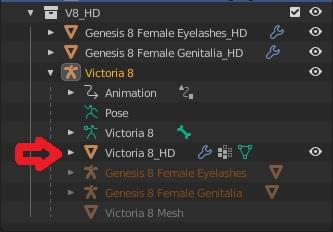
Diffeomorphic DAZ Importer Version 1.5.1Hi Donald, I quick tested the dll and it works great both with figures and sbh. It doesn't work with geografts though, I tried Victoria 8 with the G8F genitalia.
- load Victoria 8 and the genitalia and subdivide by 2
- save the scene
- enter the geometry editor
- export HD
- import into blender
The HD script generates the multires mesh when we import into blender, while the HD dll does not.
If you can't solve the issue with the geometry editor that's ok. We can always export the HD figure without geografts, then the base figure with geografts, then merge them as explained by @Krampus. The geometry editor is just a quick shortcut, it should be needed for HD geografts, but they seem not to work anyway for vertex order issues with multires.
http://diffeomorphic.blogspot.com/2020/09/hd-meshes-and-geografts.html
http://diffeomorphic.blogspot.com/2020/09/hd-meshes-and-geografts-revisited.html
 [Released] Character Converter from Genesis 3 Female to Genesis 8 Female(Now Conv JCMs) [Commercial]
Hello,
I am trying to convert some G3F characters that use Victoria 7 as well as the G3F base figure. When I do a conversion using the Convert Scene Character method it does the conversion in a relatively shoert period of time. However, it doesn't seem to create character morph dials that I can turn off and on, or dial back as I see fit. And like it states in the PDF manual, this method doesn't create character presets.
I have converted some characters that use only the base G3F figure using the "Convert Character" method and it does create character morph dials and the character presets which is what I ultimately want to do. In these cases the character conversion is done in a relatively short period of time.
However, when I try to use the "Convert Character" method to convert a G3/V7 character that I can convert using the "Convert Scene Character" method, the conversion method now takes hours and hours to run. So long in fact that I have had to cancel the script (my last attempt ran for over 7 hours and was still not near completion).
Does anyone know why this is happening, and if I am doing something wrong?
Thanks in advance for any help.
nabob21
Converting G8F wit DazToMax: Eye-Problem in VRayNow I tried to copy all the eye-materials from Victoria 7 to G8M: You see the result in the attached file: The iris changes a little bit, but still nearly all stays white. I don't understand this behaviour.
I copied:
Cornea, EyeMoisture, EyeSocket, Irises, Pupils, Sclera
I think these are all the eye materials. I didn't find another one. But after copy from V7 to G8M the eyes still don't look normal. So it'S probably not only a problem of opacity.
Converting G8F wit DazToMax: Eye-Problem in VRayNow I tried to copy all the eye-materials from Victoria 7 to G8M: You see the result in the attached file: The iris changes a little bit, but still nearly all stays white. I don't understand this behaviour.
I copied:
Cornea, EyeMoisture, EyeSocket, Irises, Pupils, Sclera
I think these are all the eye materials. I didn't find another one. But after copy from V7 to G8M the eyes still don't look normal. So it'S probably not only a problem of opacity.
Converting G8F wit DazToMax: Eye-Problem in VRayOk, so here is another file: On the left side G8M, on the right side Victoria 7. The problem with the white eyes only exists at the Generation 8-People, not at G3M/G3F-series.
I think it's a bug in the bridge which doesn't takke care of some special things at the G8-series.
Any help?
Possible to attenuate effect of character FBM on specific regions using weight map?When using a character body morph that was sculpted by the vendor, conforming clothes can get distorted in the breast area by that transferred FBM (unlike standard FBM's or partial morphs like Victoria 8 or breast size, for which vendors usually include an appopriate morph shape in the clothing). Sometimes zeroing out the character's FBM on the clothing itself and using morphs built into the product can fix the breast problem, but then the clothes may not fit well in the shoulders, hips, etc. because the overall body shape is returning to the generic G8F shape. Is there a way to remove or attenuate the effect of a morph that has been transferred to conforming clothes on particular regions of the clothes?
In other words, is there a way to edit or apply a weight map that would allow me to reduce the effect on the breasts (or any region) of an FBM? Ignoring the fact that this a morph transferred to the clothing, is it possible to attenuate the effect of a morph on any figure by editing or applying a weight map or something similar?
I've seen a tutorial for removing vertices from a morph using the geometry editor, and I tried that but it creates an abrupt transition between the vertices that were removed and those that remain.
Celebrity Look-a-Likes for 3D figures part 3coffman_steve2009 said:
PhilW said:
Mark_e593e0a5 said:
Today's new release Becs, https://www.daz3d.com/becs-hd-for-genesis-8-female looks very familiar to Anni-Frid Lyngstad the "second" A in ABBA. All the surrounding stuff kind of adds to that. Poses, that are quite typical ABBA poses, and outfits that go with quite some of their concerts.
Thanks for your interest in Becs, I really enjoyed creating her and the whole pack. As the creator of Becs, I can say that she was NOT based on Anni-Frid so any similarity is entirely coincidental. But hey, if it works for you, then go for it! I suppose the most Abba-influenced thing was the promo of her back to back with Victoria 8
It is still an awesome character -- I like it when vendors package a character as a complete character kit with hair and outift
Thank you for your kind words.
There is something wrong with G8Fs' anatomical elements in 4.14?Lissa_xyz said:
Per the PA, Ensley is supposed to be an underage character, and iirc there's something in studio's innerworkings that somehow prevents the gens from being attached to minors based on certain criteria.
I'm not even aware that Ensley is a child :D But I've tried Victoria 8 and others, the result is the same. I've just known about the problem just because I am to use it. Thank you very much.
There is something wrong with G8Fs' anatomical elements in 4.14?Lissa_xyz said:
Per the PA, Ensley is supposed to be an underage character, and iirc there's something in studio's innerworkings that somehow prevents the gens from being attached to minors based on certain criteria.
I'm not even aware that Ensley is a child :D But I've tried Victoria 8 and others, the result is the same. I've just known about the problem just because I am to use it. Thank you very much.
Celebrity Look-a-Likes for 3D figures part 3PhilW said:
Mark_e593e0a5 said:
Today's new release Becs, https://www.daz3d.com/becs-hd-for-genesis-8-female looks very familiar to Anni-Frid Lyngstad the "second" A in ABBA. All the surrounding stuff kind of adds to that. Poses, that are quite typical ABBA poses, and outfits that go with quite some of their concerts.
Thanks for your interest in Becs, I really enjoyed creating her and the whole pack. As the creator of Becs, I can say that she was NOT based on Anni-Frid so any similarity is entirely coincidental. But hey, if it works for you, then go for it! I suppose the most Abba-influenced thing was the promo of her back to back with Victoria 8
It is still an awesome character -- I like it when vendors package a character as a complete character kit with hair and outift
Celebrity Look-a-Likes for 3D figures part 3Mark_e593e0a5 said:
Today's new release Becs, https://www.daz3d.com/becs-hd-for-genesis-8-female looks very familiar to Anni-Frid Lyngstad the "second" A in ABBA. All the surrounding stuff kind of adds to that. Poses, that are quite typical ABBA poses, and outfits that go with quite some of their concerts.
Thanks for your interest in Becs, I really enjoyed creating her and the whole pack. As the creator of Becs, I can say that she was NOT based on Anni-Frid so any similarity is entirely coincidental. But hey, if it works for you, then go for it! I suppose the most Abba-influenced thing was the promo of her back to back with Victoria 8.
Who's Next to Join the G8 Family?Noah LGP said:
Why ?
Daz already did House Cat with dForce hair in July 2019
Surely, you're joking. That's a PA created product that DAZ bought which just updates the creaking and ancient original Mil cat with dForce hair and a few other fixes. It's better than nothing, but when compared to the now four year old Hivewire cat, it's very sadly lacking in terms of both sculpt and poseability and depends almost entirely on add-ons that are from the days of Victoria 2 & 3. That said, given the general lack of support for Big Cat 2, Horse 2 and Dog 8, I suspect that DAZ has little interest in creating any more new animal bases at this point... except for maybe yet another dragon.
Diffeomorphic DAZ-to-Blenderwaltertadlock said:
Hey All,
In need of some assistance. I am getting an error when trying to merge geografts.
I have Googled and searched through the forum, and have not found any reference to this error.
I have tried this with the 1.5 stable and the 1.5.1 dev on Blender 2.83.4, 2.90.1 and 2.91. I have tried selecing the character model first and then the genitalia, and vice versa. Same error everytime. It is the Victoria 8 with the New Genitalia for Victoria 8.
Help?
Thanks,
Walter
I had this error as well and I can't be 100% sure what I did to fix it, but I think this happened after I imported new UV maps for the eyes. I was using Dimension Theory eyes which required different UV maps. After some trial and error I found out I cannot use them with geografts, so I just went back to the standard UV maps for eyes.
Also, avoid importing any morphs when using geografts ('Import Body Morphs' and 'Import Custom Morphs'). You can import JCM's as much as you want and Diffeo will convert those to shapekeys which work pretty well, but importing morphs will break things.
Please let us know how you make out and what worked for you.
Daz 3D is part of

Connect
DAZ Productions, Inc.
7533 S Center View Ct #4664
West Jordan, UT 84084Licensing Agreement | Terms of Service | Privacy Policy | EULA
© 2026 Daz Productions Inc. All Rights Reserved.