-
A greatly underrated DAZ creature...
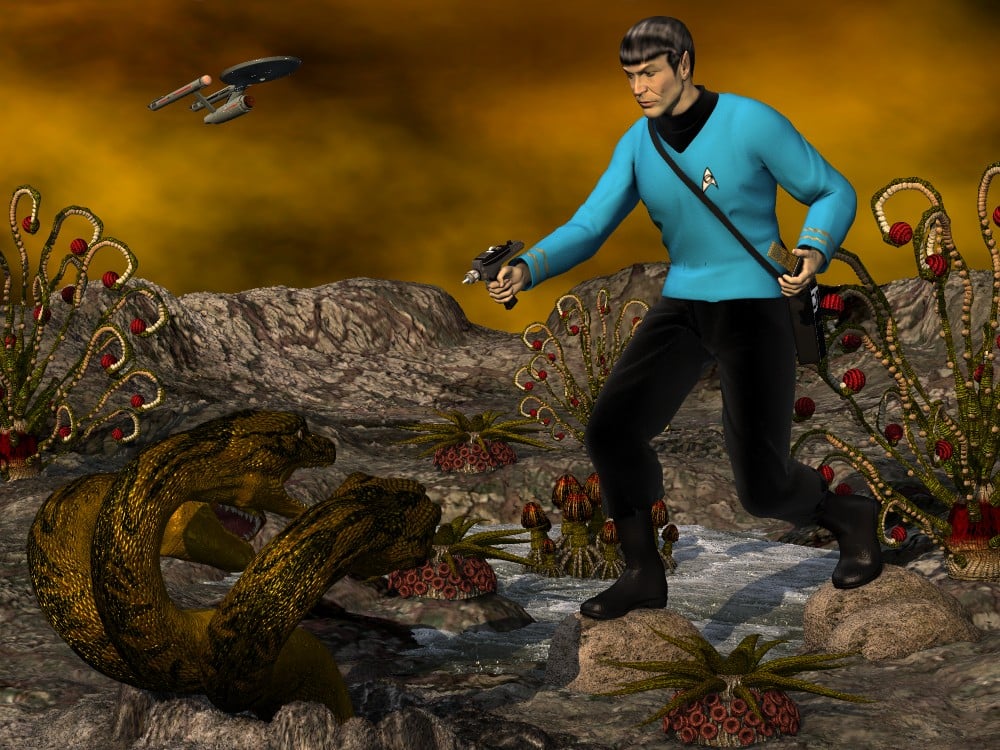
When Leonard Nimoy passed away, I felt motivated to complete a scene that had sat unfinished for quite some time. My goal was to interpret the 1974 model kit (designed by Aurora (known for its various movie monster kits) and distributed by AMT in the US), expanding upon and enhancing the elements of the kit. Yes, the original version of the assembly kit included a 3 headed space hyrda and Mallen Lane's mythological beastie proved the best choice. Funny enough, Lane's Sea Dragon would also have worked as the head and its morphs are nearly identical to those of the Hydra. Because the model kit depicted the monster's heads all springing from a central neck, I had to use three copies anyway, hiding all body parts except for the central neck and head.
Credits
Michael 2 P4...DAZ.com
Face morph...Porthos
Uniform tunic...XCalPro
Uniform pants...XCalPro
Uniform boots...XCalPro
Tricorder...XCalPro
Phaser...MechMaster
Communicator...MattyManx/Sgreco
Spock hair...Mylochka
Dragon's Keep...AntFarm
Twister sky-dome...AntFarm
RDNA XenoFlora...Traveler
Hydra...MallenLane
Enterprise...MattyManx/David Metlesits*** *** ***
Sincerely,
Bill
Amazing work!
How to apply Physics TransformationsIf you're using Rigid-body physics,. You can set the motion type to physics,. run the sim,. then set the motion type to keyframe,. Carrara will translate the position info into keyframes. see below..
NOTE: doesn't work with Soft-body physics (it doesn't transfer the physics mesh deformation).
you can also export the OBJ (with morphs and skinning) to get the OBJ model from a specific frame
In Carrara,.
Open a new scene,. Add an object,. go to the MOTION tab,. and change the motion type , from Keyframe,. To Physics.
the next thing should do,. is to set the physics parameters for that object,. (Mass / Bounce / Friction) see (Effects tab).
you should also set the physics parameters (Effects tab) for any other objects in you're scene which your Physics object could collide with,.
since a rubber ball dropped onto a clay surface, will behave differently to a rubber ball droppped onto a rubber surface,. Both surfaces play a part in the outcome.
once you have an object who's motion is set to physics,. you can only position, and adjust that object, on the first frame of your animation.
Run the physics sim by clicking the icon on the top toolbar.
when it's done,. Select your physics object,. Go to the Motion tab,. Change the Motion method back to Keyframe.
Hope that helps :)
virtual penny 4 yor carrara thoughts ?The image below is a WIP and probably doesn't look that remarkable - but it hides a secret! It is G2F wearing a G3F outfit - not only that but it is the Lulu Outfit for Genesis 3 Females which is only available as Encrypted DAZ Content, and therefore should only work in Daz Studio. Firstly I should say that I have now got the G3F for G2F clone package that I mentioned a few posts ago and for the most part it works well within Daz Studio to fit clothing intended for G3F to G2F. You can then save the DS scene and load it into Carrara directly and you should have your clothed figure there ready to go. There is sometimes a little poke through in Carrara where there wasn't any in DS. Sometimes this is just the effects of the subdivision surfaces and as such, does not show when rendered. Other more serious poke through can be fixed either by editing the mesh with Carrara's tools, or using the Poke-Away2 product.
To get the Lulu outfit across was more involved as by default it does not load into Carrara. What I did was for each item of clothing in the set, Export it from DS as an OBJ file, using the Carrara scaling option. Remember to adjust the Mesh Resolution in DS to Base and set the subdivision to 0, or the meshes are massive!
In Carrara, load the default G2F and apply the Genesis 3 Female shape that is included with the G3F to G2F pack referred to above. Now load each OBJ that you saved, turning off AutoPosition and turning On Disable Auto-Scaling. This means that each will load into the same position and scale as it was saved - and lo and behold, that will exactly match your G2F figure (with G3F shape applied). But of course these are just static objects, and so will not follow any movements or morphs that you apply to your figure.
So what I did was for each item, I used that dynamic clothing plugin. So I could set the pose and character that I wanted (in this case Natasha by Digital Touch) at 1 second, also remembering to remove the G3F morph. The dynamic clothing plugin allows you to attach parts of the clothing mesh to the figure to prevent slippage, so the waist band on the jeans, the shoulders on the tank top and the back of the neck on the cardigan. I ran the simulation to 2 seconds so the changes were made between 0 and 1 sec and any settling allowed in 1 to 2 secs (which also allows a choice of which frame to render).
Incidentally the textures for this set are not stored in the usual place and it took me a while to find them - they are at Documents/Daz3D/Studio/My Daz Connect Library/data/cloud/1_22708.
At last I will be able to use some G3F clothing in my images! Note that the dynamic clothing plugin is not required for the majority of outfits, which will come across just fine as conforming outfits as per my first paragraph. (But having said that, it is hugely useful...!).
Dynamic ClothingThe dynamic result from VWD is a different static object from the original clothe. You can save the scene character pose and object. All my dynamic results are saved in my scenes and of course you can re-open your scene and even start a new simu on the last one (just rename the objet) . There was discussion about a functionnality to use the result object as a morph target of the original one. I didn't follow it because I consider that dynamic simulation is specifiic to the pose, scene so I prefer to make a brand new simu. In VWD there is an automatic save of the clothe parameters you used so it's very efficent to make a new simu without starting from zero.
Remember that you can also change parameters DURING the simu (gravity, wind, vertices parameters,...) . For static simu you are in an "infinite" dynamic simulation so you can adjust your simu until you are happy
Here is my current working scene: conforming Uraalny from Awfulsoul on G3F (not V4). A more complex simu: belt over the dress, hard parts (chains,buckles,...) the character pose,.... but you can see: no polygons deformation for long dress under the breasts, between the legs. Natural folds I couldn't get with the morphtarget inside the clothe... I will perhaps improve by doing local simulation to have a better result. It's the first step of a big project I have.
How did you learn to use VWD? :) I've seen the youtube video of the seller but it was in french?
Michael and Friends Appreciation Association [Lots of images, please.]Here's George in G2M form! I thought about adding a bunch of other young things for him to play pool games with, maybe next time.
So that's George morph transferred to G2M, Bellatrix skin, Anagenessis with a lot of tweaks, Greek Baths, and my WTP Green Sea shader.
And a bottle from the 'Wine Me' product with some tweaks for Iray.
Very well done.
There's just so many layers of wrongness to this image, and the fact that it's so well done just makes it all the more wrong.
Great render, but now I need to go wash out my eyes with soap, or gasoline or something.

 Animation club Week #4 starting, Story Decided . Tango Alpha's Sea Escape story.
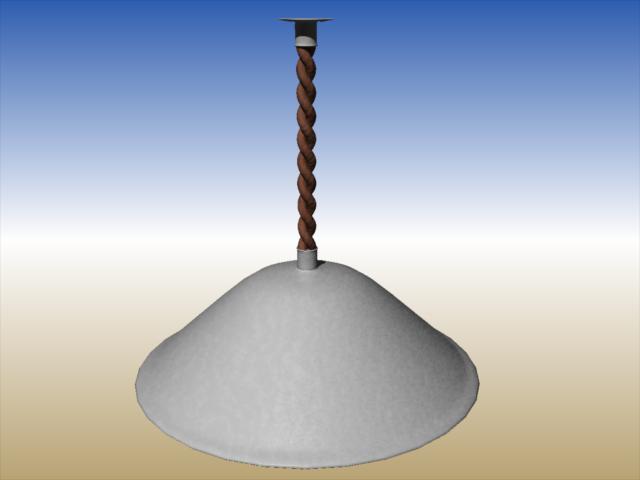
Great work, everyone. Lifesaver looks great. If it is not too late, here is a lamp that can hang from the hallway ceiling. If you want it to sway, I have included bones but have not attached them to the mesh. Shaders are procedural. Hope they transfer.
 Character Creation
Make sure you are sculpting the morph on the base mesh, nbot a pre-morphed mesh. Unexpected final shape is often the result of having another morph set at the tiem of creation - if you know which you can set them on the figure, then use Morph Loader Pro to import the new morph with Reverse Deformaitons set to on.
Need some pointers for exporting FBX with morphs (to UE4)Hey all,
New user here, so figured i might aswell post it here, since (even though a few hours of googling around didnt find it) im pretty sure my question is just a 'new user' type question.
I've made a basic female character in Daz3D, i want to export this to FBX with a few of the character morphs included, but im running into an issue.
My character is a tweaked 'Summer', with Krayon Hair & Female Genitalia (because you know, everything is fair during testing) that im trying to use in Unreal Engine 4.When i export to FBX as is, not changing any of the export settings (besides including some morphs) i get an FBX file that contains multiple figures (ie the body, the genetalia, and the hair) but this doesnt want to import into UE4 (throwing an error about duplicate bone names)
So some googling learned me that if i tick "Merge Clothing Into Figure Skeleton" in the FBX export window of Daz3D i get a single figure skeleton, perfect!, the FBX files i get when using this option do import into UE4, but the morph's on it dont work, and for some reason its showing the included body morphs double, once for the body, and once for the hair. (not sure if this 'doubling' of the morphs is a bug or a feature? either way the fact that neither change the character obviously is an issue)The thing is, if i toss the genitalia and hair away, so theres just 1 figure, and i export that to FBX and import it to UE4, it imports fine, and then the morphs work, so im pretty puzzled as to what settings i need to get the best of both worlds.
So my question is this; how do i best go about this, and/or am i doing something wrong?
I just want to export a character with hair (and later obviously clothes, for now im just testing workflow anyway) and morphs as FBX file, for use in UE4, but so far its getting me duplicate non functional morphs (when i tick "Merge Clothing Into Figure Skeleton" in FBX) or issues importing to UE4 (when i dont tick said option)I dont really have access to programs like 3DsMax or Maya (i mean, if they turn out to really be needed i could get that software but i cant afford that stuff, and i'd rather not pirate if it can be avoided) and Blender doesnt really seem to support FBX morphs, so im kinda limited to going straight from Daz3D to UE4.
My FBX Export Options: http://imgur.com/AtJT9yc (It has 22 morph's set to Export, and a bunch more get baked)
Edit: (Using DAZ Studio 4.9.2.70 Pro, and UE4.14.1)Any input very welcome!
Requesting a new window/control set for "Morphing Modifiers", AKA: Transitions.This type of blending approach would be very useful. I have often wished it were available myself. I agree that it does seem senisble that when saving the blended morph only the final % values for each contributary morph would be saved. Saving the blend values used to create the final blend would be a separate thing, but also useful. Perhaps a new Morph Blend file type would need to be created (actually this could be a simple txt file).
Anyway, a good idea, maybe a PA somewhere with scripting skills couould take this on to make a plugin.
Dynamic ClothingThe dynamic result from VWD is a different static object from the original clothe. You can save the scene character pose and object. All my dynamic results are saved in my scenes and of course you can re-open your scene and even start a new simu on the last one (just rename the objet) . There was discussion about a functionnality to use the result object as a morph target of the original one. I didn't follow it because I consider that dynamic simulation is specifiic to the pose, scene so I prefer to make a brand new simu. In VWD there is an automatic save of the clothe parameters you used so it's very efficent to make a new simu without starting from zero.
Remember that you can also change parameters DURING the simu (gravity, wind, vertices parameters,...) . For static simu you are in an "infinite" dynamic simulation so you can adjust your simu until you are happy
Here is my current working scene: conforming Uraalny from Awfulsoul on G3F (not V4). A more complex simu: belt over the dress, hard parts (chains,buckles,...) the character pose,.... but you can see: no polygons deformation for long dress under the breasts, between the legs. Natural folds I couldn't get with the morphtarget inside the clothe... I will perhaps improve by doing local simulation to have a better result. It's the first step of a big project I have.
Looking good.
You can also tweak the indifidual frames of an animation before returning it to Studio; you can return a static pose, or more than one out of a dynamic series, and then return the series. Just realise that doing this can mess up the animation.
But copying and pasting in Studio allows for multiple copies of the item with different poses embeded in them.
Victoria 4 is 10; Still a Looker...I just realized that Victoria 4, arguably the most widely used Poser figure ever, was relased ten years ago this past week...
https://www.thefreelibrary.com/DAZ+3D+Launches+Victoria+4.0.-a0155882831Thanks to weightmapping and Snarlygribley's EZSkin, she still works well.
For those who don't yet have the weightmapped version, I have the Poser Place open-source weightmapped V4 (a Python script to add a new WM rig to V4) and the Outfitter Clothing utility to transfer the weight maps to clothing on my Google Drive...
https://drive.google.com/drive/folders/0B9_I3V6UTuuXcGlDMkdYVVhtd3c
Snarly's EzSkin 3 for Poser 11 is here, which will add sub-surface scattering to any texture for either Firefly or Superfly...
http://snarlygribbly.org/snarlyspace/ezskin.html
EZSkin2 for Poser 9 and 10 here...
http://snarlygribbly.org/snarlyspace/legacy/ezskin2.html
Dynamic ClothingThe dynamic result from VWD is a different static object from the original clothe. You can save the scene character pose and object. All my dynamic results are saved in my scenes and of course you can re-open your scene and even start a new simu on the last one (just rename the objet) . There was discussion about a functionnality to use the result object as a morph target of the original one. I didn't follow it because I consider that dynamic simulation is specifiic to the pose, scene so I prefer to make a brand new simu. In VWD there is an automatic save of the clothe parameters you used so it's very efficent to make a new simu without starting from zero.
Remember that you can also change parameters DURING the simu (gravity, wind, vertices parameters,...) . For static simu you are in an "infinite" dynamic simulation so you can adjust your simu until you are happy
Here is my current working scene: conforming Uraalny from Awfulsoul on G3F (not V4). A more complex simu: belt over the dress, hard parts (chains,buckles,...) the character pose,.... but you can see: no polygons deformation for long dress under the breasts, between the legs. Natural folds I couldn't get with the morphtarget inside the clothe... I will perhaps improve by doing local simulation to have a better result. It's the first step of a big project I have.
Dynamic ClothingVWD creates a prop from the draped object and assigns morphs to the drape according to the frame in the sequence (that is, a morph for each frame in the animation that you simulated, and one morph for static drapes). Currently, there's no option to transfer those morphs to the original dress/hair/etc, although suppposedly it's one of the things being worked on for the incoming upgrade, but there's nothing stopping you from saving the draped prop.
Hand morphs for Genesis 3 MalesIThe HFS fantasy Shapes pack for genesis 3 males has a good hand morph called
- HFS Hands Knobby
I think it adds a bit of something to genesis 3 male hands.
Anthro modelsok can stuff for victoria 4 like this http://www.daz3d.com/melody-2-0 be made to fit the newer models
Yes. I've used it without mods on G1 and G2F as well as G2M. The head isn't a morph of the figure's head, it's a prop that fits over the figures head with it's own morphs for expressions. I would assume it will work on G3 as well, although I haven't tried it.
On Genesis 1:
PMD files and morph injectionsI have an old prop that was made for Poser 7. It uses .PMD and .pp2 files. The prop loads into DAZ fine, however, none of the morphs work. Reading on the forums I found, 'by default PMD injections are broken in DAZ'. Does that mean they'll never work or rather there is a way in the settings to on usage of pmd morph injections or is there a way to convert the file to something daz can or will read? I saw a link to a program in another thread here, however, the link was dead.
Anthro modelsProbably. The GenX2 products are supposed to transfer morphs from one generation to the next. I have not tried them yet, they are in my wishlist.
http://www.daz3d.com/genesis-generation-x2
http://www.daz3d.com/genx2-addon-for-genesis-2
http://www.daz3d.com/genx2-addon-for-genesis-3
You would also need another utility to transfer the textures to Genesis 3. It might be cheaper and easier to just use Genesis 1 or V4/M4, depending on what clothes and hair you already have for them.
GenX questionI'm not a DS user. I'm using GenX to transfer morphs to the Genesis figures to use them in Poser. I had already transferred a lot of morphs but I decided to delete them all and start over because I get tired of picking through each one and turning off limits in the parameter settings each time I load the figure, because my method of character creation is to turn every dial in both directions and see what it does. The manual seems to be implying that there is a way to transfer them with limits turned off, it has an instruction for it, just not one that I understand. I know how to turn off the limits for an individual morph, I want to make them automatically load without limits.
Character CreationHello,
Thank you for showing intrest in my discussion. I have been kind of playing around with 3d modeling and artwork for a few years. At this point I wish to attempt to move up to generating some income from my work and I wish to start with creating some Geness 3 content and package products to sell. Pose sets, props and scenes are not a promblem for me. I may have a few discussions I wish to touch on at a later time. Character creation is a bit more complicated.
I am in the posess of creating two G3 female characters. I still have some morph work to do through Blender. Mainly I am jumping into my texting work now. As far as my Morphing work I have a few questions I wish to toss out before I jump back to my morph work.
Question 1
When I bring in 3 party G3 characters into Daz Studio, the body morphs do not match the presentation images presented for the products. They seem it be closer to match the base Geness 3 character. In a few of the tutorials I came accross they instructed to closely match the base G3 figure. In my morph work I bing in with morph loader my figures are skinnier then the base figure. I can scale to match the base figure to height, however the basic body shape dose not match width and depth.
Before I jump back into my morph work, do I need to alter my body shape more to match the base figure.
Thanks for your responce.
Rick Elliott
SE3D
GenX questionHow to tell the transferred morphs not to respect limits? The user manual says to deselect "Respect" in something called "Value Range" in the "Morph Properties Dialog." I can't find any of those things.
Daz 3D is part of

Connect
DAZ Productions, Inc.
7533 S Center View Ct #4664
West Jordan, UT 84084Licensing Agreement | Terms of Service | Privacy Policy | EULA
© 2026 Daz Productions Inc. All Rights Reserved.