-
Legacy UVs for Genesis 3 [Commercial]
Wow, this was a treat for sure!
Does this work well enough with any of the Stephanie 3 or Laura 3 textures? How about Aiko 3? Are you doing anything for M3/D3? :)If you look at the thread in Commons where this product was announced, I posted a pic of Aiko 3's texture and morph moved to G3F. All the other Generation 3 textures (ie M3, H3 etc) should work as well, as they all use the same UV. I have attached the same scene below as I did in the other thread, only with the IRay shader tweaked a fair bit to improve them (the originals rendered too bright if you just use the default settings).
Product problemFirst question, Have you actually applied any of the morph dials?
Parameters tab>Pose controls>Head>Expressions>Tears HD
you should see something when you change the dial settings in the viewport.
Be sure to use the correct version of the material presets, 3delight for that renderer, iray for iray.
That appears to be all that those presets are is shader presets.
Legacy UVs for Genesis 3 [Commercial]Apologies do not not wish to "hijack" thread, but this product brought up the subject.
Is there any way to adapt the actual head morph for the v3 character to fit genesis 3.
If purchasing something else would do it...no problem.
Thank you
I did as Caymen Studios describes above, ie I used Gen X2 and the relevant add on packs to move Shahara's morph to G3F. She is not identical to the V3 version, but looks similar, and naturally bends far better on G3F than on V3.
Darwins' SchtuffLove the expression! Is that morph dialed, from a pack, or a DarwinsMishap special?
Generation 3 Aiko and Hiro Appreciation ThreadSomething a bit different from me, a "slice of life" moment featuring a young, aspiring filmmaker focused upon creating a stop motion sequence in his family's basement.
Given the theme of this thread, it's obvious the base figure is Hiro 3. I applied the "Liam" morph from Thorne & Sarsa and tweaked it a bit more with the Hitoro morphs by Beth Capsces. I thought giving him a traditionally parted haircut and a plaid, button down, short sleeved shirt would suggest this dates from a bygone era, probably the 1960s.
I had this composition in mind for some time, but the "linchpin" element I needed, an 8mm movie camera once available at Rendo' had been pulled due to dwindling sales. But it was "resurrected" last week and upon learning that, I bought it immediately. Afterwards, everything just kinda' fell into place. What I didn't already have on hand, like a tripod, basement set, a spring balanced lamp and a sawhorse table, I found from free.
Yeah, Theropod dinosaurs shouldn't drag their tails, but given the era I'm depicting in this scene, it was still the popular belief T-Rex stomped around like Godzilla. Besides, there's a flying saucer in the shot; I don't think the kid is going for scientific accuracy. ;-)
Hmm, I wonder if we should call the "director" Stevie or George? ;-)
Sincerely,
Bill
I love that! That's a very cool use of products there! :)
Legacy UVs for Genesis 3 [Commercial]Apologies do not not wish to "hijack" thread, but this product brought up the subject.
Is there any way to adapt the actual head morph for the v3 character to fit genesis 3.
If purchasing something else would do it...no problem.
Thank you
You can use Dimension3D's Genesis Generation X2. But bear in mind:
a) You will need an additional 3 add-ons: GenX2 AddOn for Genesis 2, GenX2 AddOn for Genesis 3, and (to be safe) GenX AddOn Gen3 Bundle;
b) Dimension3D's store is not currently on Sale; EDIT: You can get 60% off Genesis Generation X2 (2014 bestseller) when bought with a new release.
c) The morph transfers from Generation 3 to Genesis 3, in my limited experience, are of variable fidelity. This is not a fault of Dimension3D's product, but a limitation of the underlying technology and the fact that Victoria 3, for example, has 72,000 vertices and G3F has 17,000. You may be able to refine or amend any aberrations using some custom morphs, or even a modeller.
I am no expert in any of this, but I believe you can use the Transfer Utlility alone to transfer the morphs, though it is a bit of a procedure. There are tutorials about, if you can find them!
Legacy UVs for Genesis 3 [Commercial]Apologies do not not wish to "hijack" thread, but this product brought up the subject.
Is there any way to adapt the actual head morph for the v3 character to fit genesis 3.
If purchasing something else would do it...no problem.
Thank you
"tranfering head morphs"Embarasssing quesiton perhaps.
Have been creating my own morphs for awhile in Zbrush.
Have purchased all sorts of products that adjust head, etc.
But.
Years ago I created a head morph for Victoria 4.
What I wish to know is if my morph ( or for that matter any head morph) created for V4/M4 can be applied to either
genesis 2 or genesis 3.
If there is a product that will do this, no problem as to expense etc.
Thank you
Transferring DSHi all.
I am getting a new laptop in a ew days and would like to find a way to transfer my DAZ content over from my present laptop to my new one.
Here is what I am thinking: I would download and install the latest DS to my new laptop and then use my USB file transfer cable to move my Scenes, My DAZ3D Library and Render Library over, overwriting the other folders of that name.
Will this work? Or, will it create any unforseen problems?
And suggestions would be greatly appreciated, or even simply pointing me in the right direction to find the solution.
Thanks in advance. ;-)
Help ID'ing a Genesis 3 Male promo characterI dunno.. quite the hotty though. Looks young, maybe based on Jaden or The Guy?
Indeed the hotty! I thought the texture may be FWSA Ipo, but not so sure on the morph!
Genesis: Olimpia, Gia, Mei Lin, Ninive... I can't understand!!Hi there!
I was thinking Mei Lin, Ninive, etc where characters for Genesis 3 females, but i find in the shop characters for Ninive, or Gia, or Mei Lin.
So, i am wondering what's the difference between a Character and these presets. Are morph packs? If so, why are so many? I remember V4 was capable to get morphed without so many morhp packs.
I hope you can understand my poor english.Giving Credit QuestionFor myself, I try to include credits and insight into my creation process whenever possible. I'm certain this would be different if I was a professional artist where deadlines were involved or where I was promoting some product with the art. In my particular case, the artistic journey is a lot more about learning techniques, practicing, and sharing. I also feel a great deal of gratitude towards the CG artists who create this fantastic content. Yes, I paid for the license to use it freely and I don't need to credit the vendor. But if my mention of their products can help out a fellow artist and drive a little bit of sales towards the asset creator, I'm quite happy to do it.
A word of caution: if you have any intention of ever earning money from your hobby, carefully read any license agreements before you download free content and add it into your runtime. At least half of the freebies I've encountered are not licensed for commercial use. Of those that do, many stipulate that you must provide credit. Once content ends up in your library, it can be very difficult to keep track of that license. My advice would be to only load content which contains a very clear license and permits unrestricted or commercial use without credit.
And for those of you which do credit your content, you may find this trick helpful:
As I build my scene, I now rename each object to easily identify where it originated. Not only does this help when I want to document everything afterwards, but it is also very helpful if I want to go back and change a chracter's makeup, switch a texture, or find the foot pose for a set of shoes after I change a pose. You can also track intangible things like shaders or poses by adding a null object into the scene if you like.
For example, say I use the jewlery from Pretty 3D's Little Secret II outfit set for Genesis 3 female. I would rename the necklace to "Necklace - LittleSecretII (G3F) - P3D". For characters, I use a shorthand to indicate (B)ody and (F)ace morphs as well as (S)kin and (E)ye textures. For example, "ValerieSnow (G3F) B:Brooke,E:Finley, F:Brooke35,Finley35,Kimmy25,S:Finley" would translate to [my name for the character] (base figure) Brooke's body morph at 100%, Eyes from Finley, Face dials for Brooke, Finley, and Kimmy set to the corresponding numbers, and finally Finley's skin texture. It has saved me a ton of time both in workflow and documentation. Even better, I can come back to a saved scene months from now and easily find the associated files if I want to change something.
Need some pointers for exporting FBX with morphs (to UE4)Transferring figures intact, with all their functioning attributes, from one program to another ia always fraught with difficulties, and more often than not there are fundamental incompatibilities within those programs themselves that cannot be resolved. Even if both programs can import/export a common format, such as FBX, that does not necessarily mean that everything will successfully transfer. A good case in point is Poser and DAZ Studio. Although the two programs can and will share many formats, the most recent versions of each use some very different technologies. Things that do not move well between those two programs include rigging and textures, for example. There may be workarounds available, but only because the two programs and content are widely used by equivalent communities. That is not necessarily the case with programs such as UE4. That, coupled with the fact that DAZ models are not specifically designed to be compatible with, or at least optimized for, game engines. Your best bet is to look into the products available from Morph3D https://www.morph3d.com/ , a DAZ subsidiary, that are designed for use with popular game engines. Otherwise, you are likely to spend a lot of time and effort trying to put a square peg into a round hole. Your call.
Animation club Week #4 starting, Story Decided . Tango Alpha's Sea Escape story.The lifesaver will work great . Thanks.
Mike you always amaze me.
I went back and looked at the list of things needed. If nobody has taken it I can see what I can come up with for a life vest tomorrow. Today I went another direction and came up with a life bouy... don't know if you can use it or not. I'm not happy with it as is, it needs to be entirely redesigned, but it should work ok. Let me know if you want to use it and I'll add a few morphs for the rope.
The light looks great Diomede. thanks..
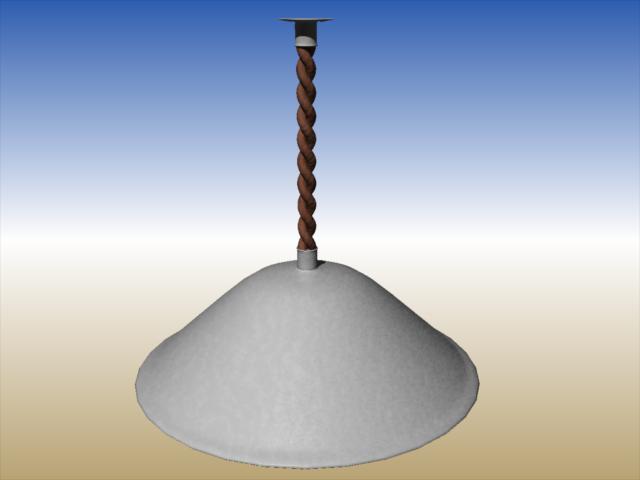
Great work, everyone. Lifesaver looks great. If it is not too late, here is a lamp that can hang from the hallway ceiling. If you want it to sway, I have included bones but have not attached them to the mesh. Shaders are procedural. Hope they transfer.
If anyone wants to model a ketchup bottle and a mustard bottle that would be great.
Dynamic ClothingThe dynamic result from VWD is a different static object from the original clothe. You can save the scene character pose and object. All my dynamic results are saved in my scenes and of course you can re-open your scene and even start a new simu on the last one (just rename the objet) . There was discussion about a functionnality to use the result object as a morph target of the original one. I didn't follow it because I consider that dynamic simulation is specifiic to the pose, scene so I prefer to make a brand new simu. In VWD there is an automatic save of the clothe parameters you used so it's very efficent to make a new simu without starting from zero.
Remember that you can also change parameters DURING the simu (gravity, wind, vertices parameters,...) . For static simu you are in an "infinite" dynamic simulation so you can adjust your simu until you are happy
Here is my current working scene: conforming Uraalny from Awfulsoul on G3F (not V4). A more complex simu: belt over the dress, hard parts (chains,buckles,...) the character pose,.... but you can see: no polygons deformation for long dress under the breasts, between the legs. Natural folds I couldn't get with the morphtarget inside the clothe... I will perhaps improve by doing local simulation to have a better result. It's the first step of a big project I have.
How did you learn to use VWD? :) I've seen the youtube video of the seller but it was in french?
They are actually helpful, once you've familiarised yourself with the ui layout.
Take a look at the tutorials I did; I can't attest to their quality, but you may find them useful. (sorry about all the 'erms' in them though.
 )PMD files and morph injections
Poser Quick and Dirty:
Edit > General Preferences > Misc. > Turn on "Use External Binary Morph Targets"
Load your prop
Check to see if the morphs work
Turn off "Use External Binary Morph Targets"
Save a new copy.
That is easy...need to remember it.
PMD files and morph injectionsPoser Quick and Dirty:
Edit > General Preferences > Misc. > Turn on "Use External Binary Morph Targets"
Load your prop
Check to see if the morphs work
Turn off "Use External Binary Morph Targets"
Save a new copy.
Dynamic ClothingVWD creates a prop from the draped object and assigns morphs to the drape according to the frame in the sequence (that is, a morph for each frame in the animation that you simulated, and one morph for static drapes). Currently, there's no option to transfer those morphs to the original dress/hair/etc, although suppposedly it's one of the things being worked on for the incoming upgrade, but there's nothing stopping you from saving the draped prop.
That's good news. If I can save out as morphs for the original garment then it will be a huge plus from my point of view.
Dynamic ClothingThe dynamic result from VWD is a different static object from the original clothe. You can save the scene character pose and object. All my dynamic results are saved in my scenes and of course you can re-open your scene and even start a new simu on the last one (just rename the objet) . There was discussion about a functionnality to use the result object as a morph target of the original one. I didn't follow it because I consider that dynamic simulation is specifiic to the pose, scene so I prefer to make a brand new simu. In VWD there is an automatic save of the clothe parameters you used so it's very efficent to make a new simu without starting from zero.
Remember that you can also change parameters DURING the simu (gravity, wind, vertices parameters,...) . For static simu you are in an "infinite" dynamic simulation so you can adjust your simu until you are happy
Here is my current working scene: conforming Uraalny from Awfulsoul on G3F (not V4). A more complex simu: belt over the dress, hard parts (chains,buckles,...) the character pose,.... but you can see: no polygons deformation for long dress under the breasts, between the legs. Natural folds I couldn't get with the morphtarget inside the clothe... I will perhaps improve by doing local simulation to have a better result. It's the first step of a big project I have.
How did you learn to use VWD? :) I've seen the youtube video of the seller but it was in french?
As usual : manual (there are tutorials at the end), trials and errors, videos even in foreign language (stop, rewind,...), there are also videos made by biscuit or writer-block in english at the rendero dedicated forum and the creator is very helpful. Start with simple clothe, simple pose,... and after more complex clothes or poses.
I would say: there is a learning curve but the results are there (at least for me!). Just for the fun:
Dynamic ClothingThe dynamic result from VWD is a different static object from the original clothe. You can save the scene character pose and object. All my dynamic results are saved in my scenes and of course you can re-open your scene and even start a new simu on the last one (just rename the objet) . There was discussion about a functionnality to use the result object as a morph target of the original one. I didn't follow it because I consider that dynamic simulation is specifiic to the pose, scene so I prefer to make a brand new simu. In VWD there is an automatic save of the clothe parameters you used so it's very efficent to make a new simu without starting from zero.
Remember that you can also change parameters DURING the simu (gravity, wind, vertices parameters,...) . For static simu you are in an "infinite" dynamic simulation so you can adjust your simu until you are happy
Here is my current working scene: conforming Uraalny from Awfulsoul on G3F (not V4). A more complex simu: belt over the dress, hard parts (chains,buckles,...) the character pose,.... but you can see: no polygons deformation for long dress under the breasts, between the legs. Natural folds I couldn't get with the morphtarget inside the clothe... I will perhaps improve by doing local simulation to have a better result. It's the first step of a big project I have.
How did you learn to use VWD? :) I've seen the youtube video of the seller but it was in french?
You can find good tutorials from biscuits over at renderosity in her freestuff.
Daz 3D is part of

Connect
DAZ Productions, Inc.
7533 S Center View Ct #4664
West Jordan, UT 84084Licensing Agreement | Terms of Service | Privacy Policy | EULA
© 2026 Daz Productions Inc. All Rights Reserved.