-
Novica & Forum Members Tips & Product Reviews Pt 7
Is that affecting both the Character preset and setting the morph on a regular G3M manually?
BOTH. the character loads with the problems and the problems occur when you dial in the morphs manually.
GenX questionBumping this up to indicate that this is still a question that I'm hoping someone can answer.
To rephrase:
I still cannot find what is being referred to in the user guide. I found a way to open a dialog that looks like it is supposed to be able to turn off the limits (since it explicitly offers that option) but it does not cause any change to occur since it does not save the changes that are made to it. It's possible that I am missing something since I don't really know my way around the interface.
Various things offer the hope that it is possible to transfer morphs without forced limits, but I still have not figured out how. Does anyone know? Thanks.
Saving Custom Body/HeadThe simplest option is to save Shaping presets, using the options dialogue to deslect the head shaping morphs or body shapping morphs to make the body and head presets. An alternative is to create a pair of master sliders that will turn on the individual morphs with a single switch - you can do that by:
- right-click on the Parameters pane and, if it isn't already checked, click Edit Mode
- right-click the parameters pane again and select Create New Property - give it a name, from which the label will initally be derived (e.g. CtrlSoAndSoBody - Ctrl because it is a cotnroller, not a true morph) and adjust limits if desired (you might want the minimum to be 0 rather than -1). Repeat for the head morph.
- with your morphs applied, right-click on the new property and select ERC Freeze. In the bottom panel you will see a list of morphs - uncheck anything you don't want included (the head morph for the body or vice versa, plus anything else that was non-zero), uncheck the restore options as you still have the other ccontroller to make, and click Accept to create the links between your property and the new shaping.
- Repeat for the head morph - right-click on its slider, ERC Freeze, uncheck the things you don't want in the head control.
- Now restore or zero the figure shape and make sure that the new controls work as desired - if so you can save a scene/sceen subset, save a character preset, or if you want the shape geenrally avaialble go to File>Save as>Support Assets>Morph Asset and save both new controls.
Mr. Bear and Son for the Genesis 3 Male(s) (commercial)Cub bear could become a Paddington.
Out of interest, is this an all-or-nothing character, or can we partially morph them in?
Happy Holidays PA Gifts!This is an excellent tutorial. One thing that wasn't clear to me in the tutorial was the need to set the dress to base resolution.
Ah.. sorry I didn't add that step, it does it automatically when you bridge to Hexagon so I didn't even think about it.
Is hoping it is nothing that will break stuff. Some of y'all do this for a living and can do it blindfolded... Others of us, it takes some time to figure out where the buttons switches and leaves are for that, lol
Nope.. since you don't have to save the clothing item again the worst you can do it get one fit morph that's not right (and you can delete it from the data folder and start over if you need to).
Happy Holidays PA Gifts!Now.. how I did it..
-Dialed up Anna, went to currently used and zeroed out everything else it added so it was just "Anna" active (including setting scale back to 100%)
-Selected the dress, turned collision iterations to 0 and smoothing iterations to 50 (I wasn't kidding when I said you could really crank it) and zeroed out all the morphs it loads with.
-Went to corner pull-down menu on the scene tab -> Edit -> Geometry -> Bake Smoothed Morphs, made sure Anna was the only thing checkmarked.
-Set smoothing iterations back to 3 and collision iterations back to 2.
-Dialed breast span medium fix to the negative until the little bit of left over breast bubble was gone (very smooth hump at that point)
(if you were just doing it for one render you'd be done at this point, just dial the style morphs for the wrinkles back up)
-Bridged to Hexagon (then went back to DS and zeroed out the breast span adjustment)
-Ran the smoothing brush over her bum (purely perfectionistic step, not entirely needed)
-Sent the dress back to DS, put in "Anna" and checkmarked overwrite existing. (You'd need to find out the internal name for the morph you're working with, open the properties of the morph to see "name", not "label", that one won't work, for Anna they are the same but they're usually not)
-With Dress selected, file -> save as -> support asset -> morph asset.. made sure Anna was the only thing checkmarked.
Tah dah! No need to resave the dress itself, any time you load it after that it will have the new morph in it.
Note - if you're doing it for a large breasted character you'd likely need to add some of the adjustment morphs for breasts to fix poke-through, zeroing out the collision itterations lets you see where the problem areas are.. with Anna there weren't any thankfully.
I've been meaning to go back and do a couple of things to her...
Is hoping it is nothing that will break stuff. Some of y'all do this for a living and can do it blindfolded... Others of us, it takes some time to figure out where the buttons switches and leaves are for that, lol
And the reason the Label and Name are the same...I hate having to hunt down the 'name', so I try to keep them the same, to preserve my sanity. Other mophs I've made but haven't posted yet will have the same setup of label/name being the same. It does make making custom fits and such much easier.
thank you.
I've been trying to think of something worthy of trying that on, and everything that I can think of that needs it has more extreme issues (biting tong). All I will say is, thank you Fisty for outfits that 'Just Work'.
Happy Holidays PA Gifts!Now.. how I did it..
-Dialed up Anna, went to currently used and zeroed out everything else it added so it was just "Anna" active (including setting scale back to 100%)
-Selected the dress, turned collision iterations to 0 and smoothing iterations to 50 (I wasn't kidding when I said you could really crank it) and zeroed out all the morphs it loads with.
-Went to corner pull-down menu on the scene tab -> Edit -> Geometry -> Bake Smoothed Morphs, made sure Anna was the only thing checkmarked.
-Set smoothing iterations back to 3 and collision iterations back to 2.
-Dialed breast span medium fix to the negative until the little bit of left over breast bubble was gone (very smooth hump at that point)
(if you were just doing it for one render you'd be done at this point, just dial the style morphs for the wrinkles back up)
-Bridged to Hexagon (then went back to DS and zeroed out the breast span adjustment)
-Ran the smoothing brush over her bum (purely perfectionistic step, not entirely needed)
-Sent the dress back to DS, put in "Anna" and checkmarked overwrite existing. (You'd need to find out the internal name for the morph you're working with, open the properties of the morph to see "name", not "label", that one won't work, for Anna they are the same but they're usually not)
-With Dress selected, file -> save as -> support asset -> morph asset.. made sure Anna was the only thing checkmarked.
Tah dah! No need to resave the dress itself, any time you load it after that it will have the new morph in it.
Note - if you're doing it for a large breasted character you'd likely need to add some of the adjustment morphs for breasts to fix poke-through, zeroing out the collision itterations lets you see where the problem areas are.. with Anna there weren't any thankfully.
I've been meaning to go back and do a couple of things to her...
And the reason the Label and Name are the same...I hate having to hunt down the 'name', so I try to keep them the same, to preserve my sanity. Other mophs I've made but haven't posted yet will have the same setup of label/name being the same. It does make making custom fits and such much easier.
2 things...There are a couple of things I want to know about...
- why wasn't the DSON Importer not intended for Poser 10? I was looking forward to start working with later model figures (perhaps Poser 11?).
- (check the Art Studio area for 'genderless model') are the male morph dials available with later female models (Genesis)? That option is proving useful, as I'm workiing on creating androgynous beings with the V4 figure, along with The Girl 4 and Aiko 4.
Happy Holidays PA Gifts!I practiced with Fisty's tutorial to make a FBM for Tisha. Here is the result. The dress shader is from DG Iray Holiday Fabrics.
Perfect!

This is an excellent tutorial. One thing that wasn't clear to me in the tutorial was the need to set the dress to base resolution. I forgot to do that, and when I imported my Blender-tweaked obj with Morph Loader Pro, I kept getting an error about geometry not matching. Changing the dress to base resolution, subD 0, and redoing the morph in Blender fixed the problem.
Novica & Forum Members Tips & Product Reviews Pt 7I picked up Parker today! Can't wait to try him.
Be warned if you purchase the hunger... The monster is totally broken in the arms and hands. I'm really suprised this one made it through testing like this. A bug report was submitted.
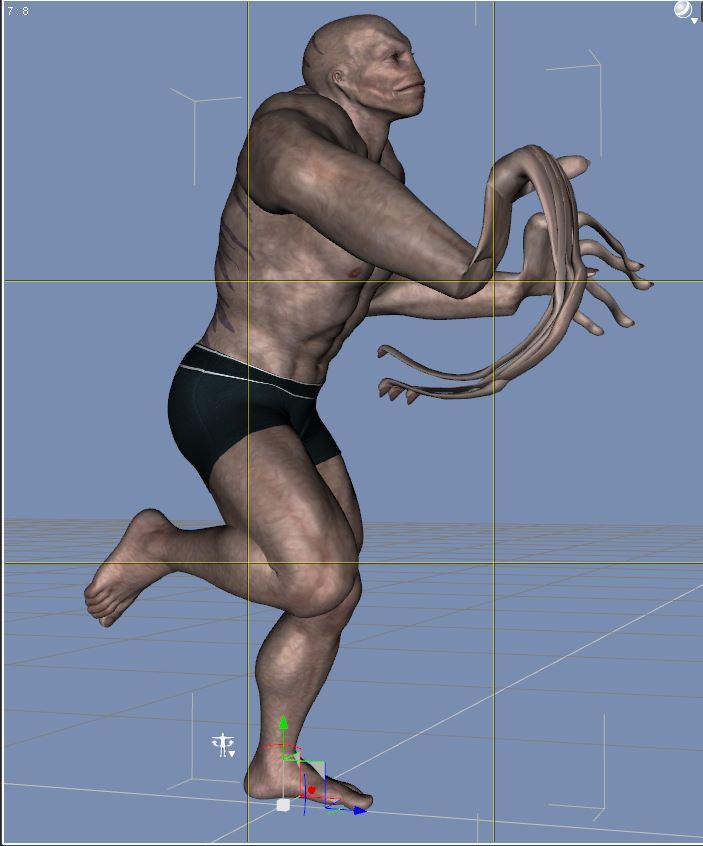
Is that affecting both the Character preset and setting the morph on a regular G3M manually?
Mystique features for genesis 3 female and maleMystique features would be:
1— long neck 'Giraffe' morph with basic afro jewelry
2—supernatural third eye-bindi with close and open pose, the bindi eye shouldn't be a right or left eye like like old models, a right third eye would be simmetrical and have no lachrimal or have two.
3—Morph to clonate head and neck to make a genesis 3 a bicephale character
4—have up to 6 arms.
5—blood stigmas resembling a supernatural suffering like Jesuchrist. (front head, hands, and hearth)
Is it possible to animate a deformer?You can convert the d-form into a morph. You apply the d-form and shape to your liking. Then you open the D-Form tab and - with the mesh selected, not the d-form - select spawn morph. The morph is now in the mesh but the d-form is still there. Dial up the morph, delete the d-form and you're done.
I will try that. Thank you very much!
Is it possible to animate a deformer?You can convert the d-form into a morph. You apply the d-form and shape to your liking. Then you open the D-Form tab and - with the mesh selected, not the d-form - select spawn morph. The morph is now in the mesh but the d-form is still there. Dial up the morph, delete the d-form and you're done.
Body mesurements and morphsHi Richard,
I was wondering, when your team developed measure metrics, were there specific morphs/transforms used for specific nodes? I would like to use all of the nodes to create G3F characters but I am oblivious as to which nodes goes with which morph/transform... Could you clear that up for me please?
[SOLVED] Applying another skin color on a body areaHello everyone
I'm not using much of DAZ3D, I only use it to make figures; I choose my figure, put on a hair cut, hair color, some little jewels sometimes, a pose and that's all I need (attached a screenshot of the 3D pattern making program I'm importing my figures, then I dress them with clothes I make).
I've no problem seing the nipples, so I let them free, but the crotch is quite disturbing lol (doll/alien) so I hide it with a pantie.
The problem I have is that the pantie from DAZ create layering issue with my program (See the attached picture below). Even if the garment is not super tight, I've risk that the pantie come through the fabric.
So I'm wandering, Is there a way to apply a color (ex black) directly on the figure's crotch area ? So that It will look like a pantie but without layering ?
I'm using the Genesis 3 female the more often.
Thank you in advance for your help !
Have a nice day/evening,
Léa
Hi Lea,
This is poke through, and it's the bane of any 3d program, daz or otherwise. There are a few ways around it however!
1. Hide the underwear. If your garments that are covering the underwear dont use any sort of transparency, you wont see the underwear anyway.
2. Corrective morphs. Most clothing comes with corrective morphs in the parameters panel to adjust clothing and fix poke-through. The dress you have may have an adjustment morph for the hip area to cover the poke through, so take a look.
3. Mesh smoothing. Once again in the parameters panel you will probably find mesh-smoothing which is a collision detection method used to stop poke-through. If you set the collision item to your underwear, it will collide with it. This is really not the most optimal way of dealing with this issue however, since mesh-smoothing is far better utilized for the figure itself.
I think you're using G3f which doesnt have a hip material zone, which means the best you could do is change the diffuse value of the torso to black. If you were using one of the earlier genesis figures, they do have a hip zone that you could change to black if needs be. You would do this under the surfaces tab. Hope this helps!
KA
Using external HD for Daz content?There is one caveat with using an external over a internal drive and that is transfer speed.. While Sata 3 has a top theoretical speed of 6Gbps and most HDD's do, do that speed the most interesting it that USB 3.0 does have a theoretical top speed of 5Gbps you will rarely if at all get anywhere near that high and in most cases you might get 480Mbps..
The thing is that external USB drives are mainly designed for the purposes of backing up data and not really for constant file transfers, if you want an external for the purposes that you are wanting a better setup might be a NAS = Network Attached Storage system.. Or if you have a spare older computer that you don't use anymore you can turn that into a NAS Box..
It depends; i have an external enclosure that I use with SSD, speed wise it's very fast; I don't use it for Daz, I use an interal SSD for my documents - I prefer a silent computer and don't mind the extra cost involved; with the exception of renders, a small amount of noise then from the fans on the graphics card(s).
Body mesurements and morphsYou need to use the Figure Metrics part of the pack - in People>Genesis # Male>Measure Metrics you will find a pose preset and wearables preset to set the figure up, then in Scripts>Utilities you will find the Figure Metrics script which opens a dialogue showing all the measurements. If an item has a check box you can check it and enter a desired value, if not you need to use the Advanced tab to assign a property to the measurement (a morph or transform that will chnage the emasuement) to get a check box. Once you have your properties checked you can click the Accept button and the script will try to adjust the selected properties to get the desired values.
Who said Blender was hard?Hi all,, a few days ago,, I happend to find one new blender plug-in for daz figures when I struglle with daz bvh for genesis3
DAZ importer by (Thomas Larsson )
http://diffeomorphic.blogspot.jp/2016/08/daz-importer.html
I seldome see user who guide about this plug in,, then I have tested and play, almost 3 days , now I believe this plug in have many future, which we could not do before. and many possiblilties,, (may need more daz user support to up-date,, I believe,).
Then,, I hope to spread this plug in for more blender users and we test and offer feed back for Thomas Larsson (who have made plug ins for Make human, nowhe seems to make plug in for daz figures,, as same as famous other blender plugins ( mcjtelblender, milghost importer,, and Khalibloo panel)
this plug in have alerady some real unique function for daz genesis figures.
1. it can import daz figures(genesis 1 to 3) with clothings, from collada (obj) and duf scene file. , after you set ds contents data path in blender tool panel.
2 the generated bones arrange is realy clean.. then you can easy modify it and you can convert rig for blender rigify, or makehuman rig too.
3 it can import animation as duf pose files.. that means,, if you make animation on daz timeline, then save it as new animation.dsf,, you can import animation (pose) and auto set keys , on blender timeline,,
4 it can import some base morph and controoler from data,,dsf files ,, in my test, it somehow remain problem,, but at least you can import moprh from dsf file.
anyway,, if many user know this plug in,, I believe yours offer feed back to the vendor... it is actually killer plug in for daz genesis3 user in blender, I beleive,
I planed to make individual topic,, but I do not know which forum is besto to announce it,, then anyway just hope you download it,, and plya it.
I may try to reply if,, someone find difficulity to usage,, (hope if someone make new topic aobut this plug in, in bledner forum, or daz forum)
in my pic,, it show I import animation (which conferted from genesis2 to genesis3 by Zaz777 script,) as duf pose files.
then merge some rigs (which I added hair tail bones) by this plug in. (one click merge) . and I made one more rig-set,, which rename all nodes whjich can work for blender symmetly (rHand to r.hand like that,,) now my actor can easy set symmetly pose as same as daz studio.
and I set constraing the re-name rig with the plug-in genareted rigs.. about mat,, I use mjcblender, then append mat and modify some nodes (which only I need to correct). anyway,, you may find many future,, and hope yours download,, try and test,, then send vendor,, many feed backs with thanks.
Using external HD for Daz content?it works perfectly fine. I have my runtimes on an external drive. Data transfer rates may be slower than an internal drive, but the simple things like a piece of clothing doesnt take long at all. Like 5 seconds, so it really isnt noticable nor a hindrance. The only things that can take some time is more detailed items, like HD characters saved as scene subsets. They can take about 30 seconds or so to load into the scene. But really, how often do you need to load things into the scene?
once things are loaded into your scene, its done. there is no constant data transfer, so the only thing affected is the initial load time
for me its really not a bother.
Show Us Your Iray Renders. Part VVisitor (lots of morph dialing GenX2)
Daz 3D is part of

Connect
DAZ Productions, Inc.
7533 S Center View Ct #4664
West Jordan, UT 84084Licensing Agreement | Terms of Service | Privacy Policy | EULA
© 2026 Daz Productions Inc. All Rights Reserved.