-
No bulge for SVM's 3-in-1 Swimwear Set
Bought this since it includes a G9 version which is supposed to work as well on the ladies. Unfortunately there is no morph to fully do away with the bulge of the thong. There is a "Gen Small" morph, but this one does not completely remove the bulge.
So if SilverMoon is maybe reading: adding a dedicated "no bulge" morph as an update would be great!
I added a dynamic surface to the fabric and dforced the cloth as a workaround, but the mentioned morph would be good nevertheless.
AIUTO...CHI CONOSCE L’ITALIANO? PARTE QUATTORDICIvangelrise said:
Cioè, con il comando "eyes side-side" nel tab parameters/head/eyes, quando roteo le iridi del personaggio, arrivo, che ne so, col cursore al massimo verso sinistra ma le iridi si sono spostate solo fino a metà del percorso. Mentre se vado tutto a destra escono dal tracciato dell'occhio (cioé le vengono gli occhi bianchi). E' come se si fosse "sfasata" la rotazione delle iridi rispetto alla rotazione della testa.Questo capita a caso con più personaggi, non uno in particolare, e anche qui non capisco quando e perché. Fino a prima funzionavano poi fanno così.

Magari uno dei morph interferisce con il rig. Metti il personaggio nella posa "sballata" e porta a zero uno per uno i morph che hai attivi, quando gli occhi sono a posto hai trovato il colpevole.
Però può capitare anche che il modello si "rompa" se troppo distante dal centro del mondo, prova ad avvicinarlo al centro del mondo. Questo aiuta anche IRay che soffre molto se la scena da renderizzare non è al centro del workspace.
Shoes Fit ErrorIn most cases, the distortion is caused by the full body morph or partial body morph. Reason: It's not possible for the vendor to make and fix AutoFollow FBM of all characters.
You may try:
- Select shoes first. Tick Show Hidden Properties... in Parameters pane (from that hamburger menu in the upper left corner).
- Slect Currently Used, look for the character's body morph property in the parameter list, reduce or zero the value.It might not be 100% perfect but it's the easiest way... If you know a modeling / sculpting software like Blender, the best way is to export the shoes and fix the AutoFollow FBM morph on the shoes.
Diffeo - problem with thigh bending bulgeYou need to tick Show Hidden Properties... then you can see auto-triggered corrective morph properties...
Then if you follow my screenshots to correct the values on shape keys, you'll get the correct morphs... at least on both thighs. Also check other properties in DS as I mentioned above.
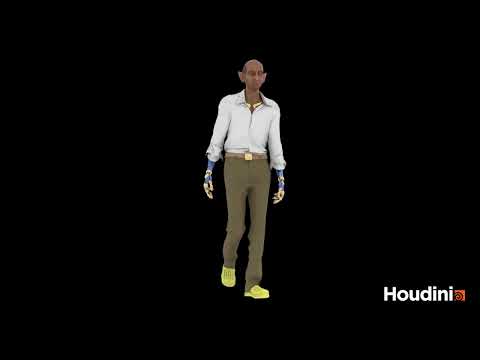
What the hell is Gordig doing now?Good God, setting this character up was a hundred times more complicated than I expected it to be, and I'm not even done. First, I had to rig the Crocs to the figure, since I had to dial the character morph out of them before exporting because it was causing some pretty extreme deformation. I had to reposition them in Houdini, but couldn't figure out how to actually rig them. Joint Capture Biharmonic wasn't working at all, because apparently the mesh needs to be closed, which Crocs famously are not, and Joint Capture Proximity was failing to capture all of the points, no matter where I put any of the settings. After a bit, I gave up and moved back into C4D for the rigging, which was pretty uneventful (although the video reveals that more work needs to be done), and also gave me an opportunity to delete the extra bones that for some reason Houdini wasn't letting me delete from the capture pose.
Anyway, after all of that, I thought the cloth setup was going to be pretty routine, but it thwarted me at every step. Part of that was carelessness, like not realizing that the groups I set up didn't necessarily include all the polygons I needed, but other things I needed to logic out and find little workarounds for. For one example, the bottom of the shirt would just clip through the pants, even with the cloth set up in layers. Solution? Just delete the polygons on the shirt that are lower than the waist of the pants. There's still the matter of the apron to work out: no matter how low I set the mass, the main apron would just keep falling, stretching the neck strap to infinity. There are also minor things to fix, like stiffening the sleeve cuffs and collar. There's also the problem that I never remember to solve before doing this extensive work, which is making sure that the animation loops smoothly and doesn't cause massive velocity shock.
 Problem with Gnollicious Surfaces
For an example of what you can do with Shape Splitter, I separated out the mouth/nose morph from the orc head morph in LY Fantasy Races and applied it to Daiji to make this character:

I use that separated morph for all of my orc characters.
Female warrior muscleThis is a pretty good product. Here's some examples of Jenni 9 with the female morphs included. Her base form, then with the massive muscle morph, then with the bodybuilder and then female hero (with also muscle added).
The Hero will increase height, hands and feet, too. Now THAT's a hero!
Problem with Gnollicious SurfacesI'm trying to frankenstein Gnollicious' lower jaw onto a human face. The learning curve to isolate one part of the morph is very high so I would like to use cutout opacity to render only the part I want and combing in post. The problem is that the eyes (several parts), mouth & teeth have no slider for CO. I loaded base G8M and verified that they'ere there.
1. Is there a way "under the hood" to restore hese sliders?
2. Is there another werewolfish anthro character that has the opacity in these parts? I'm not married to any particular generation of character, though I do want a morph, not a stand alone.
I'm going through my collection of Rawart characters but any help would be appreciated.
Female warrior muscleYou can use the massive morph set for that...it can add just muscle definition if you want, or you can dial up the muscles as big as you want.
The only thing to keep in mind is that this works full body and is not broken down into individual muscle groups, there are other sets that do that, mine is made for quick and simple bulking up
Buy Something That Doesn't Work in Carrara? Post your Questions and Workarounds here. (please)breaking my resolve to stay away because I need to help fellow Carrararians

Geografts break the UV mapping not Geoshells
the latter is just a sort of instanced mesh that can have different UVs, you can use shader operations or layers instead or conform a second figure to the first fot Geoshells
this is behaving like a Geograft for which one workaround is to conform it to an item of clothing instead preferably full body in rigging (not necessary mesh) and hide that clothing (don't parent it to it) I simply create my own using the transfer utility and a small item from a different generation chosing bodysuit in autofit and save that as a support asset clothing
change the path of several Morphs at the same time in parameter settings?crosswind said:
Which path...? the path in Parameter Settings or the path (folders on your disk) where morph files (DSF) locate ? They're different things.
If you mean the former, turn on Edit Mode in Parameters pane, multi-select the morphs, in RMB menu : Set - Property Group.
If you mean the latter, just physically move the DSF files from current folder to the destination folder. F2 - Clear DSON Cache. Then reload Genesis figure.
Thank you very much, I was talking about the 1st case... until now I did it one by one... it's crazy!
For the physical folders I don't really understand... do I have to press the F2 key? I always thought that to change the physical folder I had to save the Morphs in another folder.
change the path of several Morphs at the same time in parameter settings?Which path...? the path in Parameter Settings or the path (folders on your disk) where morph files (DSF) locate ? They're different things.
If you mean the former, turn on Edit Mode in Parameters pane, multi-select the morphs, in RMB menu : Set - Property Group.
If you mean the latter, just physically move the DSF files from current folder to the destination folder. F2 - Clear DSON Cache. Then reload Genesis figure.
change the path of several Morphs at the same time in parameter settings?Hello everyone
Do you know if it is possible to change the path of several Morph at the same time in parameter settings?
I have several dozen Morph to transfer to another folder but doing it one by one makes me lose a lot of time...
Thank you
Using the Transfer utility to transfer bones from Genesis 8/9 to a propAs Wolf said, you chose a wrong way.. i.e. rigging a figure from very beginning 'cause that'll be a long journey to get the final usable result... Like the standalone figure - Mister Bobble, making it took much more time than making a common character starting from a Genesis Base figure.
In fact, rigging an OBJ with a donor skeleton is not really a big deal, but making corrective morphs is, if you understand how a typical Genesis figure works... So as others said, the correct way is to make / sculpt your character base on a Genesis X Base figure and import OBJ as morphs.
And I have to say even if you use Transfer Utility to rig it, the common workflow won't work in your case. You may refer to my posts in this thread to rig your Prop: https://www.daz3d.com/forums/discussion/comment/8734511/#Comment_8734511
As the very first step after importing you Prop OBJ, align Genesis Base figure to the Prop as much as possible ! before going for the steps in that thread. Then Adjust Rigging to Shape, Posing, etc. will work, however, you still have no corrective morphs. Even if you can transfer morph targets of corrective morphs with Transfer Utility, you'll lose all ERC Links on them, then the workload of fixing them will be huge.
But if you can accept those ugly shapes around the joints after posing it, that may be all right ~~ Like the example I attached, I rigged a standalone Mervin Prop with TU, you can see there's no corrective morphs working on it... while even Bobble has nearly 50 corrective morphs...
Using the Transfer utility to transfer bones from Genesis 8/9 to a propIs there any reason why you're not using Transfer Utility? This does all the work for you. Make sure your imported character is at world zero, load a base figure and select it as the source with your own figure as the target when you run the utility. You're making hard work out of this! Extracting skeletons and converting figures, moving and parenting bones is heroic work but totally unnecessary unless I've missed something here.
Weight maps, limits et.al will be copied from the donor figure.
Transfer Utility. Edit -> Object -> Transfer Utility. Use that. Adjust the rigging to shape. Job done. Apart from eyes, mouth, correction morphs etc. You have picked a fairly brute force way to go about this and I would strongly recommend you use a base development figure if you want to do this again, unless you absolutely 100% need a higher poly count. That, I can't talk about, so officially you're stuck with the base resolution.
Long Load Times – Why is this still a problem?DrunkMonkeyProductions said:
Richard Haseltine said:
DrunkMonkeyProductions said:
The solution is to change the ID(s) in the file(for conflicts in a single file)Duplicate Formulas within a single asset file are usually the result of running ERC Freeze twice on the same property - in whichc ase the real fix would be to consolidate the changes from the two formulae into one.
Ok, not one i think i've encountered before.
The only one's i've seen directly had to do with dev's copy/pasting what should have been separate files into one file and breaking it.
Actually most of the duplicate formula errors resulted from the fact that the different content creators specified the same names when they created morph properties. DS ( before ver. 4.21.1.29 ) , as default, takes the property's name as URI Id...
The way of creating UIR ID has been changed since the above-mentioned version, which prevents IDs from being duplicated at very beginning... however, I know there're still some vendors are using older versions, so...Then, modifying DSF(s) directly turned out to be another culprit, no matter the vendors modified the files with or without carelessness...
The issue of ERC Refreezing could've been avoided by doing ERC Bake firstly before rerig / refreezing, but some folks didn't know about that...
Using the Transfer utility to transfer bones from Genesis 8/9 to a propIs your figure derived from the existing G8 or G9 mesh without changing the poly count? If so, import as a morph rather than trying to re-rig it.
If your figure is a complete standalone creation and vaguely resembles a base character then you can use the Transfer Utility (Edit -> Object -> Transfer Utility) to copy the skeleton from a G8 or G9 base present in the scene but you will probably encounter severe distortion when you come to bend the joints, even after you've adjusted the rigging to try to fit the mesh (Joint Editor Mode -> Right Click -> Edit -> Adjust Rigging to Shape). The corrections for this can be quite complex.
You will also have issues with no rig for the eyes/mouth in this scenario and will have to manually create them if needed. Generally, it's far, far, far easier to derive your new character from an existing base and create a morph with the added bonus that the morph *is* distributable, either free or commercially.
A bit more info is needed I think and a screen grab of your masterpiece wouldn't go amiss either if it wouldn't violate the forum rules.
Ripped shortsI own these shorts. They appear in the folder "SM Torn Clothes", so my best guess is there are more products to come, including(possibly) the belt that morph was designed for.
Buy Something That Doesn't Work in Carrara? Post your Questions and Workarounds here. (please)What I do when things don't work in Carrara is load in DS then set the item to low and export as obj
then import it still in DS and usually try one of two things
1. Transfer rigging from original item
or
2. Transfer rigging fro g8 to item
then export them as you do and see if it works in Carrara.
 Tabitha 9
TimberWolf said:
HS hairs are posable, certainly the ones I've got, but it can be time consuming. Fire up your Joint Editor and you'll find a custom bone structure - away you go, one bone at a time...
I don't think it's unreasonable to ask for a series of preset pose dials for something with complex structures and there are none of those but they are posable. It'll just take a while. I like the quality of these models enough that I'll continue to buy and use them despite the added hassle of shifting a myriad of bones around.
Your mileage may vary!
If I'm going to pay $15+ for a new pony tail / long hair product, I should at least be able to drag the dangling parts of the hair around with the Active Pose tool. And don't get me started on long hairs without an included "behind the shoulder" morph. I have been returning a lot of purchased hair items lately due to lack of pose-ability.
Daz 3D is part of

Connect
DAZ Productions, Inc.
7533 S Center View Ct #4664
West Jordan, UT 84084Licensing Agreement | Terms of Service | Privacy Policy | EULA
© 2026 Daz Productions Inc. All Rights Reserved.