-
Daz to blender - genesis 9
Hi I have been using the disformic import, but just realised that the bridge import works so much better on textures and hairs. ANy chance you update the bridge to work with genesis 9 soon?
thanks!!!!!!My DS Categories have some duplicates. How can I fix that?@NorthOf45 I looked at the LOCAL_USER metadata file with Notepad++. I can see that some of my created Marvelous Designer clothes have CompatibilityBase defined in the LOCAL_USER metadata. However when I load that item in the scene and look at the Scene Identification pane, the Compatibility Base field is <None> and the Compatibility Base value is put into the Auto-Fit Base field instead. That is wrong. None of the created materials will properly associate with the clothing that way. I think it might be a bug in the process to restore the LOCAL USER metadata. There didn't used to be an Auto-Fit Base field in Scene Identification. It is a failry recent (in Daz time) addition.
Aircraft Carrierchris-2599934 said:
Lookingforguds said:
anniekicks said:
I tried the renderosity Enterprise. No textures and no UV maps. Requires a lot of extra work.
Lucky you - I am also looking for an aircraft carrier, I also bought the Enterprise... I don't even find it in my library. - and yes, after spending way too much money on Daz-stuff I should know how to install it correctly ^^
Sorry for digging up the old threadAccording to the readme, it consists of half a dozen obj files. So you need to find wherever you stored them (or download them again) and then import them into Daz via File > Import... It'll probably take some trial and error to find the right parameters when importing to get everything the right way up and scaled correctly.
Once you've got it imported, you can save it into your library as a figure/prop asset.
oh dmn, gonna look again into it. thanks for the response :-)
My DS Categories have some duplicates. How can I fix that?barbult said:
Richard Haseltine said:
Groups ar not exported with metadata, I found this myself when I needed to do a reset (years ago, so it had faded from memory - sorry). The products should work - eithe as user data or as products of their own, depending on how you created their metadata, so I don't know why that would be AWOL.
Thanks for responding, Richard. Most (but not all) Daz Store product are working OK with Smart Content. Some older products, like Lisa's Botanicals, Loretta LoREZ, Traveler's Naturals, etc.that I added metadata to long ago, show no assets in the Content Library Product section for the product. The files are there in the Content Library Mapped Files section, they are just not associated with the Product anymore, and have no metadata at all. I probably added the metadata and did not Export it from Product view. The metadata should have been in User Data, I would think.
Is the metadata actually in the UserData files? With notepad++ you can Find In Files (if you have several UserData files) a particular asset (it is very fast) and then edit the file (not as fast) to see what metadata was saved with it. Exporting it is good, and when I do that, I add it to the product zip so I don't lose it. I also add it to the manifest so it can get re-installed if needed. User Data like custom categories, which is not integral to the product itself, I add separately, because if it is in the metadata file it is considered Vendor data, and the containing folder is read-only in the category tree, and any folders above it all the way to the root. VERY annoying.
It looks like nothing that I created myself has a proper Scene ID anymore. The assets I created myself are in the LOCAL USER product.
Unless you define a Product and add those assets, LOCAL USER is where they go. The Compatibility Base definition holds the name of the Product and the Assets, but as logical entities only. The actual geometry is tied to the Compatibility Base by the Object Compatibility statements at the end of the metadata files. Not sure if those Object Compatibilities are saved with a UserData export if you haven't saved them. It is done dynamically in the Scene, but if they aren't defined, they are not accessible by Smart Content, since it is not saved in the database. If you still have the Compatibility Bases defined, load one of each object for a particular product into the Scene. You can quickly assign all the SceneIDs by choosing the root Compatibility Base (Scene tab context menu -> Edit -> Set Default Compatibility Base(s)), which should contain all the assets. If you now open the DB Editor in the Product view, the bottom section of the Product tab should be filled with SceneIDs.
My DS Categories have some duplicates. How can I fix that?Richard Haseltine said:
Groups ar not exported with metadata, I found this myself when I needed to do a reset (years ago, so it had faded from memory - sorry). The products should work - eithe as user data or as products of their own, depending on how you created their metadata, so I don't know why that would be AWOL.
Thanks for responding, Richard. Most (but not all) Daz Store product are working OK with Smart Content. Some older products, like Lisa's Botanicals, Loretta LoREZ, Traveler's Naturals, etc.that I added metadata to long ago, show no assets in the Content Library Product section for the product. The files are there in the Content Library Mapped Files section, they are just not associated with the Product anymore, and have no metadata at all. I probably added the metadata and did not Export it from Product view. The metadata should have been in User Data, I would think.
It looks like nothing that I created myself has a proper Scene ID anymore. The assets I created myself are in the LOCAL USER product.
My DS Categories have some duplicates. How can I fix that?Groups ar not exported with metadata, I found this myself when I needed to do a reset (years ago, so it had faded from memory - sorry). The products should work - eithe as user data or as products of their own, depending on how you created their metadata, so I don't know why that would be AWOL.
Making custom folders?lorraineopua said:
semperequstri said:
lorraineopua said:
Just make sure you leave the data folder and Runtime folder where they install. Otherwise you can do what you like. I install everything into an Installation folder and cut and paste from there into my very well organised library which is a constant work in progress...I sometimes think I spend more time organising than I do using. And because when you have thousands and thousands of items you can forget you own them, I also use Everything to find things. Also, as well as moving things where you want them, you can also rename folders or items to make them searchable.
I do the same. I never use Smart Content . Instead I organize and rename everything the way I want it using Windows Explorer. Once back in DS I just do a quick refresh and Voila! the folders are as I want them.
I do make my own props so I can organize these and related purchased content as sub folders under one main category/ folder. That way if I need a "house" or a "room" I just go to the "House" or "room" folder and find the relevent sub folder.
I also keep separate backups of my Runtime and Data folders in additon to full backups of my whole library. You never know when something might go astray or when Windows will crash and burn.
Hmmm, I only have whole library backup...though when my library drive was filling up I did move a lot of stuff I didn't use often to other smaller drives till I could afford to buy a bigger library drive. It's now half full and I'm already thinking I need a bigger one ;)
I just keep those extra backups maily in case I need to reinstall home made stuff. That way I don't have to go through the whole re-import of the obj process. I just copy it from the back up and make sure I also copy the revelvent data folder enty. Otherwise you just get a blob when you open the prop in DS. If I need to find a lost texture I just copy it over too.
My DS library does "live" on my main C: drive for me to work off of. BUT I keep backups of EVERYTHING on an external I TB USB hard drive attached to the PC- Full DS library, separate runtine and folder backups, all my home made stuff AND all my DAZ purchases ( I download the zip files with every purchase). There's a backup of that external HD in my fireproof safe ( done once a week). There's another backup off site in the safe deposit box in the bank ( swapped once a month).
Yes it's paranoid but I learned the HARD way that you can never have too many backups!My DS Categories have some duplicates. How can I fix that?Oh damn, I'm sorry :( I admit I don't use the sort by order/install date very often and so didn't think about that. However, that data is not stored in the DSX file it seems and so I guess those dates would all now be set to the same value :(
The compatibility bases I would have thought should have re-imported OK since those would be set in the DSX file and so re-imported as before. Although, that is a bit of a complicated area that I thought I was starting to get to grips with understanding. My own compatibility bases are messed up although I have that down as not configuring/installing some of my third-party products correctly and is on myt list of things to fix at some point.
I am also a bit confused as to why the re-import was able to recreate the custom groups but not re-add the products - since they are only defined in the DSX files as meta-data for assets themselves.
There is a tool that I am beta-testing for someone that would be able to help you fix those products when it's released - although not the dates. But it would still require correcting the products one-by-one unfortunately.
My DS Categories have some duplicates. How can I fix that?Nothing that I created myself (clothes in Marvelous Designer, for example) works with Filter By Context anymore. The Scene Identifications are not correct anymore. In many cases, the Scene ID shows the Compatibility Base as <None> and has the correct Compatibility Base in the Auto-Fit Base field instead. Maybe this is a bug in the metadata reimport process or the saving process for User Data. Anyway, it has become a big hassle to manually restore all that for everything I have created. Bundled with the problem that my custom groups no longer have any assets assigned to them, I cannot even tell what version of my creations were the final "favorite" versions. I fear that if I ever have to reset the DB and reimport metadata again, it will all be lost again.
(By the way, SofaCitizen, I do not put any of this trouble on your discussion of resetting the DB. Since nobody else offered help, it was the only option I had left.)
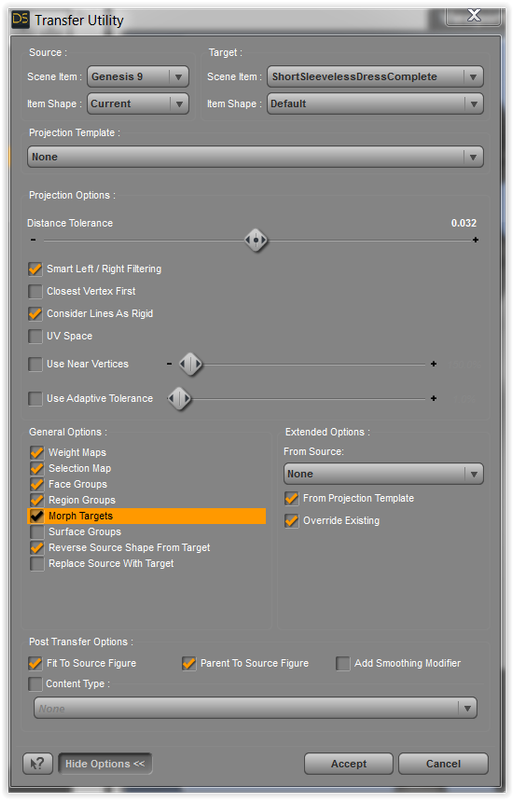
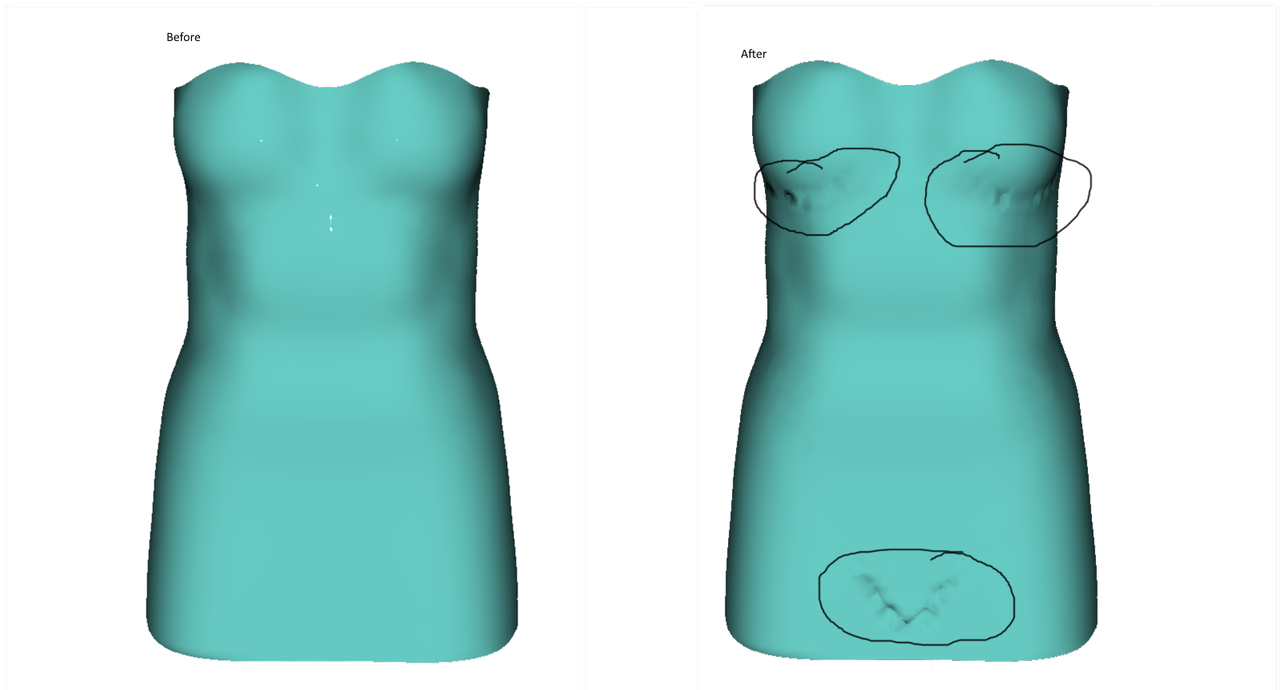
problem with fitting clothing to Genesis 9 with transfer utilityHello. Can anyone tell me how to fix this problem. when I import the dress obj into the scene it looks fine, but as soon as I fit it to Genesis 9 wit the tranfer utility, I get these distortions in the mesh under the breasts and pelvis. I transferred with the settings shown in the pic. Thanks for any help.
 My DS Categories have some duplicates. How can I fix that?
I have reset the data base and imported metadata, including my user data. The duplicate categories are gone.


My custom groups still exist, but no files are assigned to them anymore.
Smart Content will no longer sort by Order Date; everything is alphabetical.
Smart Content will no longer sort by Install Date.Filter by Context doesn't work some things I have tested. I don't know why that is. The compatibility bases and compatibilities in metadata seem OK, but the Scene IDs are no longer set up for those items. I don't know how all that is stored/reloaded in metadata. I can only hope that this resolves itself.
A few things I tested have worked. No rhyme or reason that I can see.I'll let it run for a while and see if it improves.
My DS Categories have some duplicates. How can I fix that?Well, exporting the metadata first into a UserData.dsx file should mean that when you come to do the re-import it should show up as the first item in the list of products to be re-imported. So you shouldn't lose any manually-set categorisations. If you have created products manually purely via the Daz interface then I am not sure if those are saved. I use Content Wizard to install all my third-party stuff and that tool creates a DSX file which means the re-import includes that.
Yeah, I do think that because no-one else has chimed in that it is probably one of those errors that most people have not encountered and so there is not an obvious route to correct it directly :(
SVG filesPickle Renderer said:
I started using Inkscape at work for .svg editing when we dropped Illustrator (Adobe also bought and then retired Macromedia Fireworks, which used to embed metadata into .png files so you could still edit them later). I like Inkscape a lot actually. It's also free!
But the most important thing is that the PNG exports can have transparency.
allanon said:
Thank you very muchly ! ! Opening the file in Chrome worked like a charm. Once opened in Chroome I used the snip tool in Windows to make a screen shot that could be saved as rither a png or jpg file.
Do not use chrome and screen capture. Use Inkscape and export at the best settings you need, including transparency.
Studio 4.21 doesn't see all items in libraryWell, there is your problem - you have 9 (NINE) libraries under "Daz Studio" on your old machine and only added 1 on the new machine. That will be why you cannot see a lot of your stuff.
You need to add all the other 8 libraries (copying over if necessary), then re-import the metadata.
Studio 4.21 doesn't see all items in libraryOK, the main issues here is that we do not know your exact setup or how you installed the third party assets etc. However, in general terms, if you did 2 BEFORE 1 then 4 will be missing info. This is because the export in step 1 will save ALL your custom category changes to a UserData.dsx file inside the Runtime/Support folder of your primary (listed first) Daz library. So obviously this would not be available on your new PC since you copied the stuff over first. Therefore, on your old machine go look inside the Runtime/Support folder for the UserData.dsx file (it may have a number at the end) and copy it to the same place on the new PC.
The next point is that you did not mention doing step 3. Note - "hooked up" here does not mean copying folders. It means adding them as a base library in the Content Directory Manager. I have attached the config from my setup - however, the important thing for you is to make sure you have the same number configured in your new PC that you have in your old PC.
Also, something I didn't mention before - have you ever logged into your account on Daz Studio and installed products from within - i.e. used Daz Connect. If so then you will need to add the correct folder under the "Daz Connect Data" in addition to making sure that this folder was also copied across from the old PC.
Lastly, the order is very important as in addition to including the exported data as mentioned before. The re-import process will only import Smart Content from currently configured base libraries (step 3). If you add a base library after doing the import then you will need to do it again because there isn't a way to do just the missing library easily.
Studio 4.21 doesn't see all items in librarySofaCitizen said:
Are you certain that you
- Exported UserData from your old PC via SmartContent->ContentDBMaintenance?
- Copied everything correctly - including all base folders/libraries from your old machine?
- Hooked up all those same base folders/libraries to the new PC?
- Re-Imported all metadata on your new PC via SmartContent->ContentDBMaintenance?
- Completed all these steps in this order?
I did #2 first to a portable hard drive. C > Users > Public > Public Documents > My DAZ3D Library.
I assume "hooked up" means copied them from the portable hard drive to the same spot on
my new computer as on my old computer.
Then I came here for help and did #1 and #4.Studio 4.21 doesn't see all items in libraryAre you certain that you
- Exported UserData from your old PC via SmartContent->ContentDBMaintenance?
- Copied everything correctly - including all base folders/libraries from your old machine?
- Hooked up all those same base folders/libraries to the new PC?
- Re-Imported all metadata on your new PC via SmartContent->ContentDBMaintenance?
- Completed all these steps in this order?
My DS Categories have some duplicates. How can I fix that?OK, I am making some progress even if it's a little ugly.
This script is a little complicated because it's a hacked-about version of this script from the wiki and the changes suggested in this forum comment and then with some changes to just output the items that we are interested in.
If you run it then it should attempt to just list the categories that are potentially cloned - see example output also attached. I am hoping that this will show 6 entries for you which will indicate that the clones are there and, like with the previous script will hopefully show if there are any trailing/leading spaces. There is a "verbose" option that will probably show way more than you need but might be useful if the main run is not helpful. To output the verbose option just replace false with true in the last line.
Need help with animation exportHello guys, does anyone have a working workflow or video on exporting animations from DAZ Studio to Unity and making them work in Unity?
I'm trying to export simple walk animation for G8F, export is a success but the import is a complete disaster(
The imported character simply doesn't move.
Is there any guide on this subject?
Am I missing anything?
Studio 4.21 doesn't see all items in libraryNorthOf45 said:
Copy the UserData files to the same place on the new machine, [libraryFolder]/runtime/Support (sorry, I previously said /data/runtime/Support). When you Re-Import Metadata, you should get a list of all Products and entries for the UserData. Include everything and Accept.
Let's look at the Poser stuff after this completes. One step at a time...
Is this Content Library > Square Hamburger > Content Database Maintenance > Re-import Metadata?
Did that, restarted Studio, no joy.
Still no non-DAZ showing in Content Library. Some of it does show up in DAZ Studio Formats > My DAZ 3D library, but most is still missing.
And yet, when I load an old scene, everything shows up and renders except for my custom textures, like modified colors for Melody 2.0.Daz 3D is part of

Connect
DAZ Productions, Inc.
7533 S Center View Ct #4664
West Jordan, UT 84084Licensing Agreement | Terms of Service | Privacy Policy | EULA
© 2026 Daz Productions Inc. All Rights Reserved.