-
GENX: Morphs should be in the morph folder for the according figure ?
You must first create a new .cr2 figure in DAZ Studio by loading V4.2 and then applying the MRL Ariana character. You then export the result (either as a full body morph, a head morph, or a body morph) and save it as a .cr2 with an appropriate name into a folder under the runtime folder in your content library (best is runtime/libraries/character/GenX). You'll need to create the last folder in advance or one of a name of your choosing. It is this .cr2 file that you enter under the Transfer tab in the Load Figure dialogue.
You should read through and follow the following tutorial:
http://www.sharecg.com/v/82453/browse/3/PDF-Tutorial/GenX-Plugin-Tutorial
It is slightly out of date as it was done before the release of the GenX for G3F addon, but the procedure is essentially the same.
Greater ZBrush compatibility for DAZ Studio 5!Yes, normal maps are useful, but they cannot replace the power and flexibility of being able to morph the mesh itself (at least at present as far as I have seen). To be fair, I think using normal maps should be used in conjunction with mesh morphing.
Morph that moves joints? How?Once the bone positions are adjusted (using Adjust Rigging to Shape for adjustments to fit a morph, or by manual placement with the Joint Editor tool) ERC Freeze is usually used to link the chnages to a property (the morph, or a newly created property to drive the joint changes).
- right-click on the Parameters pane and, if it isn't, set it to Edit mode
- if you don't yet have the property that will drive the joints create it by right-clicking in the Parameters pane in the group you want to hold the control and selecting Create New Property; adjust settings (name, label, and limits probably) as desired.
- Tight-click on the property that will drive the joints and select ERC Freeze, in the dialogue check that only the changed joint parameters are listed as sub-components, check Restore figure at the bottom if it isn't, and click Accept.
- Make sure that the morph/control; is working as desired - if so File>Save as>Moprh Asset to save it.
CONTENT wishes for 2017Kendall has really gotten my attention with his teasers, so I'm looking forward what he has cooking. A full weather system or something, I'm not quite sure anymore, but it's good to keep expections high
 Also LAMH to be able handle Iray without changing it to obj first, and it's in my shopping cart immediately. If/when that happens, I hope lots of new hair products that use that.
I think ( hope ) that I have enough G3 characters/clothes already, so this year I'm more interested in utilities like Ultimate Natural Bends, pretty much anything Zev0 offers, UltraScatter and stuff like that. Also Ghost lights was a really positive surprise, so anything that makes my current library better and I'm interested.
If PAs need ideas here goes:
- I'd like to have a product that would make clothes/hair wet ( preferably different levels of wetness, from wet t-shirt contest to minor splashes ).
- Some universal hair morph kit like Fit Control is for clothes would be really cool
- I hope Kendall's (whatever it will be ) product takes care of all the cloth simulations, but if not, then something designed for DS. I already have VWD, but it's quite unstable and crashes a lot, and anything bigger needs decimator etc. so something more stable please.
- Also if there's a nice water simulation just waiting for release, I'd really love to make waterfalls, beaches and stuff like that. Blender already has a water simulation, but it's so slow that almost anything is better.
PS: If G4 gets released this year, it has to be pretty spectacular, or support G3 line products, before I'm interested.
I believe the problem with LAMH and Iray is that Iray doesn't have a hair primitive. That's why there is a fairly involved process in getting the two to play happily together.
Cheers,
Alex.
Kids 4 clothing on Genesis 3well I just tried it and it worked a treat!!!

step 6 should read file save as support asset morph though but guessed that.
Now my Genesis 3 figures have a vast wardrobe to pick from TY
 GENX WHAT DO I DO?
Note that GenX can only transfer the morph of your character, you will need other products in order to use the same texture on G3F as you are using on V5.
Morph that moves joints? How?Hello, so, I am looking at the Beauty Fingers and Toes for Genesis 3 and I am noticing that the Beauty Finger and Beauty Toe controls don't appear to act like regular morphs, which just move verticies, but they also seem to reposition the bones of the underlying rig.
How does one go about moving the bones of an existing figure and then saving the positions of the bones as a control?Anime/Manga CharatcersThanks for that list - there are some older A3-related products here at DAZ like:
chibibel - http://www.daz3d.com/chibibel-school-set (both the character and clothes set)
BelBel - http://www.daz3d.com/belbel (an anime head for A3)
XinXin - http://www.daz3d.com/xinxin-for-aiko-3 (anime morph for aiko3)
And offsite, there's the maya-doll character - a standalone classic with some male morphs, and the free kururu character with some outfits. (google them?)
A local forum participant 'ghastly' has built and distributed the lolo hai character and a bunch of add-ons/clothes/morphs, etc. over at sharecg and some freebies at rendo.
There are some good cel shaders for DS at sharecg as well if you search for AcartoonDZ (Narucoman) and some pwToon shader presets by Crescent.
others?
--ms
Daz Studio 4.9.3 Pro, General Release!On my PC, Transfer Utility doesn't work as expected with 4.9.3.166 :(
I'm creating an outfit with Marvelous Designer and exporting it to OBJ, but the fitted figure doesn't keep current morphs of character.
Steps to reproduce the issue :
- Export Genesis 3 body with morphs (for example Height to 105% to have a character measuring 165cm) to OBJ
- Import OBJ in Marvelous Designer
- Create outfit and simulate
- Export outfit to OBJ
- Import OBJ with DAZ Studio
- Launch Transfer Utility
- Scene Item : Genesis 3
- Item Shape : Current
- Scene Item : Outfit
- Check Closest Vertex First (a change with DS 4.9.3)
- Check Reverse Source Shape From Target
- Click Accept
The outfit is not fitted and hasn't the right height, I tried exactly the same procedure on another PC with DS 4.9.2 and it works expected.
Please does someone have the same issue ?
Does it exist a fix ?
Thanks :)
For the moment, I don't have other choice than copying all DS files from my other computer :s Someone knows how to download DS version 4.9.2 ?@kervala, is Genesis 3 set to Default or Current in the transfer utility? You did mention that you exported at 105%...
edit: My mistake, you did mention it... hmmmmm.
Indeed, it was set to Current :)
I removed DS 4.9.3 from my PC, reinstalled everything, downloaded DS 4.9.2 and reinstalled it. It works like expected :(
I noticed another bug in DS 4.9.2, but not sure if it's still present in 4.9.3. When we import an OBJ and save the scene, when reloading the scene, the imported object is not at the right place, I have no idea what is causing that :(
I have a test case :
- download http://kervala.net/download/scene_genesis3_bug.duf and http://kervala.net/download/corset_genesis3_bug.zip
- uncompress corset_genesis3_bug.zip
- open scene_genesis3_bug.duf in DS
- import corset_genesis3.obj
- select "corset_genesis3" in Scene panel
- right click on "Scene" tab -> "Assets" -> "Transfer Utility"
- Scene Item : Genesis 3 Female
- Item Shape : Current
- Scene Item : corset_genesis3
- click on "Show Options >>"
- check "Closest Vertex First" (or not, it doesn't change anything)
- check "Reverse Source Shape From Target "
- click on "Accept"
The corset should be at the right place in all previous versions of DS, but at the wrong position in DS 4.9.3.ZDG random Daz Studio discoveries and questions.Morning. I got not much, aside from a few words of wisdom, lol. First, (runs over to grab the translator off the other desk), счастливого Рождества.
It is about 7:40am on the 7th, computer time here (Zulu Time). Funny that I'm just waking up, had a long day yesterday. Just remember, if you do not use reverse deformations, it's just easier to make the morph again rather then try to edit out mouth realism HD without HD, lol. I monkeyed with the nose dials till the navel stopped moving, and by that point there was no fixing the mouth, lol.
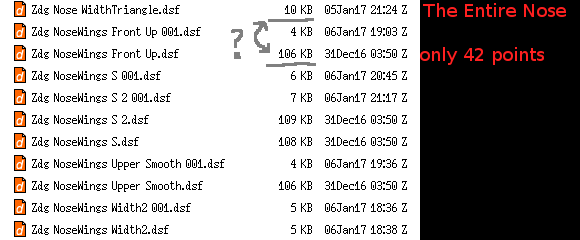
It was sort of nagging at me that some dials were 100kB larger then newer ones that intentionally moved more points around on the nose. As you can see from that screen-cap of dsf files, I have not been sitting idle. I had goofed them four dials up so bad the first time around, it was just easier to trace them out in hex from scratch on a 'clean G3F blank' mesh (that I made long after the first few dials I goofed up).

Now rather then fight duplicate ID errors renaming dials and replacing them, it was easier to just go into the text of the dsf in notepad and copy-n-past some data over to the old dsf files to rid myself of the goof. It's something I had been originally thinking about for dial colors that I did not give much thought before two days ago.
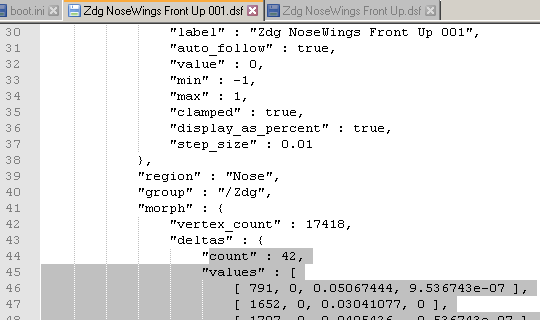
It was just easier to copy the 'deltas' over then to fuss with the hour of book-keeping to remove and replace dials so they work with former made figure dials. So, that fixed, and I'm on to another possible figure shape as the new stuff from yesterday may hint at.
Zip uploaded and link updated top of last page. Just extract and copy/overweight all the former dsf files, you'll be fine. It's smaller because they no longer mess up the mouth, lol.
An hour into grammar checking this post, it dawns on my taste buds that this is day old coffee I'm drinking. wow that will move the hair from your head to your chest, you got hair on your chest it will move it to your shoulders and back, lol.
Now I just got to get that mental image of 'Someone' degrading me out of my mind, lol. Yes I know I'm an 'Amateur', lol.
Looking for an Ao Dai for G2F & G3FSomeone was working on something like an Aio Dai for Baby Luna over on Hivewire. I think it was also dynamic, and not much help when you want it for G2F. But they may have done one for Dawn or intended to. Don't recall whenther it was completed. And would have been Poser dynamic at any case.
Yup, it is a product, but it is for Dawn, I could futz with taking it from Dawn to V4, then from V4 to G2 or G3, (Save for that annoying thing the Auto convert does to Long tailed clothes, and yes I know there is an App for that (ARGH)). It would be better make it for what it is going to be used on.
I happen to like the Genesis Models better and I have and investment in them.
If I am doing a Street scene in Saigon 1972 and I need to have my main Characters blend in white the crowd. Also with the Asian Ethnic Morphs for Genesis, Genesis 2 and Genesis 3, I have a larger Gene pool to draw from. And I’ve already proved I can use 15 primes to make a crowd of 1500 people and that Using Genesis 3 is better because of the lower poly count.
Plus I already have my main character’s designed and with various other morph and shaping sets for Genesis 1, 2, & 3, I can take them for Preschool to Old Age, while maintaining the Base Character.
I guess I am saying it is too Late to change horses, I’m in the River.
Kids 4 clothing on Genesis 3I can not get this to work for a K4 dress. When I select the MFD as the item to fit to, it has no clones (including none for K4), and so the K4 dress remains very small, which is natually not what is desired.
I'm not near my computer at the moment, but I'll try to do it tomorrow when I get up. I'm guessing that you would want to morph G3F into a child. I'll see what I can do.
Actually I am just trying to autofit the dress to an unmorphed G3F, once the autofit comes across okay (at the moment there is major distortion at the bottom), I could then try to morph G3F into something else.
Darwins' SchtuffNo problem! Actually got her body re-done, and I like this one much better. No morph packs for her since her head and body morphs are custom jobs. The skin still isn't where I want it to be, but it'll be a good indication of my half-way point on her textures/shaders and I can actually render her with clothing for once. lol I'll post it when it's done.
Looking for an Ao Dai for G2F & G3FIt's a bit of a pain in the neck if you're not good with textures and transparency maps (like me), but I'd make a texture for the Morphing Fantasy Dress (which can, with the purchase of an add on, be used on the Queen of Ages dynamic dress, though the sides won't flow right) that looks the way you want, and then find a suitable pair of pants to go under it.
I don't think I've seen an Ao dai for a non-toon character since Aiko 3 (and I'm not even sure about that) but admittedly, it's not something I've been watching for either.
Edit to add:
This is the closest I remember seeing here at Daz:
http://www.daz3d.com/lily-dress-for-a3And I'm sure that's not close enough for your purposes. (though I think with the right clones, it can fit G2F)
I did look at the Lily Dress and it is close, but it is sleeveless and if you notice Ao dai are not. (There is a reason for that Read on.)
I did find a Freebie for V3 or should I say I found a defunt link to a Feebie Ao dai for V3.
On the idea of using the MFD, I did think of that, but there are some other issue which make that not a good choice.
First: The words Ao dai literally means "long shirt”. It is pronounced "ow zai" in the north, "ow yai" in the south. Where the Cheongsam is a dress.
Second: I noticed the Back Flap, is never sat on and is always long enough to cover the Bottom of the person wearing it. I think this is so that if you sit on grass or something which might stain the pant, the back flap is use to hide the stain. So any Ao Dai model would have to have to be rigged to accommodate said action.
Third; Several pictures show the wearer holding the back flap or it draping behind on a bicycle not under the wearer.
Fourth: It appears that there can be both and inner and outer flap, which might offer depth to the design. The most the shear surface flap would be the fore ground and the under flap is the shifting background. Using this, one could almost believe the flying cranes were actually in flight as the background shifts and the cranes wings fold as the woman moves. Or the Lilies are swaying in the breaze.
The other thing I notice: the designs of the Cheongsam are a mainly repeating patterns; where a Ao dai can be a pattern, but are more often tapestries, presenting complex and colorful scenes, with the solid color of the trousers picking up on one of the accent colors of the tapestry or a base color to like a background.
My other issue: I am looking for authenticity, not anachronistic sensualism. An Ao dai has enough of that, the close fitting bodice, the hint or peak of bare skin at the waist, the way the flaps flow when in motion, make it just look good on almost everyone. I offer: Ao Dai - Vietnamese Plus Size Fashion Statement and Transcultural Tradition of the Vietnamese Ao Dai.
WARNING SOAPBOX TIME:
One of my pet peeves is that you find a great outfit that looks great and fits what I want, until look at the beautifully crated boots, only to find Spike heels. REALLY!! Have you ever seen ANYONE wearing Spiked Heals in a Forest? Next time you do, not staged, get a photo for me. I know its fantasy and I get that, but it violates the suspension of belief, because your mind goes, 'How is she walking in Spiked Heals on Moss or Sand?' I would love a morph that make the heals into something believable. Waffle Clunky stompers heels, less radical wedge heels, or gasp a non-heel version. Here are three examples: Shameless Rogue Outfit for Genesis 3 Female(s); Annika Storm for Genesis 3 Female(s) and Genesis 2 Female(s); and Woodland Huntress for Genesis 2 Female(s). I really like them and I own some of them, but I can't use the boots Even though I really want to, unless I can hide the heels in the tall grass.
Soapbox time over.
A Historical Note: The Vietnamese seem to be very progressive in some respects. In 1744, Lord Nguyễn Phúc Khoát of Huế decreed that both men and women at his court wear trousers and a gown with buttons down the front. After the Nguyen family gained control over the entire country in 1802, the conservative Confucian Emperor Minh Mang banned women’s skirts, in 1826, on aesthetic and moral grounds. The Moral Grounds came from Confucian standard and that women’s clothing violated the standards of decorum. (Confucius Scores point for Women's Rights, in this at least)
So I think I am going to try my hand at crafting a Ao dai, it will be the first piece of clothing I've made so expect Bone Head mistakes, when I Present it. It will be a Spare Time thing, so it make take some time. I have some Base long forms, and I am worried about the Long Shirt, not the Trousers yet.
BUT Hey, If there is a PA out there who is saying, 'that would take me a day or two to make and then do so Morphs, and I could fill that hole.' my words to you are 'Please GO FOR IT!!!' I need it to look good, and I know my first attempt, most likely not going to look good, or maybe not even look like a Ao dai. (I have no delusions about my abilities, when it comes to soft body modeling, I DON'T HAVE THOSE ABILITIES.
 )
)Haslor!
Darwins' SchtuffThanks for explaining :D
Sounds complicated and as a lot of work and possible headaches, but I'm sure you'll figure it out. And now I'm glad I never considered making 3D chars lol
Ohh she looks lovely the new Sol and I like her face morph a lot. . Great work on the skin .and eye texture.
Darwins' SchtuffThank you, ladies. Hopefully I shall live up to such high expectations. :) I'm still hacking away, but don't feel like I've been ran over more than a dozen times by a steam roller anymore- my s/o had to get an antibiotic shot yesterday, he's still pretty bad off. We're soldering through.
aaaaaaaaaand....Studio just crashed. Good thing I saved the progress this time. (sigh) Still- I'm rendering a tester of the new morph and updated skin. I ended up mixing three MR's just for her skin in photoshop. Let's see how this works.
HeadShop OneClick Submitted to DAZ - Best in Class! (Commercial)Where does the morph save?
My DAZ 3D Library/Runtime/FaceShop/
Kids 4 clothing on Genesis 3I can not get this to work for a K4 dress. When I select the MFD as the item to fit to, it has no clones (including none for K4), and so the K4 dress remains very small, which is natually not what is desired.
I'm not near my computer at the moment, but I'll try to do it tomorrow when I get up. I'm guessing that you would want to morph G3F into a child. I'll see what I can do.
Young Face Morph G3FIt's under the 'Shaping Tab' under 'Head' if I remeber right.
'Young Face' morph for the G3F & G3M are in the Genesis 3 Female Head Morphs / Genesis 3 Male Head Morphs
it makes the faces a bit rounder, cheekbones slightly higher, and those sort of facial characteristics. It's not overwhelming to the existing face you have morphed from, it'll still be recognizable.
Llynara's Loony Bin (WIP Thread)And which render will be more dramtic and detailed? The single high intensity/high lumens photometric light source?
Or the multiple lower intenstiy light sources?
Again... my experience is that when I use multiple low intensity lights and emitters, I get a more dramatic scene, but it takes *exponentially* longer to render than a single high intensity/high lumens light source - and that seems to make sense in a physics based lighting model.
But there is a lot about DAZ that still puzzles me. I can't get characters and morphs to reliably transfer using Generation X 2, for example.Daz 3D is part of

Connect
DAZ Productions, Inc.
7533 S Center View Ct #4664
West Jordan, UT 84084Licensing Agreement | Terms of Service | Privacy Policy | EULA
© 2026 Daz Productions Inc. All Rights Reserved.