-
Facial expressions have been bad for a long time
I think fairly subtle expressions can be done with bones & no morph, things like the 'Urk' expression below:
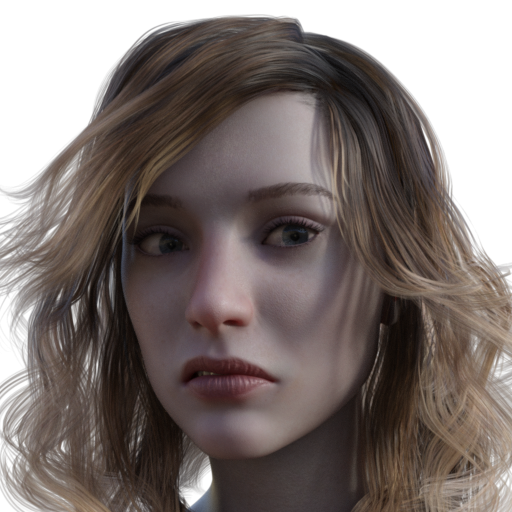
Bolder, "in your face" expressions are a bit more difficult to get looking right only using bones.
I feel that a good, wide, open smile moves the whole face, and that's where the bones only method of doing the smile does break down. Largely because there is so much going on in the face that the person posing the face misses stuff that makes it look wrong.
The 'Urk' pose above only affects 4 bones. Think how many a smile moves, and then risk some bones not being included at the correct strength, leads to a real danger of it looking wrong.
Regards,
Richard
CB Aycroft Sandals don't adjust for Victoria 8 and Victoria 8.1Yes, that's a flawed morph... But have you noticed that the sandal on the right foot is correct if you use Victoria8.1? I guess that the vendor might've imported the fixed morph with wrong Mirroring setting in MLP... but a final check can usually prevent these sort of faults.... You can just request for a fix.
But, actually, you can easily fix it yourself with using Mirroring option as well.
- Export the sandals, with Resolution Level set as Base, to an OBJ file with the name of FBMVictoria8_1.obj
- Import OBJ with Morph Loader Pro to update the AutoFollow FBM on the sandals, by using the option of Morph Mirroring, as shown in ss1.
- With the sandals selected. File - Save As - Support Asset - Save Modified Assets... Done ~Unfortunately, with Victoria8 dialed, both sandals are wrong... While waiting for the fix from the vendor, you may fix them with external application, like Blender. It'll be easy as well. A Grab brush will do.
CB Aycroft Sandals don't adjust for Victoria 8 and Victoria 8.1I have these sandals.
And it looks to me as CynderBlue has created a faulty morph. If you look at the sandals, it is a PA generated morph which fails, while all the autogenerated morphs works better.
How that has happened, I have no idea.
You can either correct the morph in a modeller, or rename/delete the morph, as it then will be autogenerated, when you dial the body shape.
DAZ+ summer sale--started. Same as everydaySilverGirl said:
Okay, now I kinda want to see Bigfoot in a sexy kimono.
The item itself made me cringe, but I might get it anyway to trigger the membership if a stacking discount drops, just because it's the cheapest option. Maybe I could retexture the fan and use it for something.
...yeah being on a tight budget, it is difficult to waste money on something I won't use even if it is to unlock a discount. I don't have an interest in any of the G9 "human" characters, the only ones I have or that interest me are the creatures based off of it like those by RawArt and others. For Human based characters, I'm content to stay with G3 and G8 as I have a huge library of content (including merchant resource and morph/shaping resources) for both.
In the past the discount for an annual membership during these sales was 50% without a Debut Release "buy in".

So the "Hot Kimono" texture add on is the only new Daz+ item for today? That is pretty lame. The other two Daz+ releases are the monthly and weekly freebies and those can't be used to unlock discounts. Usually there are two Daz+ items released on both Tuesday and Friday.
Looks like no annual membership this sale as I'm not buying something I have no use for.
...and bugger I could have scored a lot of tokens today buying a discounted membership.
Facial expressions have been bad for a long timedan_thomas said:
Gogger said:
So it's just a promo image, and no hope of getting an expression pack so we can *use* the smile?
Yeah, pretty much. But if anyone here can reproduce it and share how they did it, well that would be swell. :)
I contacted the creator to ask how he made the smile in his promo image. He said "The smile were created on photoshop so there is no morphs in DAZ studio to replicate such a smile."
And this is why I personally find that it makes very little sense to try to do everything in render... at the current level of development, there are some things that are just faster and easier to acheive in postproduction than trying to brute force with bones, morph, and deformers in DAZ Studio. And that's just using Photoshop's basic warp and puppet warp features, mind you, not some of the newer fancy "neural" filters and other AI tricks. It's one of the reasons I still do a lot of my main work using Genesis 3 figures, as while they can't generate facial expressions that are quite as "extreme" as what one can in the later Generations that are more bone-dependent, I find that the G3's mostly sculpted expression morphs are often a better base for subsequent nudging.
Problem with custom morph (Hands)OK, I tried for days now and there is now way to save the ERC Freeze on the morph. :( I do the adjust rigging to Shape and than the ERC Freeze on my morph. Than I save the morph. But as soon as I close down DAZ and open it again I have to all the steps again. What can I do to store the ERC Freeze permanentely?
Bluejaunte appreciationUps. Being no native may I ask whether "being super anal about sth." is really used these days or if damn autocorrect has made the day?
And regarding the morph for the hair: Yes, please make it available :-)
Bluejaunte appreciationGeorgehaze said:
The only thing making me hesitate for a minute in purchasing the Isolde character is wondering what hair that is that she's wearing.....
https://www.daz3d.com/fe-ashlee-hair-for-genesis-9
Customized it a bit. I guess I could make the morph available. Why does this make you hesitant though? Isn't the "dress up" up part half the fun?
[Released] RSSY Clothing Converter from Genesis 8 to Genesis 9 [Commercial]RiverSoft Art said:
lou_harper said:
I just did a quick convert and saved the log, but apperently it's too long to copy-paste and it's not an allowed file type for attachment.
I don't need the complete Daz log... just from when CC starts through processing the clothing. You can copy them out of the log and paste them into a TXT file
That's whar I did and it was too long. Here is the end part only:
2024-06-02 15:40:03.002 [DEBUG] :: setting root node presentation /Beach Caftan for Genesis 8 and 8.1 Females/Beach Caftan
2024-06-02 15:40:03.012 [DEBUG] :: Defaults: { "RootLabel" : "Beach Caftan", "BaseDataPath" : "F:/DAZ CONTENT/DAZ Main", "VendorName" : "esha", "ProductName" : "BeachDresses (Cv)", "ItemName" : "Caftan", "ContentType" : "Follower/Wardrobe/Dress", "Category" : "", "CompatibilityBase" : "/Beach Caftan for Genesis 8 and 8.1 Females/Beach Caftan", "CompatibleWith" : "/Genesis 9/Base", "SmartParentProp" : false, "WriteGeometryDef" : true, "WriteParameterDefs" : true, "WriteUVDefs" : true, "ForceUniqueIDs" : false, "CompressOutput" : true, "RunSilent" : false}
2024-06-02 15:40:03.012 [DEBUG] :: Get: { "RootLabel" : "Beach Caftan", "BaseDataPath" : "F:/DAZ CONTENT/DAZ Main", "VendorName" : "esha", "ProductName" : "BeachDresses (Cv)", "ItemName" : "Caftan", "ContentType" : "Follower/Wardrobe/Dress", "Category" : "", "CompatibilityBase" : "/Beach Caftan for Genesis 8 and 8.1 Females/Beach Caftan", "CompatibleWith" : "/Genesis 9/Base", "SmartParentProp" : false, "WriteGeometryDef" : true, "WriteParameterDefs" : true, "WriteUVDefs" : true, "ForceUniqueIDs" : false, "CompressOutput" : true, "RunSilent" : false}
2024-06-02 15:40:03.013 [DEBUG] :: Required: { "RootLabel" : "Beach Caftan", "BaseDataPath" : "F:/DAZ CONTENT/DAZ Main", "VendorName" : "esha", "ProductName" : "BeachDresses (Cv)", "ItemName" : "Caftan", "ContentType" : "Follower/Wardrobe/Dress", "Category" : "", "CompatibilityBase" : "/Beach Caftan for Genesis 8 and 8.1 Females/Beach Caftan", "CompatibleWith" : "/Genesis 9/Base", "SmartParentProp" : false, "WriteGeometryDef" : true, "WriteParameterDefs" : true, "WriteUVDefs" : true, "ForceUniqueIDs" : false, "CompressOutput" : true, "RunSilent" : true}
2024-06-02 15:40:03.015 [DEBUG] :: Compatibility Base /Beach Caftan for Genesis 8 and 8.1 Females/Beach Caftan
2024-06-02 15:40:03.125 [INFO] :: Loaded morph deltas: 0m 0.1s - /data/esha/BeachDresses/Caftan/Morphs/esha/Base/Widen Waist.dsf
2024-06-02 15:40:03.128 [INFO] :: Loaded morph deltas: 0m 0.1s - /data/esha/BeachDresses/Caftan/Morphs/esha/Base/Widen Chest.dsf
2024-06-02 15:40:03.130 [INFO] :: Loaded morph deltas: 0m 0.0s - /data/esha/BeachDresses/Caftan/Morphs/esha/Base/Widen Breasts Side.dsf
2024-06-02 15:40:03.132 [INFO] :: Loaded morph deltas: 0m 0.0s - /data/esha/BeachDresses/Caftan/Morphs/esha/Base/Widen Breasts Front.dsf
2024-06-02 15:40:03.135 [INFO] :: Loaded morph deltas: 0m 0.1s - /data/esha/BeachDresses/Caftan/Morphs/esha/Base/Widen Back Bottom.dsf
2024-06-02 15:40:03.139 [INFO] :: Loaded morph deltas: 0m 0.2s - /data/esha/BeachDresses/Caftan/Morphs/esha/Base/Skirt Wide.dsf
2024-06-02 15:40:03.143 [INFO] :: Loaded morph deltas: 0m 0.2s - /data/esha/BeachDresses/Caftan/Morphs/esha/Base/Skirt Short.dsf
2024-06-02 15:40:03.147 [INFO] :: Loaded morph deltas: 0m 0.2s - /data/esha/BeachDresses/Caftan/Morphs/esha/Base/Skirt Long.dsf
2024-06-02 15:40:03.151 [INFO] :: Loaded morph deltas: 0m 0.2s - /data/esha/BeachDresses/Caftan/Morphs/esha/Base/pJCMThighSide_85_R.dsf
2024-06-02 15:40:03.155 [INFO] :: Loaded morph deltas: 0m 0.2s - /data/esha/BeachDresses/Caftan/Morphs/esha/Base/pJCMThighSide_85_L.dsf
2024-06-02 15:40:03.159 [INFO] :: Loaded morph deltas: 0m 0.2s - /data/esha/BeachDresses/Caftan/Morphs/esha/Base/pJCMThighFwd_57_R.dsf
2024-06-02 15:40:03.163 [INFO] :: Loaded morph deltas: 0m 0.2s - /data/esha/BeachDresses/Caftan/Morphs/esha/Base/pJCMThighFwd_57_L.dsf
2024-06-02 15:40:03.167 [INFO] :: Loaded morph deltas: 0m 0.2s - /data/esha/BeachDresses/Caftan/Morphs/esha/Base/pJCMThighFwd_115_R.dsf
2024-06-02 15:40:03.172 [INFO] :: Loaded morph deltas: 0m 0.2s - /data/esha/BeachDresses/Caftan/Morphs/esha/Base/pJCMThighFwd_115_L.dsf
2024-06-02 15:40:03.175 [INFO] :: Loaded morph deltas: 0m 0.2s - /data/esha/BeachDresses/Caftan/Morphs/esha/Base/pJCMThighBack_35_R.dsf
2024-06-02 15:40:03.179 [INFO] :: Loaded morph deltas: 0m 0.2s - /data/esha/BeachDresses/Caftan/Morphs/esha/Base/pJCMThighBack_35_L.dsf
2024-06-02 15:40:03.181 [INFO] :: Loaded morph deltas: 0m 0.1s - /data/esha/BeachDresses/Caftan/Morphs/esha/Base/pJCMShldrUp_90_R.dsf
2024-06-02 15:40:03.183 [INFO] :: Loaded morph deltas: 0m 0.1s - /data/esha/BeachDresses/Caftan/Morphs/esha/Base/pJCMShldrUp_90_L.dsf
2024-06-02 15:40:03.186 [INFO] :: Loaded morph deltas: 0m 0.1s - /data/esha/BeachDresses/Caftan/Morphs/esha/Base/pJCMShldrTwistFw_80_R.dsf
2024-06-02 15:40:03.188 [INFO] :: Loaded morph deltas: 0m 0.0s - /data/esha/BeachDresses/Caftan/Morphs/esha/Base/pJCMShldrTwistFw_80_L.dsf
2024-06-02 15:40:03.191 [INFO] :: Loaded morph deltas: 0m 0.0s - /data/esha/BeachDresses/Caftan/Morphs/esha/Base/pJCMShldrTwistBk_95_R.dsf
2024-06-02 15:40:03.194 [INFO] :: Loaded morph deltas: 0m 0.1s - /data/esha/BeachDresses/Caftan/Morphs/esha/Base/pJCMShldrTwistBk_95_L.dsf
2024-06-02 15:40:03.197 [INFO] :: Loaded morph deltas: 0m 0.1s - /data/esha/BeachDresses/Caftan/Morphs/esha/Base/pJCMShldrFwd_110_R.dsf
2024-06-02 15:40:03.199 [INFO] :: Loaded morph deltas: 0m 0.1s - /data/esha/BeachDresses/Caftan/Morphs/esha/Base/pJCMShldrFwd_110_L.dsf
2024-06-02 15:40:03.202 [INFO] :: Loaded morph deltas: 0m 0.1s - /data/esha/BeachDresses/Caftan/Morphs/esha/Base/pJCMShldrDown_40_R.dsf
2024-06-02 15:40:03.205 [INFO] :: Loaded morph deltas: 0m 0.1s - /data/esha/BeachDresses/Caftan/Morphs/esha/Base/pJCMShldrDown_40_L.dsf
2024-06-02 15:40:03.207 [INFO] :: Loaded morph deltas: 0m 0.0s - /data/esha/BeachDresses/Caftan/Morphs/esha/Base/pJCMShldrBack_40_R.dsf
2024-06-02 15:40:03.209 [INFO] :: Loaded morph deltas: 0m 0.0s - /data/esha/BeachDresses/Caftan/Morphs/esha/Base/pJCMShldrBack_40_L.dsf
2024-06-02 15:40:03.212 [INFO] :: Loaded morph deltas: 0m 0.1s - /data/esha/BeachDresses/Caftan/Morphs/esha/Base/pJCMCollarUp_55_R.dsf
2024-06-02 15:40:03.215 [INFO] :: Loaded morph deltas: 0m 0.1s - /data/esha/BeachDresses/Caftan/Morphs/esha/Base/pJCMCollarUp_55_L.dsf
2024-06-02 15:40:03.219 [INFO] :: Loaded morph deltas: 0m 0.2s - /data/esha/BeachDresses/Caftan/Morphs/esha/Base/pJCMChestSide_20_R.dsf
2024-06-02 15:40:03.223 [INFO] :: Loaded morph deltas: 0m 0.2s - /data/esha/BeachDresses/Caftan/Morphs/esha/Base/pJCMChestSide_20_L.dsf
2024-06-02 15:40:03.226 [INFO] :: Loaded morph deltas: 0m 0.1s - /data/esha/BeachDresses/Caftan/Morphs/esha/Base/PBMBreastsSmall.dsf
2024-06-02 15:40:03.229 [INFO] :: Loaded morph deltas: 0m 0.1s - /data/esha/BeachDresses/Caftan/Morphs/esha/Base/PBMBreastsSize.dsf
2024-06-02 15:40:03.231 [INFO] :: Loaded morph deltas: 0m 0.1s - /data/esha/BeachDresses/Caftan/Morphs/esha/Base/PBMBreastsShape08.dsf
2024-06-02 15:40:03.233 [INFO] :: Loaded morph deltas: 0m 0.1s - /data/esha/BeachDresses/Caftan/Morphs/esha/Base/PBMBreastsShape07.dsf
2024-06-02 15:40:03.236 [INFO] :: Loaded morph deltas: 0m 0.1s - /data/esha/BeachDresses/Caftan/Morphs/esha/Base/PBMBreastsShape06.dsf
2024-06-02 15:40:03.239 [INFO] :: Loaded morph deltas: 0m 0.1s - /data/esha/BeachDresses/Caftan/Morphs/esha/Base/PBMBreastsShape05.dsf
2024-06-02 15:40:03.241 [INFO] :: Loaded morph deltas: 0m 0.1s - /data/esha/BeachDresses/Caftan/Morphs/esha/Base/PBMBreastsShape04.dsf
2024-06-02 15:40:03.243 [INFO] :: Loaded morph deltas: 0m 0.1s - /data/esha/BeachDresses/Caftan/Morphs/esha/Base/PBMBreastsShape03.dsf
2024-06-02 15:40:03.247 [INFO] :: Loaded morph deltas: 0m 0.1s - /data/esha/BeachDresses/Caftan/Morphs/esha/Base/PBMBreastsShape02.dsf
2024-06-02 15:40:03.249 [INFO] :: Loaded morph deltas: 0m 0.1s - /data/esha/BeachDresses/Caftan/Morphs/esha/Base/PBMBreastsShape01.dsf
2024-06-02 15:40:03.251 [INFO] :: Loaded morph deltas: 0m 0.1s - /data/esha/BeachDresses/Caftan/Morphs/esha/Base/PBMBreastsPerkSide.dsf
2024-06-02 15:40:03.253 [INFO] :: Loaded morph deltas: 0m 0.1s - /data/esha/BeachDresses/Caftan/Morphs/esha/Base/PBMBreastsHeavy.dsf
2024-06-02 15:40:03.256 [INFO] :: Loaded morph deltas: 0m 0.1s - /data/esha/BeachDresses/Caftan/Morphs/esha/Base/PBMBreastsGone.dsf
2024-06-02 15:40:03.258 [INFO] :: Loaded morph deltas: 0m 0.1s - /data/esha/BeachDresses/Caftan/Morphs/esha/Base/PBMBreastsDiameter.dsf
2024-06-02 15:40:03.261 [INFO] :: Loaded morph deltas: 0m 0.1s - /data/esha/BeachDresses/Caftan/Morphs/esha/Base/Fit Over Clothing Top.dsf
2024-06-02 15:40:03.265 [INFO] :: Loaded morph deltas: 0m 0.2s - /data/esha/BeachDresses/Caftan/Morphs/esha/Base/Fit Over Clothing Bottom.dsf
2024-06-02 15:40:03.272 [INFO] :: Loaded morph deltas: 0m 0.5s - /data/esha/BeachDresses/Caftan/Morphs/esha/Base/FBMZelara8.dsf
2024-06-02 15:40:03.278 [INFO] :: Loaded morph deltas: 0m 0.5s - /data/esha/BeachDresses/Caftan/Morphs/esha/Base/FBMVoluptuous.dsf
2024-06-02 15:40:03.285 [INFO] :: Loaded morph deltas: 0m 0.4s - /data/esha/BeachDresses/Caftan/Morphs/esha/Base/FBMVictoria8_1.dsf
2024-06-02 15:40:03.285 [INFO] :: Processing morph projection queue: Genesis 9 << Beach Caftan
2024-06-02 15:40:03.295 [INFO] :: Morph projection queue processed: Genesis 9 << Beach Caftan
2024-06-02 15:40:03.302 [INFO] :: Loaded morph deltas: 0m 0.5s - /data/esha/BeachDresses/Caftan/Morphs/esha/Base/FBMVictoria8.dsf
2024-06-02 15:40:03.310 [INFO] :: Loaded morph deltas: 0m 0.5s - /data/esha/BeachDresses/Caftan/Morphs/esha/Base/FBMThin.dsf
2024-06-02 15:40:03.316 [INFO] :: Loaded morph deltas: 0m 0.5s - /data/esha/BeachDresses/Caftan/Morphs/esha/Base/FBMTeenJosie8Body.dsf
2024-06-02 15:40:03.322 [INFO] :: Loaded morph deltas: 0m 0.5s - /data/esha/BeachDresses/Caftan/Morphs/esha/Base/FBMSahira8.dsf
2024-06-02 15:40:03.330 [INFO] :: Loaded morph deltas: 0m 0.5s - /data/esha/BeachDresses/Caftan/Morphs/esha/Base/FBMPearFigure.dsf
2024-06-02 15:40:03.338 [INFO] :: Loaded morph deltas: 0m 0.5s - /data/esha/BeachDresses/Caftan/Morphs/esha/Base/FBMOlympia8.dsf
2024-06-02 15:40:03.344 [INFO] :: Loaded morph deltas: 0m 0.5s - /data/esha/BeachDresses/Caftan/Morphs/esha/Base/FBMMeiLin8.dsf
2024-06-02 15:40:03.351 [INFO] :: Loaded morph deltas: 0m 0.5s - /data/esha/BeachDresses/Caftan/Morphs/esha/Base/FBMLatonya8.dsf
2024-06-02 15:40:03.361 [INFO] :: Loaded morph deltas: 0m 0.6s - /data/esha/BeachDresses/Caftan/Morphs/esha/Base/FBMGirl8.dsf
2024-06-02 15:40:03.368 [INFO] :: Loaded morph deltas: 0m 0.5s - /data/esha/BeachDresses/Caftan/Morphs/esha/Base/FBMFreja8.dsf
2024-06-02 15:40:03.375 [INFO] :: Loaded morph deltas: 0m 0.5s - /data/esha/BeachDresses/Caftan/Morphs/esha/Base/FBMFitnessSize.dsf
2024-06-02 15:40:03.381 [INFO] :: Loaded morph deltas: 0m 0.5s - /data/esha/BeachDresses/Caftan/Morphs/esha/Base/FBMFitnessDetails.dsf
2024-06-02 15:40:03.388 [INFO] :: Loaded morph deltas: 0m 0.5s - /data/esha/BeachDresses/Caftan/Morphs/esha/Base/FBMEmaciated.dsf
2024-06-02 15:40:03.394 [INFO] :: Loaded morph deltas: 0m 0.5s - /data/esha/BeachDresses/Caftan/Morphs/esha/Base/FBMEllithia8.dsf
2024-06-02 15:40:03.401 [INFO] :: Loaded morph deltas: 0m 0.5s - /data/esha/BeachDresses/Caftan/Morphs/esha/Base/FBMBrooke8_1.dsf
2024-06-02 15:40:03.407 [INFO] :: Loaded morph deltas: 0m 0.5s - /data/esha/BeachDresses/Caftan/Morphs/esha/Base/FBMBodyTone.dsf
2024-06-02 15:40:03.414 [INFO] :: Loaded morph deltas: 0m 0.5s - /data/esha/BeachDresses/Caftan/Morphs/esha/Base/FBMBodySize.dsf
2024-06-02 15:40:03.421 [INFO] :: Loaded morph deltas: 0m 0.5s - /data/esha/BeachDresses/Caftan/Morphs/esha/Base/FBMBodybuilderSize.dsf
2024-06-02 15:40:03.427 [INFO] :: Loaded morph deltas: 0m 0.5s - /data/esha/BeachDresses/Caftan/Morphs/esha/Base/FBMBodybuilderDetails.dsf
2024-06-02 15:40:03.434 [INFO] :: Loaded morph deltas: 0m 0.5s - /data/esha/BeachDresses/Caftan/Morphs/esha/Base/FBMBabina8.dsf
2024-06-02 15:40:03.440 [INFO] :: Loaded morph deltas: 0m 0.5s - /data/esha/BeachDresses/Caftan/Morphs/esha/Base/FBMAngharad8.dsf
2024-06-02 15:40:03.448 [INFO] :: Loaded morph deltas: 0m 0.5s - /data/esha/BeachDresses/Caftan/Morphs/esha/Base/FBMAlexandra8.dsf
2024-06-02 15:40:03.454 [INFO] :: Loaded morph deltas: 0m 0.4s - /data/esha/BeachDresses/Caftan/Morphs/esha/Base/FBMAiko8.dsf
2024-06-02 15:40:03.456 [INFO] :: Loaded morph deltas: 0m 0.1s - /data/esha/BeachDresses/Caftan/Morphs/esha/Base/CTRLBreastsNatural.dsf
2024-06-02 15:40:03.459 [INFO] :: Loaded morph deltas: 0m 0.1s - /data/esha/BeachDresses/Caftan/Morphs/esha/Base/CTRLBreastsImplants.dsf
2024-06-02 15:40:03.462 [INFO] :: Loaded morph deltas: 0m 0.2s - /data/esha/BeachDresses/Caftan/Morphs/esha/Base/CTRLBodybuilder.dsf
2024-06-02 15:40:03.465 [INFO] :: Loaded morph deltas: 0m 0.0s - /data/esha/BeachDresses/Caftan/Morphs/esha/Base/! Caftan Base sm 12.dsf
2024-06-02 15:40:11.456 [DEBUG] :: Saved Clothing Item: F:/DAZ CONTENT/DAZ Main/People/Genesis 9/Converted Clothing/Beach Caftan/BC Beach Caftan.duf
2024-06-02 15:40:11.494 [DEBUG] :: Copy Icons from F:/DAZ CONTENT/DAZ Main/People/Genesis 8 Female/Clothing/Beach Caftan/BC Beach Caftan.duf to F:/DAZ CONTENT/DAZ Main/People/Genesis 9/Converted Clothing/Beach Caftan/BC Beach Caftan.duf
2024-06-02 15:40:34.223 [INFO] :: Copy Icons from F:/DAZ CONTENT/DAZ Main/People/Genesis 8 Female/Clothing/Beach Caftan/BC Beach Caftan.duf to F:/DAZ CONTENT/DAZ Main/People/Genesis 9/Converted Clothing/Beach Caftan/BC Beach Caftan.duf
2024-06-02 15:40:34.367 [DEBUG] :: Copy Categories from F:/DAZ CONTENT/DAZ Main/People/Genesis 8 Female/Clothing/Beach Caftan/BC Beach Caftan.duf to F:/DAZ CONTENT/DAZ Main/People/Genesis 9/Converted Clothing/Beach Caftan/BC Beach Caftan.duf
2024-06-02 15:40:34.437 [INFO] :: Copy Categories from F:/DAZ CONTENT/DAZ Main/People/Genesis 8 Female/Clothing/Beach Caftan/BC Beach Caftan.duf to F:/DAZ CONTENT/DAZ Main/People/Genesis 9/Converted Clothing/Beach Caftan/BC Beach Caftan.duf
2024-06-02 15:40:34.493 [DEBUG] :: END Conversion of F:/DAZ CONTENT/DAZ Main/People/Genesis 8 Female/Clothing/Beach Caftan/BC Beach Caftan.duf
2024-06-02 15:40:34.493 [DEBUG] :: RemoveExtraSkeletons Genesis 9
2024-06-02 15:40:37.392 [INFO] :: Stop following: Genesis 9 << Beach Caftan
2024-06-02 15:40:37.419 [INFO] :: Following stopped: Genesis 9 << Beach Caftan
2024-06-02 15:40:39.096 [INFO] :: Stop following: Genesis 9 << G9 Eyebrows Card Style 06
2024-06-02 15:40:39.120 [INFO] :: Following stopped: Genesis 9 << G9 Eyebrows Card Style 06
2024-06-02 15:40:40.039 [INFO] :: Stop following: Genesis 9 << Genesis 9 Mouth
2024-06-02 15:40:40.063 [INFO] :: Following stopped: Genesis 9 << Genesis 9 Mouth
2024-06-02 15:40:41.029 [INFO] :: Stop following: Genesis 9 << Genesis 9 Eyes
2024-06-02 15:40:41.053 [INFO] :: Following stopped: Genesis 9 << Genesis 9 Eyes
2024-06-02 15:40:41.394 [INFO] :: Stop following: Genesis 9 << Genesis 9 Tear
2024-06-02 15:40:41.418 [INFO] :: Following stopped: Genesis 9 << Genesis 9 Tear
2024-06-02 15:40:42.262 [INFO] :: Stop following: Genesis 9 << Genesis 9 Eyelashes
2024-06-02 15:40:42.287 [INFO] :: Following stopped: Genesis 9 << Genesis 9 Eyelashes
2024-06-02 15:40:43.102 [DEBUG] :: Execution Complete.
2024-06-02 15:40:43.293 [INFO] :: Execution Complete.
2024-06-02 15:40:53.300 [INFO] :: Script executed successfully: F:/DAZ CONTENT/DAZ Main/scripts/riversoft art/clothing converter/rssy clothing converter g8f to g9.dseDiffeo - problem with thigh bending bulgeAh... I've checked the 4 corrective morph from Z Leggy Goddnes, they're set correctly. So only if you dialed the morph: Z Leggy Goddess Shape, those 4 corrective morph would be triggered. So, in general, if you still need Z Leggy Goddess Shape, you need to import this morph and the 4 corrective morphs into Bender.
And ha ~ that Pose comes from G9 Starter Essentials product, as attached.
BTW, thanks to Padone,he has already reported the above issue and Thomas confirmed it. Well, let's see if he is willing to fix it... hoho ~~ https://bitbucket.org/Diffeomorphic/import_daz/issues/2073/jcms-are-wrong
To me, I personally don't really care if they're 100% same or not (even though technically they could've been the same...), because I rarely rarely compare them after importing the figure assets in to Blender for work.
 Let's appreciate/discuss today's new releases - ongoing thread
Wondering the same things myself. How well does it work? Is it Windows only? Does it require a recognized GPU? Can the animation be exported?emanuela1 said:
Has anyone tried Mixamo Rigged G9? Sounds interesting, but does it works? Usually the compatibility between mixamo and DAZ characters reaches up to g2, to transfer Mixamo movements to DAZ for g8 you need to import them with g2 and then transfer the movement from g2 to g8 with the appropriate scripts (this is the only method I know) . Also, is there anything similar for g8?
Let's appreciate/discuss today's new releases - ongoing threadHas anyone tried Mixamo Rigged G9? Sounds interesting, but does it works? Usually the compatibility between mixamo and DAZ characters reaches up to g2, to transfer Mixamo movements to DAZ for g8 you need to import them with g2 and then transfer the movement from g2 to g8 with the appropriate scripts (this is the only method I know) . Also, is there anything similar for g8?
Genesis 8 Eye IssueYeah, that's right. To me, most likely it's an issue of orientations but the only way of identifying that is to open DSF (or DUF file if you never saved morph assets with version 4) , check and compare the orientation formula values and fix them if they're really the culprits....
That... will be a cumbersome task...
Genesis 8 Eye IssueYou are right. Making a morph from the state the character is currently in will be easy, and there's no need for the head split for the morph as the head & body are inseparable to me. With that option available it's probably not worth investigating the cause too far as it'd take much longer than diching the model & starting again.
Regards,
Richard
Decraniated for G8FIs there any reason why you can't just simply delete the head geometry above the box and save the figure with the head-parented box as a scene subset? That would work for any figure's head morph.
Box .stl model here - https://www.thingiverse.com/thing:4772538
I like elegant solutions, but when you can brute force it in a fraction of the time...
Blink dial errorIt's likely that a corrective morph to make blink work with a shape or character is applying when it shouldn't - crosswind's test ought to find that. I think at least one character did have this issue, but as I recall it was fixed in an update.
Genesis 8 Eye IssueWell, if so, it should be very easy to fix it, just like the common workflow:
- reset your Version4 figure's pose firstly, set Resolution Level to Base, export it to OBJ file.
- load a G8F or G8.1F base figure, load HeadSplit dFormer on her. Import OBJ via MLP with the option of Attenuate by + HeadSplit dFormer, so as to have separate Head Morph and Body Morph.
- Adjust Rigging to Shape. Then load that Pose Preset (expression) for testing. If there's no issue, ERC Freeze the Head and Body morph. Save morph assets.Then you can further save a new version of this char.
Working Genesis 9 Eyes and Old Toon ShadersI have some older toon eye shaders that I play around with once in a while, that only render well in 3DLight (and they worked fine with G8). I know there is a utilty that allows the transfer of legacy UVs to G9, but I'm going to guess that even using that utility, the eyes are going to be problematic since G9 handles eyes very differently than G8 and older figures.
Has anyone successfully applied legacy toon shaders to the G9 eyeballs (I read up on the geometry and I don't think it's possible)? At the moment I'm considering performing some old school mad scientist eye surgery and swap out the G9 eyeballs for G8 eyeballs, but is there an easier way? I need the eyeballs to render well in 3DLight and the new G9 eyeballs I don't think will work.
Genesis 9 No Breast/Pectoral.. Possible?I've picked up a number of general-purpose morph packs for G9. It sometimes takes quite a bit of trial and error, but I can generally find some combination to flatten out just about anything.
Genesis 8 Eye IssueIt's probably the Orientation, each bone in the base figure has a specific orientation (six to choose from), and by changing them in a morph it can really screw you over when you pose the figure.
Daz 3D is part of

Connect
DAZ Productions, Inc.
7533 S Center View Ct #4664
West Jordan, UT 84084Licensing Agreement | Terms of Service | Privacy Policy | EULA
© 2026 Daz Productions Inc. All Rights Reserved.