-
Figure Metrics and GF8 Height
food.plus13 said:
JonnyRayFirst thank you for continuing to try to help! :)
I have some screenshots at home of what my issue has been. I'll add those to this thread along with some results of the testing for my new theory that the "Height" parameter/morph on GF8 is just too limited for what I was trying to do.
Do you know how to get the slide height morph? I've looked for it but I can't find it
It is from this prod: https://www.daz3d.com/genesis-8-female-body-morphs
Alternate hands for Genesis 9In addition to some products, if you know Blender ~ firstly reduce Scale value of the fingers that you don't need, then export G9 to Blender, give it a couple of brushing of Draw, Smooth and Flatten. Import the morph back to the figure (with Mirror option for both hands...) Then adjust the rigging and ERC Freeze... But sculpting them to non-human hands / fingers will be another topic.
Decimator for Daz Studiocrosswind said:
Pls confirm one thing beforehand : You want to use this decimated Alien as a normal G3M figure in DS ?
1st, Decimator plugin is used for decimate figure and export it to other format for use in non DS application (gaming, movie... etc.). And AFAIK, DS cannot save decimated resolution in any DUF format files and cannot correctly load in LOD mesh. So that's why you saw nothing after dialing it.
2nd, if the answer to the above question is Yes.( Though I vaguely see less benefit that you may get from it... ). You cannot make it in the above way. Instead, you can :
- Import Alien30% OBJ into the scene, rig it on the original Alien with the settings in ss1. Unfit it.
- Import Alien30% OBJ again onto the rigged Alien with MLP (Reverse + Delta Only). Dial the morph and Lock it.
- Adjust Rigging to Shape and ERC Freeze the fixing morph. Now you can use this decimated Alien as a G3M ~The cons is that you might have to make some necessary corrective morphs on this Alien30%, for the purpose of posing it correctly ~~
Yes, that is what I was trying to do - decimate the G3M Alien as a normal G3M figure in DS. I was trying to replicate what Jay was showing in his February 2023 video on YouTube - Decimating your Characters and combining textures with Daz Studio (https://www.youtube.com/watch?v=RU5FTHs-MDg) starting at time 7:54. He was using Daz Studio 4.21 Pro Public Build. I don’t know if I was misunderstanding what he was demonstrating or if something changed in Daz Studio 4.22 that makes what Jay was demonstrating no longer possible. I also sent a message about this to Jay in Patreon.
I’ll take a look at your steps to see if I can achieve what I am trying to do. I’m just a dabbler so nothing that I do in DS (Poser, etc.) is urgent or crucial. Perhaps I’ll take the next step of trying to get started with Blender which I also have installed.
Help with create a package file to work with a team..and then only the .duf scene file needs to be shared. Which saves a whole lot of data transfer too.
Regards,
Richard
[Released] RSSY Character And Material Conversion Bundle Genesis 8 to Genesis 9 [Commercial]mcorr said:
Edit.
The script works OK for characteras other than those I have customized, which is the only reason why I bought it ... to transfer the morphs of those characters. I am also getting the folding phenom, but I have nothing contacting any part of the face, so I am puzzled.
The folding phenomenom happens because there are a lot of converted morphs piling up on top of each other. Are these a lot of morphs for small changes? If so, you should combine them all into one morph before transferring.
Some background:
In order to transfer morphs from one generation to another, you need the two characters to match in shape, height, and pose as closely as possible. The script modifies G9's shape to the default G8 shape (using the included "Genesis 8 Female" or "Genesis 8 Male" clone morphs), and poses G9 to the default G8 pose. Once they match, the transfer utility transfers over the morphs and you can save them. However, what transferring means is that the changes between the current G9 shape/height/pose and the morph's shape/height/pose on G8 are what are transferred over as a morph. Because G9 has been changed, the converted morph will "remember" the change in shape, height, and pose as well as the shape changes of the original morph, which can cause problems. This is why, even if the original morph only changed fingernail length or something like that, a converted morph changes the whole body on G9. The script is smart enough to only save the head of a head morph but saves the whole body or figure for all other morphs. This is why small, benign morphs on G8 can cause problems on G9.
[Released] Turbo Loader for Genesis 8 and 8.1 [Commercial]HyeVltg3 said:
I have had this for some time now and only today I am really trying to get into understanding how this works.
Reason being, it took me almost 20mins just now to Zero a Figure pose and then it hit me that I had grabbed Turbo Loader on sale a while back (Order Date: 2023-07-29).
I initially have a G8F and G8M in the scene and I filtered for the morphs used after running the full scan > Uncheck all > Tick only the G8F character I have in the scene > Exceute > it now disabled all the other morphs I left unticked > worked as expected? > I closed Daz > reopen > load scene again > but now it showed me like a Full 2-3 scroll-downs of a page of missing items required for the scene.
Is this how it should be? or I screwed up somewhere and its normal that some characters use morphs files from a bunch of other characters (the G8F was a SASE character, only searched for the 1 character and ticked that to "Enable" the morph in the TL scanned list while leaving all other morphs Unticked).
Sorry if this isnt a Tech Support place for this product.
It is very normal for a figure to use morphs from more than one product. You can use the Turbo Loader Manager (TLM) to reset everything: under the Options tab, there is a "Reset Content Directories".
What you should have done is run the Turbo Loader Scene Configuration on your scene. It will create a configuration file of all the morphs used in your scene. Then, after disabling everything using TLM, if you wanted to open that scene, you would use Turbo Loader Configurations to enable all the morphs from the configuration file you created earlier.
Alternatively, if you buy Turbo Loader Booster Utilities, there is an Open Scene script that will scan the scene file, find all the morphs in there (and all the morphs they are based on), enable them all, and then finally open the scene. No need for a configuration file.
Freebie Challenge April/May 2024 - "Soft as Plush, Smooth as Silk" - Entries ThreadPlush party
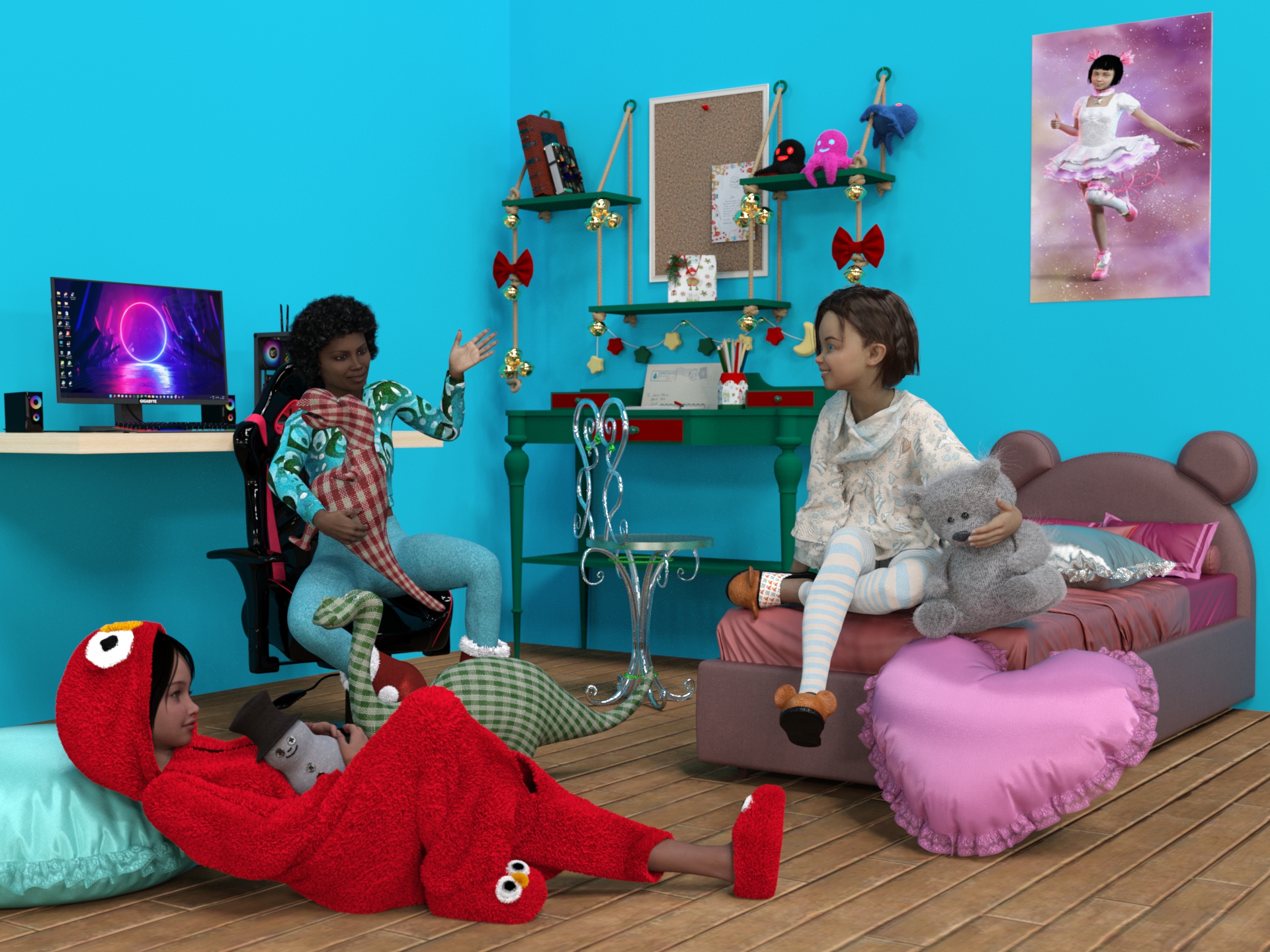
A fantastic pajama party with friends and favorite plushies among soft cushions.
April-May 2024 free Challenge 2 entry
Freebies
PB Snowman Plushie
https://sharecg.com/v/101134/browse/21/DAZ-Studio/PB-Snowman-PlushieMy Son Bed by teknology3d (wall and floor)
https://www.renderosity.com/freestuff/items/77693/my-son-bedTeddy Bed
https://www.renderhub.com/humanxystudio/teddy-bed"Gaming Desktop PC" (https://skfb.ly/or88C) by Yolala3D | Y3D is licensed under Creative Commons Attribution (http://creativecommons.org/licenses/by/4.0/).
https://sketchfab.com/3d-models/gaming-desktop-pc-d1d8282c9916438091f11aeb28787b66"Gaming Chair [FREE DOWNLOAD]" (https://skfb.ly/6QZop) by Karlos is licensed under Creative Commons Attribution (http://creativecommons.org/licenses/by/4.0/).
https://sketchfab.com/3d-models/gaming-chair-free-download-bcb13eb7ef9e4c3c9499aacff6c79757Freebie - SmidA - Dino2
https://www.deviantart.com/smida460/art/Freebie-SmidA-Dino2-921283896Freebie - SmidA - Dino1
https://www.deviantart.com/smida460/art/Freebie-SmidA-Dino1-921283670Prop - Morphing Poster by squarepeg3d
https://www.renderosity.com/freestuff/items/87552/prop-morphing-posterFantasy Chair by Chaosqueens-World
https://www.renderosity.com/freestuff/items/83991/fantasy-chairHolly Desk
https://sharecg.com/v/98492/related/21/DAZ-Studio/Holly-DeskXmas Teddy
https://sharecg.com/v/98457/gallery/21/DAZ-Studio/Xmas-Teddy
https://www.renderosity.com/freestuff/items/90164/xmas-teddyPillow
https://sharecg.com/v/93157/browse/21/DAZ-Studio/Pillow-PropsOld Book
https://www.deviantart.com/mysticartdesign/art/Old-Book-881819949Magigbook for Dazstudio iray
https://www.deviantart.com/kalhh/art/Magigbook-for-Dazstudio-iray-910339363Nanami Genji Anime Charachter For Genesis 8 Female free 3D model
https://www.cgtrader.com/free-3d-models/character/fantasy-character/nanami-genji-anime-charachter-for-genesis-8-femaleTwizted Character Creation Kit by TwiztedMetal
https://www.renderosity.com/freestuff/items/81217/twizted-character-creation-kitAlysha for Genesis 8 Female by emotionaldreams
https://www.renderosity.com/freestuff/items/83613/alysha-for-genesis-8-femaleKristen for Genesis 9 Female by pixeluna
https://www.renderosity.com/freestuff/items/93828/kristen-for-genesis-9-femaleXmas Bundle by Leilana
https://www.renderosity.com/freestuff/items/84013/xmas-bundlePajamas for Genesis 3 Female Free 3D model (slippers)
https://www.cgtrader.com/free-3d-models/character/clothing/pajamas-for-genesis-3-femaleEveryday G8
https://www.renderhub.com/teknology3d/everyday-g8
https://www.renderosity.com/freestuff/items/83138/everyday-outfit-genesis-8Everyday Outfit - additional textures by eblank
https://www.renderosity.com/freestuff/items/91369/everyday-outfit-additional-texturesSanta Costume Mega Bundle by Yashiro Amamiya (shoes)
https://www.patreon.com/posts/santa-costume-by-45417296Kigurumi for G9
https://sharecg.com/v/100853/gallery/21/DAZ-Studio/Kigurumi-for-G9Jill For G8F DL (hair)
https://www.deviantart.com/checkertoo/art/Jill-For-G8F-DL-852699253Hair 1 for Daz 3D Genesis 9 by amyaimei
https://www.deviantart.com/amyaimei/art/Hair-1-for-Daz-3D-Genesis-9-935744713Genesis 8 Young Child Pose 4-12 (Just Kids 4 ) by BBarbs
https://www.renderosity.com/freestuff/items/86827/genesis-8-young-child-pose-4-12-just-kids-4Genesis 8 Teen Pose 43 by BBarbs
https://www.renderosity.com/freestuff/items/85799/genesis-8-teen-pose-43School Time Genesis 8 by
https://www.sharecg.com/v/90137/HDRIs / Indoor / Dancing Hall
https://polyhaven.com/a/dancing_hallIn the poster:
Lily Character Morph For G8 and G8-1 Female Free 3D model
https://www.cgtrader.com/free-3d-models/character/woman/lily-character-morph-for-g8-and-g8-1-female
https://www.renderhub.com/humanxystudio/lily-character-morph-for-g8-and-g8-1-femalePlatinum Girl for G8F
https://sharecg.com/v/92997/related/21/DAZ-Studio/Platinum-Girl-for-G8FFree: Bob haircut for Genesis 8
https://www.deviantart.com/perlk/art/Free-Bob-haircut-for-Genesis-8-887913550Daz-Iray-Shaders-and-Lights
https://github.com/Astuceman/Daz-Iray-Shaders-and-LightsFREEBIE Posepack3 by dividebyzero718
https://www.deviantart.com/dividebyzero718/art/FREEBIE-Posepack3-901112132FREEBIE Painted Backdrop Pack 3 by dividebyzero718
https://www.deviantart.com/dividebyzero718/art/FREEBIE-Painted-Backdrop-Pack-3-906835561No count?
Ena hair by Prae: no longer available (It was a Christmas gift from Fantasieattic in 2021)ASINA (KA freebie april 2024, still free)
https://www.daz3d.com/asina
https://www.daz3d.com/forums/discussion/680206/asina-april-fools-competition-2024/p1
Paid:Growing Up Bundle for Genesis 8 Female(s) and Male(s)
https://www.daz3d.com/growing-up-bundle-for-genesis-8-female-s-and-male-sTime Machine for Genesis 9
https://www.daz3d.com/time-machine-for-genesis-9Freebie Challenge April/May 2024 - "Soft as Plush, Smooth as Silk" - Main Threademanuela1 said:
Plush party
A fantastic pajama party with friends and favorite plushies among soft cushions.
April-May 2024 free Challenge 2 entry
Freebies
PB Snowman Plushie
https://sharecg.com/v/101134/browse/21/DAZ-Studio/PB-Snowman-PlushieMy Son Bed by teknology3d (wall and floor)
https://www.renderosity.com/freestuff/items/77693/my-son-bedTeddy Bed
https://www.renderhub.com/humanxystudio/teddy-bed"Gaming Desktop PC" (https://skfb.ly/or88C) by Yolala3D | Y3D is licensed under Creative Commons Attribution (http://creativecommons.org/licenses/by/4.0/).
https://sketchfab.com/3d-models/gaming-desktop-pc-d1d8282c9916438091f11aeb28787b66"Gaming Chair [FREE DOWNLOAD]" (https://skfb.ly/6QZop) by Karlos is licensed under Creative Commons Attribution (http://creativecommons.org/licenses/by/4.0/).
https://sketchfab.com/3d-models/gaming-chair-free-download-bcb13eb7ef9e4c3c9499aacff6c79757Freebie - SmidA - Dino2
https://www.deviantart.com/smida460/art/Freebie-SmidA-Dino2-921283896Freebie - SmidA - Dino1
https://www.deviantart.com/smida460/art/Freebie-SmidA-Dino1-921283670Prop - Morphing Poster by squarepeg3d
https://www.renderosity.com/freestuff/items/87552/prop-morphing-posterFantasy Chair by Chaosqueens-World
https://www.renderosity.com/freestuff/items/83991/fantasy-chairHolly Desk
https://sharecg.com/v/98492/related/21/DAZ-Studio/Holly-DeskXmas Teddy
https://sharecg.com/v/98457/gallery/21/DAZ-Studio/Xmas-Teddy
https://www.renderosity.com/freestuff/items/90164/xmas-teddyPillow
https://sharecg.com/v/93157/browse/21/DAZ-Studio/Pillow-PropsOld Book
https://www.deviantart.com/mysticartdesign/art/Old-Book-881819949Magigbook for Dazstudio iray
https://www.deviantart.com/kalhh/art/Magigbook-for-Dazstudio-iray-910339363Nanami Genji Anime Charachter For Genesis 8 Female free 3D model
https://www.cgtrader.com/free-3d-models/character/fantasy-character/nanami-genji-anime-charachter-for-genesis-8-femaleTwizted Character Creation Kit by TwiztedMetal
https://www.renderosity.com/freestuff/items/81217/twizted-character-creation-kitAlysha for Genesis 8 Female by emotionaldreams
https://www.renderosity.com/freestuff/items/83613/alysha-for-genesis-8-femaleKristen for Genesis 9 Female by pixeluna
https://www.renderosity.com/freestuff/items/93828/kristen-for-genesis-9-femaleXmas Bundle by Leilana
https://www.renderosity.com/freestuff/items/84013/xmas-bundlePajamas for Genesis 3 Female Free 3D model (slippers)
https://www.cgtrader.com/free-3d-models/character/clothing/pajamas-for-genesis-3-femaleEveryday G8
https://www.renderhub.com/teknology3d/everyday-g8
https://www.renderosity.com/freestuff/items/83138/everyday-outfit-genesis-8Everyday Outfit - additional textures by eblank
https://www.renderosity.com/freestuff/items/91369/everyday-outfit-additional-texturesSanta Costume Mega Bundle by Yashiro Amamiya (shoes)
https://www.patreon.com/posts/santa-costume-by-45417296Kigurumi for G9
https://sharecg.com/v/100853/gallery/21/DAZ-Studio/Kigurumi-for-G9Jill For G8F DL (hair)
https://www.deviantart.com/checkertoo/art/Jill-For-G8F-DL-852699253Hair 1 for Daz 3D Genesis 9 by amyaimei
https://www.deviantart.com/amyaimei/art/Hair-1-for-Daz-3D-Genesis-9-935744713Genesis 8 Young Child Pose 4-12 (Just Kids 4 ) by BBarbs
https://www.renderosity.com/freestuff/items/86827/genesis-8-young-child-pose-4-12-just-kids-4Genesis 8 Teen Pose 43 by BBarbs
https://www.renderosity.com/freestuff/items/85799/genesis-8-teen-pose-43School Time Genesis 8 by
https://www.sharecg.com/v/90137/HDRIs / Indoor / Dancing Hall
https://polyhaven.com/a/dancing_hallIn the poster:
Lily Character Morph For G8 and G8-1 Female Free 3D model
https://www.cgtrader.com/free-3d-models/character/woman/lily-character-morph-for-g8-and-g8-1-female
https://www.renderhub.com/humanxystudio/lily-character-morph-for-g8-and-g8-1-femalePlatinum Girl for G8F
https://sharecg.com/v/92997/related/21/DAZ-Studio/Platinum-Girl-for-G8FFree: Bob haircut for Genesis 8
https://www.deviantart.com/perlk/art/Free-Bob-haircut-for-Genesis-8-887913550Daz-Iray-Shaders-and-Lights
https://github.com/Astuceman/Daz-Iray-Shaders-and-LightsFREEBIE Posepack3 by dividebyzero718
https://www.deviantart.com/dividebyzero718/art/FREEBIE-Posepack3-901112132FREEBIE Painted Backdrop Pack 3 by dividebyzero718
https://www.deviantart.com/dividebyzero718/art/FREEBIE-Painted-Backdrop-Pack-3-906835561No count?
Ena hair by Prae: no longer available (It was a Christmas gift from Fantasieattic in 2021)ASINA (KA freebie april 2024, still free)
https://www.daz3d.com/asina
https://www.daz3d.com/forums/discussion/680206/asina-april-fools-competition-2024/p1
Paid:Growing Up Bundle for Genesis 8 Female(s) and Male(s)
https://www.daz3d.com/growing-up-bundle-for-genesis-8-female-s-and-male-sTime Machine for Genesis 9
https://www.daz3d.com/time-machine-for-genesis-9Entry approved, please move to entries thread
Figure Metrics and GF8 HeightJonnyRayFirst thank you for continuing to try to help! :)
I have some screenshots at home of what my issue has been. I'll add those to this thread along with some results of the testing for my new theory that the "Height" parameter/morph on GF8 is just too limited for what I was trying to do.
Do you know how to get the slide height morph? I've looked for it but I can't find it
Persian Scimitar/ShamshirMy pleasure. Do hope it's useful.
The poses in the '.tip' images at the sides of the illustration above are all very similar. I positioned the sword on a G8F character first in the G8F zero position, then used various Pose Transfer scripts to move that G8F pose to a new generation character. Having done so, creating a new wearable preset was simply a matter of moving the sword relative to the hand, tweaking any finger poses and that was pretty much it. Don't know why I didn't think of this sort of thing before when using props intergenerationally.
I was worried that the Poser based parametric characters (V3 & V4) wouldn't cope with a DS wearable preset, but it turns out that wasn't a problem at all. Furthermore, my TriAx'd GV3 could morph from GV3 to A3 and still keep holding the sword in the correct place in her hand, though on cursory inspection it did seem as if the smaller hand sank into the surface of the hilt a bit.
There is only one G9 wearable preset for each hand. I did the preset on the very odd looking G9 base character, and as a result it seems to work happily on the Feminine and Masculine derivative shapes too.
Regards,
Richard
Diffeo - problem with thigh bending bulgeThank you, i did not know that existed, but it does not seem to fix my problem. From what i understand that would be useful if i imported Nina9 without bakes and wanted to add them afterwards? However i want to import a basic G9 and then add morphs to it. I could add them manually i assume (they are in the same folder as the other Nina morphs, see first image) with import custom morphs?
This does not affect the thigh problem though. I tried with importing a baked nina and the problem persists.
I think it has to do with the erc yet again. If you recall, the erc morph messed up the eye position when set to Armature all. It worked when i set the erc to Translation but now the bending seems to only work somewhat correctly when set to Armature all (second image), even with a baked import.Decimator for Daz StudioPls confirm one thing beforehand : You want to use this decimated Alien as a normal G3M figure in DS ?
1st, Decimator plugin is used for decimate figure and export it to other format for use in non DS application (gaming, movie... etc.). And AFAIK, DS cannot save decimated resolution in any DUF format files and cannot correctly load in LOD mesh. So that's why you saw nothing after dialing it.
2nd, if the answer to the above question is Yes.( Though I vaguely see less benefit that you may get from it... ). You cannot make it in the above way. Instead, you can :
- Import Alien30% OBJ into the scene, rig it on the original Alien with the settings in ss1. Unfit it.
- Import Alien30% OBJ again onto the rigged Alien with MLP (Reverse + Delta Only). Dial the morph and Lock it.
- Adjust Rigging to Shape and ERC Freeze the fixing morph. Now you can use this decimated Alien as a G3M ~The cons is that you might have to make some necessary corrective morphs on this Alien30%, for the purpose of posing it correctly ~~
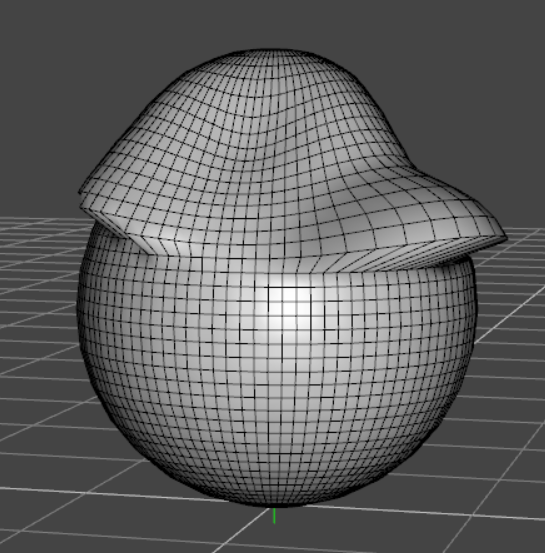
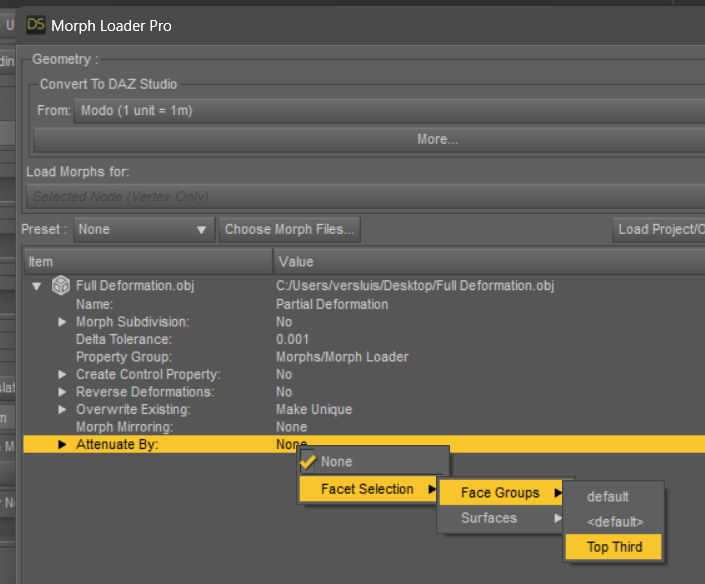
Is there a way to partially remove morphs from an item?I saw a tutorial for that on https://www.versluis.com/2024/05/attenuating-a-morph-with-a-face-group-in-daz-studio/ and I can't see why you could not go even further using weightmap influence to control the fall-off. Asssuming you want a smoother transition.
 SOLVED - Exporting Multiple Morphs from Daz Studio at Once
Okay. I'm still a ways off from rendering in Blender, so that'll do fine. I already have DTB setup. Thanks! At some point I'll follow up on blender batch exporting (daz studio figure morph) shape keys. Plenty of tutorials came up on google.
SOLVED - Remove ERC Freeze From Multiple MorphsWell, actually it's pretty easy if you want to remove ERC formulas in DSF file:
- Open one of your DSF file, search "formulas" or just scroll down a couple of lines. You'll find it.
- Click LMB to place the cursor at the beginning of that line. Scroll down (or drag scroll bar downwards) to the line of "morph" coding block. Hold Shift key, click the line before "morph". Now the formula coding block is fully selected. Hit Delete key twice !Then Ctrl + S to Save the file. Reload your Base figure. You'll see frozen ERC are removed. So even if you have 100 morphs, such a job could be done within 15 minutes ~~
SOLVED - Remove ERC Freeze From Multiple Morphs1st, there's no way of doing batch ERC Bake or ERC Freeze, you have to do it on the moprhs one by one.
2nd, I assume you're using the older version of DS... with the latest version of DS, DS has a mechanic of creating unique urI for each morph the user creates. So I don't think you'll get duplicate formulas with the latest DS version. And even if you use the older version, as long as you name the morph uniquely, you shouldn't get duplicate formulas either.
3rd, You have no way in DS to refreeze ERC on a morph property with frozen ERC, ERC Bake has to be done firstly. But as you said, yes, you can manually edit DSF file by removing the coding block of all formulas. Then reload your Base figure. That'll be much faster ~~
Finally, a script may always be able to automate these process... but that would be another topic ~~
SOLVED - Remove ERC Freeze From Multiple MorphsYeah, those are the normal steps, but you have to do it manually one morph at a time. All of the morphs on the G8F shaped GF2 mesh look fine, but adjusting the rigging to account for the new base shape is a slow enough process without the addded step of clearing the old formulas. If I just adjust the rigging and freeze, I'll end up with duplicate formulas on every morph. If I don't make the right changes, the rigging will distort all the morphs. Even if I go with the third option, which I was already considering, there is still the hassle of exporting and reimporting all those morphs.
I really wish there was a more automated way to do these things. I've always wished that there was an option to over-write ERC's if you refreeze.
SOLVED - Remove ERC Freeze From Multiple Morphs1stly, I'm not 100% sure but you're making a G8F's clone on G2F, is that correct ?
2ndly, to clear the frozen ERC on a morph property, you can do it with ERC Bake (Delta Add, Add, Substract)... which is just under ERC Freeze menu item in Edit mode. Then, re-rig it, refreeze ERC and re-save morph asset(s).
Just in case... if you encounter errors for whatever any reason when processing ERC Bake, you also can: with the morph dialed, export the figure to OBJ file. Delete the morph property as well as the saved DSF file in data folder. Import OBJ with MLP, then rig it and ERC Freeze...
[Released] Turbo Loader for Genesis 8 and 8.1 [Commercial]I have had this for some time now and only today I am really trying to get into understanding how this works.
Reason being, it took me almost 20mins just now to Zero a Figure pose and then it hit me that I had grabbed Turbo Loader on sale a while back (Order Date: 2023-07-29).
I initially have a G8F and G8M in the scene and I filtered for the morphs used after running the full scan > Uncheck all > Tick only the G8F character I have in the scene > Exceute > it now disabled all the other morphs I left unticked > worked as expected? > I closed Daz > reopen > load scene again > but now it showed me like a Full 2-3 scroll-downs of a page of missing items required for the scene.
Is this how it should be? or I screwed up somewhere and its normal that some characters use morphs files from a bunch of other characters (the G8F was a SASE character, only searched for the 1 character and ticked that to "Enable" the morph in the TL scanned list while leaving all other morphs Unticked).
Sorry if this isnt a Tech Support place for this product.
Freebie Challenge April/May 2024 - "Soft as Plush, Smooth as Silk" - Main ThreadPlush party
A fantastic pajama party with friends and favorite plushies among soft cushions.
April-May 2024 free Challenge 2 entry
Freebies
PB Snowman Plushie
https://sharecg.com/v/101134/browse/21/DAZ-Studio/PB-Snowman-PlushieMy Son Bed by teknology3d (wall and floor)
https://www.renderosity.com/freestuff/items/77693/my-son-bedTeddy Bed
https://www.renderhub.com/humanxystudio/teddy-bed"Gaming Desktop PC" (https://skfb.ly/or88C) by Yolala3D | Y3D is licensed under Creative Commons Attribution (http://creativecommons.org/licenses/by/4.0/).
https://sketchfab.com/3d-models/gaming-desktop-pc-d1d8282c9916438091f11aeb28787b66"Gaming Chair [FREE DOWNLOAD]" (https://skfb.ly/6QZop) by Karlos is licensed under Creative Commons Attribution (http://creativecommons.org/licenses/by/4.0/).
https://sketchfab.com/3d-models/gaming-chair-free-download-bcb13eb7ef9e4c3c9499aacff6c79757Freebie - SmidA - Dino2
https://www.deviantart.com/smida460/art/Freebie-SmidA-Dino2-921283896Freebie - SmidA - Dino1
https://www.deviantart.com/smida460/art/Freebie-SmidA-Dino1-921283670Prop - Morphing Poster by squarepeg3d
https://www.renderosity.com/freestuff/items/87552/prop-morphing-posterFantasy Chair by Chaosqueens-World
https://www.renderosity.com/freestuff/items/83991/fantasy-chairHolly Desk
https://sharecg.com/v/98492/related/21/DAZ-Studio/Holly-DeskXmas Teddy
https://sharecg.com/v/98457/gallery/21/DAZ-Studio/Xmas-Teddy
https://www.renderosity.com/freestuff/items/90164/xmas-teddyPillow
https://sharecg.com/v/93157/browse/21/DAZ-Studio/Pillow-PropsOld Book
https://www.deviantart.com/mysticartdesign/art/Old-Book-881819949Magigbook for Dazstudio iray
https://www.deviantart.com/kalhh/art/Magigbook-for-Dazstudio-iray-910339363Nanami Genji Anime Charachter For Genesis 8 Female free 3D model
https://www.cgtrader.com/free-3d-models/character/fantasy-character/nanami-genji-anime-charachter-for-genesis-8-femaleTwizted Character Creation Kit by TwiztedMetal
https://www.renderosity.com/freestuff/items/81217/twizted-character-creation-kitAlysha for Genesis 8 Female by emotionaldreams
https://www.renderosity.com/freestuff/items/83613/alysha-for-genesis-8-femaleKristen for Genesis 9 Female by pixeluna
https://www.renderosity.com/freestuff/items/93828/kristen-for-genesis-9-femaleXmas Bundle by Leilana
https://www.renderosity.com/freestuff/items/84013/xmas-bundlePajamas for Genesis 3 Female Free 3D model (slippers)
https://www.cgtrader.com/free-3d-models/character/clothing/pajamas-for-genesis-3-femaleEveryday G8
https://www.renderhub.com/teknology3d/everyday-g8
https://www.renderosity.com/freestuff/items/83138/everyday-outfit-genesis-8Everyday Outfit - additional textures by eblank
https://www.renderosity.com/freestuff/items/91369/everyday-outfit-additional-texturesSanta Costume Mega Bundle by Yashiro Amamiya (shoes)
https://www.patreon.com/posts/santa-costume-by-45417296Kigurumi for G9
https://sharecg.com/v/100853/gallery/21/DAZ-Studio/Kigurumi-for-G9Jill For G8F DL (hair)
https://www.deviantart.com/checkertoo/art/Jill-For-G8F-DL-852699253Hair 1 for Daz 3D Genesis 9 by amyaimei
https://www.deviantart.com/amyaimei/art/Hair-1-for-Daz-3D-Genesis-9-935744713Genesis 8 Young Child Pose 4-12 (Just Kids 4 ) by BBarbs
https://www.renderosity.com/freestuff/items/86827/genesis-8-young-child-pose-4-12-just-kids-4Genesis 8 Teen Pose 43 by BBarbs
https://www.renderosity.com/freestuff/items/85799/genesis-8-teen-pose-43School Time Genesis 8 by
https://www.sharecg.com/v/90137/HDRIs / Indoor / Dancing Hall
https://polyhaven.com/a/dancing_hallIn the poster:
Lily Character Morph For G8 and G8-1 Female Free 3D model
https://www.cgtrader.com/free-3d-models/character/woman/lily-character-morph-for-g8-and-g8-1-female
https://www.renderhub.com/humanxystudio/lily-character-morph-for-g8-and-g8-1-femalePlatinum Girl for G8F
https://sharecg.com/v/92997/related/21/DAZ-Studio/Platinum-Girl-for-G8FFree: Bob haircut for Genesis 8
https://www.deviantart.com/perlk/art/Free-Bob-haircut-for-Genesis-8-887913550Daz-Iray-Shaders-and-Lights
https://github.com/Astuceman/Daz-Iray-Shaders-and-LightsFREEBIE Posepack3 by dividebyzero718
https://www.deviantart.com/dividebyzero718/art/FREEBIE-Posepack3-901112132FREEBIE Painted Backdrop Pack 3 by dividebyzero718
https://www.deviantart.com/dividebyzero718/art/FREEBIE-Painted-Backdrop-Pack-3-906835561No count?
Ena hair by Prae: no longer available (It was a Christmas gift from Fantasieattic in 2021)ASINA (KA freebie april 2024, still free)
https://www.daz3d.com/asina
https://www.daz3d.com/forums/discussion/680206/asina-april-fools-competition-2024/p1
Paid:Growing Up Bundle for Genesis 8 Female(s) and Male(s)
https://www.daz3d.com/growing-up-bundle-for-genesis-8-female-s-and-male-sTime Machine for Genesis 9
https://www.daz3d.com/time-machine-for-genesis-9Daz 3D is part of

Connect
DAZ Productions, Inc.
7533 S Center View Ct #4664
West Jordan, UT 84084Licensing Agreement | Terms of Service | Privacy Policy | EULA
© 2026 Daz Productions Inc. All Rights Reserved.