-
Solution Share: Import MMD motion into Daz Studio with body, facial and camera motion[Need Blender]
butaixianran said:
The vmd motion you mentioned works perfectly well on my blender.
If you are using vmd retargeting addon, you must already know, there is a very detailed video tutorial for that blender addon. Follow that video, there is no way you can not make it work.
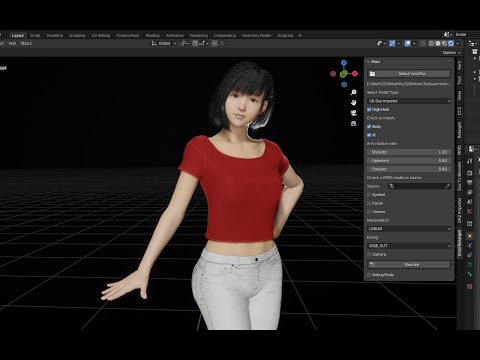
Like other users already told you, also video tutorial told you too, check "merge Rigs" when importing your character.
And there is no any glitches on the vmd motion you mentioned above. Both G8 and G8.1 works perfectly.
Also, the tutorial about how to export animation back to Daz, there is a Daz script in its description, which will make your character ready to import animation in Daz Studio.
Document is already explained why you need to unlock hidden properties, if you ignore that, your motion won't work on the character.
From your posts here, I think you are keeping making excuses to not follow video tutorial. Once you don't follow video tutorial, something will be wrong, and you don't know how to fix that.
Here is what you should do:
* You can learn everything from beginning about bones and blender, then you can ignore video tutorial and mess up everything you want.
* Or, follow video tutorial, do not skip any step, like every other users of vmd retargeting.
There are some female users of vmd retargeting, they barely learned anything about blender or Daz. They just follow every step of video tutorial and make it works perfectly.
I 100% followed the tutorial. Although the tutorial I was following was this one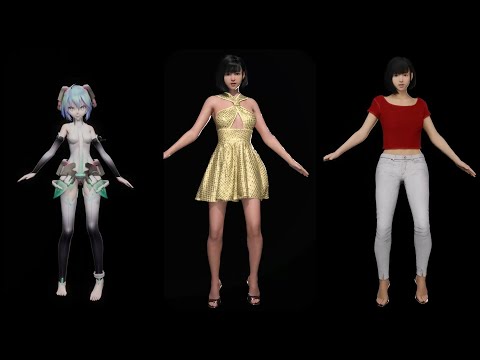
Because it was the first one you linked. I didn't realize there was a second tutorial video I needed to watch. The tutorial posted in the OP that is 8minutes starts after using daz import. Which left me to try to figure out the import from this https://diffeomorphic.blogspot.com/p/import-into-blender-version-16.html which I did only partially well. The 4 minute tutorial uses daz easy import. I was using the non-easy import. Because I couldn't figure out the easy one. I needed to follow the 4minute tutorial then the 8minute tutorial, but that wasn't really clear to me at all since the tutorials overlap each other in the topics they cover. Another problem I had is that the vmd in the tutorial is using a short test clip. My system has 64gb of ram. The 7000 frame animation I randomly chose to test things out on requires more than 64gb of ram (or dips into pagefile). I ended up disabling my pagefile and testing it again and crashing my system, which is why I'm sure the long animation was using more ram than I had. So, yeah, I sought to alter the tutorial and edit the animation and only bake/export part of it.
Also when testing how things work, using an entire song, made for a bad test, making it hard to figure out what mistake I may or may not have made. It would be really nice if I could learn how to edit NLA animations in blender to delete 90% of them. I did learn how to bake the full animation in blender then delete 90% of the keyframes before importing back to daz, that worked well. But when I tried to bake less than the full NLA things went haywire. I suppose I should've tried harder to find a sample VMD that was only 8 seconds long instead of 3minutes long. So, yeah, I'm still quite curious of if there's any way in the blender UI to fully delete segments from an NLA. Since baking 3-5minute long animations is extremely rough on my computer.
TL;DR Thank you for pointing me towards the second video, the 4minute one. That was quite useful. The first tutorial linked in this thread is not enough for me to have figured things out. I'm not sure I was willfully refusing to follow the tutorial. I was just following the 8minute video tutorial, not realizing the 4minute tutorial was critically important. If you really want there to be no way someone can do it wrong, you should link both videos in the OP of the thread.
Edit: Notes to self, now that I have my pagefile on my ssd, I can bake a full 7000 frame animation, but the keyframes are a little hard to edit/delete due to there being so many 1000s of keyframes (they're harder to see and the UI lags a lot), but it is possible. However upon redoing things using the additional tutorial, it turns out that there was nothing wrong with my original efforts. The vmd I randomly chose just does include a pose in which the character has to dislocate their own shoulder. I guess I was unclear, when I said broken, I didn't mean the animation or render broke, I meant the pose was such that if the character were real they would have broken their arm. I grabbed another vmd from a different dance though and preffered that. So, the TL;DR was, nothing was ever wrong, and it always worked. I just didn't like one of the poses in the vmd file I happened to be using. Sorry :P[Released] Content Wizard [Commercial]Hey RiverSoft, I recently found your Content Wizard product and it's an absolute live saver! Genuinely kicking myself that I never used it before!
I’ve been installing a metric ton of products and everything is working fine. However, there’s a small niggle that’s bugging me, and I’m hoping you might know of a fix or solution. Apologies if this was discussed earlier in the thread, but it’s a bit difficult to search through 46 pages for what I’m looking for!
As I said, everything is working fine, and all the products I’ve installed now have Smart Content. However, when I go into the “Files” section in the “Smart Content” content tab, I notice that several products seem to have duplicates, but with slightly-different “Product” data.
I’ve attached a few images showing one example of a Warhammer 40K armour set I picked up from DeviantArt. Now, when installing the product through Content Wizard, I entered “DeviantArt” in the “Store” section. The MetaData installed fine, and the products all work fine; everything’s showing up in Smart Content, and all the assets are where they’re meant to be.
But when viewing the same assets in the “Files” tab, you can see that I have several duplicates of the same assets, but with “LOCAL USER” listed in the “Product” info. Except, they’re not really duplicate assets, because the filepath shows that they are the exact same asset… just listed twice, for some reason? I don’t know how to describe it.I’ve tried deleting the MetaData within Daz, manually deleting the MetaData with the Runtime folder, reinstalling the amour with both “DeviantArt” and “LOCAL USER” listed as the Store Name in Content Wizard, and the problem still persists. It’s not a big issue, just a minor gripe as its meaningless clutter.
SOLVED
I figured it out!For some reason, a lot of assets were being grouped into the “LOCAL USER” product in Smart Content and the Content Library, as “unassigned” assets. By navigating to the “LOCAL USER” product in the Content Library tab, right-clicking on the asset in question and clicking “Remove Reference…”, that removes the asset from the “LOCAL USER” product and removes the duplicate files. Hey presto, solved!
If anyone else is having a similar issue, that seems to have solved it for me!
Stereo texturesAs far as I can see that is a tool for creating 3D models from photos, so I'd think it would be the output you wanted to import 9as a model) into Daz Studio, not the textures.
Stereo texturesThanks for your replies. Sorry, they are texture maps in stereo format using 3DF Zephyr. It was 155 images combined into 3 material surfaces. FBX model. I thought maybe I could check or uncheck something in the import dialogue?
Render with amd gpuSilver Dolphin said:
Blender and Unreal Engine both use AMD Pro Render, Daz has a bridge to Blender. Good luck.
I think i got it. You say I do my job (animations, character poses and materials) in daz3d. then, export the job into fbx and import it in blender and render it. right?
The camera in daz3d can be rendered in blender?
But in other hand, i think blender not supporting my rx580 8gb for rendering. is there a plugin like pro render for install it on blender to render with my rx 580?
sorry for my bad english//...Solution Share: Import MMD motion into Daz Studio with body, facial and camera motion[Need Blender]The vmd motion you mentioned works perfectly well on my blender.
If you are using vmd retargeting addon, you must already know, there is a very detailed video tutorial for that blender addon. Follow that video, there is no way you can not make it work.
Like other users already told you, also video tutorial told you too, check "merge Rigs" when importing your character.
And there is no any glitches on the vmd motion you mentioned above. Both G8 and G8.1 works perfectly.
Also, the tutorial about how to export animation back to Daz, there is a Daz script in its description, which will make your character ready to import animation in Daz Studio.
Document is already explained why you need to unlock hidden properties, if you ignore that, your motion won't work on the character.
From your posts here, I think you are keeping making excuses to not follow video tutorial. Once you don't follow video tutorial, something will be wrong, and you don't know how to fix that.
Here is what you should do:
* You can learn everything from beginning about bones and blender, then you can ignore video tutorial and mess up everything you want.
* Or, follow video tutorial, do not skip any step, like every other users of vmd retargeting.
There are some female users of vmd retargeting, they barely learned anything about blender or Daz. They just follow every step of video tutorial and make it works perfectly.
Diffeomorphic DAZ Importer version 1.6.0 releasedYes you can, just use import pose as usual, it works for simple-rig mhx rigify.
Rory HD is loaded on every G8FI believe that Daz Connect runs some updates at the application launch. I think it's only supposed to be metadata but I have heard that it also "fixes" some files that it sees as differing from what they "should" be. Although it's unlikely that the Rory product has been recently "unfixed" at source and the last reported update was 2020-12-21.
It sounds like perhaps you may have installed a character that has Rory as a prerequisite/dependant and is has a non-zero default or you might have another product that has the same IDs that rory uses - check your Daz Log for duplicate formula errors.
Diffeomorphic DAZ Importer version 1.6.0 releasedIf I use mhx rig I cant import poses? What Im missing.
Visemes to UnityThanks, I finally found it. That was an adventure.
Next question. In Daz3d for eye movement it goes negative for left/positive for right, then negative for down/positive for up. But Unity only allows positive values when exporting for VRMs. Can you use the Daz pose controls at all, or do you have to make new controls in unity for them?
EDIT - I just went ahead and created the new controls in Daz3d. Kind of a pain, but at least it's easier to figure out in Daz than in Unity.
Now just trying to get my materials optimized to import. Current workflow is to import with the iRay settings, which I don't use any of, then convert in Unity. Now working on importing with Daz default shaders to make everyting small and fast.
Blender made custom morph exploding.Jessie said:
Also forgot to mention blenders import settings I use. those are: smooth groups/ lines. split by object, forward is -z and up is y
That's your problem, you need to select "Keep Vert Order"
Blender made custom morph exploding.Also forgot to mention blenders import settings I use. those are: smooth groups/ lines. split by object, forward is -z and up is y
CMS Not Reading Multiple Content DirectoriesDid you actually reset the database? If not, the metadata is still in there, looking for the original files. Did you try putting back an old name to see if it comes back in Smart Content? The references should be in the LOCAL USER product, which is where all saved files go, since thery are not part of an actual product. If the metadata is still available, there will be orphaned references to the original file names. If you restore the original names, you should get back your metadata.
CMS Not Reading Multiple Content DirectoriesIn order for things to show in Smart Content they need to be categorised, have compatibility, and have a file type. You can set these by drag-and-drop from the Content Library pane to the Smart Content pane, with the to-be-compatible-with item loaded and selected in the scene. You don't need to reimport metadata after making chnages in DS, there you are working directly on the database ((re)importing metadata just adds the metadata to the database).
CMS Not Reading Multiple Content Directoriesbarbult said:
I don't understand what you mean by "nothing in that folder shows in CMS". Do you mean nothing shows in the Smart Content pane? Did you export User Data with Content DB Maintenance before resetting the DB? If not, your personal data won't have any metadata files to reimport.
That's what I mean, and no, I didn't so that's probably the root cause.
So, how do I go about fixing this? Take the Scenes, I've just saved a new one into the same folder, that shows in Smart Content, but the others in the same folder don't. I've selected the scenes in Content Library and right clicked, used "Categorize" to mark them under "Default > Saved Files > Scenes", which is the same as the new file, and reimported, but to no effect.
I know I'm going to need to go back through the files and give them meta data, but as "Categorize" doesn't seem to have the desired effect, is there another route?
DolphinsThe Daz Dolphin is perfectly usable in DS:
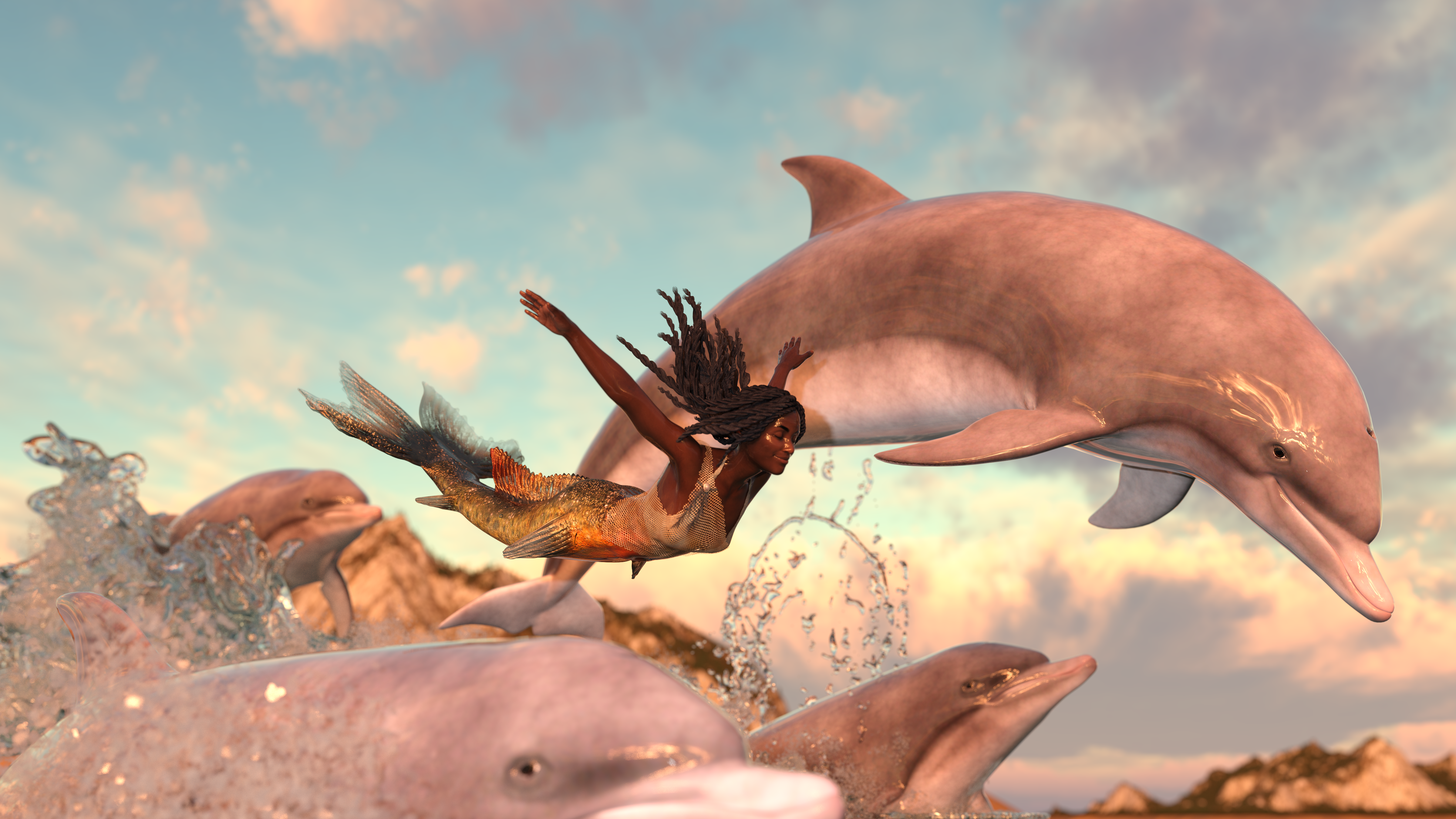
So we DO have a simple dolphin. The fact that you can put a gorilla in a spacesuit is irrelevant, because the gorillas have mostly been morphs of Genesis figures, and can thus wear whatever humans can. There's also no correlation between one product existing and an entirely unrelated product existing. Most Poser assets are usable in DS, and the difference between a "Poser asset" and something created specifically for DS is not that great. The dolphin even has metadata, so it shows up in Smart Content with all your other products (if you use Smart Content).
Solution Share: Import MMD motion into Daz Studio with body, facial and camera motion[Need Blender]What I really need to do is learn how to delete frames from NLA, all these glitches keep occurring when I ask blender to bake an NLA to an action but I ask it to only do so for 10% of the NLA.
But I only know how to delete keyframes, which is what you get after baking the NLA into an action. But I can't bake 7000 frames it's too long (my computer hangs indefinitely), I need a way to delete an NLA's frames above X. But no one likes NLA's so it's hard to ask anyone anything about NLA I guess(blenderdiscord).
Edit: Problem number a million, my animations are a little lifeless because they don't have facial animation. Not sure if this is an import problem, or if the vmd files I'm using just don't have facial expression data in them?CMS Not Reading Multiple Content DirectoriesI don't understand what you mean by "nothing in that folder shows in CMS". Do you mean nothing shows in the Smart Content pane? Did you export User Data with Content DB Maintenance before resetting the DB? If not, your personal data won't have any metadata files to reimport.
CMS Not Reading Multiple Content DirectoriesDid you undo the renaming? if not the metadata, which has the old names, will still not point to the renamed/relocated files. the only way to keep the link is to rename inside Daz Studio, and save your User data to preserve the changes.
CMS Not Reading Multiple Content DirectoriesThis is a bit of an odd one, not sure if I'm missing something. I have two directories on my PC for Daz content:
- My Library - Usual Daz content directory, has all my purchased stuff
- Personal Library - Stuff I've created, scenes, characters, presets
The reason for two is that the personal one is in a folder synched to OneDrive, if I have a hardware fail I can reinstall the products, but the stuff I've created is safe on OneDrive.
I've been using this happily for years, it all appears normally in the CMS, the problem started when I managed to break a load of the CMS by renaming files as part of housekeeping. "No problem, just re-scan known directories, reset the CMS and re-import the lot"". Scanned directories, re-imported metadata, but nothing in the personal library showed up.
I know the files are still there, and the directory is perfectly normal in Content Library, but I don't seem to be able to get CMS to read the contents.

Any thoughts?
Cheers
Fran
Daz 3D is part of

Connect
DAZ Productions, Inc.
7533 S Center View Ct #4664
West Jordan, UT 84084Licensing Agreement | Terms of Service | Privacy Policy | EULA
© 2026 Daz Productions Inc. All Rights Reserved.










