-
daz studio closes after trying to import fbx
daz studio closes after trying to import fbx
Crashed Thread: 0 Dispatch queue: com.apple.main-thread
Exception Type: EXC_BAD_ACCESS (SIGSEGV)
Exception Codes: KERN_INVALID_ADDRESS at 0x0000000000000168
Exception Note: EXC_CORPSE_NOTIFYTermination Signal: Segmentation fault: 11
Termination Reason: Namespace SIGNAL, Code 0xb
Terminating Process: exc handler [0]UberhairUberhair is an old (OLD) 3Delight shader. As far as I can tell, in the Content Library, it can be found at \Shaders\UberHair. It's so old that it may not have good metadata for Smart Content, since it predates that by nearly a decade.
Diffeomorphic DAZ Importer version 1.6.0 releasedHello.
Just installed Diffeomorphic and find it excellent so far! I think I will be rendering a lot more in Blender now

But a question about saving an animated pose preset in blender.
Blender -After Easy import of a Genesis 8, I "Add Simple IK" in diffeomorphic, create an animation and then want to export/save the animated pose to use in Daz.
I click bake pose to FK rig and save pose preset, but then after loading the pose in Daz, the Arms and Legs aren't animated. Back in Blender the tool tip info says "IK arms and Legs have to be baked separately"
How should that be done? Am I even on the right track? lol Any help most appreciated
Chains for weapon (created with Blender)arthenics said:
A side question : is it possible to import the bones if they are created in Blender or I need to recreate them?
You will need to re-rig them in DS.
Chains for weapon (created with Blender)A side question : is it possible to import the bones if they are created in Blender or I need to recreate them?
Daz Studio Pro 4.22(.0.x) - NVIDIA IrayIray 2022.1.5, build 363600.3430
Added and Changed Features
- General
- Improved robustness when handling CUDA render targets supplied by the integration.
- Improved performance of texture import via the OpenImageIO plugin, in particular when only the metadata is needed.
- Material Definition Language (MDL)
- Improved output messages for errors in annotations.
Fixed Bugs
- General
- Fixed crashes with Iray Server (nvbugs 3875764).
- Slightly improved OpenGL error handling.
- Iray Photoreal
- Fixed a crash with guided sampling, if the caustic sampler was toggled while guidance remained active (nvbugs 4011777).
- Fixed issues when changing a material to become inhomogeneous participating media (and other corner cases) (nvbugs 3972155).
- Fixed artifacts when rendering with guided sampling on multiple devices (nvbugs 3978162).
- Fixed invalid auxiliary buffer values when clipping inhomogeneous volumes (nvbugs 3970624).
- Hopefully prevent launch failures due to previously unknown launch memory requirements when using guidance.
- Iray Interactive
- Fixed occasional pixel garbage when rendering frame subwindows (nvbugs 3964935).
- Material Definition Language (MDL)
- Fixed potential crashes in the code generator when a module name contains a ".".
- Fixed crash in the MDL compiler caused by invalid constant declarations.
AI is going to be our biggest game changerwolf359 said:
You are applying a rather draconian standard to Adob'e that if applied to the average Citizen
would result in all manners of protests & righteous indignation.
Imagine if you Publicly stated that All of your Daz content was legally purchased and not pirated.
But Daz inc.(or any random third party) insisted on being able to send a forensic Data tech to your home and inspect all of your storage devices and anything short of that is “proof” that YOU are most likely lying.I'm applying the words from the Adobe PR statement, namely: "ethical" and "accountability", and maybe "initiative" if you will. It sounds so much greater, but what's under the hood?
DAZ content can be subject to DMCA, persecution of uploaders and so on. There is 1:1 accountability by design with asset stores, also because things are visible and can be bought, or you have ways to check, in case of potential infringement. DAZ can notice buyers or make an agreement with the IP owners.
That's not possible with training data for "something with ai" just so in general.
Adobe is implying claims about "ethics", while all they say is, that they are making it more safe to use their product, legally. All the other stuff appears to be pretty foggy.
Initially i didn't intend to take such a position, and i still am just waiting for them to clarify, currently i just deem this approach to be closest to reality. The abusive part can be with users, using ai to "stalk", but mainly resides with the use of training data, and how creators and rights owners are treated. So just by the physical setup, Adobe potentially is on the abusive side by design (of the situation, not necessarily theirs), and now tries to clarify it's approach with an announcement. Should i blindly believe that potentially unfounded foggy statements might hold true in the way Adobe profits most of them? Don't get me wrong, it's probably one of the least abusive approaches, i've seen so far, but i don't typically trust "ethical", when larger corporations use the word. At least not without actual evidence.
Especially with ai, you'll need secret services to monitor corporations, if we really want to go there. But that is not what i am saying. Adobe further claims "accountability", which in the context of ai means, that you know exactly which training data was used and what decisions were made, for a resulting output. But in case of Adobe Firefly, will "accountability" survive an actual analysis? With some of their training data likely taken from the internet or other sources, which in case of "openly licensed" could become infringing, but might also "just" mean, that they took it against the (explicit) consent of the creators or rights owners. The training data does not belong to adobe, their licenses and tos stated something else, but especially "openly licensed" content from random other places isn't just so "theirs" - thus a little closer look actually is necessary, to even be able to judge it. I understand that the selection of training data can be like a business secret, but if Adobe doesn't clarify in a dependable way, i clearly see a conflict evolving around "accountability" and "ethics".
How to resolve the questions? Head-sand? Adobe is and will not be alone with some of these question, of course some apply to other projects likewise, but especially since they advertise with "ethics", "accountability" and "compensation", they might at some point clarify?
MAYBE they only took "licensed for ai" content from the internet, thus that potential issue doesn't even exist. MAYBE they didn't walk over stock photos with hard to do opt-out, maybe they don't keep training data under random licenses they found on the internet, but instead keep rechecking, e.g. to prevent illegally posted contend to end up in their training data. I could even imagine this. But that's not even what their announcement states, so... someone lift the fog, perhaps?
This isn't about lies, it's about clarification. What's "openly licensed" for Adobe in this context? What's ethical, in the context of how you interpret "openly licensed"? What's ethical in case some of the rumors concerning opt-out (yes, this is for other people than Adobe to found with data)? What's ethical with the "initiative" for opt-out for all content on the internet, imposing tags for images, with a non-funded PR-theory that "metadata stays with images throughout the internet". The latter case obviously is foggy too, because a pirated image, stripped of metada, will then not have the opt-out tag, thus become training data - q.e.d. So if you thought that my statement about "not training on removed images" and similar to be draconic or somehow wild, you would be missing one if not the fundamental point.
This is all intertwined, and needs clarification, not just remain fog. Of course you could take the stance, that they needn't clarify, until sued or until they lose at some court, but rest assured, that we have less of "ethical" and less of "accountable", if we keep going there. Then also their "initiative" would get another color. WOULD.... it could be clarified, adjusted, corrected, put in contexts by court rulings, etc.
To elaborate on "draconic" and "legally binding": isn't there a need for a mechanism to verify the soundness of training data sets, especially for cases where the training data creators are thrown into competition with an "ai"? I'd say that this is a societal conflict per se, and it would not go away by declaring current practices legal. The only way to resolve the conflict would be to go for the rather scientific meaning of accountability in the context of ai, resulting in some kind of transparency and/or independent oversight for such training data sets.
Diffeomorphic DAZ Importer version 1.6.0 releasedYes.
In my opinion it is a little clunky that we have to snap every single ik chain, a "global snap" would be better. But this is also the way rigify works so mhx goes with that convention. Also because snapping was intended to snap ik/fk original animation in blender, not to import fk poses as we do with daz poses.
https://bitbucket.org/Diffeomorphic/import_daz/issues/1475/global-ik-fk-snapping
How did One Drive get all of my Daz product thumbnails?SofaCitizen said:
That is a feature of Daz Connect. If you allow Daz Studio to connect to your account then it will download those everytime you start it. By default Daz Connect has it's base folder under your Documents folder and so One Drive will include all that.
If you don't purposefully use Daz Connect as your preferred install method then you should logout of your account within Daz Studio and keep that as working offline. Technically you can then remove the thumbnails from Daz Connect's cloud folder - although I think that it does update the path in the database and so you might have to re-import the metadata to put them back to the DIM/Central locations.
It isn't a feature of Connect, it's a "feature" of OneDrive that will affect anything placed in the Documents folder.
AI is going to be our biggest game changeralgovincian said:
"The first model of the Firefly family is, according to the company, trained on "hundreds of millions" of images from Adobe's Stock photo catalog, openly licensed content and stuff from the public domain, virtually guaranteeing the model won't result in lawsuits as StableDiffusion did with the Getty unpleasantness. It also helps ensure that Stock photographers and artists will be compensated for the use of their works in training these AIs."
- Greg
I think my first answer got removed or bugged.
So in essence, that's not more than the official adobe sites tell me. They will make up something for compensation later (see their FAQ) - it's totally fog, everything. Their "initiative" to get some "Do not Train" tag seems valid, if i look at it in a naive way, but in reality it's another opt-out for the whole of the internet, leaving gaps everywhere, including if and how the license is to be interpreted. I guess i can prevent training by setting one entry in the robots.txt, or do i have to process all images on a server to update metadata tags? Do i need to write something in the license, will their bot read and interpret the licenses of my images, e.g. if i'm a small competitor gallery thing, (and so on). All that looks good when assuming they're the wight knight. I don't assume they are, but i see other white stuff: fog. Also imposing opt-out on everyone isn't the "good guy" ploy - also consider the question of removed material and updated license, which immediately implies the question of "when" something has to be ready, in order to be treated "in an ethical way". Illegally posted image? Trained! Removed? Still in training data - it had an "open license"! There is two valid approaches, no other ones are logic. 1. Rescrape forever and remove any content from training data, that has been removed or now has a license not consenting with training. Conventions have to be found for robots.txt, license texts, html and image metadata 2. A centralized database for consent, DMCA and legality question for all images of the internet (one each of the whole internet for US, BRICS, EU?).
Maybe they exclude apparently copyrighted material, whatever way they do that. That would be better than the data sets containing those - but the rest? There could be a foggy common set of stuff, for which we have to assume tricks (opt-out, procedures, tricks) rather than fairness, with images used for training against the consent of the rights owners. I would not rely on a PR statement of a commercial player, in order to feel better about using their services. This goes for all of them, and there needs to be some reliability beween what they claim and what they do - but what if the claims are foggy from start?
Perhaps it's legally sound, but from the PR texts there is quite an "open area" there, and legal doesn't necessarily mean "ethical".
This needs to be elaborated by Adobe.
("wight knight" - real typo.)
How did One Drive get all of my Daz product thumbnails?That is a feature of Daz Connect. If you allow Daz Studio to connect to your account then it will download those everytime you start it. By default Daz Connect has it's base folder under your Documents folder and so One Drive will include all that.
If you don't purposefully use Daz Connect as your preferred install method then you should logout of your account within Daz Studio and keep that as working offline. Technically you can then remove the thumbnails from Daz Connect's cloud folder - although I think that it does update the path in the database and so you might have to re-import the metadata to put them back to the DIM/Central locations.
Skeleton for G8 like M4?The skeleton must be fit to M4. Load them both. Right-click on the Skeleton and select "Fit 'm4 skeleton ds' To..". The ensuing dialog will have a drop down list where you can select 'michael 4". This will conform the skeleton to M4 and will follow poses. Then run the pose on the skeleton to align it with M4's mesh.
The scroll in the corner says that there is a Poser file and a DAZ Studio file in the same folder. This was an old accomodation to use Poser content in Studio with one click. There could still be other files for Studio only in the xxxStudioCF file, usually material settings.
From the looks of it, Michael 4 Base was not properly installed. There should be a product called "Michael 4 Base" with all sorts of expressions, morphs and poses, and "Michel 4 Base StudioCF" with simple materials. The Power Loader doesn't show as a product, but it is needed to allow you to configure which morphs are loaded (for other characters like Hiro4, Freak 4 and other morph packs). The fact that you get the scroll means all the files are there, but not quite properly configured.
The "Actor" tag comes from the metadata, which also indicates that files were not properly installed. Which method are you using? I believe you need to use DIM or Central to properly install and configure the Generation 4 characters.
Wearables presets not loading associated pose presetThe items do get parented to the figure (which I assume is the expected behaviour), but the posing does not load.
There is nothing in the log that indicates any obvious error - these are the entirety of the log entries relating to an attempt to load "SYTG8 Towel Dry Face 01 Right G8F.duf"
2023-03-26 17:15:14.174 [INFO] :: Prepare asset load (merge): /People/Genesis 8 Female/Clothing/SY Towels dForce Genesis 8 Female/Wearables/SYTG8 Towel Dry Face 01 Right G8F.duf
2023-03-26 17:15:14.174 [INFO] :: Locking viewport redraw...
2023-03-26 17:15:14.174 [INFO] :: Viewport redraw locked.
2023-03-26 17:15:14.272 [INFO] :: Native format content directories: 19
2023-03-26 17:15:14.272 [INFO] :: Poser format content directories: 3
2023-03-26 17:15:14.272 [INFO] :: Other import format content directories: 0
2023-03-26 17:15:14.272 [INFO] :: Begin asset load (merge): /People/Genesis 8 Female/Clothing/SY Towels dForce Genesis 8 Female/Wearables/SYTG8 Towel Dry Face 01 Right G8F.duf
2023-03-26 17:15:14.274 [INFO] :: Determining missing assets...
2023-03-26 17:15:14.297 [INFO] :: Setting textures...
2023-03-26 17:15:14.298 [INFO] :: Scanning for addons...
2023-03-26 17:15:14.301 [INFO] :: Creating node geometry...
2023-03-26 17:15:14.302 [INFO] :: Creating UV sets...
2023-03-26 17:15:14.302 [INFO] :: Creating materials...
2023-03-26 17:15:14.314 [INFO] :: Resolving legacy figures...
2023-03-26 17:15:14.314 [INFO] :: Preparing modifiers...
2023-03-26 17:15:14.314 [INFO] :: Creating modifiers...
2023-03-26 17:15:14.317 [INFO] :: Applying animations...
2023-03-26 17:15:14.363 [INFO] :: Finalizing modifiers...
2023-03-26 17:15:14.363 [INFO] :: Finalizing simulation providers...
2023-03-26 17:15:14.363 [INFO] :: Sorting property groups...
2023-03-26 17:15:14.363 [INFO] :: Setting up follow targets...
2023-03-26 17:15:14.363 [INFO] :: Finished asset load (merge): 0m 0.91s - /People/Genesis 8 Female/Clothing/SY Towels dForce Genesis 8 Female/Wearables/SYTG8 Towel Dry Face 01 Right G8F.duf
2023-03-26 17:15:14.991 [INFO] :: Unlocking viewport redraw...
2023-03-26 17:15:14.991 [INFO] :: Viewport redraw unlocked.And yes, I've checked this file in Notepad++ to be absolutely sure that it's also supposed to include pose data, but only the prop loads. (And no, the figure is not locked in any fashion).
This is consistent across all combined wearable/pose presets that I can recall. They also do not load shape presets that I can tell (I've got a wearable I made where I know I included a shape preset, and which used to work, but now the wearable preset only loads the graft).
Diffeomorphic DAZ Importer version 1.6.0 releasedI gues that's what you talking about? So should I snap left right IK FK Fk Ik? Is that all?
edit: I have tried snap left and right. So I guess I should snap it after every pose import? Thats the workflow? I mean only snapping left and right hand than left and right leg. Than my armature goes normal I guess? Because it seems okay.
[Released] Content Wizard [Commercial]Whiskeyjack said:
Hey RiverSoft, I recently found your Content Wizard product and it's an absolute live saver! Genuinely kicking myself that I never used it before!
I’ve been installing a metric ton of products and everything is working fine. However, there’s a small niggle that’s bugging me, and I’m hoping you might know of a fix or solution. Apologies if this was discussed earlier in the thread, but it’s a bit difficult to search through 46 pages for what I’m looking for!
As I said, everything is working fine, and all the products I’ve installed now have Smart Content. However, when I go into the “Files” section in the “Smart Content” content tab, I notice that several products seem to have duplicates, but with slightly-different “Product” data.
I’ve attached a few images showing one example of a Warhammer 40K armour set I picked up from DeviantArt. Now, when installing the product through Content Wizard, I entered “DeviantArt” in the “Store” section. The MetaData installed fine, and the products all work fine; everything’s showing up in Smart Content, and all the assets are where they’re meant to be.
But when viewing the same assets in the “Files” tab, you can see that I have several duplicates of the same assets, but with “LOCAL USER” listed in the “Product” info. Except, they’re not really duplicate assets, because the filepath shows that they are the exact same asset… just listed twice, for some reason? I don’t know how to describe it.I’ve tried deleting the MetaData within Daz, manually deleting the MetaData with the Runtime folder, reinstalling the amour with both “DeviantArt” and “LOCAL USER” listed as the Store Name in Content Wizard, and the problem still persists. It’s not a big issue, just a minor gripe as its meaningless clutter.
SOLVED
I figured it out!For some reason, a lot of assets were being grouped into the “LOCAL USER” product in Smart Content and the Content Library, as “unassigned” assets. By navigating to the “LOCAL USER” product in the Content Library tab, right-clicking on the asset in question and clicking “Remove Reference…”, that removes the asset from the “LOCAL USER” product and removes the duplicate files. Hey presto, solved!
If anyone else is having a similar issue, that seems to have solved it for me!
I am glad you like CW and solved your issue. If I remember correctly (and I might not), the asset used to disappear from LOCAL USER product once I put it in its correct product, but DS changed its behavior. I believe I saw this change working on the latest Clothing Converter.
Diffeomorphic DAZ Importer version 1.6.0 releasedYou have to make all bones posable, before converting to mhx or rigify, it is not possible to do it afterwards.
As for ik when you import a daz pose the rig goes to fk mode because daz poses are fk. You can then use snap ik/fk as is usual in ik/fk rigs.
CMS Not Reading Multiple Content DirectoriesRichard Haseltine said:
In order for things to show in Smart Content they need to be categorised, have compatibility, and have a file type. You can set these by drag-and-drop from the Content Library pane to the Smart Content pane, with the to-be-compatible-with item loaded and selected in the scene. You don't need to reimport metadata after making chnages in DS, there you are working directly on the database ((re)importing metadata just adds the metadata to the database).
Thanks, didn't realise drag and drop to Content Library was a thing, that's given me a good enough way to start, thank!
Diffeomorphic DAZ Importer version 1.6.0 released@Padaone I just tried that and It can import poses. But after Importing pose bones changes and I cant move them anymore. For example hand doesn't move but I can rotate it. I tried with different poses so I assume bone change something for all poses. I tried to untick location locks rotation locks location limits rotation limits in settings for pose import but it didn't changed anything. So I guess there is no way to keep bones as usable for hand manual control when you import pose? If there is any way to keep bones same and import pose I would like to learn it. Because importing poses without ability to change it not useful for me. Aalso it destroys bones so idk what to do.
BTW looks like it only brokes hand and foot bones. Or should I say hand and foot IK? Because neck and torso works fine.
Edit: No every ik broken.. So if I import poses IK system goes wrong? I hope there is a way to fix that :(
Solution Share: Import MMD motion into Daz Studio with body, facial and camera motion[Need Blender]butaixianran said:
The vmd motion you mentioned works perfectly well on my blender.
If you are using vmd retargeting addon, you must already know, there is a very detailed video tutorial for that blender addon. Follow that video, there is no way you can not make it work.
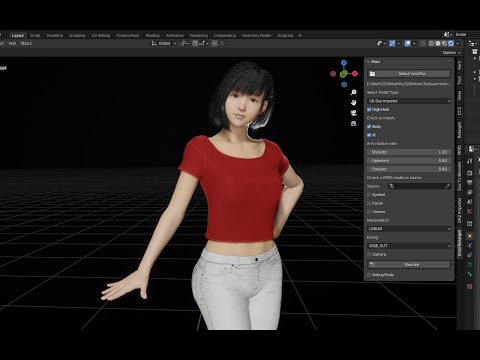
Like other users already told you, also video tutorial told you too, check "merge Rigs" when importing your character.
And there is no any glitches on the vmd motion you mentioned above. Both G8 and G8.1 works perfectly.
Also, the tutorial about how to export animation back to Daz, there is a Daz script in its description, which will make your character ready to import animation in Daz Studio.
Document is already explained why you need to unlock hidden properties, if you ignore that, your motion won't work on the character.
From your posts here, I think you are keeping making excuses to not follow video tutorial. Once you don't follow video tutorial, something will be wrong, and you don't know how to fix that.
Here is what you should do:
* You can learn everything from beginning about bones and blender, then you can ignore video tutorial and mess up everything you want.
* Or, follow video tutorial, do not skip any step, like every other users of vmd retargeting.
There are some female users of vmd retargeting, they barely learned anything about blender or Daz. They just follow every step of video tutorial and make it works perfectly.
I 100% followed the tutorial. Although the tutorial I was following was this one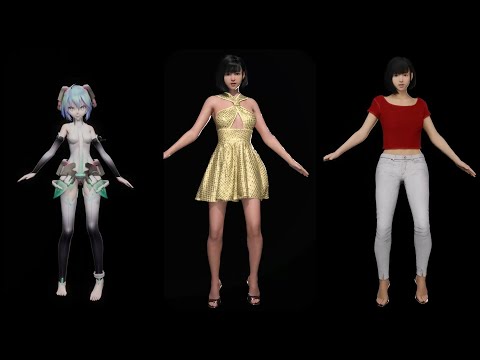
Because it was the first one you linked. I didn't realize there was a second tutorial video I needed to watch. The tutorial posted in the OP that is 8minutes starts after using daz import. Which left me to try to figure out the import from this https://diffeomorphic.blogspot.com/p/import-into-blender-version-16.html which I did only partially well. The 4 minute tutorial uses daz easy import. I was using the non-easy import. Because I couldn't figure out the easy one. I needed to follow the 4minute tutorial then the 8minute tutorial, but that wasn't really clear to me at all since the tutorials overlap each other in the topics they cover. Another problem I had is that the vmd in the tutorial is using a short test clip. My system has 64gb of ram. The 7000 frame animation I randomly chose to test things out on requires more than 64gb of ram (or dips into pagefile). I ended up disabling my pagefile and testing it again and crashing my system, which is why I'm sure the long animation was using more ram than I had. So, yeah, I sought to alter the tutorial and edit the animation and only bake/export part of it.
Also when testing how things work, using an entire song, made for a bad test, making it hard to figure out what mistake I may or may not have made. It would be really nice if I could learn how to edit NLA animations in blender to delete 90% of them. I did learn how to bake the full animation in blender then delete 90% of the keyframes before importing back to daz, that worked well. But when I tried to bake less than the full NLA things went haywire. I suppose I should've tried harder to find a sample VMD that was only 8 seconds long instead of 3minutes long. So, yeah, I'm still quite curious of if there's any way in the blender UI to fully delete segments from an NLA. Since baking 3-5minute long animations is extremely rough on my computer.
TL;DR Thank you for pointing me towards the second video, the 4minute one. That was quite useful. The first tutorial linked in this thread is not enough for me to have figured things out. I'm not sure I was willfully refusing to follow the tutorial. I was just following the 8minute video tutorial, not realizing the 4minute tutorial was critically important. If you really want there to be no way someone can do it wrong, you should link both videos in the OP of the thread.
Edit: Notes to self, now that I have my pagefile on my ssd, I can bake a full 7000 frame animation, but the keyframes are a little hard to edit/delete due to there being so many 1000s of keyframes (they're harder to see and the UI lags a lot), but it is possible. However upon redoing things using the additional tutorial, it turns out that there was nothing wrong with my original efforts. The vmd I randomly chose just does include a pose in which the character has to dislocate their own shoulder. I guess I was unclear, when I said broken, I didn't mean the animation or render broke, I meant the pose was such that if the character were real they would have broken their arm. I grabbed another vmd from a different dance though and preffered that. So, the TL;DR was, nothing was ever wrong, and it always worked. I just didn't like one of the poses in the vmd file I happened to be using. Sorry :P[Released] Content Wizard [Commercial]Hey RiverSoft, I recently found your Content Wizard product and it's an absolute live saver! Genuinely kicking myself that I never used it before!
I’ve been installing a metric ton of products and everything is working fine. However, there’s a small niggle that’s bugging me, and I’m hoping you might know of a fix or solution. Apologies if this was discussed earlier in the thread, but it’s a bit difficult to search through 46 pages for what I’m looking for!
As I said, everything is working fine, and all the products I’ve installed now have Smart Content. However, when I go into the “Files” section in the “Smart Content” content tab, I notice that several products seem to have duplicates, but with slightly-different “Product” data.
I’ve attached a few images showing one example of a Warhammer 40K armour set I picked up from DeviantArt. Now, when installing the product through Content Wizard, I entered “DeviantArt” in the “Store” section. The MetaData installed fine, and the products all work fine; everything’s showing up in Smart Content, and all the assets are where they’re meant to be.
But when viewing the same assets in the “Files” tab, you can see that I have several duplicates of the same assets, but with “LOCAL USER” listed in the “Product” info. Except, they’re not really duplicate assets, because the filepath shows that they are the exact same asset… just listed twice, for some reason? I don’t know how to describe it.I’ve tried deleting the MetaData within Daz, manually deleting the MetaData with the Runtime folder, reinstalling the amour with both “DeviantArt” and “LOCAL USER” listed as the Store Name in Content Wizard, and the problem still persists. It’s not a big issue, just a minor gripe as its meaningless clutter.
SOLVED
I figured it out!For some reason, a lot of assets were being grouped into the “LOCAL USER” product in Smart Content and the Content Library, as “unassigned” assets. By navigating to the “LOCAL USER” product in the Content Library tab, right-clicking on the asset in question and clicking “Remove Reference…”, that removes the asset from the “LOCAL USER” product and removes the duplicate files. Hey presto, solved!
If anyone else is having a similar issue, that seems to have solved it for me!
Daz 3D is part of

Connect
DAZ Productions, Inc.
7533 S Center View Ct #4664
West Jordan, UT 84084Licensing Agreement | Terms of Service | Privacy Policy | EULA
© 2026 Daz Productions Inc. All Rights Reserved.