-
Keyframe delete button greyed out?
Greetings esteemed members of this wonderful forum!
It's been quite some time since my last visit, and everything had been running smoothly with Daz until now.
I recall in previous versions of Daz 3D, I could effortlessly add a keyframe using the designated button (+) on the timeline. When I wished to remove it, I simply selected the keyframe on the timeline and clicked on the delete keyframe button (-), promptly erasing it. However, following recent updates—though I'm uncertain precisely which ones—the add keyframe function remains functional, while the delete keyframe button appears disabled, rendering me unable to remove any keyframes. It leaves me wondering: what has caused this change? Could it be a setting misconfiguration? How can I regain the ability to delete keyframes, restoring functionality to its previous state?
I've attached an image for reference; as you can see, the delete keyframe button remains greyed out.
Any assistance you can provide would be immensely appreciated. This issue has persisted for some time, and while I've found workarounds, understanding why Daz 3D behaves this way now is crucial.
Thank you kindly for your assistance; your support means a great deal.
Hot New (Northern) Season, New Sales Thread: Report Issues Here "Reporting Only"Hylas said:
Can't upload images to the forum anymore. Tried two systems (Windows & Apple) and two browsers (Firefox & Edge). Just this morning I was still able to do it, now it's forever stuck at "uploading." Anybody else?
resolved for me know, knock on wood.
Installation NightmaresI have attempted to find as much information concerning the installation of Bryce 7 Pro. I have found that I should install the actual software before the lighting and to install in a folder outside of the Daz3D folder as the software can be "persnickety' during installation. So after I did that and then read through half the forum pages, I'm still not able to get the actual program to install. During installation, it asks if I want to uninstall the previous version, even though it is not installed. I have attempted everything that was suggested and even some of my thinking...to no avail. I really need help with this. I made a YT video to show the issues I'm having that can be viewed on my channel. Contact me if you wish to watch it. (I'm not sure if links are allowed here.)
DIM Thumbnails directory does not exist - where are they? [SOLVED]When I created this thread some months ago, I wasn't missing the thumbnails in that directory. I was very new to Daz Studio at that point, maybe only by a week or two, and I misunderstood the purpose of that directory.
I lost all my product thumbnails inside of Daz Studio smart content tabs, they broke because I moved my Daz installation from one hard disk to a secondary one (C -> D). While I did set all the correct paths in DIM, I made an assumption that was the only path I needed to set.
There were two places within Daz Studio that also needed to be set after moving all my content directories around and such, in the content manager tab of Daz Studio Preferences, and then in the Content Tab (the custom content library), there are directory-style listings of both the smart content library and manual install library. Those paths needed to be adjusted as well. The last time I went through this process the content tab updated itself after editing preferences, but the first time it didn't. If you need instructions on how to do this, see the link I left in my second post.
After setting the correct directories in those locations my thumbnails returned.
It was my understanding that the Thumbnail Directory I was originally searching for inside of DIM was a misunderstanding since it did not relate to the thumbnails of my products inside Daz Studio's Smart Content. But if you are looking for your product thumbnails, they are located in My DAZ3d Library/Runtime/Support
edit-> Hope this adds a bit more clarification to anyone who stumbles into this thread in the future. :)
edit x2 -> Short warning to other new users, My DAZ3D Library/Runtime/Support contains a lot of metadata for products. Messing with the files in there can break your products. If you need to edit metadata, edit it within the product zip prior to installing and then install through DIM. The preferred method by Daz3d is to edit the metadata directly inside the application (safest way).
edit x3 -> Also don't move your Daz installation the same way I did. It'll cause you all sorts of problems. Search for the actual prefered way to go about it. None of your existing product metadata gets updated, DIM gets confused with where previously installed products actually are, and a host of other little problems crop up due to just dragging, dropping, and editing content paths. It can ultimately be done but there will be a bit of time spent troubleshooting, and most likely reinstalling packages/products so metadata manifest is properly updated.
Dartanbeck's Journey - CG FilmmakingHaving a Blast being weary from the long road!
Building and saving for these webinars is exhausting and even more rewarding - I really Love doing it!
It takes me a lot of time and hard work to get there. A lot of non-stop hours.
So after today's performance I had a bit of heavy-lifting (literally) to do. Ouch! I'm not as young as I used to be! LOL
A nice cup of hot tea and a pile of animations that I haven't converted to Rosie 8 yet are the perfect way to unwind!
I still have a nice bundle of animations from Mixamo that are still in Genesis 2 Female format. I have all of my Bone Minions set up so I can access them from the Scripts drop-down on the upper UI window. So handy!
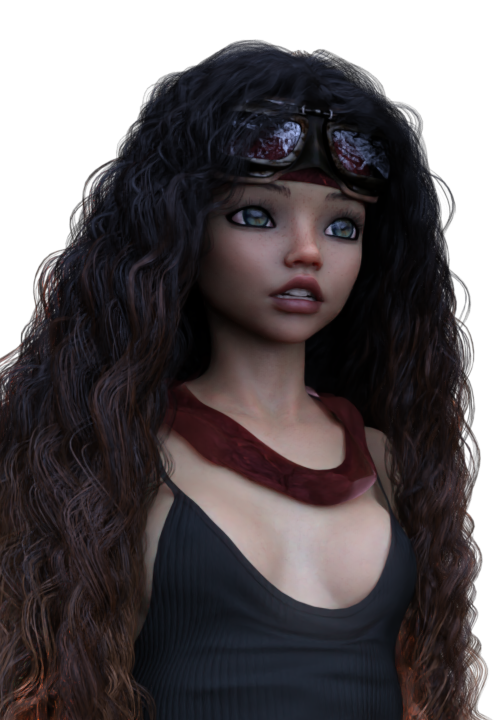 Since the massive data crash I've suffered, I still have a huge pile of other legacy aniBlocks that still need conversion as well. I had just finished GoFigure's Martial Arts collections the other day - and some of those are pretty lengthy animations - hence my not having them done earlier. But there's still a lot to do. I keep working my way through them - often beginning a major conversion session when I find that I need one that I didn't get done yet - so I'll take a break and just spend some time with my cool animations!
I love it when I kick back and work on these transfers. It gives me a really good look at everything within the entire collection that I'm working on - which always gets the gears turning inside my head!
You see, aniBlocks are really fun. Many of those from BoneTech3D and Mixamo are like one would use to drive a character using game commands, like WASD and all of the special combat and auxiliary motions. That, all by itself can be a lot of fun to build animations with. But all of these motion captures offer So Much More than their original intention.
Showing folks (here and in other forum areas) the Behind the Scenes for Blade Runner - Black Lotus got me to watching it all through again and again as I wait for renders and simulations. The way they direct the story with their actors in their motion capture suits - in a huge space where they can actually be in places (right next to the actor, for example) that they could never be if it was being filmed by a camera as usual. So they can do 'takes' of several minutes of complete acting as opposed to just a second or three. Huge difference.
So when I approach designing an animation* I think about what I want the character to be doing. Where do they come from and where are they going. Lately I'm also concerned with what their faces are doing as the gears in their heads turn.
In that, I think of my aniBlocks as "Sets" of actions that I want my characters to do.
I know that I've talked about this many times before, but I can see how difficult it can be to understand my points unless I actually demonstrate them. So one day I will. That show will take a Lot of prep and capturing lengthy workflows so I can speed them up during the lecture. Stuff that makes us sit and wait for long periods lend well to ramping up the speed so we can see it, but don't have to wait for it. I did some really cool work in the way for my last course - Movie Magic, that I think worked really well!
But here are some examples of what I mean.
 Martial Arts Shouts of Conviction
Even when exercising their moves and techniques, martial artists release the power of their energy with a special conviction, which is what makes the lightning fast motion such a powerful one that can possibly even blow a hole through a building. At the center of this comes a special war cry that occurs as the climax of the energy is being released.
Now this isn't something I was told or anything I've learned from someone or something - this is me thinking about it. Making up my own explanations to help myself "Direct" the actor(s) to deliver the performance I think I'm looking for.
I took a section of conversation from the Face Controls for Genesis 3 & 8 example files and cut out a few parts of excited speech that looks like a shout. I trim it down to the entry expression, through the shout, and the final shape of the face for that short facial musculature gesture. It's only a tenth to a third of a second, after all.
I crop these little shout clips and save them to my facial aniBlocks folder for Face Controls. At the very beginning, I had done the same sort of thing for "idle" times when there don't appear to be any visemes occurring - and save those short clips.
Now I can combine those throughout a Martial Arts move to have the shouts occur just as I think they should. Since they're aniBlocks, I have the ability to speed them up, slow them down, reverse them, mirror them, repeat them, etc., and we can do all of these things in combinations with other short blocks that have opposite adjustments to them to really get variety going.
I was recently discussing how I am making specific facial characterization dials specific to Rosie.
Using these custom dials in combination with the above facial aniBlock workflow... I mean... wow. Until I actually start using real Rosie facial performance capture, this is an excellent way to breathe life into what the character is doing - even when they're apparently doing nothing at all.
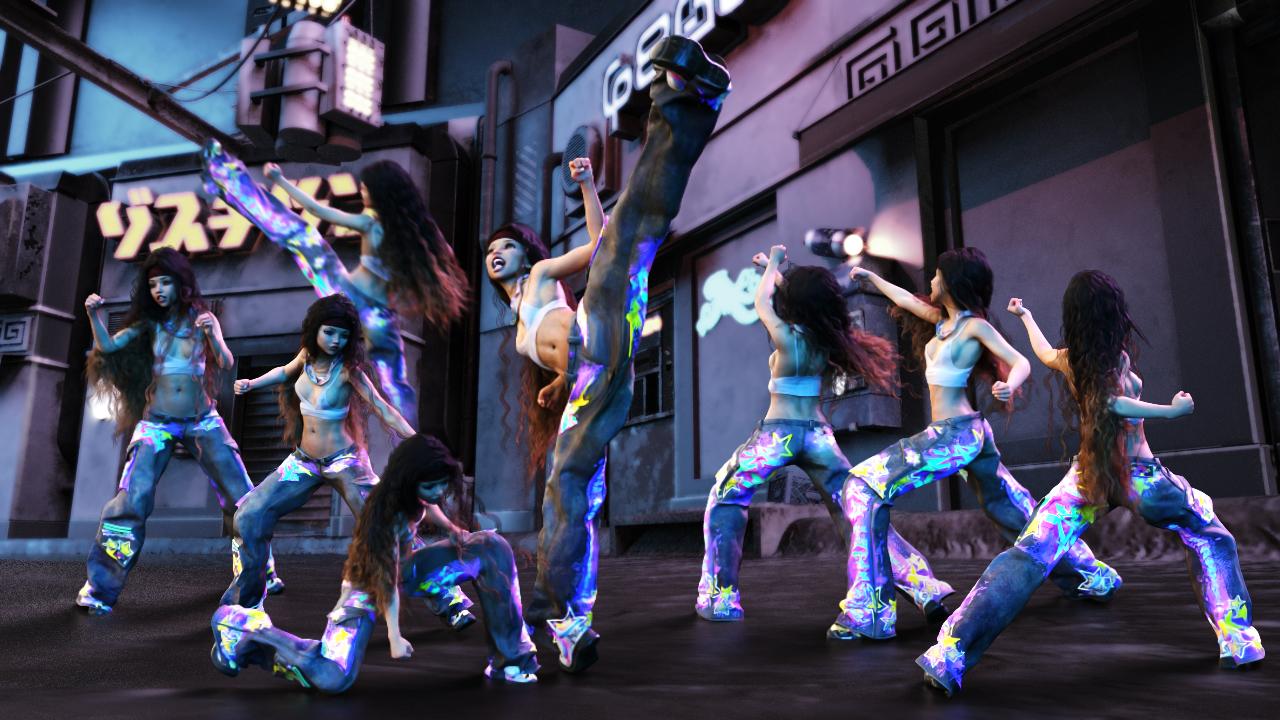
So that's the face.
In another example - I'll examine my imagination for how the character needs to move within the scene. I'm imagining the leg movement and scene translation in X, Y and Z from the hip down. This is the driving force of where the character will be, and how energetic the overall motion will be.
Now what are the characters doing? The upper torso and perhaps even the head. Most of the time I let the torso and arm actions drive the neck and head - and then key frame in changes as I need them. This usually helps to keep the head and neck aligned with the counter motions needed to match the rest of the body - but not always.
Sometimes I want the arms and hands to do something very specific so I completely ignore what they're doing as I shop my library for the right motions - because I'll be removing all of their keys and key framing their movements by hand. Other times I might load in or create an object and animate that within the scene and use LimbStick to drive the hands, forearms and shoulders. It doesn't animate the collars, leaving them free for hand key framing as well - which can be done to remove the "Stuck-to" appearance after a session with LimbStick. Then I use control dials to further animate what the hands and fingers are doing.
In this way, I'm truly directing my actors willfully, yet; actors being actors, they always give their own personal touch to our vision and surprise us in the end with a wonderful performance - or one that ends up in the waste can. Never get bummed out about failed animations. These are the best thing to happen to us - so we can lock in what we don't like about it and get better at finding results that we really like.
So... yeah. transferring piles and piles of animations from one target figure to another is not just relaxing - it's inspirational and enormously beneficial!
Hot New (Northern) Season, New Sales Thread: Report Issues Here "Reporting Only"Can't upload images to the forum anymore. Tried two systems (Windows & Apple) and two browsers (Firefox & Edge). Just this morning I was still able to do it, now it's forever stuck at "uploading." Anybody else?
Hot New (Northern) Season, New Sales Thread: Report Issues Here "Reporting Only"paulawp (marahzen) said:
Charlie Judge said:
barbult said:
Store and forum are having problems for me.
The store sale banner pages just seem to open the store page, no description page for the sale that is in the URL.
I can't upload images to the forum; it stays in 'Uploadin" forever. This happened months ago and now it is happening again.Same for me. Earlier in the day the Catchup sale banner opened the sale page but now it just goes to the main store page.
March Madness 2024 | Daz 3D page seems to not be there. I still have it open from last night, but if I open a new tab and try to go there, it just bounces to the main page.
All the other pages in the carousel open fine, so it seems like they've somehow removed that page?
Hot New (Northern) Season, New Sales Thread: Report Issues Here "Reporting Only"Charlie Judge said:
barbult said:
Store and forum are having problems for me.
The store sale banner pages just seem to open the store page, no description page for the sale that is in the URL.
I can't upload images to the forum; it stays in 'Uploadin" forever. This happened months ago and now it is happening again.Same for me. Earlier in the day the Catchup sale banner opened the sale page but now it just goes to the main store page.
March Madness 2024 | Daz 3D page seems to not be there. I still have it open from last night, but if I open a new tab and try to go there, it just bounces to the main page.
Hot New (Northern) Season, New Sales Thread: Report Issues Here "Reporting Only"barbult said:
Store and forum are having problems for me.
The store sale banner pages just seem to open the store page, no description page for the sale that is in the URL.
I can't upload images to the forum; it stays in 'Uploadin" forever. This happened months ago and now it is happening again.Same for me. Earlier in the day the Catchup sale banner opened the sale page but now it just goes to the main store page.
Hot New (Northern) Season, New Sales Thread: Report Issues Here "Reporting Only"Store and forum are having problems for me.
The store sale banner pages just seem to open the store page, no description page for the sale that is in the URL.
I can't upload images to the forum; it stays in 'Uploadin" forever. This happened months ago and now it is happening again.Seriously, a warning about zero vs restore?(a rant)This has been amply dicussed in the daz SDtudio release threads at the top of this forum.
Daz Jedi Outfit + addonI haven't watch the later group of Star Wars movies, but based on my memories of the first group, Ep. 4 - 6, I found in my runtime some options that may either give clothing for background characters (non-Jedi) or possibilities for Jedi robes with work. Unfortunately, most of my best ones were in the M3/M4 clothing and I am not listing them. Many were for females, but could work on males.
From Rendo by Lully, dForce - Divergence for G8F
The PA Sshodan's store - https://www.daz3d.com/sshodan
https://www.daz3d.com/dforce-legend-outfit-for-genesis-9 and https://www.daz3d.com/legend-outfit-texture-add-on
https://www.daz3d.com/eastern-fantasy-warrior-outfit-for-genesis-8-males and https://www.daz3d.com/eastern-fantasy-warrior-outfit-textures (the main outfit caused me to recall Star Wars when I first saw it. The textures are a bit much.)
https://www.daz3d.com/dforce-huntress-outfit-for-genesis-8-females
https://www.daz3d.com/dforce-hooded-outfit-for-genesis-8-females and https://www.daz3d.com/dforce-hooded-outfit-textures
https://www.daz3d.com/dforce-dystopian-future-outfit-for-genesis-8-females and https://www.daz3d.com/dforce-dystopian-future-outfit-textures
https://www.daz3d.com/sky-jumper-outfit-for-genesis-8-female-s (it has textures but they are way too brightly colored for Star Wars.)
https://www.daz3d.com/street-sweeper--cyber-samurai-for-genesis-8-male (Not sure if you could use bits and pieces of this outfit and with shaders tone it down.)
https://www.daz3d.com/dforce-dawn-warrior-outfit-for-genesis-8-males and https://www.daz3d.com/dforce-dawn-warrior-outfit-textures (not as flowy as you are looking for, but if matched up with a cloak from Sshodan or another PA...?)
There are the laser sword thingies in Daz's store, so I am sure you have them but this is the latest I have: https://www.daz3d.com/laser-swords-and-poses-2-for-genesis-3-and-8
Unfortunately, flowing outfits for the guys seem to be scarce. I thought I had more Asian style robes, but couldn't track them down except one that is wrong for your purpose and exploded everytime I tried to use it. Maybe other folks on the forum knows of good options here or on Rendo that will work as Jedi robes.
I do know that good shader packs have been coming out that would fix any fabric issues even if the colors are wrong.
Mary
Looking for cloven hoof + three fingers + tails for G9Hi as it says above I am looking for cloven hoofs and three fingers and tails for G9. I did try a search but not much luckSeeking Help with Daz Riggingcrosswind said:
Ah... I would say rigging / skeleton system of Genesis figures are a bit unique. You can make or import any stand-alone figures with rigging / bone system of their own, e.g. Mr. Bobble, a rigged character from Blender or other software with FBX format.
You can search on youtube, there're lots of tutorials related to this topic.
An alternative, wrap other stand-alone character with Genesis figure by using FaceForm Wrap software. In that way, you don't have to rig anything, just bring the wrapped morph back to Genesis figure in DS. Then you can use all Daz assets on them.
These are great suggestions. Thank you for your help. I appreciate it.
A Thread for Items with the "Editorial License"ArtAngel said:
Wonderland said:
The irony is that if you go to Comic-Con (or Wondercon or any comic convention) it's totally fine to sell all kinds of fan art and it's not only allowed but it's expected and encouraged. I've had fan art in the Comic-Con official catalog, sold in the official art show and sold at a booth. Never was there a legal issue. Whose trademark would we be violating? DAZ's or ViacomCBS, NBC Universal, and Disney's? I'm not going to purchase the fan art stuff sold here to make sure I don't break the Daz TOS but I've downloaded free fan outfits and morphs in the past and created my own textures for existing outfits and I have no qualms about it. If you search the internet, there are many fan outfits available for free for DAZ characters. So is DAZ paying ViacomCBS, NBCUniversal and Disney for the rights to use their IP? And if so, why isn't it legal for us to use it commercially? They are making more of a profit off of it than any of us artists would.
Fanart cannot be sold without a license unless it is a parody. Some sites collaborate with different brands (they promote fanart on their sites) because they connected with legal representatives and obtained permission for licenses. So there are legit venders at Comic-con who do have licenses to sell. This old 2018 article addresses the Comic-Con infringement issue. This is an earlier one and there have been notices recently as well. They typically send them out annually to cover their butts.
Thanks for the linked articles.
 A Thread for Items with the "Editorial License"
ArtAngel said:
Wonderland said:
The irony is that if you go to Comic-Con (or Wondercon or any comic convention) it's totally fine to sell all kinds of fan art and it's not only allowed but it's expected and encouraged. I've had fan art in the Comic-Con official catalog, sold in the official art show and sold at a booth. Never was there a legal issue. Whose trademark would we be violating? DAZ's or ViacomCBS, NBC Universal, and Disney's? I'm not going to purchase the fan art stuff sold here to make sure I don't break the Daz TOS but I've downloaded free fan outfits and morphs in the past and created my own textures for existing outfits and I have no qualms about it. If you search the internet, there are many fan outfits available for free for DAZ characters. So is DAZ paying ViacomCBS, NBCUniversal and Disney for the rights to use their IP? And if so, why isn't it legal for us to use it commercially? They are making more of a profit off of it than any of us artists would.
Fanart cannot be sold without a license unless it is a parody. Some sites collaborate with different brands (they promote fanart on their sites) because they connected with legal representatives and obtained permission for licenses. So there are legit venders at Comic-con who do have licenses to sell. This old 2018 article addresses the Comic-Con infringement issue. This is an earlier one and there have been notices recently as well. They typically send them out annually to cover their butts.
If we're looking at this as a copyright thing and not a trademark thing, then the DMCA actually made it easier for entities to profit off infriging properties. The law spells out a very specific process for reporting and removing infringing content, and by extension, companies are under no other obligation outside that process. The rights holder must file a dmca takedown notice when they identify stolen works. At that point, the person selling the content must remove it from sale, but the seller has a chance to respond and argue that their use does not violate the copyright. Once the content is removed, that's the end of it and the seller generally keeps whatever they made off the infringing content.
This is what Amazon does. A couple years ago, their kindle store was flooded with pirated manga. No mater how much of it you reported, nor how many times it was reported, they took no action against it because the customers are not the rights holders and the on-site reporting function is not a DMCA takedown notice. It took an email to one of the Japanese publishers alerting them of the problem. Amazon takes down all the pirated works, gives the publishers an "Oops, my bad." The law says they did their part, and they get to keep whatever they made off those titles.
Product identity neededRichard Haseltine said:
RobertDy said:
miladyderyni_173d399f47 said:
Note that (1) many PAs have their own custom characters (that they don't sell) for promos and (2) even out of the box, lighting can change the look. Heck, even clothing or hair can.
How do we contact the PAs? I clicked on the name on the store, but there doesn't seem to be a DM option
If they have a forum presence you can try PMing them, but it is better to open a support ticket, so that suppot can contact them once if they don't already have the information.
Thanks for the valuable help as always! Will do so
A Thread for Items with the "Editorial License"ArtAngel said:
Wonderland said:
The irony is that if you go to Comic-Con (or Wondercon or any comic convention) it's totally fine to sell all kinds of fan art and it's not only allowed but it's expected and encouraged. I've had fan art in the Comic-Con official catalog, sold in the official art show and sold at a booth. Never was there a legal issue. Whose trademark would we be violating? DAZ's or ViacomCBS, NBC Universal, and Disney's? I'm not going to purchase the fan art stuff sold here to make sure I don't break the Daz TOS but I've downloaded free fan outfits and morphs in the past and created my own textures for existing outfits and I have no qualms about it. If you search the internet, there are many fan outfits available for free for DAZ characters. So is DAZ paying ViacomCBS, NBCUniversal and Disney for the rights to use their IP? And if so, why isn't it legal for us to use it commercially? They are making more of a profit off of it than any of us artists would.
Fanart cannot be sold without a license unless it is a parody. Some sites collaborate with different brands (they promote fanart on their sites) because they connected with legal representatives and obtained permission for licenses. So there are legit venders at Comic-con who do have licenses to sell. This old 2018 article addresses the Comic-Con infringement issue. This is an earlier one and there have been notices recently as well. They typically send them out annually to cover their butts.
Interesting article. I never actually read that before. This makes sense. Comic-Con would lose a lot by being sued but knows that individual artists are most likely not at risk of serious legal action taken against them and would at most just get a cease and desist letter. Fan art is really just free advertising and it would put a big damper on the show if they tried to stop it. And comic book artists actually get hired based on how well they can depict existing characters. So if Comic-con is leaving it up to the artist's choice, why can't DAZ do the same? Just indemnify themselves and say if we get in trouble, it's up to us to deal with it?
A Thread for Items with the "Editorial License"Wonderland said:
The irony is that if you go to Comic-Con (or Wondercon or any comic convention) it's totally fine to sell all kinds of fan art and it's not only allowed but it's expected and encouraged. I've had fan art in the Comic-Con official catalog, sold in the official art show and sold at a booth. Never was there a legal issue. Whose trademark would we be violating? DAZ's or ViacomCBS, NBC Universal, and Disney's? I'm not going to purchase the fan art stuff sold here to make sure I don't break the Daz TOS but I've downloaded free fan outfits and morphs in the past and created my own textures for existing outfits and I have no qualms about it. If you search the internet, there are many fan outfits available for free for DAZ characters. So is DAZ paying ViacomCBS, NBCUniversal and Disney for the rights to use their IP? And if so, why isn't it legal for us to use it commercially? They are making more of a profit off of it than any of us artists would.
Fanart cannot be sold without a license unless it is a parody. Some sites collaborate with different brands (they promote fanart on their sites) because they connected with legal representatives and obtained permission for licenses. So there are legit venders at Comic-con who do have licenses to sell. This old 2018 article addresses the Comic-Con infringement issue. This is an earlier one and there have been notices recently as well. They typically send them out annually to cover their butts.
Product identity neededRichard Haseltine said:
If they have a forum presence you can try PMing them, but it is better to open a support ticket, so that suppot can contact them once if they don't already have the information.
However, in my opinion, it's not worth your time.
Last time I contacted support with a question like this, I was asking what morph was associated with the teen skin for Angela 9 (and I'd say it's a fairly reasonable request that when the product is half a character to ask what the other half of what you see in the promos is), but was rather bluntly told the information was not available.
Now, I should say I do appreciate that the CS team do have to make decisions about what requests actually merit being passed on - their agreement with vendors to act as the front line when it comes to support requests does require that. And I'm guessing that this probably means they're unlikely to pass on any queries or issues that don't actually directly relate to the product in question. Given that a lot of artists would have to take the time to look up their character formulae, a lot of combinations are not practical to share (a character may be made out of many different product packages, or involve customisation that cannot legally be shared) and a lot of artists deliberately seek to use customised characters to develop their own visual trademark and thus wouldn't share the recipes anyway, I can understand why it would be a request that the CS team would by default shoot down.
I'm generally philosophical about this though; the Angela Teen stuff was the first time I'd queried this in a long time, because I realise I already have access to more characters than I will possibly ever use, and have the potential to mix my own that can then be unique to me.
Daz 3D is part of

Connect
DAZ Productions, Inc.
7533 S Center View Ct #4664
West Jordan, UT 84084Licensing Agreement | Terms of Service | Privacy Policy | EULA
© 2026 Daz Productions Inc. All Rights Reserved.