-
Beta for DazCentral, your new Content Manager
Found my install paths for downloads were reverted to my C: drive. And only because of a major Windows 10 update today. My drive was maxed out. Thanks. It took a bit, and finally found a slew of 'Custom' paths added to my DIM that were not there yesterday. Deleted them, uninstalled today's downloads, and reinstalled to my F: drive.
Now, how the heck do you uninstall DAZ Central? I don't want a program that is going to override my paths and preferences behind my back.
Mary
Someone has already mentioned using the 'standard' windows add/remove program mechanism to do this.
Beta for DazCentral, your new Content ManagerFound my install paths for downloads were reverted to my C: drive. And only because of a major Windows 10 update today. My drive was maxed out. Thanks. It took a bit, and finally found a slew of 'Custom' paths added to my DIM that were not there yesterday. Deleted them, uninstalled today's downloads, and reinstalled to my F: drive.
Now, how the heck do you uninstall DAZ Central? I don't want a program that is going to override my paths and preferences behind my back.
Mary
Beta for DazCentral, your new Content ManagerPlugin installation/update support could have been added to SmartContent. V4/M4 capability and content development is pretty much frozen wrt Daz store, so once installed via DIM/manual don't require further maintenance. Doesn't justify building an entire "parallel" product for it.
Yeah, I don't think ease-of-use is the point of this, but rather DRM.
If that is the case, haven't we been here before and said NO already?
Also: DIM, Central, Connect - no wonder people think it's complicated.
But as long as I can install and organise by hand according to my own system...
Beta for DazCentral, your new Content ManagerThanks, you just saved my sanity. I went in and adjusted the correct thing like your instructions said, let it whirl, then closed it and when DIM reopend, I had content loaded, 12560 loaded and 2121 that I haven't installed. (Poser files that I have in reserve if those really old DAZ files act up again.) The last time I downloaded my library, I had to do it in bits over 5 months, so I wouldn't exceed our limit, and still leave room for my flatmate who has to maintain his three websites.
I think I will keep DAZ Central off for now.Mary
Awesome - glad you're back in business too :)
Beta for DazCentral, your new Content ManagerThanks, you just saved my sanity. I went in and adjusted the correct thing like your instructions said, let it whirl, then closed it and when DIM reopend, I had content loaded, 12560 loaded and 2121 that I haven't installed. (Poser files that I have in reserve if those really old DAZ files act up again.) The last time I downloaded my library, I had to do it in bits over 5 months, so I wouldn't exceed our limit, and still leave room for my flatmate who has to maintain his three websites.
I think I will keep DAZ Central off for now.Mary
Beta for DazCentral, your new Content ManagerI redownloaded the DIM, and when I tried to open it, got a message that DIM and DAZ Central can't be open at the same time. Closed DAZ Central. Opened DIM and found all my content is under 'Ready to Download' some 14636 products, not 'Installed'. I only have 7 items under 'installed' now. Well. Just. Well. Yeah.
Yeah - I ran into the same issue. Not sure if it'll work for you, but in DIM:
- Click on the Settings icon.
- Click Basic Settings.
- For Base Directory, choose 'Default' from the drop-down menu:
 Beta for DazCentral, your new Content Manager
I redownloaded the DIM, and when I tried to open it, got a message that DIM and DAZ Central can't be open at the same time. Closed DAZ Central. Opened DIM and found all my content is under 'Ready to Download' some 14636 products, not 'Installed'. I only have 7 items under 'installed' now. Well. Just. Well. Yeah.
Beta for DazCentral, your new Content Manager
I had a similar experience - I had to go back into DIM to reset the base location (it was set to Custom and changing it to Default seemed to work). I wasn't expecting any settings changed in DazCentral to also change in DIM.I tried it and it decided I did not have Daz Studio installed! I had both the regular one and the Beta. Next thing I knew DAZ Central is downloading and installing a new copy of DS. I saw a glimpse of a message of fixing an error or something. Hard to read when moving fast. I checked both Content Directory Managers and found some new entries on the new DS. I am attaching images of both Content Directory Manager (CDM) for the new DS and the Beta. I am at a loss. I have my content on my 8TB F: drive.
It took me and Customer Service to get my directories to work correctly. So please let me know if the C:/ProgramData/DAZ 3D/Applications/Data/DAZ 3D/My DAZ 3D Library is not going to mess me up, or do I need to move the directory to F:?
Thanks,
Mary
Beta for DazCentral, your new Content ManagerI tried it and it decided I did not have Daz Studio installed! I had both the regular one and the Beta. Next thing I knew DAZ Central is downloading and installing a new copy of DS. I saw a glimpse of a message of fixing an error or something. Hard to read when moving fast. I checked both Content Directory Managers and found some new entries on the new DS. I am attaching images of both Content Directory Manager (CDM) for the new DS and the Beta. I am at a loss. I have my content on my 8TB F: drive.
It took me and Customer Service to get my directories to work correctly. So please let me know if the C:/ProgramData/DAZ 3D/Applications/Data/DAZ 3D/My DAZ 3D Library is not going to mess me up, or do I need to move the directory to F:?
Thanks,
Mary
Beta for DazCentral, your new Content ManagerWell i don't know if you are after feedback in general or only bugs. HEre is both just in case:
* Compared to DIM i kind of miss multi selection install.
Noted, I can't promise it will get in there but I like the idea. Thank you for the feedback.
* The fact that in dashboard only shows recent purchases to install may be a good thing. But what is exactly the criteria? If i did not open central in over a week and have purchased but not installed some products, will they not show in the dashboard?
The recent purchases just shows the last few products sorted by when you purchased them. If you make a bunch of purchases over the course of a week they would not be visible.
* What does "Update assets automatically actually mean?" Only models but not main software and plugins gets updated?
Just content is updated, no plug-ins or applications.
* What is the criteria for Asset/Pluging? I have "Look at Me II" in assets and Michael 4 base in plugins. Some things do not get shown at all? I'm not finding scene optimizer
I'll have someone look in to that, DazCentral attempts to sort things a little bit differently than DIM so some things may need a little updating on the store's database to get them to appear in their correct locations.
* Search so far seems really good. Search response is instant, partials and multiples words have no issues. I think it can still be improved by adding more info: specially thinking in artist and also "tags". If its just too many columns, maybe add the ability to choose witch ones we want to see, but index all by default.
Once again, thank you for the feedback. This will probably have to wait for the refreshed store software in order to get the data in the right places at the right time to make this happen.
Possible bug: I get error when trying to open a base character from central. Daz do open, but i get this:
Are you running the latest version of Daz Studio? It had fixes in it to solve that bug (and also a newer version of Iray with a bunch of fixes and improvements in that as well).
Beta for DazCentral, your new Content ManagerWell i don't know if you are after feedback in general or only bugs. HEre is both just in case:
* Compared to DIM i kind of miss multi selection install.
* The fact that in dashboard only shows recent purchases to install may be a good thing. But what is exactly the criteria? If i did not open central in over a week and have purchased but not installed some products, will they not show in the dashboard?
* What does "Update assets automatically actually mean?" Only models but not main software and plugins gets updated?
* What is the criteria for Asset/Pluging? I have "Look at Me II" in assets and Michael 4 base in plugins. Some things do not get shown at all? I'm not finding scene optimizer
* Search so far seems really good. Search response is instant, partials and multiples words have no issues. I think it can still be improved by adding more info: specially thinking in artist and also "tags". If its just too many columns, maybe add the ability to choose witch ones we want to see, but index all by default.
Possible bug: I get error when trying to open a base character from central. Daz do open, but i get this:
Beta for DazCentral, your new Content ManagerFurther greetings, with updates to DazCentral!
First things first, thank you so much for your engagement and feedback. We appreciate both, without which we wouldn’t be able to announce that we’ve made some new updates to DazCentral. Which we have :).
This current build that we’ve published solves three issues that users highlighted specifically:
-
Computer reboot
DazCentral no longer reboots your computer upon installation. -
File Path issues
DazCentral has improved how it will handle multiple paths that are already setup in DIM. If you change the path in DazCentral, it overrides your DIM paths as well. -
Exiting while installing
If you attempt to quit DazCentral while installing/updating/uninstalling an item, you will now be asked if you really want to exit and will exit if you choose to.
Again, thank you all for your feedback and for trying out our new Content Manager. Please continue to let us know about things that you notice (good or bad), whether just general or anything new you see.
_____________________Greetings, Daz Forumites!
We’re inviting you to try the Beta test of DazCentral, the new content manager from Daz 3D! Because managing Daz Studio 3D content can be… difficult, we made a simple, clean, and easy-to-use Content Manager that combines upgraded storing and sorting capabilities with an intuitive user interface.
Features
DazCentral comes with exciting updates like enhanced sorting capabilities for content and One-Click open directly into Studio. DazCentral’s new features include:-
One-Click Open
You asked for it, Daz built it. Open your 3D content directly into Studio with (yeah, you guessed it) one click. -
Easy Content Sorting
The ‘My Assets’ tab sorts your content by Name, Order Date, or Size so you can find your 3D models quicker. -
Plug-in Capabilities
DazCentral comes with a framework for you to manage and update your Daz Plug-ins so you can do more with your content. -
A Sleek User Interface
By which we mean, DazCentral looks good, it works great, and it’s intuitive and easy to use.
Why you should get DazCentral
Just like Studio and Hexagon, DazCentral is powerful, easy to use, and totally free. This Content Managing wizard makes importing your content into Studio a breeze, and delivers tutorials and other helpful links right when you need them.
Things you might be wondering about:
Can I still use the Daz Install Manager (DIM)?
Absolutely! DazCentral is to offer another Content Manager to users who may not have as much experience with the DIM, or are unfamiliar with the DIM’s processes. DazCentral and DIM cannot currently run at the same time.
Can I use both DazCentral and the DIM?
You can certainly do so, but not concurrently. DazCentral will not only detect what content is installed through DIM, but also automatically read and install to that path.
Can I use DazCentral with a Mac?
Unfortunately, Mac isn’t a supported operating system at this time. Mac users should continue to use DIM.
For additional information, check out the DazCentral page and DazCentral FAQs.
Try the DazCentral Beta today!
Note: As installing DazCentral may require a restart of your computer, we recommend you save your work and exit programs before installation.
Virtual Actress/Singer signs a deal.Hatsuni Miku asks "Am I a joke to you people?"
Yeah. I find the tech behind Hatsumi a lot more exciting than what's done with Miquela. It combines stylized figures with live music to create a sort of nerd Cirque du Soleil experience. And what's important to remember is than the social aspect, the being part of the audience sharing a common experience is a central part of the spectacle. There's a lot of unexplored potential here, too.
 Show Us Your Bryce Renders Part 11
More. Of Khaeorr...
Graeabitha (Grabbing Great Green Bite Hag) are a family of Spaeeshia that resemble gaunt green giantess humanoids with long wirely frames that hide maeystrial charged maeulgadense muscle power and natural supernatural biform shifting, whose eating of sentients, grants them more power.
Graeabitha are mostly of moral dread, though most societies know of emergent virtuous groups coming into number and power, to rival thier dread kin and to assert themselves as a tradable culture to tolerate when virtuous civilization meet them, though these are still contended in recognition to most Order.
Graeabitha look like weird wild green giantess wrestler witches, and most are at secret war with any nearby encroaching societies, and most use thier considerably undetectable wild green magics, usually only possible to detect with kind magics, to infiltrate settlements and wreak chaos, sometimes for profit.
Graeabitha are like some oaeothorb ANNIS, though 3x more powerful (life dam only - 30% mres, +5ft ht/+10tht/dam added), can "true shapechange to nearby ally" as a FORMIDABLE (6lv) 3x a day, mostly taking on human norm forms as disguise, and IS human form size over half the time, for "truth" requirements.
Graeabitha have ancestry with cannibalistic giants and witches, and is why they need to eat humanoids to maintain most magic, specifically a meat diet to be of "significant sentient origin", meaning "a few people" a month (d4+1), which ironically, makes societies a cursed need for them to keep thier magic powers.
Graeabitha, in the eyes of Order, are usually considered Tresspassers, Risky Roamers to be expelled and/or Invaders Too Dangerous to negotiate with/Subdue or destroy on sight, yet there are the Graeirbfa
Graeirbva are Maeatronus Praeomationists, meaning any compatable humanoid male they share certain time and touch with, yields enough shared energy to create another Graeabitha like most humanoid female pregnancies, yet details are guarded, and are only known to involve extra ritual and a
Graeabitha bloodlines are at war with themselves, as the older cultures,Graeirbfa (Great Grab-Green Grief-Girl Assassin) refuse to embrace virtueous civilizations, newer bloodlines, such as the Graeirbfre (Great Grab-Green Grief-Girl Free-friend-Empath) altered accidentally and exposed to virtue, are now at odds with them.
Graeabitha bloodlines, in thier Graeabitha Bloodwar , call themselves cultural racial names when addressing eachother in conflict, as the Graeirbfa call the Graeirbfre "Saeverede Sisters", and the Graeirbfre call the Graeirbfa (Saenielde Sisters), yet this internal dialog has made it into thier outside monikers with Paeactaar
Graeabitha bloodlines, in thier Graeabitha Bloodwar , know outsiders call their historic conflict, Graeirbfa Graeenviling (Green Envy Anvil Villaining), a Spaeeshia civil war of morals, that separated the race into two, the Graeirbfre (Free) and the Graeirbfa (Fallen-assassin), yet tend to contend its perspective.
Graeabitha bloodlines
-=-=-=-=-=----=Graeirbfa (Great Grab-Green Grief-Girl Assassin) - considered the laecendric (legend central dread nature) line , with a central mental cultural stance of aggressive independence that requires cold covert hard conflict - permanent standoff with nearly all unlike them (morals - intents)
Graeirbfre (Great Grab-Green Grief-Girl Free-friend-Empath) - considered and contended as the "new true"-"cursed worse" line , with a central mental cultural stance of independent empathic tendencies that promote them as a new respectable race - especially at odds with thier "saenilae sisters" (morals - intents)
due to maeorphual field exposure and seeing the advantages of good local world order, and are now in talks of first treaties.
 Daz3d Grabbing Hand
What you’re seeing there is essentially live cloth simulation, for which dForce is woefully unequipped, but other programs can do to varying degrees. That video was made in Marvelous Designer, which is expressly designed around making clothing, so I’m guessing that functionality like that was the central focus of their physics engine.
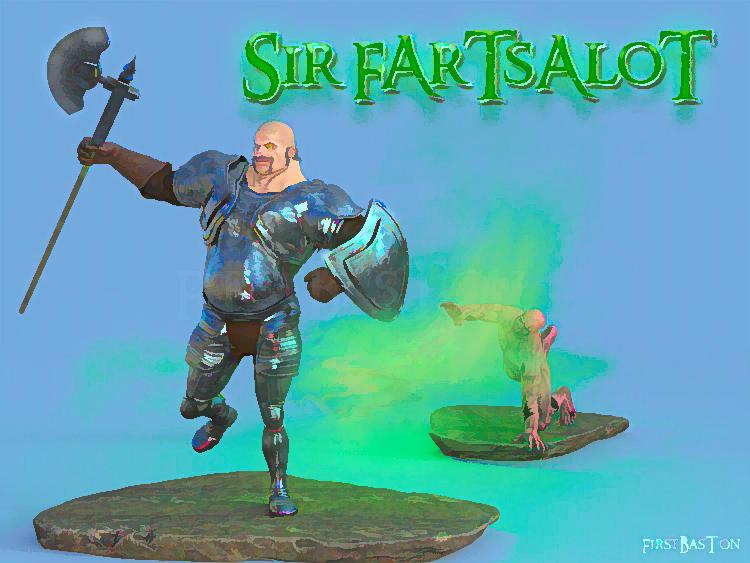
Pointless Prizeless Challenge #87: Render A Ridiculous RPG CharacterName: Sir Fartsalot
whose gaseous indiscretion were renowned throughout the Realm.
Behinders, also known as Ass Tyrants, Elderberry Orbs, and Gastators, are probably among the most feared when it comes to monsters that use foul gases as one of their weapons. Some have even been rumored to put adult Green Dragons to shame when it comes to lethal gassings. It consists of a large round floating body having two large cheeks and a central orifice, above which a large eye is located. From the top of its main body sprouts several or more appendages of which to the ends are attached what appear to be the lower torso, behinds, and strong legs of humanoids. Each also has its own eye positioned just above its respective central orifice between the "hindquarters". Besides having the ability to shoot waste & spew gases for various effects(some potentially lethal and far-reaching), death from Behinder kicks, stomping rampages, and cheek smotherings are also real possibilities; especially when the Behinder wants to mete out punishment up close and personal. Never mess with those "cheeks of many reeks" unprepared, or your adventuring party could find itself kicked, stomped, and gassed... hhhorribly
How to deform only part of a character node?Thank you, Richard. What you suggested does work. But I am unable to smoothly deform the mesh by hand using the node weight map brush.
I wish there was a way to select the polygon(s) at the center of the action then select the polygons on the edge (or boundary) of the action so that the central polygons would move, the boundary polygons would not move and the other polygons inside the boundary would displace smoothly from the center of the action out to the boundary. Is there currently any way to do that?
Novica & Forum Members Tips & Product Reviews Pt 13Went Garcon Point Road, state troopers turned me around. So picture this, I drove 12 minutes through Bagdad on (North) Garcon Point Road, got turned around by state troopers (and the Interstate 10 exits were closed. I knew that much.) So then 20 minutes back to 90 and through Pace, to Scenic. So now my house/Garcon Point Road is on our left as we look out the window. This first TWO SHOTS are at the Interstate 10 interchange, but no one can go left of course. So that's the first shot, below, looking at Interstate 10 and the fire which is going to be south of it. The barn, as you look at this, is going to be to the right of the picture. We're going to drive all the way around and approach from the other direction

Shot from Scenic, looking back to our left toward Garcon Point area (which is on the right in the photo.)


Now we go through Gulf Breeze and hang a left turn, so we are headed straight toward the fire. This is shot going over the Garcon Point Bridge. (Trust me, I wasn't looking. I clicked off about 60 shots, hoping one of them would be in focus!) Yeah, this is what I'm driving into.

So we're on Avalon and have now turned on to Garcon Point Road (yeah, went all the way around but we made it!) and this is what we're seeing. Barn is going to be four miles down the road into this.

At the barn, the arena with the smoke from the fire behind it.


Scary! I remember when I worked in the DFW metro in the summer of1996 and the daily temperature there was over 100 degrees for weeks and at that same time forest fires so massive in Central America were burning that the skies in the DFW area were smoke filled too. Hot, Hot Hot! That was also the year Beanie Babies from McDonald's were a big thing! Our lifegard instructor asked us to help her to collect them all. I think we got them all for her but one by the time we graduated from the class.
 Terradome 2 versus Terradome 3
Why do the landscapes in the promos look so much more convincing with Terradome 2 for Poser as with Terradome 3 for DAZ3D?
Having both, I'd say a good bit of it is because the promos for TD 2 were done for RDNA over a much longer period of time while the promos for TD 3 were made for DAZ very quickly. Also, generally, the TD 2 promos use more non-Terradome items as the central focus and are rendered darker, while the promos for TD 3 are often of nothing except the actual T3D sets and shaders and tend to use a lot more bright, brilliantly saturated colored skies. As a relative example, look at how much better the first wave of test renders for new DAZ core characters always seems to be than the promotional images that DAZ has made for themselves. All that said, I will say that I like the way water renders in the TD 2 examples, but I don't think that there was a really great volumetric water shader for Iray at the point that TD 3 came out.
Why the Weird Marketing Words?I can't tell if there's higher curve of user complaints or it's very vocal, small goup.
Nit-picking can be funny- and even fun to join in on.....
There has always been a learning...and working hurdle to get into 3D- and stores in general.
Every day there's like ten new products hitting the store - that's somewhere around 3,000 products a year.
Is a failed search that common? That it makes customers give up buying stuff and daz loses (a significant amount of) sales.....?
-----------
So after a forum-thread- nobody knew what it was and it was all the fault of the product's name and bad tags?
This is a thing?
I spent a long time searching for a bridge....ruined, broken, damaged, discarded, abandoned, dystopian, aged....post-apocalytpic....
I tried DzFire...Stonemason......TheAntfarm.....even Zeddicus cause maybe there was a hot chick leaning against the rubble.
If I even remember- it was an 'overpass' or underpass(?) and maybe the word forgotten....
That rough a search is a rare thing.....
It just seems like this forum is becoming complaint central and not the nice customer feedback kind, but the everyone at Daz is [insert some rude stuff].
Ask for change- suggest real world solutions....
-
Like maybe there could be a user-fed and maintained tag system that uses adjectives or descriptors{sp?)
Like "strapless" "3 piece" or a list among "bikes" and "hover" Future" Scifi" could be one of the choices....something to add on....so you'd have exercise bike or real world bike....
Even if it was forum-powered and (certain) registered users could add tags....and or a new set of semi-mods....
Daz 3D is part of

Connect
DAZ Productions, Inc.
7533 S Center View Ct #4664
West Jordan, UT 84084Licensing Agreement | Terms of Service | Privacy Policy | EULA
© 2026 Daz Productions Inc. All Rights Reserved.