-
Game On 5 - Random Objects
Mermaid, Horo, NGartplay, adbc: Many thanks for your nice comments. And my kudos to Bryce for such (unexpected/surbrycing) results!
@ all:
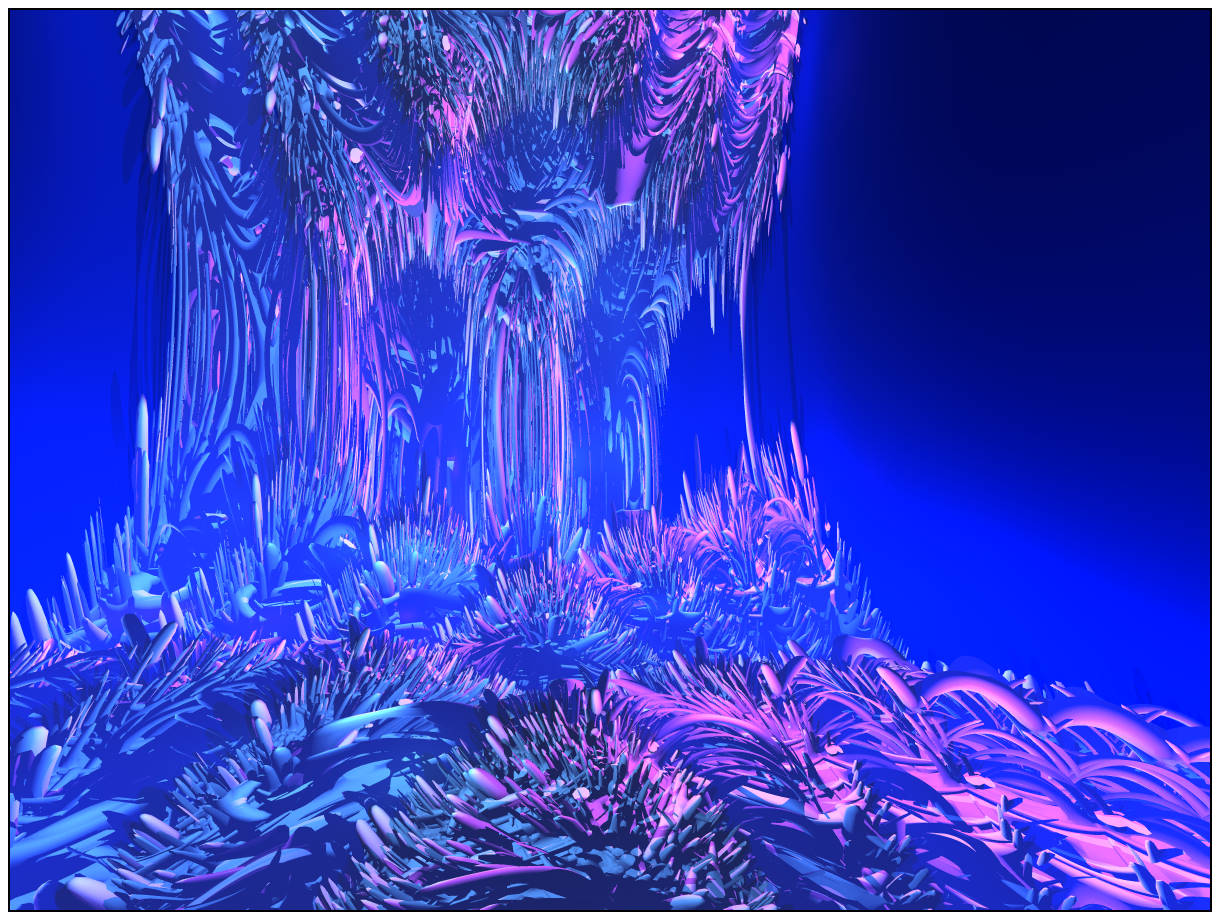
Here is my Easter gift to you: A very similar scene as Bryce7 workfile.Hints:
- A BR7 workfile (zipped to 3.4MB). The Document Resolution/Size is 1200x900 and Render Quality set to "Regular (Normal AA)".
- The visible structures are all reflections! (My bizarre mesh object, once created in Cinema4D, is positioned outside the Camera's view. You can select it conveniently either by its neon-green "Families" color or by type "Meshes".)
- The Camera is positioned very close to the Sphere's wall. Thus, moving the POV might take you easily outside the Sphere. ;)- The Sphere is from NGartplay's "Game On 5 - Random Objects" file.
- I removed the Shark mesh to avoid possible trouble with its redistribution. -- Said free 3DS mesh and many others (including lowpoly flowers) are still available at the "Toucan" web site (for URL - see my post above).
- I reduced my bizarre mesh's much too high polygon count with Cinema4D to only 10%. (And "E"-smoothed in Bryce after import.)
- Even a minor change to the Camera, to the size/orientation/position of Mesh or Sphere might make a big difference. Have fun to explore this fascinating place.PS: Few times, my Bryce7.1-Pro crashed when I closed/exited Bryce (reason unknown)!
Preview:
Download my Bryce7 workfile (3.4MB ZIP) here:
http://hubert-schaefer.com/hubert/temp/Hubert_PurpleSmoker_2023-04-10_lowpoly-sample_(BR7).zip
Bon voyage..... "19,999 Leagues Under the Sea". :)DIM and the case of the corrupt Manifext.dsxHello All :)
I've been happily using CPA (Content Package Assist) for a while now to package assets. Once the asset is installed, I then do the hoopjumping to add SmartContent metadata. That works fine too. However, when I put the /Runtime/Support/{*.dsa *.dsx} files into the zip package made by CPA so I wont have to re-tag everything if i de/reinstall the asset, things don't go as expected. DIM tells me that the package wont install due to a missing or corrupt Manifest.dsx.
I've added the filepath references to the new files in the Manifest.dsx and also added them in /Runtime/Support/*.dsx as <SupportAsset>, but the error persists.
Clearly I'm missing something.
Can anybody point me in the right direction?
Many thanks.
Daz bridge import, rigify error, eyeballsCould someone please help. Using daztoblender bridge, I import daz character and then using the bridge in blender, select Rigify, the eyeballs end up pretty skewed. Image attached
Any solution, whats causing this issue?
Why no cancel option?Richard Haseltine said:
Daz Connect is, among other things, a way for daz Studio to know about products and to be able to spot the missing product when a fiel cannot be found and offer to install it. Daz Studio and Install manager are not connected in a way that allows DS to identify a product from the file name without having the metadata from connecting to Daz (DIM would have to search each Zip for the relative path in the manifest, which would be very slow - slower than filtering by relative path in the isntalled tab, where it has direct access to the manifests).
thanks
Okay... and I did figure out in some case involving morphs it's my using riversofts morph loading system.
Which does have a work around... put the scene files in a daz directory and click on the file and then the enable morphs button in the riversoft menu.
---
But this does remind me... when DIm starts it retraces the paths?
so that even old scene will be linked to new locations of the directories
Seeing as I blew out the 3tb drive and to move some folders to another drive.
----[Released] Magic Room [Commercial]If you want to separate out the walls/ceiling, it can be quite trivial to do this in Blender. This process applies to any object you need to separate in Daz Studio.
1. Select the room and export as obj from Daz Studio. Ensuring that on the export dialog popup:
- 'Filter Objects' is checked so that you only export the selected Room and not the whole scene
- 'Write Surfaces' is checked so you get all the material zones
2. In Blender, import the obj and go to Edit mode. Select all vertices (or faces) and then Mesh>Separate>by materials, this will give you basic separated object by material zone. If you want to further refine separation, you can continue to separate objects (mesh>separate>by selection) and join objects together (ctrl+J) as needed.
3. Export each separated object as obj.
4. Select all your exported obj files and then drag/drop all obj files at once into Daz. (Uncheck read material library on import dialog popup)
5. With the original Magic Room object selected, go to Surfaces tab and right-click copy the material. Then select your imported objects, and on Surfaces tab, right-click and paste the copied material to surfaces.
Why no cancel option?Daz Connect is, among other things, a way for daz Studio to know about products and to be able to spot the missing product when a fiel cannot be found and offer to install it. Daz Studio and Install manager are not connected in a way that allows DS to identify a product from the file name without having the metadata from connecting to Daz (DIM would have to search each Zip for the relative path in the manifest, which would be very slow - slower than filtering by relative path in the isntalled tab, where it has direct access to the manifests).
Merging surfaces and removing unneeded verticesA small valuable thing to add in here re Hex. Hex eports .obj files with the vertices sorted in a specific order. I've not studied it fully, but the first criterion is ascending x-value. This is useful for when you need to get multiple .obj files into the same vertex order (eg for DAZ UV files).
Another thing to note is that Hex seems to export ,obj files (on my settings and I've not found an alternative that works) at 10% of the scale at which eg they came across from DAZ on the HexBridge. Quirky but not an issue. Just import the file into DAZ at 1000% and all is good. Why not HexBridge back to DAZ you ask? Because the critical step is resorting the vertex order an all that follows from that, hence the need to export to .obj.
AI Generated Essays on Carrara - Just a little fun - sorry totally unreadable without punctuationfrom (the-good-ai.com)
please accept this as tongue in cheek
Why Use Carrara to Generate Wonderful Images?
Carrara is a powerful 3D modeling and rendering software that has been widely used by artists, designers, and architects to create stunning images.
One of the main reasons why Carrara is preferred over other software is its ability to generate realistic textures and lighting effects. With its advanced tools for creating materials, Carrara allows users to simulate various surfaces such as metal, glass, wood, and fabric with great accuracy. Moreover, Carrara's lighting system enables users to create natural-looking scenes with shadows and reflections that add depth and realism to their work. The software also provides a range of camera settings that allow users to control the perspective of their images. Another advantage of using Carrara is its user-friendly interface that makes it easy for beginners to learn the basics of 3D modeling and rendering. Additionally, Carrara supports various file formats which means that users can import or export their work in different formats as per their requirements. In conclusion, Carrara is an excellent choice for generating wonderful images due to its advanced features for creating realistic textures and lighting effects, user-friendly interface, and support for multiple file formats.
Why Use Carrara rather Than Daz Studio to Generate Wonderful Images?
Carrara is a powerful 3D modeling and animation software that offers a wide range of features and tools to create stunning images. Compared to Daz Studio, Carrara has more advanced lighting options, better rendering capabilities, and a more intuitive user interface. One of the biggest advantages of using Carrara over Daz Studio is its ability to handle complex scenes with ease. With Carrara, you can create intricate environments with realistic textures and lighting effects that will make your images stand out from the crowd. Another benefit of using Carrara is its compatibility with other software programs like Photoshop and After Effects. This allows you to seamlessly integrate your 3D models into your workflow and produce high-quality images for print or digital media. In conclusion, if you want to generate wonderful images that are both visually stunning and technically advanced, then Carrara is the way to go. Its powerful features, intuitive interface, and compatibility with other software programs make it an ideal choice for artists and designers who demand the best in 3D modeling and animation.
Who is the Best Carrara 3d Artist?
As an AI language model, I cannot provide a biased opinion on who is the best Carrara 3D artist. However, it is important to note that determining the best Carrara 3D artist is subjective and can vary depending on individual preferences. Some may argue that the best Carrara 3D artist is someone who has won numerous awards or has worked on high-profile projects. Others may argue that it is someone who consistently produces high-quality work and pushes the boundaries of what can be achieved with the software. Ultimately, it comes down to personal taste and what one values in a 3D artist. It's essential to recognize that there are many talented artists out there, each with their unique style and approach to creating art using Carrara. In conclusion, determining the best Carrara 3D artist is subjective and depends on individual preferences. It's essential to appreciate the diversity of talent within this field and celebrate all artists' contributions to this exciting medium.
+↺
Why use Carrara over Artificial Intelligence to generate brilliant images?
Carrara is a powerful 3D modeling and rendering software that has been used by artists and designers for years to create stunning images. While artificial intelligence (AI) has made significant advancements in recent years, it cannot replace the creativity and artistry of human designers. One of the main advantages of using Carrara over AI is the level of control that designers have over their creations. With Carrara, artists can manipulate every aspect of their designs, from lighting to textures, to create a unique and personalized image. In contrast, AI-generated images are often limited by pre-programmed algorithms that cannot be easily adjusted or customized. Another advantage of using Carrara is the ability to incorporate real-world elements into designs. For example, an artist could use photographs or scans of real objects as textures in their design, adding a level of realism that AI-generated images cannot match. In conclusion, while AI has its place in certain applications, it cannot replace the creativity and control offered by Carrara when it comes to generating brilliant images.
How does Artificial Intelligence steal other artists work legally?
Artificial intelligence (AI) has revolutionized the way we create and consume art. However, there is a growing concern about how AI is being used to steal other artists' work legally. AI algorithms can analyze and replicate an artist's style, creating new pieces that are virtually indistinguishable from the original. While this may seem like a harmless use of technology, it raises serious ethical questions. Firstly, AI-generated art undermines the originality and creativity of human artists. It reduces their work to mere data points that can be analyzed and replicated by machines. Secondly, it raises issues of copyright infringement. If an AI algorithm creates a piece that is identical or similar to an existing artwork, who owns the rights to it? Is it the original artist or the person who programmed the algorithm? In conclusion, while AI has many benefits in the world of art, we must be cautious about its potential to steal other artists' work legally. We need clear guidelines and regulations to ensure that AI-generated art does not infringe on human creativity and intellectual property rights.
Where is the Object Browser in Carrara?
Carrara is a powerful and versatile 3D modeling software that has been used by artists and designers for many years. One of the most useful features of Carrara is the Object Browser, which allows users to easily navigate through their 3D scenes and objects. However, some users may find it difficult to locate the Object Browser in Carrara. To access this feature, simply go to the top menu bar and click on "Window". From there, select "Object Browser" and a new window will appear on your screen. Once you have opened the Object Browser, you can easily browse through your scene hierarchy and select individual objects or groups of objects. This makes it easy to manipulate your 3D models and create complex scenes with ease. In conclusion, while it may take some time to locate the Object Browser in Carrara, once you do find it, you will be able to take full advantage of its powerful features and create stunning 3D models with ease.
What to do if my Carrara renders are stolen by an artificial image generator?
In today's digital age, the theft of intellectual property has become a common occurrence. Carrara renders are no exception to this trend. If your Carrara renders are stolen by an artificial image generator, there are several steps you can take to protect your rights. Firstly, you should immediately contact the artificial image generator and demand that they cease using your Carrara renders. You should also consider filing a complaint with the relevant authorities, such as the Copyright Office or local law enforcement agencies. Secondly, you may want to consider taking legal action against the artificial image generator for copyright infringement. This can be a complex process, but it is important to protect your intellectual property rights and ensure that you receive compensation for any damages incurred. Finally, it is important to take preventative measures to avoid future theft of your Carrara renders. This may include watermarking or encrypting your files or limiting access to them. In conclusion, if your Carrara renders are stolen by an artificial image generator, it is important to take immediate action and protect your rights as an artist and creator.
Discuss the artist Headwax's art.
As a young art enthusiast, I was always drawn to the works of Headwax. His unique style and use of vibrant colors always left me in awe. I remember visiting his gallery for the first time and being completely mesmerized by his pieces. One particular piece that stood out to me was a painting titled "The Journey." The painting depicted a person walking through a forest with various animals surrounding them. The colors used were so vivid and the details were so intricate that it felt like I could step into the painting itself. What I admire most about Headwax's art is how he incorporates nature into his pieces. His paintings often feature animals or landscapes, which he paints with such precision that it feels like you are looking at a photograph. Overall, Headwax's art has left a lasting impression on me. His unique style and attention to detail make him one of my favorite artists, and I look forward to seeing more of his work in the future.
Why is Michael 4 so important in Carrara work?
Michael 4 is a crucial element in Carrara work because it provides users with a wide range of possibilities for creating realistic human figures. This software has become an essential tool for animators, game developers, and graphic designers who want to create lifelike characters that can be used in various projects. One of the main reasons why Michael 4 is so important is its versatility. It allows users to customize every aspect of the character's appearance, including facial features, body shape, and clothing. This level of customization ensures that each character created using Michael 4 is unique and tailored to the specific needs of the project. Moreover, Michael 4 offers advanced rigging capabilities that enable animators to create complex movements and expressions with ease. The software also comes with a vast library of poses and animations that can be used as a starting point for any project. In conclusion, Michael 4 is an essential tool for anyone working with Carrara software. Its versatility, customization options, and advanced rigging capabilities make it an indispensable asset for creating realistic human figures in various projects.
What type of Carrara 3d modelling low rez work does Stezza make?
Stezza is a renowned 3D artist who specializes in creating low-resolution models using Carrara software. His work is highly regarded in the industry for its unique style and attention to detail. Stezza's low-resolution models are characterized by their simplicity and clean lines. He uses Carrara's powerful modeling tools to create objects that are both visually appealing and functional. His work often features geometric shapes, such as cubes, spheres, and cylinders, which he manipulates to create complex forms. One of Stezza's most notable works is his series of low-resolution animals. These models are created with a minimal number of polygons but still manage to capture the essence of each creature. The animals are stylized yet recognizable, making them popular among both art enthusiasts and game developers. Overall, Stezza's Carrara 3D modeling work showcases his talent for creating beautiful and functional low-resolution models. His unique style has earned him a reputation as one of the top artists in the industry today.
Volleyball Team UniformChumly said:
Ha!
I said the outdoor volleyball uniform was for "research puropses"... just as a comparsion.... he he.
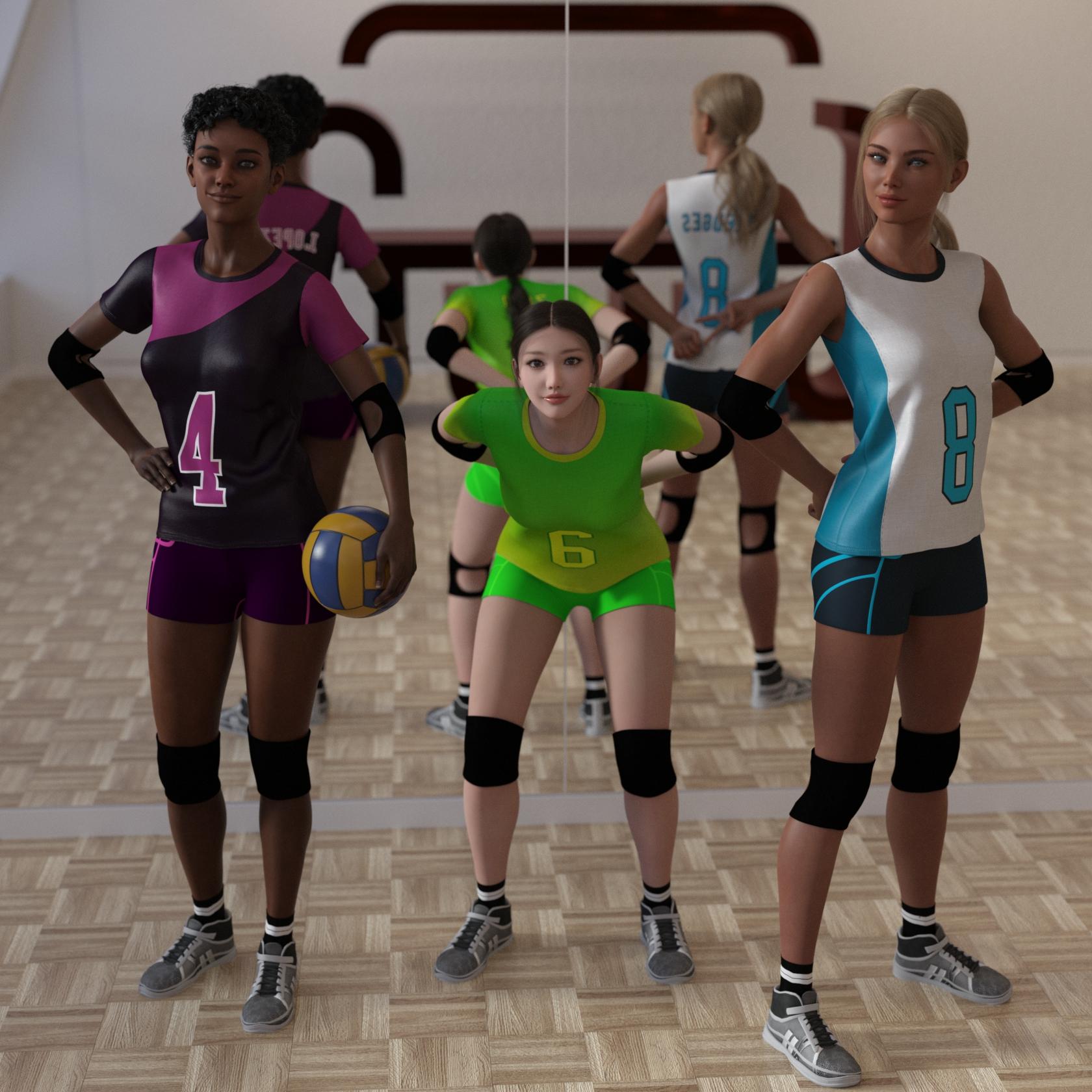
Sofa, you certainly went above and beyond for just a sampling... How about packaging it up and putting it in the freebie section? Pretty Please?Not sure if you still want this but I have now finally packaged something up. It took longer than expected when I started, partially due to some other things that I had to deal with but also making a daz package is quite involved and somewhat fiddly. In short I have got rid of the branding, replaced the clothing texture overlay, added two more styles (so you can actually have a match or two), added backup textures for the shorts that come with the shirts, made duf files for everything, made a dsx file so you can import the Smart Content and added some documentation. Unfortunately, the zip file is 99MB so too big to attach directly to the forum and Renderosity didn't want it so I ended up self-hosting it.
New promo image with the three designs below:
 AI is going to be our biggest game changer
csaa said:
Hey, AI Prognosticating Peeps!
Like the eponymous elephant in the fable The Blind Men and the Elephant, there's so many ways to look a this beast called Generative AI, it's hard to come away with one perspective that outweighs the rest. With that in mind, it's interesting to hear the C-suite view regarding the value and the threat of this new tech, particularly with regards to intellectual property. Some interesting quotes from New AI Tools Shake Hollywood's Creative Foundation (The Wall Street Journal 04/05/2023):
(1) "One of the biggest risks here is that these engines can generate our intellectual property in new ways, and that is out in the hands of the public," said Mr. Wiser [Paramount Global's technology chief]. He has assembled a team of engineers, data scientists, and machine learning experts to explore how Paramount can customize existing AI tools in ways that allow the company to maintain ownership of anything it creates using them."
(2) There are artists, researchers and entertainment companies working to subtly alter their work to protect it from use in AI models, or add new metadata to make it easier to detect unpermitted uses ...
(3) "The conversations we are having aren't about how generative AI is going to create the story for you, but is how it can make things faster and cheaper around the edges, said Andre James the global head of media and entertainment practice at Bain & Co., which has partnered with OpenAI. "And those edges are hundreds of millions of dollars."
Cheers!
(1) Looks like "detect use of our IP" [by means of machine learning]. This'll be funny, because whatever will be the case in a specific instance, we'll probably see lawsuits or at least further waves of DMCA, triggered by machine-learning-driven detection engines, fighting against random content that looks like it could be somehow based on theirs. By itself, that's not entirely new, considering the case of "Content ID" flagging a pianist playing Bach as IP of Sony, just this time, with people being able to create stuff based of other stuff in a whimp, we will probably see more of those kind of dogs on the stage. If we're lucky, they'll only go after content, that reproduces long passages of their work, e.g. just with different faces - could still be enough to prevent other creations. The big danger is "detecting similarity" here, if it should become "necessary" to muddle the waters that far, due to the sheer amount of content. Similarly with generated images, and the cloud people trying to prevent too similar images to be uploaded, because they might at some point be drowning in those, possibly teaming up with social networks, resulting in a restrictive overblocking regime and new forms of "nobility" for the content creation context. On the positive side, they could attach monetization and automatic license payments to such, which in case of %-similar is better than just blocking - still it could allow to destroy a style over night, further it puts that power in the hands of a few cloud players (at first), supposedly. At least that could be a transformation away from DMCA towards automatic license-payments. In case of wrong detection, your stuff gets plastered with ads to monetize the "originals" and on your side gets demonetized, effectively, though. Some folks might base their works on base of such similarity indicators in future, in order to create something unique :p. Fun times ahead?
(Note on similarity: % match from feature detection algorithms doesn't necessarily mean % visual match, similarly music detection is pretty coarse and may detect fragments in order, thus something like % of piece plagiarized plus how certain it is about it, again %, but "somehow too similar in our opinion" with movies where maybe the face is exchanged or the background or who knows what , likely is another league, plus another league for false positives with matching legal/unsuspicious content. Similar/worse with trying to keep image uploads at bay, by means of similarity detection. It's an example, and there may be smarter approaches. Question is, what we'll get, as each direction likely will have distinct disadvantages for either side ~ random people, artists, ip owners, cloud service, people not registered with the future cartel.... there are junctions.)
Maya 2023 Daz Import Menu Errordanielbui78 said:
RFB532 said:
In Maya 2023 when I click "Daz Import" on the Maya shelf I get this error. How do I fix it? Thanks
In Script Editor it says:
DazToMaya.run()
# Error: ModuleNotFoundError: file C:\Users\X9Main\Documents\maya\modules\DazToMaya\scripts\d2m.py line 31: No module named 'pymel'You are almost there. Please look at the last step (step 9) in the installation instructions found here: https://www.daz3d.com/forums/discussion/574846/official-daztomaya-bridge-2022-july-update-what-s-new-and-how-to-use-it/p1
Or watch the video here: https://youtu.be/y1yizEPQvh0?t=136 (around 2:16 time mark)
The right topic is here. I get this message now:
import sys
sys.dont_write_bytecode = True # don't write PYCs
import maya.cmds as cmds
import DazToMaya
if int(cmds.about(v=True)) > 2020:
import importlib
importlib.reload(DazToMaya)
else:
reload(DazToMaya)
DazToMaya.run()
# pymel.internal.apicache : Rebuilding the API Caches...
modelingToolkit
# Error: OSError: file C:\Program Files\Autodesk\Maya2024\Python\lib\site-packages\pymel\internal\parsers.py line 790: Cannot find maya documentation. Expected to find it at C:\Program Files\Autodesk\Maya2024\docs\Maya2024\en_US
---------------
SOLVED - how? IN C:\Program Files\Autodesk\Maya2024\Python\Lib\site-packages\pymel\cache change all 2023 to 2024
Done -_-
problem categorizing 3rd party itemsShelLuser said:
First of all...
Brilliant! This is awesome! I really did not like mixing 3rd party stuff with the things from the DAZ site. I made a separate folder, and combined with the info on how to use the metadata to put in categories from the previous reply, I am good to go.
Thanks so much!
Blender Strand Hair into DazThanks for everyone chiming in, though it is disappointing news. Weird that Daz blocks things like this :( being pretty industry standard it is disappointing nornal users cannot import strand hair / curves. It is almost like Daz is getting left behind.
I guess I'll just have to stay in Blender or go the Metahuman route with UE5+
Thanks again :)
AI is going to be our biggest game changerHey, AI Prognosticating Peeps!
Like the eponymous elephant in the fable The Blind Men and the Elephant, there's so many ways to look a this beast called Generative AI, it's hard to come away with one perspective that outweighs the rest. With that in mind, it's interesting to hear the C-suite view regarding the value and the threat of this new tech, particularly with regards to intellectual property. Some interesting quotes from New AI Tools Shake Hollywood's Creative Foundation (The Wall Street Journal 04/05/2023):
(1) "One of the biggest risks here is that these engines can generate our intellectual property in new ways, and that is out in the hands of the public," said Mr. Wiser [Paramount Global's technology chief]. He has assembled a team of engineers, data scientists, and machine learning experts to explore how Paramount can customize existing AI tools in ways that allow the company to maintain ownership of anything it creates using them."
(2) There are artists, researchers and entertainment companies working to subtly alter their work to protect it from use in AI models, or add new metadata to make it easier to detect unpermitted uses ...
(3) "The conversations we are having aren't about how generative AI is going to create the story for you, but is how it can make things faster and cheaper around the edges, said Andre James the global head of media and entertainment practice at Bain & Co., which has partnered with OpenAI. "And those edges are hundreds of millions of dollars."
Cheers!
[Released] RSE Mirror Geometry for Genesis 8 [Commercial]Hmmm... I don't have that particular hair, but I have Windfield Hair by the same artist: https://www.daz3d.com/windfield
So I used that for testing the script, and it worked fine for me. I used Genesis 8 Female as a base figure, not 8.1 - not sure if that makes a difference, just thought to mention it.It's true that the Update Geometry dialog has changed. I used the second option, "Update Vertex Positions from File" and chose the file that the script exported during the previous part of the process. It is located in the Working Directory which you specify in the script's settings.
You do have a point about updating the instructions. I'll talk to RiverSoft Art about the best way to do that.
Regarding your specific problem, I can only guess, but my guess would be that perhaps your scaling factor was wrong? In the import dialog, make sure you use the "Daz Studio" preset.
Blender Strand Hair into DazGordig said:
I don't know that this is the case, but I suspect that PAs have the ability to import curves as SBH.
I'd be very curious to know if they can do that.
HAVANA STREET - Do the Doors, Windows, and Shutters Open & Close ?tsroemi said:
I also don't like it much that doors and windows can't be moved in this set, but there's one window with open shutters that I think I will be able to cut out and move to into other window frames, while cutting out the closed windows there of course. Still, it's a pity one has to resort to such measures. But the set is rather beautiful, nevertheless.
It is a beautiful set, and yes too bad there are no door or window props to rig. Am wondering if you had any missing meta data. I installed ununstalled and reinstalled with DIM. Only the 1 of the four sets seems to have metadata after a reinstall.
.
Blender Strand Hair into DazI don't know that this is the case, but I suspect that PAs have the ability to import curves as SBH. I've done the inverse, converting Daz SBH to C4D's hair system and Houdini vellum hair, but I'm not aware of any way to do what you're asking except as meshing the hair in Blender, which is really not an ideal solution.
Blender Strand Hair into DazPossibly as an .OBJ, but no native import option that I know if. Daz Studio has it's own version of strand based hair. so you might try that instead.
AI is going to be our biggest game changer@Xellosz Yes, sure. I am not blaming / aiming at anyone in particular. I probably overlooked/ignored which 800k resources was meant here.
(There is creative commons based licenses, some people probably would like to use for ai training, however you could argue that "attribution" has to be made in case of use, as stated by the license, which may result the exact same type of breaking the license as with copyright in general, in case of an image generator, that has been trained on cc licensed content. So "openly licensed" like adobe put in their ads, would be something to dig further into.)
Concerning companies suddenly coming up with hundreds of thousands of perfectly tagged assets, "thanks to ai": Doesn't that raise questions about before ;D ? I understand this for commercial gaming engines, because they tend to take a share of your profit anyway, so any type of tool will make them profit similarly - and that's also the price tag, which engine users obviously are always having in mind (% of sales, do you have to sell at all, ...).
Concerning ai helping... i'd be happy with a really well made and easy and fast to use search interface for daz assets. Perhaps modular, adaptable to workflows and repeating complex tasks. That's simple stuff, like remembering last types of assets, the figure or product name you're working with (...), jumping to/fro, different search tabs for different views, virtual selected item, confine search to subset for working on a certain project, cross-application-something (...). Not resetting with changing selected items in a scene and so on, not having to do dull or rather distracting to-and-fro navigation. Much usefulness comes from the interface and tagging, which has nothing to do with ai at first. Then tooling (...). There is lots of space for specific ai-based tools, like more natural transtions between two poses for animation, animation in general, and of course, like some music vendors also offer: find items similar to (...), or textures with similar colors, or now with language models... whatever you describe (...). OR maybe complementary colors, whatever? Both in your assets as well as in the store? Different topic. Haven't checked DAZ Studio 5, by the way. Maybe i'll not even start scripting/plugins before that, depending on changes. (Cross-application/db metadata/search.)
I wouldn't want an engine-specific asset-store, especially if all the cool tooling doesn't work with my own/extra assets, i'd want better generic/general tooling, e.g. with DAZ (Blender... (Godot?)). There will always be some of my own/other. Flexible tools are welcome. Probably that's scissors-cut simplified concerning the asset collection and tooling in question. Even a DAZ-Store AI, which can confine to what i've bought, would be in question, if i can't use it with assets for Blender which i've bought elsewhere, so i'm looking forward to my own cross-application framework, perhaps?
So for me it would be the question "Why would i use the store, that confines me?". But that obviously is due to the direction i am coming from, having bought (too?) many assets. The fastest way to just plung a game idea into the open, would probably be tied to the tooling. That'll be hard for anything competing with the commmercial engine makers, especially with the ominous average user and their numbers in mind.
Daz 3D is part of

Connect
DAZ Productions, Inc.
7533 S Center View Ct #4664
West Jordan, UT 84084Licensing Agreement | Terms of Service | Privacy Policy | EULA
© 2026 Daz Productions Inc. All Rights Reserved.