-
We’re updating Daz Security Settings!
As part of our ongoing commitment to keep your information secure, we’ve been implementing a number of security updates over the last few weeks. Most of those updates have happened in the background across all our programs including our website, DazCentral, DIM, DazConnect, and Studio.
One change we’ve installed is that Daz now requires at least seven (7) characters for each user password, which better protects your individual account and helps keep your information secure. Note, there are no other requirements for that password.
While this large security update overhaul only affected certain users in a small capacity, it also marked the first time that some Daz users have ever changed their password! For good measure, we recommend you change your password at least once every five years or so :).
We’re also offering you a special deal to thank you for participating in our increased password security: take 15% off up to 5 items* of your choosing using coupon code: SECURE-IT
Thank you for being a Daz User, and for helping us keep your account secure!
*Offer excludes New Releases.
*Usable once per customer.
*Limited time offer - coupon works until 12:00 midnight MDT, Friday 5/22.
Thanks, but this information would have been nice when several of us were running around trying to figure out why we couldn't log into DIM several days ago
Was just abou to mention this. Coming from a programming/Tech Support/System Software background I am fully in favour of better security, but if you are going to suddenly 'invalidate' peoples' passwords, you HAVE to warn them ahead of time, surely?
We’re updating Daz Security Settings!As part of our ongoing commitment to keep your information secure, we’ve been implementing a number of security updates over the last few weeks. Most of those updates have happened in the background across all our programs including our website, DazCentral, DIM, DazConnect, and Studio.
One change we’ve installed is that Daz now requires at least seven (7) characters for each user password, which better protects your individual account and helps keep your information secure. Note, there are no other requirements for that password.
While this large security update overhaul only affected certain users in a small capacity, it also marked the first time that some Daz users have ever changed their password! For good measure, we recommend you change your password at least once every five years or so :).
We’re also offering you a special deal to thank you for participating in our increased password security: take 15% off up to 5 items* of your choosing using coupon code: SECURE-IT
Thank you for being a Daz User, and for helping us keep your account secure!
*Offer excludes New Releases.
*Usable once per customer.
*Limited time offer - coupon works until 12:00 midnight MDT, Friday 5/22.
Thanks, but this information would have been nice when several of us were running around trying to figure out why we couldn't log into DIM several days ago
Stop genesis from loading morphsms,
Yes indeed. Not sure it would ever reach the level of some of the high end head morphs but it might be an option for expressions. A better option might be a set of expressions or two that satisfied 95% and the rest you left for special characters or purposes.
TheKD
Related to the above, I have encountered another consideration in my rebuild process. I am having to reinstall some of my characters because of the hard drive failure. In many cases I have created my own variation(s) saved as a scene subset to the same folder as the original character (just with some extras and hair etc.) We may have been saying this all along, but reloading my own characters is listing a long list of missing files. It would seem that many (all?) morphs that are present when the character is saved are leaving a slot/channel/footprint/memory/space in the saved character file and they come up as missing during loading if they are not present. While this will not impact RAM consumption it might impact loading times. It makes me wonder at the utility of a strategy I am considering of compartmentalizing collections into specific runtimes.
per this effect, it's hard to describe, but let me try:
- DS obviously uses the real/original geometry and resources from the original mapped content libs when you load and make a scene.
- but, it also caches some of this data, in the ....../data/auto_adapted/... directory of one (or more?) of the mapped content folders - probably for efficiency.
auto_adpated is for converted Poser content, DS does cache things but not like that (see Edit>Preferences>DSON Cache)
- when you reload a scene, if the original mapped content isn't there, I *think* it looks in the cached folders, in case the equiv data is there
Vice-versa, for Poser content (it looks in the converted fiels first, then tries to find the original)
- if not, those errors occur, and aren't as obvious as the simple 'missing items' messages you'd expect.
My take-away, and anyone who knows better, please chime in, is when building a scene, DS generates cached files in the background, placing them in one of the .../data/auto_adapted/... folders in your content library. I would guess it's the first one in your list, but I really do not know how it decides.
Upon content library mapping, ordering, or other adjustments we might make, the original data and/or the cached files may or may not be able to regenerate your scene at a later time.
To be sure, if you have all of your scene dependencies available, no matter where they were mapped originally, if they are there at all DS should find them and use them. It's when we 'unmap' our data out from under DS that the seemingly odd message occur, when the real items *and* the cached items cannot be found and DS has to surrender to the truly unfindable data and generate the error.
Two things I do, that I *think* help here, is I try to never mix my saved data with my original content libraries - so I map my own DS project lib, and then I map my program and content libraries (which I keep separate too). This means that I have people/figure libraries that are 'sacred' all original, and my own 'space' - project oriented, that I save too. It's a bit of a pain to have multiple people/figure folders (orig and mine), but at least I know my work is separated from the original content and won't be lost by accident. YMMV.
I also always try to keep a sense of those .../data/auto_adapted/... folders that appear and I consolidate them by periodically shutting tdown DS and moving all of the content folders in these various auto_adapted directories into one central .../data/auto_adapted folder (I pick one) then restart DS, knowing my caches are consolidated and not strewn about my various mapped libraries.
I do *not* know if this is OK in the DS program operating scheme! I just made this up to solve my own issues! e.g. Multiple instances of DS seemed to work, but was never actually OK, so this may suffer the same risks. All I know is by doing this, the cache relics strewn about my libraries are at least somewhat managed and not as apt to become a problem w side-effects.
Lastly, given that these are cache files that DS generates, I believe you can simply remove them (I don't know for sure though), and if your scene dependencies are missing, you will get errors on loading, and if they are available to your scene when you load it, you won't - and all will load fine...
I would like to know which mapped library is used for this caching (how it is decided), as I would always put that library with the active .../data/auto_adapted/... folder on a (stub) content library and put in on an SSD if I knew I could count on DS to behave in that specific way. Anyone know? First one found?, first one in the mapping list?, registry setting?, folder that contains certain data elements or content? I dunno.
cheers,
--ms
We’re updating Daz Security Settings!As part of our ongoing commitment to keep your information secure, we’ve been implementing a number of security updates over the last few weeks. Most of those updates have happened in the background across all our programs including our website, DazCentral, DIM, DazConnect, and Studio.
One change we’ve installed is that Daz now requires at least seven (7) characters for each user password, which better protects your individual account and helps keep your information secure. Note, there are no other requirements for that password.
While this large security update overhaul only affected certain users in a small capacity, it also marked the first time that some Daz users have ever changed their password! For good measure, we recommend you change your password at least once every five years or so :).
We’re also offering you a special deal to thank you for participating in our increased password security: take 15% off up to 5 items* of your choosing using coupon code: SECURE-IT
Thank you for being a Daz User, and for helping us keep your account secure!
*Offer excludes New Releases.
*Usable once per customer.
*Limited time offer - coupon works until 12:00 midnight MDT, Friday 5/22.
Stop genesis from loading morphsms,
Yes indeed. Not sure it would ever reach the level of some of the high end head morphs but it might be an option for expressions. A better option might be a set of expressions or two that satisfied 95% and the rest you left for special characters or purposes.
TheKD
Related to the above, I have encountered another consideration in my rebuild process. I am having to reinstall some of my characters because of the hard drive failure. In many cases I have created my own variation(s) saved as a scene subset to the same folder as the original character (just with some extras and hair etc.) We may have been saying this all along, but reloading my own characters is listing a long list of missing files. It would seem that many (all?) morphs that are present when the character is saved are leaving a slot/channel/footprint/memory/space in the saved character file and they come up as missing during loading if they are not present. While this will not impact RAM consumption it might impact loading times. It makes me wonder at the utility of a strategy I am considering of compartmentalizing collections into specific runtimes.
per this effect, it's hard to describe, but let me try:
- DS obviously uses the real/original geometry and resources from the original mapped content libs when you load and make a scene.
- but, it also caches some of this data, in the ....../data/auto_adapted/... directory of one (or more?) of the mapped content folders - probably for efficiency.
- when you reload a scene, if the original mapped content isn't there, I *think* it looks in the cached folders, in case the equiv data is there
- if not, those errors occur, and aren't as obvious as the simple 'missing items' messages you'd expect.
My take-away, and anyone who knows better, please chime in, is when building a scene, DS generates cached files in the background, placing them in one of the .../data/auto_adapted/... folders in your content library. I would guess it's the first one in your list, but I really do not know how it decides.
Upon content library mapping, ordering, or other adjustments we might make, the original data and/or the cached files may or may not be able to regenerate your scene at a later time.
To be sure, if you have all of your scene dependencies available, no matter where they were mapped originally, if they are there at all DS should find them and use them. It's when we 'unmap' our data out from under DS that the seemingly odd message occur, when the real items *and* the cached items cannot be found and DS has to surrender to the truly unfindable data and generate the error.
Two things I do, that I *think* help here, is I try to never mix my saved data with my original content libraries - so I map my own DS project lib, and then I map my program and content libraries (which I keep separate too). This means that I have people/figure libraries that are 'sacred' all original, and my own 'space' - project oriented, that I save too. It's a bit of a pain to have multiple people/figure folders (orig and mine), but at least I know my work is separated from the original content and won't be lost by accident. YMMV.
I also always try to keep a sense of those .../data/auto_adapted/... folders that appear and I consolidate them by periodically shutting tdown DS and moving all of the content folders in these various auto_adapted directories into one central .../data/auto_adapted folder (I pick one) then restart DS, knowing my caches are consolidated and not strewn about my various mapped libraries.
I do *not* know if this is OK in the DS program operating scheme! I just made this up to solve my own issues! e.g. Multiple instances of DS seemed to work, but was never actually OK, so this may suffer the same risks. All I know is by doing this, the cache relics strewn about my libraries are at least somewhat managed and not as apt to become a problem w side-effects.
Lastly, given that these are cache files that DS generates, I believe you can simply remove them (I don't know for sure though), and if your scene dependencies are missing, you will get errors on loading, and if they are available to your scene when you load it, you won't - and all will load fine...
I would like to know which mapped library is used for this caching (how it is decided), as I would always put that library with the active .../data/auto_adapted/... folder on a (stub) content library and put in on an SSD if I knew I could count on DS to behave in that specific way. Anyone know? First one found?, first one in the mapping list?, registry setting?, folder that contains certain data elements or content? I dunno.
cheers,
--ms
Show Us Your Bryce Renders Part 11Thank you Tim82 and for the welcome...thank you Slepalex Although I am mainly a digital painter I hope to continue with Bryce and this Forum...Thank You Rieke for your supportive comment and the welcome
Horo Nice texture and scene I really like the sky as well
As promised the renders below are in chronilogical order and some are evolving scenes as I was learning and trying out things............ I have a large amount of material but won't offload in one go
the very first one won me first prize in" Landscape" Digital art competition and that got me into using Bryce ..I used it for the competition because renders were winning against digital Paintings more and more
the second one won me 3rd prize in "Africa" competition the acacia trees are notpart of bryce render only the foreground left and central ones are
the next two were experiments trying things out
The next one was trying out symmetrical lattice
the next three were trying out canyon
the next two throw back to my space paintings
they were all part of my early learning curve and I still have a long long way to go
Wonderful scenery, spuddy! The hand of the artist is felt!
And you want to say that you created all this during the week of training at Bryce?Thanks Slepalex glad you like them .........to answer you Absolutely!... I have spent approx 56 hrs learning and experimenting with Bryce so no it's isn't a monday to sunday week which you seem fixated on for some reason .....please try not to judge my work by your own past experience learning bryce....the point is the number of hours spent learning..I Did in fact say it was just over a week not that it really matters...why is this so hard for you to accept?...if I was a sensitive soul which I am not i would be feeling slightly under some sort of accusing cloud here. all I can state are the facts I spend 6 to 8 hrs painting on and off during the day or in this case playing with bryce but not every day hence the spread........ that said most have been produced in the last three weeks as the learning accelerated...I found the tutorials by David Brinnen very useful plus any others I could find
Show Us Your Bryce Renders Part 11Thank you Tim82 and for the welcome...thank you Slepalex Although I am mainly a digital painter I hope to continue with Bryce and this Forum...Thank You Rieke for your supportive comment and the welcome
Horo Nice texture and scene I really like the sky as well
As promised the renders below are in chronilogical order and some are evolving scenes as I was learning and trying out things............ I have a large amount of material but won't offload in one go
the very first one won me first prize in" Landscape" Digital art competition and that got me into using Bryce ..I used it for the competition because renders were winning against digital Paintings more and more
the second one won me 3rd prize in "Africa" competition the acacia trees are notpart of bryce render only the foreground left and central ones are
the next two were experiments trying things out
The next one was trying out symmetrical lattice
the next three were trying out canyon
the next two throw back to my space paintings
they were all part of my early learning curve and I still have a long long way to go
Wonderful scenery, spuddy! The hand of the artist is felt!
And you want to say that you created all this during the week of training at Bryce?Show Us Your Bryce Renders Part 11Thank you Tim82 and for the welcome...thank you Slepalex Although I am mainly a digital painter I hope to continue with Bryce and this Forum...Thank You Rieke for your supportive comment and the welcome
Horo Nice texture and scene I really like the sky as well
As promised the renders below are in chronilogical order and some are evolving scenes as I was learning and trying out things............ I have a large amount of material but won't offload in one go
the very first one won me first prize in" Landscape" Digital art competition and that got me into using Bryce ..I used it for the competition because renders were winning against digital Paintings more and more
the second one won me 3rd prize in "Africa" competition the acacia trees are notpart of bryce render only the foreground left and central ones are
the next two were experiments trying things out
The next one was trying out symmetrical lattice
the next three were trying out canyon
the next two throw back to my space paintings
they were all part of my early learning curve and I still have a long long way to go
Changing email addressJust change here and in DIM/Connect/Daz Central (whichever you use to install stuff) - in DIM you may need to create a new account, with dummy data, and make it the active one in order to edit the maina ccount (that used to be the case, but I haven't had to do it for quite a while). The only issue is that any ZenDesk (support) tickets will still be tied to your old account, but it is possible to temporarily revert the store account to access them if need be then switch back for shopping etc.
Novica & Forum Members Tips & Product Reviews Pt 13I'm glad you found the information helpful. I looked at what the new Daz Central was supposed to accomplish and immediately decided to stay away from it. I totally "get" DIM, and I'm in control of it, not the other way around. I want my utilities smarter, not "central"…

With everything I've read since, I'm really glad I shied away from it.
Now, on the other hand, if you ever need help with DIM, don't hesitate to ask.
OT, Mornington Crescent: Round 8 :- (Tudor Court Rules)I was contemplating SnaresBrook or Stamford Brook, but then a better move dawned on me...
Tower Gateway > Euston > Banc > Charing Cross > Harlesden > Eliffant a Castell > Capel Gwyn (Whitechapel) > Baching > Llanfairpwllgwyngyllgogerychwyrndrobwllllantysiliogogogoch > Shepherd's Bush > B(r)econ[tree] (Beacons) > Pontarfynach (Devil's Bridge) > Angel > Heathrow Terminal 5 >Llandudno Junction > Amersham > Clogwyn> Beddgelert > Pontrhydyfen > Llanwrtyd Wells > Caerdydd Canolog [Cardiff Central] > Hobbs End > Hickory Road >
Timbuktu
(I'm convinced it used to be spelt transliterated rendered "Timbuctoo" - probably before the spelling police got their hands on it)
Can’t log into DIMI was able to log in just now. Richard mentioned something about new password strength in the Daz Central thread, though.
Log-in issues are likely down to the stricter requirements for passwords, you may need to chnage yours in your account settings.
Can’t log into DIMAll of a sudden I'm getting the message "Unable to login to the specified account. Verify the email and/or password and try again." I haven't changed anything. I haven't downloaded Daz Central. Is DIM no longer usable?
New game like render engine in the works?But why are you thinking about Filament, or a new rendering engine?
Maybe they're just making Iray another 5% faster?
It would be huge to change render engine. Basically all materials would become instantly obsolete. Unless I'm missing something?
I would guess because of this in the Public Beta change log.
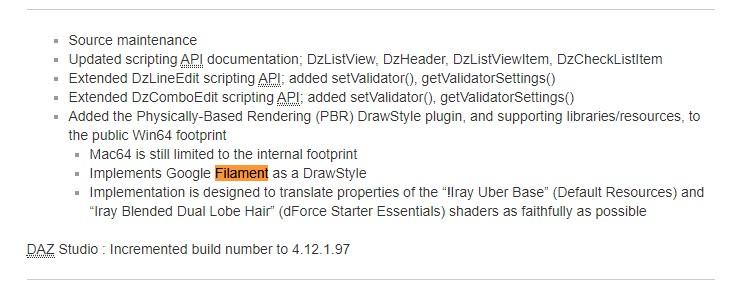
Oh wow!
So...are we talking about this next Daz 4.13 already?
I don't understand what that means! I guess the property translation of Iray materials means we don't need to rebuild the whole library?But why are you thinking about Filament, or a new rendering engine?
The response by DAZ was to 2 comments wherein the central concept was Real-Time Rendering.
If you've ever worked in or modded game production, and made changes to animations, physics, textures and so on, and then watched your character move around in Real-time with your changes...well the idea of IRAY even improving 100% or 200% isn't enough.For many users, until we see 30fps min with physics, for probably many users, there will always the push and dream for next big step.


IF Daz was referring to Filament...then am sadly much less excited about this hint.
Was hoping for an official bridge to an existing render solution porting all the morph types, or something like that.
A synergy between DAZ & Company X.DAZ does real quality stuff, but quality takes time with bugs & evolutions that just naturally happen along the way.
So implementing something that is reportedly designed in great-part for ligher-weight mobile Android systems, doesn't really make me feel warm & fuzzy about chances of Higher-Quality rendering with Filament...for many years to come anyway.
Possibly it's scalable for more advanced systems? Lack of any amount of showcase vids indicates earlier-stage development. Unless I missed something?Can see why DAZ would consider the Filament route.
Until a game engine advances a market-place of products as high a quality as DAZ, feel we users are stuck with sticking with this or that environment. Or making the enormous amount of time to migrate assets.
Am speaking from the the POV of all the morphs and PBR-Iray Mats/Shaders in DAZ.At this rate I'm going to have buy two 3000Gen Titans in Q1-Q2 2021.
 Cos can't wait that long.
But would
 for Daz to surprise me!
I wouldn't mind being able to experiment with real-time animations. Nowadays it's something I don't even consider because it would take way too long with my hardware.
But even having something that would render with a high-quality GPU a picture we now need 1 hour for in 1 minute would be fabulous!
What I would love is a bridge between DAZ and UE 4/5 that converts all the beautiful Iray materials automagically into Unreal.
Also, "Groom" there real-time hair looks incredible compared to our curve-based hair even in real time.
https://www.unrealengine.com/en-US/tech-blog/an-early-look-at-next-generation-real-time-hair-and-fur
That is real-time?! Oh wow!!!!
That hair looks incredible, much much better than the ones we have in hours-long renders!
 Not a UE shortcoming
Wow, and that was UE4!
Honestly, those characters look even better than Iray.
I don't understand the worries about quality-loss.
I would be very happy to have that kind of quality with a real-time engine in Daz. Oh wow, I could make a whole story in one day, instead of weeks/months!!!
Can't Log Into Install ManagerDid Daz make any announcement of a change to the password policy for Install Manager? The Install Manager change log is utterly useless. All it says is "Source maintenance" for the last 8 updates. Where is the Install Manager password policy documented? The documentation center says only to use your store account email and password. But now it sounds like people are not able to use the store account password in Install Manager any longer. Are there different password policies now for the store and Install Manager?
Source maintenance gets used to cover things that are secret - Iray and dForce for example - as well as actual source maintenance. Given that Daz Central uses the DIM code it's fairly easy to guess in retrospect what some of those entries cover. But, as I said above, DIM isn't the thing doing the authenticating so the changes would not have been in the DIM change log even if it was wholly transparent.
New game like render engine in the works?But why are you thinking about Filament, or a new rendering engine?
The response by DAZ was to 2 comments wherein the central concept was Real-Time Rendering.
If you've ever worked in or modded game production, and made changes to animations, physics, textures and so on, and then watched your character move around in Real-time with your changes...well the idea of IRAY even improving 100% or 200% isn't enough.For many users, until we see 30fps min with physics, for probably many users, there will always the push and dream for next big step.
IF Daz was referring to Filament...then am sadly much less excited about this hint.
Was hoping for an official bridge to an existing render solution porting all the morph types, or something like that.
A synergy between DAZ & Company X.DAZ does real quality stuff, but quality takes time with bugs & evolutions that just naturally happen along the way.
So implementing something that is reportedly designed in great-part for ligher-weight mobile Android systems, doesn't really make me feel warm & fuzzy about chances of Higher-Quality rendering with Filament...for many years to come anyway.
Possibly it's scalable for more advanced systems? Lack of any amount of showcase vids indicates earlier-stage development. Unless I missed something?Can see why DAZ would consider the Filament route.
Until a game engine advances a market-place of products as high a quality as DAZ, feel we users are stuck with sticking with this or that environment. Or making the enormous amount of time to migrate assets.
Am speaking from the the POV of all the morphs and PBR-Iray Mats/Shaders in DAZ.At this rate I'm going to have buy two 3000Gen Titans in Q1-Q2 2021.
Cos can't wait that long.But would
for Daz to surprise me!Daz Install Manager (DIM) 1.4.0.94, Now Available! (*UPDATED*)...so what is this "Daz Central"? (manually DLd a few items I just got in offline mode)
Beta of a new content manager, primarily aimed at new users. There's a thread about it in the commons: https://www.daz3d.com/forums/discussion/407131/beta-for-dazcentral-your-new-content-manager/p1
Daz Install Manager (DIM) 1.4.0.94, Now Available! (*UPDATED*)...so what is this "Daz Central"? (manually DLd a few items I just got in offline mode)
Beta for DazCentral, your new Content ManagerNear as I can tell, this doesn't do anything useful.
The only feature I need is the ability to determine if a product has been updated since I last downloaded it. i.e. a remedial level of revision control that has been availble planet wide for the last 50 years or so. Heck, even putting a version number on downloaded files would be incredibly massively horrifically monsterously valuable. I CRAVE THAT.
DIM already does this, for installed content and for content with the zip (or at least the matching .dsx file) in the Downloads folder.
I don't and most likely never will use so called 'smart content' as it requires the maintenance and sorting of materials as well as a duplication of the existing database (the file system). It also suffers from massive clutter so.. meh.
The file system isn't a database, which is the whole point - the CMS (of which Smart Content is only a part) allows organisation without moving fiels around, which means things can be duplicated (placed in more than one category) for a minimal amount of additional data.
Maybe I'm wrong... does Daz Central handle normal use of Daz Content? Namely moving files around and sorting content?
Beta for DazCentral, your new Content ManagerDIM can't natively import foreign data of any kind! Was clearly never designed to. In fact, it still cannot properly handle DAZ Bryce (tm) or DAZ Carrara (tm) content zipfiles after 5 years! (and yes, even *this* makes sense to me, however much I don't like it).
Admittedly I don't use Bryce or Carrara much, but I've never had problems installing their content with DIM.
In a word, it doesn't work. Never has, really - at least for native B/C content. Some power-users swear by it for the DAZ/Poser content that they use in Carrara, which bears mention. Given that this new tool is based on the DIM core, perhaps Carrara/Bryce will benefit and get some attention here too. (anyone know if DAZ Central has menu/install options for Bryce or Carrara or Hexagon? Any success in using them, if so?)
I disagree. DIM, from the beginning, was intended to be and built to be program agnostic. Packages for products that don't use the standard DS/Poser content locations need to be set up correctly -- I know I encountered many Bryce packages that were set up incorrectly. I reported them and they were fixed. I wouldn't be surprised if someone tried to install a faulty package and concluded that DIM couldn't do it, but AFAICT it can.
I love DIM for the download management for these tools, but manually install from there - especially now that I customize my stuff so much anyway. The point is that DIM is, has, will be, and probably should be DS oriented - as this is clearly DAZ's core business direction.
To remake my original point (without snarkiness), can you get DIM or DAZ Central to install a hivewire or rendo zipfile? Do you expect this functionality in the near future? The question is valid, and still hasn't really been answered. I won't count on it as I review the placement of this new resource in my toolkit. And that's OK.
DIM can. Obviously it can't download from other stores -- I can't imagine Rendo or HW or any other store letting Daz3D build that ability into DIM, let alone the work on their end to feed the data into DIM. But some content creators at other stores have provided DIM-compatible zip files (if the brokerage allowed it), and many end users have created DIM-compatible zips for products from other sources. There are several PA products here to assist in doing so. While DIM will install metadata if it is present, it isn't required. As for DazCentral, I don't know how it installs things (which is a showstopper for me personally, being a control freak) -- we've been told it uses the DIM core, but given that it launches DS and shows the product in Smart Content, I don't know how it handles products without metadata, or products that don't have the DS/Poser content format. I recall it only showing DS and Hexagon (although it picked up the paths for Bryce and Carrara from my DIM settings), so it presumably is set up to work with Hexagon.
Are you speculating that there's a large number of silent users that have tried and really like the new DAZ Central tool, and haven't experienced any of the problems described in here?
No, I think that problems installing and finding content are still the biggest issue new users face. There are a lot of these in the New Users forum, and there are probably a lot of new users who don't use (or even know about) the forums and submit help tickets about it. I definitely got the impression long ago that it was the single biggest source of customer support tickets. I don't know if that's still the case, but it seems to have been the driver behind developing DIM, and then Connect, and now DazCentral, so I suspect it still is.
Absolutely. In my TL;DR comments, I do actually acknowledge this, and acknowledge DAZ for their choice addressing that future. But it is clearly not intended or designed around the needs of veteran users (who would frequent any of the forums). That's fine, but it wasn't clear who DAZ meant when asserting 'we heard your voices' in the announcement. I assumed they meant us.
Yes, I agree completely -- the thread title and first post should have made clear that this was for new users. It's certainly not "your new Content Manager" for me, and I think it won't fit the needs of most veteran users.
some good points/corrections - I must of given up before the DIM issues were fixed.
thanks for the response/thoughts.
--ms
Daz 3D is part of

Connect
DAZ Productions, Inc.
7533 S Center View Ct #4664
West Jordan, UT 84084Licensing Agreement | Terms of Service | Privacy Policy | EULA
© 2026 Daz Productions Inc. All Rights Reserved.